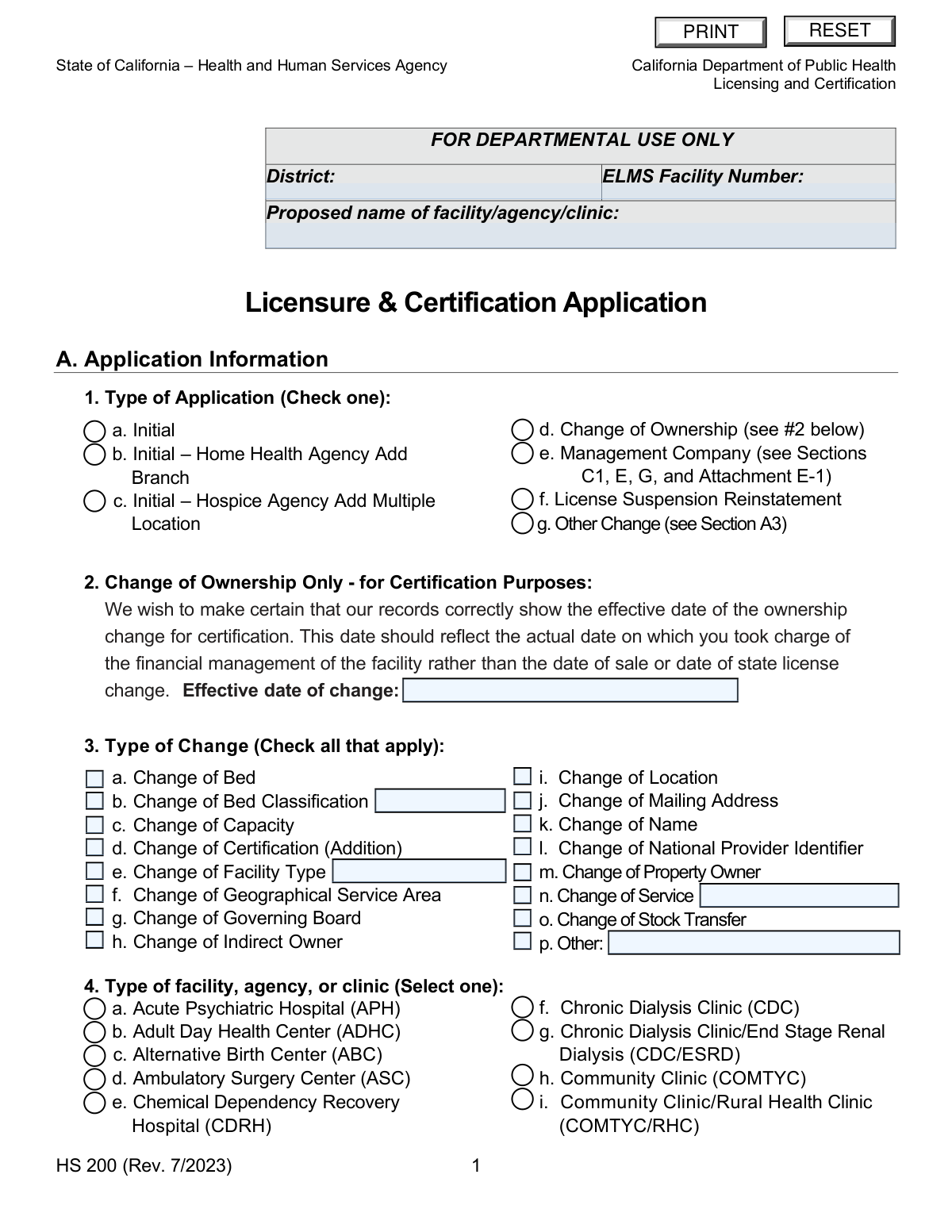
Yes! You can use AI to fill out Form HS 200, Licensure & Certification Application
Form HS 200, the Licensure & Certification Application, is a mandatory document for healthcare facilities operating in California, submitted to the Department of Public Health. It is used to apply for a new license, report a change of ownership, or update facility details such as services, location, or capacity. Completing this extensive form accurately is crucial for legal operation and participation in programs like Medicare and Medi-Cal. Today, this form can be filled out quickly and accurately using AI-powered services like Instafill.ai, which can also convert non-fillable PDF versions into interactive fillable forms.
Our AI automatically handles information lookup, data retrieval, formatting, and form filling.
It takes less than a minute to fill out HS 200 using our AI form filling.
Securely upload your data. Information is encrypted in transit and deleted immediately after the form is filled out.
Form specifications
| Form name: | Form HS 200, Licensure & Certification Application |
| Number of pages: | 23 |
| Language: | English |
Instafill Demo: How to fill out PDF forms in seconds with AI
How to Fill Out HS 200 Online for Free in 2026
Are you looking to fill out a HS 200 form online quickly and accurately? Instafill.ai offers the #1 AI-powered PDF filling software of 2026, allowing you to complete your HS 200 form in just 37 seconds or less.
Follow these steps to fill out your HS 200 form online using Instafill.ai:
- 1 Navigate to Instafill.ai and upload or select the Form HS 200, Licensure & Certification Application.
- 2 Use the AI assistant to specify the application type, such as 'Initial', 'Change of Ownership', or 'Other Change', and provide details for the selected type.
- 3 Enter detailed information for the licensee and the facility, including legal names, addresses, entity type, and key personnel like the administrator and medical director.
- 4 Provide property ownership details, information about Medicare/Medi-Cal program applications, and specifics on bed capacity and hours of operation.
- 5 Complete any required attachments, such as Attachment E-1 for management companies or Attachment F-1 for subcontractor information if applying for Medi-Cal.
- 6 Disclose ownership interests, related facilities, and any history of license suspensions or fines as prompted by the form's sections.
- 7 Review all entered data for accuracy, then securely sign the declaration, provide contact information, and download the completed form for submission.
Our AI-powered system ensures each field is filled out correctly, reducing errors and saving you time.
Why Choose Instafill.ai for Your Fillable HS 200 Form?
Speed
Complete your HS 200 in as little as 37 seconds.
Up-to-Date
Always use the latest 2026 HS 200 form version.
Cost-effective
No need to hire expensive lawyers.
Accuracy
Our AI performs 10 compliance checks to ensure your form is error-free.
Security
Your personal information is protected with bank-level encryption.
Frequently Asked Questions About Form HS 200
This form is used by health facilities, agencies, and clinics in California to apply for an initial license, report a change of ownership, add a new location, or make other significant changes to their license or certification status with the Department of Public Health.
Any individual or entity seeking to operate a new health facility, or any current licensee reporting changes such as ownership, name, location, services, or bed capacity must complete this form. It covers a wide range of facility types, from hospitals and clinics to home health agencies.
Required documents vary but often include organizational charts for corporate entities, proof of property control like a lease or deed, and approved construction documents if applicable. You may also need to submit specific attachments for management companies or if applying for Medi-Cal.
You must enter the effective date on which you took charge of the facility's financial management. This date is for certification purposes and may be different from the property sale date or the date the state license change is finalized.
Yes, you must complete Attachment E-1 if your facility is an Acute Psychiatric Hospital (APH), General Acute Care Hospital (GACH), Intermediate Care Facility (ICF), or Skilled Nursing Facility (SNF) that will be operated by a management company.
Attachment F-1 is mandatory if you are applying for certification in the Medi-Cal (Medicaid) program. It is used to disclose information about subcontractors and significant business transactions.
You must list all persons with a 5 percent or more direct or indirect ownership or control interest in the facility. This includes their name, ownership percentage, and disclosure of any familial relationships (spouse, parent, child, or sibling) with other listed owners.
This section, which applies only to specific facility types like ICF/DDs and CLHFs, is used to prevent a high concentration of similar facilities in one area. You must report if other specified facilities are located within a 300-foot or 1,000-foot radius.
Applicants for an SNF or ICF must submit evidence, such as bank statements or a line of credit, demonstrating they have sufficient financial resources to operate the facility for at least 90 days.
The instructions state to return the original signed application and all supporting documents to the California Department of Public Health, Licensing and Certification. You should contact your local district office for the specific mailing address and keep a copy for your records.
Yes, services like Instafill.ai use AI to accurately auto-fill form fields, which can save you significant time and help reduce errors on complex applications like the HS 200.
You can use a service like Instafill.ai to complete the form online. Simply upload the HS 200 PDF, and the platform will make it interactive, allowing you to type directly into the fields, save your progress, and easily manage attachments.
If you have a non-fillable or 'flat' PDF, you can use a tool like Instafill.ai to instantly convert it into an interactive, fillable form. This allows you to easily type your information instead of printing and filling it out by hand.
The instructions state that you should not leave applicable items blank and should mark 'N/A' if a question does not apply. Failure to provide all requested information or misrepresenting facts can result in application denial or license revocation.
Compliance HS 200
Validation Checks by Instafill.ai
1
Ensures Exclusive Application Type Selection
This check verifies that exactly one option is selected in Section A, question 1, 'Type of Application'. The form requires a single, specific application type to be chosen for proper processing. If zero or more than one option is selected, the submission is ambiguous and cannot be routed correctly, leading to processing delays or rejection.
2
Validates Conditional Change of Ownership Date
This validation ensures that if 'Change of Ownership' (A1d) is selected, the 'Effective date of change' field (A2) is filled with a valid date. This date is critical for establishing the correct timeline for certification and financial responsibility. A missing or invalid date will halt the change of ownership process until corrected.
3
Verifies Conditional Medicare Information
This check confirms that if an applicant answers 'Yes' to applying for the Medicare program (A5), then the Medicare Provider #, Fiscal Intermediary Choice, and National Provider Identifier (NPI) fields are all completed. The NPI must also be validated to ensure it is a 10-digit number. Failure to provide this information prevents the processing of the Medicare certification request.
4
Enforces Conditional Medi-Cal Requirements
This validation ensures that if an applicant answers 'Yes' to applying for the Medi-Cal program (A6), the NPI field is completed and Attachment F-1 is submitted. This information is mandatory for Medi-Cal enrollment and for disclosing required subcontractor and business transaction details. An incomplete submission will result in the denial of the Medi-Cal certification portion of the application.
5
Validates Bed Capacity Logic
This check verifies that the 'Current bed capacity' and 'Proposed bed capacity' (A7) are valid non-negative integers. Furthermore, it enforces that for an 'Initial' application type, the 'Current bed capacity' must be 0. This logic ensures the application accurately reflects the facility's status and prevents nonsensical data entries, like a new facility having a pre-existing capacity.
6
Ensures Mutually Exclusive Hours of Operation
This validation confirms that the 'in operation 24/7/365' checkbox and the daily hours of operation table (A9) are mutually exclusive. If the checkbox is selected, the table should be empty or ignored. If the checkbox is not selected, at least one entry in the table is required, and the hours must be in a valid time format (e.g., '9:00 AM - 5:00 PM'). This prevents contradictory information about the facility's operating hours.
7
Validates Construction Date Chronology
This check ensures that if 'Yes' is selected for required construction (A10), both the start and completion dates are provided. It also validates that the 'date construction was completed' is on or after the 'date construction began'. This maintains logical consistency and provides an accurate record of the construction timeline for regulatory review.
8
Validates Federal Tax ID (EIN) Format
This check verifies that the Federal Tax Identification Number/Employer Identification Number (EIN) entered in Section B, question 2, adheres to the standard IRS format of XX-XXXXXXX. This is crucial for correctly identifying the legal entity for tax and regulatory purposes. An incorrectly formatted EIN can lead to data mismatches with federal and state systems, causing significant processing delays.
9
Enforces Management Agreement Logic
This validation checks that if 'Yes' is selected for operating under a management agreement (C1a), the facility type selected in A4 is one of the applicable types (APH, GACH, ICF, or SNF). It also confirms that Section E and Attachment E-1 are completed as required. This rule prevents applicants from incorrectly applying management company rules to ineligible facility types and ensures all necessary disclosures are made.
10
Verifies Professional License Expiration Date
This check ensures that for any managing position listed in Section C, question 4, the 'Expiration date' of the professional license is a future date. This is critical to confirm that key personnel hold valid, active licenses as required by law for facility operation. An expired license would render the application non-compliant and could lead to denial.
11
Validates Total Ownership Percentage
This validation calculates the sum of all ownership percentages listed for individuals in Section C, question 5 (including any attachments). The check ensures the total percentage does not exceed 100%. This prevents erroneous data entry and ensures the ownership structure is reported accurately and logically for regulatory oversight.
12
Enforces Conditional Property Information Disclosure
This check validates that based on the 'Property Ownership' selection in Section D, question 1, the correct corresponding information is provided. For example, if 'Lease' is selected, the Lessor and Lessee information in D3 becomes mandatory. This ensures that evidence of control of the property, a key licensure requirement, is properly documented.
13
Requires Signature and Declaration
This validation ensures that at least one signature block in Section G is fully completed, including a signature, printed name, title, and a valid date. The signature legally binds the licensee to the attestations made in the application. An unsigned application is legally incomplete and will be rejected immediately.
14
Validates Conditional Relationship Disclosure in Attachment F-1
This check applies to Attachment F-1, Part B, which discloses subcontractor ownership. If an individual is marked as being related to a licensee owner ('Yes' is selected), the validation ensures that the specific relationship (e.g., Spouse, Parent) is checked and the name of the related individual is provided. This is a critical anti-fraud measure for the Medi-Cal program, and failure to disclose this information can result in penalties or application denial.
Common Mistakes in Completing HS 200
Applicants often enter their 'doing business as' (DBA) name or a common abbreviation in Section B.1 instead of the full legal entity name registered with the IRS and the California Secretary of State. This discrepancy causes validation failures against official records, leading to significant processing delays or rejection of the application. Always use the exact legal name as it appears on tax and incorporation documents to ensure a smooth verification process.
In Section A, applicants may select an incorrect application type or create ambiguity. A common error is checking 'g. Other Change' in A.1 without specifying the exact change in Section A.3, leaving regulators to guess the application's purpose. This forces the department to send a request for clarification, halting all progress on the application until a response is received. Carefully review both sections to ensure your selections are complete and accurately reflect your intent.
This complex application requires numerous attachments, such as organizational charts (Section B.3), evidence of property control like a lease or deed (Section D.1), and management agreements (Section C.1). Applicants frequently overlook these requirements, leading to an incomplete submission and immediate rejection or delay. To avoid this, create a checklist based on your answers and gather all necessary documents before submission. AI-powered tools can help identify which documents are needed based on your form entries.
The form contains critical conditional logic; for example, applying for Medi-Cal (A.6) requires completing Attachment F-1, and indicating a management company (C.1.a) requires completing Section E. Applicants often miss these dependencies, submitting an application that is fundamentally incomplete for their request. This results in the application being returned with instructions to complete the missing sections, restarting the review process. Using a guided digital process can prevent this by automatically revealing required sections based on your answers.
In Section A.2, the form specifically requests the date the new owner took charge of 'financial management,' not the date of sale or license change. Applicants often misunderstand this nuance and provide the wrong date, which can create serious compliance and certification issues for Medicare/Medi-Cal billing. This error can lead to audits and potential repayment demands. Carefully read the instructions and provide the precise date financial control was transferred.
Sections B.4 and C.5 require full disclosure of all other facilities the licensee has been involved with and all individuals with 5% or more ownership. Applicants sometimes omit facilities outside California or miscalculate indirect ownership percentages, which can be viewed as a material misrepresentation. Failure to provide a complete history can lead to application denial and future scrutiny. It is critical to conduct a thorough internal review to ensure all affiliations and ownership interests are fully disclosed.
When reporting a change of name, location, or ownership, Sections C.2 and C.3 require information for both the 'current' and 'proposed' state of the facility. A frequent mistake is to fill out only one section or copy the same information into both, making it impossible for the department to process the change. This requires manual correction and resubmission, delaying the effective date of the change. Ensure that both sections are filled out accurately to reflect the 'before' and 'after' states.
In Section C.4, applicants must provide the full name, professional license number, expiration date, and date of hire for key personnel like the Administrator and Director of Nursing. It is common for one or more of these details, particularly the license expiration date, to be left blank. An incomplete entry prevents the licensing board from verifying credentials, causing the application to be flagged for follow-up and delaying approval. Ensure all fields for each listed position are fully completed.
Attachment F-1, required for Medi-Cal applicants, is highly complex and a common source of errors. Applicants often misinterpret the definitions of 'subcontractor' or 'significant business transaction,' leading to under-disclosure of relationships and financial dealings. This can have severe consequences, including denial of Medi-Cal certification and fraud investigations. If unsure, it is best to over-disclose or seek legal counsel to ensure compliance with these intricate federal regulations.
The form instructions explicitly state to mark 'N/A' for fields that are not applicable, but many applicants simply leave them empty. An empty field is ambiguous and may be interpreted by the reviewer as an oversight or an incomplete answer, prompting a request for more information. This simple mistake can add weeks to the application processing time. To avoid this, methodically go through the form and enter 'N/A' in any field that does not apply to your situation. AI-powered form filling tools like Instafill.ai can help automate this process.
Throughout the form, address fields for the licensee, facility, and property owners specify a 'Zip (9-digit)' format. Many applicants only provide the standard 5-digit ZIP code, which can lead to data entry inconsistencies and potential mail delivery issues. While it may seem minor, failing to follow the specified format can contribute to a perception of a hastily completed application. Use a ZIP+4 lookup tool to find the correct 9-digit code for all addresses. Since this form is a non-fillable PDF, tools like Instafill.ai can convert it to a fillable version and help validate address formats.
Section G requires a signature from a person with the authority to legally bind the licensee, such as a corporate officer or owner. Sometimes, a lower-level manager or the person completing the form signs, which can invalidate the entire application. This error may not be caught until late in the review process, forcing a complete resubmission and wasting significant time. Ensure the final document is reviewed and signed only by an individual with the proper legal authority as defined in your entity's governing documents.
Saved over 80 hours a year
“I was never sure if my IRS forms like W-9 were filled correctly. Now, I can complete the forms accurately without any external help.”
Kevin Martin Green
Your data stays secure with advanced protection from Instafill and our subprocessors
Robust compliance program
Transparent business model
You’re not the product. You always know where your data is and what it is processed for.
ISO 27001, HIPAA, and GDPR
Our subprocesses adhere to multiple compliance standards, including but not limited to ISO 27001, HIPAA, and GDPR.
Security & privacy by design
We consider security and privacy from the initial design phase of any new service or functionality. It’s not an afterthought, it’s built-in, including support for two-factor authentication (2FA) to further protect your account.
Fill out HS 200 with Instafill.ai
Worried about filling PDFs wrong? Instafill securely fills form-hs-200-licensure-certification-application forms, ensuring each field is accurate.