Style Replication

Upload previously filled documents and let the AI learn exactly how you write — so every new fill matches your phrasing, length, abbreviations, and terminology without correction

Style Replication

Overview

AI form filling produces accurate values — the right name in the right field, the right date in the right format. But for open-ended text fields — descriptions of scope, clinical summaries, narrative explanations, statement-of-work sections, professional background statements — accuracy is not enough. The AI might fill the correct information while writing it in a way that doesn't match your organization's voice, doesn't match the length a prior successful submission used, or doesn't use the specific terminology your reviewers expect.

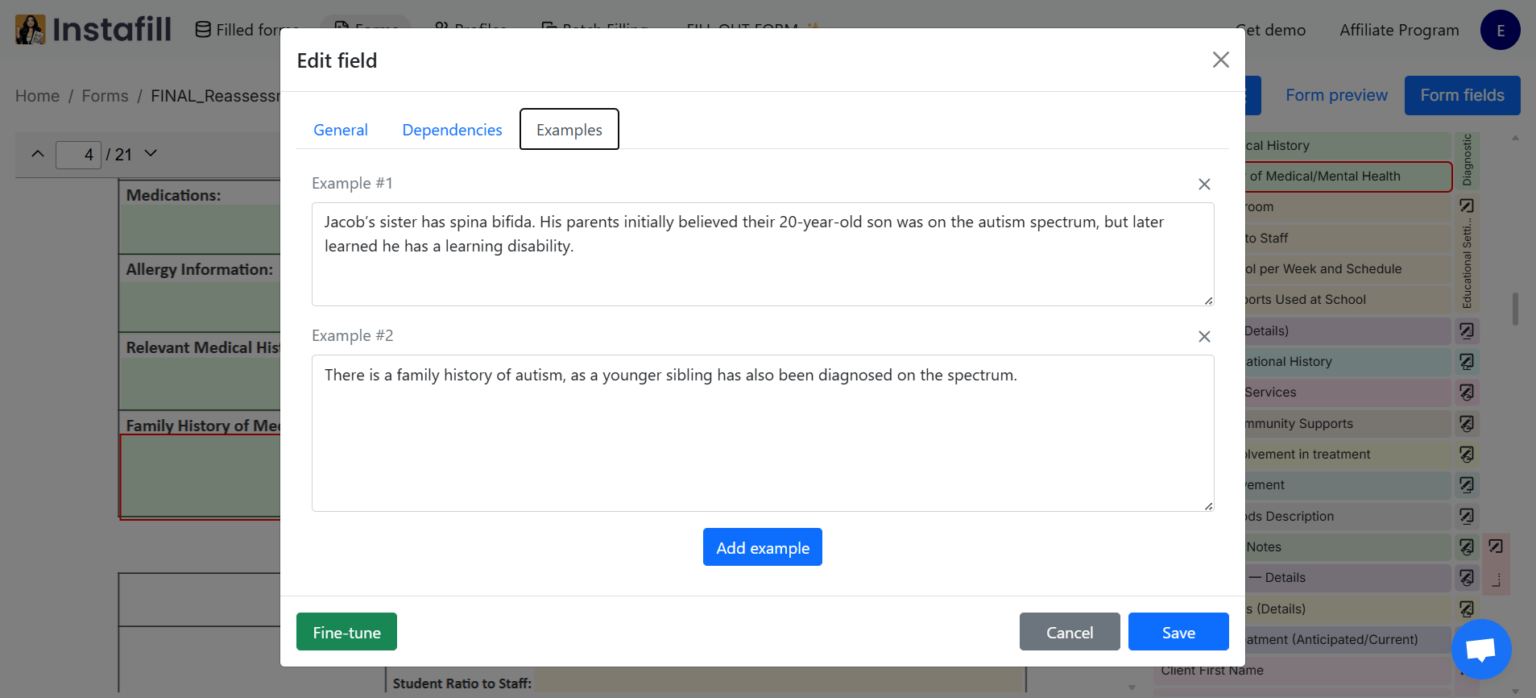
Style Replication addresses this. Upload previously filled documents to the form template — prior approved filings, executed agreements, accepted grant applications, standardized HR letters. The AI extracts the value from each open-ended field using vision, stores those values as per-field examples, and then uses them as few-shot references when filling future sessions. The prompt the AI receives includes the actual prior answers as examples alongside the current source data — it matches the established pattern rather than generating from scratch.

The result: narrative fields come back the way your reviewers expect them. The AI doesn't over-explain when your prior answers were concise, doesn't truncate when your standard answers run three sentences, and doesn't switch from "Attorney" to "Atty." when your documents consistently use the full word.

Style Replication vs. Version-Based Filling: Both use the same underlying per-field example mechanism. The distinction is in purpose. Version-Based Filling focuses on carrying forward data values — names, ID numbers, dates — between form versions. Style Replication focuses on carrying forward how text is written — phrasing, length, terminology, voice — for narrative and open-ended fields. In practice, both benefits apply whenever examples are stored; the emphasis depends on what matters most for the field type.

Key Capabilities

  • Vision-based extraction from prior documents: The AI doesn't pattern-match text across pages — it uses form page screenshots and page mapping to identify which specific value appears in which specific field, making the extraction reliable even when similar-looking text appears in multiple places
  • Word count calibration: For every field with stored examples, the system calculates the average word count across all examples and passes it to the AI as a length constraint — the AI produces output that matches your typical answer density, not its own default verbosity
  • Few-shot prompt construction: Stored example values are appended directly to the AI prompt before each fill — the AI sees what prior answers looked like before generating a new one
  • Specialized AI model path: Example-based fields use a dedicated model configuration with lower reasoning effort — the stylistic baseline is set by the examples, so less inference is needed and responses complete faster
  • Custom rules layered on top: Workspace date format settings, field-type-specific rules, and group-level instructions apply on top of the example baseline — examples handle voice and length, rules handle format edge cases
  • Multiple examples per field: Upload several prior documents and each contributes an example — the AI generalizes across all of them, producing output that reflects consistent patterns rather than copying a single prior answer verbatim
  • Full provenance per example: Each stored example records the source document, who uploaded it, and when — if a style reference is questioned or needs updating, the source document is traceable
  • Field-granular activation: Only fields with stored examples use style-guided filling. Fields without examples fill through standard source-based autofill. No configuration required — the mode switches automatically.

How AI Style Replication Works

Step 1 — Upload Reference Documents

Go to the form template in your library and upload one or more previously filled documents. These are documents that represent the voice, phrasing, and formatting you want the AI to replicate:

  • Prior approved submissions (grant applications, regulatory filings)
  • Executed agreements with narrative sections in your organization's standard language
  • Completed forms reviewed and signed off by senior practitioners
  • Any prior fill where the text output was reviewed, corrected, and finalized by your team

The more representative the examples, the more precisely the AI matches your established style. Uploading only one document teaches the AI that document's style; uploading five gives it patterns that generalize across normal variation in your writing.

Step 2 — AI Extracts Style From Each Field

The system processes each uploaded document:

  1. Page mapping: Determines which pages of the reference document correspond to which pages of the current form template
  2. Screenshot generation: Renders each form template page with fields highlighted
  3. Vision extraction: The filled document's text and the form page screenshot are sent to a vision-capable AI model, which identifies the specific value entered into each field — not just the text content, but the field-to-value mapping
  4. Per-field storage: The extracted value is stored as a field example with full metadata

For a narrative "Describe the applicant's qualifications" field, this stores the exact phrasing your prior submission used — not a summary of it, not a paraphrase, the actual text. That text becomes the style reference.

Step 3 — Length Calibration

Before building the fill prompt, the system calculates avg_words_count across all stored examples for each field:

Field: "Describe scope of services"
Example 1: "Provision of licensed clinical social work services including..." (47 words)
Example 2: "Delivery of outpatient behavioral health services including..." (43 words)
Example 3: "Provision of individual and group therapy services including..." (51 words)
avg_words_count = 47

This figure is passed to the AI as a length constraint. The AI produces an answer of approximately 47 words — matching the density of your established answers, not defaulting to a longer or shorter response than your standard.

Step 4 — Few-Shot Prompt Construction

When example-based filling activates for a field, the AI prompt is built with:

  1. The standard field context: field label, description, surrounding fields, source document text
  2. The current source material: what the attached documents say about this topic for the current fill
  3. The example values in sequence: "Example #1: / Example #2: ..."
  4. The word count calibration guidance

The AI receives both what the current source data says and how prior answers were phrased — it generates an answer informed by current facts but shaped by established style.

Step 5 — Custom Rules Refine the Output

Workspace-level and form-level custom rules apply on top of the example baseline. Date formatting preferences ("use February 17, 2026 not 02/17/26"), abbreviation standards, field-type rules (text fields vs. checkbox fields vs. numeric fields), and group-level instructions configured in form settings all layer over the example-based output. Examples set the voice; rules enforce format specifics.

Use Cases

Legal filings and court documents: Law firms that submit the same types of pleadings, motions, or regulatory filings repeatedly need every document to sound like it came from the same attorney — same formal register, same citation style, same way of describing procedural posture. Uploading prior filed motions or regulatory submissions as style examples means AI-filled narrative sections match the firm's established voice. The "Background" section, "Statement of Facts," and "Relief Requested" fields don't read like AI-generated boilerplate — they read like the firm's prior work.

Clinical documentation and prior authorizations: Medical practices submitting prior authorization requests, clinical summary letters, or credentialing narrative sections need consistent clinical language that matches what payers and reviewers expect. A clinical director reviewing ten prior authorization letters that were approved, uploading them as examples, and then running new authorizations — the AI generates clinical rationale in the same structure and at the same level of specificity as the approved examples. "Medically necessary due to..." follows the same pattern; diagnostic code descriptions use the same terminology.

Grant applications and funded proposals: Nonprofit grant writers and research teams refine their organizational narrative, program description, and evaluation methodology language over multiple application cycles. When a prior funded proposal is uploaded as an example, the AI fills the current cycle's narrative fields with output that matches the length, formality, and framing of the successful application. Writers refine from a stylistically appropriate draft rather than rewriting AI output that sounds nothing like the organization's established grant voice.

HR letters and employment documents: HR teams that send offer letters, severance agreements, performance improvement plans, and termination notices in standardized organizational language need every document to use the same approved phrasing for legal and compliance reasons. Uploading finalized, legally-reviewed versions of each document type as style examples means AI-generated drafts of new letters use the same sentence structures and terminology as the approved templates — reducing legal review time because fewer deviations appear in the AI output.

Insurance narrative fields: Commercial and specialty insurance applications contain open-ended narrative fields — "Describe the applicant's loss history," "Describe safety and risk management procedures," "Describe the scope of operations." Underwriters and brokers develop standard language for these fields that has been accepted by carriers. Uploading prior accepted applications as style examples means new applications use the same carrier-accepted framing, reducing the back-and-forth of underwriter questions.

Regulatory submissions with prescribed style: Certain regulatory filings — FDA submissions, SEC disclosures, government contract proposals — develop highly specific language through years of prior approved submissions. Organizations upload their prior approved filings as examples so that AI-filled new submissions use the same regulatory vocabulary, the same level of specificity in technical descriptions, and the same answer length that prior reviewers accepted.

Real-World Examples: Medical billing companies that fill the same claim narrative fields hundreds of times per day upload approved claim examples so the AI produces consistent medical necessity language across all practitioners. Credentialing specialists upload prior approved credentialing packets so the AI fills narrative sections of new applications with the same phrasing that credentialing committees have previously accepted.

Benefits

  • Eliminate post-fill style correction: The biggest time cost when reviewing AI-filled documents is correcting not what was filled but how it was written — the wrong level of formality, too long, too short, wrong terminology. Style replication moves that correction step from every session to a one-time example upload.
  • Consistent voice across the team: When multiple staff members run filling sessions on the same form template, every output reflects the organization's established language rather than varying by who ran the session or which AI generation produced what phrasing.
  • Length-calibrated output every time: Word count calibration means narrative fields don't balloon or shrink relative to your standard — the AI doesn't decide a three-sentence answer needs six sentences "for completeness."
  • Approved language reused, not paraphrased: For fields where specific regulatory, legal, or clinical language has been approved by reviewers, examples ensure the AI reproduces that language as its reference — not a paraphrase of it that might not carry the same compliance weight.
  • Faster sessions on familiar forms: Example-based filling completes faster than standard autofill for the same fields — the AI has less to infer because the style is established. This compounds across large batch runs where many sessions use the same form template with stored examples.
  • Progressive improvement: As your team reviews, corrects, and signs off on AI-filled documents, those corrections feed back into the example library — the style reference improves over time toward the output your reviewers actually approve.

Security & Privacy

Style examples are stored and protected under the same access and encryption controls as all form and session data:

  • Workspace isolation: Per-field examples are scoped to the workspace and form template that uploaded them. No style data crosses workspace boundaries — examples from one organization's forms do not influence filling in any other workspace.
  • Encrypted storage: The source PDFs uploaded as style references are stored in Azure Blob Storage with workspace-scoped encryption keys managed in Azure Key Vault. Each stored example links to the encrypted source document.
  • Access control: POST /api/forms/{form_id}/add-examples requires form-level edit permissions. Users who can view but not edit a form template cannot add or modify style examples.
  • No cross-organization model training: Uploaded example documents are used only as few-shot context within your workspace's filling prompts. They are never used to fine-tune or train AI models, and they do not affect autofill behavior in any other organization's workspace.
  • Source provenance retained: Each example's example_file field references the original uploaded document. If a document containing sensitive information was uploaded as a style reference and needs to be removed, the specific example can be deleted without affecting other field examples.
  • Retention policy: Uploaded example source documents follow the workspace retention policy. Organizations can configure automatic deletion of source PDFs after processing, retaining only the extracted field values in the example store.

Common Questions

What types of fields benefit most from style replication?

Style replication is most valuable for open-ended text fields where the quality of phrasing matters:

  • Narrative/description fields: "Describe the nature of the claim," "Describe the scope of services," "Explain the medical necessity"
  • Summary fields: "Brief description of the applicant," "Overview of the project," "Background of the organization"
  • Explanation fields: "Explain any gaps in employment," "Explain any prior claims," "Describe the circumstances"
  • Statement fields: "Statement of qualifications," "Statement of purpose," "Mission statement"

For structured fields — names, addresses, dates, ID numbers, checkboxes — style is less meaningful since the format is determined by the field type. Those fields are better served by version-based filling (to carry forward data values) or standard autofill (to extract from current sources).

The two mechanisms work together in the same session: structured fields use whatever source or history best provides the accurate data value; narrative fields use stored examples to match established style.

How is this different from just providing instructions to the AI?

Instructions tell the AI what to do; examples show it what the output should look like. Both are used simultaneously.

When you configure custom rules in form settings — "use formal register," "spell out abbreviations," "use MM/DD/YYYY dates" — you are giving instructions. The AI applies them as constraints. When you upload prior filled documents as examples, you are showing the AI what your specific interpretation of "formal" looks like in the context of this particular form's fields — including nuances that are hard to articulate as rules but obvious from a dozen prior examples.

Instructions and style examples are layered: examples set the pattern, custom rules enforce format specifics that the examples might not fully constrain. An example might show three-sentence answers in formal language; a custom rule ensures dates always use the full month name even if some examples used abbreviations.

Does the AI copy prior answers verbatim or generate new output?

The AI generates new output informed by the examples — it does not copy and paste prior answers. The few-shot prompt provides examples as reference, not as templates to replicate character-for-character.

In practice: if five prior examples all describe "provision of licensed clinical social work services" in slightly different words, the AI produces a new answer that reflects the pattern (clinical language, specific service descriptor, similar length) rather than picking one prior answer and repeating it. If the current source document describes a different service scope, the AI adapts the content while maintaining the style.

This matters for compliance: regulators and reviewers who see identical language across multiple submissions may flag it. Style replication produces consistent style, not repeated text.

How many example documents should I upload per form?

Two to five representative examples produces good style calibration for most use cases. A single example teaches the AI one document's style, which may have idiosyncrasies. Five examples allow the AI to generalize across normal variation and find consistent patterns.

For forms with very long, complex narrative sections — multi-paragraph grant narratives, clinical summary letters — upload examples that cover the range of scenarios the AI will encounter, not just the easiest cases. If the form is sometimes completed for individual clients and sometimes for organizations, upload examples of both.

Adding more examples after initial calibration continues to improve output quality. There is no maximum — additional examples each contribute their own entry to the per-field example library.

Can I remove or replace a style example that no longer reflects how we write?

Yes. Individual field examples can be deleted through the form template settings. When outdated language needs to be removed — for example, examples that used pre-revision legal language that has since been updated — delete the affected examples and upload a new reference document with the current standard.

Corrections made during review sessions also feed into the example library. When a reviewer edits a narrative field in the visual editor and saves the session, the corrected value is stored as a new example for that field. Over time, examples naturally evolve toward the most-reviewed, most-approved version of your organizational voice.

Does style replication work with batch processing?

Yes — and the benefit compounds at batch scale. When a batch job fills the same form for 50, 100, or 500 records, every session uses the same form template and therefore the same stored style examples. Every filled narrative field across the entire batch reflects the same voice and length calibration — consistency that would be impossible if 500 fields were generated independently without style references.

For batch workflows where narrative fields differ per record (e.g., a "description of loss" field that varies per claim), style replication ensures the structure and register of each answer is consistent even when the specific content differs by record.

Related Features

Ready to get started?

Start automating your form filling process today with Instafill.ai

Try Instafill.ai View Pricing