Intelligent Field Grouping
When you upload a form, the AI organizes fields into logical groups - address blocks, employment records, contact sections - so you can configure AI behavior per group, review by section, and get more accurate fills on complex forms.
Overview
A 20-page government application can contain hundreds of fields. If the AI treated them as a flat list, you'd have no way to give different instructions to different parts of the form. The employer section needs different handling than the contact section. A table of prior addresses needs different AI reasoning than a simple name field.
Intelligent Field Grouping solves two problems at once: accuracy and speed. On accuracy - a 10-page immigration form with separate sections for applicant, sponsor, employer, and emergency contact can produce errors if the AI treats all 200 fields as a flat list. Grouping keeps each person's data in its correct section. On speed - sections with no dependencies on each other (the employer section doesn't depend on the emergency contact section) can be filled simultaneously rather than sequentially. A 200-field form filled 40 groups at a time completes in roughly the same time as a 20-field form.
During fine-tuning, the AI doesn't just extract individual fields - it also identifies which fields belong together. Related fields are organized into named groups like "Company Information," "Billing Address," "Shipping Address," and "Contact Information." These groups are visible in the Field Editor, color-coded so you can see the logical structure at a glance.
Each group can be configured independently: choose a different AI model, adjust reasoning effort, add custom instructions, or ignore the entire section. This means you can assign a lighter, faster model to simple name-and-address groups while reserving a more advanced model for complex tables or narrative fields.
How Groups Work
Created automatically during fine-tuning
When you upload a form for the first time, the AI performs a one-time analysis (fine-tuning). As part of this process, it identifies which fields belong together and assigns them to groups. You don't configure groups manually - the AI creates them based on the form's structure.
The How Instafill.ai Works guide describes this step: "The AI studies the form to understand which fields go together (e.g. employer name + address), what label maps to what field, where tables or repeated sections are used".
Typical groups the AI creates include Company Information, Billing Address, Shipping Address, Contact Information, Employment History, and similar logical sections. On government forms like USCIS applications, groups might correspond to the form's own labeled sections - Applicant Information, Sponsor Information, Employment History.
Visible and editable in Field Editor
Groups appear in the Field Editor as color-coded sections. Each field shows which group it belongs to, making it easy to see the form's logical structure. Verifying a filled address block means checking four related fields at once rather than hunting them across a long field list.
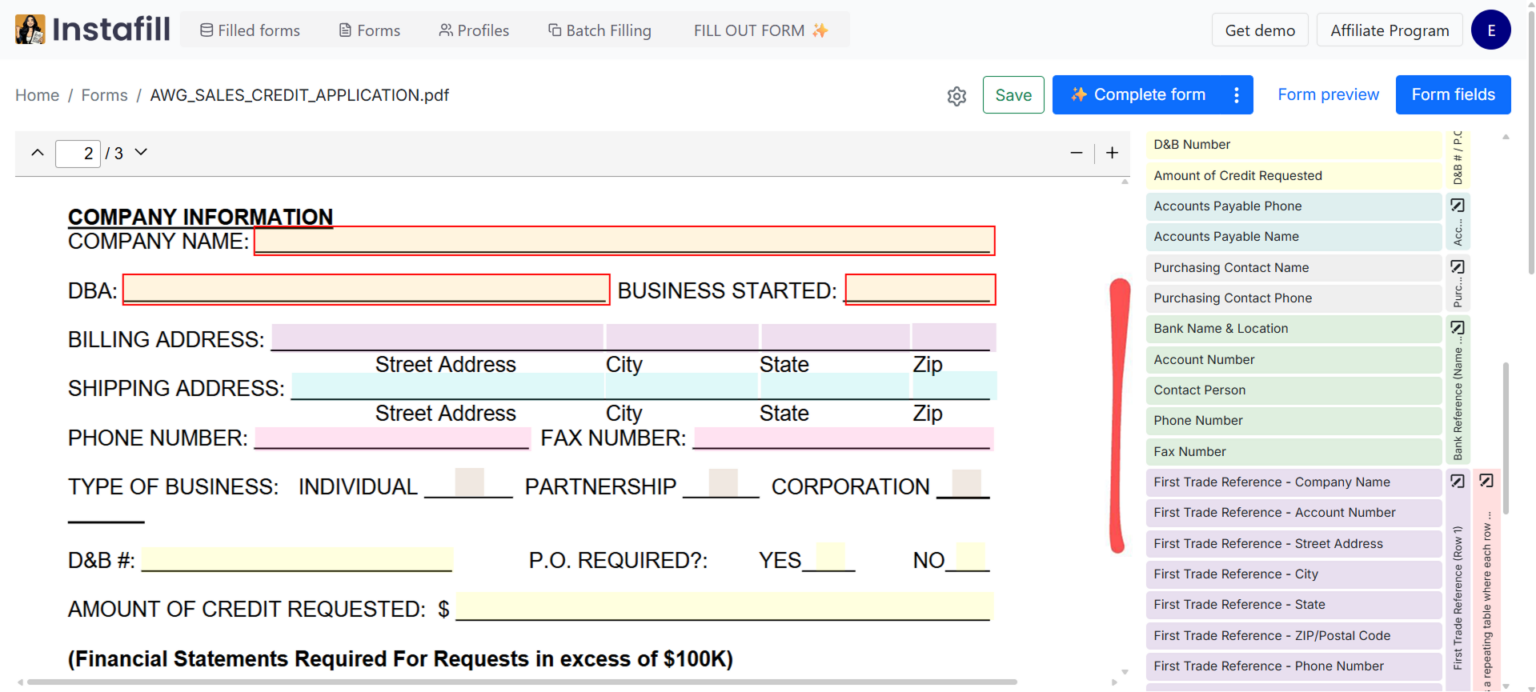
From the Field Editor, you can:
- Create new groups for fields the AI didn't group
- Rename existing groups for clarity
- Reassign fields from one group to another
- Select multiple fields with Ctrl/Cmd+click and add them to a group in one step
All changes are saved permanently and apply to every future fill of that form.
Configurable per group
Each group can be configured independently. This is what the Field Editor blog calls "one of Field Editor's most powerful capabilities."
| Setting | What it controls |
|---|---|
| AI Model | Choose the model for the group's complexity. Lighter models for simple fields like names and addresses. More advanced models for complex tables or lists. |
| AI Reasoning Effort | How deeply the AI analyzes fields in this group. Set higher effort (medium or high) for ambiguous sections, lighter effort (low) for straightforward fields. |
| Custom Instructions | Specific guidance for the group. Examples: "Add only the first three digits of the ZIP code," "Use the billing address if shipping address is not provided," "Format the phone number as (XXX) XXX-XXXX." |
| Dependencies | Define relationships between fields. For example, a date field that should be copied to multiple locations, or spouse fields that should only fill when "Marital Status" is "Married." |
| Ignore all fields | Toggle to exclude the entire group from filling. Useful for sections that should stay blank or be filled manually. |
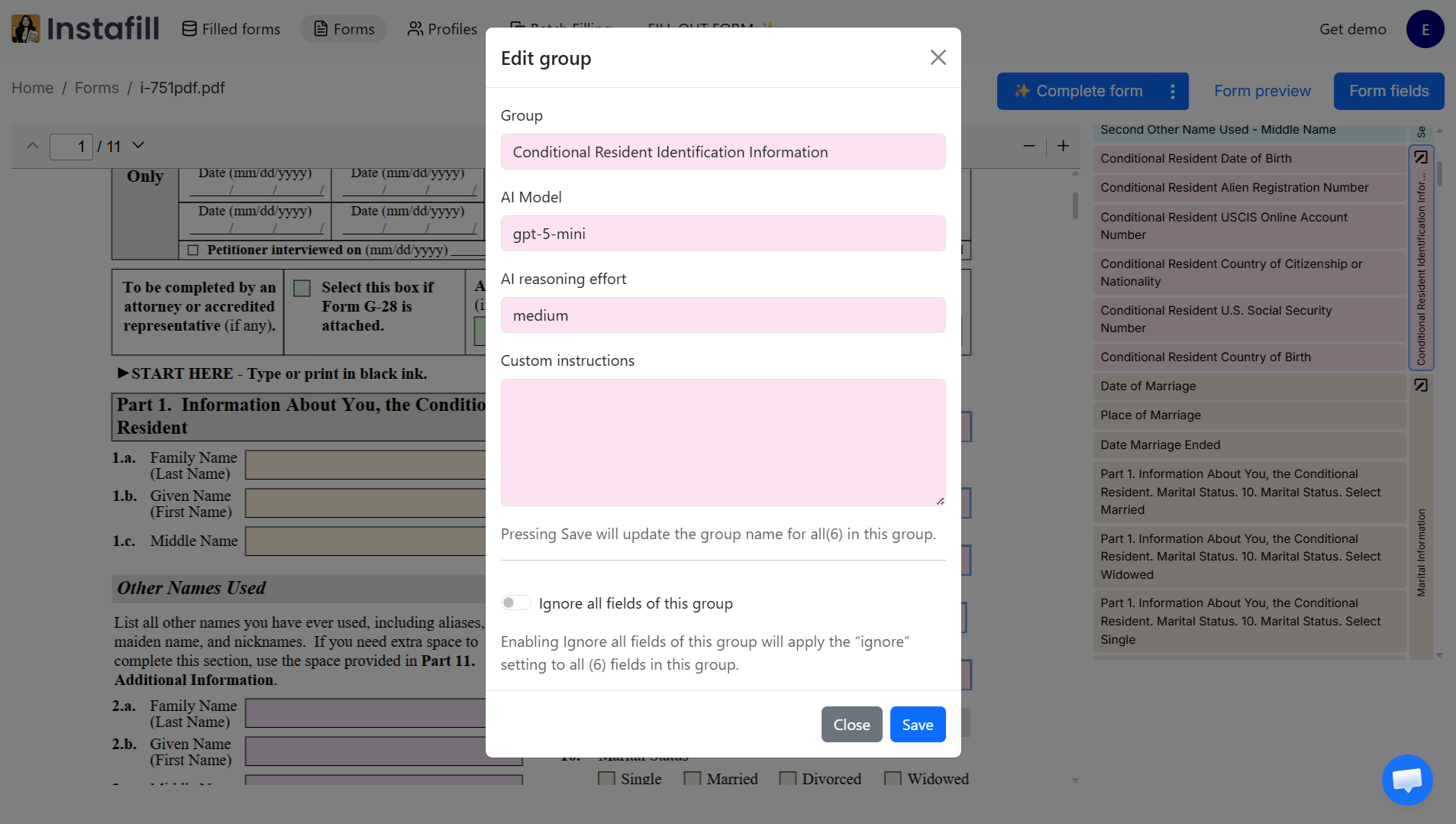
These settings let you fine-tune AI performance for different parts of the form without changing how other sections are handled.
Get access: Field Editor is available by request. Contact [email protected] to enable it for your workspace.
Source data targeted per section
For forms with distinct labeled sections, the AI maps source content to the appropriate group. The "Applicant" section receives source content about the applicant; the "Co-Applicant" section receives content about the co-applicant. This targeting is what prevents the applicant's employer from appearing in the co-applicant's employer field, even when both sections use identical field labels (Name, Address, Phone, Employer).
This matters most on forms where multiple sections describe different people or entities - and all sections share the same field structure.
Repeatable Sections
Forms frequently repeat the same field structure across pages - three employer blocks, five dependent sections, multiple explanation fields. These create a specific grouping challenge: the AI needs to recognize that each repetition is a separate instance, not the same section.
Instafill.ai automatically detects repeatable sections during fine-tuning. The AI analyzes the complete form structure, recognizes when identical field groups repeat across pages, and maps each section as a distinct entry.
Before this detection
Information could be duplicated across repeated sections, or data could be mapped to the wrong instance. The system didn't always distinguish between identical field structures that appeared multiple times.
After this detection
Each repetition is identified as a separate instance. Data fills into the correct section without duplication. Remaining blocks stay empty instead of carrying over values from previous entries.
Real example
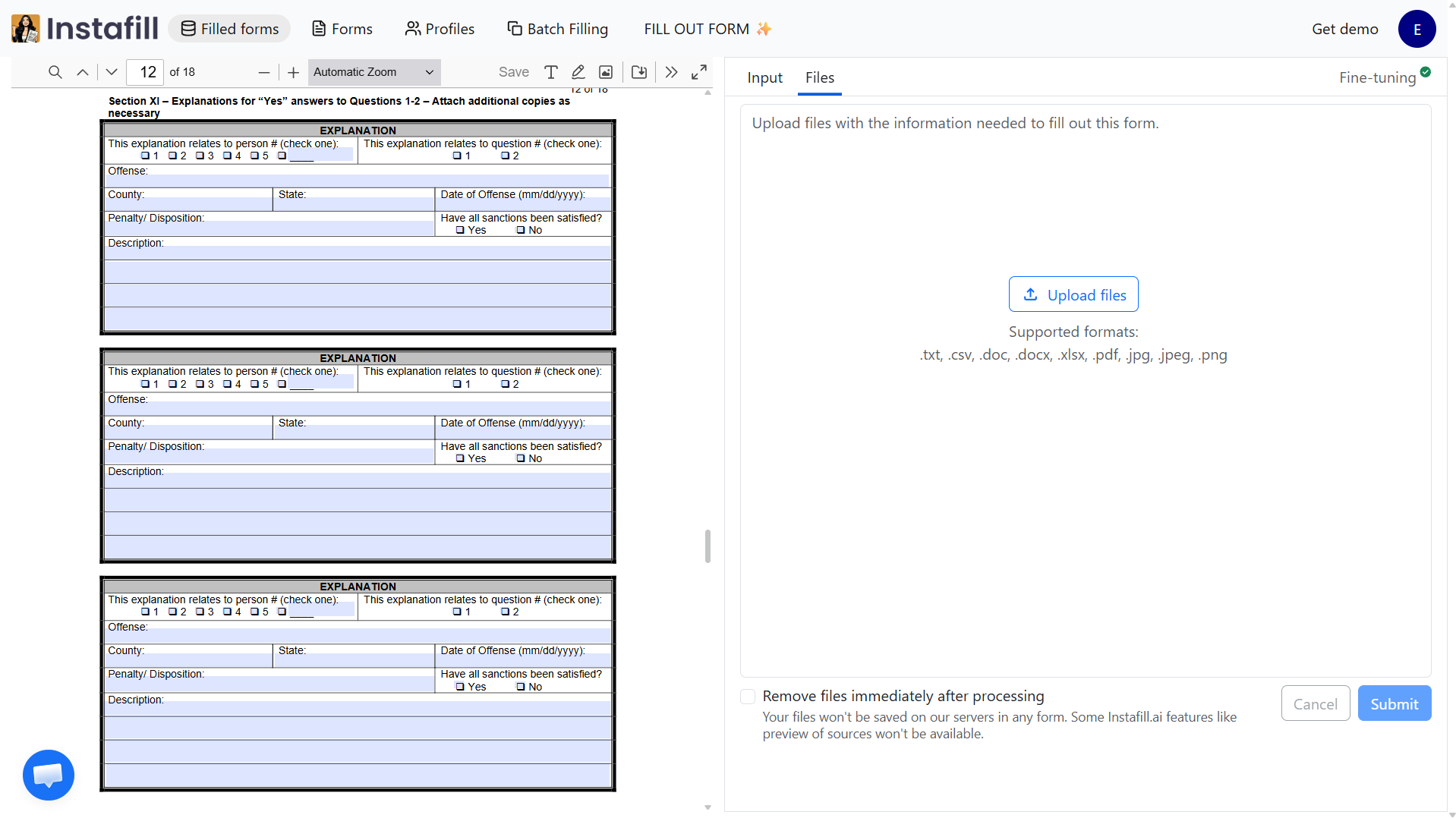
The Florida DBPR CILB 6-B application for Certified Building Contractor is an 18-page form with an Explanation section repeated three times on consecutive pages. Each block reuses the same labels and structure. The AI now correctly identifies these as three distinct entries and fills each one with the appropriate data from your source documents.
How repeated instances are filled
When a form has multiple identical blocks (e.g. three employer history sections), the AI maps source data entries to form instances in order:
- Source data entries are counted (e.g., the source document contains 3 prior employers)
- Entries are sorted in the order the form expects (most recent first for employment history)
- Instance 1 gets the most recent employer, Instance 2 the prior employer, Instance 3 the oldest
- If the source has fewer entries than instances, remaining instances stay blank
- If the source has more entries than the form has space for, blocks are filled to capacity
The same logic applies to dependent sections, prior address blocks, project history entries, medication lists, asset rows, and any other repeating structure.
When Groups Matter Most
Whether you fill out PDF forms for immigration, real estate, healthcare, or construction, field grouping delivers the most value on forms with complex structure. Here's where it makes a measurable difference, based on published case studies.
| Form type | Why grouping helps | Example |
|---|---|---|
| Multi-form immigration packets | The same client data needs to populate consistently across 3-4 USCIS forms per case (I-485, I-765, I-130). Groups keep biographical, employment, and family data organized so fills are consistent across forms. | Hong LLC - 75-80% time reduction per form |
| High-field-count real estate forms | MLS Data forms with 1,200+ fields need logical grouping to manage property measurements, features, parking, zoning, and hundreds of checkboxes. Per-group AI settings keep accuracy at 95-97%. | Toronto brokerage - under 2 min per form |
| Multi-provider ABA therapy reports | 20-30 page assessment templates from different therapy companies (Wonderway ABA, Accomplish ABA, Shining Star ABA). Each has different sections requiring different AI reasoning effort. | Independent BCBA - 99% accuracy |
| Construction prequalification forms | Subcontractor prequalification forms from multiple general contractors, each with unique layout but similar section types (company info, insurance, project history, safety records). | Fender Strategic Group |
| Credentialing applications | Multiple health plan forms (SFHP, GCHP, Blue Shield Promise, Central California Alliance), each with different layouts but similar logical sections. | Raya Health |
| Multi-page licensing applications | Government licensing forms with repeatable sections across pages (employment history, project history, explanation blocks). | DBPR CILB 6-B - 18 pages |
| Large tax returns | 44-page forms with 3,885 fields need per-group configuration to handle income, deductions, credits, and schedules differently. | Ireland Form 11 |
How to Use Groups Effectively
| Tip | |
|---|---|
| ✓ | Check group assignments after fine-tuning. Open the Field Editor and review the color-coded groups. If a field is assigned to the wrong group, reassign it. |
| ✓ | Use custom instructions for tricky sections. If a group consistently fills incorrectly, add custom instructions. For example: "This is the co-applicant section, not the applicant section" or "Use MM/DD/YYYY format for all dates in this group." |
| ✓ | Set lighter AI models for simple groups. Name and address groups rarely need advanced reasoning. Assign a lighter model to save processing time and reserve heavier models for tables, narratives, and complex sections. Use the ROI calculator to estimate how grouping-driven speed improvements translate to time and cost savings for your team. |
| ✓ | Define dependencies between groups. Use dependencies for conditional sections - spouse fields that should only fill when "Married" is selected, or sub-questions that activate based on a "Yes" answer. Dependencies ensure conditional sections fill correctly and stay blank when they should. |
| ✓ | Ignore sections that should stay blank. Toggle "Ignore all fields of this group" for sections filled manually, or sections that don't apply (e.g., a co-applicant section when there's no co-applicant). |
| ✓ | Use multi-select for bulk changes. Select multiple fields with Ctrl/Cmd+click, then add them all to a group, toggle ignore, or run fine-tuning for just those fields. Essential for forms with hundreds of fields. |
| ✓ | Regenerate fine-tuning to get updated groups. The AI's grouping algorithms improve weekly. Click "Regenerate fine-tuning" in the form details panel to re-analyze with the latest AI. Your manual edits (renamed fields, custom instructions, dependencies, ignored fields) are preserved. |
| ✓ | Combine groups with Style Replication. For narrative fields, add examples of your writing voice in the Field Editor. The AI applies your tone to generated text while respecting the group's AI model and reasoning settings. |
Common Questions
Are groups created automatically?
Yes. Groups are created during fine-tuning, the one-time analysis that runs when you first upload a form. The AI identifies which fields belong together based on the form's structure and labels - you don't define groups manually. You can review, rename, or reassign groups afterward in the Field Editor.
What if the AI groups fields incorrectly?
On non-standard or poorly structured forms, group boundaries are occasionally misidentified - for example, an "Applicant Phone" field positioned near an "Emergency Contact" section might get grouped with emergency contact fields.
When this happens, open the Field Editor, find the misassigned field, and move it to the correct group. You can also create new groups or rename existing ones. All changes are saved permanently and apply to every future fill of that form.
If you don't have Field Editor access, use the flag incorrect fields feature to report the issue, and the Instafill.ai team will fix it.
On clearly structured forms (government forms, standard legal templates, common financial forms), grouping is reliably correct. Ambiguity appears most often on custom internal forms with non-standard layouts or forms that mix related sections on the same visual row without clear separators.
How does grouping handle repeating sections?
The AI automatically detects repeatable sections during fine-tuning. When a form has multiple instances of the same structure - five employer blocks, three dependent information sections, eight prior-address rows - each with identical fields but for different data entries, the AI identifies the repeating pattern and treats each as a distinct instance.
During filling, source data entries are counted and sorted in the order the form expects (most recent first for employment history). Each instance maps to the corresponding entry. If the source has fewer entries than instances, remaining instances stay blank. If the source has more entries than the form has space for, blocks are filled to capacity.
Does grouping work on flat (scanned) PDFs that have been converted to fillable?
Yes. After flat-to-fillable conversion, detected fields carry their spatial coordinates and label associations. Group detection runs on these fields the same way it runs on native fillable PDF fields.
The main difference is that converted forms may have less reliable label associations, since labels are inferred from nearby text rather than stored as explicit field metadata. On clean, high-resolution scanned forms, group detection after conversion works comparably to native fillable forms. On lower-quality scans or non-standard layouts, some group boundaries may need correction in the Field Editor after the first fill.
Can I set different AI models for different sections of a form?
Yes, that's one of the main benefits of grouping. In the Field Editor, each group has independent settings for AI model, reasoning effort, and custom instructions. You can assign a lighter, faster model to simple name-and-address groups and a more advanced model to complex tables or narrative fields. This balances accuracy with processing speed across the form.
Will regenerating fine-tuning reset my groups?
No. When you click "Regenerate fine-tuning," all your manual edits are preserved - field names, descriptions, groups, dependencies, and ignored fields stay exactly as you set them. Only fields you haven't manually edited get regenerated. This means you can benefit from the latest AI improvements without losing any of your customization.
How do groups work with batch processing and API?
Groups apply to every fill method - individual form filling sessions, batch processing, and API calls. The group configuration (AI model, reasoning effort, custom instructions, dependencies) is stored with the form template and used automatically regardless of how the form is filled.
Do I need Field Editor access to benefit from groups?
No. Groups work automatically even without Field Editor access. The AI creates groups during fine-tuning and uses them when filling. Field Editor gives you the ability to review, adjust, and configure groups yourself - which is most valuable for complex forms or specialized workflows. Contact [email protected] to request access.