
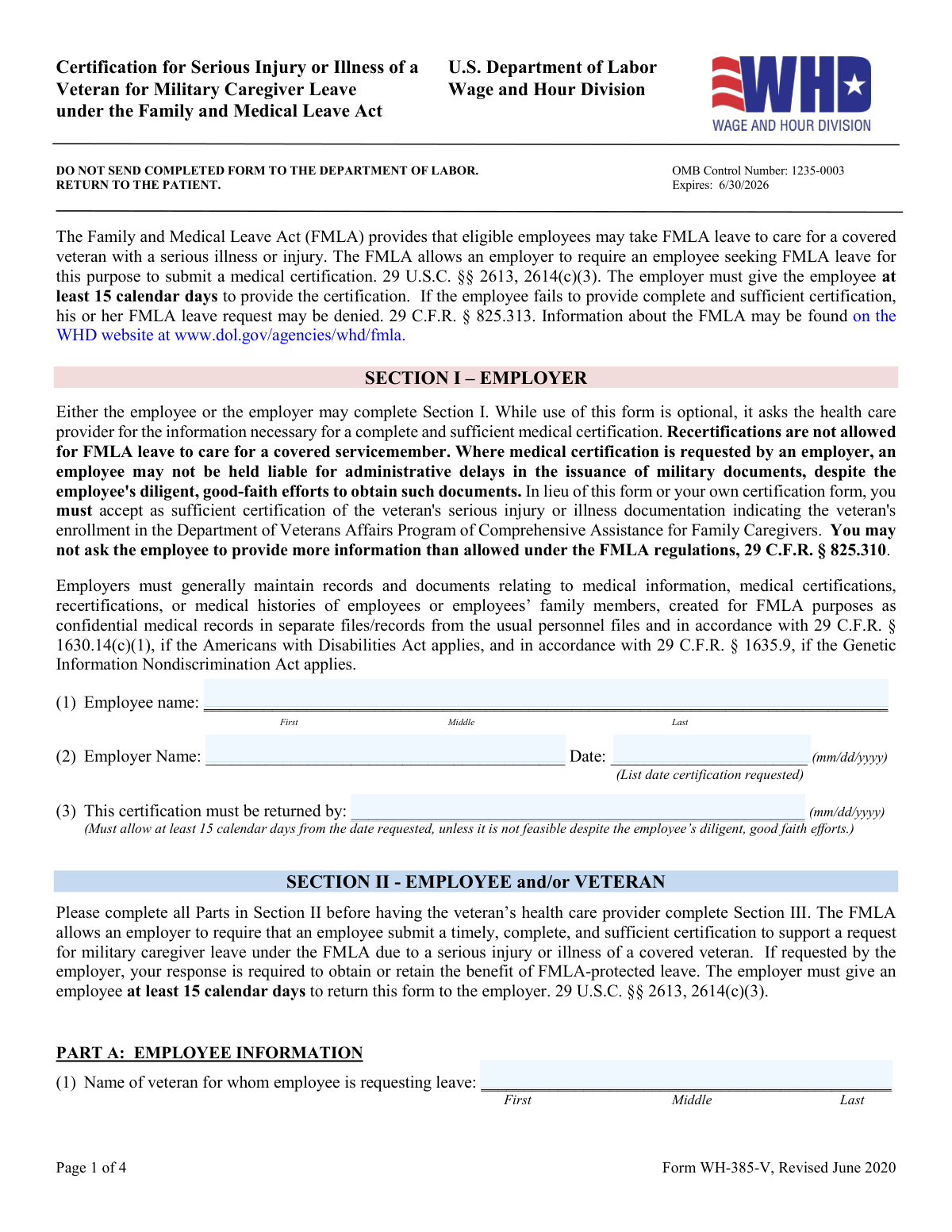
Yes! You can use AI to fill out Form WH-385-V, Certification for Serious Injury or Illness
Don't type 71 fields by hand. Tell our AI about yourself, or upload a document you already have, and it fills every field in seconds. You check it, then download, print or sign.
The AI does the filling. You just check it.
No typing into boxes, nothing to install.
What this form asks for
The AI fills all of it, from your answers or your documents.
The AI checks your answers before you download
15 checks built for this form, so a wrong date or a missing answer is caught before anyone else sees it.
Ensures that the employee's full name is correctly entered in Section I. This includes a thorough check of the first, middle, and last names as provided. The AI cross-references this information with existing employee records when available to ensure accuracy and consistency. Any discrepancies are flagged for review to prevent errors in identification.
Confirms that the employer's name and the date the certification was requested are accurately recorded in Section I. The AI system checks the current date against the date of entry to ensure it falls within a reasonable timeframe. It also validates the employer's name against registered business entities to ensure proper identification and to avoid any potential miscommunication.
Verifies that the certification return date in Section I is correctly entered and complies with the 15 calendar days requirement. The AI calculates the date of request and adds 15 calendar days to determine the correct return date. If the entered date does not match the calculated date, the system flags this for correction to adhere to regulatory timelines.
Checks that the veteran's full name is correctly entered in Section II, Part A. This includes validation of the first, middle, and last names. The AI system may reference available military or veteran databases for confirmation of the veteran's identity when possible, ensuring the name matches official records.
Validates that the employee's relationship to the veteran is properly indicated in Section II, Part A. The AI assesses the provided relationship status to ensure it falls within predefined categories. It also checks for consistency and clarity in the relationship description to prevent misunderstandings in the certification process.
This validation check ensures that the discharge status of the veteran, such as honorable or general discharge, is correctly identified and recorded. It also confirms that the discharge date provided matches official records and is formatted correctly, typically as MM/DD/YYYY. This information is critical as it may affect the eligibility for certain benefits or services. The check is designed to prevent any inaccuracies that could lead to delays or denials in processing the form.
And 9 more checks
- Verifies the veteran's military details, including branch, rank, and unit, are correctly provided in Section II, Part B.
- Ensures that the veteran's medical treatment status is clearly indicated in Section II, Part B.
- Checks that all applicable types of care the employee will provide to the veteran are marked and any 'Other' care is specified in Section II, Part B.
- Validates the estimate of leave needed, including the amount of FMLA leave, in Section II, Part B.
- Reduced Work Schedule Details
- Health Care Provider Information
- Medical Information Completeness
- Leave Needed Amount
- Health Care Provider's Signature Verification
Let AI fill out your Form WH-385-V
No typing. Every field filled in seconds, checked, ready to sign.
How to Fill Out Form WH-385-V Online for Free in 2026
What the AI walks you through.
- Visit instafill.ai site and select Form WH-385-V.
- Enter employee and employer information.
- Complete veteran's information and care details.
- Have the health care provider fill out their section.
- Sign and date the form electronically.
- Check for accuracy and submit the form.
Common Mistakes in Completing Form WH-385-V
The ones the AI is built to catch.
Incorrect or incomplete employee name in Section I
Incorrect or missing employer name and date in Section I
Late submission of the form to the employer
Incorrect or incomplete name of the veteran in Part A of Section II-Employee and/or Veteran
Incorrect relationship status to the veteran in Part A of Section II-Employee and/or Veteran
Incorrect or missing information in Part B of Section II-Employee and/or Veteran regarding discharge status and date
Incorrect military details of the veteran in Part B of Section II-Employee and/or Veteran
Failure to indicate whether the veteran is receiving medical treatment or not in Part B of Section II-Employee and/or Veteran
Incomplete or unclear description of care provided to the veteran in Part B of Section II-Employee and/or Veteran
Incorrect or unrealistic estimate of leave needed in Part B of Section II-Employee and/or Veteran
Incomplete or inaccurate information in Part A of Section III-Health Care Provider
Failure to select the appropriate type of FMLA health care provider in Part A of Section III-Health Care Provider
Incomplete or unclear medical information about the veteran's condition in Part B of Section III-Health Care Provider
Failure to complete all applicable fields regarding the amount of leave needed in Part C of Section III-Health Care Provider
Failure to sign and date the form by the health care provider in Part C of Section III-Health Care Provider
Frequently Asked Questions About Form WH-385-V
Is it really free for 7 days?
Can I fill other forms too?
How do I cancel?
How does the AI fill out Form WH-385-V?
What happens to my information?
How complex is Form WH-385-V to fill out?
What is the purpose of the Certification for Serious Injury or Illness of a Veteran form?
Who can complete Section I of the form?
What information is required in Section II of the form?
Who needs to complete Section III of the form?
What is the difference between a DOD health care provider and a VA health care provider?
Is the use of the Certification for Serious Injury or Illness of a Veteran form mandatory?
What happens if the veteran's health care provider is unable to complete Section III of the form?
What is the difference between a DOD TRICARE network authorized private health care provider and a DOD non-network TRICARE authorized private health care provider?
What information does the health care provider need to provide in Part B of the form?
What is the difference between a physical or mental condition that substantially impairs the covered veteran's ability to secure or follow a substantially gainful occupation by reason of a disability or disabilities related to military service and a condition that is a continuation of a serious injury or illness that was incurred or aggravated when the covered veteran was a member of the Armed Forces?
What is the difference between intermittent care and continuous care?
What is the difference between a physical condition and a mental condition?
What is the difference between a serious injury or illness and a serious health condition?
What is the difference between a DOD Recovery Care Coordinator and an authorized VA representative?
What is the difference between genetic tests and genetic services?
What is the difference between a physical condition and a mental condition in terms of FMLA leave eligibility?
What is the difference between a serious injury or illness and a serious health condition in terms of FMLA leave eligibility?
What is the difference between a physical condition and a mental condition in terms of the care that is needed for a Certification for Serious Injury or Illness of a Veteran?
Get your Form WH-385-V filled out by AI
$0 today. Cancel before Nov 2 and you pay nothing.
Other forms like this one
certification forms: Form HS 200, Licensure & Certification Application, W-9, Request for Taxpayer Identification Number and Certification, Form WH-380-E, Certification of Health Care Provider, Form WH-385, Certification for Serious Injury or Illness, Form WH-380-F, Certification of Health Care Provider, Form 8802, Application for U.S. Residency Certification, Form I-905, Application for Authorization to Issue Certification for Health Care Workers, Form N-648, Medical Certification for Disability Exceptions, Form 01-339, Texas Sales and Use Tax Resale Certificate / Texas Sales and Use Tax Exemption Certification, Dakota County CDA New Admissions Informal Review Request Form (Housing Choice Voucher Program) and HUD Form 5382, Certification of Domestic Violence, Dating Violence, Sexual Assault, or Stalking, and Alternate Documentation, NJ Department of Labor & Workforce Development Form MW-562, Payroll Certification for Public Works Projects (Contractor and Subcontractor’s Weekly and Final Certification), ROTC Cadet Academic Plan / Degree and Credit Hour Worksheet (Student Identification, Term-by-Term Courses, GPA Summary, and Completion Certification), Certification for Special Assessment (Office of Building, Planning, & Code Compliance, City of Knox, Indiana), Outpatient Behavioral Health (BH) – ABA Treatment Request: Required Information for Precertification (GR-69017-4), Form W-9, Request for Taxpayer Identification Number and Certification, 401(k) Program Rollover Certification, WTIA 401(k) Plan Rollover Contribution Employee Certification, Trust Certification and Trustee Powers, Form GR-68831, Precertification Information Request Form, Precertification request form: Advanced Radiology and Cardiology Services
Let AI fill out your Form WH-385-V
Your trial starts once a card is added. You pay nothing before Nov 2.
Our AI already knows this form, all 71 fields of it. Skip the typing: tell it about yourself, or upload what you have, and it fills the whole form in seconds.
- AI fills every field on all 4 pages, checkboxes included
- No typing into boxes: answer a few questions, or upload a document you already have, an old copy of this form, a photo of a document
- The AI checks the answers; you review and change anything before you download
- Download the finished PDF, print it, or sign it online
- Encrypted, and never used to train AI
Cancel before Nov 2 and you pay nothing.
A card is needed to start the trial. Cancel in two clicks from your account.
Terms · Privacy