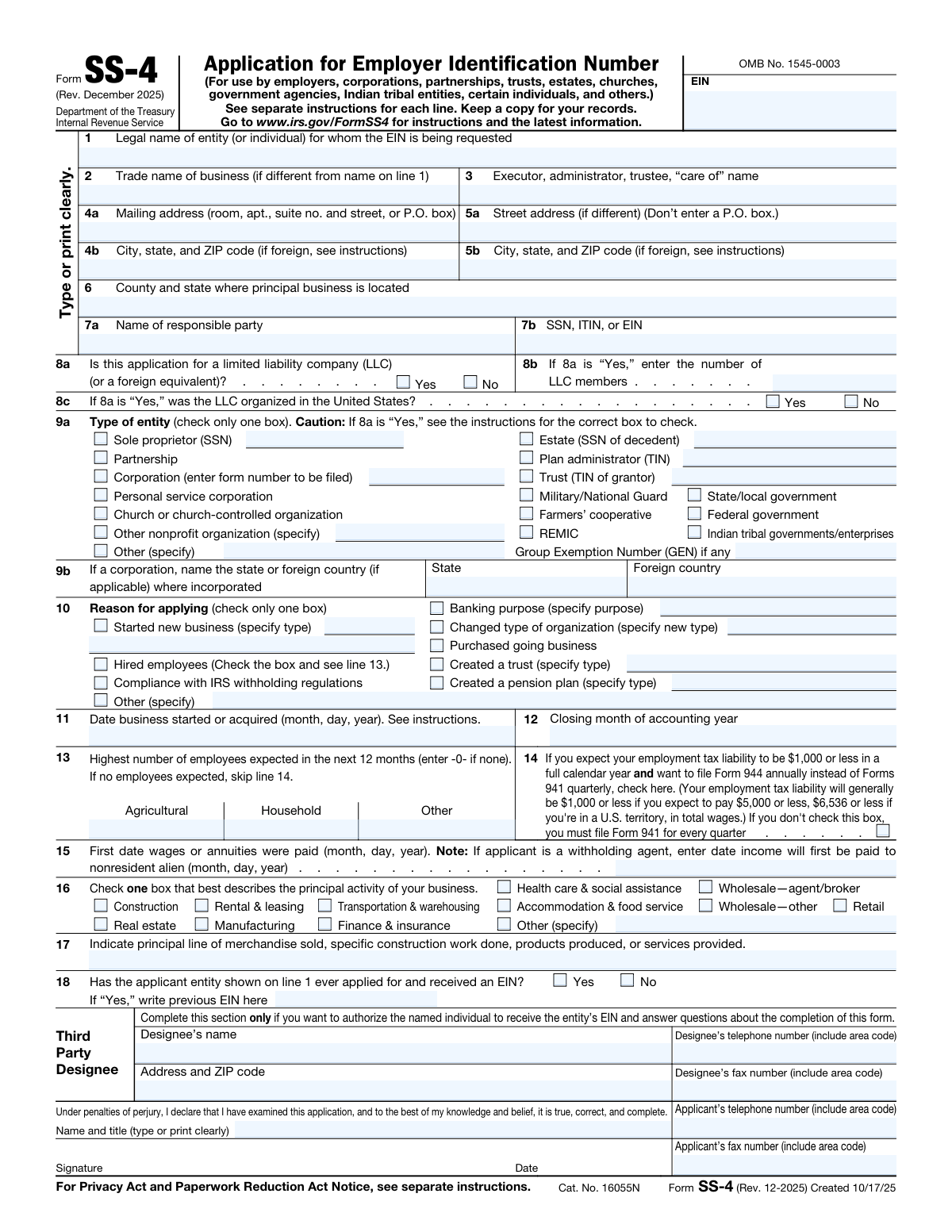
Yes! You can use AI to fill out Form SS-4 (Rev. December 2025), Application for Employer Identification Number

Form SS-4 is the Internal Revenue Service application used to request an Employer Identification Number (EIN) for an entity such as a sole proprietorship, corporation, partnership, LLC, trust, estate, nonprofit, or government/tribal organization. The EIN functions like a federal tax ID number and is used on tax returns, information returns, and other IRS documents. It is important because many entities must have an EIN to hire employees, comply with withholding and employment tax rules, open certain financial accounts, or file specific IRS forms. The form also captures key classification details (entity type, reason for applying, start date, and business activity) that affect how the IRS records the entity.
Our AI automatically handles information lookup, data retrieval, formatting, and form filling.
It takes less than a minute to fill out SS-4 using our AI form filling.
Securely upload your data. Information is encrypted in transit and deleted immediately after the form is filled out.

Form specifications

Form name: Form SS-4 (Rev. December 2025), Application for Employer Identification Number
Number of pages: 2
Filled form examples: Form SS-4 Examples
Language: English
main-image

Instafill Demo: filling out a legal form in seconds

How to Fill Out SS-4 Online for Free in 2026

Are you looking to fill out a SS-4 form online quickly and accurately? Instafill.ai offers the #1 AI-powered PDF filling software of 2026, allowing you to complete your SS-4 form in just 37 seconds or less.
Follow these steps to fill out your SS-4 form online using Instafill.ai:
  1. 1 Enter the entity’s legal name (and trade name if different) and provide any “care of” name for an executor/administrator/trustee if applicable.
  2. 2 Provide the mailing address and, if different, the physical street address, plus the county and state where the principal business is located.
  3. 3 Identify the responsible party and enter their SSN/ITIN/EIN as required.
  4. 4 Answer the LLC questions (whether the applicant is an LLC/foreign equivalent, number of members, and whether organized in the U.S.) and select the correct entity type box (sole proprietor, partnership, corporation, trust, nonprofit, government, etc.).
  5. 5 Select the reason for applying (for example, started a new business, hired employees, banking purpose, purchased a business, created a trust/pension plan, or other) and enter the business start/acquisition date and accounting year closing month.
  6. 6 Complete employment and tax filing details, including expected number of employees, whether requesting annual Form 944 filing (if eligible), and the first date wages/annuities (or payments to nonresident aliens) will be paid.
  7. 7 Describe the principal business activity and products/services, answer whether an EIN was previously obtained, optionally add a third-party designee, then sign and date the certification with contact information.

Our AI-powered system ensures each field is filled out correctly, reducing errors and saving you time.

Why Choose Instafill.ai for Your Fillable SS-4 Form?

Speed

Complete your SS-4 in as little as 37 seconds.

Up-to-Date

Always use the latest 2026 SS-4 form version.

Cost-effective

No need to hire expensive lawyers.

Accuracy

Our AI performs 10 compliance checks to ensure your form is error-free.

Security

Your personal information is protected with bank-level encryption.

Frequently Asked Questions About Form SS-4

Form SS-4 is used to apply for an Employer Identification Number (EIN) from the IRS. An EIN is a federal tax ID number used on tax returns, statements, and other IRS documents.

You file Form SS-4 if your entity doesn’t already have an EIN and is required to show an EIN on any return, statement, or other document. Common applicants include businesses, LLCs, corporations, partnerships, trusts, estates, nonprofits, churches, and certain individuals (such as withholding agents).

You may still need an EIN even without employees, especially if you are a partnership, corporation, nonprofit, REMIC, farmers’ cooperative, or need an EIN for certain tax filings (excise, retirement plan reporting, etc.). The “Do I Need an EIN?” table on page 2 lists common situations.

You’ll generally need the legal name (line 1), mailing address (line 4), responsible party name and SSN/ITIN/EIN (line 7), entity type (line 9), reason for applying (line 10), and business start date (line 11). Depending on your situation, you may also need employee estimates (line 13) and business activity details (lines 16–17).

Line 1 is the official legal name of the entity or individual requesting the EIN. Line 2 is your “doing business as” (DBA) or trade name, only if it’s different from the legal name.

The responsible party is the person who ultimately owns or controls the entity or who exercises effective control over it. You must provide the responsible party’s SSN, ITIN, or EIN on line 7b.

If the application is for an LLC (or foreign equivalent), check “Yes” on 8a, enter the number of LLC members on 8b, and indicate whether it was organized in the U.S. on 8c. The form cautions that if 8a is “Yes,” you should review the instructions to choose the correct entity type on line 9a.

Check only one box that matches your entity type (for example, sole proprietor, partnership, corporation, trust, estate, nonprofit, government entity). If you answered “Yes” to the LLC question on line 8a, the form warns you to follow the instructions to select the correct box for your LLC’s tax classification.

You generally apply for a new EIN when you start a new business, change the legal character/ownership of the organization, purchase a going business (and don’t already have an EIN), create certain trusts, or need an EIN for specific reporting. The form notes you should not apply for a new EIN for certain changes like only changing a business name or certain tax classification elections, and an existing corporation electing S status should use its previously assigned EIN.

Usually no—Form SS-4 notes not to use the prior business’s EIN unless you became the “owner” of a corporation by acquiring its stock. In most asset purchases or transfers, you should apply for your own EIN if you don’t already have one.

Check one reason that best fits your situation, such as started a new business, hired employees, banking purpose, purchased a going business, created a trust, or compliance with IRS withholding regulations. If none apply, choose “Other” and specify the reason.

Enter “-0-” on line 13 if you expect no employees in the next 12 months. If no employees are expected, the form instructs you to skip line 14.

Line 14 lets you request to file Form 944 annually instead of filing Form 941 quarterly if you expect your employment tax liability to be $1,000 or less for a full calendar year. If you don’t check the box, you generally must file Form 941 each quarter.

Line 16 asks you to choose the principal activity category that best describes your business (for example, retail, construction, manufacturing, etc.). Line 17 asks for a specific description of what you sell, make, or do (for example, “online clothing retail,” “residential plumbing,” or “software consulting”).

This section is optional and is only completed if you want to authorize someone else to receive the EIN and answer IRS questions about the application. If you don’t want to grant that authorization, leave the Third Party Designee section blank.

Compliance SS-4
Validation Checks by Instafill.ai

1
Line 1 Legal Name Required and Character Validity
Validates that the legal name of the entity/individual on line 1 is present and not blank, since it is the primary identifier for the EIN request. The check should also reject obviously invalid entries (only punctuation, placeholder text like “N/A,” or excessive special characters) and enforce a reasonable length limit. If validation fails, the submission should be blocked and the user prompted to enter the full legal name as it will appear on tax filings.
2
Line 4 Mailing Address Completeness and Structure
Ensures line 4a (street/PO box) and 4b (city, state, ZIP) are both provided and structurally valid, because IRS correspondence and the EIN notice are mailed to this address. Validate that 4b includes a state/territory code (or foreign format per instructions) and a ZIP code in 5-digit or ZIP+4 format when U.S.-based. If invalid or incomplete, the form should be rejected to prevent undeliverable IRS mail and downstream identity/address mismatches.
3
Line 5 Physical Street Address Rule (No P.O. Box) and Conditional Requirement
Checks that line 5 is only required when the street address differs from the mailing address, and if provided, line 5a does not contain a P.O. box (explicitly prohibited on the form). This prevents users from duplicating mailing address data incorrectly and ensures the IRS receives a true physical location when needed. If a P.O. box is detected in 5a or 5b is missing when 5a is present, validation should fail with a clear correction message.
4
Line 6 Principal Business Location (County and State) Required When Applicable
Validates that line 6 includes both county and state for U.S. principal business location when the applicant is operating in the U.S. and the form scenario requires lines 4a–6 (for example, hiring employees). This supports jurisdictional and administrative routing and reduces ambiguity for entities with multiple locations. If missing or inconsistent with a U.S. address, the submission should be flagged for correction before acceptance.
5
Responsible Party Name (7a) and TIN (7b) Presence and Format
Ensures line 7a (responsible party name) is provided and line 7b contains a valid identifier type (SSN, ITIN, or EIN) in an acceptable format. SSNs should be 9 digits (optionally formatted as XXX-XX-XXXX), ITINs should be 9 digits with valid ITIN starting ranges, and EINs should be 9 digits (optionally formatted as XX-XXXXXXX). If the TIN is missing, malformed, or contains non-numeric characters beyond allowed separators, validation fails to prevent IRS rejection and identity verification issues.
6
LLC Indicator Logic (8a) and Dependent Fields (8b, 8c)
Validates that line 8a is explicitly answered Yes/No, and if Yes, then 8b (number of LLC members) and 8c (organized in the U.S.) are completed. The number of members must be a positive integer (>=1) and should be consistent with entity selection rules (for example, single-member vs multi-member implications). If 8a is Yes but 8b/8c are missing or 8b is 0/non-numeric, the submission should be rejected because entity classification depends on these fields.
7
Entity Type Selection (9a) Exactly One and Required
Checks that exactly one box is selected on line 9a and that it is not left blank, since entity type drives IRS processing and filing obligations. The validation should also require any “specify” text when “Other nonprofit organization (specify)” or “Other (specify)” is selected, and enforce a reasonable text length. If multiple boxes are checked or required specification is missing, validation fails to avoid contradictory entity classification.
8
Corporation Incorporation Jurisdiction Required When Corporation Selected (9b)
If line 9a indicates a corporation, validates that line 9b is completed with either a U.S. state/territory or a foreign country, and that only one of those options is chosen. This is important for determining legal formation jurisdiction and related compliance. If corporation is selected but 9b is blank or both state and foreign country are provided, the submission should be blocked until corrected.
9
Reason for Applying (10) Exactly One and Required Specification
Ensures line 10 has exactly one reason selected and that any reason requiring details includes the specified text (e.g., “Started new business (specify type),” “Banking purpose (specify purpose),” “Created a trust (specify type),” “Created a pension plan (specify type),” or “Other (specify)”). This is critical because it determines which additional lines are required and how the IRS interprets the request. If multiple reasons are selected or required details are missing, validation fails and the user must correct the selection/details.
10
Business Start/Acquisition Date (11) Valid Date and Not in the Future
Validates that line 11 is a real calendar date in MM/DD/YYYY (or equivalent accepted) format and is not a future date relative to submission, unless the IRS instructions explicitly allow a future start in the given scenario. This date is used to establish the entity’s timeline for tax obligations and filings. If the date is invalid (e.g., 02/30) or unreasonably far in the future/past, the submission should be rejected or flagged for review.
11
Closing Month of Accounting Year (12) Valid Month Value
Checks that line 12 is provided and is a valid month (either a month name or numeric 1–12) and not an arbitrary string. This matters for determining the entity’s tax year and related filing deadlines. If the month is missing or invalid, validation should fail and prompt the applicant to enter a valid closing month (e.g., December).
12
Employee Counts (13) Non-Negative Integers and Conditional Line 14 Behavior
Validates that the agricultural, household, and other employee counts on line 13 are integers >= 0 and not decimals, negatives, or text. It should also enforce the form rule: if all categories are 0, line 14 should be skipped/left unchecked; if any category is >0, line 14 becomes applicable. If counts are invalid or line 14 is completed inconsistently with zero employees, the submission should be blocked or corrected to prevent incorrect employment tax filing setup.
13
First Wage/Annuity Payment Date (15) Required When Employees Expected and Date Consistency
If line 13 indicates any employees (>0) or the reason for applying includes “Hired employees,” validates that line 15 is completed and is a valid date. The date should be on or after the business start/acquisition date (line 11) in typical cases, and should not be unreasonably far in the past relative to the start date without explanation. If missing or inconsistent, validation fails because payroll tax filing schedules depend on this date.
14
Principal Activity (16) Single Selection and ‘Other’ Requires Specification
Ensures exactly one principal activity is selected on line 16 and that if “Other (specify)” is chosen, the specification text is provided and meaningful. This classification supports IRS industry coding and downstream compliance analytics. If multiple activities are selected or “Other” lacks a description, validation should fail to avoid ambiguous business classification.
15
Principal Products/Services Description (17) Required and Minimum Content Quality
Validates that line 17 is completed with a substantive description of merchandise/services (not blank, not “N/A,” not a single generic word like “business”). This is important for clarifying the nature of operations and aligning with the principal activity selection. If the description is missing or too vague, the submission should be rejected or flagged for follow-up to reduce misclassification risk.
16
Prior EIN Question (18) and Previous EIN Format When Yes
Checks that line 18 is answered Yes/No, and if Yes, requires a previous EIN value in valid EIN format (9 digits, optionally XX-XXXXXXX). This prevents duplicate EIN issuance and supports IRS record matching. If “Yes” is selected without a valid previous EIN, validation fails and the applicant must provide the prior EIN or correct the answer.
17
Third Party Designee Section Completeness When Any Field Is Present
If any third-party designee field is filled (name, phone, address, or fax), validates that the designee’s name and telephone number are present and that phone/fax numbers follow a valid format (10 digits with area code for U.S., or validated international format). This is important because partial authorization details can create privacy and authorization disputes. If incomplete or malformed, validation should fail and require either completing the entire designee section or clearing it.

Common Mistakes in Completing SS-4

Using a nickname or trade name on Line 1 instead of the legal name

Applicants often put the DBA/brand name on line 1 because that’s the name they use publicly, but line 1 must match the entity’s legal name as formed/registered (or the individual’s legal name for a sole proprietor). Mismatches can cause IRS record issues, delays, or problems when opening bank accounts and filing returns. Put the exact legal name on line 1 and use line 2 only for the trade name/DBA if it differs.

Leaving Line 2 blank when a DBA is used (or incorrectly repeating Line 1)

People either forget to list a trade name/DBA or they copy the legal name again without thinking. This can create confusion for banks, vendors, and state agencies that know the business by its DBA, and it can complicate matching EIN documentation to business paperwork. If you operate under any name different from line 1, enter it on line 2; if not, leave line 2 blank rather than duplicating.

Misusing the “Care of” field on Line 3

Line 3 is frequently filled with the business owner’s name, a registered agent, or a random contact even when it’s not an executor/administrator/trustee or true “c/o” mailing situation. Incorrect use can route IRS mail to the wrong person or make it unclear who is legally responsible for receiving correspondence. Use line 3 only when mail should be directed to a fiduciary or a specific “c/o” recipient (for estates, trusts, or similar situations).

Entering a P.O. Box on Line 5a (physical address) or mixing up Lines 4 and 5

Applicants commonly put a P.O. box on line 5a or repeat the mailing address without noticing that line 5 is for the street (physical) address and explicitly says not to enter a P.O. box. This can cause verification issues and confusion about the principal place of business. Put the mailing address (including P.O. box) on line 4, and only a physical street address on line 5 if it differs.

Incorrect city/state/ZIP formatting, especially for foreign addresses

People often use nonstandard abbreviations, omit ZIP+4 when available, or enter foreign addresses in a U.S. format without following the “if foreign, see instructions” note. Address formatting errors can lead to undeliverable IRS mail and delays in receiving the EIN confirmation. Use USPS-standard city/state abbreviations and ZIP codes for U.S. addresses, and follow the IRS foreign address instructions for non-U.S. locations.

Listing the wrong “County and state where principal business is located” on Line 6

Applicants sometimes enter the county/state of the mailing address, the registered agent, or the state of formation rather than where the business actually operates primarily. This can create inconsistencies across filings and may affect state-level matching or correspondence. Use the county and state of the principal business location (generally where day-to-day operations are managed), not where mail is received or where the entity was formed.

Confusing the “Responsible party” on Line 7a and entering a business name or nominee

A common mistake is listing the company itself, a paid preparer, or a registered agent as the responsible party. The IRS expects an individual (or, in limited cases, an entity) who controls, manages, or directs the applicant and has ultimate effective control. Enter the true responsible party and provide the correct SSN/ITIN/EIN on line 7b to avoid processing delays and future IRS identity/matching problems.

Entering the wrong identifier on Line 7b (SSN vs ITIN vs EIN) or leaving it blank

Applicants frequently put the entity’s EIN (when it doesn’t exist yet), a spouse’s SSN, or an incorrect/partial number, or they omit it due to privacy concerns. Incorrect TINs can cause rejection, delays, or later compliance issues when the IRS cannot validate the responsible party. Provide the responsible party’s correct SSN or ITIN (or EIN if applicable per instructions) and double-check all digits.

LLC questions (Lines 8a–8c) answered inconsistently or skipped

People often check “Yes” for LLC on 8a but forget to complete 8b (number of members) and 8c (organized in the U.S.), or they answer “No” even though the entity is an LLC. These inconsistencies can lead to the wrong entity classification and incorrect downstream tax filing expectations. If the applicant is an LLC (or foreign equivalent), answer 8a and complete 8b–8c accurately; if not, leave 8b–8c blank.

Checking the wrong entity type on Line 9a (especially for LLCs and nonprofits)

Applicants commonly select “Sole proprietor,” “Partnership,” or “Corporation” based on how they think they’re taxed, without following the caution that LLCs must use the instructions to pick the correct box. Choosing the wrong entity type can cause the IRS to expect the wrong returns (e.g., 1065 vs 1120) and can create compliance notices later. Determine the legal entity type first (including LLC member count and elections) and then select the correct 9a box per the SS-4 instructions.

Incorrect dates and tax-year fields (Lines 11, 12, and 15)

A frequent error is using the incorporation/formation date instead of the date the business actually started or was acquired, entering dates in the wrong format, or leaving line 12 blank without considering the accounting year-end. Wrong dates can affect payroll tax setup, filing obligations, and IRS record accuracy. Use month/day/year for lines 11 and 15, enter the true start/acquisition and first-wage dates, and specify the correct closing month of the accounting year on line 12.
Saved over 80 hours a year

“I was never sure if my IRS forms like W-9 were filled correctly. Now, I can complete the forms accurately without any external help.”

Kevin Martin Green

Your data stays secure with advanced protection from Instafill and our subprocessors

Robust compliance program

Transparent business model

You’re not the product. You always know where your data is and what it is processed for.

ISO 27001, HIPAA, and GDPR

Our subprocesses adhere to multiple compliance standards, including but not limited to ISO 27001, HIPAA, and GDPR.

Security & privacy by design

We consider security and privacy from the initial design phase of any new service or functionality. It’s not an afterthought, it’s built-in, including support for two-factor authentication (2FA) to further protect your account.

Fill out SS-4 with Instafill.ai

Worried about filling PDFs wrong? Instafill securely fills form-ss-4-rev-december-2025-application-for-employ forms, ensuring each field is accurate.