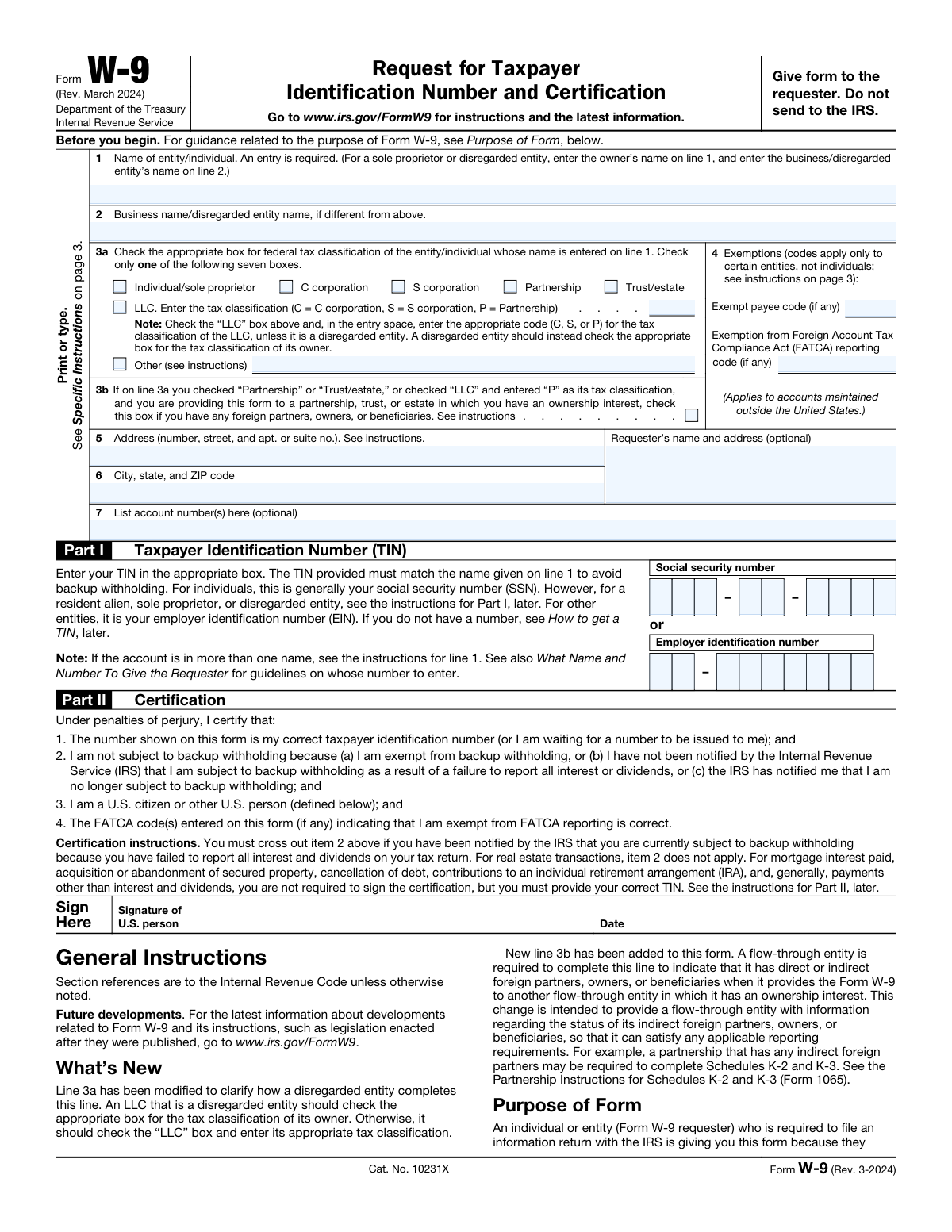
Yes! You can use AI to fill out Form W-9, Request for Taxpayer Identification Number and Certification
Form W-9, Request for Taxpayer Identification Number and Certification, is an Internal Revenue Service (IRS) form that individuals and entities use to certify their taxpayer identification number (SSN, ITIN, or EIN) and confirm their U.S. person status to payers or requesters who must file information returns. It is essential for avoiding backup withholding and ensuring accurate tax reporting on payments such as interest, dividends, freelance income, and real estate proceeds. Failure to provide a correct TIN can result in a 24% backup withholding on applicable payments. Today, Form W-9 can be filled out quickly and accurately using AI-powered services like Instafill.ai, which can also convert non-fillable PDF versions into interactive fillable forms.
Our AI automatically handles information lookup, data retrieval, formatting, and form filling.
It takes less than a minute to fill out W-9 using our AI form filling.
Securely upload your data. Information is encrypted in transit and deleted immediately after the form is filled out.
Form specifications
| Form name: | Form W-9, Request for Taxpayer Identification Number and Certification |
| Number of pages: | 1 |
| Language: | English |
| Categories: | employer forms, tax forms, IRS forms |
Instafill Demo: filling out a legal form in seconds
How to Fill Out W-9 Online for Free in 2026
Are you looking to fill out a W-9 form online quickly and accurately? Instafill.ai offers the #1 AI-powered PDF filling software of 2026, allowing you to complete your W-9 form in just 37 seconds or less.
Follow these steps to fill out your W-9 form online using Instafill.ai:
- 1 Navigate to Instafill.ai and either upload your copy of Form W-9 or select it from the available form library to begin filling it out online.
- 2 Enter the legal name of the individual or entity on Line 1, and if applicable, enter the business or disregarded entity name on Line 2.
- 3 Select the appropriate federal tax classification on Line 3a (e.g., Individual/sole proprietor, C corporation, S corporation, Partnership, Trust/estate, or LLC with the correct tax classification code), and check Line 3b if you have foreign partners, owners, or beneficiaries.
- 4 Complete the Exemptions section on Line 4 by entering the exempt payee code and/or FATCA reporting exemption code if applicable, then fill in your address on Lines 5 and 6 and any optional account numbers on Line 7.
- 5 Enter your Taxpayer Identification Number (TIN) in Part I — either your Social Security Number (SSN) or Employer Identification Number (EIN) — in the appropriate fields.
- 6 Review the Part II Certification statements, cross out item 2 if you are subject to backup withholding, then sign and date the form to certify the accuracy of the information provided.
- 7 Download the completed Form W-9 from Instafill.ai and provide it directly to the requester — do not send it to the IRS.
Our AI-powered system ensures each field is filled out correctly, reducing errors and saving you time.
Why Choose Instafill.ai for Your Fillable W-9 Form?
Speed
Complete your W-9 in as little as 37 seconds.
Up-to-Date
Always use the latest 2026 W-9 form version.
Cost-effective
No need to hire expensive lawyers.
Accuracy
Our AI performs 10 compliance checks to ensure your form is error-free.
Security
Your personal information is protected with bank-level encryption.
Frequently Asked Questions About Form W-9
Form W-9 is an IRS form titled 'Request for Taxpayer Identification Number and Certification.' It is used by individuals and entities to provide their correct Taxpayer Identification Number (TIN) to a requester — such as a bank, employer, or client — who is required to file an information return with the IRS reporting payments made to you, such as interest, dividends, or nonemployee compensation.
Any U.S. person (including resident aliens) who is asked by a requester to provide their TIN must complete Form W-9. This includes individuals, sole proprietors, corporations, partnerships, LLCs, trusts, and estates. Foreign persons should not use Form W-9; they should instead use the appropriate Form W-8 or Form 8233.
Line 1 must match the name shown on your tax return. Individuals should enter their personal name, sole proprietors should enter their individual name (not the business name), and entities such as corporations or partnerships should enter the legal entity name. For a disregarded entity, enter the owner's name on Line 1 and the disregarded entity's name on Line 2.
For individuals, your TIN is generally your Social Security Number (SSN). For businesses and other entities, it is your Employer Identification Number (EIN). Resident aliens who are not eligible for an SSN should use their Individual Taxpayer Identification Number (ITIN). The TIN you provide must match the name entered on Line 1 to avoid backup withholding.
Backup withholding is a 24% tax withheld from certain payments when a payee fails to provide a correct TIN, does not certify their TIN, or has been notified by the IRS of underreporting. You can avoid backup withholding by providing your correct TIN on Form W-9, signing the certification, and accurately reporting all taxable interest and dividends on your tax return.
An LLC should check the 'LLC' box on Line 3a and enter the appropriate tax classification code: C for C corporation, S for S corporation, or P for partnership. However, if the LLC is a disregarded entity (single-member LLC not taxed as a corporation), it should instead check the box that matches the tax classification of its owner rather than checking the LLC box.
Line 3b is a new field that must be checked if you are a partnership, trust, or estate with any foreign partners, owners, or beneficiaries, and you are providing this form to another partnership, trust, or estate in which you have an ownership interest. Failing to complete Line 3b when required may result in penalties and prevent you from filing correct information returns.
Exemption codes on Line 4 identify payees that are exempt from backup withholding (Exempt payee codes 1–13) or from FATCA reporting (codes A–M). These codes generally apply to certain entities such as corporations, government agencies, and tax-exempt organizations — not to individuals or sole proprietors. Leave these fields blank if no exemption applies to you.
No. Form W-9 should be given directly to the requester — such as your employer, bank, or client — who asked for it. You do not send Form W-9 to the IRS. The requester uses the information on the form to file information returns with the IRS on your behalf.
If you have applied for a TIN but have not yet received it, write 'Applied For' in the TIN field, then sign and date the form and return it to the requester. For interest and dividend payments, you generally have 60 days to provide your TIN before backup withholding applies. For other payment types, backup withholding will apply immediately until you provide your TIN.
FATCA (Foreign Account Tax Compliance Act) requires certain foreign financial institutions to report U.S. account holders to the IRS. If you hold accounts outside the United States, you may need to enter a FATCA exemption code on Line 4. If your accounts are only within the United States, you can generally leave the FATCA exemption code field blank.
Yes — AI-powered services like Instafill.ai can help you accurately auto-fill Form W-9 by guiding you through each field and reducing the risk of errors. These tools save time and ensure your TIN, name, and tax classification are entered correctly before you submit the form to your requester.
You can visit Instafill.ai, upload or select the Form W-9, and use the AI-assisted tool to fill in all required fields — including your name, TIN, tax classification, address, and certification — directly in your browser. Once completed, you can download and provide the filled form to your requester without needing to print and manually fill it out.
If you have a flat, non-fillable PDF version of Form W-9, Instafill.ai can convert it into an interactive fillable form so you can type your information directly into the document. This eliminates the need to print, handwrite, and scan the form, making the process faster and more convenient.
Providing incorrect information on Form W-9 can result in serious penalties: a $50 penalty for each failure to furnish a correct TIN, a $500 civil penalty for making a false statement that results in no backup withholding, and potential criminal penalties — including fines and imprisonment — for willfully falsifying certifications or affirmations on the form.
Compliance W-9
Validation Checks by Instafill.ai
1
Line 1 Name Field Cannot Be Blank
Validates that the Name field on Line 1 is not empty, as the form explicitly states 'An entry is required.' The name entered must match the name shown on the taxpayer's tax return to ensure proper IRS reporting and avoid backup withholding issues. If this field is left blank, the form is considered incomplete and cannot be processed, potentially triggering backup withholding at the 24% rate.
2
Exactly One Federal Tax Classification Box Selected on Line 3a
Validates that one and only one of the seven federal tax classification checkboxes on Line 3a is selected: Individual/sole proprietor, C corporation, S corporation, Partnership, Trust/estate, LLC, or Other. The form explicitly instructs the filer to 'Check only one of the following seven boxes,' and selecting multiple boxes or leaving all boxes unchecked renders the classification ambiguous. Failure to select exactly one box makes the form invalid and prevents the requester from correctly categorizing the payee for tax reporting purposes.
3
LLC Tax Classification Code Is Required When LLC Box Is Checked
Validates that when the LLC checkbox on Line 3a is selected, the adjacent tax classification entry field contains one of the three valid codes: C (C corporation), S (S corporation), or P (Partnership). An LLC that is a disregarded entity should instead check the appropriate box for its owner's tax classification rather than the LLC box. If the LLC box is checked but no valid classification code is entered, the form is incomplete and the requester cannot determine the correct withholding and reporting obligations.
4
Line 3b Foreign Partners Checkbox Conditional Applicability
Validates that Line 3b is only completed when the entity checked Partnership or Trust/estate on Line 3a, or checked LLC and entered 'P' as the tax classification. This checkbox is exclusively for flow-through entities providing the form to another partnership, trust, or estate in which they hold an ownership interest and have foreign partners, owners, or beneficiaries. If Line 3b is checked for an entity type that does not qualify (e.g., a C corporation or individual), it should be flagged as an inconsistency, as incorrect completion may result in erroneous Schedule K-2 and K-3 filing obligations.
5
Other Tax Classification Description Is Required When 'Other' Is Selected
Validates that when the 'Other (see instructions)' checkbox is selected on Line 3a, the accompanying text field for the specific classification description is not left blank. The 'Other' option requires the filer to specify the exact nature of the entity's federal tax classification per the form instructions. Leaving this field empty when 'Other' is checked provides no meaningful classification information to the requester and renders the form incomplete.
6
Mutually Exclusive TIN Entry: SSN or EIN, Not Both
Validates that the filer has provided a Taxpayer Identification Number in only one of the two available fields — either the Social Security Number (SSN) fields or the Employer Identification Number (EIN) fields — but not both simultaneously. The form instructs that individuals generally use an SSN while entities use an EIN, and entering values in both fields creates an ambiguous TIN that cannot be matched to the name on Line 1. If both TIN fields are populated, the form must be rejected or clarified to avoid backup withholding and incorrect IRS reporting.
7
SSN Format Validation: Three Segments Must Form a Complete 9-Digit Number
Validates that when an SSN is provided, all three segments are present and collectively contain exactly 9 numeric digits: the first segment must have 3 digits, the middle segment must have 2 digits, and the final segment must have 4 digits. SSNs must be numeric only and cannot contain letters, spaces, or special characters beyond the standard dashes separating the segments. An incomplete or incorrectly formatted SSN will not match IRS records, triggering backup withholding and potential penalties for furnishing an incorrect TIN.
8
EIN Format Validation: Two Segments Must Form a Complete 9-Digit Number
Validates that when an EIN is provided, both segments are present and collectively contain exactly 9 numeric digits: the prefix segment must have 2 digits and the remaining segment must have 7 digits. EINs must be entirely numeric and cannot contain letters or special characters. An improperly formatted EIN will fail IRS TIN matching, exposing the requester to backup withholding obligations and the payee to a $50 penalty for failure to furnish a correct TIN.
9
TIN Must Be Provided or 'Applied For' Must Be Indicated
Validates that the TIN section is not entirely blank — either a valid SSN or EIN must be entered, or the phrase 'Applied For' must be indicated to signal that a TIN application is pending. Leaving the TIN section completely empty without any indication means the form cannot fulfill its core purpose of providing a correct taxpayer identification number to the requester. A blank TIN will immediately subject the payee to backup withholding at the 24% rate on applicable payments.
10
Exempt Payee Code Must Be a Valid Code (1–13) If Provided
Validates that if an exempt payee code is entered on Line 4, it must be one of the 13 recognized numeric codes (1 through 13) as defined in the form instructions. Individuals and sole proprietors are generally not eligible for an exempt payee code, so the system should flag a potential inconsistency if an exempt payee code is entered alongside an Individual/sole proprietor tax classification on Line 3a. An invalid or inapplicable exempt payee code could result in incorrect withholding treatment and potential IRS penalties.
11
FATCA Exemption Code Must Be a Valid Letter Code (A–M) If Provided
Validates that if a FATCA exemption code is entered on Line 4, it must be one of the 13 recognized letter codes (A through M) as defined in the form instructions. This field is only applicable to accounts maintained outside the United States by certain foreign financial institutions, and entering an invalid code or a code that does not correspond to the entity's actual status constitutes a false certification. An incorrect FATCA code could expose the filer to civil penalties of $500 for false statements and potential criminal penalties for willful falsification.
12
Line 5 Street Address Must Be Present and Properly Formatted
Validates that Line 5 contains a street address including a building or house number, street name, and any applicable apartment or suite number, and that the field is not left blank. The address on Line 5 is where the requester will mail information returns such as 1099 forms, making it critical for the payee to receive their tax documents. An absent or clearly malformed address (e.g., containing only letters with no numeric component) should be flagged to ensure information returns are deliverable.
13
Line 6 City, State, and ZIP Code Must Be Present and Properly Formatted
Validates that Line 6 contains a city name, a valid two-letter U.S. state or territory abbreviation, and a ZIP code consisting of either 5 digits or the ZIP+4 format (5 digits, a hyphen, and 4 digits). All three components — city, state, and ZIP — must be present for the address to be complete and deliverable. A missing or improperly formatted ZIP code or an unrecognized state abbreviation should trigger a validation error, as an incomplete address prevents the requester from mailing required information returns to the payee.
14
Tax Classification and TIN Type Consistency Check
Validates that the type of TIN provided in Part I is consistent with the federal tax classification selected on Line 3a. Specifically, individuals and sole proprietors should generally provide an SSN, while corporations, partnerships, trusts, and estates should provide an EIN; providing an SSN for a corporation or an EIN for an individual (without a valid exception) indicates a likely data entry error. This consistency check helps prevent TIN-to-name mismatches in IRS records that would trigger backup withholding and could indicate an incorrectly completed form.
15
Disregarded Entity Owner Name Consistency on Line 1 vs. Line 2
Validates that when the entity type is a disregarded entity (e.g., a single-member LLC not electing corporate status), the owner's legal name — not the disregarded entity's name — is entered on Line 1, and the disregarded entity's name is placed on Line 2. Entering the disregarded entity's name on Line 1 instead of the owner's name is a common error that causes TIN-to-name mismatches because the TIN must belong to the owner, not the disregarded entity. If the same name appears on both Line 1 and Line 2, or if the Line 1 name appears to be a business entity name while the LLC classification is selected as a disregarded entity, the form should be flagged for review.
16
S Corporation Must Not Enter an Exempt Payee Code for Broker Transactions
Validates that if the S corporation tax classification is selected on Line 3a, no exempt payee code is entered in the exempt payee code field on Line 4, particularly in the context of broker transactions. Per the form instructions, S corporations must not enter an exempt payee code because they are only exempt for sales of noncovered securities acquired prior to 2012, and entering a general exempt payee code would incorrectly signal broader exemption from backup withholding. Flagging this combination prevents incorrect withholding treatment and ensures the requester applies the correct reporting rules for S corporation payees.
Common Mistakes in Completing W-9
Sole proprietors and owners of disregarded entities frequently enter their business or DBA name on Line 1 instead of their personal legal name as it appears on their tax return. This causes a TIN mismatch because the IRS matches the name on Line 1 against the SSN or EIN provided, which can trigger backup withholding at 24%. The correct approach is to enter the owner's individual legal name on Line 1 and place the business or DBA name on Line 2. Tools like Instafill.ai can help by prompting users with the correct field-specific guidance before submission.
LLC owners frequently check 'Individual/sole proprietor' or leave the LLC box unchecked when they should check the 'LLC' box and enter the appropriate tax classification code (C, S, or P). A single-member LLC disregarded for tax purposes should check the box for its owner's classification, not the LLC box, while a multi-member LLC taxed as a partnership should check LLC and enter 'P'. Selecting the wrong classification can cause incorrect tax reporting and potential IRS scrutiny. Carefully review the Line 3a instructions table and, if uncertain, consult a tax professional or use Instafill.ai, which validates classification choices based on entity type.
Individuals sometimes enter their Social Security Number in the Employer Identification Number box, or businesses enter their EIN in the SSN box, because the two fields look similar and people are unsure which applies to them. The IRS requires that the TIN match the name on Line 1: individuals and sole proprietors generally use their SSN, while corporations, partnerships, and multi-member LLCs use their EIN. A mismatch between the TIN type and the entity name will trigger backup withholding and IRS notices. Always confirm which TIN type corresponds to your entity classification, and use Instafill.ai to automatically route the correct TIN to the correct field.
Some filers skip Line 1 entirely, assuming the requester already has their name on file or that the business name on Line 2 is sufficient. However, the form explicitly states that an entry on Line 1 is required, and a blank Line 1 renders the form incomplete and invalid. Without a name on Line 1, the TIN cannot be properly matched, exposing the payee to backup withholding. Always enter the legal name of the individual or entity on Line 1 before completing any other section of the form.
Individual filers and sole proprietors sometimes enter an exempt payee code on Line 4, mistakenly believing they are exempt from backup withholding. The instructions clearly state that individuals and sole proprietors are generally not exempt from backup withholding, and entering an incorrect exemption code can result in under-withholding and IRS penalties. Exempt payee codes apply only to specific entity types such as corporations, government entities, and certain tax-exempt organizations. Leave Line 4 blank unless you have confirmed with a tax professional that a specific exemption code applies to your situation.
A very common and consequential error is submitting a TIN (SSN or EIN) that does not exactly match the name entered on Line 1 as it appears in IRS or Social Security Administration records — for example, using a maiden name, a nickname, or a recently changed name that hasn't been updated with the SSA. The IRS cross-references the name and TIN combination, and a mismatch triggers a B-Notice and mandatory backup withholding at 24% on future payments. Ensure the name on Line 1 matches exactly what is on your most recent tax return or Social Security card, and use Instafill.ai to validate name-TIN combinations before submitting.
Many filers complete all the data fields but forget to sign and date the form in Part II, which is required to certify the accuracy of the TIN and confirm non-foreign status. An unsigned Form W-9 is legally incomplete and the requester cannot rely on it, meaning the payee may be subject to backup withholding as if no form had been submitted at all. This mistake often happens when forms are filled out digitally and the signature field is overlooked. Always review the entire form before submission to ensure the signature and date fields in Part II are completed.
Filers who have been notified by the IRS that they are currently subject to backup withholding due to underreporting of interest or dividends are required to cross out Item 2 in the Part II certification before signing. Many people are unaware of this requirement and sign the certification as-is, which constitutes a false statement under penalties of perjury and can result in a $500 civil penalty. If you have received an IRS backup withholding notice, carefully read the certification instructions and cross out Item 2 before signing. Instafill.ai can flag this requirement during the form completion process.
Foreign individuals and entities sometimes submit Form W-9 when they should be submitting the appropriate Form W-8 (such as W-8BEN, W-8BEN-E, or W-8ECI) or Form 8233. Form W-9 is only for U.S. persons, including resident aliens; submitting it as a foreign person provides an incorrect certification of U.S. status and can lead to improper withholding treatment and potential penalties. If you are a nonresident alien or a foreign entity, do not use Form W-9 — consult IRS Publication 515 and submit the correct W-8 series form instead.
Filers often omit apartment or suite numbers, use non-standard state abbreviations, enter incorrect ZIP codes, or combine city, state, and ZIP into Line 5 instead of Line 6. An incorrect address means that information returns (such as 1099 forms) may be mailed to the wrong location, causing the payee to miss important tax documents. Line 5 should contain only the street address including any unit number, while Line 6 should contain the city, the official two-letter state abbreviation, and the full ZIP code. Instafill.ai can auto-populate and validate address fields to ensure proper formatting.
Partnerships, trusts, and estates that have foreign partners, owners, or beneficiaries and are providing this form to another flow-through entity in which they hold an ownership interest are required to check the box on Line 3b, but this new line is frequently overlooked. Failing to check Line 3b when required means the receiving entity may not have the information needed to complete Schedules K-2 and K-3 correctly, potentially resulting in penalties under sections 6698, 6722, and 6724. Review whether your entity has any foreign partners, owners, or beneficiaries before finalizing the form, and check Line 3b if the conditions described in the instructions are met.
Filers sometimes enter a FATCA exemption code when they hold only domestic U.S. accounts (where FATCA codes are not required), or they enter an incorrect code for accounts held outside the United States. Entering an incorrect FATCA code constitutes a false certification and can expose the filer to penalties, while unnecessarily completing the field can cause confusion for the requester. The FATCA exemption code field applies only to accounts maintained outside the United States by certain foreign financial institutions; if you are unsure whether it applies, consult the requesting institution or leave the field blank. Instafill.ai can help determine whether this field is applicable based on your account type.
Saved over 80 hours a year
“I was never sure if my IRS forms like W-9 were filled correctly. Now, I can complete the forms accurately without any external help.”
Kevin Martin Green
Your data stays secure with advanced protection from Instafill and our subprocessors
Robust compliance program
Transparent business model
You’re not the product. You always know where your data is and what it is processed for.
ISO 27001, HIPAA, and GDPR
Our subprocesses adhere to multiple compliance standards, including but not limited to ISO 27001, HIPAA, and GDPR.
Security & privacy by design
We consider security and privacy from the initial design phase of any new service or functionality. It’s not an afterthought, it’s built-in, including support for two-factor authentication (2FA) to further protect your account.
Fill out W-9 with Instafill.ai
Worried about filling PDFs wrong? Instafill securely fills form-w-9-request-for-taxpayer-identification-number-and-certification forms, ensuring each field is accurate.