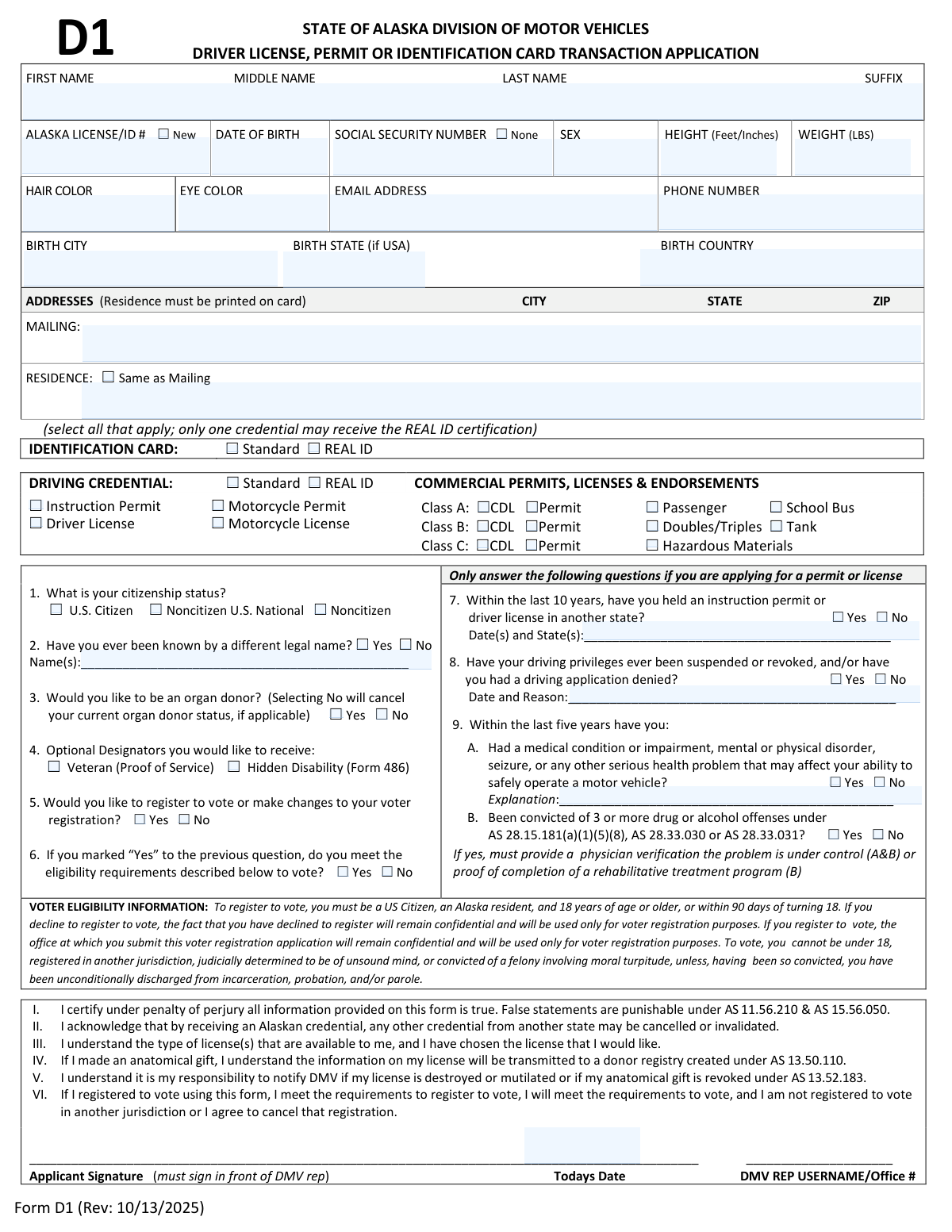
Yes! You can use AI to fill out Form D1, Driver License, Permit or Identification Card Transaction Application
Form D1 is the official application used by the Alaska Division of Motor Vehicles (DMV) for individuals seeking to obtain a new driver license, instruction permit, or identification card, or to update an existing one. It gathers essential personal, medical, and legal information to determine an applicant's eligibility for the requested credential. Today, this form can be filled out quickly and accurately using AI-powered services like Instafill.ai, which can also convert non-fillable PDF versions into interactive fillable forms.
Our AI automatically handles information lookup, data retrieval, formatting, and form filling.
It takes less than a minute to fill out Form D1 using our AI form filling.
Securely upload your data. Information is encrypted in transit and deleted immediately after the form is filled out.
Form specifications
| Form name: | Form D1, Driver License, Permit or Identification Card Transaction Application |
| Number of pages: | 2 |
| Language: | English |
| Categories: | permit application forms, CAR forms, driver license forms, identification forms, permit forms |
Instafill Demo: How to fill out PDF forms in seconds with AI
How to Fill Out Form D1 Online for Free in 2026
Are you looking to fill out a FORM D1 form online quickly and accurately? Instafill.ai offers the #1 AI-powered PDF filling software of 2026, allowing you to complete your FORM D1 form in just 37 seconds or less.
Follow these steps to fill out your FORM D1 form online using Instafill.ai:
- 1 Navigate to Instafill.ai and upload or select the Alaska Form D1.
- 2 Use the AI assistant to accurately input your personal details, including your full name, date of birth, Social Security Number, and physical characteristics.
- 3 Enter your current mailing and residence addresses, and specify the type of credential you are applying for (e.g., REAL ID, Standard License, ID Card).
- 4 Answer the series of required questions regarding your citizenship status, organ donor preference, voter registration, and driving history.
- 5 If you are a minor, have your parent or legal guardian complete the consent section.
- 6 Carefully review all the information auto-filled by the AI for accuracy and completeness.
- 7 Download the completed form, ready for you to sign and submit to the Alaska DMV as required.
Our AI-powered system ensures each field is filled out correctly, reducing errors and saving you time.
Why Choose Instafill.ai for Your Fillable Form D1 Form?
Speed
Complete your Form D1 in as little as 37 seconds.
Up-to-Date
Always use the latest 2026 Form D1 form version.
Cost-effective
No need to hire expensive lawyers.
Accuracy
Our AI performs 10 compliance checks to ensure your form is error-free.
Security
Your personal information is protected with bank-level encryption.
Frequently Asked Questions About Form Form D1
Form D1 is the official State of Alaska application used to apply for a new, renewal, or replacement Driver License, Instruction Permit, or Identification Card. It is required for all driver and ID card transactions at the DMV.
Any individual applying for an Alaska driver license, permit, or ID card must complete this form. This includes applications for standard and REAL ID credentials, as well as commercial driver licenses (CDL).
A REAL ID is a federally compliant credential that will be required for domestic air travel and access to federal facilities. A standard credential is not federally compliant and will be marked with 'Federal Limits Apply'.
Yes, if you are a minor applying for a driving credential, your parent or legal guardian must complete the 'Parent/Legal Guardian Consent' section. They must sign in front of a DMV representative or a notary and provide proof of their relationship to you.
No, you must sign the application in the presence of a DMV representative at the DMV office. Do not sign the form beforehand.
You must disclose that you have held a license in another state within the last 10 years on question 7. Be aware that receiving an Alaskan credential may cancel or invalidate your license from the other state.
Yes, if you have a medical condition that may affect your ability to drive safely, you must disclose it in question 9A. You may be required to provide a physician's verification that the condition is under control.
Yes, this form allows you to register to vote or update your voter registration information. Simply check 'Yes' on question 5 and confirm your eligibility.
While the form doesn't list all documents, you will typically need proof of identity, residency, and legal presence. For optional designators like 'Veteran,' you must bring proof of service.
Selecting 'No' indicates that you do not wish to be an organ donor. If you are currently registered as a donor, this action will cancel your existing organ donor status.
Yes, services like Instafill.ai use AI to help you accurately auto-fill forms like this one, which can save you time and reduce errors. This ensures all required fields are completed correctly before your DMV visit.
Simply upload the Form D1 PDF to the Instafill.ai platform. The AI will identify the fields, and you can provide your information once to have it automatically and accurately placed throughout the document.
You can use a service like Instafill.ai, which can convert flat, non-fillable PDFs into interactive, fillable forms. This allows you to type your information directly into the fields before printing.
Yes, this form is used for all driving credentials, including Commercial Permits and Licenses for Classes A, B, and C. You can also select any endorsements you are applying for, such as HazMat or School Bus.
Compliance Form D1
Validation Checks by Instafill.ai
1
Validates Applicant's Age and Date of Birth Format
Checks that the Date of Birth is a valid date in a standard format (e.g., MM/DD/YYYY) and that the applicant meets the minimum age for the requested credential. For example, an applicant for a driver license must be at least 16 years old. This validation is critical for legal compliance and ensuring only eligible individuals are issued credentials. If the date is invalid or the age is insufficient, the application will be flagged for correction or rejection.
2
Ensures Mutually Exclusive SSN Entry
This validation verifies that the applicant has either provided a Social Security Number (SSN) or checked the 'None' box, but not both. It also checks that any provided SSN follows the 9-digit format. This prevents data entry errors and ensures the application data is consistent for processing with federal databases. An invalid submission would require the applicant to correct the SSN field before proceeding.
3
Enforces Single REAL ID Certification
The system checks that the applicant has selected 'REAL ID' for either the Identification Card or the Driving Credential, but not both. Federal regulations permit an individual to hold only one REAL ID compliant credential. This validation prevents the issuance of multiple REAL ID cards, which would create a compliance issue and require one of the credentials to be invalidated later.
4
Requires Previous Name if Indicated
This check ensures that if an applicant answers 'Yes' to question 2 ('Have you ever been known by a different legal name?'), the corresponding 'Name(s)' field is not left empty. This is crucial for conducting a thorough background check and maintaining a complete identity history for the individual. Failure to provide the previous name(s) will halt the application process until the required information is supplied.
5
Validates Voter Registration Eligibility
If an applicant selects 'Yes' to register to vote (Question 5), this validation cross-references their answers to other questions to confirm eligibility. It checks that the applicant has selected 'U.S. Citizen' for citizenship status and that their calculated age from the Date of Birth is 18 or older, or within 90 days of their 18th birthday. This ensures the DMV complies with voter registration laws and prevents ineligible applications from being sent to the Division of Elections.
6
Requires Voter Eligibility Confirmation
This validation ensures that if an applicant checks 'Yes' for question 5 ('Would you like to register to vote...'), they must provide an answer (either 'Yes' or 'No') to question 6 ('...do you meet the eligibility requirements...'). This is a required step to confirm the applicant has read and acknowledged the eligibility criteria. An incomplete response would prevent the voter registration part of the application from being processed.
7
Requires Details for Prior Out-of-State Licenses
If an applicant answers 'Yes' to question 7, indicating they have held a license in another state within the last 10 years, this validation requires the 'Date(s) and State(s)' field to be completed. This information is essential for the DMV to check the National Driver Register and verify the applicant's driving history and status. Submitting the form without these details will result in an incomplete application and processing delays.
8
Requires Explanation for Driving Privilege Issues
This check is triggered if the applicant answers 'Yes' to question 8, confirming a history of license suspension, revocation, or denial. The validation ensures that the 'Date and Reason' field is filled out with a specific explanation. This information is mandatory for the DMV to assess the applicant's current eligibility and determine if any outstanding requirements or sanctions exist.
9
Mandates Explanation for Affirmative Medical History
When an applicant answers 'Yes' to question 9A regarding a medical condition that could affect driving, this validation ensures the 'Explanation' field is completed. This detailed information is critical for the DMV's medical review board to assess driving fitness and determine if any restrictions are necessary for public safety. The application will be considered incomplete without this mandatory explanation.
10
Verifies Parental Consent for Minors
This validation checks the applicant's age based on their Date of Birth. If the applicant is a minor (e.g., under 18) and is applying for a driving credential, the system verifies that the 'PARENT/LEGAL GUARDIAN CONSENT' section is fully completed. This is a legal requirement to ensure the minor has permission to drive and that a parent or guardian accepts liability. An application from a minor without this consent cannot be processed.
11
Ensures Residence Address is Complete
This validation checks if the 'Same as Mailing' checkbox is ticked for the residence address. If it is not checked, the system requires that all fields for the Residence Address (street, city, state, zip) are filled out. A physical residence address is legally required to be printed on the card and is used to establish residency, so this check prevents the creation of a credential with missing critical information.
12
Checks Citizenship for Hazardous Materials Endorsement
This validation is triggered if the applicant selects the 'Hazardous Materials' endorsement. It verifies that the applicant's citizenship status is marked as 'U.S. Citizen' or another federally approved status for holding a HazMat endorsement. This is a strict federal security requirement, and an applicant who does not meet the criteria will be denied the endorsement.
13
Validates New vs. Existing License Number Entry
This check ensures data consistency for the 'Alaska License/ID #' field. If the 'New' checkbox is selected, the license number field must be empty. Conversely, if the 'New' box is not checked, the license number field must be populated, as this indicates a renewal or replacement transaction. This prevents confusion and ensures correct processing for new versus existing customers.
Common Mistakes in Completing Form D1
Applicants often list a P.O. Box in the 'Residence' field, but the form requires a physical street address to be printed on the card. This common error leads to application rejection and processing delays, as a physical address is mandatory for identity and residency verification. To avoid this, always enter your actual physical street address in the residence field and use the separate mailing address field for P.O. Boxes. AI-powered tools like Instafill.ai can help by validating address formats and flagging non-physical addresses in residence fields.
The form explicitly states the applicant and any consenting parent must sign in front of a DMV representative or a notary. A frequent mistake is to sign the form at home, which invalidates the signature and forces you to fill out a new form at the DMV. To prevent this delay, always leave the signature lines blank until you are in the presence of a DMV official and are instructed to sign.
Many applicants are unsure about the difference between a Standard and REAL ID or select REAL ID without bringing the required additional documentation. This results in wasted time at the DMV and the inability to complete the transaction as requested. Before your visit, research the specific documents needed for a REAL ID and ensure you have them. If you only have a non-fillable PDF of the form, a tool like Instafill.ai can convert it into a smart, fillable version with helpful tips for such complex choices.
When answering question #2, individuals who have had a name change often forget to list all previous legal names, such as a maiden name. This omission can cause discrepancies during identity verification against other government records, leading to significant processing delays. Ensure you list all former legal names to create a clear and verifiable identity history.
The form specifies height in 'Feet/Inches,' but applicants frequently enter it in other formats like total inches (e.g., '68') or using metric units. This data entry error requires correction by the DMV agent, slowing down the process. Always use the specified format, such as 5' 8", to ensure accuracy. Using a smart form-filling tool like Instafill.ai can prevent this by automatically formatting the data into the correct 'feet/inches' structure as you type.
When a parent or guardian signs for a minor, they often forget to bring the required legal document proving their relationship, such as a birth certificate or court-ordered guardianship papers. The form clearly states this is required for initial consent, and its absence will prevent the minor from proceeding with their application. Always gather all required personal and parental documents before your DMV visit to ensure a smooth process.
For questions regarding previous licenses, driving history, or medical conditions (#7, #8, #9), answering 'Yes' requires providing mandatory follow-up details in the space provided. Applicants often check 'Yes' but forget to write in the explanation, which makes the application incomplete. This stops the process until the information is provided. Smart digital forms can help by prompting the user to fill the explanation field if 'Yes' is selected.
Applicants may check 'Yes' to question #5 ('Would you like to register to vote?') but then forget to answer question #6 about their eligibility, or they answer it 'No.' This creates a conflicting and invalid request that the DMV cannot process. To avoid this, ensure you answer both questions logically; if you wish to register, you must also confirm your eligibility by answering 'Yes' to question #6.
First-time applicants for an Alaska license or ID sometimes overlook the 'New' checkbox next to the 'ALASKA LICENSE/ID #' field. This checkbox is crucial for DMV data entry to create a new record rather than search for an existing one. Forgetting to check it can cause confusion and slight delays as the agent clarifies your application status. When filling out the form, double-check all checkboxes to ensure they accurately reflect your situation.
Applicants may incorrectly answer 'No' to sensitive questions about medical conditions (9A) or past convictions (9B) to avoid complications or extra paperwork. This is a false statement made under penalty of perjury and can lead to severe consequences, including license revocation and legal charges. It is critical to answer truthfully and provide any required physician verification or proof of treatment to avoid future legal trouble and ensure you are legally compliant.
Saved over 80 hours a year
“I was never sure if my IRS forms like W-9 were filled correctly. Now, I can complete the forms accurately without any external help.”
Kevin Martin Green
Your data stays secure with advanced protection from Instafill and our subprocessors

Robust compliance program
Transparent business model
You’re not the product. You always know where your data is and what it is processed for.
ISO 27001, HIPAA, and GDPR
Our subprocesses adhere to multiple compliance standards, including but not limited to ISO 27001, HIPAA, and GDPR.
Security & privacy by design
We consider security and privacy from the initial design phase of any new service or functionality. It’s not an afterthought, it’s built-in, including support for two-factor authentication (2FA) to further protect your account.
Fill out Form D1 with Instafill.ai
Worried about filling PDFs wrong? Instafill securely fills form-d1-driver-license-permit-or-identification-card-transaction-application forms, ensuring each field is accurate.