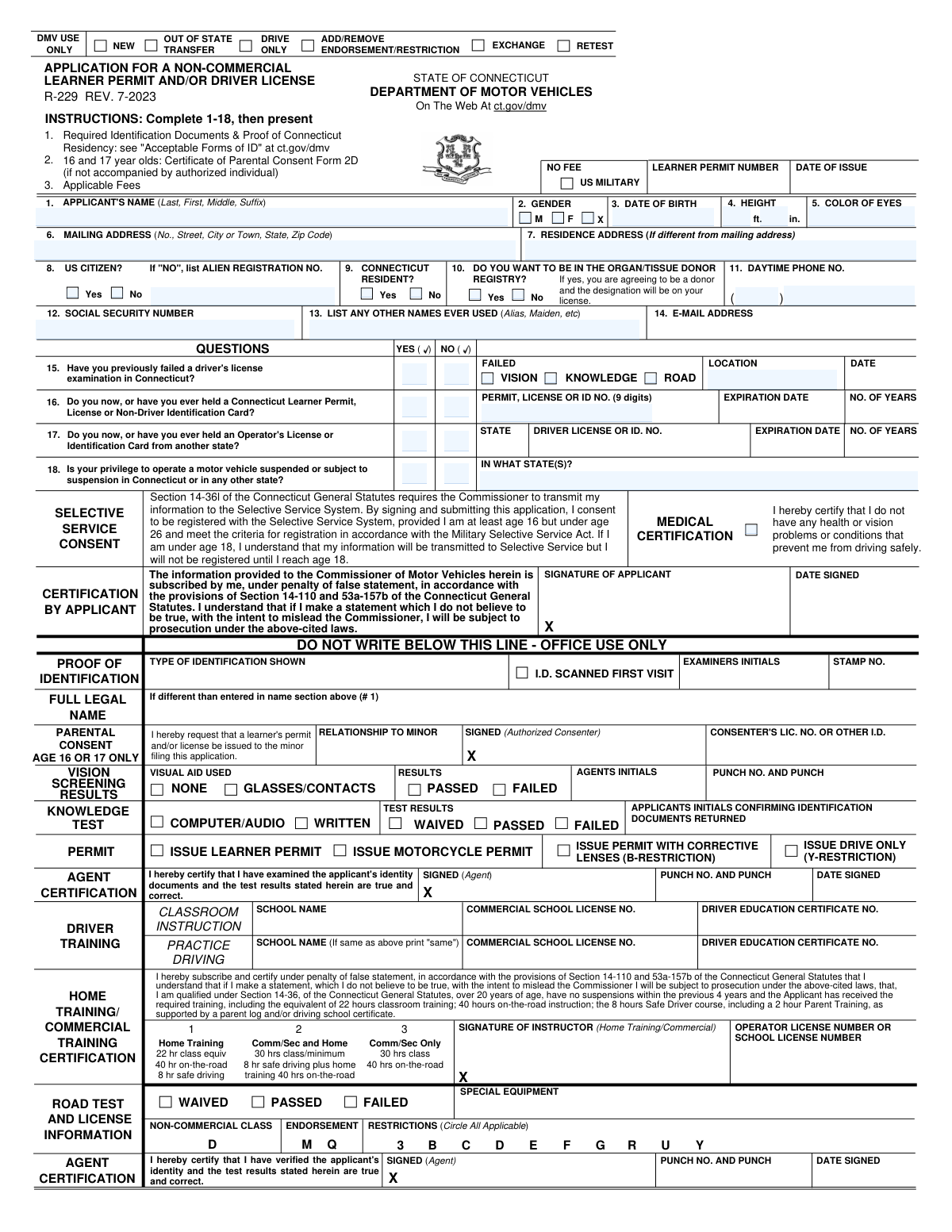
Yes! You can use AI to fill out State of Connecticut Form R-229, Application for a Non-Commercial Learner Permit and/or Driver License

Connecticut Form R-229 is the application used by the Department of Motor Vehicles (DMV) for individuals applying for a new non-commercial learner permit or driver license. It collects essential personal information, driving history, medical certification, and parental consent for minors. Completing this form accurately is the first step toward legally operating a vehicle in Connecticut. Today, this form can be filled out quickly and accurately using AI-powered services like Instafill.ai, which can also convert non-fillable PDF versions into interactive fillable forms.
Our AI automatically handles information lookup, data retrieval, formatting, and form filling.
It takes less than a minute to fill out R-229 using our AI form filling.
Securely upload your data. Information is encrypted in transit and deleted immediately after the form is filled out.

Form specifications

Form name: State of Connecticut Form R-229, Application for a Non-Commercial Learner Permit and/or Driver License
Number of pages: 1
Language: English
Categories: permit application forms, driver license forms, permit forms, commercial forms, PA state forms
main-image

Instafill Demo: How to fill out PDF forms in seconds with AI

How to Fill Out R-229 Online for Free in 2026

Are you looking to fill out a R-229 form online quickly and accurately? Instafill.ai offers the #1 AI-powered PDF filling software of 2026, allowing you to complete your R-229 form in just 37 seconds or less.
Follow these steps to fill out your R-229 form online using Instafill.ai:
  1. 1 Navigate to Instafill.ai and upload or select the Connecticut Form R-229.
  2. 2 Provide your personal details, such as your full name, date of birth, address, and physical characteristics.
  3. 3 Answer the series of questions regarding your citizenship, residency, and driving history, including any previous licenses or suspensions.
  4. 4 Complete the medical certification, indicate your organ donor preference, and provide your Social Security Number.
  5. 5 If you are a minor, ensure the parental consent section is completed by an authorized individual.
  6. 6 Review all the information populated by the AI for accuracy, then electronically sign and date the application.
  7. 7 Download the completed Form R-229 to print and bring to your DMV appointment along with required identification documents.

Our AI-powered system ensures each field is filled out correctly, reducing errors and saving you time.

Why Choose Instafill.ai for Your Fillable R-229 Form?

Speed

Complete your R-229 in as little as 37 seconds.

Up-to-Date

Always use the latest 2026 R-229 form version.

Cost-effective

No need to hire expensive lawyers.

Accuracy

Our AI performs 10 compliance checks to ensure your form is error-free.

Security

Your personal information is protected with bank-level encryption.

Frequently Asked Questions About Form R-229

This form is the official Connecticut application for a non-commercial learner permit and/or driver license. It is used for new applicants, out-of-state transfers, retesting, and adding or removing endorsements.

Anyone applying for a new Connecticut non-commercial learner permit or driver license must complete this form. This includes first-time drivers, individuals moving from another state, and those seeking to exchange a license.

You must present proof of identification and Connecticut residency. The form directs applicants to ct.gov/dmv for a list of acceptable documents.

Yes, for applicants aged 16 or 17, a parent or legal guardian must sign the 'Parental Consent' section. If they cannot be present, you must bring a completed Certificate of Parental Consent (Form 2D).

By signing this section, you are certifying under penalty of law that you do not have any health or vision problems that would prevent you from driving safely.

In question 17, you must indicate that you've held an out-of-state license. You will need to provide the state(s), the license number, and its expiration date.

If you are male, at least 16 but under 26 years old, signing this application provides your consent to be registered with the U.S. Selective Service System as required by federal law.

This section must be completed and signed by your qualified instructor, from either home training or a commercial driving school. It certifies that you have completed all required training hours.

No, you should complete all other required sections (1-18) but wait to sign the application in the presence of a DMV agent.

Checking 'Yes' confirms your agreement to be an organ and tissue donor. This designation will be added to your driver license or learner permit.

Yes, services like Instafill.ai use AI to accurately auto-fill form fields. This can help you complete the application faster and with fewer mistakes.

You can upload the Form R-229 PDF to the Instafill.ai platform. The service will make the fields interactive, allowing you to type your information, save, and print the completed form.

You can use a tool like Instafill.ai, which can convert non-fillable PDFs into interactive forms. This allows you to easily type your information into the fields before printing it for submission.

Yes, your Social Security Number is required on this application for identity verification purposes in accordance with state and federal law.

Compliance R-229
Validation Checks by Instafill.ai

1
Validates Social Security Number Format
This check ensures the Social Security Number field contains exactly 9 digits and is not left blank. The SSN is a critical unique identifier for federal and state verification processes, including the Selective Service system. A failed validation would prevent the form from being processed until a valid 9-digit number is entered.
2
Validates Date of Birth and Confirms Minimum Age
Ensures the Date of Birth is a valid calendar date and is in the past. It also calculates the applicant's current age to confirm they meet the minimum age requirement (e.g., 16 years old) for a learner's permit. An invalid date or an applicant who is too young will result in an immediate validation error.
3
Enforces Conditional Requirement for Alien Registration Number
This check makes the 'ALIEN REGISTRATION NO.' field required if, and only if, the applicant answers 'NO' to the 'US CITIZEN?' question. This is important for collecting necessary documentation from non-citizens for identity verification. If the condition is not met, the user will be prompted to either provide the number or correct their citizenship status.
4
Requires Parental Consent Section for Minors
Based on the age calculated from the Date of Birth, this validation confirms that the 'PARENTAL CONSENT' section is completed for all applicants aged 16 or 17. This is a legal requirement to ensure a parent or legal guardian authorizes the minor to obtain a permit or license. The application cannot be accepted for a minor without this completed section.
5
Enforces Conditional Requirement for Previous CT Credential Number
Validates that the 'PERMIT, LICENSE OR ID NO.' field is completed when the applicant answers 'Yes' to question 16 regarding a previously held Connecticut credential. This ensures the DMV can locate the applicant's existing record in their system. Failure to provide the number when required will halt the application process pending a manual record lookup.
6
Enforces Conditional Requirement for Previous Out-of-State License Details
This check verifies that the 'IN WHAT STATE(S)?' field is filled out if the applicant answers 'Yes' to question 17 about holding a license from another state. This information is critical for checking the National Driver Register and ensuring the applicant has a clear driving record nationwide. The form will be considered incomplete if this information is missing.
7
Enforces Conditional Requirement for Suspension Details
Validates that the state(s) of suspension are listed if the applicant answers 'Yes' to question 18, indicating their driving privilege is suspended. This is a critical check for eligibility, as an active suspension typically disqualifies an applicant. Failure to provide the state will result in the application being rejected until the information is supplied.
8
Validates Mailing Address Completeness
This check ensures that the Mailing Address field contains a street address, city, state, and a valid 5-digit ZIP code. A complete and valid address is essential for all official correspondence, including sending the physical license or permit. An incomplete or malformed address will cause a validation error, requiring the applicant to correct it before submission.
9
Validates Daytime Phone Number Format
Ensures the Daytime Phone Number, including the area code, consists of exactly 10 digits. This allows the DMV to have a reliable contact number for the applicant if any issues or questions arise with their application. An incorrectly formatted number would be rejected to ensure data quality.
10
Validates Logical Consistency of Height Input
This check verifies that the value entered for height in feet is a reasonable number (e.g., between 3 and 8) and the value for inches is a number between 0 and 11. This prevents common data entry errors, such as entering total inches in the feet field. It ensures the physical description data on the license is accurate and plausible.
11
Confirms Connecticut Residency Selection
This validation checks that the applicant has selected 'Yes' for the 'CONNECTICUT RESIDENT?' question. Being a resident is a primary eligibility requirement for obtaining a standard Connecticut driver's license. If 'No' is selected, the application may be invalid or require a different process, and the system should flag this for review or rejection.
12
Ensures Mandatory Medical Certification Checkbox
Verifies that the 'MEDICAL CERTIFICATION' checkbox has been checked by the applicant. This certification is a legal attestation that the applicant has no known health or vision problems that would make them an unsafe driver. An unchecked box means the application is legally incomplete and cannot be processed.
13
Verifies Applicant Signature and Date
This check confirms that the applicant's signature is present and that the 'DATE SIGNED' field contains a valid date that is not in the future. The signature and date are legally binding elements of the application, confirming the applicant's attestation under penalty of false statement. An application without a valid signature and date is invalid.
14
Enforces Selection for Mutually Exclusive Questions
This validation ensures that for each question with a 'Yes/No' or 'M/F/X' choice, exactly one option has been selected. This applies to Gender, US Citizenship, CT Residency, and questions 15 through 18. This prevents ambiguity and ensures the application is complete, as these questions are fundamental to determining eligibility and processing requirements.

Common Mistakes in Completing R-229

Incorrect Applicant Name Format

Applicants often enter their name as 'First Middle Last' out of habit, but this form specifically requires 'Last, First, Middle, Suffix' in Field 1. This error can cause data entry problems in the DMV system and may require the applicant to fill out the form again. To avoid this, carefully read the field label and enter your name exactly as requested. AI-powered form fillers like Instafill.ai can help by parsing your name and placing each part in the correct field automatically.

Omitting the Residence Address

Applicants with a P.O. Box or different mailing address often fill out Field 6 but leave Field 7 (Residence Address) blank. A physical residence address is mandatory for proving Connecticut residency and is required by law. Leaving this field blank will result in the application being rejected. Since this form is a non-fillable PDF, a tool like Instafill.ai can convert it into a fillable version and use smart logic to remind you to complete the residence address.

Forgetting to List All Prior Names

In Field 13, applicants frequently forget to list previous names, such as a maiden name or any legal name changes. This omission can create significant delays if the name on their primary identification, like a birth certificate, doesn't match their current legal name. To prevent this, gather all identity documents beforehand and list every prior name to ensure a smooth verification process.

Failure to Disclose Out-of-State Licenses

In Field 17, applicants may incorrectly check 'No' when asked if they've ever held a license from another state, especially if it expired years ago. The DMV checks national databases, and failing to disclose this information can be considered a false statement, leading to penalties or denial of the application. Always truthfully report all previous licenses held in any state, regardless of their status.

Missing Alien Registration Number

Non-US citizens who correctly check 'No' in Field 9 often forget to provide their Alien Registration Number in the designated space. This number is mandatory for identity verification and processing for non-citizens. An application submitted without this number will be considered incomplete. AI tools like Instafill.ai can use conditional logic to make the Alien Registration Number field required if you select 'No' for US citizenship, preventing this oversight.

Incomplete or Missing Parental Consent for Minors

For applicants aged 16 or 17, the 'Parental Consent' section is frequently filled out incorrectly or left incomplete. Common errors include a missing signature from the parent/guardian or failing to provide the consenter's driver's license number for verification. This will prevent the minor from being issued a permit or license until the form is corrected and properly signed.

Submitting an Unsigned Application

Forgetting to sign and date the application is one of the most common and easily avoidable mistakes. The signature legally certifies that all information provided is true under penalty of false statement. An unsigned form is invalid and will be immediately rejected by the DMV, forcing the applicant to start the process over.

Incomplete Driver Training Certification

The 'Driver Training Certification' section requires a signature from a qualified instructor, along with their license or school number, to verify training hours. This section is often submitted with a missing signature or incomplete instructor details. This invalidates the proof of training, which is a prerequisite for many applicants, leading to the rejection of the application until the certification is properly completed.

Misinterpreting the Suspension Question

In Field 18, applicants may not fully understand what 'subject to suspension' means or may forget about a past unresolved issue in another state, leading them to incorrectly answer 'No'. This is a serious error, as undisclosed suspensions will be found during a national database check and can result in prosecution for making a false statement. If unsure, it is best to verify your status with any state where you previously held a license.

Using a P.O. Box for a Physical Address

Applicants sometimes enter a P.O. Box in the 'Residence Address' field (Field 7), but this field requires a physical street address to establish legal residency. Using a P.O. Box here will lead to the application's rejection, as it does not meet the proof of residency requirements. To avoid this, ensure you provide the full street address where you live. AI-powered tools like Instafill.ai can help prevent this by validating address formats and flagging P.O. Boxes in fields requiring a physical location.
Saved over 80 hours a year

“I was never sure if my IRS forms like W-9 were filled correctly. Now, I can complete the forms accurately without any external help.”

Kevin Martin Green

Your data stays secure with advanced protection from Instafill and our subprocessors

Robust compliance program

Transparent business model

You’re not the product. You always know where your data is and what it is processed for.

ISO 27001, HIPAA, and GDPR

Our subprocesses adhere to multiple compliance standards, including but not limited to ISO 27001, HIPAA, and GDPR.

Security & privacy by design

We consider security and privacy from the initial design phase of any new service or functionality. It’s not an afterthought, it’s built-in, including support for two-factor authentication (2FA) to further protect your account.

Fill out R-229 with Instafill.ai

Worried about filling PDFs wrong? Instafill securely fills state-of-connecticut-form-r-229-application-for-a-non-commercial-learner-permit-andor-driver-license forms, ensuring each field is accurate.