
Instafill.ai
7 days free
AI form filling · 24 fields · 2 pages · done in seconds

Yes! You can use AI to fill out Form UCS-840C, Request for Judicial Intervention Commercial Division Addendum

Don't type 24 fields by hand. Tell our AI about yourself, or upload a document you already have, and it fills every field in seconds. You check it, then download, print or sign.
7 days free, then $19.99/month · Cancel anytime
AI fills it, no typingEncrypted, never used to train AICancel in two clicks
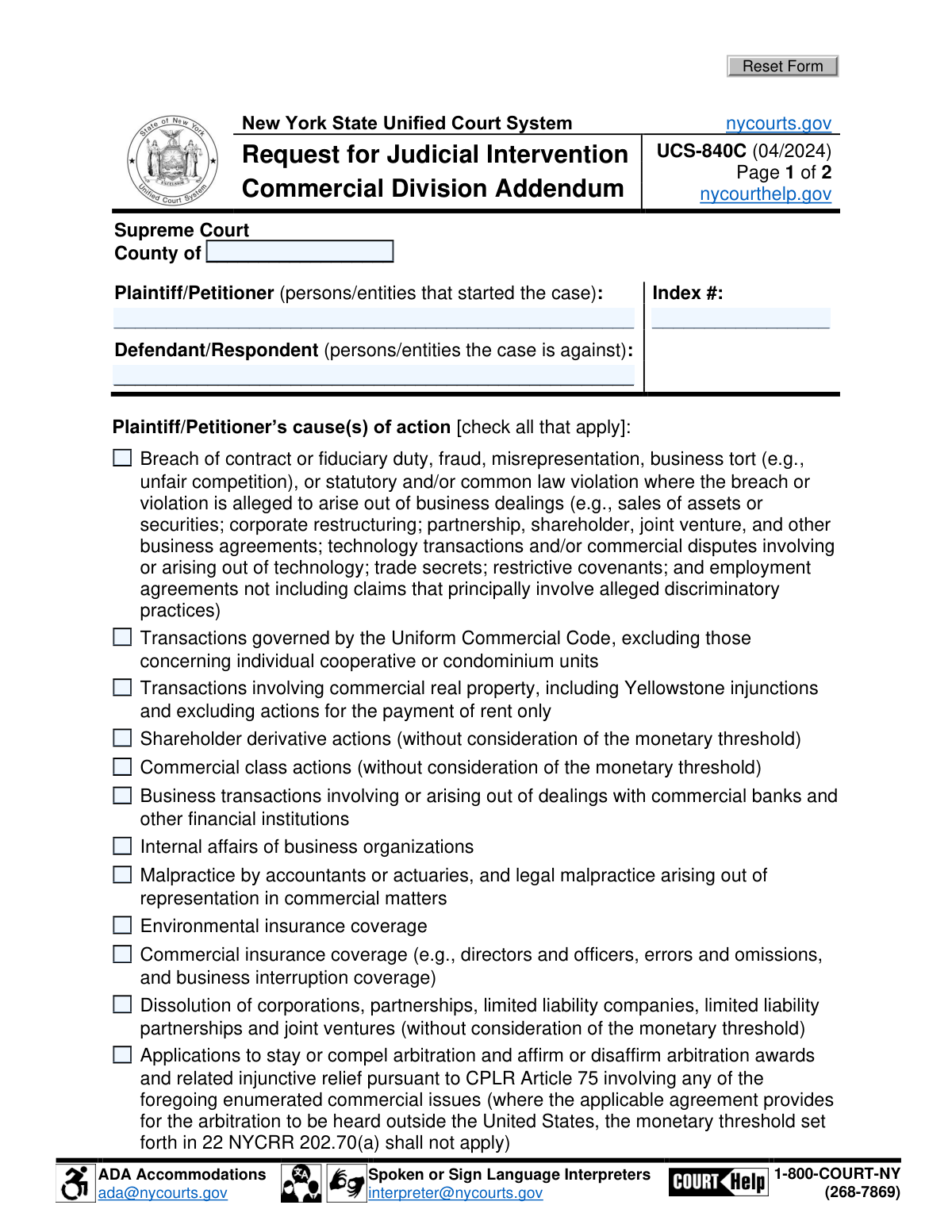
Form UCS-840C, Request for Judicial Intervention Commercial Division Addendum, page 1
Basic · 32/100Form Complexity Index

The AI does the filling. You just check it.

No typing into boxes, nothing to install.

Tell the AI about youAnswer a few questions in plain words, or upload a document you already have. That is all the typing there is.
AI fills every field in secondsIt puts each answer in the right box on every page, checkboxes included.
Check it and downloadReview every field, change anything, then download, print or sign the PDF.

What this form asks for

The AI fills all of it, from your answers or your documents.

Form UCS-840C, also known as the Request for Judicial Intervention Commercial Division Addendum, is used in the New York State Unified Court System. It is designed for cases that seek assignment to the Commercial Division, outlining the cause of action and verifying that the case meets specific jurisdictional requirements. This form is crucial for ensuring that commercial disputes are appropriately categorized and processed within the court system.
Fillable fields24
Pages2
Sections11
Form Complexity IndexBasic, 32/100

The AI checks your answers before you download

10 checks built for this form, so a wrong date or a missing answer is caught before anyone else sees it.

County name entry

Ensures that the County name is accurately entered in the designated space at the top of the form. This validation is crucial for identifying the jurisdiction under which the case falls. It confirms the geographical area relevant to the judicial intervention request. The absence or inaccuracy of this information could lead to processing delays or jurisdictional errors.

Index Number accuracy

Confirms that the Index Number provided by the court is accurately filled in. This number is essential for tracking the case within the court's system. Verifies that the number matches the court's records to prevent any discrepancies. Ensures the form is correctly associated with the intended legal proceeding.

Parties' names listing

Ensures that the names of the Plaintiff/Petitioner and the Defendant/Respondent are correctly listed in their respective fields. Validates the accuracy of the parties involved in the case to avoid any confusion or misidentification. Confirms that the names match those in the court's records. This step is vital for maintaining the integrity of the legal process.

Cause(s) of action checkboxes

Validates that all applicable boxes describing the Plaintiff/Petitioner’s cause(s) of action are checked and align with the Commercial Division’s jurisdictional requirements. Ensures the case is appropriately categorized under the Commercial Division. Confirms that the selected causes of action are within the division's scope. This verification is key to determining the suitability of the case for the Commercial Division.

Compensatory damages specification

Checks that the amount claimed for compensatory damages is specified correctly, excluding punitive damages, interest, costs, and counsel fees. Ensures the claim adheres to the Commercial Division's guidelines for damages. Validates the clarity and accuracy of the financial claim to facilitate fair adjudication. This step is essential for maintaining transparency and fairness in the judicial process.

Verifies that a brief description of the Plaintiff/Petitioner’s claim for equitable or declaratory relief is provided.

Ensures that the form includes a concise yet comprehensive description of the Plaintiff/Petitioner’s claim for equitable or declaratory relief. Confirms that the description is clear and directly related to the case at hand. Validates that the description meets the legal requirements for such claims. Checks that the description is free from any ambiguous language that could lead to misinterpretation.

And 4 more checks
  • Confirms that, if applicable, the Defendant/Respondent’s counterclaims, including any claims for monetary relief, are described.
  • Ensures that the form is signed and dated, with the name printed clearly below the signature.
  • Validates that the form has been reviewed to ensure all information is accurate and complete before submission.
  • Checks for any necessary ADA accommodations or requests for spoken/sign language interpreters, confirming contact information is provided if needed.

Let AI fill out your UCS-840C

No typing. Every field filled in seconds, checked, ready to sign.

7 days free, then $19.99/month · Cancel anytime

How to Fill Out UCS-840C Online for Free in 2026

What the AI walks you through.

  1. Visit instafill.ai site and select UCS-840C
  2. Enter plaintiff/petitioner and defendant/respondent details
  3. Select applicable causes of action
  4. Specify compensatory damages and relief sought
  5. Sign and date the form electronically
  6. Check for accuracy and submit form

Common Mistakes in Completing UCS-840C

The ones the AI is built to catch.

Incorrect County name entry
Filling in the wrong county name can lead to delays in processing the form as it may be routed to the incorrect jurisdiction. Always verify the county name where the case is being filed before submission. Cross-referencing with the court's official website or contacting the clerk's office can ensure accuracy. This step is crucial for the timely and correct handling of your judicial intervention request.
Missing or wrong Index Number
An incorrect or missing index number can result in the form being rejected or misplaced. The index number is a unique identifier for your case, and its accuracy is paramount. Double-check the index number against any correspondence or documents received from the court. Ensuring this number is correct facilitates smoother processing and avoids unnecessary setbacks.
Incomplete Plaintiff/Petitioner or Defendant/Respondent names
Omitting or inaccurately listing the names of the parties involved can invalidate the form or cause confusion. It's essential to include full legal names as they appear in official documents. Review all case documents to confirm the correct spelling and titles of all parties. Accuracy in this section is vital for the clarity and legitimacy of the judicial intervention request.
Unchecked or misaligned cause(s) of action boxes
Failing to properly mark the cause(s) of action can lead to the form being returned or delayed. Each cause of action relevant to the case must be clearly indicated. Carefully review the legal basis of your case to ensure all applicable boxes are checked. This attention to detail ensures that the court fully understands the grounds for your request.
Incorrect compensatory damages amount
An inaccurate compensatory damages amount can affect the court's assessment of the case. It's important to calculate this figure carefully, based on documented losses or injuries. Consulting with a legal professional can help in determining the correct amount. Precise information in this section supports a fair and accurate judicial review.
Missing description of equitable or declaratory relief
Failing to include a detailed description of the equitable or declaratory relief sought can lead to delays or dismissal of the request. It is crucial to clearly articulate the nature of the relief to ensure the court understands the request. Providing specific details about the relief sought helps in aligning the court's understanding with the petitioner's needs. Always review the form to ensure all necessary descriptions are included and clearly stated.
Omission of Defendant/Respondent’s counterclaims
Neglecting to include the Defendant/Respondent’s counterclaims can result in an incomplete submission, potentially affecting the case's outcome. It is essential to thoroughly review all aspects of the case to ensure no counterclaims are overlooked. Including counterclaims provides a comprehensive view of the dispute to the court. Ensure all relevant counterclaims are documented and attached to the form for a complete submission.
Missing signature or date
Submitting the form without a signature or date renders it invalid, causing unnecessary delays in the judicial process. The signature and date are critical for verifying the authenticity and timeliness of the submission. Always double-check the form to ensure both the signature and date are present before submission. This simple step can prevent significant setbacks in the case proceedings.
Unclear printed name below signature
An unclear or illegible printed name below the signature can create confusion regarding the identity of the submitter. It is important to print the name clearly to avoid any ambiguity or delays in processing. The printed name serves as a reference for the court to match with the signature. Taking the time to ensure clarity can facilitate smoother processing of the request.
Failure to review form before submission
Not reviewing the form before submission can lead to errors or omissions that may compromise the request's validity. A thorough review ensures all sections are completed accurately and all necessary information is included. This step is crucial for identifying and correcting any mistakes that could hinder the judicial process. Allocate sufficient time to review the form meticulously to avoid preventable issues.

Frequently Asked Questions About UCS-840C


Is it really free for 7 days?
Yes. You pay $0 today. Cancel before Nov 2 and you are never charged. Keep it, and it is $19.99 a month for 5 fills of your UCS-840C.
Can I fill other forms too?
This plan is for your UCS-840C: your own AI agent fills it as often as 5 times a month. To fill other forms and upload your own, choose a Professional plan from your account.
How do I cancel?
From your account, in two clicks, any time. No email, no call.
How does the AI fill out UCS-840C?
You answer a few questions in plain words, or upload a document you already have. The AI reads what you give it and puts each answer into the right field of UCS-840C, on every page, in seconds. It checks the answers against the form's own rules, and you review and change anything before you download, print or sign.
What happens to my information?
It is encrypted in transit and at rest, and it is never used to train AI.
How complex is UCS-840C to fill out?
UCS-840C has a Form Complexity Index of 32 out of 100, in the basic tier: 24 fillable fields across 2 pages. Instafill.ai's AI fills it in under a minute, with every field there for you to review before you download.
What is the purpose of Form UCS-840C?
Form UCS-840C, Request for Judicial Intervention Commercial Division Addendum, is designed to facilitate the request for judicial intervention in cases within the Commercial Division. It serves as an addendum to the standard Request for Judicial Intervention form, specifically tailored for commercial cases, ensuring that the unique aspects and requirements of commercial litigation are addressed.
Who needs to fill out Form UCS-840C?
Form UCS-840C must be filled out by parties or their legal representatives who are initiating a request for judicial intervention in a case that falls under the jurisdiction of the Commercial Division. This typically involves commercial disputes that meet the specific criteria set by the Commercial Division.
What are the jurisdictional requirements for the Commercial Division as mentioned in Form UCS-840C?
The jurisdictional requirements for the Commercial Division, as outlined in Form UCS-840C, include that the case must involve commercial disputes, such as those related to business transactions, commercial contracts, or other matters specified under the Commercial Division's jurisdiction. The exact monetary threshold and types of cases may vary by jurisdiction, so it's important to consult the local rules or guidelines.
How can I request ADA accommodations when submitting Form UCS-840C?
To request ADA accommodations when submitting Form UCS-840C, you should contact the court where the form is being filed as early as possible. Provide details about the accommodations needed due to a disability. The court will provide guidance on the necessary steps and documentation required to process your accommodation request.
How can I request a spoken or sign language interpreter for assistance with Form UCS-840C?
If you require a spoken or sign language interpreter for assistance with Form UCS-840C, you should notify the court at the time of filing or as soon as the need is known. The court will arrange for an interpreter to assist you, ensuring that you have full access to the judicial process. It's advisable to make this request well in advance of any scheduled proceedings to allow sufficient time for arrangements to be made.
What types of cases are eligible for assignment to the Commercial Division according to Form UCS-840C?
Form UCS-840C specifies that cases eligible for assignment to the Commercial Division typically involve complex commercial litigation. This includes, but is not limited to, disputes related to business transactions, corporate governance, partnership dissolutions, commercial contracts, and other matters that require specialized commercial expertise.
What information is required about the Plaintiff/Petitioner in Form UCS-840C?
Form UCS-840C requires detailed information about the Plaintiff/Petitioner, including their full legal name, address, and contact information. Additionally, the form may ask for the Plaintiff/Petitioner's legal representation details, if applicable, and any other relevant information that identifies the party initiating the legal action.
What information is required about the Defendant/Respondent in Form UCS-840C?
Similar to the Plaintiff/Petitioner, Form UCS-840C requires the Defendant/Respondent's full legal name, address, and contact information. The form may also request details about the Defendant/Respondent's legal representation, if any, and other pertinent information that identifies the party against whom the legal action is being taken.
How should the cause(s) of action be described in Form UCS-840C?
In Form UCS-840C, the cause(s) of action should be described clearly and concisely, detailing the legal basis for the lawsuit. This includes specifying the statutes, laws, or legal principles that the Plaintiff/Petitioner believes the Defendant/Respondent has violated. It's important to provide enough detail to justify the assignment of the case to the Commercial Division.
What is the process for claiming compensatory damages in Form UCS-840C?
Form UCS-840C requires the Plaintiff/Petitioner to specify the amount of compensatory damages being claimed, if applicable. The form may also ask for a brief explanation or justification of the damages sought, including how the amount was calculated. It's important to provide supporting documentation or evidence where possible to substantiate the claim for compensatory damages.
How should claims for equitable or declaratory relief be described in Form UCS-840C?
Claims for equitable or declaratory relief in Form UCS-840C should be described clearly and concisely, detailing the nature of the relief sought. Include specific facts and legal grounds that support the request for such relief, ensuring that the description aligns with the requirements of the Commercial Division.
What should be included in the description of Defendant/Respondent’s counterclaims in Form UCS-840C?
The description of Defendant/Respondent’s counterclaims in Form UCS-840C should include a clear and detailed account of the counterclaims, specifying the legal and factual basis for each. It should also reference any relevant documents or evidence that support the counterclaims, ensuring compliance with the Commercial Division’s requirements.
Is there a monetary threshold for cases involving arbitration agreements outside the United States as per Form UCS-840C?
Form UCS-840C does not specify a monetary threshold for cases involving arbitration agreements outside the United States. However, it is advisable to consult the Commercial Division’s rules or seek legal advice to ensure compliance with any applicable jurisdictional or procedural requirements.
Where can I find more information or help regarding Form UCS-840C?
More information or help regarding Form UCS-840C can be found on the official website of the New York State Unified Court System or by contacting the Commercial Division of the Supreme Court directly. Legal professionals or court clerks may also provide guidance on completing the form correctly.
How do I certify that my case meets the Commercial Division’s jurisdictional requirements on Form UCS-840C?
To certify that your case meets the Commercial Division’s jurisdictional requirements on Form UCS-840C, you must affirmatively state that the case complies with the jurisdictional criteria set forth by the Commercial Division. This includes confirming that the case involves commercial disputes as defined by the Division’s rules and that any monetary thresholds or other requirements are satisfied.
What is the significance of the Index number in Form UCS-840C?
The Index number in Form UCS-840C is crucial as it uniquely identifies your case within the court system. This number is used to track the case's progress, file additional documents, and ensure all paperwork is associated with the correct legal matter. It's essential to include the correct Index number to avoid delays or misplacement of your submission.
Can Form UCS-840C be submitted electronically, and if so, how?
Yes, Form UCS-840C can often be submitted electronically, depending on the court's specific e-filing system requirements. You would typically need to access the court's electronic filing portal, register or log in, and follow the instructions for uploading and submitting the form. It's important to check with the specific Commercial Division or court for their e-filing procedures and any associated fees.
What are the consequences of not meeting the Commercial Division’s jurisdictional requirements when submitting Form UCS-840C?
Not meeting the Commercial Division’s jurisdictional requirements when submitting Form UCS-840C can result in the rejection of your form or the dismissal of your case. The Commercial Division has specific criteria for cases it will hear, typically involving complex commercial disputes above a certain monetary threshold. Failing to meet these requirements may necessitate refiling in a different court, potentially causing delays and additional costs.
How often is Form UCS-840C updated, and where can I find the most current version?
Form UCS-840C is updated as needed to reflect changes in court procedures or legal requirements. The most current version of the form can typically be found on the official website of the court or Commercial Division where the case is being filed. It's advisable to check for updates before each submission to ensure compliance with the latest requirements.
What should I do if I make a mistake on Form UCS-840C after submission?
If you discover a mistake on Form UCS-840C after submission, you should promptly contact the court or Commercial Division where the form was filed. Depending on the nature of the error, you may need to submit an amended form or a written request to correct the mistake. It's important to address errors as soon as possible to avoid any negative impact on your case.
Encrypted in transit and at restNever used to train AIDelete your forms any time

Get your UCS-840C filled out by AI

$0 today. Cancel before Nov 2 and you pay nothing.

7 days free, then $19.99/month · Cancel anytime