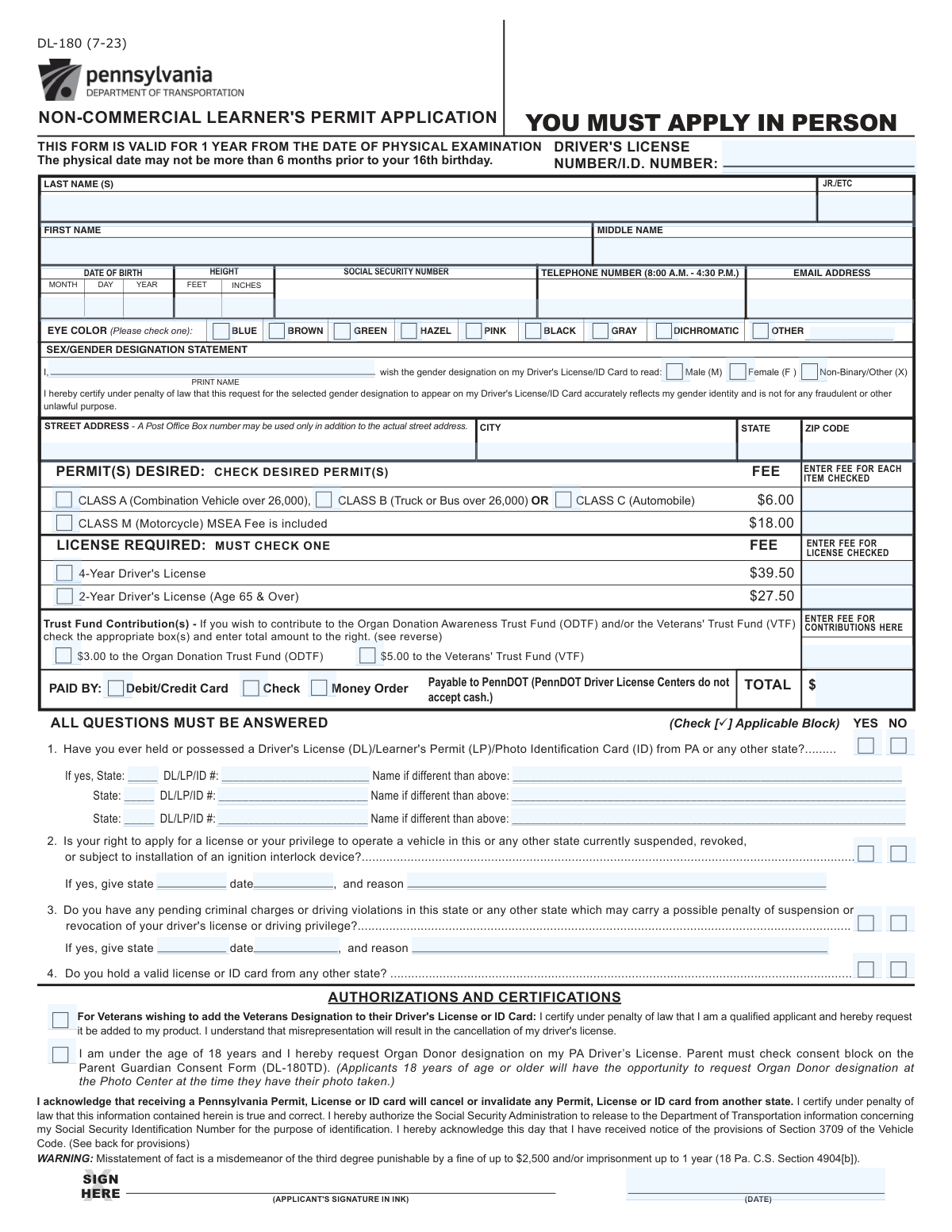
Yes! You can use AI to fill out Form DL-180, Pennsylvania Non-Commercial Learner's Permit Application
Form DL-180 is the Pennsylvania Department of Transportation (PennDOT) application used to apply for a non-commercial learner's permit. It gathers essential applicant information, driving history, and includes a mandatory medical examination report to ensure the applicant is physically and mentally fit to drive. Today, this form can be filled out quickly and accurately using AI-powered services like Instafill.ai, which can also convert non-fillable PDF versions into interactive fillable forms.
Our AI automatically handles information lookup, data retrieval, formatting, and form filling.
It takes less than a minute to fill out DL-180 using our AI form filling.
Securely upload your data. Information is encrypted in transit and deleted immediately after the form is filled out.
Form specifications
| Form name: | Form DL-180, Pennsylvania Non-Commercial Learner's Permit Application |
| Number of fields: | 128 |
| Number of pages: | 3 |
| Language: | English |
| Categories: | commercial forms, permit application forms, permit forms |
Instafill Demo: How to fill out PDF forms in seconds with AI
How to Fill Out DL-180 Online for Free in 2026
Are you looking to fill out a DL-180 form online quickly and accurately? Instafill.ai offers the #1 AI-powered PDF filling software of 2026, allowing you to complete your DL-180 form in just 37 seconds or less.
Follow these steps to fill out your DL-180 form online using Instafill.ai:
- 1 Navigate to Instafill.ai and upload your DL-180 form or select it from the platform's template library.
- 2 Use the AI assistant to automatically populate your personal information, including your full name, address, date of birth, and physical characteristics.
- 3 Answer the questions regarding your driving history, such as previous licenses held or any current suspensions, by checking the appropriate boxes.
- 4 Complete the medical examination section by having your healthcare provider fill it out or by transcribing the information from their report.
- 5 Select the permit class you are applying for, review the associated fees, and choose your payment method.
- 6 Carefully review all sections of the completed form for accuracy, then e-sign and date the authorization and certification section.
- 7 Download the completed DL-180 form to print and submit to a PennDOT Driver License Center along with required proofs of identity and residency.
Our AI-powered system ensures each field is filled out correctly, reducing errors and saving you time.
Why Choose Instafill.ai for Your Fillable DL-180 Form?
Speed
Complete your DL-180 in as little as 37 seconds.
Up-to-Date
Always use the latest 2026 DL-180 form version.
Cost-effective
No need to hire expensive lawyers.
Accuracy
Our AI performs 10 compliance checks to ensure your form is error-free.
Security
Your personal information is protected with bank-level encryption.
Frequently Asked Questions About Form DL-180
This form is used to apply for a new driver's license, learner's permit, or state ID card. It collects your personal information, driving history, and includes mandatory medical and vision examination results.
A qualified healthcare provider, such as an M.D., D.O., C.R.N.P., P.A., or D.C., must complete and sign the medical and vision sections. The applicant cannot fill out these parts of the form.
You will need your personal details like full name and address, date of birth, Social Security Number, and information about any previous driver's licenses you have held. The form also requires a medical and vision exam, so you will need to visit a healthcare provider.
A Class C permit is for operating a standard, non-commercial automobile. A Class M permit is specifically for operating a motorcycle.
The form provides a 'Non-Binary/Other (X)' option in the Sex/Gender Designation section. Selecting this will list 'X' as the gender marker on your driver's license or ID card.
You must check 'Yes' for Question 1 and provide the details of your prior license, including the issuing state, the license number, and the name on the card if it was different from your current name.
Not necessarily, but your healthcare provider must complete the medical section to certify if your condition could prevent safe driving. The licensing authority will review the provider's report to determine your eligibility.
No, the standard is typically a combined vision of 20/40 or better. If you need glasses or contacts to meet this requirement, your license will include a restriction indicating that you must wear corrective lenses while driving.
Yes, applicants aged 65 and over can choose to apply for a 2-Year Driver's License instead of the standard 4-year license. You can select this option and enter the corresponding fee.
The form allows you to select your payment method from Debit/Credit Card, Check, or Money Order. You must calculate and enter the total amount due, including any optional donations you wish to make.
These are optional donations you can add to your total fee. You can choose to contribute $3.00 to the Organ Donation Trust Fund (ODTF) or $5.00 to the Veterans' Trust Fund (VTF).
You must disclose this by checking 'Yes' for Question 2 and providing details about the suspension. A current suspension will likely impact your eligibility to apply for a new license or permit.
Yes, services like Instafill.ai use AI to accurately auto-fill form fields with your personal information, saving time and reducing errors. However, the medical and vision sections must still be completed by a qualified healthcare provider.
Simply upload the form to the Instafill.ai platform. The AI will identify the fields, allowing you to automatically populate your information, which makes the process faster and more accurate before you print it for signatures.
You can use a service like Instafill.ai, which is designed to convert flat, non-fillable PDFs into interactive, fillable forms. This allows you to easily type your information directly into the fields on your computer.
Compliance DL-180
Validation Checks by Instafill.ai
1
Date of Birth Age Verification
This check calculates the applicant's age based on the entered Date of Birth and verifies it against the state's minimum age requirement for a learner's permit. It is a critical check to ensure the applicant is legally old enough to apply. If the applicant is underage, the submission should be rejected or flagged for manual review.
2
Social Security Number Format
This validation ensures the Social Security Number is entered in a valid format, such as XXX-XX-XXXX or a 9-digit number without hyphens. Correct formatting is crucial for successful identity verification with federal databases. An invalid format will prevent the form from being processed and require the user to correct the entry.
3
Exclusive Eye Color Selection
This check validates that only one of the available eye color checkboxes (e.g., Blue, Brown, Green, etc.) is selected. An applicant cannot have multiple distinct eye colors unless 'Dichromatic' is chosen. If multiple options are selected, an error should be displayed, prompting the user to choose only the single most accurate option.
4
Conditional 'Other Eye Color' Requirement
This validation ensures that if the 'Other' checkbox for eye color is selected, the corresponding 'Other Eye Color (Specify)' text field is not empty. This prevents incomplete data submissions where the user indicates a non-standard option but fails to provide the necessary detail. Failure to provide the specific color will result in a validation error.
5
Age-Restricted License Option Consistency
This check verifies that if the '2-Year Driver's License (Age 65 & Over)' option is selected, the applicant's age calculated from their Date of Birth is 65 years or older. This prevents ineligible applicants from selecting a license option for which they do not qualify. If the age is less than 65, the selection should be invalidated and the user prompted to choose a different option.
6
Total Payment Calculation Verification
This validation confirms that the value entered in the 'Total Payment Amount' field accurately reflects the sum of all selected license/permit fees and any voluntary trust fund contributions. This is essential for correct financial processing and preventing billing discrepancies. If the total does not match the sum of the itemized costs, the form submission will be blocked until the amount is corrected.
7
Conditional Suspension Details Requirement
This check ensures that if an applicant answers 'Yes' to the question about a current license suspension or revocation, the subsequent detail fields ('Suspension/Revocation State', 'Date', and 'Reason') must be filled out. This information is critical for the licensing authority to assess the applicant's eligibility. An incomplete section will halt the application process until the required details are provided.
8
Date Chronology Validation
This validation verifies that the 'Signature Date' is on or after the 'Physical Exam Date'. An applicant cannot legally certify the results of a medical exam before it has occurred. This check ensures logical consistency and legal validity of the applicant's certification, and an invalid date order would block submission.
9
Exclusive Gender Designation Selection
This check ensures that the applicant has selected exactly one option from the 'Sex/Gender Designation' section (Male, Female, or Non-Binary/Other). This is a mandatory field for producing the ID card and must contain a single, unambiguous value. If zero or more than one option is selected, the user will be prompted to correct their selection.
10
ZIP Code Format Validation
This validation checks that the 'ZIP Code' field contains a value in a valid 5-digit (NNNNN) or ZIP+4 (NNNNN-NNNN) format. A valid ZIP code is essential for address verification and ensuring any mailings are deliverable. An incorrectly formatted ZIP code will trigger an error, requiring the user to correct the entry.
11
Height in Inches Range
This validation ensures the 'Height — Inches' field contains a numeric value between 0 and 11, inclusive. This rule prevents illogical data entry, such as '5 feet 15 inches', and maintains data integrity for the physical description on the license. An out-of-range value will result in an error message.
12
Conditional Medical Details Requirement
This check ensures that if the 'Conditions causing repeated lapses of consciousness' checkbox is marked, the 'Specify condition(s)' and 'Date of last seizure' fields are populated. This information is critical for a medical review to determine driving fitness. Failure to provide these mandatory details when the condition is indicated will prevent the form from being submitted.
13
Vision Qualification Logic Check
This validation enforces a business rule where if 'Combined vision 20/40 or better — No' is checked, the system should verify that 'Report of Eye Examination (attached) — Yes' is also checked. This ensures that an applicant who fails the basic vision screening provides the required supplementary documentation for further review. A mismatch would trigger a warning or error, prompting the user to attach the report.
14
Trust Fund Contribution Sum
This check validates that the 'Trust Fund Contribution Amount' equals the sum of the values of the selected donation checkboxes. For example, if both the '$3.00' and '$5.00' boxes are checked, the amount must be '$8.00'. This ensures the amount entered matches the applicant's intent and prevents financial reconciliation issues. A mismatch will result in a validation error.
Common Mistakes in Completing DL-180
Applicants often check boxes for licenses, permits, or donations but fail to enter the correct corresponding fee amounts in the designated fields. This leads to an incorrect 'Total Payment Amount', causing the application to be rejected for incorrect payment. To avoid this, carefully add up all selected fees and donations and double-check that the sum matches the total entered. AI-powered tools like Instafill.ai can automatically calculate totals based on selections, preventing these mathematical errors and ensuring the payment amount is accurate.
A frequent error is answering 'Yes' to a question (e.g., having a previous license or a medical condition) but failing to provide the mandatory follow-up details in the subsequent fields. This incomplete information halts the application process, as the missing data is required for verification. Always review your 'Yes' answers and ensure you have filled out all related fields, such as the 'Previous Issuing State' or 'Reason for Suspension/Revocation'. If the form is a non-fillable PDF, a tool like Instafill.ai can convert it to a smart, fillable version that can highlight required fields based on your answers.
Applicants sometimes enter a nickname or a shortened version of their first name instead of their full legal name as it appears on their birth certificate or other official documents. This creates a data mismatch that can lead to rejection or the issuance of an incorrect ID. Always use your complete and official first, middle, and last names. Form-filling software can save your legal name and auto-populate it correctly across all documents to ensure consistency.
In the vision section, fields like 'Uncorrected Right Eye Visual Acuity (20/)' ask for only the denominator of the vision score (e.g., enter '40' for a 20/40 result). Providers or applicants often mistakenly write the full '20/40' fraction, which is an invalid data format for the field. This can cause data entry failures and require the form to be corrected and resubmitted. Pay close attention to field-specific instructions to prevent such formatting errors.
Many sections, such as 'Eye Color' and 'Medical Conditions', have an 'Other' checkbox. A common mistake is to check this box but forget to write the required details in the adjacent text field. This leaves the application incomplete, as the processing agent does not know what 'Other' refers to. If you select 'Other', always provide a clear and concise description in the space provided. Smart form fillers like Instafill.ai can flag an empty specification field when 'Other' is checked, reminding you to complete it.
When entering a street address, applicants living in multi-unit buildings frequently omit their apartment, suite, or unit number. This can result in the new license or official correspondence being returned as undeliverable, causing significant delays. Always include your specific unit number in the 'Street Address' field to ensure proper mail delivery. Using an address autocomplete feature, often found in tools like Instafill.ai, can help ensure the full, validated address is entered correctly.
If an applicant has changed their name (e.g., due to marriage or a legal change) and has a previous license under that old name, they often forget to fill out the 'Name on Previous Credential (if different)' field. This omission can complicate identity verification and delay the application. If your name has changed, you must provide the name exactly as it appeared on your prior ID to avoid processing issues.
The form requires the Date of Birth to be entered into three separate fields: Month, Day, and Year. Applicants may accidentally transpose the month and day or enter the date in a single 'MM/DD/YYYY' format in the first box. This formatting error leads to data rejection. To prevent this, carefully enter the numeric month (1-12), day (1-31), and four-digit year into their respective, separate fields as instructed.
The instructions state that a P.O. Box may only be used *in addition* to a physical street address, not as a replacement for it. Applicants sometimes list only a P.O. Box, which is not permissible for establishing residency and will result in the application being rejected. You must provide your full physical residential address; the P.O. Box can be listed as a separate mailing address if the form allows, but not as the primary one.
Applicants sometimes mistakenly check both 'Yes' and 'No' for the same question, such as for 'Question 1 - Yes/No' regarding a previous license. This creates a logical contradiction that makes it impossible for the agency to process the form, requiring clarification and resubmission. Carefully review each question and select only one response. Using a digital form filler can help prevent this by using radio buttons that only allow a single selection per question.
Saved over 80 hours a year
“I was never sure if my IRS forms like W-9 were filled correctly. Now, I can complete the forms accurately without any external help.”
Kevin Martin Green
Your data stays secure with advanced protection from Instafill and our subprocessors

Robust compliance program
Transparent business model
You’re not the product. You always know where your data is and what it is processed for.
ISO 27001, HIPAA, and GDPR
Our subprocesses adhere to multiple compliance standards, including but not limited to ISO 27001, HIPAA, and GDPR.
Security & privacy by design
We consider security and privacy from the initial design phase of any new service or functionality. It’s not an afterthought, it’s built-in, including support for two-factor authentication (2FA) to further protect your account.
Fill out DL-180 with Instafill.ai
Worried about filling PDFs wrong? Instafill securely fills form-dl-180-pennsylvania-non-commercial-learners-permit-application forms, ensuring each field is accurate.