Yes! You can use AI to fill out Washington Single-Family Property Term Lease & Security Deposit Receipt (WA Single-Family Lease) | Revised 10/08/2025

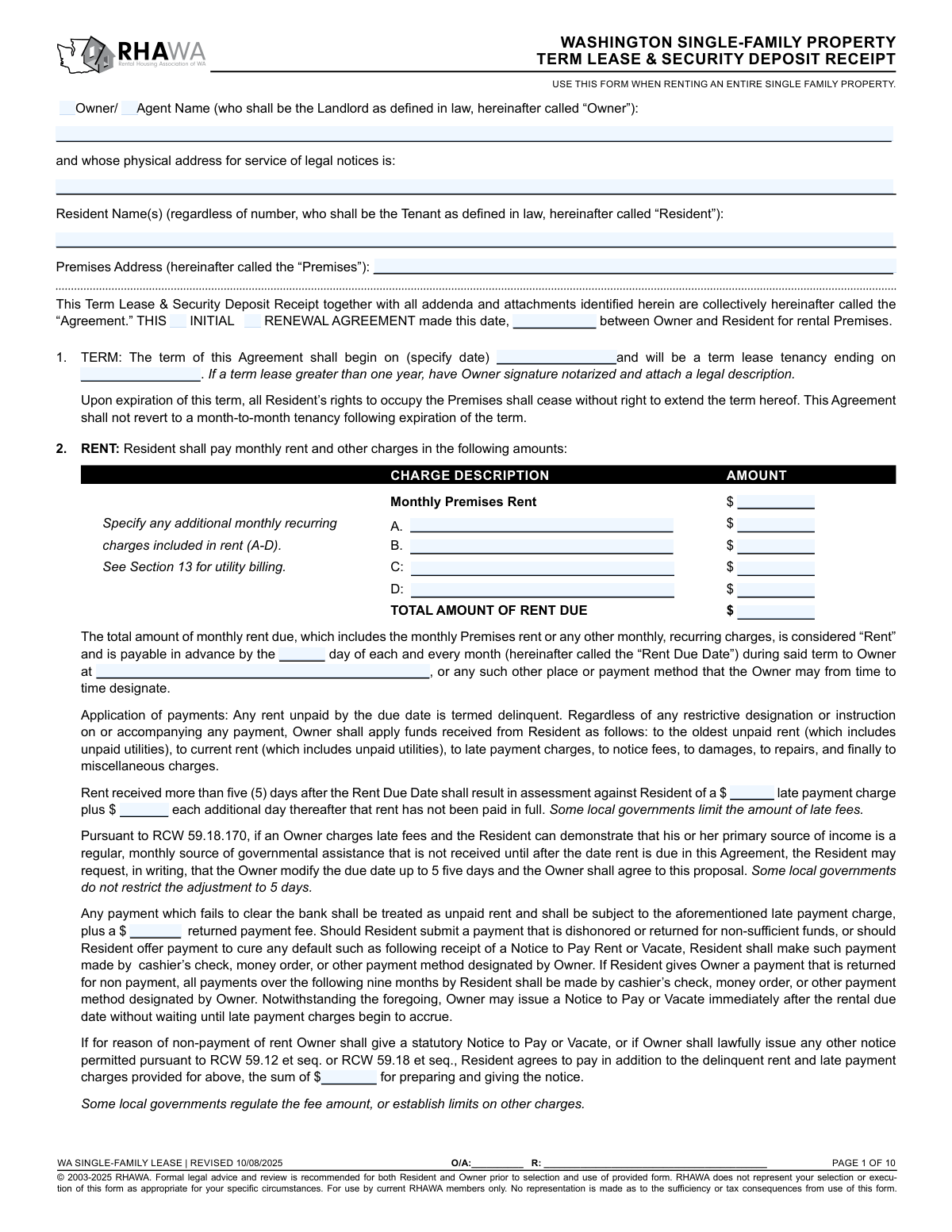
This form is a Washington fixed-term (non-month-to-month) single-family residential lease agreement that also serves as a security deposit receipt, setting the legal terms between the Owner/Agent (landlord) and Resident(s) (tenant). It documents key deal points—term start/end dates, rent and late fees, deposit handling and refund conditions, utility billing, occupancy/guest limits, pets, insurance requirements, and statutory notices—helping both parties comply with Washington law (e.g., RCW 59.18 and related provisions). It is important because it creates enforceable rights and obligations and provides a clear record of funds received and required addenda (e.g., property condition checklist, mold handout, lead disclosures when applicable). Today, this form can be filled out quickly and accurately using AI-powered services like Instafill.ai, which can also convert non-fillable PDF versions into interactive fillable forms.
Our AI automatically handles information lookup, data retrieval, formatting, and form filling.
It takes less than a minute to fill out WA Single-Family Lease (RHAWA) Revised 10/08/2025 using our AI form filling.
Securely upload your data. Information is encrypted in transit and deleted immediately after the form is filled out.

Form specifications

Form name: Washington Single-Family Property Term Lease & Security Deposit Receipt (WA Single-Family Lease) | Revised 10/08/2025
Number of pages: 10
Language: English
Categories: real estate forms, Washington rental forms, lease agreement forms, Washington landlord forms
main-image

Instafill Demo: filling out a legal form in seconds

How to Fill Out WA Single-Family Lease (RHAWA) Revised 10/08/2025 Online for Free in 2026

Are you looking to fill out a WA SINGLE-FAMILY LEASE (RHAWA) REVISED 10/08/2025 form online quickly and accurately? Instafill.ai offers the #1 AI-powered PDF filling software of 2026, allowing you to complete your WA SINGLE-FAMILY LEASE (RHAWA) REVISED 10/08/2025 form in just 37 seconds or less.
Follow these steps to fill out your WA SINGLE-FAMILY LEASE (RHAWA) REVISED 10/08/2025 form online using Instafill.ai:
  1. 1 Go to Instafill.ai, upload the WA Single-Family Lease (RHAWA) PDF (or select it from the form library) and start a new fill session.
  2. 2 Enter the parties and property details: Owner/Agent name, service address for legal notices, all Resident names, and the full premises address; choose whether the agreement is an initial lease or a renewal and set the agreement date.
  3. 3 Complete the lease term and rent section: term start/end dates, monthly premises rent, any additional recurring charges (A–D), total rent due, rent due day, payment location/method, and late/returned-payment/notice fees.
  4. 4 Fill in move-in funds and deposit details: security deposit amount and holding financial institution, any non-refundable fees (amount and description), last month’s rent prepayment, application/screening fees, and the move-in “Summary of Funds Received and Due” table.
  5. 5 Configure property rules and disclosures: keys/lockout policy, smoke and carbon monoxide detector details and responsibilities, authorized occupants/guest limits and charges, utilities billing options and limits, pets policy, water-heater acknowledgment, and renters insurance requirements/coverage.
  6. 6 Add and confirm required attachments/addenda (e.g., Property Condition Checklist, Mold Handout, Lead-Based Paint disclosures if pre-1978, local law disclosures, notary form if term > 1 year), then have Instafill.ai run a completeness check for missing fields and inconsistencies.
  7. 7 Generate the final document, review with both parties, and send for e-signature (Owner/Agent and all Residents) and download/store copies for records.

Our AI-powered system ensures each field is filled out correctly, reducing errors and saving you time.

Why Choose Instafill.ai for Your Fillable WA Single-Family Lease (RHAWA) Revised 10/08/2025 Form?

Speed

Complete your WA Single-Family Lease (RHAWA) Revised 10/08/2025 in as little as 37 seconds.

Up-to-Date

Always use the latest 2026 WA Single-Family Lease (RHAWA) Revised 10/08/2025 form version.

Cost-effective

No need to hire expensive lawyers.

Accuracy

Our AI performs 10 compliance checks to ensure your form is error-free.

Security

Your personal information is protected with bank-level encryption.

Frequently Asked Questions About Form WA Single-Family Lease (RHAWA) Revised 10/08/2025

This form is a fixed-term lease agreement for renting an entire single-family property in Washington State, and it also documents deposits and other move-in funds. It sets the rules for rent, fees, utilities, occupancy, and move-out requirements.

The Owner/Agent (landlord for legal notice purposes) and all adult Residents (tenants) who will be financially responsible should complete and sign it. Everyone listed as a Resident is typically jointly and severally liable under the agreement.

Check “INITIAL” if this is the first lease between the parties for this premises. Check “RENEWAL AGREEMENT” if you are extending/renewing an existing lease rather than starting a brand-new initial term.

No—this form states the tenancy ends on the term end date and does not revert to month-to-month. Residents must vacate at the end of the term unless a new agreement is signed.

You must enter the monthly premises rent, any additional recurring monthly charges (A–D), the total rent due, the rent due day, and where/how rent must be paid. You also need to fill in late fee amounts, returned payment fee, and any notice preparation fee if the landlord charges them.

The form allows the Owner to apply funds to the oldest unpaid rent (including unpaid utilities), then current rent, then late charges, notice fees, damages, repairs, and miscellaneous charges. This means partial payments may not stop late fees or notices if rent remains unpaid.

Late fees apply if rent is received more than five (5) days after the Rent Due Date, using a flat late fee plus a daily amount until paid in full. The form notes some local governments limit late fees, and the Owner may issue a Notice to Pay or Vacate immediately after the due date.

You must enter the deposit amount and the name and address of the bank/credit union holding the deposit in trust. The lease also requires a Property Condition Checklist whenever a refundable deposit is collected.

A refundable deposit may be returned after move-out if lease conditions are met, subject to an itemized statement and lawful deductions. A non-refundable fee (Section 4) is kept by the Owner for the specific purpose described and is not returned under any circumstances.

Common required attachments include the Property Condition Checklist (required if a refundable deposit is collected) and the Mold Handout (required in Washington residential rentals). If the home was built before 1978, the Lead-Based Paint pamphlet and disclosure addendum are also required, and some areas require local law disclosures or property registration/license copies.

Usually yes—Section 23 requires renters’ liability insurance unless the Owner waives it in writing, and it lists a minimum of $300,000 liability coverage (or higher if specified). Proof of insurance is required before receiving keys or taking possession.

Each utility can be set as paid directly to the provider, billed to the Resident by invoice through the Owner, charged as a flat fee per person, included with rent, or included with a usage limit with overages billed. If utilities are paid to the Owner, the form treats utility charges as “rent,” which can affect late fees and eviction risk for nonpayment.

The lease limits how many days a guest may enter within a specified period; exceeding that limit without written permission makes them an unauthorized occupant. Unauthorized occupants are a lease violation and can trigger a per-day charge and possible termination/eviction.

Section 28 requires paying all amounts due by move-in (often in certified funds), completing and returning the Property Condition Checklist, and providing proof of renters insurance (if required). The security deposit must be paid by a separate check because it is placed in a separate trust account.

Yes—AI tools can help by extracting the form fields and auto-filling them accurately; services like Instafill.ai can save time and reduce errors. If your PDF is flat/non-fillable, Instafill.ai can convert it into an interactive fillable form and then guide you to complete fields like rent, deposits, utilities, and required addenda before you download and sign.

Compliance WA Single-Family Lease (RHAWA) Revised 10/08/2025
Validation Checks by Instafill.ai

1
Validates exactly one Agreement Type is selected (Initial vs Renewal)
Checks that either the INITIAL box or the RENEWAL AGREEMENT box is selected, but not both and not neither. This is important because the legal context, term continuity, and referenced prior agreements differ between an initial lease and a renewal. If validation fails, the submission should be blocked and the user prompted to select exactly one agreement type.
2
Ensures Owner/Agent role selection is consistent and complete
Validates that exactly one of the role checkboxes is selected: Owner (property owner/landlord) or Agent (acting as landlord for service). This prevents ambiguity about who is legally responsible for notices and landlord duties. If both or neither are selected, the form should be rejected and the user required to correct the role selection.
3
Owner/Agent legal name completeness and character validation
Ensures the Owner/Agent Name field is present, contains a plausible full legal name (not blank, not only initials, not only punctuation), and does not exceed reasonable length limits. This matters because the landlord identity must be clear for enforceability and service of notices. If invalid, the system should require correction and optionally flag suspicious entries (e.g., single-letter names) for review.
4
Owner’s Service Address must be a physical address (no P.O. Boxes)
Validates that the service address is provided and appears to be a physical street address (e.g., contains street number/name) and does not contain patterns like 'P.O. Box', 'POB', or 'Box ####'. The lease explicitly requires a physical address for service of legal notices, and using a P.O. box can invalidate notice procedures. If validation fails, block submission and request a compliant physical address including city/state/ZIP where applicable.
5
Resident names required and signature count consistency
Checks that at least one Resident Name is provided and that each listed resident has a corresponding signature block completed (Signature Resident 1–4) and signature date. This is important because all tenants must be parties to the agreement to be jointly and severally liable as stated. If the number of residents exceeds available signature slots or signatures/dates are missing for any listed resident, the submission should fail and require alignment (add/remove residents or collect missing signatures).
6
Premises Address completeness and Washington location validation
Validates that the Premises Address includes street address, city, state, and ZIP, and that the state is WA (Washington) since the form is Washington-specific. This prevents jurisdictional mismatch and ensures the property is identifiable for enforcement and venue. If invalid or non-WA, the system should block submission and require a corrected address or the correct state-specific form.
7
Agreement Date and Term Dates format and chronological logic
Validates that Agreement Date, Term Start Date, and Term End Date are valid dates in an accepted format and that Term Start Date is on/after Agreement Date and Term End Date is after Term Start Date. This is critical to define the fixed term and avoid an unenforceable or contradictory lease period. If validation fails, the system should prevent submission and prompt for corrected dates.
8
Notary requirement trigger for lease terms longer than one year
Calculates the term length from Term Start Date to Term End Date and, if greater than 365 days, requires the 'Notary Form for Landlord Signature' attachment selection (and/or a notary field/workflow) as indicated by the form instructions. This matters because the form states notarization is required by WA state law for terms longer than one year and may require a legal description attachment. If the term exceeds one year and the notary/required attachment is missing, the submission should be blocked and the user instructed to add the notary form (and any required legal description).
9
Rent line-item arithmetic validation (Total Rent Due)
Ensures Total Amount of Rent Due equals the sum of Monthly Premises Rent plus any entered Additional Charges A–D amounts (treating blank charges as zero). This prevents billing disputes and ensures the contract’s defined 'Rent' is internally consistent. If the total does not match the computed sum, the system should either auto-correct the total (with user confirmation) or reject submission until corrected.
10
Rent Due Day must be a valid calendar day and compatible with monthly billing
Validates Rent Due Day is an integer between 1 and 31 and is not blank. This is important because the lease defines delinquency and late fees relative to the due date; an invalid day creates ambiguity (e.g., day 31 in shorter months). If invalid, block submission; optionally warn if 29–31 is selected and require a policy for months without that day (if your system supports such addenda).
11
Late fee and returned payment fee numeric and non-negative validation
Checks that the flat late payment charge, additional daily late fee, returned payment fee, and notice preparation fee are valid currency amounts (numeric, max two decimals) and are not negative. These values drive financial obligations and must be machine-calculable for ledgers and notices. If any are missing where the clause is used or are invalid/negative, the system should reject the submission and require corrected amounts (or explicit zeros if permitted by business rules).
12
Deposit and deposit account institution fields completeness
Validates that Deposit Amount is a valid currency amount (including allowing $0 if no deposit is collected per policy) and, if Deposit Amount > 0, requires Financial Institution Name and Financial Institution Address to be completed. This is important because the form states the deposit will be held in a trust account at a named financial institution, and missing institution details can violate statutory requirements and create compliance risk. If Deposit Amount > 0 and institution details are missing, block submission and require completion.
13
Non-refundable fee description required when amount is non-zero
Checks that if Non-Refundable Fee Amount is greater than zero, the Non-Refundable Fee Description is present and specific (not blank or generic like 'fee'). The form requires the fee to identify what it covers, and insufficient description can create enforceability and consumer-protection issues. If amount > 0 and description is missing/too short, reject submission and prompt for a specific description.
14
Utility billing option exclusivity and dependent amount validation
For each utility row (electricity, garbage, sewer, water, gas, internet, cable, other), validates that exactly one billing option is selected (Direct, By Invoice, Per Person, Included, Included with Limit). If 'Per Person' is selected, requires a per-person amount; if 'Included with Limit' is selected, requires a limit amount; if 'Other' utility is used, requires the Other Utility Description. If these dependencies are not met or multiple options are selected, the system should block submission to prevent contradictory billing terms.
15
Pets policy mutual exclusivity and pet details requirement
Validates that either Pets Allowed or Pets Not Allowed is selected, but not both. If Pets Allowed is selected, requires at minimum Pet Type and Pet Number (and optionally Breed if the form expects it) to avoid ambiguity about authorized animals. If validation fails, reject submission and require a clear pets policy and complete pet details when applicable.
16
Required addenda selection based on deposit and property age disclosures
Validates that the Property Condition Checklist addendum is selected whenever a refundable security deposit is collected (Deposit Amount > 0), as the form states it is required. Also validates that if the property is indicated/known in your system as pre-1978, the Lead Based Paint Pamphlet and Lead Based Paint Disclosure Addendum are selected; and that the Mold Handout is selected for all WA residential rentals. If required addenda are missing, the submission should be blocked and the user prompted to attach/select the missing documents.

Common Mistakes in Completing WA Single-Family Lease (RHAWA) Revised 10/08/2025

Checking the wrong “Owner” vs “Agent” landlord box

People often check both boxes or the wrong one because they assume “owner” and “agent” are interchangeable. This can create confusion about who is legally the “Landlord” for service of notices and who is responsible for statutory duties, which can cause notice defects or disputes later. Only check the box that matches the person/entity named as the Landlord on the Owner/Agent Name line, and ensure the service address matches that party. AI-powered form filling tools like Instafill.ai can help prevent this by prompting for role selection and validating that the selected role matches the entered name and notice address.

Using a P.O. Box or incomplete service address for legal notices

A very common error is entering a mailing address or P.O. Box instead of a physical street address, or leaving off city/ZIP. The form explicitly requires a physical address for service of legal notices; an invalid address can lead to missed or ineffective legal notices and compliance problems. Always enter a complete physical street address (street, city, state, ZIP) where the Owner/Agent can accept service. Instafill.ai can flag P.O. Boxes and auto-format addresses to ensure they meet the “physical address” requirement.

Not listing all residents by full legal name (or mixing residents with occupants)

Applicants frequently list nicknames, omit a co-tenant, or put minors/occupants in the “Resident Name(s)” field. This can create enforcement issues (who is jointly and severally liable), problems with deposit refund checks (payable to all residents), and disputes about who has tenancy rights. List every adult tenant who will sign the lease using full legal names, and list minors/other authorized occupants only in the Authorized Occupants section. Instafill.ai can pull legal names from screening/application data and ensure consistent naming across signature blocks and occupant lists.

Premises address entered without unit number or with mismatched city/ZIP

People often forget the unit/apartment number, transpose digits, or use a mailing address that differs from the actual premises. An incorrect premises address can cause confusion for notices, utilities, inspections, and even court filings if enforcement is needed. Enter the complete premises address exactly as recognized by USPS/utility providers, including unit number, city, state, and ZIP. Instafill.ai can validate and standardize addresses to reduce typos and missing components.

Selecting the wrong agreement type (Initial vs Renewal) or leaving it blank

Because the form presents “INITIAL” and “RENEWAL AGREEMENT” side-by-side, users sometimes forget to check either box or check the wrong one. This can create ambiguity about whether the document replaces a prior lease, extends it, or is the first agreement—leading to disputes over term dates, rent changes, and addenda applicability. Confirm whether this is the first lease for this tenancy or a renewal of an existing lease, then check only the correct box. Instafill.ai can ask a simple guided question (new lease vs renewal) and lock the correct selection.

Term dates missing, inconsistent, or not compliant with “no month-to-month” language

A frequent mistake is leaving the start/end dates blank, entering an end date earlier than the start date, or writing a vague term (e.g., “12 months”) instead of a specific end date. Since this is a fixed term lease that does not convert to month-to-month, unclear dates can cause major disputes about when occupancy rights end and when move-out obligations trigger. Always enter specific calendar dates for both start and end, and double-check they match the intended fixed term. Instafill.ai can validate date logic and ensure the end date is after the start date and formatted consistently.

Rent math errors: Total Rent Due doesn’t equal base rent + recurring charges (A–D)

Users commonly enter the monthly premises rent but forget to include recurring charges (or include one-time fees), then miscalculate the “TOTAL AMOUNT OF RENT DUE.” This can lead to underpayment/overpayment, late fee disputes, and accounting problems because the lease defines “Rent” as the total of these monthly recurring amounts. Only put monthly recurring charges in A–D, and ensure the Total Rent Due equals the sum of the base rent plus A–D. Instafill.ai can automatically calculate totals and prevent mismatches between line items and the total.

Late fee and returned payment fields left blank or entered in the wrong format

Many people skip the flat late fee, daily late fee, returned payment fee, and notice preparation fee fields, or enter text like “per lease” instead of a dollar amount. Blank or unclear fee terms can be unenforceable or trigger local-law compliance issues, and they often cause conflict when a payment is late or returned. Enter clear numeric dollar amounts (e.g., 75.00) and confirm they comply with any local limits referenced in the form. Instafill.ai can enforce numeric formatting and prompt for required fee amounts when late-fee provisions are selected.

Deposit and non-refundable fee confusion (mixing refundable deposit with non-refundable charges)

A common misunderstanding is labeling part of the security deposit as “non-refundable,” leaving the non-refundable fee section blank, or failing to specify what the non-refundable fee covers. This can violate Washington/local rules, complicate deposit accounting, and increase the risk of disputes or penalties at move-out. Put refundable amounts in the Deposit section, put truly non-refundable charges in Section 4, and describe the non-refundable fee purpose with specific wording (e.g., “non-refundable cleaning fee”). Instafill.ai can separate refundable vs non-refundable entries and require a specific description when a non-zero non-refundable fee is entered.

Utility billing table completed inconsistently (multiple options checked or missing limits/amounts)

People often check more than one billing option for the same utility (e.g., “Included with rent” and “Paid direct”), or select “Included with limit/overages” but forget to enter the limit amount. This creates billing ambiguity and can lead to nonpayment claims, disputes over what counts as “rent,” and difficulty enforcing utility charges. For each utility, select exactly one billing method and fill in any required per-person fee or limit amount. Instafill.ai can enforce “one selection per utility” rules and require the corresponding amount fields when a fee/limit option is chosen.

Missing required initials and attachments (checklist, mold handout, lead disclosures, addenda list)

This lease requires multiple resident initials (e.g., smoke/CO devices, insurance) and identifies mandatory attachments like the Property Condition Checklist and Mold Handout (and lead documents for pre-1978). People frequently forget to initial, fail to provide the checklist, or don’t mark which addenda are attached—creating compliance gaps and weakening the owner’s ability to make deposit deductions or prove disclosures. Use a completion checklist: collect initials at every required section and attach/identify every required addendum before signing. Instafill.ai can highlight missing initials, ensure required attachments are selected, and if the lease is provided as a flat non-fillable PDF, Instafill.ai can convert it into a fillable version to reduce missed fields.
Saved over 80 hours a year

“I was never sure if my IRS forms like W-9 were filled correctly. Now, I can complete the forms accurately without any external help.”

Kevin Martin Green

Your data stays secure with advanced protection from Instafill and our subprocessors

Robust compliance program

Transparent business model

You’re not the product. You always know where your data is and what it is processed for.

ISO 27001, HIPAA, and GDPR

Our subprocesses adhere to multiple compliance standards, including but not limited to ISO 27001, HIPAA, and GDPR.

Security & privacy by design

We consider security and privacy from the initial design phase of any new service or functionality. It’s not an afterthought, it’s built-in, including support for two-factor authentication (2FA) to further protect your account.

Fill out WA Single-Family Lease (RHAWA) Revised 10/08/2025 with Instafill.ai

Worried about filling PDFs wrong? Instafill securely fills washington-single-family-property-term-lease-security-deposit-receipt-wa-single-family-lease-revised-10082025 forms, ensuring each field is accurate.