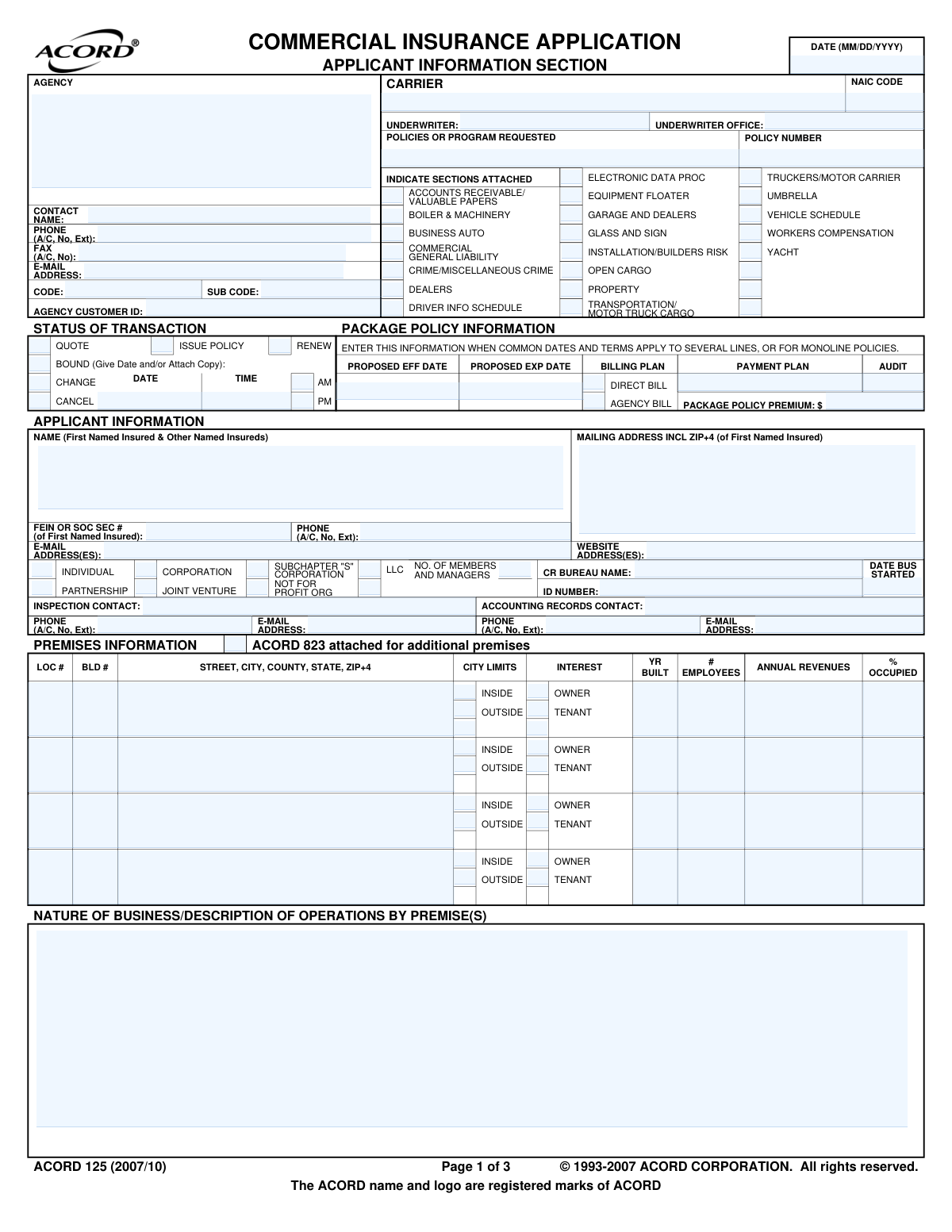
Yes! You can use AI to fill out ACORD 125, Commercial Insurance Application and ACORD 143, Transportation Section

ACORD 125, the Commercial Insurance Application, is a standardized form used across the insurance industry to collect essential information about a business applying for commercial insurance, covering applicant details, prior insurance history, and general operations. It is frequently accompanied by specific coverage sections, such as the ACORD 143 for transportation and motor truck cargo, to provide detailed underwriting information. Today, this form can be filled out quickly and accurately using AI-powered services like Instafill.ai, which can also convert non-fillable PDF versions into interactive fillable forms.
Our AI automatically handles information lookup, data retrieval, formatting, and form filling.
It takes less than a minute to fill out ACORD 125 / ACORD 143 using our AI form filling.
Securely upload your data. Information is encrypted in transit and deleted immediately after the form is filled out.

Form specifications

Form name: ACORD 125, Commercial Insurance Application and ACORD 143, Transportation Section
Number of pages: 5
Language: English
Categories: insurance forms, transportation forms, Section 8 forms, commercial forms, ACORD forms, insurance application forms, SEC forms
main-image

Instafill Demo: How to fill out PDF forms in seconds with AI

How to Fill Out ACORD 125 / ACORD 143 Online for Free in 2026

Are you looking to fill out a ACORD 125 / ACORD 143 form online quickly and accurately? Instafill.ai offers the #1 AI-powered PDF filling software of 2026, allowing you to complete your ACORD 125 / ACORD 143 form in just 37 seconds or less.
Follow these steps to fill out your ACORD 125 / ACORD 143 form online using Instafill.ai:
  1. 1 Navigate to Instafill.ai and upload or select the ACORD 125 and ACORD 143 forms.
  2. 2 Use the AI assistant to automatically populate the Applicant Information section, including business name, address, FEIN, and contact details.
  3. 3 Complete the Premises Information section for all business locations, detailing addresses, occupancy, and operations.
  4. 4 Answer all questions in the General Information section regarding business history, safety programs, and potential exposures.
  5. 5 Provide detailed Prior Carrier Information and Loss History for the past five years, attaching additional documents if needed.
  6. 6 Fill out the attached ACORD 143 Transportation Section with specifics on vehicles, cargo types, routes, and driver management practices.
  7. 7 Carefully review all sections for accuracy, then e-sign the application and submit it to your insurance agent or carrier.

Our AI-powered system ensures each field is filled out correctly, reducing errors and saving you time.

Why Choose Instafill.ai for Your Fillable ACORD 125 / ACORD 143 Form?

Speed

Complete your ACORD 125 / ACORD 143 in as little as 37 seconds.

Up-to-Date

Always use the latest 2026 ACORD 125 / ACORD 143 form version.

Cost-effective

No need to hire expensive lawyers.

Accuracy

Our AI performs 10 compliance checks to ensure your form is error-free.

Security

Your personal information is protected with bank-level encryption.

Frequently Asked Questions About Form ACORD 125 / ACORD 143

The ACORD 125 is a general Commercial Insurance Application used to gather basic information for various policies. The ACORD 143 is a supplemental form that must be attached if you are applying for Transportation or Motor Truck Cargo insurance, providing specific details about your hauling operations.

Any business or individual applying for new or renewed commercial insurance, particularly those with transportation or cargo exposures, will need to complete these forms with their insurance agent or broker.

You will need your business's legal name, FEIN or Social Security Number, a description of operations, details for all business premises, and your insurance and loss history for the past 3-5 years, including prior carrier names and policy numbers.

The form notes that you should attach an ACORD 823 form to provide the required information for any additional premises beyond the four listed on the main application.

You must provide a detailed explanation for any 'YES' responses in the 'REMARKS/PROCESSING INSTRUCTIONS' section located on page 2 of the ACORD 125 form.

If you have no prior losses or claims to report for the specified period, you can simply check the box labeled 'CHK HERE IF NONE' in the Loss History section on page 3.

An 'Occurrence' policy covers incidents that happen during the policy period, no matter when the claim is filed. A 'Claims Made' policy only covers claims that are filed during the policy period.

An authorized representative of the applicant (your business) must sign and date the form to certify the information is accurate. The insurance producer (agent) will also need to sign the application.

Yes, the 'VEHICLE SCHEDULE' section requires you to list details for the vehicles used in your transportation operations, including the year, make, model, and VIN. If more space is needed, you may need to attach an additional schedule.

Processing time varies depending on the complexity of your business and the insurance carrier. After your agent submits the completed application, it can take anywhere from a few days to several weeks for the underwriter to review and provide a quote.

Yes, services like Instafill.ai use AI to auto-fill form fields accurately and save time. This can help reduce manual data entry and ensure the information is consistent across the application.

You can upload the PDF of the ACORD 125 and 143 forms to the Instafill.ai platform. Their service allows you to fill out the forms in an interactive online environment, making it easy to enter data, save your progress, and download the completed document.

If you have a non-fillable or 'flat' PDF, you can use a service like Instafill.ai. It can convert the static document into an interactive form, allowing you to type your information directly into the fields online.

Compliance ACORD 125 / ACORD 143
Validation Checks by Instafill.ai

1
Validates FEIN or SSN Format
This check ensures that the 'FEIN OR SOC SEC #' field is formatted correctly as either a 9-digit Employer Identification Number (XX-XXXXXXX) or a 9-digit Social Security Number (XXX-XX-XXXX). This is critical for accurately identifying the applicant for legal, tax, and underwriting purposes. A failure in validation would prevent the form submission until a correctly formatted number is provided, avoiding data errors downstream.
2
Ensures Policy Expiration Date is After Effective Date
This validation confirms that the 'Proposed EXP DATE' is chronologically later than the 'Proposed EFF DATE'. This is a fundamental logical check to ensure the policy term is valid and makes sense. If the expiration date is not after the effective date, the system will flag an error, as a policy cannot end before it begins.
3
Requires Explanation for 'Yes' Responses in General Information
This check verifies that if any of the 'General Information' questions (1a through 12) are answered with 'Yes', the 'EXPLAIN ALL "YES" RESPONSES' or 'Remarks' section must contain text. This is crucial for underwriters to assess risks indicated by the 'Yes' answers, such as foreign operations or past claims. A failure to provide an explanation would halt the submission and prompt the user to provide the necessary details for risk evaluation.
4
Validates Exclusive Selection of Applicant's Legal Entity
This check ensures that only one checkbox is selected from the list of legal entity types (Individual, Partnership, Corporation, LLC, etc.). An applicant can only have one primary legal structure for a given policy. Selecting multiple options would create ambiguity, so the system should enforce a single selection to ensure legal and contractual clarity.
5
Conditional Requirement for LLC Member/Manager Count
This validation rule mandates that if the 'LLC' checkbox is selected as the applicant's legal entity, the 'NO. OF MEMBERS AND MANAGERS' field must be populated with a positive integer. This information is essential for underwriting and rating a Limited Liability Company. If 'LLC' is checked and this field is empty or zero, the form submission will be blocked until the required count is entered.
6
Verifies Loss History Section Completeness
This check validates the 'LOSS HISTORY' section. If the 'IF NONE CHK HERE' box is not checked, the system expects at least one loss record to be entered with all required fields (Date of Occurrence, Description, Amount Paid/Reserved). This ensures that a complete loss history is provided for underwriting review, which is a critical factor in assessing risk and determining premiums. An incomplete entry would trigger an error.
7
Requires Retro Date for Claims-Made Policies
This validation ensures that if a prior carrier policy is marked as 'CLAIMS MADE', the corresponding 'RETRO DATE' field must be populated with a valid date. The retroactive date is a fundamental component of a claims-made policy, defining the start of coverage for incidents. Missing this date makes it impossible to determine the scope of prior coverage, so the system must enforce its entry.
8
Validates Vehicle Identification Number (VIN) Format
This check ensures that any 'V.I.N.' entered in the 'VEHICLE SCHEDULE' is a valid 17-character alphanumeric string, excluding the letters I, O, and Q. A valid VIN is essential for accurately identifying vehicles for coverage, rating, and regulatory filings. The validation prevents data entry errors and ensures that the correct vehicle is insured.
9
Validates Premise Occupancy Percentage
This rule checks that the value entered in the '% OCCUPIED' field for any premise is a number between 0 and 100. This data point is important for assessing the risk associated with a property, as vacancy can significantly increase risk. An invalid percentage would be rejected, ensuring data quality for property underwriting.
10
Enforces Mutually Exclusive Billing Plan Selection
This validation ensures that for the 'BILLING PLAN', either 'AGENCY BILL' or 'DIRECT BILL' is selected, but not both. These are mutually exclusive options that define who is responsible for sending premium invoices. Allowing both to be selected would create confusion in the billing process, so the system must enforce a single choice.
11
Requires Trust Name if Business is in a Trust
This check mandates that if question 11, 'HAS BUSINESS BEEN PLACED IN A TRUST?', is answered 'YES', the 'IF "YES", NAME OF TRUST' field must be filled out. The name of the trust is legally significant and necessary to correctly identify the insured entity. The system will prevent submission if 'YES' is selected without providing the corresponding trust name.
12
Validates Email Address Format
This check verifies that all email address fields (e.g., 'E-MAIL ADDRESS' for Applicant, Contacts, Agency) contain a string that follows the standard email format (e.g., '[email protected]'). This is crucial for ensuring that all electronic communications, including policy documents and notifications, are deliverable. An invalid format would trigger an error and require correction before submission.
13
Validates ZIP+4 Code Format
This check ensures that all address fields requiring a ZIP+4 code adhere to either a 5-digit (NNNNN) or 9-digit (NNNNN-NNNN) format. Accurate ZIP codes are essential for location-based risk assessment, rating, and ensuring mail delivery of important documents. The validation prevents incorrect or incomplete address information from being entered.
14
Requires Cancellation Date and Time if 'Cancel' is Checked
This validation rule ensures that if the 'Cancel' checkbox under 'STATUS OF TRANSACTION' is selected, the 'DATE' and 'TIME' fields in that same section must be populated. A cancellation requires a specific effective date and time for legal and contractual purposes. The system must enforce this to prevent ambiguous or incomplete cancellation requests.

Common Mistakes in Completing ACORD 125 / ACORD 143

Providing an Incorrect or Incomplete 'Named Insured'

Applicants often list their 'Doing Business As' (DBA) name instead of the full legal entity name (e.g., 'Main Street Cafe' instead of 'Main Street Hospitality, LLC'). This mistake occurs due to a misunderstanding of the legal requirements for an insurance contract. An incorrect named insured can lead to significant issues at the time of a claim, potentially resulting in a denial of coverage because the legal entity that suffered the loss was not the one listed on the policy.

Failing to Explain 'Yes' Answers in the General Information Section

The form requires a detailed explanation for any 'Yes' response in the General Information section, but applicants frequently check 'Yes' and neglect to provide the corresponding details in the Remarks section. This omission forces the underwriter to issue a follow-up request, delaying the quoting and binding process significantly. To avoid this, carefully review all questions and prepare explanations for any 'Yes' answers before filling out the form.

Incomplete or Inaccurate Loss History Disclosure

Applicants may intentionally or unintentionally omit prior claims, especially if they were small or not their fault, despite the form requiring all losses for the prior 5 years 'regardless of fault'. This is a form of material misrepresentation and can have severe consequences, including the insurer voiding the policy retroactively, even after a new claim has occurred. Always provide a complete and honest 5-year loss history, attaching separate loss run reports if necessary.

Incorrectly Identifying the Business's Legal Entity Type

Choosing the wrong business structure, such as checking 'Corporation' for a 'Limited Liability Company' (LLC), is a frequent error. This mistake can stem from confusion about legal structures and has major implications for how the policy is rated, who is covered, and how claims are handled. Double-check your business's legal formation documents to ensure you select the correct entity type on the application.

Using Vague Descriptions for Business Operations or Cargo

In the 'Nature of Business' or 'Property Hauled' sections, applicants often use overly broad terms like 'Contractor' or 'General Freight'. Underwriters need specific details (e.g., 'Residential roofing contractor' or 'Hauling refrigerated produce and electronics') to accurately assess risk and calculate the premium. Vague descriptions lead to processing delays and may result in coverage exclusions for operations the underwriter was not aware of.

Entering Incorrect or Missing Vehicle Identification Numbers (VINs)

The vehicle schedule requires a complete and accurate 17-digit VIN for each vehicle, but data entry errors like transposed numbers or incomplete entries are common. The VIN is crucial for underwriters to verify vehicle details, check for safety recalls, and ensure the correct vehicle is covered. An incorrect VIN can cause delays in issuing policies and state filings, and could lead to a claim being denied for an unlisted vehicle.

Confusing 'Occurrence' and 'Claims-Made' Prior Coverage

Applicants often struggle to correctly identify whether their prior General Liability policies were 'Occurrence' or 'Claims-Made' forms. This distinction is critical, as a 'Claims-Made' policy requires a 'Retro Date' to determine coverage for past events, and failing to report this correctly can create dangerous gaps in coverage. Review your prior policy documents carefully to ensure this information is accurate.

Forgetting to Include the Full ZIP+4 Code

The form specifically requests the mailing address 'INCL ZIP+4', but many applicants only provide the standard 5-digit ZIP code. This happens because people are often unaware of their full ZIP+4 or see it as unimportant. However, insurers use the full code for precise location-based risk assessment and rating, and its omission can lead to inaccurate quotes or delays while the information is corrected.

Misrepresenting the 'Radius of Operations' for Vehicles

A common mistake in the transportation section is understating the vehicle's radius of operations, for instance, listing '50 miles' when the vehicle occasionally makes trips of 200 miles. This is often done to obtain a lower premium, but it's a significant misrepresentation of risk. If a loss occurs outside the stated radius, the insurance company may have grounds to deny the claim entirely.

Failing to Attach Referenced Documents

Applicants frequently check boxes like 'See Attached Loss Summary' or 'ACORD 823 attached for additional premises' but then fail to include the corresponding documents with their submission. This oversight brings the application process to a halt, as the underwriter cannot proceed without the missing information. To prevent this, create a checklist of all required attachments before submitting the application. AI-powered tools like Instafill.ai can help manage and bundle all necessary documents with the form submission.
Saved over 80 hours a year

“I was never sure if my IRS forms like W-9 were filled correctly. Now, I can complete the forms accurately without any external help.”

Kevin Martin Green

Your data stays secure with advanced protection from Instafill and our subprocessors

Robust compliance program

Transparent business model

You’re not the product. You always know where your data is and what it is processed for.

ISO 27001, HIPAA, and GDPR

Our subprocesses adhere to multiple compliance standards, including but not limited to ISO 27001, HIPAA, and GDPR.

Security & privacy by design

We consider security and privacy from the initial design phase of any new service or functionality. It’s not an afterthought, it’s built-in, including support for two-factor authentication (2FA) to further protect your account.

Fill out ACORD 125 / ACORD 143 with Instafill.ai

Worried about filling PDFs wrong? Instafill securely fills acord-125-commercial-insurance-application-and-acord-143-transportation-section forms, ensuring each field is accurate.