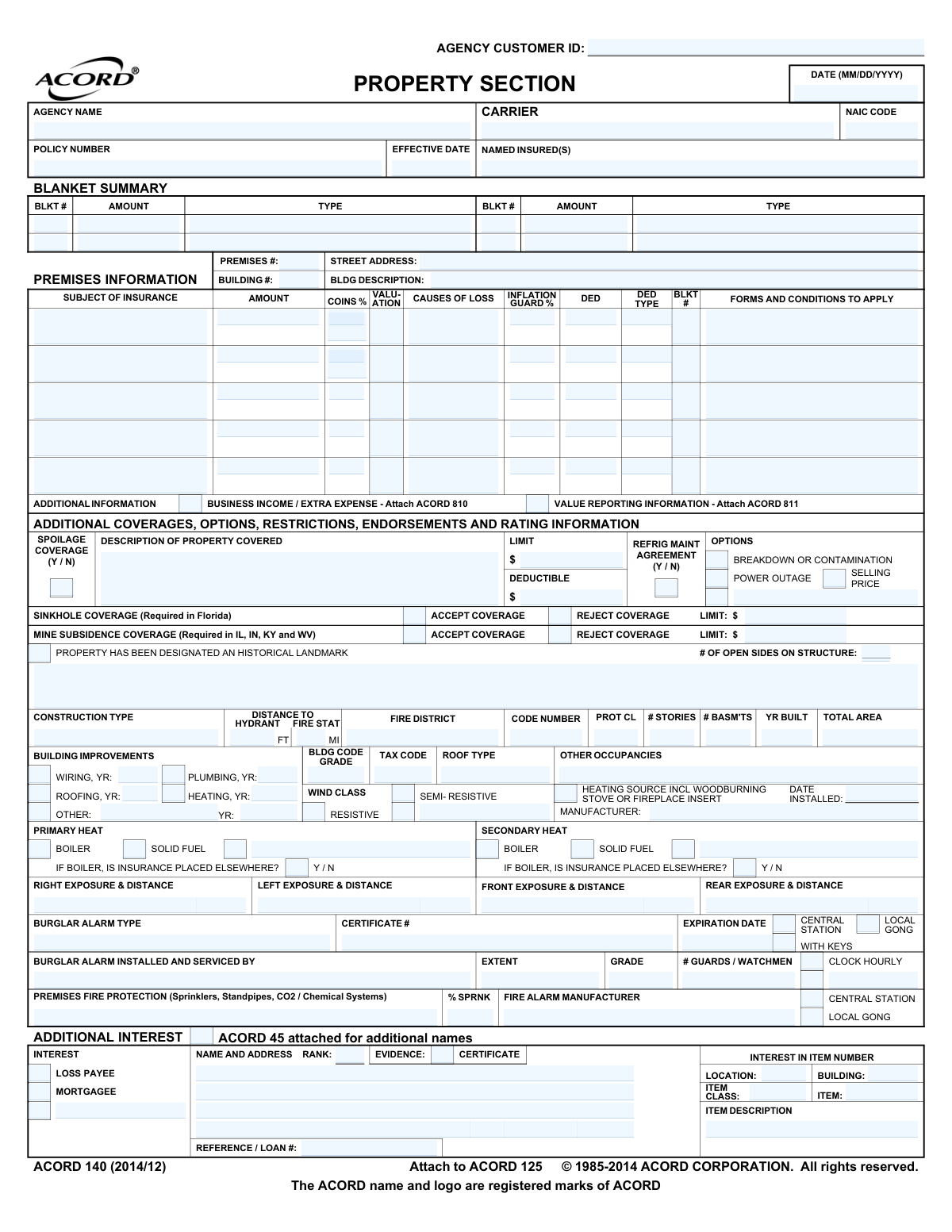
Yes! You can use AI to fill out ACORD 140 (2014/12), Property Section (Attach to ACORD 125)

ACORD 140 is the ACORD Property Section that supplements the ACORD 125 commercial insurance application by capturing property-specific underwriting details. It records information about each premises/building (construction, protection, improvements, exposures) and the requested coverages (limits, deductibles, causes of loss, optional coverages like sinkhole or mine subsidence where required). Insurers and agents use it to evaluate risk, determine eligibility and pricing, and issue accurate policy terms. It also includes fraud warnings and signature attestations required in various jurisdictions.
Our AI automatically handles information lookup, data retrieval, formatting, and form filling.
It takes less than a minute to fill out ACORD 140 using our AI form filling.
Securely upload your data. Information is encrypted in transit and deleted immediately after the form is filled out.

Form specifications

Form name: ACORD 140 (2014/12), Property Section (Attach to ACORD 125)
Number of pages: 3
Filled form examples: Form ACORD 140 Examples
Language: English
main-image

Instafill Demo: filling out a legal form in seconds

How to Fill Out ACORD 140 Online for Free in 2026

Are you looking to fill out a ACORD 140 form online quickly and accurately? Instafill.ai offers the #1 AI-powered PDF filling software of 2026, allowing you to complete your ACORD 140 form in just 37 seconds or less.
Follow these steps to fill out your ACORD 140 form online using Instafill.ai:
  1. 1 Enter applicant/agency identifiers and policy context (agency customer ID, named insured(s), carrier/NAIC code if applicable, effective date, policy number if renewal, and reference/loan number).
  2. 2 Add premises and building details for each location (street address, premises/building numbers, building description, year built, total area, number of stories/basement, occupancy, roof type, tax/building codes, wind class).
  3. 3 Complete protection and systems information (distance to hydrant/fire station, fire district/protection class, sprinklers %, fire alarm type and monitoring, burglar alarm details, guards/watchmen, heating/plumbing/wiring/roofing update years, solid-fuel/boiler and fireplace/insert details).
  4. 4 Specify property coverages and valuation terms (subject of insurance, amount, coinsurance %, causes of loss, inflation guard %, deductibles, blanket vs. scheduled items, and forms/conditions to apply).
  5. 5 Add optional/special coverages and state-required selections (e.g., sinkhole coverage in Florida; mine subsidence coverage in IL/IN/KY/WV; spoilage, power outage, breakdown/contamination, refrigeration maintenance agreement) including limits and deductibles.
  6. 6 List additional interests and certificates (mortgagee/loss payee/additional interest name and address, rank, evidence/certificate details; attach ACORD 45 for additional names and ACORD 101 for remarks if needed).
  7. 7 Review all entries for accuracy, acknowledge applicable fraud notices, and collect producer/applicant signatures, producer license/NPN (where required), and dates before submitting with any required attachments (e.g., ACORD 810/811).

Our AI-powered system ensures each field is filled out correctly, reducing errors and saving you time.

Why Choose Instafill.ai for Your Fillable ACORD 140 Form?

Speed

Complete your ACORD 140 in as little as 37 seconds.

Up-to-Date

Always use the latest 2026 ACORD 140 form version.

Cost-effective

No need to hire expensive lawyers.

Accuracy

Our AI performs 10 compliance checks to ensure your form is error-free.

Security

Your personal information is protected with bank-level encryption.

Frequently Asked Questions About Form ACORD 140

ACORD 140 is used to provide detailed property information for a commercial insurance application. It supports the main application (often ACORD 125) by listing building details, coverages, limits, deductibles, and protection features.

The applicant (insured) typically provides the property details, and the insurance agent/producer usually completes and submits the form. The form must be signed by an authorized representative of the applicant and the producer where required.

You’ll need the building address and description, construction details (year built, roof type, wiring/plumbing/heating update years), square footage/area, fire protection details, and the coverage limits/deductibles you want. If there are lenders or other interested parties, you’ll also need their names and addresses.

Use “Premises #” to identify the location/site and “Building #” to identify a specific building at that premises. If you have multiple buildings at one address, each building should have its own building number and details.

“Subject of Insurance” identifies what is being covered (e.g., building, business personal property). “Amount” is the limit of insurance requested, and “Coins %” is the coinsurance percentage that may apply to that coverage.

“Causes of Loss” refers to the coverage form (such as Basic, Broad, or Special) that determines which types of losses are covered. Your agent will help select the appropriate option based on your risk and policy requirements.

The Blanket Summary is used when one limit applies across multiple buildings or types of property rather than listing separate limits for each item. If you are not using blanket coverage, your agent may leave this section blank or complete itemized limits instead.

Enter them in the “Additional Interest” section with the name and address, the type of interest (Mortgagee or Loss Payee), and the item/building number they apply to. If you have more names than space allows, the form references using ACORD 45 for additional names.

This is typically the lender’s loan number or reference used to match the insurance evidence to a financing requirement. It’s commonly required when a mortgagee or lender is listed, so provide it if you have one.

Mine subsidence coverage is shown as required in IL, IN, KY, and WV, and sinkhole coverage is shown as required in Florida. The form allows you to accept or reject these coverages and to list limits/deductibles where applicable.

Marking a property as a historical landmark can affect underwriting, valuation, and repair requirements. If the building is designated, answer “Y” and be prepared to provide documentation or details if requested.

Solid fuel and woodburning systems can increase fire risk and may require special underwriting review. If a boiler is insured elsewhere, indicate “Y” and be ready to provide the other policy information if requested.

Provide the type of protection (e.g., sprinklers, standpipes, CO2/chemical systems), alarm type (central station/local gong), and any manufacturer/installer details requested. For burglar alarms, include the certificate number and expiration date if applicable.

Exposures describe nearby risks (neighboring buildings/operations) and the approximate distance from your building on each side (front/rear/left/right). If you don’t know exact measurements, provide a reasonable estimate and note any significant hazards nearby.

Yes—this form references attaching ACORD 810 for Business Income/Extra Expense and ACORD 811 for Value Reporting information when those coverages apply. It also references ACORD 101 for additional remarks if you need more space.

The applicant’s authorized representative and the producer sign on the signature page, with dates and license/NPN information where required. The fraud warnings explain that providing false, incomplete, or misleading information can lead to criminal and civil penalties, with wording varying by state.

Compliance ACORD 140
Validation Checks by Instafill.ai

1
Validates ACORD 140 application date format (MM/DD/YYYY) and calendar validity
Checks that the primary application DATE field is present and matches MM/DD/YYYY, and that it is a real calendar date (e.g., not 02/30/2026). This is important for policy issuance timing, underwriting documentation, and audit trails. If the date is missing or invalid, the submission should be rejected or routed for correction before any quoting/binding actions occur.
2
Ensures effective date is provided and is logically consistent with application date
Verifies the EFFECTIVE DATE is present and is a valid date, and that it is not earlier than the application date (or outside allowed backdating rules configured by the carrier/agency). Effective date drives coverage start and rating; inconsistencies can create coverage gaps or compliance issues. If the effective date fails validation, the system should block binding and request corrected dates or an override reason per business rules.
3
Requires Named Insured(s) and Agency Name to be completed (non-empty, non-placeholder)
Confirms NAMED INSURED(S) and AGENCY NAME fields are populated with meaningful text (not blanks, 'N/A', or placeholder characters). These are core identifiers for the policy record and downstream documents (certificates, invoices, endorsements). If missing or invalid, the submission should be marked incomplete and prevented from progressing to underwriting.
4
Validates Agency Customer ID presence and format consistency
Checks that AGENCY CUSTOMER ID is present and conforms to the agency’s configured format (e.g., alphanumeric length constraints) and is consistent across pages where it appears. This prevents misfiling and ensures the submission links to the correct customer/account in the agency management system. If it fails, the system should flag a critical error and require correction before ingestion.
5
Validates NAIC code format and plausibility
Ensures the NAIC CODE is numeric and matches expected length (commonly 5 digits) and is not an impossible value (e.g., all zeros). NAIC codes are used for carrier identification, reporting, and integration mapping. If invalid, the system should reject the record or require selection from a controlled list to avoid downstream carrier mismatches.
6
Validates Carrier and Policy Number requirements when evidence/certificate details are provided
If CARRIER and/or POLICY NUMBER fields are present (or if EVIDENCE/CERTIFICATE information is entered), validates that both carrier name and policy number are provided and policy number meets allowed character rules (no illegal symbols, within length limits). This ensures evidence of insurance and additional interest processing can be completed accurately. If incomplete or malformed, the system should flag the evidence section and prevent certificate generation until corrected.
7
Enforces state-specific requirement: Mine Subsidence coverage selection for IL, IN, KY, WV
When the risk location state is IL, IN, KY, or WV, verifies Mine Subsidence Coverage is explicitly marked ACCEPT or REJECT and that any required LIMIT/DED fields are completed per selection. This is a regulatory/filing requirement in those states and must be captured explicitly. If not satisfied, the submission should be blocked for compliance and returned for completion.
8
Enforces state-specific requirement: Sinkhole coverage selection for Florida
When the risk location state is Florida, checks that Sinkhole Coverage is explicitly ACCEPT or REJECT and that associated LIMIT/DEDUCTIBLE fields are present and numeric when required. Florida sinkhole handling is highly regulated and materially affects rating and coverage terms. If missing or inconsistent, the system should prevent quoting/binding and prompt for the required election and amounts.
9
Validates premises/building identification completeness (Premises #, Building #, Street Address, Location)
Ensures each premises/building entry includes STREET ADDRESS, PREMISES #, BUILDING #, and LOCATION/BUILDING identifiers where applicable, and that they are not blank. Accurate premises identification is essential for rating, inspections, claims handling, and geocoding (e.g., fire protection distances). If incomplete, the system should flag the specific premises record and require completion before submission.
10
Validates construction and building characteristics fields for allowed values and ranges
Checks that CONSTRUCTION TYPE is selected from allowed categories (e.g., Frame/Masonry/Semi-Resistive/Resistive as applicable), and that numeric fields like # STORIES, # BASM'TS, YR BUILT, and TOTAL AREA are present where required and within reasonable ranges (e.g., year built not in the future, area > 0). These attributes materially impact underwriting eligibility and rating. If values are out of range or missing, the system should require correction or underwriting referral.
11
Validates fire protection details: distance to hydrant/fire station units and protection class
Ensures DISTANCE TO HYDRANT and FIRE STATION distances are numeric and accompanied by the correct unit indicator (FT/MI), and that PROT CL is within an allowed set (commonly 1–10 or carrier-specific). Fire protection data is used for rating and risk scoring; unit errors (feet vs miles) can drastically change results. If invalid, the system should flag the field and prevent rating until corrected.
12
Validates coverage amounts, limits, deductibles, and coinsurance as numeric and non-negative
Checks that AMOUNT, LIMIT, DEDUCTIBLE, SELLING PRICE, and similar monetary fields contain valid numeric values (currency), are not negative, and meet minimum/maximum constraints configured by product rules. Also validates COINS % is numeric and within 0–100 (or carrier-allowed range such as 50–125 where applicable). If invalid, the system should block rating and return clear field-level errors.
13
Ensures subject of insurance entries are complete and internally consistent
For each SUBJECT OF INSURANCE line, verifies required components are present: description, amount, causes of loss, valuation, and any referenced forms/conditions when indicated. This prevents orphaned coverage lines that cannot be rated or interpreted by underwriting. If incomplete, the system should require completion of the missing attributes or removal of the partial line item.
14
Validates additional interest records: type selection and required party details
When an ADDITIONAL INTEREST is entered, checks that TYPE (e.g., Mortgagee, Loss Payee, Additional Interest) is selected, NAME AND ADDRESS is provided, and INTEREST IN ITEM NUMBER references a valid item/building. Additional interests drive certificate/evidence outputs and loss payment clauses; incorrect references can create legal and claims issues. If validation fails, the system should prevent issuance of evidence/certificates and require corrected party and item linkage.
15
Validates alarm and certificate information when burglar alarm is indicated
If BURGLAR ALARM TYPE or related options (CENTRAL/LOCAL/WITH KEYS) are selected, verifies CERTIFICATE # and EXPIRATION DATE are provided and that expiration is on/after the effective date. Alarm credits and underwriting requirements often depend on current certification. If missing/expired, the system should remove/deny credits automatically and/or refer to underwriting, and prompt for updated certificate details.
16
Validates solid fuel/boiler heating questions and conditional 'insurance placed elsewhere' responses
If SOLID FUEL/BOILER is indicated for PRIMARY HEAT or SECONDARY HEAT, requires the corresponding 'IF BOILER, IS INSURANCE PLACED ELSEWHERE? Y/N' to be answered, and if 'Yes' is selected, requires carrier/policy reference details in remarks or supporting fields. Solid fuel and boiler exposures are underwriting-sensitive and may require separate coverage or documentation. If unanswered or inconsistent, the system should flag for underwriting review and block submission until completed.

Common Mistakes in Completing ACORD 140

Leaving state-required coverages unaddressed (Mine Subsidence / Sinkhole)

Applicants often miss the state-specific prompts like Mine Subsidence (required in IL, IN, KY, WV) and Sinkhole (required in FL) because they look like optional endorsements. If you don’t explicitly mark Accept/Reject and provide the required limit/deductible/type, the carrier may suspend underwriting, issue the policy incorrectly, or require a rewrite. Avoid this by checking the property state(s) first, then completing every required coverage line with a clear Accept/Reject selection and the corresponding limit/deductible fields.

Using inconsistent or missing premises/building identifiers

People frequently omit or mix up Premises #, Building #, and Street Address, especially when there are multiple locations or multiple buildings at one address. This can cause coverage to be applied to the wrong structure, delay issuance, or create claim disputes about which building was insured. Avoid it by assigning a unique Premises # and Building # for each location/structure and keeping those identifiers consistent across all pages and any attachments.

Incomplete “Subject of Insurance” entries (Amount/Coins %/Causes of Loss/Valuation)

A common error is entering only the limit/amount while leaving Coins %, Causes of Loss, Valuation, Inflation Guard %, and applicable forms/conditions blank. Underwriters rely on these fields to price and confirm how losses will be settled; missing data often triggers follow-up requests or incorrect terms. Avoid this by completing the entire row for each item (building, BPP, etc.) and confirming the valuation method (e.g., RC vs ACV) matches the intended coverage.

Not providing deductible and limit details for optional coverages (Breakdown/Contamination/Power Outage/Spoilage)

Applicants often check “Y” for options like Spoilage Coverage, Refrigeration Maintenance Agreement, or Power Outage but forget to fill in the deductible, limit, and description of property covered. This leads to endorsements being declined, issued with default terms, or delayed pending clarification. Avoid it by treating every “Y/N” option as a mini-coverage request that must include limit, deductible, and a clear description of what is being covered.

Incorrect date formats or missing effective/signature dates

The form specifies dates in MM/DD/YYYY, but people enter other formats (DD/MM/YYYY), partial dates, or leave the Effective Date and signature dates blank. Incorrect dates can cause binding issues, gaps in coverage, or rejection by the carrier’s intake system. Avoid this by using MM/DD/YYYY everywhere and ensuring the Effective Date aligns with the requested policy start and the signatures are dated the same day the application is finalized.

Omitting or misclassifying Additional Interests (Mortgagee/Loss Payee) and rank/evidence details

Applicants frequently list a lender or interested party without selecting the correct interest type (Mortgagee vs Loss Payee), without rank, or without the certificate name/address and reference/loan number. This can result in incorrect loss payment handling, certificate errors, and lender non-compliance notices. Avoid it by entering the full legal name and mailing address, selecting the correct interest type, providing rank (1st, 2nd, etc.), and including the loan/reference number exactly as the lender requires.

Failing to attach required supporting ACORD forms (810/811/45/101)

The application references attachments (ACORD 810 for Business Income/Extra Expense, ACORD 811 for Value Reporting, ACORD 45 for additional names, ACORD 101 for remarks), but applicants often don’t include them even when the coverage is requested or space is exceeded. Missing attachments delay underwriting and can lead to incomplete or incorrect coverage issuance. Avoid this by matching requested coverages to the required supplemental forms and attaching them whenever the form indicates they are needed.

Inaccurate building characteristics (construction type, stories, basement, year built, total area)

People commonly guess or leave blank key building details such as construction type (e.g., frame vs semi-resistant vs resistive), number of stories, basement presence, year built, and total area. These fields materially affect eligibility, rating, and catastrophe modeling; errors can cause mispricing or declination after inspection. Avoid this by using reliable sources (appraisals, assessor records, building plans) and ensuring the details are consistent for each building listed.

Missing fire protection and distance metrics (hydrant/fire station/protection class)

Applicants often omit Distance to Hydrant, Distance to Fire Station (ft/mi), Fire District, alarm station type (central/local), and Protection Class because they are not readily known. Underwriters use these to evaluate fire risk and determine pricing/eligibility; blanks typically trigger follow-up or conservative assumptions. Avoid this by confirming distances via mapping tools or local fire department information and clearly indicating units (feet vs miles) as requested.

Not completing heating/boiler/solid-fuel questions and “insurance placed elsewhere”

The solid fuel/boiler primary and secondary heat sections are frequently left unanswered, or applicants mark “boiler” without stating whether insurance is placed elsewhere. Solid-fuel and boiler exposures can require special underwriting, inspections, or exclusions; missing answers can delay or lead to coverage restrictions. Avoid this by answering every Y/N, specifying primary vs secondary heat, and documenting where boiler coverage is placed if it is insured under a different policy.

Alarm and protection system details missing or inconsistent (burglar/fire alarm certificates, expiration, installer)

Applicants often indicate alarms or sprinklers exist but fail to provide certificate numbers, expiration dates, extent/grade, monitoring type, or the company that installed/serviced the system. This can eliminate protective device credits, create compliance issues, or cause underwriting to require proof before binding. Avoid this by pulling details from the alarm company certificate/contract and ensuring the monitoring type (central station vs local) matches what is actually in place.

Missing required producer/applicant identifiers and signatures (NPN, license no., printed names)

The signature section is commonly incomplete—missing applicant signature, producer signature, printed producer name, state producer license number, or National Producer Number (required in Florida). Incomplete execution can make the application invalid for binding and can delay issuance while corrected pages are obtained. Avoid this by completing every signature line, printing names legibly, and verifying state-specific requirements (like FL NPN) before submission.
Saved over 80 hours a year

“I was never sure if my IRS forms like W-9 were filled correctly. Now, I can complete the forms accurately without any external help.”

Kevin Martin Green

Your data stays secure with advanced protection from Instafill and our subprocessors

Robust compliance program

Transparent business model

You’re not the product. You always know where your data is and what it is processed for.

ISO 27001, HIPAA, and GDPR

Our subprocesses adhere to multiple compliance standards, including but not limited to ISO 27001, HIPAA, and GDPR.

Security & privacy by design

We consider security and privacy from the initial design phase of any new service or functionality. It’s not an afterthought, it’s built-in, including support for two-factor authentication (2FA) to further protect your account.

Fill out ACORD 140 with Instafill.ai

Worried about filling PDFs wrong? Instafill securely fills acord-140-201412-property-section-attach-to-acord forms, ensuring each field is accurate.