Yes! You can use AI to fill out ACORD 126, Commercial General Liability Section

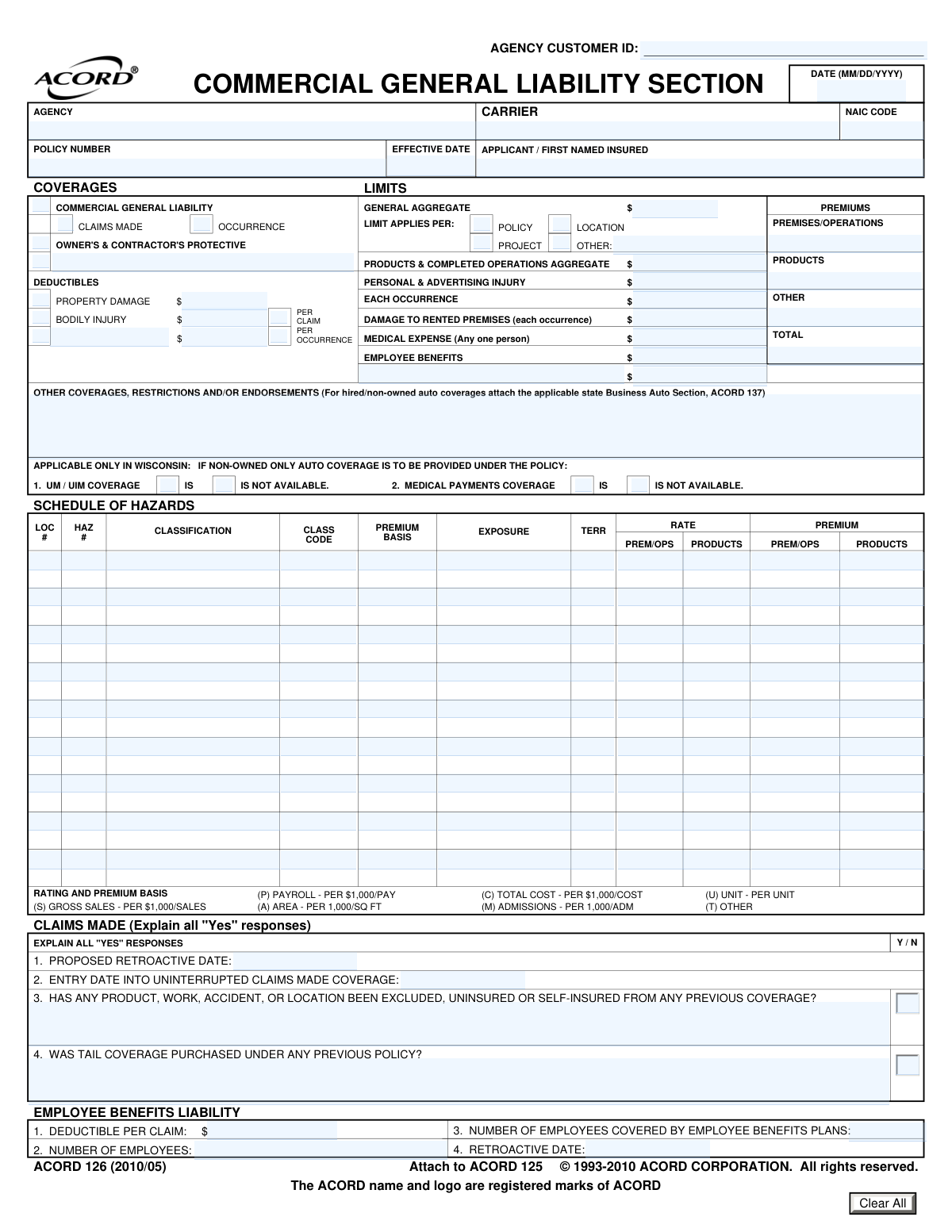
ACORD 126, the Commercial General Liability Section, is a supplemental form used with the ACORD 125 (Commercial Insurance Application) to provide underwriters with detailed information about a business's liability exposures. It covers specifics like premises/operations, products/completed operations, personal and advertising injury, and includes detailed schedules of hazards and contractor information. Completing this form accurately is crucial for obtaining appropriate CGL insurance. Today, this form can be filled out quickly and accurately using AI-powered services like Instafill.ai, which can also convert non-fillable PDF versions into interactive fillable forms.
ACORD 126 is part of the ACORD forms, ACO forms, commercial forms, SEC forms and Section 8 forms categories on Instafill.
Our AI automatically handles information lookup, data retrieval, formatting, and form filling.
It takes less than a minute to fill out ACORD 126 using our AI form filling.
Securely upload your data. Information is encrypted in transit and deleted immediately after the form is filled out.

Form specifications

Form name: ACORD 126, Commercial General Liability Section
Number of fields: 283
Number of pages: 4
Language: English
main-image

Instafill Demo: How to fill out PDF forms in seconds with AI

How to Fill Out ACORD 126 Online for Free in 2026

Are you looking to fill out a ACORD 126 form online quickly and accurately? Instafill.ai offers the #1 AI-powered PDF filling software of 2026, allowing you to complete your ACORD 126 form in just 37 seconds or less.
Follow these steps to fill out your ACORD 126 form online using Instafill.ai:
  1. 1 Navigate to Instafill.ai and upload your ACORD 126 form or select it from the template library.
  2. 2 Use the AI assistant to fill in the header information, including agency, carrier, policy number, and the first named insured's details.
  3. 3 Specify the desired coverage limits, such as General Aggregate, Each Occurrence, and Products/Completed Operations Aggregate, and indicate any applicable deductibles.
  4. 4 Complete the 'Schedule of Hazards' section by providing details for each location and operation, including classification codes, premium basis, exposure, and rates.
  5. 5 Answer the detailed questionnaires regarding contractors, products/completed operations, and general information about your business practices.
  6. 6 Review all the information populated by the AI across the form, ensuring all sections like 'Claims Made' details and 'Employee Benefits Liability' are correct.
  7. 7 Download the completed, accurate ACORD 126 form, ready for submission to your insurance carrier or agent.

Our AI-powered system ensures each field is filled out correctly, reducing errors and saving you time.

Why Choose Instafill.ai for Your Fillable ACORD 126 Form?

Speed

Complete your ACORD 126 in as little as 37 seconds.

Up-to-Date

Always use the latest 2026 ACORD 126 form version.

Cost-effective

No need to hire expensive lawyers.

Accuracy

Our AI performs 10 compliance checks to ensure your form is error-free.

Security

Your personal information is protected with bank-level encryption.

Frequently Asked Questions About Form ACORD 126

This form is used to gather detailed information for a Commercial General Liability (CGL) insurance policy. It helps the insurance carrier understand your business operations, specific risks, and desired coverage limits to accurately underwrite and price your policy.

An 'Occurrence' policy covers incidents that happen during the policy period, regardless of when the claim is filed. A 'Claims-Made' policy covers claims that are reported during the policy period, which requires defining a 'Retroactive Date' for coverage to begin.

For each business operation or location, you must enter its classification, class code, premium basis (e.g., payroll, sales), and the corresponding exposure amount. This information is used to calculate the premium for your Premises/Operations and Products coverages.

The General Aggregate Limit is the maximum total amount the insurer will pay for all covered claims during your policy term. You need to specify if this limit applies per policy, per project, or per location.

You must disclose if subcontractors are allowed to work without providing a certificate of insurance and if they carry lower coverage limits than you. You'll also need to provide the total amount paid to subcontractors and describe the types of work they perform.

For each product, you need to list its name, annual gross sales, number of units sold, and how long it has been on the market. You must also describe its intended use and list its principal components.

You must indicate 'Yes' to the question about selling or re-packaging products of others under your label. You will then need to provide a detailed description of these products, including the original manufacturer's name.

An Additional Interest is a person or entity, like a landlord or lender, who has a financial interest in your insured property. You must provide their name, address, and specify their interest type, such as 'Additional Insured', 'Loss Payee', or 'Mortgagee'.

A Retroactive Date is required for 'Claims-Made' policies and establishes the date from which your coverage begins. Incidents that occurred before this date are not covered, even if the claim is filed during the policy period.

You should use the 'Schedule of Hazards' section to list each location separately. Each row allows you to enter a unique location number and detail the specific operations, classifications, and premium calculations for that site.

Yes, services like Instafill.ai use AI to auto-fill form fields accurately from your saved information, which saves time and helps prevent errors. This is particularly useful for lengthy applications with repetitive data entry.

You can use a service like Instafill.ai to complete this form digitally. Simply upload the document, and the platform will allow you to type your answers, save your progress, and securely store the completed form.

If you have a non-fillable or 'flat' PDF, you can upload it to a platform like Instafill.ai. The service will automatically convert it into an interactive, fillable form that you can easily complete on your computer or mobile device.

Compliance ACORD 126
Validation Checks by Instafill.ai

1
CGL Coverage Basis Exclusivity
This check ensures that for Commercial General Liability (CGL) coverage, only one basis of coverage, either 'Claims Made' or 'Occurrence', is selected. A policy cannot be written on both bases simultaneously. If both or neither are checked when CGL is selected, the form submission should be flagged for correction to ensure the policy terms are unambiguous.
2
Total Premium Calculation Accuracy
Validates that the 'Total Premium' amount is the correct sum of 'Premises/Operations Premium', 'Products Premium', and 'Other Premium'. This is crucial for financial accuracy and correct billing. A mismatch would indicate a calculation error or data entry mistake, requiring manual review and correction before the policy can be bound or billed.
3
Conditional Explanation Field for 'Yes' Responses
This rule verifies that whenever a question with a 'Yes'/'No' format is answered with 'Yes', the corresponding explanation or details field is not empty. For example, if 'Plans/Designs Yes/No' is 'Yes', the 'Plans/Designs Explanation' field must contain text. This ensures that all necessary underwriting information is captured for high-risk exposures, and failure to provide details would render the risk assessment incomplete.
4
Logical Policy Date Sequence
Ensures the 'Policy Effective Date' is on or after the 'Form Date'. It is illogical for a policy to become effective before the application form is even completed. This check prevents data entry errors and ensures a valid and logical timeline for the policy's inception, preventing potential coverage disputes.
5
NAIC Code Format Validation
This check verifies that the 'NAIC Code' field contains a valid, 5-digit numerical code. The NAIC code is a standard identifier for insurance carriers used for regulatory and reporting purposes. An invalid format would hinder automated processing and regulatory compliance, so submissions with incorrect codes should be rejected until a valid code is provided.
6
General Aggregate Limit Application Exclusivity
Validates that only one option ('Policy', 'Project', 'Location', or 'Other') is selected to specify how the 'General Aggregate Limit' applies. Selecting multiple options would create ambiguity in how coverage limits are applied in the event of a claim. The system should enforce a single selection to ensure clarity in the policy contract.
7
Requirement for 'Other' Specification
This rule ensures that if the 'Other' checkbox is selected in the 'General Aggregate and Limit Applies Per' section, the corresponding text field 'Other — Limit Applies Per (Specify)' must be filled out. This prevents incomplete data where a non-standard option is chosen without an explanation. A failure would mean the basis for the aggregate limit is unknown, making the policy terms unclear.
8
Employee Count Consistency
Verifies that the 'Employees Covered by Benefits Plans' is not greater than the 'Number of Employees'. It is logically impossible to have more employees covered by a plan than the total number of employees. This check catches data entry errors and ensures the data used for rating Employee Benefits Liability is accurate.
9
Wisconsin Coverage Option Exclusivity
This check ensures that for Wisconsin-specific options, mutually exclusive checkboxes are not selected together. For example, 'UM/UIM Coverage - IS' and 'UM/UIM Coverage - IS NOT AVAILABLE' cannot both be checked. This validation prevents contradictory information on the form, which would require manual clarification and delay processing.
10
Deductible Amount and Checkbox Synchronization
Validates that if a deductible amount field (e.g., 'Property Damage Deductible') contains a numeric value greater than zero, its corresponding checkbox ('Property Damage deductible') must be checked. Conversely, if the checkbox is checked, the amount field must not be empty or zero. This ensures consistency and clarity that a deductible is intended to apply and has a specified value.
11
Claims-Made Retroactive Date Logic
For policies on a 'Claims Made' basis, this check ensures the 'Proposed Retroactive Date' is on or before the 'Policy Effective Date'. The retroactive date defines the starting point for covered events, and it cannot be after the policy begins. This validation is critical to defining the scope of coverage correctly and preventing an invalid policy structure.
12
Schedule of Hazards Row Completeness
Ensures that if any significant data is entered in a 'Schedule of Hazards' row (e.g., a 'Classification'), then all other essential fields for that row (such as 'Class Code', 'Premium Basis', 'Exposure', and 'Rate') are also filled. This prevents incomplete hazard entries that cannot be used for rating. An incomplete row should trigger an error requiring the user to either complete the row or clear it.
13
Schedule of Hazards Premium Calculation Verification
This check verifies the calculation within each 'Schedule of Hazards' row, ensuring that 'Premium — Premises/Operations' is the result of ('Exposure' multiplied by 'Rate — Premises/Operations'), adjusted for the premium basis. This validation catches mathematical errors at the most granular level, ensuring the foundation of the total premium calculation is correct. Discrepancies would require immediate correction as they directly impact the policy cost.
14
Subcontractor Percentage Range
Validates that the value entered in 'Percent of Work Subcontracted' is a number between 0 and 100. This ensures the data is a valid percentage and prevents nonsensical entries like negative numbers or values over 100. Maintaining data integrity for this field is important for accurately assessing the applicant's reliance on subcontractors.

Common Mistakes in Completing ACORD 126

Using an Incorrect 'First Named Insured'

Applicants often enter their 'Doing Business As' (DBA) name or a trade name instead of the full, legal entity name. This can cause significant legal and coverage issues, as the policy is a contract with the legal entity. A claim involving the legal entity might be denied if only the DBA is listed. Always use the complete legal name as registered with the state (e.g., 'Acme Widgets, LLC' not just 'Acme Widgets').

Confusing 'Claims-Made' and 'Occurrence' Coverage

Applicants frequently misunderstand the fundamental difference between 'Claims-Made' and 'Occurrence' policies and check the wrong box. Selecting 'Occurrence' when the policy is 'Claims-Made' can lead to a complete lack of coverage if a claim is reported after the policy expires. This mistake happens due to the complexity of the terms and can result in catastrophic, uninsured losses. It is crucial to verify the coverage basis on the policy declarations page before filling out the form.

Incomplete Conditional Responses

The form contains numerous Yes/No questions that require a detailed explanation if 'Yes' is selected (e.g., 'Blasting/Explosives Y/N' and its explanation field). A very common error is to answer 'Yes' but leave the mandatory explanation field blank. This creates an incomplete application, which always results in processing delays as the underwriter must follow up for the missing information.

Mismatching Classification and Class Code in Schedule of Hazards

In the 'Schedule of Hazards' grid, users often mismatch the descriptive 'Classification' of work (e.g., 'Carpentry') with its corresponding numeric 'Class Code'. This is a critical error as the class code is directly used to determine the premium rate. A mismatch can lead to significant over or under-payment of premium, policy audits, and potential coverage disputes if a claim arises from an incorrectly classified operation.

Entering an Incorrect Retroactive Date

For 'Claims-Made' policies, the 'Retroactive Date' is one of the most critical pieces of information, as it defines the start of the coverage period for past acts. A frequent mistake is to enter the new policy's effective date instead of the original, established retroactive date from prior policies. This error effectively erases all coverage for work performed before the new policy began, creating a massive gap in liability protection.

Misinterpreting 'General Aggregate Limit Applies Per'

Applicants often fail to correctly specify whether the General Aggregate limit applies per 'Policy', 'Project', or 'Location'. This choice dramatically impacts the amount of coverage available for multiple claims. For example, a contractor working on three projects who selects 'Per Policy' has their total aggregate limit spread across all three, whereas 'Per Project' would provide a full aggregate limit for each one. An incorrect selection can lead to premature exhaustion of limits and significant uninsured exposure.

Inconsistent Premium Basis and Exposure Data

In the 'Schedule of Hazards', the 'Premium Basis' (e.g., Payroll, Sales, Area) must align with the 'Exposure' figure provided. Users frequently make errors like selecting 'Payroll' as the basis but entering a sales figure in the 'Exposure' field. This data inconsistency makes it impossible for the carrier to accurately rate the policy, leading to application rejection or incorrect premium calculations that require later correction.

Failing to Provide Full Product Liability Details

When completing the 'Products' section, applicants may provide vague or incomplete information for fields like 'Intended use' or 'Principal components'. For example, listing 'metal parts' instead of 'stamped 304 stainless steel and cast aluminum'. This lack of detail forces underwriters to assume a higher risk, potentially leading to higher premiums or a refusal to quote. Providing specific, detailed product information is essential for accurate underwriting.

Ignoring Conditional Logic for Subcontractor Questions

The subcontractor section has complex conditional logic, where several fields are only required if a specific preceding question is answered 'Yes'. People often miss these instructions, either leaving required fields blank or filling in sections that don't apply to them. This leads to a confusing and incomplete picture of their subcontractor risk management, causing delays and extensive follow-up from the insurer. AI-powered form fillers like Instafill.ai can help by dynamically showing or hiding fields based on user input, preventing this type of error.

Transcription Errors in Key Policy Identifiers

Simple typos in critical fields like 'Policy Number' and 'NAIC Code' are extremely common but have serious consequences. An incorrect policy number can cause the entire submission to be rejected or misfiled, delaying coverage verification. A wrong NAIC code identifies the wrong insurance carrier, leading to confusion and processing failures. Double-checking these numbers against the source document is vital. If the form is a non-fillable PDF, tools like Instafill.ai can convert it to a fillable version, reducing the chance of manual transcription errors.
Saved over 80 hours a year

“I was never sure if my IRS forms like W-9 were filled correctly. Now, I can complete the forms accurately without any external help.”

Kevin Martin Green

Your data stays secure with advanced protection from Instafill and our subprocessors

Robust compliance program

Transparent business model

You’re not the product. You always know where your data is and what it is processed for.

ISO 27001, HIPAA, and GDPR

Our subprocesses adhere to multiple compliance standards, including but not limited to ISO 27001, HIPAA, and GDPR.

Security & privacy by design

We consider security and privacy from the initial design phase of any new service or functionality. It’s not an afterthought, it’s built-in, including support for two-factor authentication (2FA) to further protect your account.

Fill out ACORD 126 with Instafill.ai

Worried about filling PDFs wrong? Instafill securely fills acord-126-commercial-general-liability-section-1 forms, ensuring each field is accurate.