Data Residency
Choose the country your data is physically stored in, across 11 Microsoft Azure regions. The same encryption, the same access controls, the same product - just located where you need it to be, for GDPR, HIPAA, data residency, or lower latency.
Overview
The documents you fill out with AI often contain sensitive personal information - medical records, tax returns, legal intake, financial details, client data. For many teams, the physical location of that data is a requirement rather than a preference: GDPR for European organizations, data residency rules in healthcare and finance, or internal policies that keep information inside a specific country. For others, it is about keeping data close to reduce latency.
Until recently, all Instafill.ai data was stored in the United States, which remains the default. You can now choose the country your organization's data is stored in, from a list of 11 regions, all running on Microsoft Azure. The choice is made once when your account is created and applies to your entire organization.
Choosing a region places your data on infrastructure that carries that region's compliance certifications. There is no security trade-off for choosing a region outside the US - your documents are encrypted in transit and at rest and isolated to your own workspace in every region. Storage regions sit alongside the AI provider control, which governs where your data is processed - together they let you decide both where data lives and where it runs.
Key Capabilities
| Capability | What it means |
|---|---|
| 11 regions worldwide | Store your data in the US, Germany, France, Italy, the Netherlands, the UK, Canada, Australia, Mexico, the UAE, or Israel |
| Chosen at sign-up | Pick your region on the welcome screen when your account is created |
| Organization-wide | The region applies to every workspace, member, and document in your organization |
| Compliance per region | Each region shows its physical location and compliance certifications before you select it |
| No extra cost | Choosing a region is available to every user at no additional charge |
| Identical security | Encryption, access controls, and recovery are the same in every region |
How It Works
The region is selected at sign-up and shown clearly afterward. There is nothing to configure in code or infrastructure on your side.
1. Pick a region at sign-up
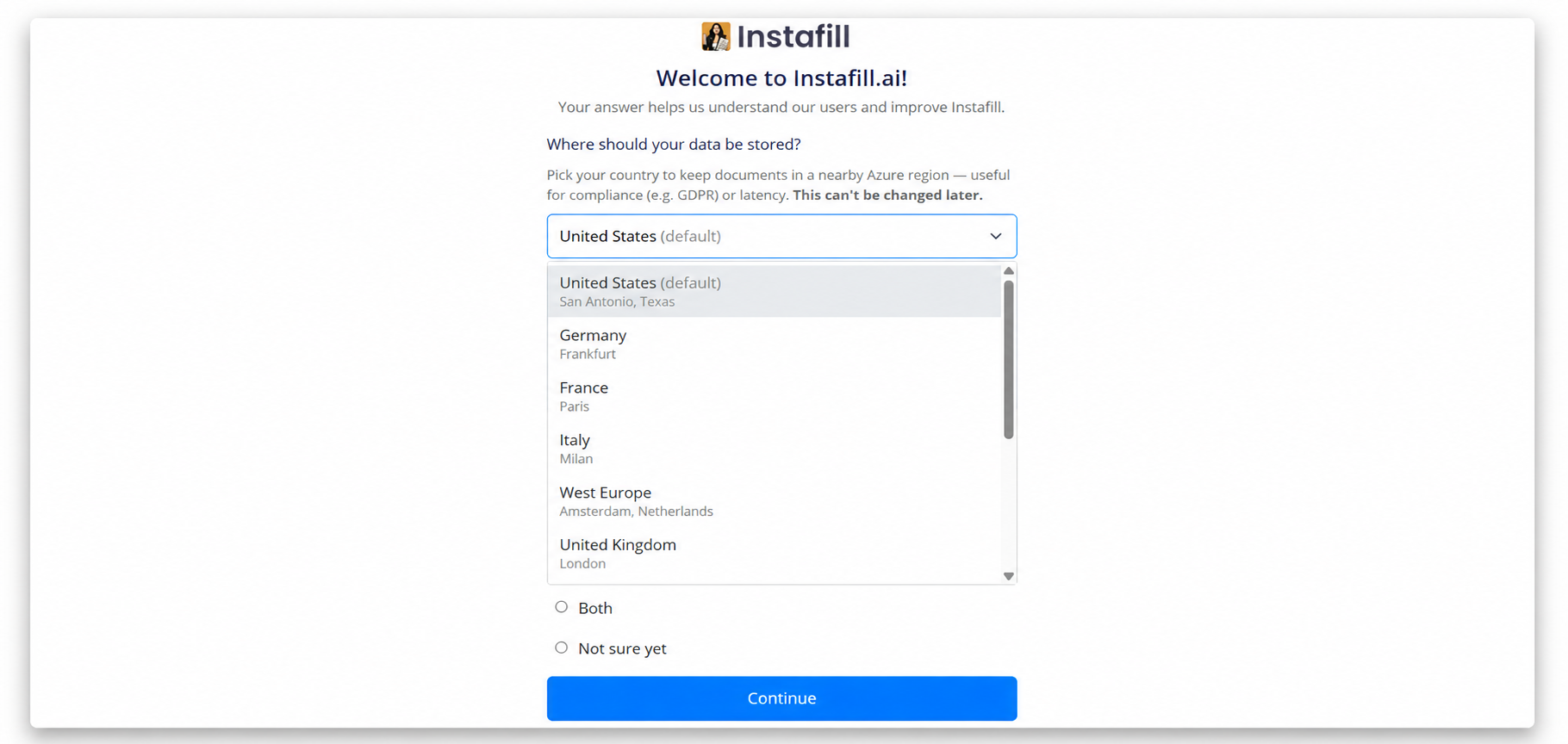
When you create your account, the welcome screen includes a storage region picker. By default, the region matching your location is pre-selected - a user in Canada sees Canada already chosen. If your country does not have a dedicated region, the United States is used. You can pick a different country from the dropdown before continuing.
2. See exactly what you are choosing
Each region shows its physical location and the compliance certifications it carries, so the choice is transparent before you commit to it.
3. Your region is fixed and always visible
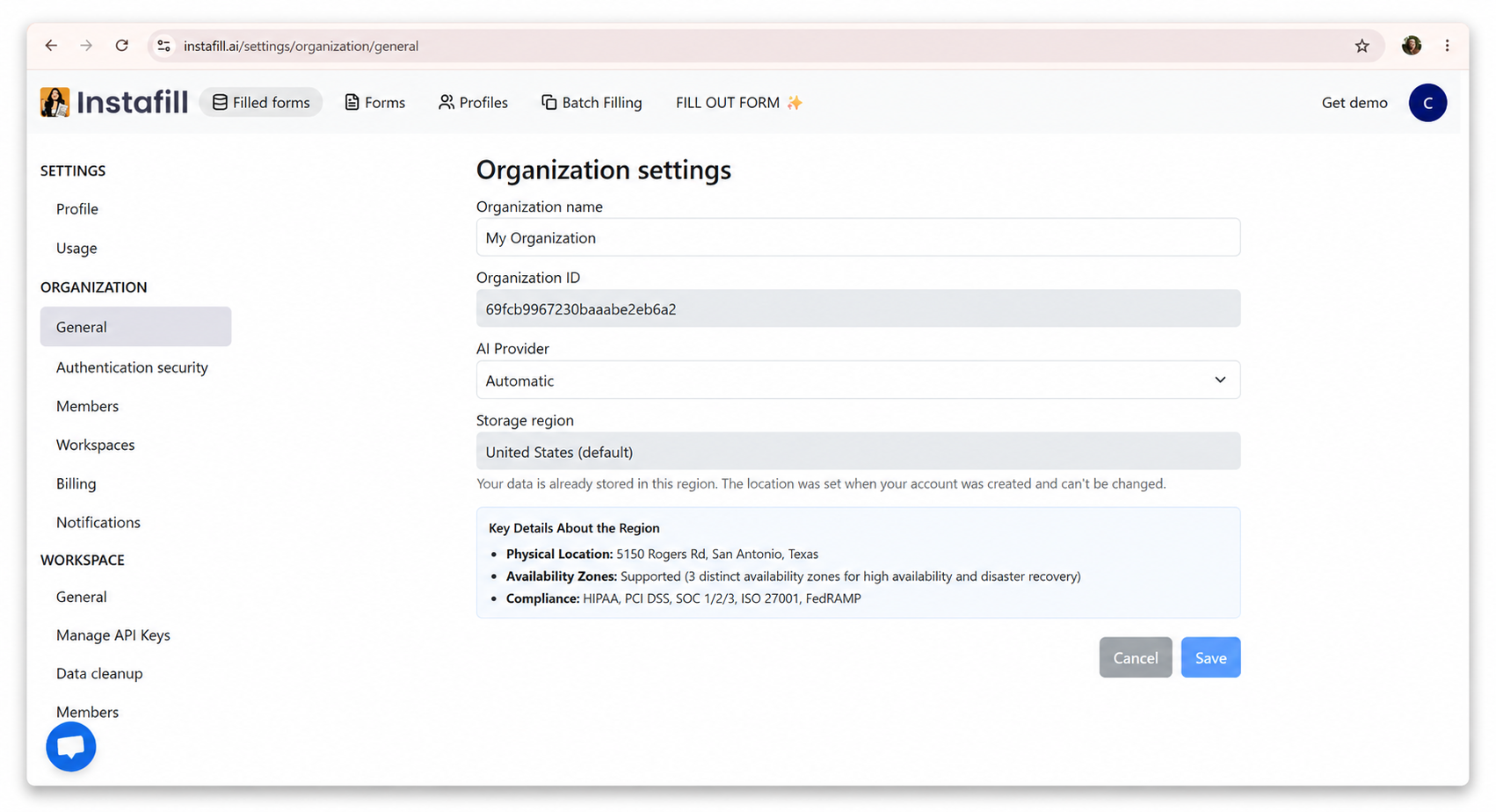
The region is set once, at account creation, and your data stays there from that point on. Because it is an organization-level setting, it covers every workspace and member at once. You can view it any time under Organization settings -> General, along with the region's physical location, availability zones, and compliance details.
Available Regions
Every region runs on Microsoft Azure. The United States is the default. Each row shows where the region physically lives and the compliance certifications it carries - the same details shown in-product when you select it.
| Region | Physical location | Compliance |
|---|---|---|
| United States (default) | San Antonio, Texas | HIPAA, PCI DSS, SOC 1/2/3, ISO 27001, FedRAMP |
| Germany | Frankfurt | GDPR, BSI C5, ISO 27001, SOC 1/2/3, HIPAA, PCI DSS |
| France | Paris | GDPR, HDS (Health Data Hosting), ISO 27001, SOC 1/2/3, PCI DSS |
| Italy | Milan | GDPR, ISO 27001, SOC 1/2/3, PCI DSS |
| West Europe | Amsterdam, Netherlands | GDPR, ISO 27001, SOC 1/2/3, HIPAA, PCI DSS |
| United Kingdom | London | UK G-Cloud, GDPR, ISO 27001, SOC 1/2/3, HIPAA, PCI DSS |
| Canada | Toronto | PIPEDA, CCCS Medium, ISO 27001, SOC 1/2/3, HIPAA, PCI DSS |
| Australia | Sydney | IRAP, ISO 27001, SOC 1/2/3, HIPAA, PCI DSS |
| Mexico | Querétaro | ISO 27001, SOC 1/2/3, PCI DSS |
| UAE | Dubai | ISO 27001, SOC 1/2/3, PCI DSS, Dubai Electronic Security Center |
| Israel | Tel Aviv | ISO 27001, SOC 1/2/3, PCI DSS |
You can cross-reference any location against Microsoft's official Azure global infrastructure list.
Compliance
Choosing a region places your data on infrastructure certified to that region's standards. These certifications cover the data centers, encryption, and operational controls your data runs on. They support your own compliance work - GDPR, HIPAA, and the rest - and complement Instafill.ai's own HIPAA, GDPR & SOC 2 program, but they do not replace your obligations.
The Same Security in Every Region
Choosing a region outside the US is not a security trade-off. Every region is provisioned to an identical baseline, with the same data encryption and workspace isolation that protect every account.
| Control | What it means |
|---|---|
| Data stays in your region | Storage is not replicated to any other geography. Your documents do not leave the country you chose. |
| Encrypted at rest | Infrastructure-level encryption is enabled on every account, on top of Azure's standard storage encryption. |
| No public access | Anonymous and public access is fully disabled. Storage sits behind a firewall that only allows our own services. |
| Encrypted in transit | TLS 1.2 is the minimum and all access is HTTPS-only. Direct anonymous requests to storage are refused. |
| Protected against loss | Soft-delete and versioning are enabled in every region, so accidental deletions and overwrites can be recovered. |
| Keys kept in a vault | Access keys are stored in and read from a secured key vault, never embedded in the application. |
What Stays in the US Region
One category of data does not move to your chosen region: blank, reusable form templates. These are shared across accounts to avoid re-processing the same form repeatedly, and they never contain personal data. Everything that can include your information - source files, filled forms, and extracted data - is stored in your region, and you control how long it is kept with data retention and cleanup.
Already Using Instafill.ai?
Existing organizations remain on the United States region, where their data already lives - nothing changed automatically. New organizations choose their region at sign-up.
If you would prefer your data in another region, we can migrate an existing organization for you. It is a one-time move we run on our side. Contact [email protected] with the region you want.
Common Questions
Can I change my region after signing up?
The region cannot be changed from the dashboard, but we can move it for you. Contact [email protected] with the region you want, and we will physically migrate your data to it - a one-time move we run on our side.
How do I see which region I'm in right now?
Open https://instafill.ai/settings/organization/general. Your current region, its physical location, and its compliance details are shown there.
Can I use different regions for different workspaces?
No. The region is chosen at the organization level and applies to every workspace, member, and document in your organization.
Do I have to pay extra to choose a region?
No. Choosing your storage region is available to every user at no additional cost.
Is Microsoft Azure secure?
Yes. Every region runs on Microsoft Azure, one of the most heavily audited cloud platforms in the world. Each data center is independently certified against broad standards like ISO 27001 and SOC 1/2/3, and many regions add certifications tied to local rules - GDPR and BSI C5 in Germany, HDS for health data in France, PIPEDA in Canada, HIPAA across several regions, and FedRAMP in the US. Those audits cover the physical buildings, the encryption, and the day-to-day operational controls your data sits on, which is why the same security baseline applies in every region.
My region isn't in the list - can you add it?
Write to us with the country you need. As long as Microsoft Azure runs a data center there, we can include it in an upcoming update. You can check coverage on the official Azure region list.
Is there any difference in how the product works between regions?
No. Access, encryption, and every feature behave identically regardless of region. The only difference is the physical location of the storage.