Cleanup & Data Management
Control how long Instafill.ai keeps your sessions, source documents, and filled forms - and delete everything on a schedule or immediately when a session completes
Overview
Every form filling session you run creates data: the source documents you uploaded, the completed PDF, and the session record itself. By default that data stays in your workspace so you can review, re-download, or reference it later. For many teams that convenience is fine. For others - those working under HIPAA, GDPR, or internal data minimization policies - keeping source documents longer than necessary creates compliance risk, not value.
Cleanup & Data Management gives workspace admins three ways to control this lifecycle. You can delete files manually at any point. You can check a box before submitting a fill session and have all files permanently removed the moment processing completes. Or you can configure a workspace-wide automatic policy so that sessions, source documents, and filled forms are deleted after a set number of days without anyone needing to remember to do it.
All deletions are permanent. There is no recycle bin and no way to restore deleted data through the application.
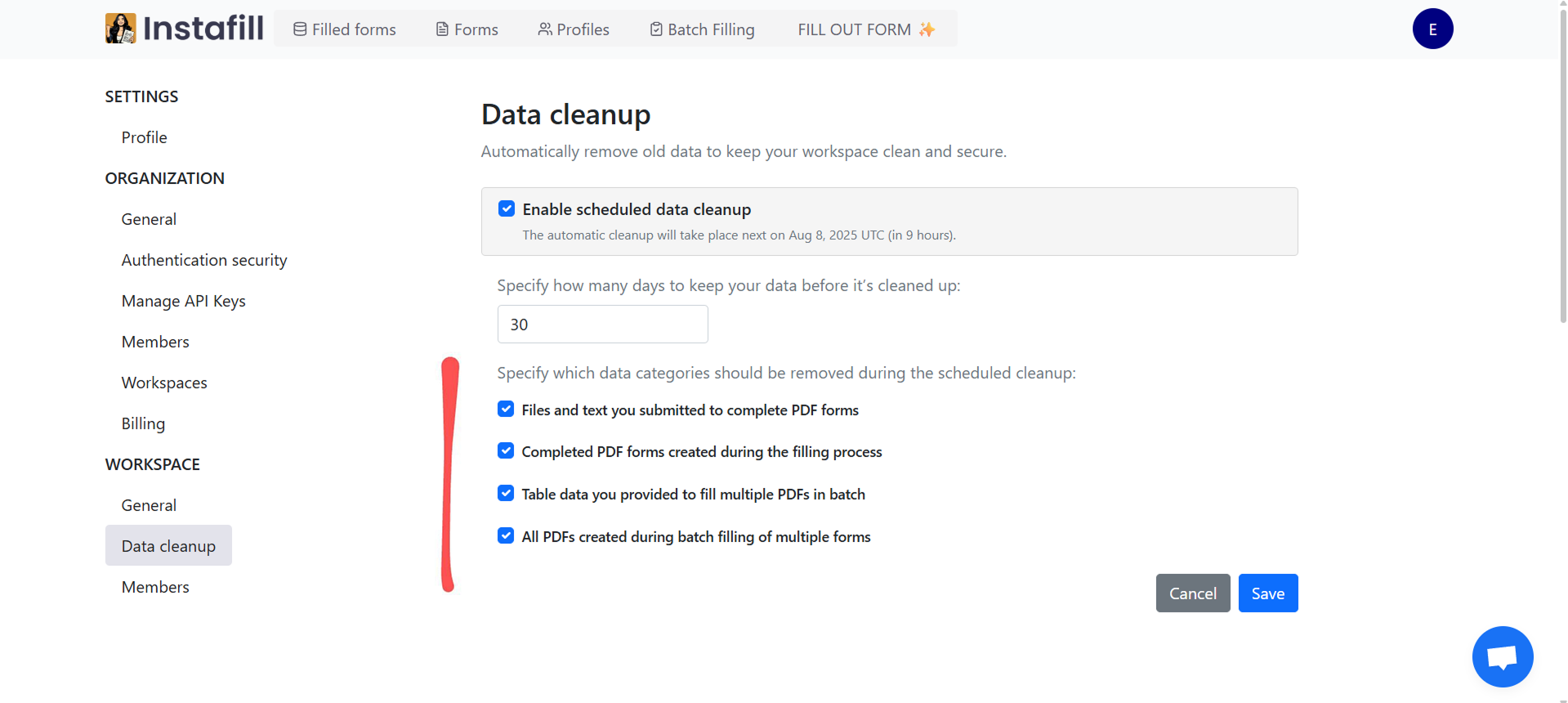
Data cleanup settings (Settings > Workspace > Data cleanup). Enable the policy, set the retention period in days, and choose which data categories it applies to. The page shows the exact time of the next scheduled run.
Key Capabilities
| Capability | What it means for you |
|---|---|
| Scheduled automatic cleanup | Set a retention period in days. The platform deletes matching data categories once per day at midnight UTC, automatically |
| Remove files immediately after processing | Check a box before submitting a fill. All source files and the completed PDF are permanently deleted as soon as the fill completes |
| Per-category retention control | Apply the cleanup policy to source files, completed forms, batch table data, and batch-generated PDFs independently |
| Manual deletion | Delete any specific file or session at any time without changing the workspace policy |
| GDPR right-to-erasure | A single erasure request removes all data for that user across sessions, sources, filled forms, and their profile - scoped to their workspace only |
| Encryption at rest | AES-256 encryption at rest, TLS 1.2+ in transit. Encryption keys stored in Azure Key Vault |
| Audit trail | Deletion activity logged for compliance reference |
| Workspace isolation | Cleanup operations scoped to the originating workspace - cannot affect another workspace's data |
How It Works
Instafill.ai gives you three ways to control how long your data is retained. They can be used independently or in combination depending on your workflow.
Option 1 - Manual Deletion
Delete any source file, completed form, or session directly in the app. Best for one-off cases - when a specific file was uploaded by mistake or a client requests immediate removal of their documents.
Deletion is permanent. Once removed, the data cannot be restored through the application.
Option 2 - Remove Files Immediately After Processing
For sessions where source documents cannot be retained at all, check "Remove files immediately after processing" before submitting the fill. Once processing completes:
- You download the completed PDF
- All uploaded source files and the completed PDF are permanently deleted from storage
- Nothing from that session is saved for future use
The trade-off: you cannot re-fill or reference that session later. If you need to fill the same form again, you re-upload your source files and start a new session. This option is appropriate for healthcare teams handling patient documents, legal teams with client confidentiality obligations, or any workflow where retaining uploaded source files beyond the immediate task is not acceptable.
Option 3 - Scheduled Automatic Cleanup by Policy
Organization owners and admins configure a workspace-wide policy under Settings > Workspace > Data cleanup. Setup takes about a minute:
- Enable "Scheduled data cleanup"
- Set a retention period in days (minimum 1). Common periods are 14, 30, 90, or 365 days depending on regulatory requirements
- Select which data categories the policy applies to:
- Source files and text submitted to fill forms
- Completed PDF forms from fill sessions
- Table data uploaded for batch filling (CSV, XLS, XLSX)
- Completed PDFs generated by batch filling
- Save the policy
Cleanup runs automatically once per day at midnight UTC. The settings page shows the exact date and time of the next scheduled run. Saving the policy does not trigger an immediate deletion - the next run applies your latest saved configuration. Items already past the retention threshold when you first enable the policy are included on the next run.
You can modify or disable the policy at any time. If you add a new data category to the policy later, items in that category already past the threshold are removed on the next scheduled run.
Full setup guide: How to Use Automatic Data Cleanup in Instafill.ai
GDPR Right-to-Erasure
When a right-to-erasure request is received for a user, deletion propagates across all data associated with that user in their workspace: fill sessions, source documents, completed forms, and the user profile. The deletion is scoped strictly to the requesting workspace - other users and other workspaces are not affected.
Where legal retention obligations apply, such as tax records with a statutory retention period, the data is kept only for that required period and the user is informed. Audit logs of the erasure action are retained to document compliance.
Use Cases
| Industry | How they use it |
|---|---|
| Healthcare | Enable "Remove files immediately after processing" for patient intake documents and clinical records - source files are gone as soon as the form is filled, supporting HIPAA data minimization requirements |
| Legal | Set a 7-year retention policy for fill sessions and completed forms to meet record-keeping requirements, while using a shorter or immediate retention for uploaded client source documents |
| Financial services | Apply different retention periods to different data categories - longer for loan application session records, shorter for uploaded bank statements and supporting documents |
| EU-based organizations | Use scheduled cleanup to enforce GDPR data minimization automatically and the right-to-erasure flow for individual deletion requests, with audit logs documenting each action |
| Government and compliance | Configure workspace-level retention policies that match specific regulatory requirements, with audit logs showing the policy is running consistently |
Healthcare - automating insurance credentialing and billing forms: A healthcare technology company automated credentialing forms across federal, state, insurance, and billing databases for over 1,000 physicians. Read the Healthcare Insurance Credentialing Form Automation case study.
Healthcare - VA Disability Benefits Questionnaires: A veterans benefits service automated VA DBQ forms across 15+ condition types, with specific control over which fields retain data between sessions and which are re-filled for each veteran. Read the VA Disability Benefits Questionnaire Automation case study.
Benefits
- Three deletion modes: Manual, immediate after processing, or scheduled by policy - use the level of control that fits each workflow
- Per-category retention: Source files, completed forms, and batch data each have their own retention setting - you are not locked into one timeline for everything in the workspace
- Immediate deletion for sensitive sessions: Check one box and all files are gone as soon as the fill is done - no waiting, no manual follow-up
- Scheduled policy enforcement: Set the rule once. The platform enforces it daily without anyone needing to remember
- Permanent, complete deletion: All deletions remove data permanently from storage. No trash bin, no temporary staging
- GDPR erasure is scoped and complete: One request removes all of a user's data within their workspace - other workspaces are unaffected
- Audit trail for compliance: Deletion activity is logged, giving you documented evidence for audits, client requests, or internal review
Security & Privacy
All data is scoped to the workspace it belongs to. Encryption uses AES-256 at rest and TLS 1.2+ in transit. Encryption keys are stored in Azure Key Vault and are not embedded in application code or the database. Source files are stored in Azure Blob Storage with Azure-managed encryption keys.
Deletions are permanent - there is no recycle bin and no recovery path through the application. If data is deleted by mistake, source files can be re-uploaded to generate a new completed form.
Instafill.ai completed an independent white-box penetration test of the full application and APIs in late 2025, covering authentication, authorization, data access controls, and payment flows. The full 102-page report is available on request for compliance or security reviews. Read the security update for details.
See Data Encryption & Security and Workspace Data Isolation for full technical details.
Common Questions
Is there a recycle bin or a way to recover deleted files?
No. All deletions in Instafill.ai - manual, immediate after processing, or by scheduled policy - are permanent. There is no recycle bin, no trash folder, and no recovery path through the application. If something is deleted by mistake, you can re-upload the source files and run the fill again to generate a new completed form.
When does the scheduled cleanup actually run?
Once per day at midnight UTC. The Data cleanup settings page shows the exact date and time of the next scheduled run. Saving your policy does not trigger an immediate deletion. Items already past the retention threshold at the time of the next run are included automatically, even if they were already past the threshold before you enabled the policy.
Can I apply different retention periods to different form types?
Retention policies apply at the workspace level to each data category. There is no native option to set different periods for different form types within the same workspace. Organizations that need separate policies for different form types use separate workspaces with separate configurations. See Workspace Management for workspace setup options.
What does "Remove files immediately after processing" do exactly?
It is a per-session checkbox you enable before submitting a fill. When checked, Instafill.ai permanently deletes all uploaded source files and the completed PDF as soon as processing finishes. You download the completed form first, then it is removed from storage.
Use this when source documents cannot be retained at all after the fill - for example, uploading a patient record to fill a healthcare form, or a client document to fill a legal form, where your policy requires the source file to not persist beyond the immediate task.
The trade-off: you cannot re-fill from that session later. You would need to re-upload the source files and start a new session.
How does GDPR right-to-erasure work?
When a right-to-erasure request is processed, deletion propagates across all data associated with that user within their workspace: fill sessions, source documents, completed forms, and the user profile. The deletion is scoped strictly to the requesting workspace - data belonging to other users or other workspaces is not affected.
Where legal retention obligations apply, the data is retained only for the required period and the user is informed. Audit logs of the erasure action are kept to document compliance.
Who can configure the data cleanup policy?
Organization owners and admins can configure the workspace cleanup policy under Settings > Workspace > Data cleanup. Regular users can enable "Remove files immediately after processing" on individual fill sessions, but cannot change workspace-level retention policies.