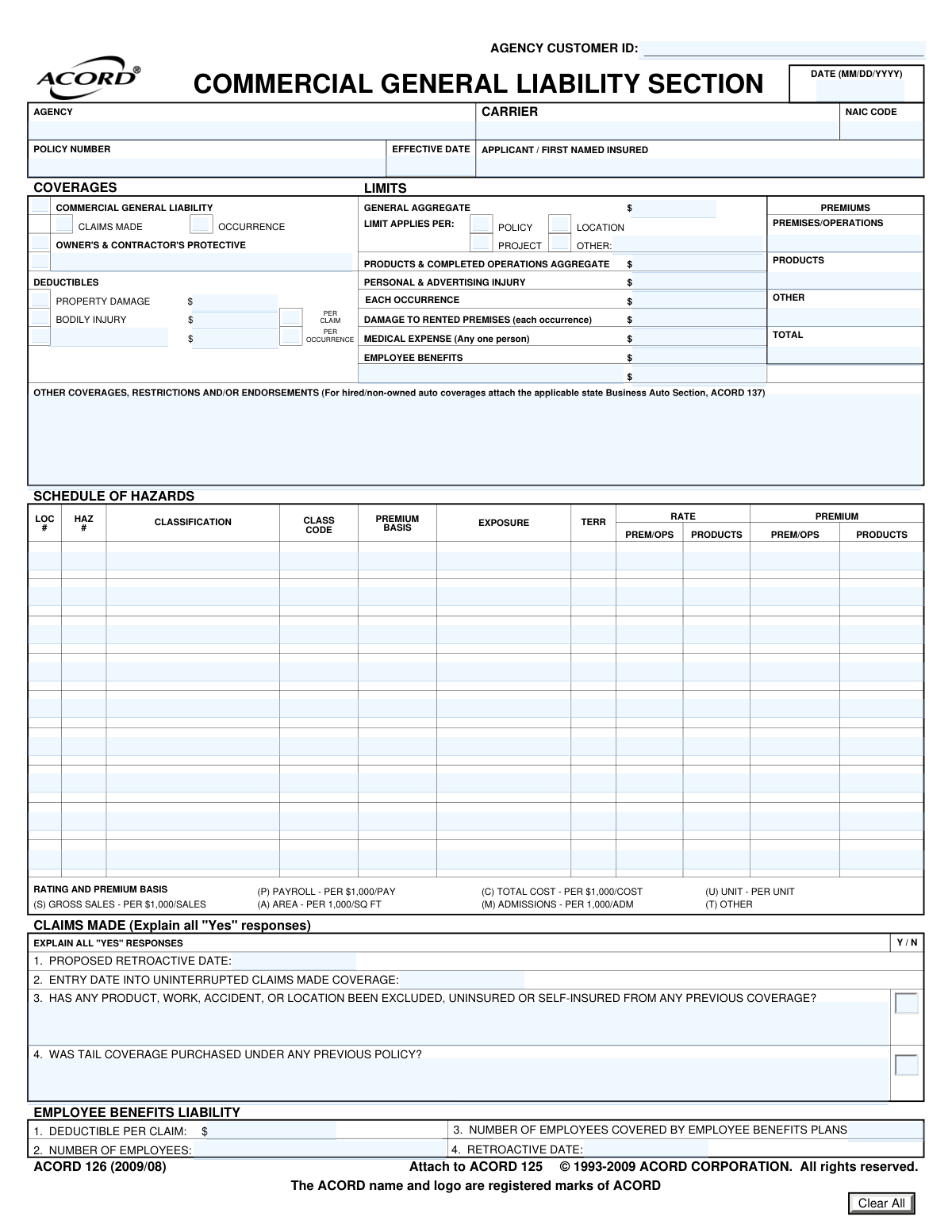
Yes! You can use AI to fill out ACORD 126, Commercial General Liability Section
ACORD Form 126 is a standardized insurance document used by businesses to apply for Commercial General Liability (CGL) insurance. It collects detailed information about a company's operations, premises, products, and potential hazards, which insurers use to assess risk and determine policy terms and premiums. Today, this form can be filled out quickly and accurately using AI-powered services like Instafill.ai, which can also convert non-fillable PDF versions into interactive fillable forms.
Our AI automatically handles information lookup, data retrieval, formatting, and form filling.
It takes less than a minute to fill out ACORD 126 using our AI form filling.
Securely upload your data. Information is encrypted in transit and deleted immediately after the form is filled out.
Form specifications
| Form name: | ACORD 126, Commercial General Liability Section |
| Number of pages: | 4 |
| Language: | English |
| Categories: | Section 8 forms, commercial forms, ACORD forms, SEC forms |
Instafill Demo: How to fill out PDF forms in seconds with AI
How to Fill Out ACORD 126 Online for Free in 2026
Are you looking to fill out a ACORD 126 form online quickly and accurately? Instafill.ai offers the #1 AI-powered PDF filling software of 2026, allowing you to complete your ACORD 126 form in just 37 seconds or less.
Follow these steps to fill out your ACORD 126 form online using Instafill.ai:
- 1 Navigate to Instafill.ai and upload your ACORD 126 form or select it from their template library.
- 2 Provide basic applicant, agency, and desired policy information in the header section.
- 3 Specify the desired coverage limits, such as General Aggregate, Products & Completed Operations, and Each Occurrence, along with any applicable deductibles.
- 4 Complete the 'Schedule of Hazards' by detailing your business operations, classifications, exposure basis (e.g., payroll, sales), and locations.
- 5 Answer the detailed questionnaires regarding your products, completed operations, contractor usage, and general business information, providing explanations for all 'Yes' responses.
- 6 List any additional interests, such as mortgagees or loss payees, who require inclusion on the policy.
- 7 Review all the information populated by the AI for accuracy, make any final adjustments, and then securely sign and submit the completed application.
Our AI-powered system ensures each field is filled out correctly, reducing errors and saving you time.
Why Choose Instafill.ai for Your Fillable ACORD 126 Form?
Speed
Complete your ACORD 126 in as little as 37 seconds.
Up-to-Date
Always use the latest 2026 ACORD 126 form version.
Cost-effective
No need to hire expensive lawyers.
Accuracy
Our AI performs 10 compliance checks to ensure your form is error-free.
Security
Your personal information is protected with bank-level encryption.
Frequently Asked Questions About Form ACORD 126
The ACORD 126 form, known as the Commercial General Liability Section, is an application supplement used to gather detailed information about a business's operations and risks. It is attached to the main ACORD 125 application and helps insurers underwrite and price a general liability policy.
Any business applying for or renewing a Commercial General Liability (CGL) insurance policy needs to complete this form. It is typically filled out by the business owner or an authorized officer, often with the help of their insurance agent.
An 'Occurrence' policy covers incidents that happen during the policy period, no matter when the claim is filed. A 'Claims Made' policy only covers claims that are actually filed during the policy period, which is why it requires a 'Retroactive Date' to define the start of coverage.
In this section, you must list your business operations using specific class codes and provide the 'premium basis' (e.g., payroll, sales, area) and 'exposure' (the total amount of that basis). This data is crucial for the insurer to calculate your premium accurately.
For most questions, a space is provided directly below for you to write your explanation. If you run out of room, you can use the 'Remarks' section on the last page or attach an ACORD 101, the Additional Remarks Schedule.
Insurers need to understand all potential sources of liability risk. Detailed information about your products (e.g., intended use, components) and your subcontractors' insurance status helps them assess the likelihood of a claim related to product failure or work done on your behalf.
It's helpful to have your annual sales figures, total payroll, details on subcontracted work, and any product brochures or warning labels. If you have foreign product exposures or need to list many additional insureds, you may need to attach ACORD 815 or ACORD 45 forms, respectively.
An 'Additional Interest' is any person or entity, other than you, who has a financial stake in your business and needs to be included on your policy. This often includes landlords (as an Additional Insured), lenders (as a Lienholder or Mortgagee), or clients who require it by contract.
You will submit the completed form to your insurance agent, who then provides it to the insurance carrier for a quote. Processing times vary by carrier, but your agent can give you an estimate of when to expect a response.
Yes, services like Instafill.ai use AI to accurately auto-fill form fields, which can save you significant time and help reduce errors. This is especially useful for complex, multi-page forms like the ACORD 126.
Simply upload your ACORD 126 PDF to the Instafill.ai platform. The AI will make the form fillable and guide you through a series of simple questions, automatically placing your answers in the correct fields.
You can use a service like Instafill.ai to instantly convert the flat, non-fillable PDF into an interactive, fillable form. This allows you to easily type your information directly onto the document, saving you the hassle of printing and handwriting.
A retroactive date is the date from which an insurer agrees to cover claims under a 'Claims Made' policy. You only need to provide this if you are selecting a 'Claims Made' policy, as it establishes the start of your continuous coverage history.
Compliance ACORD 126
Validation Checks by Instafill.ai
1
Conditional Requirement for Claims-Made Details
This check ensures that if the 'Claims Made' checkbox is selected under Commercial General Liability, then the 'Proposed Retroactive Date' and 'Entry Date Into Uninterrupted Claims Made Coverage' fields are mandatory. This is critical because these dates define the scope of coverage for a claims-made policy. Failure to provide these dates results in an incomplete application and prevents accurate policy rating and issuance.
2
Mandatory Explanation for 'Yes' Responses
Validates that for every question with a 'Y/N' option, if the user selects 'Y' (Yes), the corresponding explanation text field must be filled out. These explanations are essential for underwriters to understand and assess potential risks associated with the applicant's operations. An empty explanation for a 'Yes' answer would halt the application process pending clarification.
3
Logical Consistency of Employee Counts
This validation confirms that the 'Number of Employees Covered by Employee Benefits Plans' is not greater than the total 'Number of Employees'. This is a logical check to ensure data accuracy and prevent simple data entry errors. An invalid entry would require correction as it's impossible to cover more employees than exist.
4
Total Premium Summation Accuracy
Verifies that the value in the 'Total Premiums' field is the correct sum of the 'Premiums for Premises/Operations', 'Premiums for Products', and 'Premiums for Other' fields. This check ensures the financial data on the form is arithmetically correct. A mismatch would indicate a calculation error and could lead to incorrect billing or policy documents.
5
Date Format and Chronological Order
Ensures all date fields, such as 'Effective Date' and 'Proposed Retroactive Date', are entered in a valid MM/DD/YYYY format. It also checks for logical consistency, for example, that the 'Proposed Retroactive Date' is not later than the 'Entry Date Into Uninterrupted Claims Made Coverage'. This prevents data corruption and ensures key policy timelines are logical and correctly recorded.
6
Conditional Requirement for 'Other' Limit Application
This check ensures that if the 'Other' checkbox is selected for 'General Aggregate Limit Applies Per', the adjacent text field explaining the criteria must be completed. This is important for defining a non-standard basis for the aggregate limit. If the explanation is missing, the policy terms are ambiguous and the application cannot be processed.
7
Deductible Amount Presence
Validates that if a deductible checkbox (e.g., 'Property Damage', 'Bodily Injury') is checked, the corresponding monetary amount field must be populated with a positive numeric value. Checking the box indicates a deductible applies, so the amount is essential information. Failure to provide the amount leaves the policy terms incomplete.
8
Coverage Basis Selection (Occurrence vs. Claims Made)
This check verifies that if 'Commercial General Liability' is selected, exactly one of 'Occurrence' or 'Claims Made' must also be selected. These are mutually exclusive coverage triggers that fundamentally define the policy. Selecting neither or both is a logical contradiction that makes the application invalid.
9
Schedule of Hazards Row Completeness
Ensures that if any data is entered into a row within the 'Schedule of Hazards', all required fields for that row (e.g., Classification, Premium Basis, Exposure, Rate) are also filled. Partial information for a hazard is insufficient for rating and underwriting. This validation enforces the submission of complete data for each declared risk.
10
Additional Interest Recipient Details
This validation ensures that if any checkbox indicating a type of additional interest (e.g., 'Additional Insured', 'Loss Payee', 'Mortgagee') is selected, the corresponding 'Name and Address' field for that party must be filled out. This is crucial for ensuring legal notices and claim payments are directed to the correct entities. An incomplete entry would prevent the proper addition of these parties to the policy.
11
NAIC Code Format Validation
Verifies that the 'NAIC Code' field contains a valid 5-digit number. The NAIC code is a standard identifier for insurance companies used for regulatory and tracking purposes. An incorrect format or invalid code would prevent proper system identification of the carrier.
12
Subcontractor Information Dependency
This check ensures that if the 'Percentage of Work Subcontracted' is greater than zero, then the 'Description of Subcontracted Work' and 'Amount Paid to Subcontractors' fields are required. This information is vital for assessing the applicant's vicarious liability exposure through their subcontractors. Missing details would result in an incomplete risk profile.
13
Parking Fee Question Dependency
This validation enforces that the question 'Is a fee charged for parking?' can only be answered if the preceding question, 'Any parking facilities owned/rented?', is answered 'Yes'. This creates a logical flow and prevents the user from providing contradictory or irrelevant information. Answering the fee question without confirming the existence of parking facilities is a data entry error.
14
Monetary Field Value Validation
This check ensures that all fields intended for monetary values (e.g., all 'Limits', 'Premiums', 'Deductibles') contain only non-negative numeric characters and valid currency formatting. This maintains data integrity for all financial aspects of the policy. Submitting non-numeric or negative values would cause calculation errors and invalidate the application.
Common Mistakes in Completing ACORD 126
The form repeatedly instructs the applicant to 'EXPLAIN ALL "YES" RESPONSES' for numerous questions regarding operations, products, and general business activities. Applicants often check 'Y/N' but forget to provide the mandatory written explanation. This omission leaves underwriters unable to assess the risk, leading to processing delays, requests for more information, and potentially inaccurate quoting.
This grid requires precise data, including class codes, premium basis codes (e.g., 'P' for Payroll, 'S' for Sales), and exposure figures. Mistakes like using the wrong basis code, miscalculating the exposure (e.g., payroll per $1,000), or entering an incorrect class code are frequent. These errors directly impact the premium calculation, resulting in incorrect quotes and potential compliance issues.
Applicants often misunderstand the fundamental difference between 'Claims-Made' and 'Occurrence' policies, checking the wrong box or incorrectly filling out the 'Claims-Made' section with retroactive dates. This mistake can result in being quoted for the wrong type of policy, creating significant coverage gaps. It is crucial to understand that an 'Occurrence' policy covers incidents during the policy period, while 'Claims-Made' covers claims filed during the policy period.
In the 'Contractors' section, applicants frequently fail to provide complete details about their use of subcontractors, such as the percentage of work subcontracted, total cost, and whether Certificates of Insurance are consistently collected. Incomplete disclosure prevents the insurer from accurately evaluating the transferred risk. This can lead to higher premiums or, more critically, the denial of a claim related to work performed by an uninsured subcontractor.
When detailing products in the 'Products / Completed Operations' table, applicants may use overly general terms like 'various parts' or 'consulting services'. Underwriters require specific information to assess liability, such as the product's intended use and principal components. Vague descriptions will always trigger follow-up questions, delaying the quote and potentially leading to policy exclusions if the risk is not fully understood.
The 'Additional Interest' section is complex, and errors are common, such as listing a party as a 'Loss Payee' when a contract requires them to be an 'Additional Insured'. These roles have different legal implications; an Additional Insured gains liability protection, while a Loss Payee is simply entitled to payment for property damage. Such an error can constitute a breach of contract and leave the intended party without the required coverage.
Applicants may unintentionally omit or downplay high-risk activities queried in the 'General Information' section, such as the storage of hazardous materials, demolition work, or sponsoring social events with alcohol. This is a material misrepresentation that can lead to the denial of a related claim or even the voiding of the entire policy. Full transparency is essential for securing appropriate coverage.
Choosing whether the General Aggregate Limit applies per 'Policy', 'Project', or 'Location' has significant coverage implications, yet applicants often select an option without understanding the difference. For a contractor, a 'Per Project' aggregate provides a separate limit for each job, offering far greater protection than a single 'Per Policy' limit. An incorrect choice can leave a business severely underinsured in the event of multiple claims across different projects.
The application explicitly calls for attachments like product literature, the ACORD 815 for foreign products, or the ACORD 101 for additional remarks. Failing to include these documents renders the submission incomplete and halts the underwriting process. To avoid significant delays, create a checklist of all required attachments while filling out the form and ensure they are all included with the final submission.
An applicant might list a certain number of employees for Employee Benefits Liability but provide a different staff count in the 'Contractors' section, or list sales figures in the 'Schedule of Hazards' that don't align with the 'Products' section. These inconsistencies raise red flags for underwriters, suggesting carelessness and prompting a more detailed, time-consuming review of the entire application. Using an AI-powered tool like Instafill.ai can help prevent these errors by cross-referencing data points for consistency. If the form is a non-fillable PDF, Instafill.ai can also convert it into an interactive, fillable version to streamline the process.
Saved over 80 hours a year
“I was never sure if my IRS forms like W-9 were filled correctly. Now, I can complete the forms accurately without any external help.”
Kevin Martin Green
Your data stays secure with advanced protection from Instafill and our subprocessors

Robust compliance program
Transparent business model
You’re not the product. You always know where your data is and what it is processed for.
ISO 27001, HIPAA, and GDPR
Our subprocesses adhere to multiple compliance standards, including but not limited to ISO 27001, HIPAA, and GDPR.
Security & privacy by design
We consider security and privacy from the initial design phase of any new service or functionality. It’s not an afterthought, it’s built-in, including support for two-factor authentication (2FA) to further protect your account.
Fill out ACORD 126 with Instafill.ai
Worried about filling PDFs wrong? Instafill securely fills acord-126-commercial-general-liability-section forms, ensuring each field is accurate.