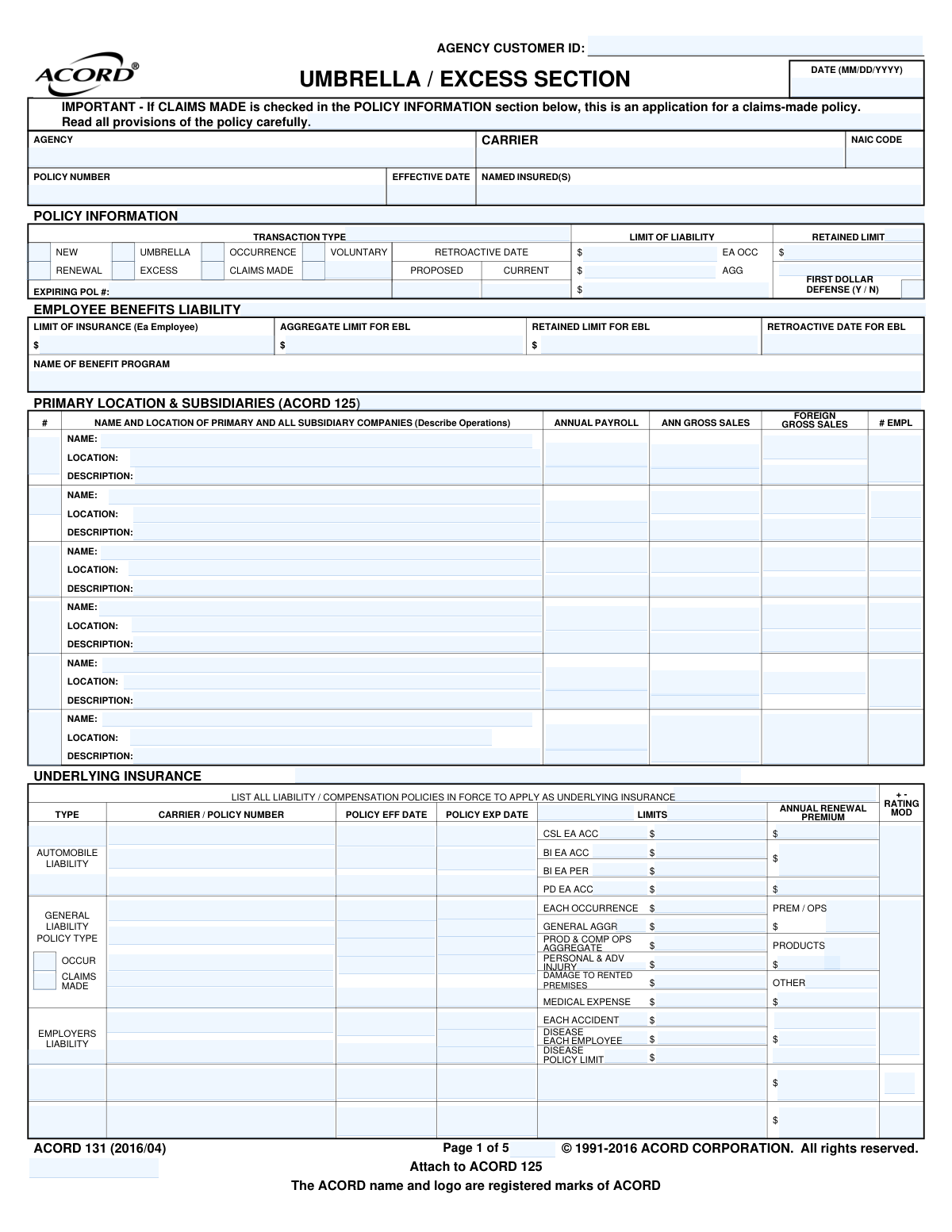
Yes! You can use AI to fill out ACORD 131, Umbrella / Excess Liability Section

ACORD Form 131, the Umbrella/Excess Liability Section, is a supplemental application used by businesses to apply for additional liability insurance that sits on top of their existing primary policies. It gathers detailed information on underlying coverages like general liability, auto, and employers liability, as well as specific risk exposures, allowing underwriters to assess the need for higher limits. Today, this form can be filled out quickly and accurately using AI-powered services like Instafill.ai, which can also convert non-fillable PDF versions into interactive fillable forms.
Our AI automatically handles information lookup, data retrieval, formatting, and form filling.
It takes less than a minute to fill out ACORD 131 using our AI form filling.
Securely upload your data. Information is encrypted in transit and deleted immediately after the form is filled out.

Form specifications

Form name: ACORD 131, Umbrella / Excess Liability Section
Number of pages: 5
Language: English
Categories: Section 8 forms, ACORD forms, SEC forms
main-image

Instafill Demo: How to fill out PDF forms in seconds with AI

How to Fill Out ACORD 131 Online for Free in 2026

Are you looking to fill out a ACORD 131 form online quickly and accurately? Instafill.ai offers the #1 AI-powered PDF filling software of 2026, allowing you to complete your ACORD 131 form in just 37 seconds or less.
Follow these steps to fill out your ACORD 131 form online using Instafill.ai:
  1. 1 Navigate to an AI-powered platform like Instafill.ai and upload your ACORD 131 PDF or select it from a template library.
  2. 2 Enter the basic policy information, including the named insured, agency details, policy number, and effective dates.
  3. 3 Detail all underlying insurance policies, such as General Liability, Auto, and Employers Liability, by providing carrier names, policy numbers, limits, and expiration dates.
  4. 4 Complete the exposure sections by answering questions related to business operations, including auto usage, product liability, foreign operations, and any other potential risks.
  5. 5 Review the information populated by the AI, verifying that all limits, dates, and responses to questions are accurate and complete.
  6. 6 The producer and applicant can then review the fraud statements and provide their digital signatures in the designated fields.
  7. 7 Securely download, print, or submit the finalized ACORD 131 form directly to the insurance carrier or agency.

Our AI-powered system ensures each field is filled out correctly, reducing errors and saving you time.

Why Choose Instafill.ai for Your Fillable ACORD 131 Form?

Speed

Complete your ACORD 131 in as little as 37 seconds.

Up-to-Date

Always use the latest 2026 ACORD 131 form version.

Cost-effective

No need to hire expensive lawyers.

Accuracy

Our AI performs 10 compliance checks to ensure your form is error-free.

Security

Your personal information is protected with bank-level encryption.

Frequently Asked Questions About Form ACORD 131

The ACORD 131 is a commercial insurance application used to apply for Umbrella or Excess Liability coverage. This type of policy provides additional liability limits above and beyond your primary policies, and this form must be attached to the main ACORD 125 application.

Any business or organization seeking to purchase or renew a Commercial Umbrella or Excess Liability insurance policy needs to complete this form as part of their application package.

An 'Occurrence' policy covers incidents that happen during the policy period, regardless of when the claim is filed. A 'Claims-Made' policy, as noted in the form's warning, only covers claims that are first made against you and reported to the insurer during the policy period.

You must provide a complete list of your existing primary liability policies, such as General Liability, Auto Liability, and Employers Liability. This includes the carrier name, policy number, effective dates, and coverage limits for each policy.

The Retained Limit is the amount of loss you, the insured, are responsible for paying before the umbrella or excess policy begins to pay. It is similar to a deductible or a self-insured retention (SIR).

A Retroactive Date is used on 'Claims-Made' policies and specifies the date after which an injury or damage must have occurred to be covered. Claims arising from incidents that happened before this date will not be covered by the policy.

In the 'Previous Experience' section, you must disclose details of all liability claims exceeding $10,000 or any incidents that might lead to a claim from the past five years. If you have none, you can check the 'NO SUCH CLAIMS' box.

The insurer needs to understand all potential sources of risk your business has to properly underwrite and price the policy. You must disclose any exposures your business has, even if they are infrequent, such as owning a watercraft or performing work for others.

The form must be signed and dated by both the applicant (an authorized representative of your company) and the producer (your insurance agent or broker). The signature confirms the information provided is true and accurate.

Yes, services like Instafill.ai use AI to auto-fill form fields accurately and save time. This can be especially helpful for long forms like the ACORD 131 by pulling information from your existing documents.

You can use a service like Instafill.ai to upload the PDF and fill it out in an interactive online format. This allows you to easily type information into the fields, save your progress, and ensure the form is legible.

If you have a non-fillable or 'flat' PDF, you can use a platform like Instafill.ai. It can convert the non-fillable PDF into an interactive form that you can easily complete by typing directly into the fields.

Compliance ACORD 131
Validation Checks by Instafill.ai

1
Ensures Transaction Type is Logical and Complete
This check verifies that either 'NEW' or 'RENEWAL' is selected, but not both. If 'RENEWAL' is chosen, it ensures the 'Expiring Pol #' field is populated with the policy number being renewed. This is crucial for maintaining policy history and ensuring continuous coverage for the insured. A failure would lead to processing delays and potential gaps in coverage records.
2
Validates Retroactive Date for Claims-Made Policies
This check confirms that if 'CLAIMS MADE' coverage is indicated, a 'Retroactive Date' is provided. It also verifies that the 'Retroactive Date' is on or before the policy's 'Effective Date'. This is critical because the retroactive date defines the starting point for covered events under a claims-made policy; an invalid date would fundamentally alter the scope of coverage.
3
Validates Underlying Policy Period Dates
This validation ensures that for each listed underlying policy, the 'Policy Eff Date' and 'Policy Exp Date' are in a valid MM/DD/YYYY format. It also confirms that the effective date occurs before the expiration date. This is fundamental for defining the coverage period and preventing invalid policy term data, which could lead to incorrect premium calculations and coverage disputes.
4
Requires Explanation for 'YES' Answers in Exposure Sections
This check ensures that for any question in the 'Additional Exposures' or 'Underlying General Liability Information' sections answered with 'Y' (Yes), the corresponding explanation field is filled out. These explanations are vital for underwriters to assess risk accurately. Missing details can lead to incomplete risk evaluation, incorrect pricing, or application rejection.
5
Ensures Completeness of Underlying Insurance Details
This validation verifies that for every underlying policy listed, essential fields such as 'Carrier / Policy Number', 'Policy Eff Date', 'Policy Exp Date', and 'Limits' are all populated. This information is fundamental for the umbrella/excess policy, as it defines the primary layer of coverage. Incomplete data prevents the carrier from confirming that underlying requirements are met, halting the quoting and binding process.
6
Validates Financial and Limit Fields for Numeric Format
This validation ensures that all fields intended for monetary values or limits (e.g., 'Annual Renewal Premium', 'General Aggregate Limit', 'Annual Gross Sales') contain only valid numeric characters and formatting. Non-numeric data in these fields will cause calculation errors for rating and premium determination. This check is essential for maintaining data integrity and ensuring the policy is priced correctly.
7
Ensures Logical Consistency for Previous Claims Experience
This check verifies the logic between the 'NO SUCH CLAIMS' checkbox and the corresponding details text area. If the box is checked, the text area must be empty; if it is unchecked, the system should expect claim details if any exist. This prevents contradictory information and ensures that the applicant's claims history, a key underwriting factor, is clearly and accurately represented.
8
Correlates Exposure Presence with Coverage Indication
This check verifies that if an 'Exposure' checkbox is marked for a specific risk (e.g., Watercraft, Aircraft), the corresponding 'Coverage' checkbox is also marked in the underlying policies checklist. An exposure without corresponding underlying coverage is a significant red flag for an umbrella carrier. This validation ensures that known risks are properly insured at the primary level, which is a prerequisite for obtaining excess coverage.
9
Validates Arkansas-Specific Rule for Defense Costs
This check enforces the specific regulatory requirement for the state of Arkansas mentioned on the form. It verifies that if the insured's location is in Arkansas, the 'ARE DEFENSE COSTS: WITHIN AGGREGATE LIMITS?' box is not checked for the underlying General Liability policy. This is a critical compliance check to ensure the policy structure adheres to state law, preventing the issuance of a non-compliant policy.
10
Ensures Tail Coverage Effective Date is Provided and Valid
This validation confirms that if the applicant indicates 'YES' to purchasing 'tail' coverage (Question 5), the corresponding 'Eff. Date' field is populated with a valid date in MM/DD/YYYY format. The effective date of tail coverage is essential for defining the extended reporting period. Missing or invalid data would create a critical gap in understanding the applicant's prior acts coverage.
11
Validates Vehicle Counts as Non-Negative Integers
This check ensures that all fields for vehicle counts in the auto exposure section (e.g., '# Owned', '# Leased', '# Non-Owned') contain only whole, non-negative numbers. The number of vehicles is a primary exposure basis for auto liability rating. Entering text, decimals, or negative numbers would corrupt the rating calculation and lead to an inaccurate premium.
12
Validates Mutually Exclusive Selection for Defense Costs
This check ensures that only one option is selected for how defense costs are handled ('Within Aggregate Limits', 'A Separate Limit', or 'Unlimited'). These options are mutually exclusive and define a critical aspect of the underlying coverage. Selecting multiple options creates ambiguity and prevents accurate assessment of the underlying policy's structure, which is necessary for pricing the excess layer.
13
Ensures NAIC Code is a Valid Format
This validation checks that the 'NAIC Code' field contains a 5-digit numeric value. The NAIC code is a standard identifier for insurance carriers, essential for regulatory reporting and accurate company identification. An incorrect format would cause submission rejections and data mismatches in industry databases.
14
Enforces Florida National Producer Number Requirement
This validation checks if the policy is being written for an insured in Florida and, if so, ensures the 'NATIONAL PRODUCER NUMBER' field is populated. The form explicitly states this is required in Florida. Failure to provide state-mandated information can result in regulatory non-compliance and rejection of the application by the carrier.

Common Mistakes in Completing ACORD 131

Incomplete or Inaccurate Underlying Policy Schedule

Applicants often provide incomplete carrier names, incorrect policy numbers, or inaccurate limits in the 'Underlying Insurance' grid. This happens when rushing or not having the underlying policy declaration pages available for reference. Inaccurate data can lead to significant delays in quoting, incorrect pricing, and potentially fatal coverage gaps if the umbrella policy does not properly align with the primary layers. To avoid this, meticulously cross-reference every detail with the source policy documents. AI-powered tools like Instafill.ai can prevent these errors by automatically extracting and validating information from underlying policies.

Confusing 'Occurrence' and 'Claims-Made' Policies

A frequent error is incorrectly checking the 'Occurrence' or 'Claims-Made' box for the policy type or for the underlying General Liability. This distinction is critical as it defines what triggers coverage. Forgetting to include the 'Retroactive Date' for a claims-made policy is a related and serious omission. This mistake can lead to a complete misunderstanding of the coverage being requested and result in a policy that does not cover prior acts as intended. Always verify the policy form type on the underlying declaration page before completing this section.

Failing to Explain 'YES' Responses

The form contains numerous questions, particularly in the 'Underlying General Liability Information' and 'Additional Exposures' sections, that require a detailed explanation for every 'YES' answer. Applicants frequently check 'Y/N' but neglect to provide the mandatory written details. This forces the underwriter to halt the process and request the missing information, causing delays. To prevent this, treat every 'YES' as a prompt to provide a full, clear explanation in the space provided or on an attached ACORD 101 remarks schedule.

Ignoring the 'Exposure' Column in the Coverage Checklist

In the 'Underlying Insurance Coverage Information' checklist, applicants often check the box indicating a 'Coverage' is in place but fail to check the corresponding 'Exposure' box. Underwriters need to know both if a coverage exists and if the applicant has an actual exposure for it (e.g., having liquor liability coverage but also having an exposure because they serve alcohol). This ambiguity requires follow-up and slows down the underwriting process. Ensure that for each line item, you consider and mark both the coverage and exposure status.

Vague or Generic Description of Operations

In the 'Primary Location & Subsidiaries' section, providing a generic description like 'Consulting' or 'Services' is a common mistake. Underwriters require a specific description of operations (e.g., 'Environmental engineering consulting for commercial construction') to accurately assess risk. Vague descriptions lead to underwriting questions and delays. Be as specific as possible about the nature of the business, its products, and services at each location listed.

Incomplete Claims History Disclosure

In the 'Previous Experience' section, applicants may incorrectly check the 'No Such Claims' box or provide incomplete details for past incidents. This can happen if they forget about a claim or don't have the full details (date, description, amount paid, amount outstanding). Omitting or misrepresenting claim history is a material misrepresentation that could lead to the policy being voided. Always conduct a thorough review of loss runs for the past five years and report all applicable claims with complete information.

Misidentifying How Defense Costs are Handled

Question 1 in 'Underlying General Liability Information' asks if defense costs are within the aggregate, a separate limit, or unlimited. This is a crucial detail for an umbrella underwriter, but it is often answered incorrectly or guessed. An incorrect answer can lead to improper layering and pricing. This information is found on the underlying General Liability policy declarations or endorsements; always verify it there before answering.

Missing State-Mandated Signatures or Initials

The final page of the form includes state-specific requirements, such as initialing the selection or rejection of Uninsured/Underinsured Motorist (UM/UIM) coverage in states like Louisiana and New Hampshire. Forgetting to provide these initials or the applicant's signature renders the selection invalid and the application incomplete. This can cause significant processing delays and legal issues. Carefully review the signature page and complete all required initial and signature blocks. If the form is a non-fillable PDF, a tool like Instafill.ai can convert it to a fillable version, making it easier to add digital signatures and initials.

Inaccurate Vehicle Exposure Information

In the 'Additional Exposures - Auto Liability' section, applicants often provide incorrect counts for owned, leased, and non-owned vehicles or misclassify their radius of operation (Local, Intermediate, Long Distance). This information is vital for pricing the auto liability exposure that the umbrella policy will cover. Inaccurate data can result in incorrect premiums or questions about the true scope of the risk. A detailed and current vehicle schedule should be used to fill out this section accurately.
Saved over 80 hours a year

“I was never sure if my IRS forms like W-9 were filled correctly. Now, I can complete the forms accurately without any external help.”

Kevin Martin Green

Your data stays secure with advanced protection from Instafill and our subprocessors

Robust compliance program

Transparent business model

You’re not the product. You always know where your data is and what it is processed for.

ISO 27001, HIPAA, and GDPR

Our subprocesses adhere to multiple compliance standards, including but not limited to ISO 27001, HIPAA, and GDPR.

Security & privacy by design

We consider security and privacy from the initial design phase of any new service or functionality. It’s not an afterthought, it’s built-in, including support for two-factor authentication (2FA) to further protect your account.

Fill out ACORD 131 with Instafill.ai

Worried about filling PDFs wrong? Instafill securely fills acord-131-umbrella-excess-liability-section forms, ensuring each field is accurate.