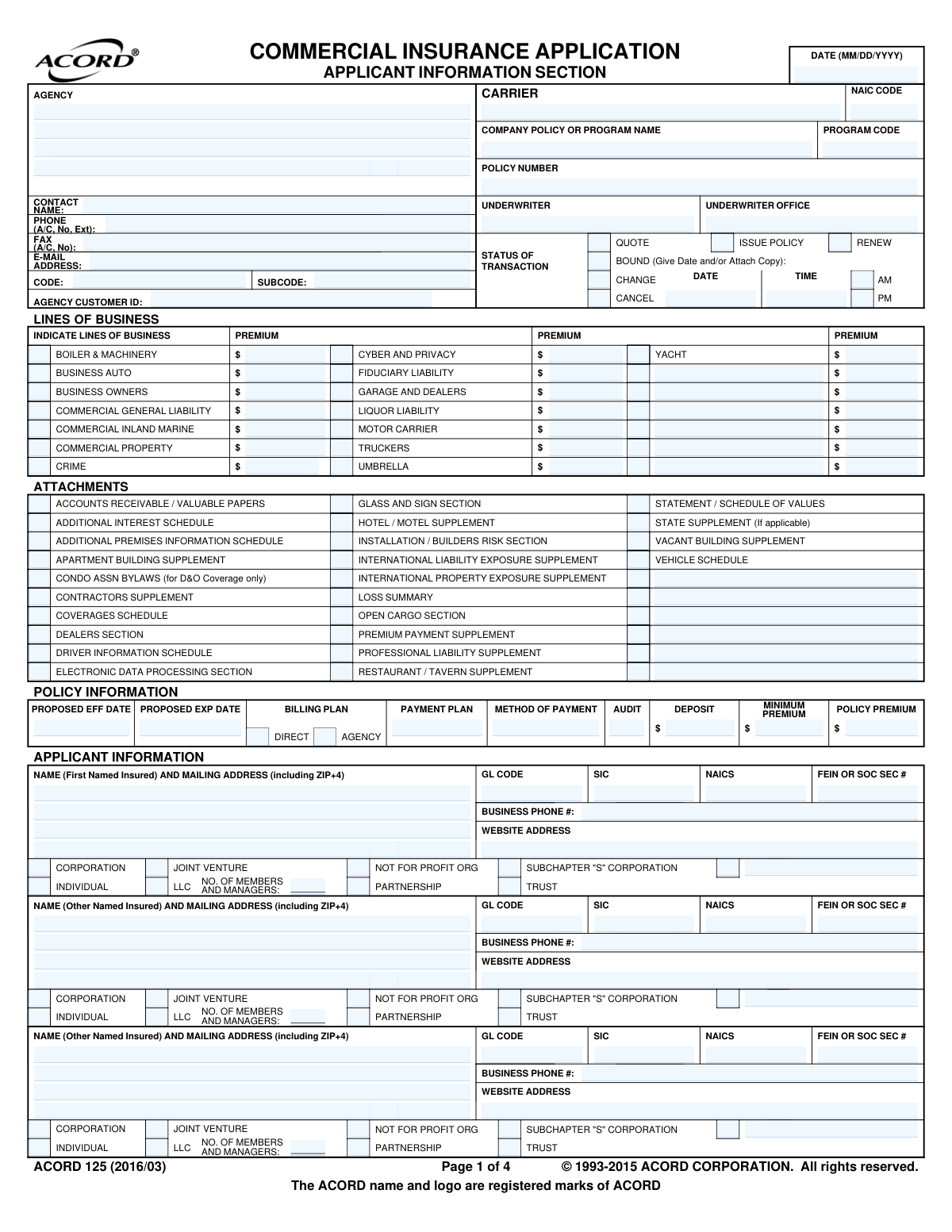
Yes! You can use AI to fill out ACORD 125, Commercial Insurance Application, Applicant Information Section
ACORD Form 125, the Commercial Insurance Application, is a standardized document used by insurance agents and brokers to gather essential information from businesses applying for commercial insurance coverage. It collects data on the applicant's business structure, operations, premises, prior insurance history, and loss history to underwrite policies like general liability, commercial property, and business auto. Today, this form can be filled out quickly and accurately using AI-powered services like Instafill.ai, which can also convert non-fillable PDF versions into interactive fillable forms.
Our AI automatically handles information lookup, data retrieval, formatting, and form filling.
It takes less than a minute to fill out ACORD 125 using our AI form filling.
Securely upload your data. Information is encrypted in transit and deleted immediately after the form is filled out.
Form specifications
| Form name: | ACORD 125, Commercial Insurance Application, Applicant Information Section |
| Number of fields: | 551 |
| Number of pages: | 4 |
| Language: | English |
| Categories: | ACORD forms, commercial forms, insurance application forms, insurance forms, SEC forms, Section 8 forms |
Instafill Demo: How to fill out PDF forms in seconds with AI
How to Fill Out ACORD 125 Online for Free in 2026
Are you looking to fill out a ACORD 125 form online quickly and accurately? Instafill.ai offers the #1 AI-powered PDF filling software of 2026, allowing you to complete your ACORD 125 form in just 37 seconds or less.
Follow these steps to fill out your ACORD 125 form online using Instafill.ai:
- 1 Navigate to Instafill.ai and upload or select the ACORD 125 form.
- 2 Use the AI assistant to accurately input agency, carrier, and policy information.
- 3 Complete the Applicant Information section, providing details about your business entity, contact information, and business nature.
- 4 Fill in the Premises Information, describing your business locations, operations, and any additional interests.
- 5 Answer all questions in the General Information section, including details about safety programs, prior insurance, and loss history.
- 6 Review all the information pre-filled by the AI for accuracy and completeness.
- 7 Electronically sign and date the application before downloading or submitting it to the insurance carrier.
Our AI-powered system ensures each field is filled out correctly, reducing errors and saving you time.
Why Choose Instafill.ai for Your Fillable ACORD 125 Form?
Speed
Complete your ACORD 125 in as little as 37 seconds.
Up-to-Date
Always use the latest 2026 ACORD 125 form version.
Cost-effective
No need to hire expensive lawyers.
Accuracy
Our AI performs 10 compliance checks to ensure your form is error-free.
Security
Your personal information is protected with bank-level encryption.
Frequently Asked Questions About Form ACORD 125
The ACORD 125 is a standard Commercial Insurance Application used by businesses to apply for various types of coverage. Your insurance agent will typically help you complete this form to gather the necessary information for underwriters to provide a quote or issue a policy.
This application covers a wide range of commercial insurance, including Commercial General Liability, Property, Business Auto, and Business Owners Policies (BOP). You can also apply for specialized coverages like Cyber Liability, Professional Liability, and Umbrella policies by checking the appropriate boxes.
A 'Named Insured' is the primary individual or business entity covered by the policy. An 'Additional Interest,' such as a landlord or lender (mortgagee/lienholder), is another party with a financial stake in your property who is added to the policy to protect their interest.
These are industry classification codes that help insurers understand your business operations and risks. Your insurance agent can help you determine the correct NAICS (North American Industry Classification System), SIC (Standard Industrial Classification), and GL (General Liability) codes for your business.
You will need copies of your insurance policies from the last few years, which show your previous carriers, policy numbers, and premiums. For the loss history, you must list any claims, including the date, a brief description, and the amount paid or reserved.
If your business is new and has no prior insurance or loss history, you can simply state 'New Venture' in the relevant sections or check the box indicating no prior losses. Your agent will guide you on the best way to note this on the application.
These are additional forms that provide more detailed information for specific industries or coverages, such as the Restaurant/Tavern Supplement or Contractors Supplement. Your agent will let you know which, if any, supplements are required based on your business operations.
Your Federal Employer Identification Number (FEIN) or Social Security Number (for sole proprietors) is used by the insurance company to accurately identify your business for underwriting and reporting purposes. It ensures all information is correctly associated with your business entity.
After submission, an underwriter at the insurance carrier will review your application to assess your business's risk. They will then use this information to determine your eligibility for coverage and calculate a premium for your policy quote.
Yes, services like Instafill.ai use AI to accurately auto-fill form fields, which can save you significant time and help reduce errors. These tools can pull information from your existing documents to populate the application quickly.
You can use a service like Instafill.ai to easily complete the form online. Simply upload the ACORD 125 PDF, and the platform will make it an interactive, fillable form that you can complete and sign electronically.
If you have a non-fillable or 'flat' PDF, you can use a tool like Instafill.ai to convert it into an interactive, fillable form. This allows you to type your information directly into the fields instead of printing and filling it out by hand.
Provide a clear and detailed summary of your primary business activities. Be specific about what you do, the services you provide, or the products you sell, as this helps the underwriter accurately classify your business risk.
Your signature confirms that the information you have provided is true, correct, and complete to the best of your knowledge. It also serves as an acknowledgment that you have read the fraud warnings and privacy notices included on the form.
Compliance ACORD 125
Validation Checks by Instafill.ai
1
Validates FEIN or SSN Format
Checks if the provided Federal Employer Identification Number (FEIN) or Social Security Number (SSN) is in the correct 9-digit format. This is crucial for uniquely identifying the business entity for legal, tax, and credit purposes. An invalid number can lead to policy issuance failure, incorrect reporting, and compliance issues.
2
Ensures Policy Expiration Date Follows Effective Date
This validation confirms that the 'Proposed Expiration Date' is chronologically later than the 'Proposed Effective Date'. This is a fundamental logical requirement for defining a valid policy term. A failed validation would indicate a data entry error that makes the requested coverage period nonsensical and would prevent the policy from being quoted or issued.
3
Requires Explanation for Affirmative General Information Responses
This check ensures that if a question in the 'General Information' section (e.g., exposure to flammables, prior cancellations, foreign operations) is answered 'Yes', the corresponding explanation field must be filled out. These explanations are critical for underwriters to accurately assess the applicant's risk profile. Missing details can lead to application delays, incorrect risk pricing, or outright rejection.
4
Validates LLC Member and Manager Count
This validation ensures that if the applicant's organization type is marked as 'LLC', the 'No. of Members and Managers' field must contain a valid number greater than zero. This information is essential for underwriting to understand the management structure and ownership of the LLC. Failure to provide this count for an LLC will result in an incomplete application and prevent proper risk assessment.
5
Verifies Total Policy Premium Matches Line of Business Premiums
This check calculates the sum of all individual premium amounts entered for each selected Line of Business and verifies that it equals the value in the 'Policy Premium' field. This ensures mathematical accuracy and consistency in the premium calculation. A mismatch indicates a data entry error that must be corrected before the policy can be billed or issued.
6
Validates ZIP+4 Code Format
This check verifies that all ZIP code fields are entered in a valid format, either 5 digits (e.g., 90210) or the full 9-digit ZIP+4 format (e.g., 90210-1234). Correct postal codes are essential for accurate mail delivery of policy documents and bills. An invalid format could lead to returned mail and communication breakdowns with the insured.
7
Validates Chronological Order of Loss History Dates
This check ensures that for each entry in the Loss History section, the 'Date of Claim' is on or after the 'Date of Occurrence'. It is logically impossible for a claim to be filed before the incident happened. This validation catches data entry errors and ensures the integrity of the loss history data, which is critical for underwriting.
8
Requires Binding Date and Time when 'Bound' is Checked
This validation enforces that if the 'Bound' checkbox is selected under 'Status of Transaction', then the 'Transaction Status Date' and 'Time' fields must be completed. The exact date and time of binding are legally significant as they mark the precise moment coverage begins. Missing this information creates ambiguity and potential legal exposure for the carrier and agency.
9
Validates Premises Square Footage Consistency
This check verifies that the sum of 'Occupied Area' and any area leased to others does not exceed the 'Total Building Area' for a given premises. This ensures the logical consistency of the physical space being described. Inaccurate square footage can lead to incorrect property valuation, improper rating, and inadequate coverage limits.
10
Enforces Single Selection for Organization Type
This validation ensures that for each named insured, only one checkbox is selected from the list of legal entity types (Individual, Partnership, Corporation, LLC, etc.). A business can only have one primary legal structure. Selecting multiple types indicates a data entry error and creates ambiguity about the legal entity being insured.
11
Verifies Validity of NAICS Code
This check validates the entered North American Industry Classification System (NAICS) code against an official database. This code is fundamental to classifying the business's operations for rating, statistical analysis, and determining eligibility for certain programs. An invalid code will prevent proper classification and may lead to incorrect premium calculations.
12
Ensures Completeness of Agency Contact Information
This validation confirms that essential agency details, including 'Agency Name', 'Agency Contact Name', and 'Agency Phone Number', are provided. This information is mandatory for the carrier to process the application, ask follow-up questions, and communicate decisions. An application with missing agency contact information is incomplete and cannot be processed.
13
Requires at least one Line of Business to be selected
This check ensures that the applicant has selected at least one line of business for which they are requesting coverage (e.g., Commercial General Liability, Business Auto). An application cannot be processed without knowing what type of insurance is being requested. This validation prevents the submission of an empty or incomplete request.
14
Cross-references Required Attachments with Selections
This validation checks for consistency between answers and the 'ATTACHMENTS' section. For example, if the applicant answers 'Yes' to having foreign operations, the system verifies that the 'International Liability Exposure Supplement' checkbox is ticked. This ensures all necessary supporting documents are included, preventing processing delays due to incomplete submissions.
15
Validates Business Start Date
This check ensures the 'Date Business Started' is a valid date and is not in the future. This date is important for underwriters to determine the expertise, stability, and business success of the applicant. An invalid or future date would indicate a data entry error and require correction before the risk can be properly evaluated.
Common Mistakes in Completing ACORD 125
Applicants often provide overly simple or technical descriptions, such as 'Contractor' or using industry classification codes, which the form explicitly advises against. Underwriters need a detailed, plain-language narrative of the business's day-to-day activities to accurately assess risk and apply the correct premium. A vague description can lead to misclassification, incorrect pricing, or even denial of a claim if the actual operations were not properly disclosed. To avoid this, clearly describe all facets of the business, including services offered, customer types, and materials used.
A frequent error is failing to report all prior claims or losses within the requested period, often because the applicant believes a small loss or a 'not-at-fault' incident is irrelevant. Insurers require a complete history to evaluate risk, and any omission, intentional or not, can be considered material misrepresentation. This could lead to the policy being voided, a future claim being denied, or even allegations of insurance fraud. Always disclose every incident, regardless of fault or amount, and provide all requested details like dates, amounts paid, and claim status.
The General Information section contains critical underwriting questions (e.g., prior bankruptcies, safety violations, foreign operations) that require a detailed explanation for every 'Yes' answer. Applicants often check 'Yes' but leave the explanation field blank, assuming the agent will handle it or that the answer is self-explanatory. This always results in an incomplete application, causing significant processing delays as the underwriter must halt review to request the missing information. To prevent this, be prepared to provide a full, written explanation for any 'Yes' response immediately.
Applicants may enter their 'Doing Business As' (DBA) name instead of the full, registered legal entity name, or select the wrong entity type (e.g., marking 'Individual' for an LLC). The legal name and entity type on the policy must exactly match legal documents to ensure the correct entity is covered. A mismatch can create significant legal and financial problems during a claim, potentially leaving the business uninsured. Always use the full legal name as registered with the state and double-check that the correct entity structure (Corporation, LLC, Partnership, etc.) is selected.
The 'Additional Interest' section is complex, and applicants frequently confuse the roles of 'Additional Insured,' 'Loss Payee,' and 'Mortgagee/Lienholder.' Each has different rights under the policy, and selecting the wrong one can fail to meet contractual obligations with a landlord, lender, or client. This can lead to breach of contract or payment delays during a claim. It is crucial to understand the requirements of your contracts and select the precise interest type for each party listed.
The application lists numerous attachments and supplements (e.g., Contractors Supplement, Vehicle Schedule, Restaurant/Tavern Supplement) that are required for specific business types or coverages. Applicants may check the box indicating an attachment is needed but then fail to complete and submit the corresponding form. An application submitted without its required supplements is incomplete and cannot be underwritten, leading to delays or rejection. Ensure you identify, complete, and attach all necessary supplements based on your business operations and requested coverages.
The 'Premises Information' section asks for multiple square footage values: 'Occupied Area,' 'Total Building Area,' and 'Open to Public Area.' Applicants often confuse these, providing the same number for all or guessing the values. These figures are critical for calculating property values and liability exposure, so incorrect data can lead to being underinsured or overpaying on premiums. Carefully measure or obtain accurate records for each specific area to ensure proper rating and coverage.
An application is not legally binding until it is properly signed and dated by the applicant and, in some cases, the producer. Common mistakes include forgetting to sign, dating the form incorrectly, or overlooking the initial box for the 'Notice of Information Practices.' An unsigned or incomplete application is invalid and will be returned, delaying the binding of coverage and leaving the business exposed to risk. Always perform a final review to ensure all signature, initial, and date fields are completed correctly.
The form specifically requests the ZIP+4 code for mailing addresses, but many applicants only provide the standard five-digit ZIP code. While it seems minor, the full nine-digit code is used by insurers for more precise location-based risk assessment, territory rating, and ensuring critical documents are mailed accurately. Providing an incomplete code can lead to rating errors or delayed mail. To avoid this, use the USPS lookup tool to find the correct ZIP+4 for your address. AI-powered form-filling tools like Instafill.ai can automatically find and format this information correctly.
When filling out the 'Prior Carrier Information' section, applicants often provide incomplete policy numbers (missing prefixes/suffixes), incorrect carrier names (listing the agency instead of the underwriting company), or leave premium amounts blank. Underwriters use this data to assess an applicant's insurance history and verify loss runs, which influences quoting and eligibility. Incomplete information forces the underwriter to seek clarification, delaying the quote. Before starting, gather your prior insurance declaration pages to ensure you can provide accurate and complete details. If the form is a non-fillable PDF, tools like Instafill.ai can convert it into a fillable version, making data entry easier.
Saved over 80 hours a year
“I was never sure if my IRS forms like W-9 were filled correctly. Now, I can complete the forms accurately without any external help.”
Kevin Martin Green
Your data stays secure with advanced protection from Instafill and our subprocessors

Robust compliance program
Transparent business model
You’re not the product. You always know where your data is and what it is processed for.
ISO 27001, HIPAA, and GDPR
Our subprocesses adhere to multiple compliance standards, including but not limited to ISO 27001, HIPAA, and GDPR.
Security & privacy by design
We consider security and privacy from the initial design phase of any new service or functionality. It’s not an afterthought, it’s built-in, including support for two-factor authentication (2FA) to further protect your account.
Fill out ACORD 125 with Instafill.ai
Worried about filling PDFs wrong? Instafill securely fills acord-125-commercial-insurance-application-applicant-information-section forms, ensuring each field is accurate.