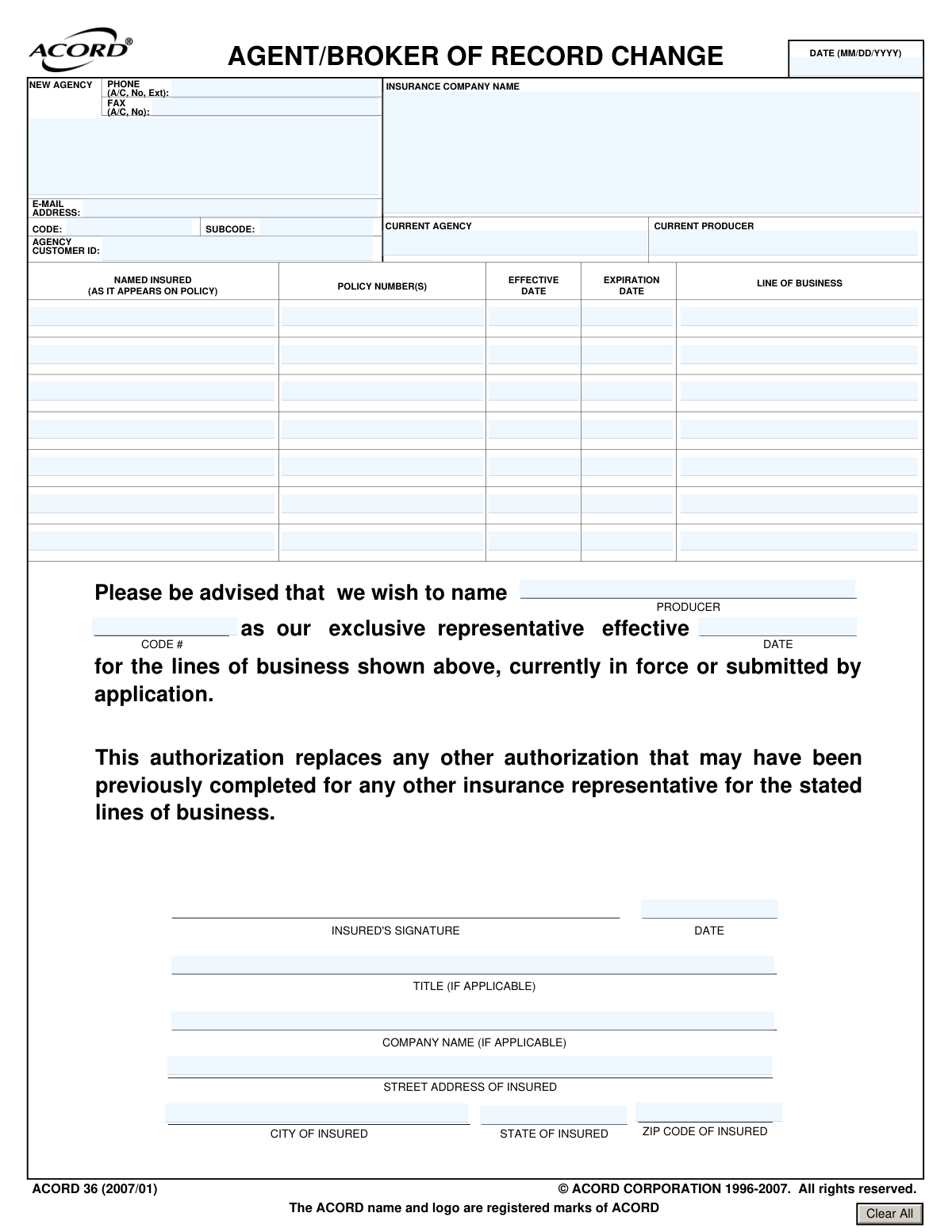
Yes! You can use AI to fill out ACORD 36, Agent/Broker of Record Change
ACORD 36, also known as the Agent/Broker of Record Change form, is used by an insured party to notify their insurance company that they are appointing a new agent or broker as their exclusive representative. This authorization replaces any previous agreements and transfers the responsibility for managing the specified insurance policies to the new representative. Today, this form can be filled out quickly and accurately using AI-powered services like Instafill.ai, which can also convert non-fillable PDF versions into interactive fillable forms.
Our AI automatically handles information lookup, data retrieval, formatting, and form filling.
It takes less than a minute to fill out ACORD 36 using our AI form filling.
Securely upload your data. Information is encrypted in transit and deleted immediately after the form is filled out.
Form specifications
| Form name: | ACORD 36, Agent/Broker of Record Change |
| Number of pages: | 1 |
| Language: | English |
| Categories: | ACORD forms, broker forms |
Instafill Demo: How to fill out PDF forms in seconds with AI
How to Fill Out ACORD 36 Online for Free in 2026
Are you looking to fill out a ACORD 36 form online quickly and accurately? Instafill.ai offers the #1 AI-powered PDF filling software of 2026, allowing you to complete your ACORD 36 form in just 37 seconds or less.
Follow these steps to fill out your ACORD 36 form online using Instafill.ai:
- 1 Navigate to Instafill.ai and upload your ACORD 36 form or select it from their template library.
- 2 Provide the AI assistant with details about the insured party, including name and address, and the name of the insurance company.
- 3 Input information about the current agent/broker and list all relevant policy numbers, effective/expiration dates, and lines of business being transferred.
- 4 Enter the complete details for the new agency or broker you are appointing as your exclusive representative.
- 5 Specify the effective date for the change of representation to take place.
- 6 Review all the information auto-filled by the AI for accuracy, including agency details, policy numbers, and dates.
- 7 Electronically sign and date the form to finalize the authorization and submit it to the insurance company.
Our AI-powered system ensures each field is filled out correctly, reducing errors and saving you time.
Why Choose Instafill.ai for Your Fillable ACORD 36 Form?
Speed
Complete your ACORD 36 in as little as 37 seconds.
Up-to-Date
Always use the latest 2026 ACORD 36 form version.
Cost-effective
No need to hire expensive lawyers.
Accuracy
Our AI performs 10 compliance checks to ensure your form is error-free.
Security
Your personal information is protected with bank-level encryption.
Frequently Asked Questions About Form ACORD 36
This form is used to officially notify your insurance company that you are appointing a new agent or broker to represent you and manage your existing insurance policies.
The policyholder, referred to as the 'Named Insured' on the policy, must complete and sign the form to authorize the change of representation.
You will need your policy numbers, the name of your current agent, and the full contact details and producer codes for the new agent or agency you are appointing.
The 'Line of Business' refers to the specific type of insurance coverage for each policy, such as General Liability, Commercial Auto, or Property Insurance.
If you have more policies than the provided rows, you can attach a separate, clearly labeled document with the additional policy information. Make a note on the main form that an attachment is included.
Your new agent or broker will provide you with their Producer Code. This is a unique identifier the insurance company uses to link the policy to the correct agency.
No, this form only changes who services your policy. The terms, conditions, coverage, and premium of your existing policy remain unchanged.
This is the specific date on which you want the change to take effect and for your new agent to officially become your representative. You can set this for the current date or a future date.
The completed and signed form should be sent to your insurance company. Your new agent can typically guide you on the submission process or even submit it for you.
Yes, providing the names of both the current agency and the individual producer (agent) helps the insurance company accurately identify the representative being replaced.
Yes, services like Instafill.ai use AI to auto-fill form fields with your saved information, which helps you complete the form accurately and saves time.
You can use a service like Instafill.ai to upload the form and fill it out on your computer. Their platform allows you to easily enter your information, save your progress, and download the completed PDF.
If you have a non-fillable or 'flat' PDF, you can upload it to a platform like Instafill.ai. Their technology can convert it into an interactive, fillable form that you can complete and sign digitally.
Compliance ACORD 36
Validation Checks by Instafill.ai
1
Policy Expiration Date After Effective Date
This check ensures that for each listed policy, the 'Expiration Date' is chronologically after the 'Effective Date'. This is crucial for maintaining logical data integrity, as a policy cannot expire before it becomes active. If validation fails, the user will be prompted to correct the dates, preventing the submission of nonsensical policy information.
2
Standard Date Format (MM/DD/YYYY)
Validates that all date fields, including policy effective/expiration dates, the signature date, and the authorization effective date, adhere strictly to the MM/DD/YYYY format. This standardization is essential for consistent data processing and to prevent errors in date interpretation by backend systems. A failure would trigger an error message requiring the user to re-enter the date in the correct format.
3
Minimum Policy Information Requirement
This validation ensures that at least the first policy row is completely filled out, including 'Named Insured', 'Policy Number', 'Effective Date', 'Expiration Date', and 'Line of Business'. The form is meaningless without at least one policy to apply the agent change to. If this information is missing, the form submission will be blocked until the required policy details are provided.
4
New Representative Name Presence
Verifies that the name of the new exclusive representative (the 'Producer Name' in the authorization section) has been entered. This field is the primary subject of the form, identifying the new agent or broker. Without this name, the agent of record change cannot be processed, so a failed validation will halt submission and require the user to enter the representative's name.
5
Authorization Effective Date Mandatory
Checks that the 'Authorization Effective Date' is provided. This date is legally significant as it specifies the exact moment the new agent's authority begins. Missing this date creates ambiguity and can lead to disputes over representation, so the form cannot be submitted without it.
6
Signature Date Presence
Ensures the 'Signature Date' field is filled out. The signature date authenticates when the insured party authorized the change, which is critical for the legal validity of the document. A submission without this date would be considered incomplete and legally questionable, thus the system will prevent submission until it is entered.
7
New Agency Phone Number Format
This check validates that the 'New Agency Phone Number' follows a standard North American phone number format (e.g., (XXX) XXX-XXXX). Correct formatting ensures the contact information is usable and can be correctly parsed and stored in a database. An invalid format will result in an error, prompting the user to correct the entry before proceeding.
8
New Agency Email Address Format
Validates that the 'New Agency Email Address' is in a proper email format (e.g., [email protected]). This is essential for ensuring that electronic communications regarding the policy and the agent change can be successfully delivered. If the format is invalid, the user will be notified to correct the email address to prevent communication failures.
9
Insured's ZIP Code Format
This validation ensures the 'Insured Zip Code' is a valid 5-digit or 9-digit (ZIP+4) numeric format. A correct ZIP code is vital for accurate mail delivery, location-based risk assessment, and proper jurisdiction assignment. An invalid entry will trigger an error, requiring the user to provide a valid ZIP code.
10
Policy Row Data Integrity
For any policy row where a 'Policy Number' is entered, this check verifies that the corresponding 'Line of Business', 'Effective Date', and 'Named Insured' fields are also filled. This prevents incomplete policy records from being submitted, which would require manual follow-up to clarify. A failure will highlight the incomplete row and require the user to provide the missing information.
11
Distinct Current and New Agency
This check compares the 'Current Agency Name' with the new 'Producer Name' (representing the new agency) to ensure they are not the same. Submitting a form to change the agent of record to the existing agent is a redundant and likely erroneous action. If the names match, a warning or error will be displayed to ask the user to confirm or correct the entry.
12
Authorization Date vs. Signature Date Logic
Verifies that the 'Authorization Effective Date' is on or after the 'Signature Date'. An authorization cannot become effective before it has been signed by the insured party. This logical check prevents the submission of legally inconsistent documents, and a failure would require the user to adjust one or both dates.
13
Named Insured Presence
This check confirms that the 'Named Insured' field in the first policy section is not empty. The Named Insured is the primary entity or person covered by the policy and is the one authorizing the change. Without this information, it's impossible to identify the policyholder, making the form invalid and requiring the user to fill in the name.
14
Insurance Company Name Presence
Validates that the 'Insurance Company Name' field is completed. This information is critical as it directs the agent of record change request to the correct insurance carrier. Submitting the form without the carrier's name would make it impossible to process, so the system will block submission until this field is filled.
Common Mistakes in Completing ACORD 36
Users often enter their name or company name from memory, which may not exactly match the official 'Named Insured' on the policy documents. This can include using abbreviations (e.g., 'ABC Inc.' instead of 'ABC Company, LLC') or slight variations. Any discrepancy can cause the insurance carrier's system to fail to find the policy, leading to rejection of the form and significant delays in changing the agent of record.
Policy numbers are often long and complex, making them prone to typos, transposed digits, or omissions. A single incorrect digit will prevent the carrier from identifying the policy. This mistake completely halts the process, as the core instruction of the form—to change the agent for a specific policy—cannot be executed.
When asked for the 'Line of Business,' people may write generic terms like 'Business Insurance' or 'Auto'. However, carriers require specific descriptions like 'Commercial General Liability' or 'Business Auto Policy' to correctly identify the policy type. Vague entries force the carrier to seek clarification, delaying the agent change, or may result in only a portion of the intended policies being transferred.
This form has fields for both the date the form is signed and the date the agent change becomes effective. Users frequently enter the same date in both fields without consideration, or leave the effective date blank. This can cause the agent change to occur prematurely or later than intended, potentially creating gaps in service or communication during a critical period like a claim or renewal.
An unsigned or undated form is legally invalid and will be rejected immediately. For business policies, omitting the signer's 'Title' is another critical error, as it fails to establish the individual's authority to make changes on behalf of the company. This simple oversight requires the entire submission process to be restarted.
The form requires full details for both the new and current agencies, including names, producer codes, and contact information. Users often provide only the agency name, omitting the specific producer's name or the agency code required by the insurance carrier for routing. This incomplete data makes it impossible for the carrier to identify the correct parties, leading to processing delays until the missing information is supplied.
The form includes a table to list multiple policies, but users often list only one policy, assuming the change will apply to their entire account with the carrier. The 'Agent of Record' change is policy-specific. This mistake results in the agent being changed for only the single policy listed, leaving all other policies with the previous agent and creating a confusing, fragmented service relationship.
In their haste, users may accidentally enter the new agent's information in the section labeled 'CURRENT PRODUCER' and vice-versa. This error makes the request illogical and impossible for the insurance company to process. The form will be rejected, forcing the user to carefully refill and resubmit the entire document.
This ACORD form is often distributed as a non-fillable PDF, forcing users to print it and fill it out by hand. Poor handwriting can make critical information like policy numbers, names, and dates unreadable. This leads to data entry errors on the carrier's end or outright rejection of the form, requiring the user to start over. To avoid this, AI-powered tools like Instafill.ai can convert flat PDFs into clean, fillable versions.
The form explicitly requests the MM/DD/YYYY format, but users, particularly from different regions, may default to a DD/MM/YYYY format. This creates ambiguity (e.g., is 04/07/2024 April 7th or July 4th?), which can cause the change to be processed on the wrong date. To prevent this, it's crucial to adhere to the specified format. Form-filling tools like Instafill.ai can help by automatically validating and formatting dates correctly.
Saved over 80 hours a year
“I was never sure if my IRS forms like W-9 were filled correctly. Now, I can complete the forms accurately without any external help.”
Kevin Martin Green
Your data stays secure with advanced protection from Instafill and our subprocessors

Robust compliance program
Transparent business model
You’re not the product. You always know where your data is and what it is processed for.
ISO 27001, HIPAA, and GDPR
Our subprocesses adhere to multiple compliance standards, including but not limited to ISO 27001, HIPAA, and GDPR.
Security & privacy by design
We consider security and privacy from the initial design phase of any new service or functionality. It’s not an afterthought, it’s built-in, including support for two-factor authentication (2FA) to further protect your account.
Fill out ACORD 36 with Instafill.ai
Worried about filling PDFs wrong? Instafill securely fills acord-36-agentbroker-of-record-change-1 forms, ensuring each field is accurate.