
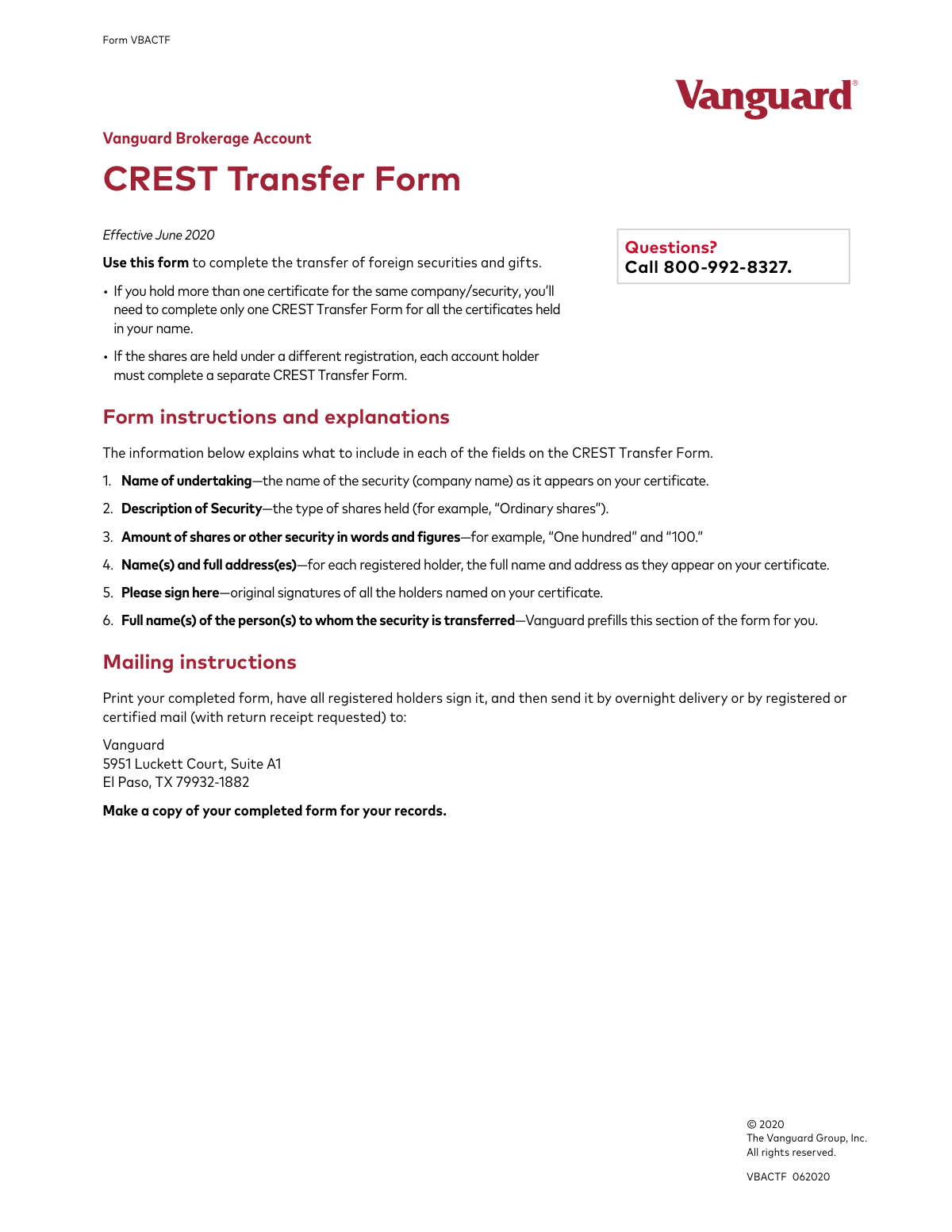
Yes! You can use AI to fill out Vanguard Brokerage Account CREST Transfer Form
Don't type 7 fields by hand. Tell our AI about yourself, or upload a document you already have, and it fills every field in seconds. You check it, then download, print or sign.
The AI does the filling. You just check it.
No typing into boxes, nothing to install.
What this form asks for
The AI fills all of it, from your answers or your documents.
The AI checks your answers before you download
12 checks built for this form, so a wrong date or a missing answer is caught before anyone else sees it.
This check ensures that the numerical value entered in the 'Figures' box for the share amount matches the textual representation in the 'Amount of shares or other security in words' field. This is a critical cross-validation to prevent ambiguity and potential errors in the quantity of shares being transferred. A mismatch will result in the form being returned for correction.
This validation cross-references the number of names listed in the 'registered holder(s)' field with the number of signatures provided. If the security is jointly owned, all registered holders must sign to authorize the transfer. A missing signature from any joint holder indicates incomplete authorization and will cause the transfer to be rejected.
This check confirms that the 'Full name(s) of the person(s) to whom the security is transferred' field has not been altered and still contains the pre-filled entity, 'CHASE Nominees Limited'. This is a crucial security measure to ensure assets are transferred to the correct destination account. Any modification to this field will invalidate the form and may trigger a security review.
This validation confirms that the 'Name of undertaking' field is not empty. This field is mandatory as it identifies the specific company security being transferred. A failure to provide this information would make it impossible to process the transfer, leading to the form's rejection.
This check verifies that at least one signature is present in the 'Signature(s) of transferor(s)' section. A signature provides the legal authorization for the transfer, and its absence renders the form invalid. Forms submitted without the required original signature(s) will be rejected immediately.
This validation ensures the 'Name(s) and full address(es) of registered holder(s)' field contains the name of the current owner. The full legal name is required for identity verification and to confirm ownership against the security's certificate. An empty or incomplete name field will halt the transfer process.
And 6 more checks
- Checks for Block Capital or Typed Entry
- Ensures Description of Security is Provided
- Validates Numeric Format for Share Amount in Figures
- Ensures Registered Holder's Full Address is Provided
- Verifies Integrity of Pre-filled Participant ID
- Verifies Integrity of Pre-filled Member Account ID
Let AI fill out your VBACTF
No typing. Every field filled in seconds, checked, ready to sign.
How to Fill Out VBACTF Online for Free in 2026
What the AI walks you through.
- Navigate to Instafill.ai and upload the Vanguard CREST Transfer Form PDF or select it from their template library.
- Use the AI assistant to automatically populate your personal details, such as the full name(s) and address(es) of the registered holder(s).
- Enter the specific details of the security being transferred, including the 'Name of undertaking', 'Description of Security', and the amount of shares in both words and figures.
- Verify that the transferee information, which is pre-filled by Vanguard to direct the assets to CHASE Nominees Limited, is correct.
- Carefully review all entered information on the form for accuracy and completeness before finalizing.
- Download and print the completed form.
- Sign the printed form where indicated and mail it to the Vanguard address provided in the instructions.
Common Mistakes in Completing VBACTF
The ones the AI is built to catch.
Mismatch Between Share Amount in Words and Figures
Entering an Incomplete or Incorrect Security Name
Using Photocopies or Missing Signatures from Joint Holders
Providing a Current Address Instead of the Registered Address
Failing to Use Block Capitals
Incorrect Form Usage for Multiple Holdings
Omitting 'Description of Security'
Failing to Specify Capacity When Signing for Another Person
Incorrect Mailing Method
Altering Pre-filled Transferee Information
Frequently Asked Questions About VBACTF
Is it really free for 7 days?
Can I fill other forms too?
How do I cancel?
How does the AI fill out VBACTF?
What happens to my information?
How complex is VBACTF to fill out?
What is the purpose of the Vanguard CREST Transfer Form?
Who needs to fill out this form?
I have multiple certificates for the same company. Do I need a separate form for each?
What if my shares are held under different registrations, like one in my name and one in a joint account?
What information do I need to provide on the form?
Who needs to sign the form?
The section for who the security is transferred to is already filled out. Should I change it?
How do I submit the completed form?
Where do I mail the signed form?
Is there a fee for this type of transfer?
Can I use an AI tool to help me fill out this form?
How can I fill out this form online using Instafill.ai?
The PDF I downloaded isn't fillable. What can I do?
What should I do if I have questions while completing the form?
Get your VBACTF filled out by AI
$0 today. Cancel before Nov 1 and you pay nothing.
Other forms like this one
brokerage forms: 41, Fidelity Change of Account Registration: Changing to an Individual, Joint, or Custodial Brokerage Account, Fidelity Change of Account Registration — Changing to a Trust, Estate, Guardian, or Conservator Brokerage Account, Move Assets from My Schwab Brokerage Account, Open a Schwab One® Brokerage Account, Charles Schwab PCRA Self-Directed Brokerage Account, Schwab Health Savings Brokerage Account (HSBA) to HSA Invest Choice Account Transfer Form, Intra-Brokerage Securities Transfer, Moving your Vanguard funds to a Vanguard Brokerage Account Disclosure statement, Moving your Vanguard funds to a Vanguard Brokerage Account Disclosure statement, TIAA Brokerage Incoming Account Transfer Form, TIAA Brokerage Joint Transfer on Death Account Agreement, TIAA Brokerage IRA Distribution Request (Form F11025), Request for a Qualified Charitable Distribution (QCD) from a Brokerage Individual Retirement Account (IRA), TIAA Brokerage Authorization To Gift Securities, Form F11014, TIAA Brokerage Power of Attorney (POA) Form, TIAA Brokerage Durable Power Of Attorney Affidavit Of Full Force And Effect, TIAA Brokerage Incoming Managed Account Transfer Form (F11319), Form F11015, TIAA Brokerage Designation of Beneficiary, Form F11004, TIAA Brokerage Individual Transfer on Death Account Agreement
account transfer forms: Fidelity Funds Account Transfer of Assets Form, Group Transfer Form Fidelity Health Savings Account (HSA), Form APP13017-29, Transfer Your Account to Schwab, Transfer of Assets Out - Partial Account or Charitable Gift Transfers, Charles Schwab & Co., Inc. Account Transfer Form, HSA Bank Investment Account Transfer Form, Rollover/Transfer Request — ABLE Account, Schwab Health Savings Brokerage Account (HSBA) to HSA Invest Choice Account Transfer Form, Retirement Transfer Between Existing Vanguard Accounts, The Vanguard 529 College Savings Plan Transfer Due to Death of Account Owner Form, Account Transfer Authorization (ACATS) Form, AbbVie Savings Plan 401(k) Account Transfer Notice, Transfer Between Existing Fidelity Accounts, Rollover/Transfer Request — ABLE Account, TIAA Brokerage Incoming Account Transfer Form, TIAA Brokerage Joint Transfer on Death Account Agreement, TIAA Brokerage Incoming Managed Account Transfer Form (F11319), Health Savings Account (HSA) Transfer Request, Client Account Transfer Form to Merrill Lynch, Pierce, Fenner & Smith Incorporated, Authorization to transfer funds from a bank retirement account
Vanguard forms: Gift of Nonretirement Assets to Existing Vanguard Account Form, Vanguard VRPA Transfer Request Form, Vanguard Personal Investor – Transfer form, Vanguard Asset Transfer Authorization Form for the Emory University Retirement Plan, Retirement Transfer Between Existing Vanguard Accounts, Vanguard Personal Investor – Transfer initiation form – Transfer out, Vanguard Asset Transfer Authorization, Moving your Vanguard funds to a Vanguard Brokerage Account Disclosure statement, Make a contribution - Vanguard Charitable, Vanguard Transfer Form, Vanguard Full Agent Authorization, Vanguard Transfer on Death Plan Form, The Vanguard 529 College Savings Plan: Power of Attorney, Vanguard Direct Rollover IRA Adoption Agreement, Vanguard Limited Agent Authorization, The Vanguard 529 College Savings Plan Agent Authorization/Limited Power of Attorney, The Vanguard 529 College Savings Plan Direct Rollover Out to Roth IRA Form, The Vanguard 529 College Savings Plan Transfer Due to Death of Account Owner Form, Your guide to completing a rollover - Vanguard, Vanguard IRA Distribution Kit (including IRA Distribution Form RRDFT and Form W-4R)
broker forms: Letter of Authorization to Broker, Form 1099-B, Proceeds From Broker Transactions, 41, Fannie Mae Residential Broker Price Opinion (BPO) (Revised 03/99), Fidelity Change of Account Registration: Changing to an Individual, Joint, or Custodial Brokerage Account, Fidelity Change of Account Registration — Changing to a Trust, Estate, Guardian, or Conservator Brokerage Account, Move Assets from My Schwab Brokerage Account, Open a Schwab One® Brokerage Account, Charles Schwab PCRA Self-Directed Brokerage Account, Schwab Health Savings Brokerage Account (HSBA) to HSA Invest Choice Account Transfer Form, Intra-Brokerage Securities Transfer, Moving your Vanguard funds to a Vanguard Brokerage Account Disclosure statement, Moving your Vanguard funds to a Vanguard Brokerage Account Disclosure statement, TIAA Brokerage Incoming Account Transfer Form, TIAA Brokerage Joint Transfer on Death Account Agreement, TIAA Brokerage IRA Distribution Request (Form F11025), Request for a Qualified Charitable Distribution (QCD) from a Brokerage Individual Retirement Account (IRA), Form OL 75, Auto Broker Log, TIAA Brokerage Authorization To Gift Securities, Form F11014, TIAA Brokerage Power of Attorney (POA) Form
brokerage account forms: BlackRock New Account Application For Non-Retirement Accounts, Fidelity Change of Account Registration: Changing to an Individual, Joint, or Custodial Brokerage Account, Fidelity Change of Account Registration — Changing to a Trust, Estate, Guardian, or Conservator Brokerage Account, Move Assets from My Schwab Brokerage Account, Open a Schwab One® Brokerage Account, Charles Schwab PCRA Self-Directed Brokerage Account, Schwab Health Savings Brokerage Account (HSBA) to HSA Invest Choice Account Transfer Form, Moving your Vanguard funds to a Vanguard Brokerage Account Disclosure statement, Moving your Vanguard funds to a Vanguard Brokerage Account Disclosure statement, TIAA Brokerage Incoming Account Transfer Form, TIAA Brokerage Joint Transfer on Death Account Agreement, Request for a Qualified Charitable Distribution (QCD) from a Brokerage Individual Retirement Account (IRA), TIAA Brokerage Incoming Managed Account Transfer Form (F11319), Form F11004, TIAA Brokerage Individual Transfer on Death Account Agreement, Fidelity® Brokerage Business Account Certification, Brokerage Corestone Account Application, IRA/IRRA®/Roth IRA/SEP/SRA Divorce Transfer Instruction Form, Merrill AwardChoice® Individual Investor Account Application Form for U.S. Persons, Merrill Business Investor Account (BIA) and Working Capital Management Account (WCMA) Account Application Booklet and Agreements, Merrill Edge Self-Directed Trust and Estate Cash Management Account (CMA Account) Account Application Booklet and Agreements
brokerage transfer forms: Client Account Transfer Form to Merrill Lynch, Pierce, Fenner & Smith Incorporated, Schwab Health Savings Brokerage Account (HSBA) to HSA Invest Choice Account Transfer Form, Intra-Brokerage Securities Transfer, TIAA Brokerage Incoming Account Transfer Form, TIAA Brokerage Joint Transfer on Death Account Agreement, TIAA Brokerage Incoming Managed Account Transfer Form (F11319), Form F11004, TIAA Brokerage Individual Transfer on Death Account Agreement, Outgoing Partial Asset/Gifting Transfer Authorization Letter, U.S. Bancorp Investments Account Transfer Form
Let AI fill out your VBACTF
Your trial starts once a card is added. You pay nothing before Nov 1.
Our AI already knows this form, all 7 fields of it. Skip the typing: tell it about yourself, or upload what you have, and it fills the whole form in seconds.
- AI fills every field on both pages, checkboxes included
- No typing into boxes: answer a few questions, or upload a document you already have, an old copy of this form, a photo of a document
- The AI checks the answers; you review and change anything before you download
- Download the finished PDF, print it, or sign it online
- Encrypted, and never used to train AI
Cancel before Nov 1 and you pay nothing.
A card is needed to start the trial. Cancel in two clicks from your account.
Terms · Privacy