Yes! You can use AI to fill out VA Form 29-357, Claim for Disability Insurance Benefits (Government Life Insurance)
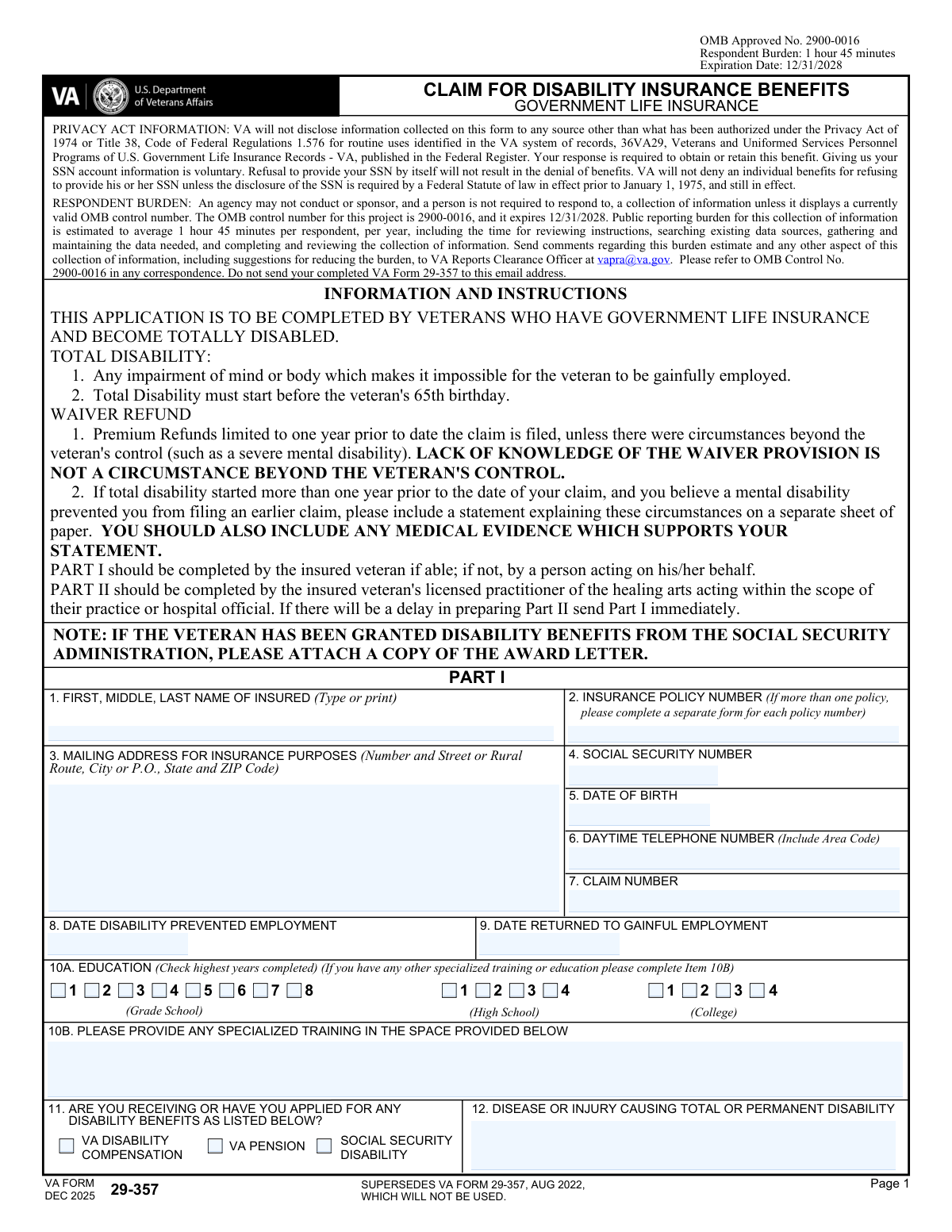
VA Form 29-357 is an official Department of Veterans Affairs application for veterans who have Government Life Insurance and become totally disabled before age 65, to claim disability insurance benefits and request waiver of premiums (and, in some cases, premium refunds). The form collects identifying information, policy and claim details, disability onset and work history, and requires a medical report (Part II) completed by a hospital official or licensed practitioner to substantiate the disability. Submitting a complete and accurate form helps VA evaluate eligibility and process the claim efficiently, including any supporting evidence such as a Social Security disability award letter. Today, this form can be filled out quickly and accurately using AI-powered services like Instafill.ai, which can also convert non-fillable PDF versions into interactive fillable forms.
Our AI automatically handles information lookup, data retrieval, formatting, and form filling.
It takes less than a minute to fill out VA Form 29-357 using our AI form filling.
Securely upload your data. Information is encrypted in transit and deleted immediately after the form is filled out.
Form specifications
| Form name: | VA Form 29-357, Claim for Disability Insurance Benefits (Government Life Insurance) |
| Number of pages: | 3 |
| Language: | English |
| Categories: | life insurance forms, VA forms, disability insurance forms, veterans benefits forms |
Instafill Demo: filling out a legal form in seconds
How to Fill Out VA Form 29-357 Online for Free in 2026
Are you looking to fill out a VA FORM 29-357 form online quickly and accurately? Instafill.ai offers the #1 AI-powered PDF filling software of 2026, allowing you to complete your VA FORM 29-357 form in just 37 seconds or less.
Follow these steps to fill out your VA FORM 29-357 form online using Instafill.ai:
- 1 Go to Instafill.ai and upload VA Form 29-357 (or select it from the form library) and let the AI detect the fields.
- 2 Enter the insured veteran’s personal and policy details in Part I (name, policy number, mailing address, SSN, date of birth, phone, and claim number).
- 3 Provide disability and employment information in Part I (date disability prevented employment, any return-to-work date, education/training, benefits applied for, and the condition causing total/permanent disability).
- 4 Add treatment sources and work history (hospitals, licensed practitioners, and employment records for the year prior to disability through present), and upload supporting documents (e.g., SSA award letter, medical evidence, statements).
- 5 Review the consent/authorization language and complete the signature and date fields for the insured or authorized representative, then have Instafill.ai run validation checks for missing items and formatting.
- 6 Send Part II to the attending licensed practitioner/hospital official to complete the medical report section (history, diagnosis, objective findings, functional capacity, prognosis, and signature), using Instafill.ai sharing/export tools if available.
- 7 Download the completed packet and submit it to the VA Insurance Center (or upload via VA’s Insurance document upload service), keeping a copy of the final submission for your records.
Our AI-powered system ensures each field is filled out correctly, reducing errors and saving you time.
Why Choose Instafill.ai for Your Fillable VA Form 29-357 Form?
Speed
Complete your VA Form 29-357 in as little as 37 seconds.
Up-to-Date
Always use the latest 2026 VA Form 29-357 form version.
Cost-effective
No need to hire expensive lawyers.
Accuracy
Our AI performs 10 compliance checks to ensure your form is error-free.
Security
Your personal information is protected with bank-level encryption.
Frequently Asked Questions About Form VA Form 29-357
VA Form 29-357 is used to claim Disability Insurance Benefits (including a waiver of premiums) under Government Life Insurance when an insured veteran becomes totally disabled.
This application is for veterans who have Government Life Insurance and became totally disabled. Part I is completed by the insured veteran (or someone acting on the veteranâs behalf if the veteran is unable).
Total disability means an impairment of mind or body that makes it impossible for the veteran to be gainfully employed. The total disability must begin before the veteranâs 65th birthday.
Part I contains the veteranâs personal, insurance, disability, treatment, and employment information. Part II must be completed by a hospital official or the veteranâs attending licensed practitioner of the healing arts and provides medical details supporting the disability.
No. If there will be a delay in preparing Part II, you should send Part I immediately and submit Part II as soon as it is completed.
If you have been granted Social Security Administration disability benefits, attach a copy of your SSA award letter. If hospital summaries or other medical evidence are available, include them as wellâespecially if you are explaining a delayed filing due to mental disability.
Premium refunds are generally limited to one year prior to the date the claim is filed. If total disability began more than one year before you filed and you believe a mental disability prevented earlier filing, include a separate statement and supporting medical evidence.
No. The form states that lack of knowledge of the waiver provision is not considered a circumstance beyond the veteranâs control for extending the premium refund period.
Complete a separate VA Form 29-357 for each policy number. This helps VA process each policyâs disability/waiver determination correctly.
List your employment for one year prior to the date total disability began through the present, including self-employment. Provide dates of employment, last day worked, hours and earnings (weekly), occupation, employer name/address, and reason for termination.
Item 8 should be the date your disability began or the date it prevented you from being gainfully employed. Item 9 should be completed only if you later returned to gainful employment, using the date you resumed that work.
Mail the claim to: Department of Veterans Affairs, Insurance Center, P.O. Box 5209, Janesville, WI 53547-5209. The fastest and most secure option is the VA Insurance document upload service at https://insurance.va.gov/home/IDU.
The estimated public reporting burden is about 1 hour and 45 minutes, including reviewing instructions, gathering records, completing the form, and reviewing it.
Yes. AI form-filling services like Instafill.ai can help auto-fill form fields accurately using the information you provide, which can save time and reduce missed fieldsâthough you should still review everything for accuracy before signing and submitting.
You can upload the PDF to Instafill.ai, provide your details (policy number, disability dates, treatment providers, employment history, etc.), and have the tool populate the fields for review and download. If the PDF is flat/non-fillable, Instafill.ai can convert it into an interactive fillable form before auto-filling.
Compliance VA Form 29-357
Validation Checks by Instafill.ai
1
Insured Full Name Completeness and Character Validation
Validates that the insuredâs name (first, middle, last) is present and not left blank or entered as initials-only (e.g., âJ Dâ). It should allow common name characters (letters, spaces, hyphens, apostrophes) and reject numeric-only or symbol-heavy entries. This is important for identity matching across VA insurance records and medical documentation. If validation fails, the submission should be flagged for correction because the claim may not be matchable to the correct insured.
2
Insurance Policy Number Format and Single-Policy Rule
Checks that the insurance policy number is provided and matches expected formatting rules (e.g., includes required letter prefix if applicable, preserves dashes/letters, and is not truncated). Also validates that only one policy number is represented per submission, since the form instructs a separate form for each policy. This prevents misrouting and incorrect association of disability waiver decisions to the wrong policy. If validation fails, the system should reject or route to manual review and request a separate submission per policy.
3
Mailing Address Completeness (Street/City/State/ZIP) and ZIP Format
Ensures the mailing address includes street or PO box/rural route, city, state, and ZIP code, and that the ZIP is valid (5 digits or ZIP+4). A complete address is required for official correspondence, premium waiver decisions, and refund communications. Missing or malformed address data can cause returned mail and delays in benefits processing. If validation fails, prompt the user to complete missing components or correct the ZIP format.
4
Social Security Number (SSN) 9-Digit and Disallowed Values Check
Validates that the SSN, if provided, is exactly 9 digits (optionally allowing standard dash formatting) and is not an obviously invalid value (e.g., all zeros, 123456789). Although SSN disclosure is described as voluntary, when supplied it must be usable for identity resolution and record matching. Invalid SSNs can lead to mismatched records or processing errors. If validation fails, the system should request correction or allow submission without SSN only if business rules permit.
5
Date of Birth Format and Age-Based Eligibility (Disability Before 65)
Checks that the date of birth is a valid calendar date and not in the future. Then verifies the rule stated on the form: total disability must start before the veteranâs 65th birthday by comparing DOB to the âDate Disability Prevented Employmentâ (Item 8). This is critical because claims outside eligibility criteria may be denied. If validation fails, the system should flag the claim as potentially ineligible and require confirmation or supporting explanation before submission.
6
Daytime Telephone Number Format and Minimum Contactability
Validates that the daytime phone number contains a valid number of digits (e.g., 10 digits for US numbers, or E.164-compatible if country code is included) and is not placeholder text. Reliable contact information is needed to resolve missing evidence, clarify employment history, or coordinate medical documentation. Incorrect phone numbers increase processing time and can lead to denial for failure to respond. If validation fails, prompt for a corrected phone number or an alternate contact method if supported.
7
Claim Number Presence and Format Consistency
Ensures the claim number field is not blank and conforms to expected VA claim number patterns (e.g., alphanumeric length constraints, no illegal characters). The claim number is used to associate the submission with an existing VA claim record and correspondence. Incorrect claim numbers can cause misfiling or duplicate claim creation. If validation fails, the system should request correction or route to manual indexing.
8
Disability Onset Date (Item 8) Validity and Not After Signature Date
Validates that the âDate Disability Prevented Employmentâ is a real date and is not in the future relative to the date of signature/submission. This date is central to determining eligibility, waiver start, and potential premium refund windows. A future onset date indicates data entry error or misunderstanding of the question. If validation fails, block submission until corrected or require an attestation/explanation if the system allows exceptions.
9
Return to Gainful Employment Date (Item 9) Logical Consistency
If a return-to-work date is provided, checks that it is on or after the disability onset date and not before the last day worked in the employment records. This prevents contradictory timelines (e.g., returning to work before disability prevented employment). Consistent dates are necessary to evaluate total disability duration and waiver/refund periods. If validation fails, prompt the user to correct the date or clarify that they have not returned to gainful employment.
10
Education Level Selection: Exactly One Highest Year Completed
Validates that the education section (Item 10A) has exactly one âhighest year completedâ selection across grade school, high school, and college options, and that mutually exclusive boxes are not simultaneously checked. This ensures the data represents a single highest completed level rather than multiple conflicting levels. Education can be relevant to employability assessments and claim context. If validation fails, require the user to select only one highest year completed.
11
Specialized Training (Item 10B) Conditional Requirement and Minimum Detail
If the applicant indicates specialized training/education beyond the basic highest year completed (or if the workflow explicitly asks for it), validate that Item 10B is not blank and includes minimally useful detail (e.g., training name and provider or dates). This information can support employability and vocational context in disability determinations. Empty or vague entries (e.g., âtrainingâ) reduce evidentiary value. If validation fails, prompt for additional details or allow âNoneâ explicitly.
12
Disability Benefits Selection (Item 11) and SSA Award Letter Attachment Prompt
Validates that at least one checkbox is selected if the applicant answers âyesâ to receiving/applying for benefits, and that selections are limited to the provided options (VA compensation, VA pension, SSA disability). If Social Security Disability is selected, the system should require an attachment indicator or prompt for the SSA award letter as instructed. This helps corroborate disability status and speeds adjudication. If validation fails, request corrected selections and/or prompt for the missing SSA documentation.
13
Cause of Disability (Item 12) Non-Empty and Not Placeholder Text
Ensures the disease or injury causing total/permanent disability is provided and contains meaningful content (e.g., not âN/Aâ, âunknownâ, or a single character). This field is essential for medical evaluation, matching to practitioner reports, and determining whether the condition aligns with the claimed disability timeline. Missing or non-informative entries can stall medical development. If validation fails, require a brief description or diagnosis statement.
14
Hospitalization Entries: Paired Fields and Admission/Release Date Order
For each hospital listed, validates that name, address, admission date, and release date are provided together (no orphaned dates without facility identification). Also checks that admission date is on/before release date and that both are valid calendar dates. Accurate hospitalization history supports medical evidence gathering and timeline verification. If validation fails, prompt to complete missing fields or correct date ordering.
15
Licensed Practitioner Entries: Required Pairing and Treatment Date Sequence
For each practitioner listed, validates that name and address are present when any treatment dates are entered, and that âdate treatment beganâ is on/before âdate of last treatment.â This ensures VA can request records and that the treatment timeline is coherent. Incomplete practitioner information can prevent evidence collection and delay adjudication. If validation fails, require completion of missing practitioner identifiers or correction of date sequences.
16
Employment History Completeness and Numeric Range Checks (Hours/Earnings)
For each employment record provided, validates that employer name/address, occupation, dates (from/to), last day worked, hours worked (weekly), earnings (weekly), and reason for termination are present when the record is used. Hours and earnings must be numeric and within reasonable bounds (e.g., hours 0â168; earnings non-negative), and date ranges must be consistent (from †to; last day worked within the employment period). Employment history is required to evaluate gainful employment and confirm when disability prevented work. If validation fails, the system should flag the specific row and require correction before submission.
17
Signature and Date of Signature Presence and Date Validity
Validates that the insured (or authorized fiduciary/official) signature is present and that the date of signature is a valid date not in the future. The signature certifies truthfulness and authorizes release of information, which is necessary for obtaining medical/employment records. Missing signatures or invalid dates can make the submission legally insufficient and unprocessable. If validation fails, block submission until a valid signature and date are provided.
Common Mistakes in Completing VA Form 29-357
People often download an older saved PDF (e.g., AUG 2022) or reuse a prior packet, not realizing the form has been superseded (DEC 2025). Using an outdated version can delay processing or trigger a request to resubmit on the current form. Always confirm the edition date (DEC 2025) and that the OMB control number is valid before completing. If you only have a flat, non-fillable PDF, Instafill.ai can convert it into a fillable version and help ensure youâre using the correct, current template.
Applicants frequently omit the letter prefix, dashes, or other characters, or they enter a different VA/insurance identifier instead of the policy number. This causes record-matching problems and can delay or misroute the claim, especially if the veteran has multiple policies. Copy the policy number exactly as shown on the policy (including any letters and punctuation) and complete a separate form for each policy. Instafill.ai can help by validating the expected policy-number format and flagging missing prefixes.
Because the form asks for both a policy number (Item 2) and a claim number (Item 7), people often swap them or assume they are the same. This can lead to delays while VA clarifies identifiers or requests additional documentation. Use the claim number exactly as it appears on VA correspondence/award letters, and keep it distinct from the insurance policy number. AI-powered tools like Instafill.ai can map data to the correct fields and reduce mix-ups between similar identifiers.
A very common issue is listing a disability date that doesnât match the âstopped workingâ date in Part II, or entering the last day worked in the employment section that conflicts with Item 8. Inconsistencies can trigger follow-up requests, slow adjudication, or raise questions about whether the disability prevented gainful employment. Use one consistent timeline: onset/when disability prevented employment (Item 8), last day worked, and any return-to-work date (Item 9), and ensure Part II matches. Instafill.ai can cross-check dates across sections and flag conflicts before submission.
Some applicants provide dates showing total disability began after the veteranâs 65th birthday, or they leave dates vague, not realizing the form requires total disability to start before age 65. This can result in denial or a request for clarification/evidence about when total disability actually began. Verify the date of birth (Item 5) and ensure the disability start date (Item 8 and Part II) clearly falls before the 65th birthday. Instafill.ai can automatically compare DOB and onset dates and warn you if the timeline appears ineligible.
Applicants who have not returned to work often leave Item 9 empty without clarifying, while others enter ambiguous text that doesnât fit the date field. Missing or non-date entries can cause processing delays because VA may need to confirm whether the veteran resumed gainful employment. If you have not returned to work, follow the formâs expectations by leaving it blank only if allowed by the form instructions/system, or provide a clear note if the submission method permits (some systems require a date). Instafill.ai can enforce date-only formatting and prompt for a consistent ânot returnedâ handling based on the formâs rules.
People often list a hospital or doctor name but omit full addresses, admission/release dates, or treatment start/last treatment dates. Incomplete provider information makes it harder for VA to request records and can slow the medical review. Provide complete facility/provider names, full mailing addresses, and specific dates for each entry (Items 13â14), adding additional sheets if needed. Instafill.ai can standardize addresses, ensure required subfields are filled, and keep date formats consistent.
Because Part II must be completed by a hospital official or licensed practitioner, applicants sometimes submit only Part I and never follow up, or the provider returns Part II without a signature/title/date. Missing Part II (or an unsigned report) can stall the claim until VA receives adequate medical certification. If Part II will be delayed, send Part I immediately as instructed, but coordinate with the provider to complete Part II promptly and ensure it is signed, dated, and includes the preparerâs title. Instafill.ai can generate a provider-ready packet and checklist to reduce missing signature/date/title errors.
The form specifically requests a copy of the SSA award letter if the veteran has been granted SSA disability benefits, but many applicants forget to include it. Missing attachments can lead to additional evidence requests and longer processing times. If you checked Social Security Disability in Item 11 (or you have an award), attach the award letter with the submission. Instafill.ai can prompt for required attachments based on your answers and help package documents for upload.
Item 15 asks for employment for one year prior to total disability to the present (including self-employment), but people often list only their last job, omit self-employment, or provide monthly/annual earnings instead of weekly. Gaps or mismatched earnings/hours can create questions about âgainful employmentâ and may require clarification. List each employer (or self-employment) covering the required period, include dates (From/To), last day worked, weekly hours, weekly earnings, occupation, and reason for termination. Instafill.ai can normalize earnings to weekly amounts and flag missing periods in the timeline.
Part I must be signed and dated (Items 16â17), and if someone completes it for the insured, they must be an appropriate official/fiduciary; people sometimes forget the date, use a typed signature, or fail to indicate proper authority. Unsigned or improperly signed forms are commonly returned and delay benefits. Ensure a handwritten (or accepted e-signature if permitted by the submission channel) signature is provided, the date is entered, and the signerâs role/authority is clear when not the insured. Instafill.ai can highlight signature/date requirements and reduce omissions before you submit.
Saved over 80 hours a year
âI was never sure if my IRS forms like W-9 were filled correctly. Now, I can complete the forms accurately without any external help.â
Kevin Martin Green
Your data stays secure with advanced protection from Instafill and our subprocessors

Robust compliance program
Transparent business model
Youâre not the product. You always know where your data is and what it is processed for.
ISO 27001, HIPAA, and GDPR
Our subprocesses adhere to multiple compliance standards, including but not limited to ISO 27001, HIPAA, and GDPR.
Security & privacy by design
We consider security and privacy from the initial design phase of any new service or functionality. Itâs not an afterthought, itâs built-in, including support for two-factor authentication (2FA) to further protect your account.
Fill out VA Form 29-357 with Instafill.ai
Worried about filling PDFs wrong? Instafill securely fills va-form-29-357-claim-for-disability-insurance-benefits-government-life-insurance forms, ensuring each field is accurate.