
Yes! You can use AI to fill out Intra-Brokerage Securities Transfer
Don't type 20 fields by hand. Tell our AI about yourself, or upload a document you already have, and it fills every field in seconds. You check it, then download, print or sign.
The AI does the filling. You just check it.
No typing into boxes, nothing to install.
What this form asks for
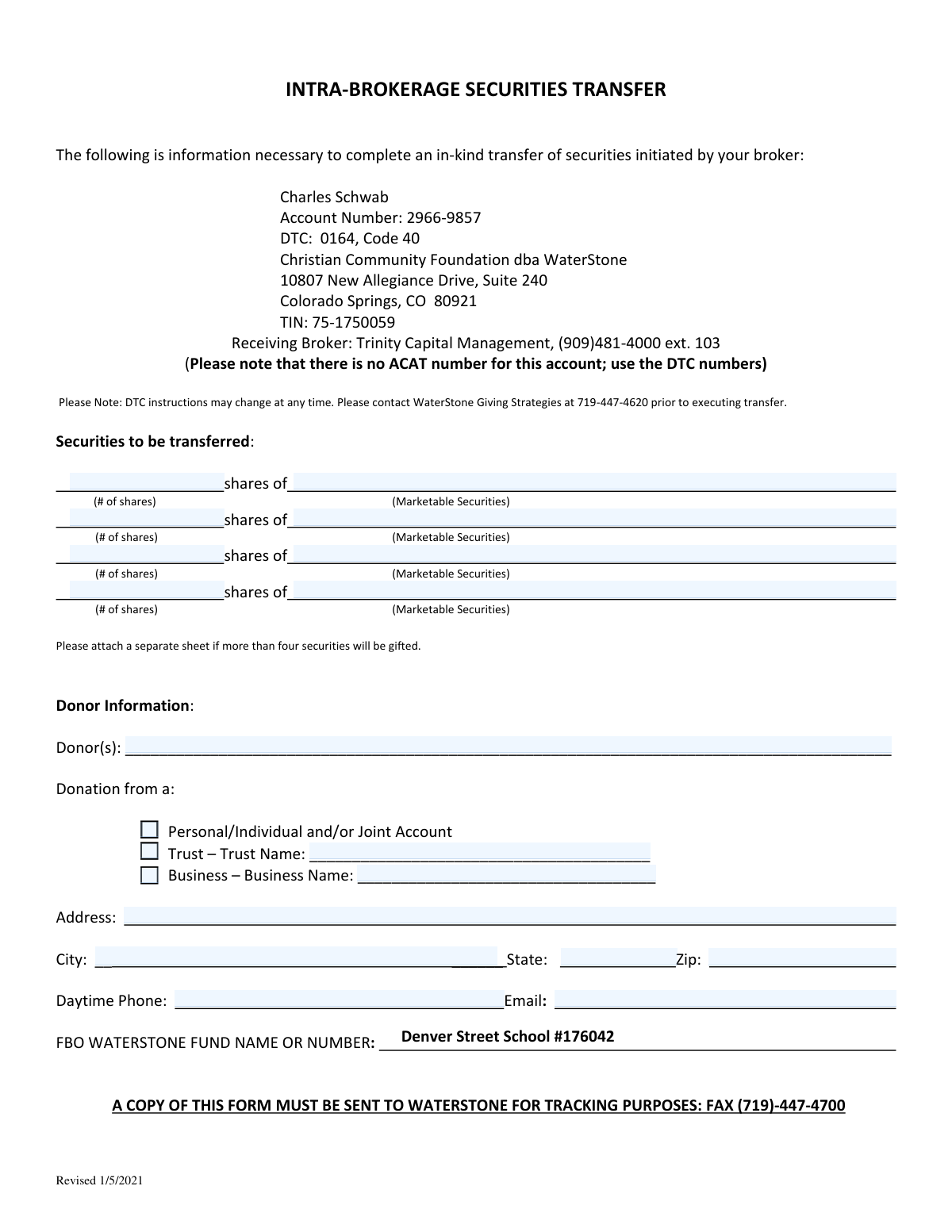
The AI fills all of it, from your answers or your documents.
The AI checks your answers before you download
12 checks built for this form, so a wrong date or a missing answer is caught before anyone else sees it.
Checks that at least one pair of '# of shares' and 'shares of' fields is filled out. This is crucial because the primary purpose of the form is to document a securities transfer. If no securities are listed, the form is incomplete and cannot be processed, leading to delays in the donation.
This check ensures that the value entered in any '# of shares' field is a whole number greater than zero. Securities are typically transferred in whole units, and a non-positive or fractional number would be invalid for a transfer instruction. An invalid number would cause the transfer to be rejected by the brokerage.
This validation verifies that if a value is entered for '# of shares', the corresponding 'shares of' field (the name of the security) is also filled. Without the security's name or ticker symbol, the brokerage cannot identify which asset to transfer. This prevents incomplete transfer instructions that would be rejected and require manual follow-up.
This validation ensures the 'Donor(s)' field is not empty. Identifying the donor is fundamental for legal, tax, and record-keeping purposes, including providing the donor with a receipt for their contribution. An anonymous submission would prevent proper attribution and acknowledgement of the gift.
This check verifies that only one of the checkboxes (Personal/Individual, Trust, or Business) is selected. The source of the donation determines the legal entity making the gift, which has significant tax and legal implications. Selecting none or multiple options creates ambiguity and would require manual clarification before the transfer can be processed.
This validation is triggered if the 'Trust' checkbox is selected, ensuring the 'Trust Name' field is filled out. The specific name of the trust is legally required to identify the donating entity correctly for transfer and tax documentation. A missing trust name would render the form incomplete and legally insufficient.
And 6 more checks
- Requires Business Name if donation is from a Business
- Validates completeness of the Donor's mailing address
- Validates the format of the Zip Code
- Validates the format of the Daytime Phone number
- Validates the format of the Email address
- Ensures the destination Fund Name or Number is provided
Let AI fill out your Intra-Brokerage Securities Transfer Form
No typing. Every field filled in seconds, checked, ready to sign.
How to Fill Out Intra-Brokerage Securities Transfer Form Online for Free in 2026
What the AI walks you through.
- Navigate to Instafill.ai and upload or select the Intra-Brokerage Securities Transfer form.
- Use the AI-powered tool to automatically fill in your personal details in the 'Donor Information' section, including name, address, and contact information.
- Specify the securities to be transferred by entering the number of shares and the name of each security in the designated fields.
- Indicate the source of the donation by checking the appropriate box for a Personal, Trust, or Business account.
- Enter the specific WaterStone Fund Name or Number to ensure your donation is correctly allocated.
- Review all the information entered for accuracy, making sure all fields are complete.
- Download the completed form and send a copy to WaterStone via fax as instructed to ensure proper tracking of your gift.
Common Mistakes in Completing Intra-Brokerage Securities Transfer Form
The ones the AI is built to catch.
Failing to Contact WaterStone Before Transfer
Omitting the 'For the Benefit Of' (FBO) Fund Name
Forgetting to Send a Copy to WaterStone for Tracking
Ambiguous or Incorrect Security Identification
Incorrectly Selecting the Donation Source
Attempting a Standard ACAT Transfer
Illegible Handwriting on a Printed Form
Incomplete or Inaccurate Donor Contact Information
Entering a Vague Quantity of Shares
Misunderstanding the Roles of the Involved Parties
Frequently Asked Questions About Intra-Brokerage Securities Transfer Form
Is it really free for 7 days?
Can I fill other forms too?
How do I cancel?
How does the AI fill out Intra-Brokerage Securities Transfer Form?
What happens to my information?
How complex is Intra-Brokerage Securities Transfer Form to fill out?
What is the purpose of the Intra-Brokerage Securities Transfer form?
Who needs to fill out this form?
What do I do with this form after I fill it out?
Why do I need to contact WaterStone before executing the transfer?
What is a DTC number and why is it used here?
What information do I need to provide about the securities I'm transferring?
What do I enter in the 'FBO WATERSTONE FUND NAME OR NUMBER' field?
My donation is from a trust account. How do I indicate that?
Who is the receiving broker for this transfer?
Can I use an AI tool to help me fill out this form?
How can I fill out this securities transfer form online?
The PDF version of this form I have is not fillable. What can I do?
Where do I find the information for the receiving institution?
Get your Intra-Brokerage Securities Transfer Form filled out by AI
$0 today. Cancel before Nov 1 and you pay nothing.
Other forms like this one
brokerage forms: 41, Fidelity Change of Account Registration: Changing to an Individual, Joint, or Custodial Brokerage Account, Fidelity Change of Account Registration — Changing to a Trust, Estate, Guardian, or Conservator Brokerage Account, Move Assets from My Schwab Brokerage Account, Open a Schwab One® Brokerage Account, Charles Schwab PCRA Self-Directed Brokerage Account, Schwab Health Savings Brokerage Account (HSBA) to HSA Invest Choice Account Transfer Form, Moving your Vanguard funds to a Vanguard Brokerage Account Disclosure statement, Vanguard Brokerage Account CREST Transfer Form, Moving your Vanguard funds to a Vanguard Brokerage Account Disclosure statement, TIAA Brokerage Incoming Account Transfer Form, TIAA Brokerage Joint Transfer on Death Account Agreement, TIAA Brokerage IRA Distribution Request (Form F11025), Request for a Qualified Charitable Distribution (QCD) from a Brokerage Individual Retirement Account (IRA), TIAA Brokerage Authorization To Gift Securities, Form F11014, TIAA Brokerage Power of Attorney (POA) Form, TIAA Brokerage Durable Power Of Attorney Affidavit Of Full Force And Effect, TIAA Brokerage Incoming Managed Account Transfer Form (F11319), Form F11015, TIAA Brokerage Designation of Beneficiary, Form F11004, TIAA Brokerage Individual Transfer on Death Account Agreement
SEC forms: Form 4137, Social Security and Medicare Tax on Unreported Tip Income, Form 8919, Uncollected Social Security and Medicare Tax, Form SS-5-FS, Application for a Social Security Card, Form SSA-4-BK, Application for Social Security Benefits, Form I-485 Supp A, Adjustment of Status Under Section 245(i), Form 104, List of Creditors 20 Largest Unsecured Claims, Form SSA-8000-BK, Application for Supplemental Security Income (SSI), Form SSA-1042S, Social Security Benefit Statement, QBCC Licence Application Form – Mutual Recognition (Application under section 19 of the Mutual Recognition Act 1992 (Cwlth) and section 18 of the Trans-Tasman Mutual Recognition Act 1997 (Cwlth)), QBCC Licence Application Form – Company (Application made under section 33, Queensland Building and Construction Commission Act 1991), ACORD 140 (2014/12), Property Section (Attach to ACORD 125), Form SSA-3369-BK, Work History Report (Social Security Administration), European Public Prosecutor’s Office (EPPO) Application Form, Washington Single-Family Property Term Lease & Security Deposit Receipt (WA Single-Family Lease) | Revised 10/08/2025, Form 8919, Uncollected Social Security and Medicare Tax on Wages, VA Form 21-0781a, Statement in Support of Claim for Service Connection for Post-Traumatic Stress Disorder (PTSD) Secondary to Personal Assault, Louisiana Secretary of State – Notice of Change of Registered Office and/or Change of Registered Agent (Domestic Limited Liability Company) (R.S. 12:1308) (Form SS983, Rev. 01/24), Building Regulation 2021 (Queensland) – Section 143A(3) – Form 18 (Version 6, March 2023), Notice to the owner (where owner is not the client) that a private certifier has been engaged, Form SSA-827 (06-2024), Authorization to Disclose Information to the Social Security Administration (SSA), Order Instituting Administrative and Cease-and-Desist Proceedings, Pursuant to Sections 15(b) and 21C of the Securities Exchange Act of 1934 and Sections 203(e) and 203(k) of the Investment Advisers Act of 1940, Making Findings, and Imposing Remedial Sanctions and a Cease-and-Desist Order
transfer forms: Form REG 227, Application for Replacement or Transfer of Title, City of Harvey Real Estate Transfer Declaration & Application (with Certificate for Exemption), DBPR ABT-6002 – Application for Transfer of Ownership of an Alcoholic Beverage License, DBPR ABT-6002, Division of Alcoholic Beverages and Tobacco Application for Transfer of Ownership of an Alcoholic Beverage License, Request for Transfer of Records (Adelaide Health Care) – AHC-0013-05-PS (Version 2), DBPR Form ABT-6002, Division of Alcoholic Beverages and Tobacco Application for Transfer of Ownership of an Alcoholic Beverage License, Pfändungs- und Überweisungsbeschluss (Garnishment and Transfer Order) – German Civil Enforcement Court Form, Fidelity Funds Account Transfer of Assets Form, Fidelity Stock Plan Services (SPS) Transfer Request Form, How to Transfer Assets from Morgan Stanley to Fidelity Investments (Fidelity Stock Plan Services Guide), Transfer Due to Divorce — IRA/HSA/529, Fidelity Investments Transfer/Rollover/Exchange Form, Fidelity Investments Standing Transfer Instructions Form, Fidelity Investments Transfer/Rollover Form, Group Transfer Form Fidelity Health Savings Account (HSA), Plan–to-Plan Transfer, Plan Exchange, or Service Credit Authorization Form, Beneficiaries — Nonretirement Transfer on Death, Transfer Shares as a Gift — Nonretirement, Form APP13017-29, Transfer Your Account to Schwab, Transfer of Assets Out - Partial Account or Charitable Gift Transfers
securities forms: Order Instituting Administrative and Cease-and-Desist Proceedings, Pursuant to Sections 15(b) and 21C of the Securities Exchange Act of 1934 and Sections 203(e) and 203(k) of the Investment Advisers Act of 1940, Making Findings, and Imposing Remedial Sanctions and a Cease-and-Desist Order, TIAA Brokerage Authorization To Gift Securities, Securities Transfer Request and Notification Form, J.P. Morgan Securities LLC Account Transfer Request, First Republic Securities Company, LLC Entity Account Application (FRSC 778 E 7/19), New York Life Investments Funds Individual Retirement Account Application and NYLIFE Securities LLC Investor Profile, Confidential Purchaser Questionnaire, Disposal of Security with Insignificant Value, Eagle Point Credit Company Inc. Convertible Preferred Stock Investor Application, Pomona Investment Fund Investor Initial Application (Class A & Class I Shares)
broker forms: Letter of Authorization to Broker, Form 1099-B, Proceeds From Broker Transactions, 41, Fannie Mae Residential Broker Price Opinion (BPO) (Revised 03/99), Fidelity Change of Account Registration: Changing to an Individual, Joint, or Custodial Brokerage Account, Fidelity Change of Account Registration — Changing to a Trust, Estate, Guardian, or Conservator Brokerage Account, Move Assets from My Schwab Brokerage Account, Open a Schwab One® Brokerage Account, Charles Schwab PCRA Self-Directed Brokerage Account, Schwab Health Savings Brokerage Account (HSBA) to HSA Invest Choice Account Transfer Form, Moving your Vanguard funds to a Vanguard Brokerage Account Disclosure statement, Vanguard Brokerage Account CREST Transfer Form, Moving your Vanguard funds to a Vanguard Brokerage Account Disclosure statement, TIAA Brokerage Incoming Account Transfer Form, TIAA Brokerage Joint Transfer on Death Account Agreement, TIAA Brokerage IRA Distribution Request (Form F11025), Request for a Qualified Charitable Distribution (QCD) from a Brokerage Individual Retirement Account (IRA), Form OL 75, Auto Broker Log, TIAA Brokerage Authorization To Gift Securities, Form F11014, TIAA Brokerage Power of Attorney (POA) Form
brokerage transfer forms: Client Account Transfer Form to Merrill Lynch, Pierce, Fenner & Smith Incorporated, Schwab Health Savings Brokerage Account (HSBA) to HSA Invest Choice Account Transfer Form, Vanguard Brokerage Account CREST Transfer Form, TIAA Brokerage Incoming Account Transfer Form, TIAA Brokerage Joint Transfer on Death Account Agreement, TIAA Brokerage Incoming Managed Account Transfer Form (F11319), Form F11004, TIAA Brokerage Individual Transfer on Death Account Agreement, Outgoing Partial Asset/Gifting Transfer Authorization Letter, U.S. Bancorp Investments Account Transfer Form
securities transfer forms: TIAA Brokerage Authorization To Gift Securities, Securities Transfer Request and Notification Form, J.P. Morgan Securities LLC Account Transfer Request
Let AI fill out your Intra-Brokerage Securities Transfer Form
Your trial starts once a card is added. You pay nothing before Nov 1.
Our AI already knows this form, all 20 fields of it. Skip the typing: tell it about yourself, or upload what you have, and it fills the whole form in seconds.
- AI fills every field on the form, checkboxes included
- No typing into boxes: answer a few questions, or upload a document you already have, an old copy of this form, a photo of a document
- The AI checks the answers; you review and change anything before you download
- Download the finished PDF, print it, or sign it online
- Encrypted, and never used to train AI
Cancel before Nov 1 and you pay nothing.
A card is needed to start the trial. Cancel in two clicks from your account.
Terms · Privacy