
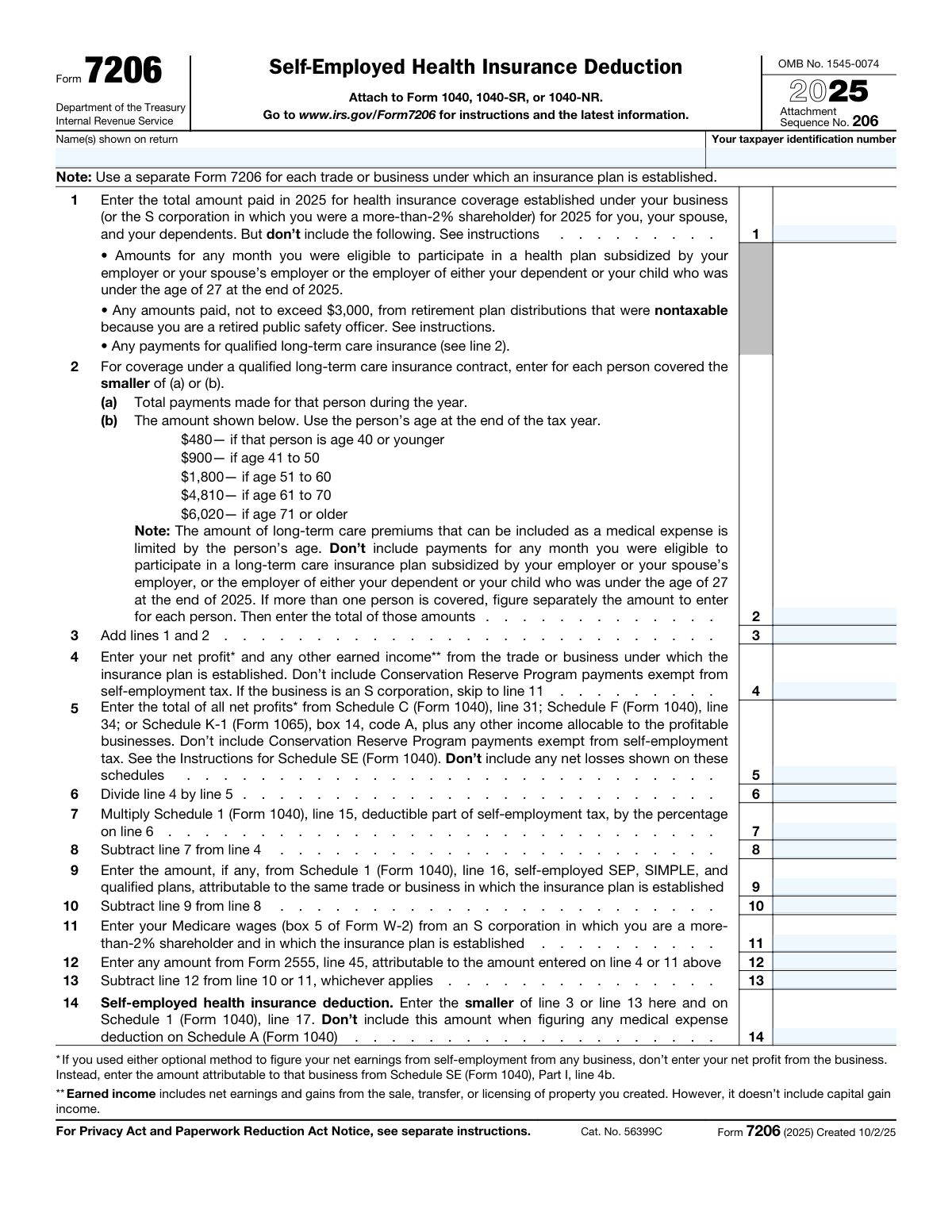
Yes! You can use AI to fill out Form 7206 (2025), Self-Employed Health Insurance Deduction
Don't type 16 fields by hand. Tell our AI about yourself, or upload your insurance card, and it fills every field in seconds. You check it, then download, print or sign.
The AI does the filling. You just check it.
No typing into boxes, nothing to install.
What this form asks for
The AI fills all of it, from your answers or your documents.
The AI checks your answers before you download
16 checks built for this form, so a wrong date or a missing answer is caught before anyone else sees it.
Validate that the submission is for tax year 2025 and that all entered amounts correspond to payments and income for calendar year 2025. This matters because the line instructions and long-term care premium limits are year-specific and can change by year. If the tax year is not 2025, the form should be rejected or routed to the correct year’s Form 7206 version to prevent applying incorrect limits and calculations.
Ensure the taxpayer name(s) shown on the return and the taxpayer identification number are present and the TIN matches an allowed format (SSN: 9 digits, ITIN: 9 digits starting with 9, or EIN where applicable for the filing context). This is critical for matching the attachment to the correct Form 1040/1040-SR/1040-NR and preventing misapplied deductions. If missing or malformed, the submission should fail validation and require correction before filing.
Check that the filer indicates which trade or business the insurance plan is established under, and that only one trade/business is represented per Form 7206. The form explicitly requires a separate Form 7206 for each trade or business, and mixing businesses can distort the earned-income limitation calculation. If multiple businesses are detected (e.g., multiple Schedule C/F/K-1 sources without a clear single business attribution), the system should flag the return and require separate forms or clear allocation.
Validate that lines 1–14 accept only numeric currency amounts (no text), with appropriate precision (typically whole dollars or two decimals depending on system rules), and that no line contains a negative value. These lines represent payments, income, and computed limits that should not be negative on this form. If a negative or non-numeric value is entered, the form should error because downstream calculations and IRS e-file schemas generally disallow such values.
Verify that line 3 is exactly the sum of line 1 and line 2. This is a core arithmetic dependency used later to cap the deduction on line 14. If the sum does not match, the system should either auto-calculate line 3 or reject the submission to prevent an incorrect deduction amount.
For each covered person included in line 2, validate that the amount counted is the smaller of (a) total payments for that person and (b) the age-based limit ($480, $900, $1,800, $4,810, or $6,020 based on age at end of 2025). This is required by statute and prevents overstating deductible long-term care premiums. If ages are missing, inconsistent, or the total exceeds the allowed per-person caps, the system should fail validation or require per-person detail to compute the correct total.
And 10 more checks
- Age Determination Must Use Age at End of 2025
- S Corporation Path vs Self-Employed Business Path Consistency
- Line 5 Must Be Positive When Line 6 Is Computed (No Division by Zero)
- Line 6 Percentage Range Validation (0 to 1, Inclusive)
- Line 7 Must Equal Schedule 1 Line 15 × Line 6 (With Rounding Rules)
- Line 8 Must Equal Line 4 Minus Line 7 and Cannot Be Negative
- Line 10 Must Equal Line 8 Minus Line 9 and Cannot Be Negative
- Form 2555 Amount (Line 12) Must Not Exceed Related Earned Income Base
- Line 13 Must Equal Applicable Base Minus Line 12 (Correct Base Selection)
- Line 14 Deduction Must Be the Smaller of Line 3 or Line 13 and Must Match Schedule 1 Line 17
Let AI fill out your Form 7206
No typing. Every field filled in seconds, checked, ready to sign.
How to Fill Out Form 7206 Online for Free in 2026
What the AI walks you through.
- Enter taxpayer identifying information and confirm whether you need separate Form 7206 filings for multiple trades or businesses with separate insurance plans.
- Report total 2025 health insurance premiums paid under the business-established plan on line 1, excluding months you were eligible for subsidized employer coverage and other disallowed amounts described in the instructions.
- Calculate allowable qualified long-term care premiums on line 2 using the age-based limits for each covered person, then total the allowed amounts.
- Add lines 1 and 2 to get total potentially deductible premiums on line 3.
- Compute the earned-income limitation for the specific business: enter net profit/earned income on line 4, total net profits from all profitable businesses on line 5, and complete lines 6–10 to allocate the deductible part of self-employment tax and subtract any SEP/SIMPLE/qualified plan deductions attributable to the same business.
- If applicable, complete the S corporation path (lines 11–13) using Medicare wages from the S corporation and subtract any Form 2555 amounts attributable to that income.
- Determine the final deduction on line 14 as the smaller of line 3 or line 13, then transfer it to Schedule 1 (Form 1040), line 17, and ensure it is not also included as a medical expense on Schedule A.
Common Mistakes in Completing Form 7206
The ones the AI is built to catch.
Not using a separate Form 7206 for each business/plan
Including premiums for months with employer-subsidized plan eligibility
Putting long-term care premiums on line 1 instead of line 2
Failing to apply the age-based long-term care premium limits per person
Using the wrong income figure on line 4 (net profit vs. Schedule SE optional method)
Including net losses on line 5 or netting losses against profits
Misallocating the deductible part of self-employment tax (line 7) by skipping the line 6 percentage
Forgetting to reduce earned income by retirement plan contributions (line 9)
S corporation more-than-2% shareholder errors (wrong line path or wrong wage figure)
Not subtracting Form 2555 amounts when applicable (line 12)
Double-dipping the same premiums on Schedule A medical expenses
Frequently Asked Questions About Form 7206
Is it really free for 7 days?
Can I fill other forms too?
How do I cancel?
How does the AI fill out Form 7206?
What happens to my information?
How complex is Form 7206 to fill out?
What is Form 7206 used for?
Who needs to file Form 7206?
Do I need a separate Form 7206 for each business I own?
What health insurance payments can I include on line 1?
What does “eligible to participate in an employer-subsidized health plan” mean, and why does it matter?
How do I report qualified long-term care insurance premiums on Form 7206?
What are the age-based limits for long-term care premiums on line 2?
What income amount do I enter on line 4, and what if I used the optional method on Schedule SE?
What is line 5 for, and why does it say not to include net losses?
How do lines 6 and 7 work, and what is being allocated?
What is the purpose of lines 9 and 10 (SEP/SIMPLE/qualified plans)?
I’m a more-than-2% shareholder in an S corporation—what do I do differently?
What is Form 2555 line 45 doing on line 12?
How do I figure the final deduction amount on line 14?
Can I also claim these premiums as a medical expense on Schedule A?
Get your Form 7206 filled out by AI
$0 today. Cancel before Nov 1 and you pay nothing.
Other forms like this one
insurance forms: Form 1095-A, Health Insurance Marketplace Statement, Form SSA-4-BK, Application for Child's Insurance Benefits, Form SSA-10, Application for Widow's or Widower's Insurance Benefits, Form 1095-C, Employer-Provided Health Insurance Offer and Coverage, National Integrity Life Insurance Company Ownership Change Request Form (NI-77-0039-2505), Record of Advice and Needs Analysis (Non-Life Insurance — Personal and Commercial Lines), Continental American Insurance Company (CAIC) / Aflac Group Critical Illness Claim Form (with Attending Physician’s Statement, HIPAA Authorization to Obtain Information, and Electronic Funds Transaction Authorization), Prudential Group Disability Insurance – Education and Employment History Form (GL.2009.009, Ed. 06/2017), acord-25-201603-certificate-of-liability-insurance-1, Brotherhood Mutual Insurance Company Ministry Driver Screening Form (A99), Assurity Life Insurance Company Disability Claim Form — Attending Physician’s Statement, Amateur Sports / Activities Accident Insurance Quote Request Form (Philadelphia Insurance Companies), Martial Arts Studio General Liability and Property Application (Fitness and Wellness Insurance / Philadelphia Insurance Companies) (03/2011), The Prudential Insurance Company of America Group Disability Insurance – Education and Employment History Form (GL.2009.009, Ed. 06/2017), VA Form 29-357, Claim for Disability Insurance Benefits (Government Life Insurance), CMS-1500 (02-12), Health Insurance Claim Form (NUCC Approved) (OMB 0938-1197), Prudential Group Disability Insurance – Education and Employment History Form (GL.2009.009, Ed. 06/2017), HDFC ERGO General Insurance Company Limited – Request for Cashless Hospitalisation for Health Insurance (Policy Part – C), Beneficiary Designation/Change - Principal Life Insurance Company, Principal Life Insurance Company UCTIE INTERNATIONAL UNION 401(K) SAVINGS PLAN Enrollment Form
health insurance forms: Form 1095-A, Health Insurance Marketplace Statement, Form 1095-C, Employer-Provided Health Insurance Offer and Coverage, CMS-1500 (02-12), Health Insurance Claim Form (NUCC Approved) (OMB 0938-1197), HDFC ERGO General Insurance Company Limited – Request for Cashless Hospitalisation for Health Insurance (Policy Part – C), Standard Health Insurance Claim Form - Part B, Blue Shield of California Network Participation Letter of Intent, Blue Shield of California Prior Authorization Request Form, Blue Shield of California Urgent Request for Prior Authorization, Cigna Out-of-Network Referral Disclosure Form, Identificación Estado Sanitario Poblacional, Anexo II, Res. 83/2007 (Superintendencia de Servicios de Salud), John Hancock Independent Care Provider Service Reimbursement, John Hancock Independent Care Provider Service Reimbursement, Kaiser Permanente Washington Request for Authorization, Oscar Grievance and Appeal Form - Florida, R+V Krankenversicherung AG Antrag Krankenversicherung und Pflegepflichtversicherung, UnitedHealthcare Prior Authorization Request Form, Form CMS-1561, Health Insurance Benefit Agreement, CMS-1500 Health Insurance Claim Form (OMB-0938-0999), Form 8941, Credit for Small Employer Health Insurance Premiums, Affinity Healthcare Non-Emergency Medical Transportation Insurance Application
self-employed forms: Form 7206, Self-Employed Health Ins. Ded., Form 433-A (OIC), Collection Information Statement for Wage Earners and Self-Employed Individuals, BIR Form No. 1901, Application for Registration For Self-Employed (Single Proprietor/Professional), Mixed Income Individuals, Non-Resident Alien Engaged in Trade/Business, Estate and Trust
health forms: Form 1095-A, Health Insurance Marketplace Statement, Form 8889, Health Savings Accounts, Form WH-380-E, Certification of Health Care Provider, Form 7206, Self-Employed Health Ins. Ded., Form 8885, Health Coverage Tax Credit, Form WH-380-F, Certification of Health Care Provider, Form 1095-C, Employer-Provided Health Insurance Offer and Coverage, Form 1095-B, Health Coverage, Form I-905, Application for Authorization to Issue Certification for Health Care Workers, Form BHVH, Outpatient Behavioral Health – ABA Treatment Request, Form SHA, Separation Health Assessment, DHS-6696-ENG, Minnesota Health Care Programs Application (MNsure/DHS), Geisinger Health Plan Behavioral Health Professional Services Questionnaire, Priority Health Small Group Renewal Decision Form, Form CH-006: PA-BH-Res-PCS, Oregon Behavioral Health Support Program Plan of Care Authorization (Plan of Care Request for Behavioral Health Residential or Personal Care Services), HIPAA Authorization Form, Authorization for the Release of Protected Health Information, Prior Authorization (PA) Request Form – Adult Palliative Care (Alameda Alliance for Health), Medicare Enrolment Application (Australia) – Enrol in Medicare, Re-enrol/Extend Eligibility, Enrol a Newborn, and Register for My Health Record, Alameda Alliance for Health Prior Authorization (PA) Request Form – Adult Palliative Care, Health Assessment – Ontario Health atHome (Fixing Long-Term Care Act, 2021) (Form 4768-69E)
Let AI fill out your Form 7206
Your trial starts once a card is added. You pay nothing before Nov 1.
Our AI already knows this form, all 16 fields of it. Skip the typing: tell it about yourself, or upload what you have, and it fills the whole form in seconds.
- AI fills every field on the form, checkboxes included
- No typing into boxes: answer a few questions, or upload your insurance card, an old copy of this form, a photo of a document
- The AI checks the answers; you review and change anything before you download
- Download the finished PDF, print it, or sign it online
- Encrypted, and never used to train AI
Cancel before Nov 1 and you pay nothing.
A card is needed to start the trial. Cancel in two clicks from your account.
Terms · Privacy