Yes! You can use AI to fill out TIAA Brokerage Incoming Managed Account Transfer Form (F11319)
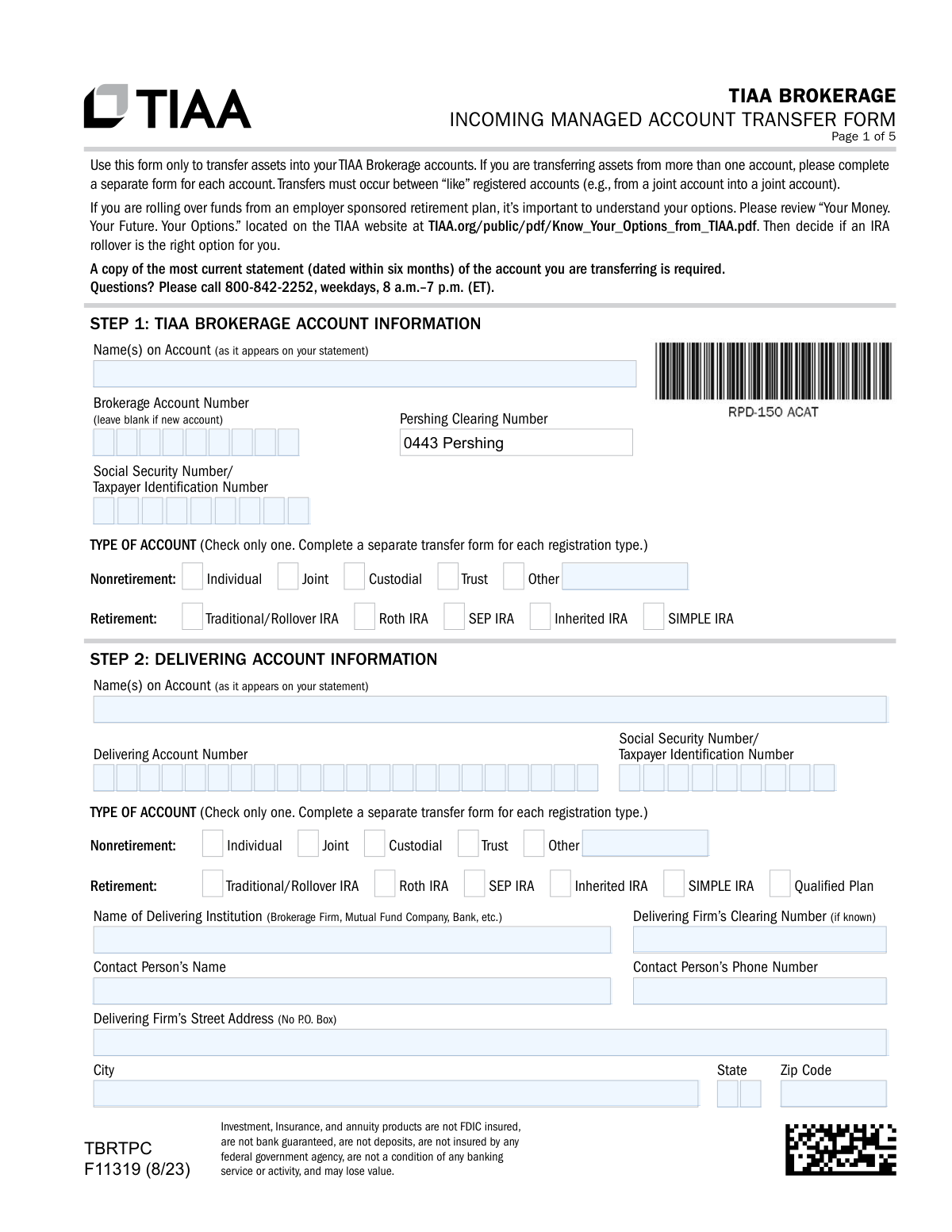
Form F11319 is an authorization document for clients wishing to move their investments, such as stocks, mutual funds, or retirement plan assets, from an external firm into a TIAA Brokerage managed account. It provides TIAA with the necessary details about the delivering institution and the specific assets to be transferred, ensuring a smooth consolidation of your portfolio. Today, this form can be filled out quickly and accurately using AI-powered services like Instafill.ai, which can also convert non-fillable PDF versions into interactive fillable forms.
F11319 is part of the
brokerage forms, investment account forms, financial transfer forms, TIAA forms, account transfer forms, transfer forms, broker forms, brokerage account forms, brokerage transfer forms and managed account forms categories on Instafill.
Rather not fill this in by hand? Instafill is an online form filler that completes PDF forms automatically — upload the blank form, answer a few questions, and the AI fills every field.
Form specifications
| Form name: | TIAA Brokerage Incoming Managed Account Transfer Form (F11319) |
| Number of pages: | 1 |
| Language: | English |
Our AI automatically handles information lookup, data retrieval, formatting, and form filling.
It takes less than a minute to fill out F11319 using our AI form filling.
Securely upload your data. Information is encrypted in transit and deleted immediately after the form is filled out.
Instafill Demo: How to fill out PDF forms in seconds with AI
How to Fill Out F11319 Online for Free in 2026
Are you looking to fill out a F11319 form online quickly and accurately? Instafill.ai offers the #1 AI-powered PDF filling software of 2026, allowing you to complete your F11319 form in just 37 seconds or less.
Follow these steps to fill out your F11319 form online using Instafill.ai:
- 1 Navigate to Instafill.ai and upload or select the TIAA Brokerage Incoming Managed Account Transfer Form (F11319).
- 2 Provide your TIAA Brokerage account information, allowing the AI to assist with pre-filling details from your profile.
- 3 Enter the information for the delivering account you are transferring from, including the institution's name, address, and your account number.
- 4 Clearly specify your transfer instructions, indicating whether it's a full or partial transfer and listing specific assets if applicable.
- 5 Complete any necessary certifications for retirement plan rollovers or if there are name variations between the accounts.
- 6 Review all the information populated by the AI for accuracy, then electronically sign and date the form to authorize the transfer.
- 7 Securely submit the completed form along with a required copy of your most recent account statement through the platform.
Our AI-powered system ensures each field is filled out correctly, reducing errors and saving you time.
Why Choose Instafill.ai for Your Fillable F11319 Form?
Speed
Complete your F11319 in as little as 37 seconds.
Up-to-Date
Always use the latest 2026 F11319 form version.
Cost-effective
No need to hire expensive lawyers.
Accuracy
Our AI performs 10 compliance checks to ensure your form is error-free.
Security
Your personal information is protected with bank-level encryption.
Frequently Asked Questions About F11319
This form is used to transfer assets from an account at another financial institution, such as another brokerage, mutual fund company, or bank, into your TIAA Brokerage account.
You must attach a complete copy of your most recent account statement from the institution you are transferring from. The statement must be dated within the last six months.
An 'In Kind' transfer means your assets, like stocks or mutual funds, are moved directly to your TIAA account without being sold first. If you wish to sell assets, you must do so at your delivering firm before submitting this form.
If you are submitting this form along with a new account application, you can leave the Brokerage Account Number field in Step 1 blank. Otherwise, you must enter your existing TIAA Brokerage account number.
You should complete Step 5, the 'One and the Same Certification,' to certify that both names refer to you. Note that some significant name variations may require additional legal documentation, like a marriage certificate.
Yes, you can perform a partial transfer. In Step 3, select option B and list the specific assets and the number of shares you wish to move to TIAA.
You have several options: upload it via the TIAA mobile app or the TIAA website, fax it, or send it via standard or overnight mail. The form provides specific addresses and fax numbers for submission.
When transferring from a joint account to an individual account, a change of ownership occurs. You must provide a notarized Letter of Authorization signed by all account owners of the original joint account.
For a qualified retirement plan rollover, you should first consult your plan administrator, as they may have their own required paperwork or procedures. Some plans may not allow 'In Kind' transfers, meaning assets would need to be liquidated first.
All account holders listed on the new TIAA Brokerage account must sign and date the form in Step 6. For trust accounts, all trustees must sign.
Money market funds are not transferable 'in kind'. They will automatically be liquidated by your delivering firm, and the resulting cash balance will be transferred to your TIAA account.
Yes, services like Instafill.ai use AI to accurately auto-fill form fields, which can save you time and help reduce errors. This is especially useful for forms with repetitive information.
You can use a service like Instafill.ai to fill out the form online. Simply upload the PDF, and the tool will help you complete the fields digitally before you print and sign.
If you have a non-fillable or 'flat' PDF, you can use a service like Instafill.ai. It can convert the document into an interactive, fillable form that you can complete on your computer.
Compliance F11319
Validation Checks by Instafill.ai
1
SSN/TIN Format Validation
This check verifies that the Social Security Number (SSN) or Taxpayer Identification Number (TIN) in both Step 1 and Step 2 consists of exactly nine digits and contains no letters or special characters. Correct tax identification is crucial for regulatory reporting and ensuring assets are credited to the correct legal entity. If the format is invalid, the form submission will be rejected, and the user will be prompted to correct the number.
2
Account Registration Type Consistency
This validation ensures that the account registration type selected in Step 1 (TIAA Brokerage Account) is compatible with the type selected in Step 2 (Delivering Account). The form states transfers must occur between 'like' registered accounts, such as from a joint account to a joint account. A mismatch can cause legal, tax, or ownership complications, so a failure will halt processing and require user correction or additional documentation like a notarized Letter of Authorization.
3
Exclusive Transfer Instruction Selection
This check confirms that the user has selected only one transfer instruction option from the list (A through G) in Step 3. Selecting multiple options creates ambiguity and makes the transfer request impossible to process accurately. If more than one option is checked, the form will be considered invalid and the user must clarify their intent by selecting a single instruction.
4
Required Statement Attachment and Date
This validation confirms that a copy of the most recent delivering account statement has been attached to the submission and that the statement date is within the last six months. This document is essential for verifying account details, ownership, and the assets to be transferred. Missing or outdated statements will cause the transfer to be placed on hold until the required document is provided.
5
Required Signatures for All Account Holders
This check verifies that all account holders listed on the TIAA Brokerage account in Step 1 have provided a signature in Step 6. For joint, trust, or other multi-owner accounts, authorization from all parties is legally required to execute the transfer. If any signatures are missing, the form is not in good order and will be rejected pending completion by all required signatories.
6
Completeness of Partial Transfer Instructions
If the user selects option B ('Transfer only the assets listed below') or C ('Direct Mutual Fund Company Transfers') in Step 3, this validation ensures that at least one asset or fund is listed with all its required details. An instruction for a partial transfer with no assets specified is incomplete and cannot be acted upon. A failure will result in an error message asking the user to either list the assets or choose a different transfer instruction.
7
Delivering Firm Physical Address Requirement
This check validates that the address provided for the delivering firm in Step 2 is a physical street address and does not contain 'P.O. Box'. The form explicitly states a physical address is needed, likely to expedite the request via overnight mail. Using a P.O. Box can delay the transfer process, so a validation failure would require the user to provide a valid street address.
8
Conditional CD Maturity Date Validation
If the user selects 'Liquidate my CD/savings at maturity' in Step 3E, this check ensures the 'Specify Date of Maturity' field is filled with a valid date in mm/dd/yyyy format. The date must also be within 30 days of the form's submission date as per the instructions. An invalid, missing, or out-of-range date will cause a validation error, as the instruction cannot be processed without a specific and timely maturity date.
9
Conditional Amount for Partial Rollover/Transfer
When a 'Partial Rollover' (Option F) or 'Partial Transfer' (Option G) is selected, this validation confirms that a valid, positive dollar amount has been entered in the corresponding field. A partial transfer request is incomplete without the specific amount to be moved. If the amount is missing, zero, or non-numeric, the submission will be flagged as incomplete and returned for correction.
10
Prohibited Rollover from QRP/403(b) to SIMPLE IRA
This check enforces the rule noted in the instructions that Qualified Retirement Plans (QRP) or 403(b) plans cannot be rolled into a SIMPLE IRA. It cross-references the account types selected in Step 1 and Step 2. This is a critical compliance check to prevent invalid and potentially taxable transactions, and a failure would immediately block the transfer request.
11
Date Field Format and Plausibility
This validation scans all date fields on the form (e.g., signature dates, maturity date) to ensure they are in the correct 'mm/dd/yyyy' format and represent a logical date. For example, signature dates cannot be in the future. This ensures data integrity and proper record-keeping, and a failure would require the user to correct the malformed date before submission.
12
Account Type Selection Exclusivity
This check ensures that for both the TIAA account in Step 1 and the delivering account in Step 2, exactly one 'Type of Account' checkbox has been selected. Selecting none or multiple types makes the account registration ambiguous and prevents proper processing. A validation failure would prompt the user to make a single, definitive selection for each account.
13
Conditional 'One and the Same' Certification Logic
This validation checks if the 'One and the Same Certification' in Step 5 has been completed. This section should only be filled out if the account owner names in Step 1 and Step 2 do not match exactly. If the names are identical but the section is filled, or if the names differ and the section is blank, the form may be flagged for manual review to prevent processing errors.
14
Conditional IRA Owner Signature in Step 4
This check verifies that the 'Rollover Certification of Employee' signature and date fields in Step 4 are completed if the transfer involves a retirement account. This signature certifies the owner's understanding of rollover rules and tax consequences. If a retirement account is being transferred and this signature is missing, the form is incomplete and will be rejected.
Common Mistakes in Completing F11319
The form explicitly requires a full copy of the most current statement (dated within six months) from the delivering institution. Applicants often forget to include this attachment, which is critical for verifying account details, ownership, and the assets being transferred. Without the statement, the transfer request cannot be processed and will be rejected, causing significant delays. To avoid this, always double-check that the statement is included before submission; AI-powered tools like Instafill.ai can remind users of required attachments.
The form states that transfers must occur between 'like' registered accounts (e.g., Individual to Individual, Joint to Joint). A common error is attempting to transfer assets from a joint account into an individual account without providing the required notarized Letter of Authorization signed by all owners. This mismatch in registration type without proper documentation will cause the transfer to be rejected immediately. Ensure the account types in Step 1 and Step 2 match, or that you have obtained and attached all necessary legal documents for any change in ownership.
The account holder name(s) in Step 1 (TIAA Account) and Step 2 (Delivering Account) must be an exact match. People often overlook minor differences like a missing middle initial, a suffix (Jr./Sr.), or using a nickname. If the names are not identical, the 'One and the Same Certification' in Step 5 must be completed. Failing to either ensure names match or complete Step 5 will halt the process until the discrepancy is clarified, often requiring a new form submission.
For any account with multiple owners, such as a Joint or Trust account, the form requires a signature from every single owner or trustee in Step 6. It is a frequent mistake for only the primary account holder to sign, rendering the form invalid. This oversight requires the form to be sent back for the missing signatures, delaying the entire transfer process. Always verify that all individuals listed on the account have signed and dated the form before submitting.
Step 3 requires the user to choose only one transfer method (A, B, C, D, E, F, or G). A common mistake is checking multiple boxes, such as selecting both 'Transfer my entire account in kind' (A) and also listing specific assets in 'Transfer only the assets listed below' (B). This creates ambiguity and forces the processing agent to seek clarification, delaying the transfer. Carefully read each option and select only the single one that accurately reflects your transfer request.
For brokerage account transfers (Options A and B), users often mistakenly believe they can instruct TIAA to sell assets by listing them on the form. The instructions clearly state that TIAA cannot liquidate assets and that the user must contact the delivering firm to sell positions *before* submitting the transfer form. Submitting the form with an implicit expectation of liquidation will result in the assets being transferred 'In Kind', which may not be the user's intention. For mutual funds (Option C), failing to check 'Liquidate' will also result in an 'In Kind' transfer by default.
In Step 2, the form specifically requests the 'Delivering Firm’s Street Address (No P.O. Box)' to facilitate expedited and overnight communication. Many people enter a P.O. Box out of habit, which is not acceptable for this purpose and can slow down the transfer process significantly. To avoid this, find the physical street address for the delivering firm's transfer department on their website or your account statement. AI-powered form fillers like Instafill.ai can help by automatically populating validated physical addresses for financial institutions.
When requesting a partial transfer of securities (Step 3B) or a direct mutual fund transfer (Step 3C), all columns must be filled out completely. Users frequently omit the number of shares (or 'ALL'), the CUSIP/Symbol, or the full fund account number. For mutual funds, failing to specify the method ('In Kind' or 'Liquidate') can lead to an unintended outcome. Incomplete information requires follow-up and prevents the transfer from being initiated, so it's crucial to copy all details exactly from your account statement.
When transferring a retirement account, the applicant certifies that the amount being transferred does not include the current year's RMD if they are of applicable age. Overlooking this detail and transferring the entire account balance before taking the RMD can lead to tax complications and potential penalties from the IRS. Before submitting the form, confirm with your tax advisor or the delivering firm that your RMD for the current year has been satisfied.
The instructions clearly state, 'please complete a separate form for each account' you are transferring. Applicants sometimes try to list assets from multiple different accounts (even if they are at the same institution) on a single form to save time. This is not permissible and will result in the form being rejected, as each account transfer must be processed as a distinct transaction. If you are transferring a brokerage account and a mutual fund account, for example, you must fill out two separate forms.
Saved over 80 hours a year
“I was never sure if my IRS forms like W-9 were filled correctly. Now, I can complete the forms accurately without any external help.”
Kevin Martin Green
Your data stays secure with advanced protection from Instafill and our subprocessors




Robust compliance program
Transparent business model
You’re not the product. You always know where your data is and what it is processed for.
ISO 27001, HIPAA, and GDPR
Our subprocesses adhere to multiple compliance standards, including but not limited to ISO 27001, HIPAA, and GDPR.
Security & privacy by design
We consider security and privacy from the initial design phase of any new service or functionality. It’s not an afterthought, it’s built-in, including support for two-factor authentication (2FA) to further protect your account.
Fill out F11319 with Instafill.ai
Worried about filling PDFs wrong? Instafill securely fills tiaa-brokerage-incoming-managed-account-transfer-form-f11319 forms, ensuring each field is accurate.
