Yes! You can use AI to fill out TIAA Brokerage Durable Power Of Attorney Affidavit Of Full Force And Effect
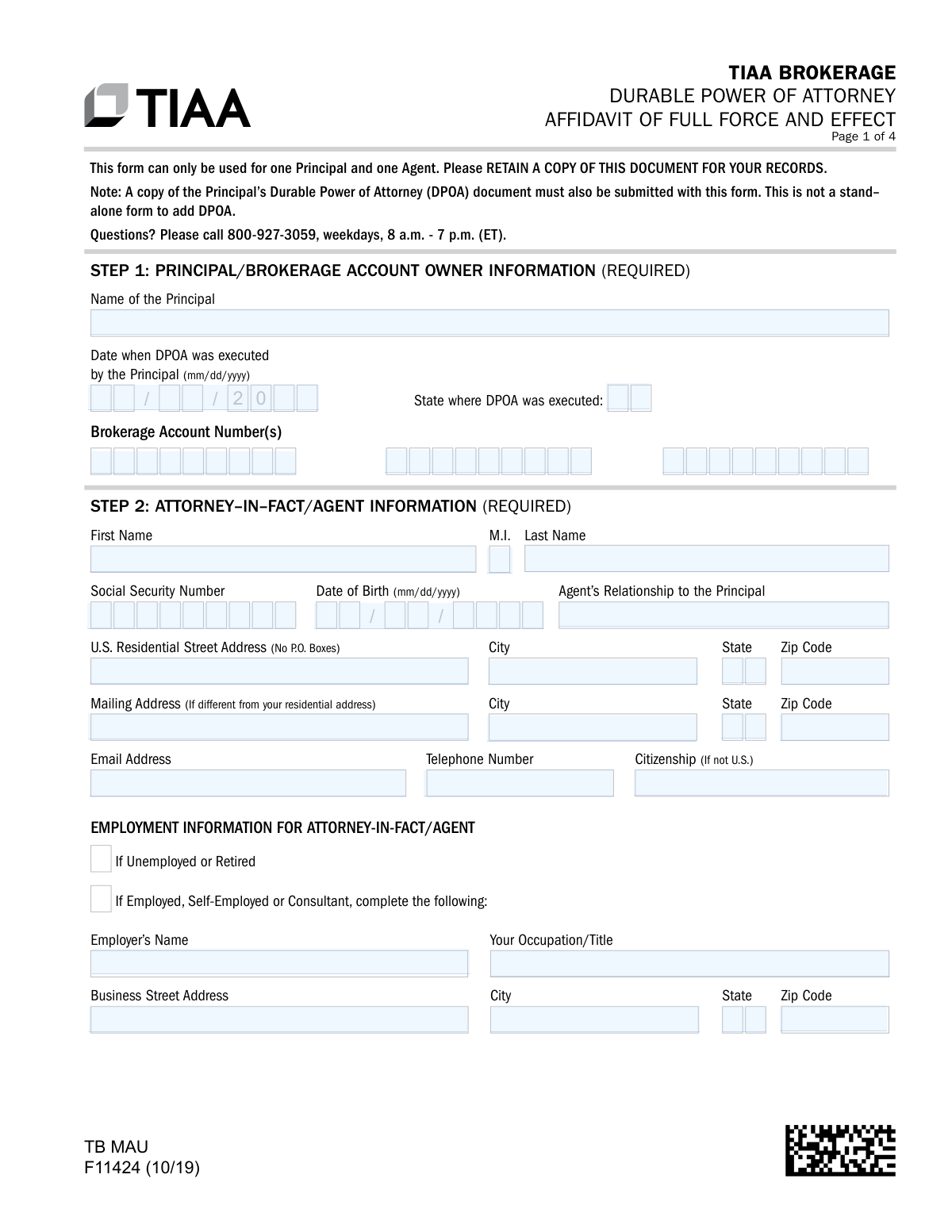
Form F11424, the TIAA Brokerage Durable Power of Attorney Affidavit of Full Force and Effect, is a legal document required by TIAA. The person appointed as the agent (attorney-in-fact) must complete and sign this affidavit to attest that the principal is alive, the original DPOA document is still valid, and has not been revoked. This form must be submitted with a copy of the DPOA to grant the agent authority over the principal's TIAA brokerage accounts. Today, this form can be filled out quickly and accurately using AI-powered services like Instafill.ai, which can also convert non-fillable PDF versions into interactive fillable forms.
F11424 is part of the
brokerage forms, TIAA forms, broker forms, power of attorney forms, affidavit forms and financial affidavit forms categories on Instafill.
Rather not fill this in by hand? Instafill is an online form filler that completes PDF forms automatically — upload the blank form, answer a few questions, and the AI fills every field.
Form specifications
| Form name: | TIAA Brokerage Durable Power Of Attorney Affidavit Of Full Force And Effect |
| Number of pages: | 1 |
| Language: | English |
Our AI automatically handles information lookup, data retrieval, formatting, and form filling.
It takes less than a minute to fill out F11424 using our AI form filling.
Securely upload your data. Information is encrypted in transit and deleted immediately after the form is filled out.
Instafill Demo: How to fill out PDF forms in seconds with AI
How to Fill Out F11424 Online for Free in 2026
Are you looking to fill out a F11424 form online quickly and accurately? Instafill.ai offers the #1 AI-powered PDF filling software of 2026, allowing you to complete your F11424 form in just 37 seconds or less.
Follow these steps to fill out your F11424 form online using Instafill.ai:
- 1 Navigate to Instafill.ai and upload or select the TIAA Brokerage DPOA Affidavit (Form F11424).
- 2 Provide the required information for the Principal (account owner), including their name, brokerage account numbers, and details about the DPOA execution.
- 3 Enter the complete personal, contact, and employment information for the Attorney-in-Fact (Agent).
- 4 Carefully review the Agent Certification section to affirm the powers granted under the DPOA.
- 5 Read the Attorney-in-Fact Agreement, then sign and date the form in the designated section.
- 6 Download the completed affidavit, print it, and have the Agent's signature officially notarized by a Notary Public.
- 7 Submit the fully executed and notarized affidavit, along with a copy of the original DPOA document, to TIAA through their online portal, mobile app, fax, or mail.
Our AI-powered system ensures each field is filled out correctly, reducing errors and saving you time.
Why Choose Instafill.ai for Your Fillable F11424 Form?
Speed
Complete your F11424 in as little as 37 seconds.
Up-to-Date
Always use the latest 2026 F11424 form version.
Cost-effective
No need to hire expensive lawyers.
Accuracy
Our AI performs 10 compliance checks to ensure your form is error-free.
Security
Your personal information is protected with bank-level encryption.
Frequently Asked Questions About F11424
This form is an affidavit used by an Attorney-in-Fact (Agent) to certify that an existing Durable Power of Attorney (DPOA) for a TIAA Brokerage account owner is still valid and in full effect. It does not establish a DPOA but rather accompanies an existing one.
The Attorney-in-Fact, also known as the Agent, is the person who must complete, sign, and date this form. The Principal (the account owner) does not sign this affidavit.
Yes, you must submit a complete copy of the Principal’s fully executed Durable Power of Attorney (DPOA) document along with this affidavit. This form is not a stand-alone document and will not be processed without the DPOA.
No, this form cannot be used to create or appoint a Power of Attorney. It is only used to certify that a separate, legally executed DPOA document is still valid.
You must provide your full name, Social Security Number, date of birth, contact information, and detailed employment information. You also need to disclose any affiliations with public companies, financial firms, or non-U.S. political offices as specified.
If your DPOA document does not grant you one or more of the powers listed in the Agent Certification section, you must contact TIAA at 800-927-3059 for guidance before signing the affidavit.
Yes, your signature as the Attorney-in-Fact must be acknowledged before a Notary Public. The notary must complete Step 5, including their signature, seal, and commission details.
You can upload the documents via the TIAA mobile app or the TIAA.org website for the fastest processing. Alternatively, you can submit them by fax or by standard or overnight mail to the addresses listed on the form.
No, the form explicitly states it can only be used for one Principal and one Agent. If multiple agents need to be recognized, you may need to submit separate forms or contact TIAA for instructions.
By signing, you are swearing that the DPOA is in effect and agree to indemnify TIAA and Pershing LLC against any losses resulting from your instructions. You also agree to be bound by the TIAA Brokerage Customer Account Agreement, including its arbitration clause.
If you have a non-fillable PDF, you can use a service like Instafill.ai to convert it into an interactive, fillable form. This allows you to type your information directly into the fields before printing for signature and notarization.
Yes, services like Instafill.ai use AI to accurately auto-fill form fields with your saved information, which can save time and help prevent errors. After the form is filled, you must print it to obtain the required notary signature.
Simply upload the TIAA F11424 form to the Instafill.ai platform. The AI will identify the fields, allowing you to auto-fill your information or type it in manually before downloading the completed document for printing and notarization.
The 'Principal' is the owner of the TIAA Brokerage account. The 'Attorney-in-Fact' or 'Agent' is the person the Principal has legally authorized to make financial decisions on their behalf through the DPOA document.
Compliance F11424
Validation Checks by Instafill.ai
1
Principal's DPOA Execution Date Validity
Checks that the 'Date when DPOA was executed' is a valid date in mm/dd/yyyy format and is not a future date. This ensures the referenced legal document existed before this affidavit was created. A future or invalid date would render the affidavit logically unsound and cause the submission to be rejected for correction.
2
Agent's Social Security Number Format
Validates that the Social Security Number in Step 2 is a 9-digit number, conforming to the standard XXX-XX-XXXX or XXXXXXXXX format. This is a critical piece of personally identifiable information required for identity verification and regulatory compliance under Know Your Customer (KYC) rules. Failure to provide a valid SSN will prevent the agent from being added to the account.
3
Agent's Age Verification
Verifies that the Agent's 'Date of Birth' indicates they are of legal age, typically 18 years or older. This is a fundamental legal requirement for an individual to act as an attorney-in-fact for financial matters. Submissions for underage agents will be rejected as they lack the legal capacity to enter into such agreements.
4
Prohibits P.O. Box for Residential Address
Ensures the 'U.S. Residential Street Address' field does not contain 'P.O. Box' or similar text, as explicitly stated on the form. Federal regulations require financial institutions to obtain a physical residential address for identity verification purposes. Using a P.O. Box will result in a validation failure and require the user to provide a valid street address.
5
Conditional Employment Information Requirement
Checks that if the 'Employed, Self-Employed or Consultant' option is selected, the subsequent fields for 'Employer’s Name', 'Your Occupation/Title', and 'Business Street Address' are completed. This information is required for regulatory and compliance purposes. If the option is checked but the details are missing, the form submission will be flagged as incomplete.
6
Conditional Disclosure Field Completion
Validates that if any of the checkboxes regarding affiliation with a publicly traded company, another FINRA member firm, or a non-U.S. political official are checked, the corresponding detail fields are filled out. This information is mandated by FINRA and other regulators to identify and manage potential conflicts of interest. An incomplete disclosure will halt the processing of the form.
7
Signature and Notarization Date Consistency
Compares the 'Today’s Date' under the Attorney-in-Fact's signature in Step 4 with the date of notarization in Step 5. The signature date must be on or before the notary date. A notary cannot legally attest to a signature that has not yet occurred, so a discrepancy would invalidate the notarization and cause the form to be rejected.
8
Affidavit Date vs. DPOA Execution Date Logic
Verifies that the agent's signature date (Step 4) and the notary date (Step 5) are on or after the 'Date when DPOA was executed' (Step 1). The affidavit, which attests to the DPOA's validity, cannot logically predate the creation of the DPOA document itself. This check prevents chronological impossibilities and ensures the legal sequence of events is correct.
9
Completeness of Notary Certification Section
Ensures all fields within the 'Notary Certification' in Step 5 are fully completed, including the printed name of the signer, state, county, date, the notary's signature, and their commission details. A missing seal (where required) or any incomplete information invalidates the notarization, which is a mandatory requirement for this legal affidavit. The form will be returned if the notarization is incomplete.
10
Agent Name Consistency Check
Confirms that the 'Print Name' field under the signature in Step 4 matches the full name provided for the Attorney-in-Fact in Step 2. This simple cross-reference ensures the individual identified as the agent is the same person signing the affidavit. A mismatch could indicate an error or a fraudulent submission and will require clarification.
11
Brokerage Account Number Validation
Checks that the provided 'Brokerage Account Number(s)' conform to the expected format and length for TIAA accounts. This validation ensures that the power of attorney is being applied to a valid, existing account within the TIAA system. An invalid account number would prevent the form from being processed and linked to the correct principal.
12
DPOA Document Attachment Verification
This is a system-level check to confirm that a separate file containing a copy of the Principal's Durable Power of Attorney (DPOA) document has been uploaded or submitted with the affidavit form. The form explicitly states it is not a stand-alone document and is invalid without the accompanying DPOA. Failure to include the DPOA document will result in the immediate rejection of the entire submission.
Common Mistakes in Completing F11424
The most common error is failing to include a copy of the actual, executed Durable Power of Attorney (DPOA) document along with this affidavit. This form is an affidavit that certifies an existing DPOA; it does not create one. Submitting the affidavit alone is incomplete and will be immediately rejected, causing significant delays in granting the agent access. Always use the checklist on page 4 to ensure the DPOA document is attached to your submission.
Step 5 requires a notary public's certification, which is frequently done incorrectly. Common errors include the agent signing the form before meeting the notary, the notary forgetting to add their seal (if required), or omitting their commission expiration date. An invalid notarization makes the entire affidavit legally void, requiring the agent to restart the process. To avoid this, sign the document only in the physical presence of the notary and verify they have completed their section in full.
In Step 3, the agent certifies they possess a long list of specific powers (e.g., making gifts, opening new accounts). Agents often sign this without cross-referencing their actual DPOA document, which may contain restrictions. Falsely attesting to powers you do not have can have serious legal consequences and lead to the rejection of your authority. Before signing, you must carefully compare the list in Step 3 with the text of your DPOA; if any power is not granted, you must contact TIAA as instructed.
Applicants often overlook required fields in the Attorney-in-Fact/Agent section, particularly the employment and affiliation details. It is mandatory to provide either your employer's information or check the 'Unemployed or Retired' box. Furthermore, the three checkboxes regarding affiliations with public companies, FINRA, or foreign political officials are often skipped, which can halt the compliance review process. Ensure every field and checkbox in this section is addressed to prevent processing delays.
The form explicitly states 'No P.O. Boxes' for the agent's U.S. Residential Street Address. Many people enter a P.O. Box out of habit, which violates federal regulations (like the Patriot Act) requiring a physical address for identity verification. This error will cause the form to be returned for correction. Always provide your physical street address, and use the separate 'Mailing Address' field if you receive mail elsewhere.
The form contains multiple date fields that must be accurate and consistent. The 'Date when DPOA was executed' in Step 1 must match the date on your DPOA document. Additionally, the agent's signature date in Step 4 must match the date of notarization in Step 5. Any mismatch suggests the document may have been signed improperly and will lead to rejection. AI-powered form fillers like Instafill.ai can help prevent this by validating date formats and ensuring consistency across fields.
In Step 1, the agent must list all of the Principal's brokerage account numbers to which the DPOA should apply. Omitting an account number means the agent will not be granted authority over that specific account. Entering an incorrect number will cause a processing failure. It is crucial to locate the Principal's account statements and transcribe all relevant account numbers accurately.
This is a 4-page document, and the instructions state to 'upload all pages.' Applicants sometimes only submit the pages they signed or filled out, omitting pages that contain important legal terms and conditions (like page 2). Financial institutions require the full, unaltered document for their records. Submitting a partial form will result in it being rejected as incomplete. Always ensure you scan or fax every single page of the document.
A fundamental misunderstanding is believing this form establishes a Power of Attorney. This document is an 'Affidavit of Full Force and Effect,' meaning it is a sworn legal statement by the agent affirming that an existing DPOA is still valid and has not been revoked. This confusion leads people to submit the form without a DPOA, which is pointless. Understanding that this form is a required supplement, not a standalone document, is key to a successful submission.
When the form is printed and filled out by hand, illegible handwriting is a common cause of errors and delays. Unclear names, addresses, or account numbers can be misinterpreted during data entry, leading to failed identity verification or incorrect account mapping. To prevent this, it is best to fill out the form digitally before printing for signature. Tools like Instafill.ai can convert flat PDFs into fillable forms and populate them with clear, typed text to ensure legibility and accuracy.
Saved over 80 hours a year
“I was never sure if my IRS forms like W-9 were filled correctly. Now, I can complete the forms accurately without any external help.”
Kevin Martin Green
Your data stays secure with advanced protection from Instafill and our subprocessors




Robust compliance program
Transparent business model
You’re not the product. You always know where your data is and what it is processed for.
ISO 27001, HIPAA, and GDPR
Our subprocesses adhere to multiple compliance standards, including but not limited to ISO 27001, HIPAA, and GDPR.
Security & privacy by design
We consider security and privacy from the initial design phase of any new service or functionality. It’s not an afterthought, it’s built-in, including support for two-factor authentication (2FA) to further protect your account.
Fill out F11424 with Instafill.ai
Worried about filling PDFs wrong? Instafill securely fills tiaa-brokerage-durable-power-of-attorney-affidavit-of-full-force-and-effect forms, ensuring each field is accurate.
