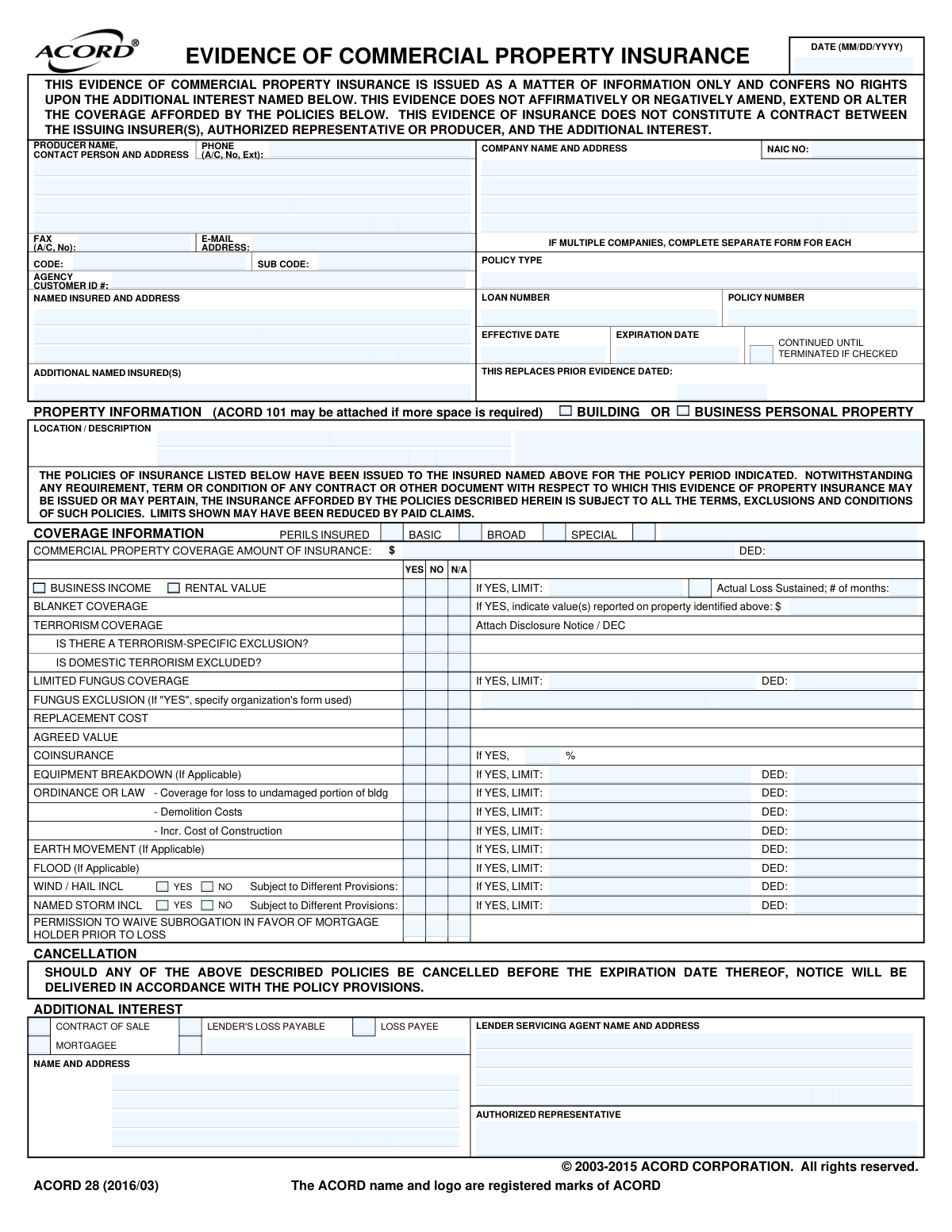
Yes! You can use AI to fill out ACORD 28, Evidence of Commercial Property Insurance
The ACORD 28, Evidence of Commercial Property Insurance form, is a crucial document in business and real estate transactions. It serves as a snapshot of an active commercial property insurance policy, detailing coverages, limits, deductibles, and interested parties, without conferring any rights or altering the policy itself. This standardized proof of insurance is essential for lenders, landlords, and other stakeholders who require verification of coverage. Today, this form can be filled out quickly and accurately using AI-powered services like Instafill.ai, which can also convert non-fillable PDF versions into interactive fillable forms.
ACORD 28 is part of the
ACORD forms, commercial insurance forms and property insurance forms categories on Instafill.
Our AI automatically handles information lookup, data retrieval, formatting, and form filling.
It takes less than a minute to fill out ACORD 28 using our AI form filling.
Securely upload your data. Information is encrypted in transit and deleted immediately after the form is filled out.
Form specifications
| Form name: | ACORD 28, Evidence of Commercial Property Insurance |
| Number of fields: | 159 |
| Number of pages: | 1 |
| Language: | English |
More forms in ACORD forms
Instafill Demo: How to fill out PDF forms in seconds with AI
How to Fill Out ACORD 28 Online for Free in 2026
Are you looking to fill out a ACORD 28 form online quickly and accurately? Instafill.ai offers the #1 AI-powered PDF filling software of 2026, allowing you to complete your ACORD 28 form in just 37 seconds or less.
Follow these steps to fill out your ACORD 28 form online using Instafill.ai:
- 1 Navigate to Instafill.ai and upload your ACORD 28 form or select it from a template library.
- 2 Provide the producer (agency) and named insured's contact information for the AI to populate in the appropriate sections.
- 3 Enter the insurer's name, policy number, and the effective and expiration dates of the commercial property policy.
- 4 Detail the property information, including the location and description, and specify the coverage types, limits, and deductibles.
- 5 Indicate any special coverages or exclusions, such as for terrorism, flood, or equipment breakdown, by checking the relevant boxes and providing limit details.
- 6 List any additional interests, such as a mortgagee or loss payee, along with their contact information and interest type.
- 7 Review all the information populated by the AI for accuracy, then download, print, or securely share the completed ACORD 28 form.
Our AI-powered system ensures each field is filled out correctly, reducing errors and saving you time.
Why Choose Instafill.ai for Your Fillable ACORD 28 Form?
Speed
Complete your ACORD 28 in as little as 37 seconds.
Up-to-Date
Always use the latest 2026 ACORD 28 form version.
Cost-effective
No need to hire expensive lawyers.
Accuracy
Our AI performs 10 compliance checks to ensure your form is error-free.
Security
Your personal information is protected with bank-level encryption.
Frequently Asked Questions About Form ACORD 28
This form is used to provide proof of commercial property insurance to a third party, such as a lender, landlord, or client. It summarizes the policy's key coverages, limits, and insured parties for informational purposes.
The insurance producer (the agent or broker) for the named insured is responsible for completing and signing this form. A business owner cannot fill it out themselves; they must request it from their agent.
The 'Named Insured' is the primary individual or company that owns the insurance policy. The 'Additional Interest' is a third party, like a mortgagee or loss payee, who has a financial stake in the property and requires proof of insurance.
No, this form is issued for information only and does not alter your policy in any way. The form explicitly states it confers no rights upon the additional interest and is subject to all terms and conditions of the actual policy.
You will need to provide the full name and address of the party requesting the form (the 'Additional Interest') and any relevant loan or reference numbers. Your agent will use your policy information to complete the rest.
'Replacement Cost' coverage pays to replace damaged property with new items of similar kind and quality, without deducting for depreciation. 'Agreed Value' waives the coinsurance penalty and pays for losses based on a value that you and the insurer agreed upon when the policy was written.
The form states that if the policy is cancelled before its expiration date, a notice will be delivered according to the provisions outlined in your actual insurance policy contract.
A separate ACORD 28 form must be completed for each insurance company. Your agent will need to issue a distinct form for each policy that applies to the property in question.
Checking 'Special' indicates the property has 'all-risk' coverage, which is the most comprehensive type. It covers losses from all perils except those specifically listed as exclusions in the policy.
Yes, insurance professionals can use services like Instafill.ai to streamline form completion. The AI can accurately auto-fill policy data into the correct fields, which saves time and helps reduce manual errors.
An authorized representative can upload the ACORD 28 PDF to Instafill.ai. The platform's AI will make the document interactive, allowing the user to quickly click and type to fill in all the necessary fields before saving or sharing it.
You can use a service like Instafill.ai to make the document usable. Upload the flat PDF, and the tool will automatically convert it into an interactive, fillable form online.
Business Income coverage helps replace lost profits and pay for continuing operating expenses (like rent and payroll) if your business must temporarily close due to a covered property loss.
This coverage applies when building codes enforced after a loss increase the cost of repairs. It can cover the costs to demolish undamaged portions of the building or upgrade to meet new codes, which are often excluded from standard property policies.
Compliance ACORD 28
Validation Checks by Instafill.ai
1
Policy Period Chronology
Ensures the 'Policy_ExpirationDate_A' is chronologically after the 'Policy_EffectiveDate_A'. A policy cannot expire before it begins. This is a fundamental check for the validity of the policy term. If this validation fails, the form is considered invalid as the coverage period is illogical.
2
NAIC Code Format
Validates that the 'Insurer_NAICCode_A' field contains a valid 5-digit numeric code. The NAIC code is a standard, unique identifier for insurance companies. An incorrect or missing code can lead to misidentification of the carrier, causing issues with regulatory reporting and claims processing.
3
Core Policy Information Completeness
Verifies that essential fields such as 'NamedInsured_FullName_A', 'Policy_PolicyNumberIdentifier_A', 'Policy_EffectiveDate_A', and 'CommercialPropertyCoverage_Property_LimitAmount_A' are not empty. These fields are the minimum required information to identify the insured, the policy, and the primary coverage amount. A submission lacking this data is incomplete and cannot be processed.
4
Conditional Coinsurance Percentage Requirement
Checks that if the 'CommercialPropertyCoverage_Coinsurance_YesIndicator_A' is marked 'YES', the corresponding 'CommercialProperty_Premises_CoinsurancePercent_A' field is populated with a valid percentage (e.g., 80, 90, 100). Coinsurance is a critical factor in calculating claim payouts. Failure to provide the percentage when coinsurance applies makes it impossible to determine potential claim penalties.
5
Conditional Business Income Limit
Ensures that if 'CommercialPropertyCoverage_BusinessIncomeOrRentalValue_YesIndicator_A' is checked, the 'CommercialPropertyCoverage_BusinessIncomeOrRentalValue_LimitAmount_A' field contains a valid monetary value. This is crucial because indicating coverage exists without specifying the limit is ambiguous and unacceptable for underwriting or for a certificate holder. The form would be rejected for clarification.
6
Producer Email Address Format
Validates that the 'Producer_ContactPerson_EmailAddress_A' field contains a string that conforms to the standard email address format (e.g., '[email protected]'). This is important for ensuring reliable electronic communication with the producer for follow-up questions or notifications. An invalid format would prevent communication and cause processing delays.
7
Peril Type Selection
Verifies that at least one of the peril type indicators ('Policy_PolicyType_BasicIndicator_A', 'Policy_PolicyType_BroadIndicator_A', or 'Policy_PolicyType_SpecialIndicator_A') is selected. The peril type defines the fundamental scope of what events are covered by the policy. Without this information, the nature of the coverage is unknown, rendering the evidence of insurance incomplete.
8
Address Completeness for Named Insured
Checks that if a 'NamedInsured_FullName_A' is provided, then the core address fields ('NamedInsured_MailingAddress_LineOne_A', 'CityName_A', 'StateOrProvinceCode_A', 'PostalCode_A') are also filled. A complete address is required for legal notices, billing, and proper identification of the insured party. Missing address information can lead to compliance and communication failures.
9
Logical Check for 'Continued Until Terminated'
Validates the relationship between 'Policy_ContinuedUntilTerminatedIndicator_A' and 'Policy_ExpirationDate_A'. If the 'Continued Until Terminated' box is checked, the 'Policy_ExpirationDate_A' field should be empty. If it is not checked, the 'Policy_ExpirationDate_A' field is mandatory. This prevents contradictory information about the policy term.
10
Conditional Requirement for Blanket Coverage Value
Ensures that if 'CommercialProperty_Blanket_YesIndicator_A' is checked, the 'StatementOfValues_Premises_ValueAmount_A' field is populated with a numeric value. Blanket coverage applies a single limit across multiple properties, and the total value reported is essential for underwriting and rating. Indicating blanket coverage without a value is an incomplete submission.
11
Additional Interest Information Completeness
Verifies that if an interest type is selected (e.g., 'AdditionalInterest_Interest_MortgageeIndicator_A' is checked), then the 'AdditionalInterest_FullName_A' and associated address fields are fully populated. The purpose of the form is often to provide evidence to this third party, so their information must be complete and accurate. An incomplete entry fails to properly notify the intended party.
12
Date Field Format (MM/DD/YYYY)
Validates that all date fields on the form, such as 'Form_CompletionDate_A' and 'Policy_EffectiveDate_A', adhere to the MM/DD/YYYY format. Consistent and valid date formatting is critical for accurate data processing, term calculations, and avoiding system errors. Incorrectly formatted dates will be rejected to prevent data corruption.
13
Property Type Specification
Checks that at least one of the property type indicators, 'Property_Building_CoverageIndicator_A' or 'Property_BusinessPersonalProperty_CoverageIndicator_A', is selected. This specifies whether the policy covers the physical structure, its contents, or both. Without this selection, the subject of the insurance is unclear, making the evidence of insurance ambiguous.
14
Conditional Requirement for Fungus Exclusion Form ID
Ensures that if 'CommercialPropertyCoverage_FungusExclusion_YesIndicator_A' is checked, the 'FormEndorsement_FormIdentifier_A' field is populated. This is important because it specifies the exact endorsement used for the exclusion, which has significant legal and coverage implications. Stating an exclusion exists without identifying the specific policy form is insufficient.
Common Mistakes in Completing ACORD 28
Users often check 'YES' for a specific coverage type, such as Business Income or Equipment Breakdown, but then fail to enter the required Limit and Deductible amounts in the adjacent fields. This leaves the evidence of insurance incomplete and ambiguous, potentially leading to rejection by the certificate holder (like a lender) and delays in processing loans or contracts. To avoid this, always double-check that every 'YES' selection has all corresponding financial details filled in from the policy declarations.
The form requires specifying the nature of the additional interest (e.g., Mortgagee, Loss Payee, Lender's Loss Payable). People frequently select the wrong category or leave it blank, which can have significant legal and financial consequences, as different categories confer different rights under the policy. This error can delay transactions and may not provide the intended protection to the third party. Always verify the required interest type with the requesting party before completing this section.
When 'YES' is selected for Coinsurance, it is mandatory to fill in the applicable percentage. This value is critical as it determines how the insurer calculates payments in the event of a partial loss and can result in a significant penalty if the property is underinsured. Forgetting this percentage makes the form incomplete and can misrepresent the policy terms, causing disputes during a claim. Ensure the correct percentage is entered directly from the policy declarations page.
The 'LOCATION / DESCRIPTION' field is often filled with just a street address, omitting crucial details for properties with multiple buildings or specific insured areas. This ambiguity can lead to disputes over which specific building or part of a property is actually covered. To prevent this, provide the full address and a clear description, such as 'Building A at 123 Main St.' or 'Business Personal Property on 2nd Floor'.
The form has several related questions about terrorism coverage, including whether it's provided and if specific exclusions apply. A common mistake is to provide conflicting answers, such as checking 'YES' for terrorism coverage but also 'YES' for a terrorism-specific exclusion without clarification. This creates confusion and can lead to the form being rejected. Carefully review the policy to ensure all terrorism-related questions are answered consistently.
Simple data entry errors, like transposing digits in the policy number or entering incorrect effective/expiration dates, are very common. An incorrect policy number can make it impossible for the recipient to verify coverage, while wrong dates can falsely indicate a lapse in coverage. These errors lead to immediate rejection and require re-issuance, delaying important business processes. AI-powered tools like Instafill.ai can help prevent this by validating data formats and saving correct information for future use.
The 'ORDINANCE OR LAW' section is broken into three distinct coverages: Undamaged Portion, Demolition Costs, and Increased Cost of Construction. A frequent error is to check 'YES' for one of these without specifying the individual limits and deductibles for each. This provides an incomplete picture of the coverage and can be a major issue if a loss triggers these specific provisions. Ensure that if any part of Ordinance or Law coverage is active, its specific limits are clearly stated.
When 'Blanket Coverage' is marked 'YES,' the form requires indicating the value(s) reported for the property. A common error is to either check 'YES' without providing the value or to misunderstand what blanket coverage entails. This mistake can misrepresent how limits are applied across multiple locations or types of property, leading to confusion and potential coverage gaps. Ensure that if blanket coverage applies, the associated reported values are included as specified on the policy.
Failing to provide the full name, address, and NAIC number for the insurance company, or the complete contact details for the producer (agent/broker), is a frequent oversight. The recipient of this form needs this information to verify the policy and contact the appropriate parties. Missing details can halt the verification process and delay the underlying transaction. Using a tool like Instafill.ai can help by storing and auto-populating this recurring information accurately every time.
An unsigned ACORD form is not valid evidence of insurance. The signature of the authorized representative certifies that the information is accurate as of the date of issuance. Forgetting to sign the form is a simple but critical error that will cause it to be immediately rejected by the receiving party, requiring it to be re-issued and causing delays. If the form is a non-fillable PDF, tools like Instafill.ai can convert it to a fillable version where a digital signature can be easily applied.
Saved over 80 hours a year
“I was never sure if my IRS forms like W-9 were filled correctly. Now, I can complete the forms accurately without any external help.”
Kevin Martin Green
Your data stays secure with advanced protection from Instafill and our subprocessors

Robust compliance program
Transparent business model
You’re not the product. You always know where your data is and what it is processed for.
ISO 27001, HIPAA, and GDPR
Our subprocesses adhere to multiple compliance standards, including but not limited to ISO 27001, HIPAA, and GDPR.
Security & privacy by design
We consider security and privacy from the initial design phase of any new service or functionality. It’s not an afterthought, it’s built-in, including support for two-factor authentication (2FA) to further protect your account.
Fill out ACORD 28 with Instafill.ai
Worried about filling PDFs wrong? Instafill securely fills acord-28-evidence-of-commercial-property-insurance forms, ensuring each field is accurate.