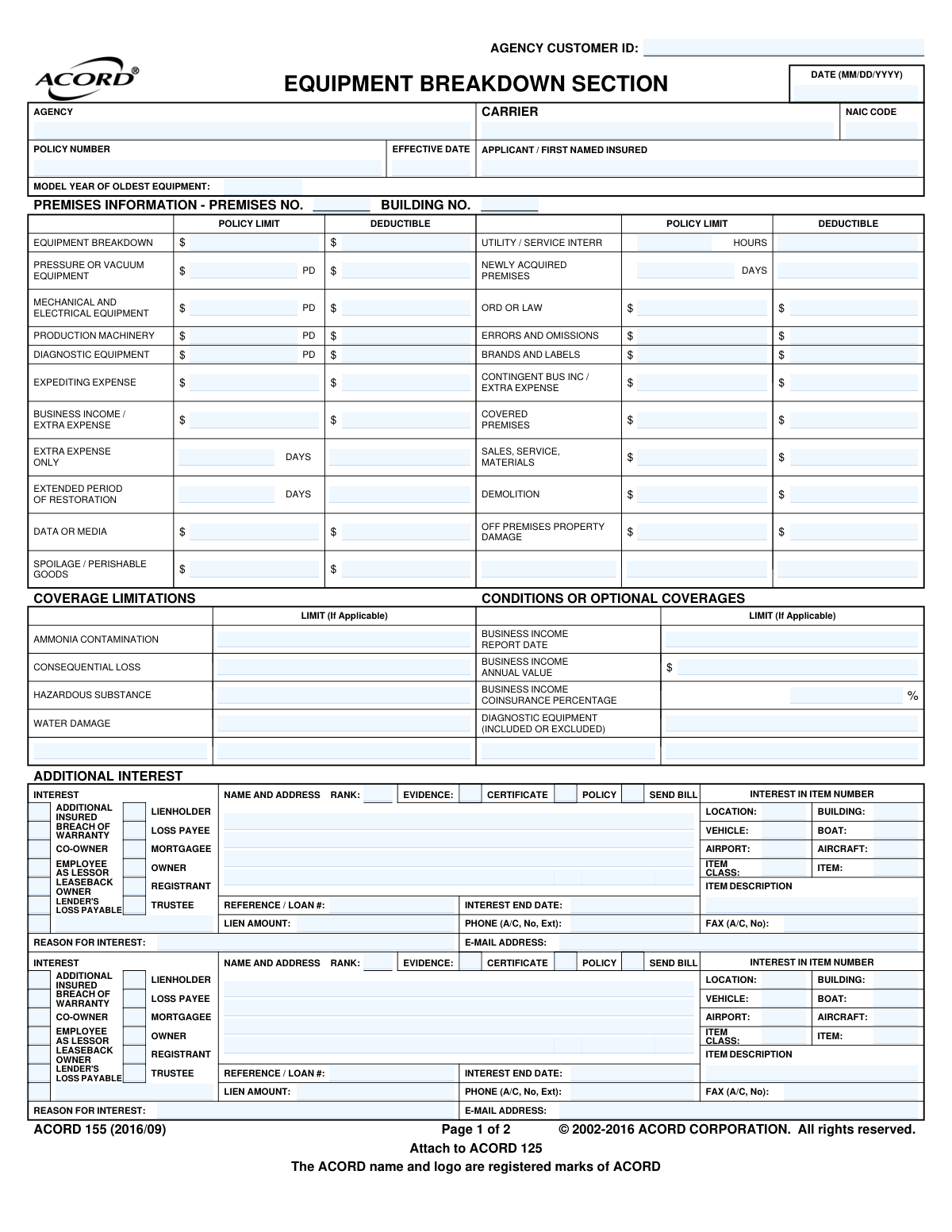
Yes! You can use AI to fill out ACORD 155, Equipment Breakdown Section
ACORD Form 155, known as the Equipment Breakdown Section, is a standardized document used in the insurance industry for businesses applying for equipment breakdown coverage. It allows applicants to detail specific machinery, request coverage limits for various risks like production machinery or diagnostic equipment, and list any additional parties with a financial interest. Completing this form accurately is crucial for ensuring proper protection against costly equipment failures. Today, this form can be filled out quickly and accurately using AI-powered services like Instafill.ai, which can also convert non-fillable PDF versions into interactive fillable forms.
ACORD 155 is part of the
commercial insurance forms and property insurance forms categories on Instafill.
Our AI automatically handles information lookup, data retrieval, formatting, and form filling.
It takes less than a minute to fill out ACORD 155 using our AI form filling.
Securely upload your data. Information is encrypted in transit and deleted immediately after the form is filled out.
Form specifications
| Form name: | ACORD 155, Equipment Breakdown Section |
| Number of fields: | 169 |
| Number of pages: | 1 |
| Language: | English |
More forms in Commercial insurance forms
Instafill Demo: How to fill out PDF forms in seconds with AI
How to Fill Out ACORD 155 Online for Free in 2026
Are you looking to fill out a ACORD 155 form online quickly and accurately? Instafill.ai offers the #1 AI-powered PDF filling software of 2026, allowing you to complete your ACORD 155 form in just 37 seconds or less.
Follow these steps to fill out your ACORD 155 form online using Instafill.ai:
- 1 Navigate to Instafill.ai and upload or select the ACORD 155 form.
- 2 Provide basic applicant, agency, and policy information for the AI to populate the header section.
- 3 Specify the desired coverage limits and deductibles for various categories such as Equipment Breakdown, Business Income, and Spoilage.
- 4 Enter details for any additional interests, including names, addresses, and the nature of their interest in the insured property.
- 5 Answer the 'General Information' questions regarding equipment maintenance, condition, and accessibility.
- 6 Review the entire form, which has been auto-filled by the AI, to ensure all information is correct and complete.
- 7 Electronically sign the application and submit it to the insurance carrier or agency.
Our AI-powered system ensures each field is filled out correctly, reducing errors and saving you time.
Why Choose Instafill.ai for Your Fillable ACORD 155 Form?
Speed
Complete your ACORD 155 in as little as 37 seconds.
Up-to-Date
Always use the latest 2026 ACORD 155 form version.
Cost-effective
No need to hire expensive lawyers.
Accuracy
Our AI performs 10 compliance checks to ensure your form is error-free.
Security
Your personal information is protected with bank-level encryption.
Frequently Asked Questions About Form ACORD 155
The ACORD 155 is a supplemental form used to apply for specific types of commercial insurance, primarily Equipment Breakdown coverage. It details the specific equipment, desired coverage limits, and deductibles for a business.
Any business seeking to obtain or modify an Equipment Breakdown insurance policy needs to complete this form. It is typically filled out by the business owner or an authorized representative, often with assistance from their insurance agent.
The ACORD 155 is not a standalone document; it must be attached to the main ACORD 125, Commercial Insurance Application. Both forms are then submitted together to the insurance carrier to apply for coverage.
The 'Limit' is the maximum amount the insurance company will pay for a covered loss. The 'Deductible' is the amount you, the insured, must pay out-of-pocket for a claim before the insurance coverage begins to pay.
You must complete this section if a third party, such as a lender or leasing company, has a financial interest in your equipment. This ensures they are properly notified or compensated in the event of a covered loss.
You will need your basic business and policy information, desired coverage limits, and details about your equipment's condition and maintenance schedules. If you have loans on the equipment, you'll also need the lender's contact information and loan details.
This information helps the insurer assess the risk, as older machinery may have a higher probability of failure. It can influence your premium rates and the overall terms of your coverage.
The form requires you to provide an explanation for all 'No' responses (except for question 4). Use the 'Remarks' section to give a clear and honest explanation of the circumstances.
This coverage is for businesses with perishable stock, like food or pharmaceuticals, that could be ruined due to a breakdown of refrigeration or climate control equipment. It reimburses you for the value of the spoiled goods.
Yes, services like Instafill.ai use AI to accurately auto-fill form fields from your existing records, which can save significant time and reduce errors. This is especially helpful for repetitive information like your business name and address.
You can use a service like Instafill.ai to complete the form digitally. Simply upload the ACORD 155 PDF, and the platform will allow you to type directly into the fields, save your progress, and easily share the completed form.
If you have a non-fillable or 'flat' PDF, you can upload it to a tool like Instafill.ai. The service will automatically convert it into an interactive, fillable form that you can complete on your computer.
Both the applicant (an authorized representative of the business) and the insurance producer (agent) must sign the form. The applicant's signature certifies that the information provided is true and correct to the best of their knowledge.
ACORD 155 is a multi-purpose form that can be used for different supplemental coverages, including both Equipment Breakdown and Commercial Earthquake. The specific fields you fill out will depend on the type of coverage you are applying for.
Compliance ACORD 155
Validation Checks by Instafill.ai
1
Ensures Date Fields are Correctly Formatted and Logical
This check verifies that all date fields, such as `Policy_EffectiveDate_A` and `Form_CompletionDate_A`, are entered in the standard MM/DD/YYYY format. It also ensures the date is a real, valid calendar date (e.g., not 02/30/2023). This is crucial for establishing correct policy periods and avoiding processing errors or legal disputes over coverage timing.
2
Validates Model Year of Oldest Equipment
This validation ensures the `BoilerAndMachineryCoverage_EquipmentBreakdown_ModelYear_A` field contains a valid four-digit year. The year must not be in the future and should be within a reasonable historical range to be plausible. This is critical for underwriting, as the age of equipment directly impacts its risk profile and premium calculation.
3
Verifies Business Income Coinsurance Percentage is within Range
This check confirms that the value entered for `BoilerAndMachineryCoverage_BusinessIncome_CoinsurancePercent_A` is a numeric value between 0 and 100, inclusive. Coinsurance is a fundamental part of the insurance calculation, and an incorrect percentage would lead to incorrect premium calculations and claim payouts. This validation prevents data entry errors that could have significant financial consequences.
4
Ensures Coverage Limit is Greater Than or Equal to Deductible
This validation performs a cross-field check on all coverage pairs, such as `BoilerAndMachineryCoverage_EquipmentBreakdown_LimitAmount_A` and its corresponding `DeductibleAmount`. It ensures the specified limit of liability is not less than the deductible amount for the same coverage. This maintains the logical integrity of the policy structure, as a deductible cannot exceed the total coverage available.
5
Requires Explanation for Negative General Information Responses
This check enforces the rule stated in the 'GENERAL INFORMATION' section. If any of the questions 1, 2, 3, or 5 are answered 'No', the corresponding explanation field must be filled out. This is vital for underwriters to understand the specific risks associated with non-standard maintenance, accessibility, or equipment condition.
6
Requires Explanation for 'Yes' Response on CFC Refrigerants Question
This validation ensures that if question 4, regarding the use of Chlorofluorocarbon (CFC) refrigerants, is answered 'Yes', the associated explanation field is mandatory. The use of CFCs can represent a significant environmental and regulatory risk, and underwriters require detailed information to properly assess the exposure. Failure to capture this explanation could lead to mispriced risk.
7
Ensures Applicant / First Named Insured is Provided
This validation confirms that the `NamedInsured_FullName_A` field is not empty. The applicant's name is the most fundamental piece of information on the application, identifying the legal entity seeking coverage. An application without this information is incomplete and cannot be processed.
8
Validates Email Address Format for Additional Interests
This check verifies that any value entered into the `AdditionalInterest_Primary_EmailAddress_A` field follows the standard [email protected] format. Correct email addresses are essential for sending legally required notices and certificates of insurance to interested parties like lienholders. Invalid addresses would result in communication failures and potential compliance issues.
9
Requires an Interest Type for each Additional Interest
This validation ensures that if an Additional Interest party is named, at least one of the corresponding interest type checkboxes (e.g., `Lienholder`, `Mortgagee`, `Loss Payee`) must be selected. This is critical to define the legal rights and notification requirements for that party under the policy. Without a defined interest type, the role of the additional party is ambiguous and unenforceable.
10
Validates NAIC Code Format
This check ensures the `Insurer_NAICCode_A` field contains a 5-digit numeric code. The NAIC code is a standard identifier for insurance companies used for regulatory and reporting purposes. Correct formatting is essential for system-to-system data exchange and accurate identification of the carrier.
11
Verifies all Limit and Deductible fields are Valid Currency Amounts
This rule validates that all fields ending in `LimitAmount` or `DeductibleAmount` contain only non-negative numeric values. This prevents text or special characters from being entered into financial fields, which would cause calculation errors in rating and policy issuance systems. It is a foundational check for ensuring the financial data on the form is clean and usable.
12
Enforces National Producer Number Requirement for Florida
This check validates that the `Producer_NationalIdentifier_A` field is populated if the business is being written in Florida, as explicitly required on the form. This is a state-specific compliance requirement. Failure to provide the NPN can result in regulatory penalties and prevent the policy from being legally issued in that state.
13
Ensures Applicant Signature Date is Provided
This validation checks that the `NamedInsured_SignatureDate_A` field is filled out and contains a valid date, especially if the `NamedInsured_Signature_A` field is populated. The signature date is legally significant as it establishes when the applicant attested to the truthfulness of the information provided. An application is often considered incomplete or invalid without a signature date.
14
Validates Phone Number Format
This check verifies that phone number fields, such as `AdditionalInterest_Primary_PhoneNumber_A`, adhere to a consistent format like (999) 999-9999. Standardizing the format ensures data consistency and allows for successful integration with communication systems. It prevents data entry errors that would make it impossible to contact the party.
Common Mistakes in Completing ACORD 155
The 'General Information' section explicitly requires written explanations for all 'NO' answers and for a 'YES' answer to question #4 (regarding CFC refrigerants). Applicants frequently check the box but forget to provide the corresponding narrative in the 'Remarks' section. This omission creates an incomplete application, forcing the underwriter to request the missing information, which delays the quoting and binding process. To avoid this, carefully review each question and provide a clear, concise explanation in the 'Remarks' section for any answer that requires it.
The 'Additional Interest' section is often submitted with missing or partial information, such as omitting the full legal name, complete address, or the specific 'REFERENCE / LOAN #' for a lienholder. This happens because the applicant may not have the information readily available when filling out the form. An incomplete entry can cause significant delays during a claim, as the insurer cannot properly notify or issue payment to the interested party. Always gather all necessary documents for lienholders or lessors beforehand to ensure all fields are entered accurately.
The form layout features adjacent columns for 'LIMIT' and 'DEDUCTIBLE' for dozens of coverage types. A frequent and critical data entry error is inadvertently entering a coverage limit into the deductible column, or vice versa. This simple mistake can have drastic consequences, either leaving the business severely underinsured or resulting in a quote with an unacceptably high deductible and incorrect premium. To prevent this, double-check every line item to ensure financial figures are placed in the correct columns. AI-powered form-filling tools like Instafill.ai can help prevent this by using clear labels and validation to guide data entry.
Applicants often leave the 'MODEL YEAR OF OLDEST EQUIPMENT' field blank, guess the year, or enter an average year for all their equipment. This specific data point is a critical underwriting factor used to assess the risk of breakdown due to age and obsolescence. Providing inaccurate or missing information can lead to incorrect pricing, coverage limitations on older equipment, or even a declination from the carrier. Before completing the form, inventory your key equipment and identify the manufacturing year of the oldest piece to ensure accurate risk assessment.
The 'Additional Interest' section provides numerous checkboxes to define a party's interest (e.g., 'Lienholder', 'Loss Payee', 'Mortgagee', 'Lender's Loss Payable'). Each has a distinct legal meaning that affects how claims are paid. Applicants often select a generic option like 'Loss Payee' when a more specific one like 'Lender's Loss Payable' is required by contract, which can complicate or delay claim payouts. It is crucial to understand the legal relationship with the third party and select the precise interest type; consult your agent if unsure.
The 'BUSINESS INCOME' section requires an 'ANNUAL VALUE' and a 'COINSURANCE PERCENTAGE', which are often misunderstood or miscalculated. Applicants may mistakenly enter their total annual revenue instead of the correct business income value (typically net income plus continuing normal operating expenses). This error can lead to being significantly over-insured and paying excessive premiums, or being under-insured and facing a substantial coinsurance penalty during a major loss. Work with a financial professional or your insurance agent to accurately calculate this value based on your financial statements.
This form requires applicants to allocate coverage limits across distinct equipment categories like 'Production Machinery', 'Diagnostic Equipment', and 'Mechanical and Electrical Equipment'. A common error is misclassifying an asset, for instance, listing a specialized medical scanner under general 'Mechanical' equipment instead of 'Diagnostic'. This can lead to coverage gaps or disputes during a claim if the damaged equipment isn't covered under the correct, specifically-underwritten category. To prevent this, carefully review the function of each piece of machinery and list it under the most appropriate heading.
Basic but essential fields in the header like 'POLICY NUMBER' (for renewals), 'AGENCY CUSTOMER ID', and 'NAIC CODE' are often left empty. Applicants may assume this information will be filled in by the agent or is not necessary for a quote. However, omitting these identifiers can cause processing delays, misidentification of the account, or prevent the application from being routed to the correct carrier or underwriter. Always complete all fields in the header section to the best of your ability to ensure a smooth submission process.
The applicant and producer signature lines at the end of the form are frequently overlooked or left unsigned. An unsigned or undated application is not legally valid and cannot be processed or bound by the insurance carrier. This simple oversight brings the entire underwriting process to a halt until a properly executed signature page is received, delaying the inception of coverage. Make it a final checklist item to ensure both the applicant and producer have signed and dated the form in the designated areas before submission.
This ACORD form is often distributed as a flat, non-fillable PDF, forcing users to either print it and fill it out by hand or manually type information using basic PDF editors. This process is highly prone to typographical errors, misalignments, and illegible entries, especially in the dense tables for coverage limits. These errors can lead to incorrect quotes and policies. To mitigate this, use a tool like Instafill.ai, which can convert flat PDFs into an interactive, fillable version, reducing manual errors and ensuring data is clean and properly formatted.
Saved over 80 hours a year
“I was never sure if my IRS forms like W-9 were filled correctly. Now, I can complete the forms accurately without any external help.”
Kevin Martin Green
Your data stays secure with advanced protection from Instafill and our subprocessors

Robust compliance program
Transparent business model
You’re not the product. You always know where your data is and what it is processed for.
ISO 27001, HIPAA, and GDPR
Our subprocesses adhere to multiple compliance standards, including but not limited to ISO 27001, HIPAA, and GDPR.
Security & privacy by design
We consider security and privacy from the initial design phase of any new service or functionality. It’s not an afterthought, it’s built-in, including support for two-factor authentication (2FA) to further protect your account.
Fill out ACORD 155 with Instafill.ai
Worried about filling PDFs wrong? Instafill securely fills acord-155-equipment-breakdown-section forms, ensuring each field is accurate.