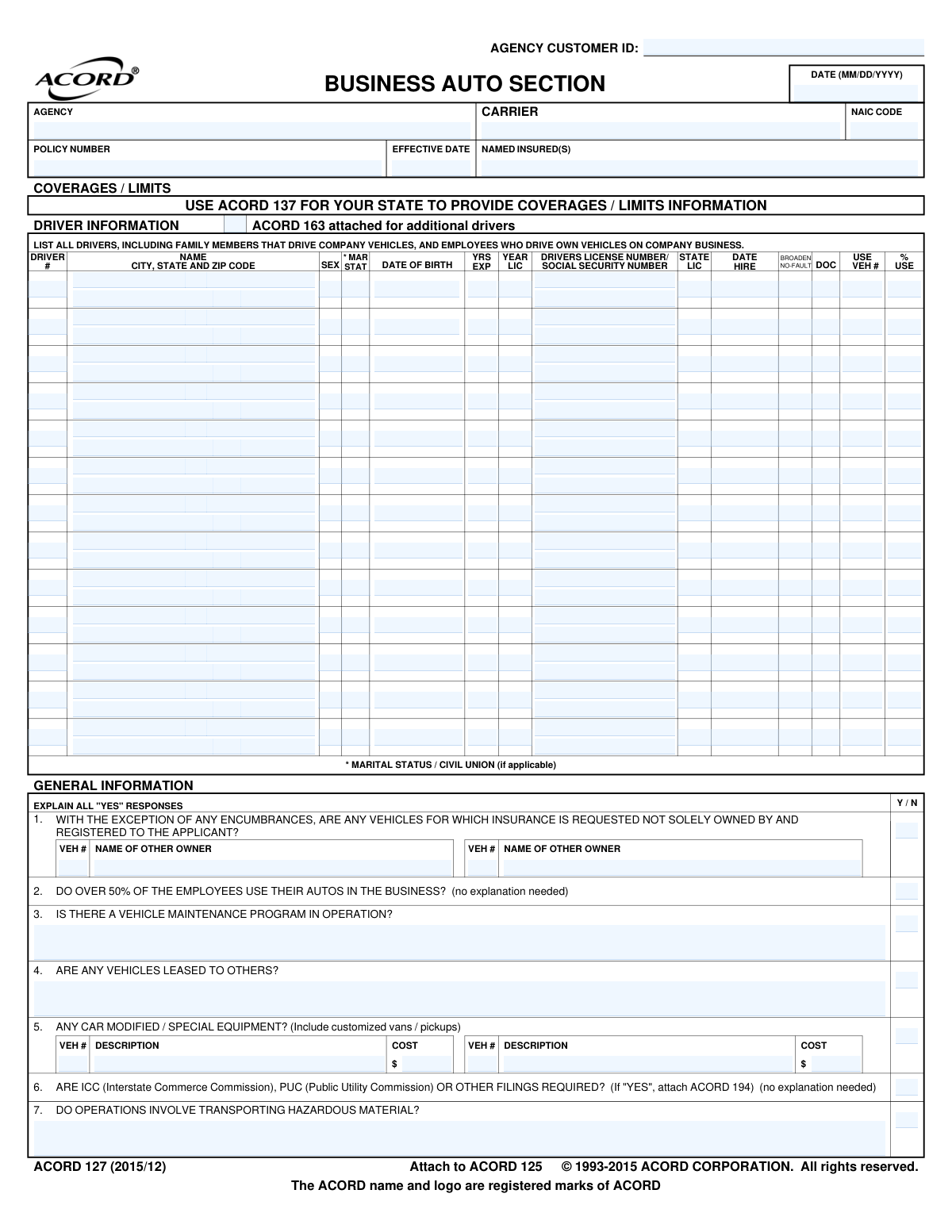
Yes! You can use AI to fill out ACORD 127, Business Auto Section

ACORD 127, also known as the Business Auto Section, is a standardized insurance application form used to collect essential underwriting information for a commercial auto policy. It details the vehicles to be insured, driver information, operational use, and requested coverages, which is critical for insurers to assess risk and determine premiums. Today, this comprehensive form can be filled out quickly and accurately using AI-powered services like Instafill.ai, which can also convert non-fillable PDF versions into interactive, fillable forms to streamline the process.
ACORD 127 is part of the business insurance forms and commercial insurance forms categories on Instafill.
Our AI automatically handles information lookup, data retrieval, formatting, and form filling.
It takes less than a minute to fill out ACORD 127 using our AI form filling.
Securely upload your data. Information is encrypted in transit and deleted immediately after the form is filled out.

Form specifications

Form name: ACORD 127, Business Auto Section
Number of fields: 637
Number of pages: 1
Language: English
main-image

Instafill Demo: How to fill out PDF forms in seconds with AI

How to Fill Out ACORD 127 Online for Free in 2026

Are you looking to fill out a ACORD 127 form online quickly and accurately? Instafill.ai offers the #1 AI-powered PDF filling software of 2026, allowing you to complete your ACORD 127 form in just 37 seconds or less.
Follow these steps to fill out your ACORD 127 form online using Instafill.ai:
  1. 1 Navigate to Instafill.ai and upload your ACORD 127 form, or select it from a library of fillable forms.
  2. 2 Enter your business's general information, including the named insured, policy details, and agency information in the top section.
  3. 3 List all vehicles to be insured in the 'Vehicle Description' section, providing details like VIN, year, make, model, cost, and garaging address for each.
  4. 4 Complete the 'Driver Information' section for all individuals who will operate the company vehicles, including their personal details, license information, and driving history.
  5. 5 Respond to the 'General Information' questions about your business operations, such as vehicle maintenance programs, use of hazardous materials, and driver verification processes.
  6. 6 Indicate any additional interests (like lienholders) and specify the desired coverage limits for liability, collision, and comprehensive insurance.
  7. 7 Review all the information for accuracy, then electronically sign and date the application to complete the submission process.

Our AI-powered system ensures each field is filled out correctly, reducing errors and saving you time.

Why Choose Instafill.ai for Your Fillable ACORD 127 Form?

Speed

Complete your ACORD 127 in as little as 37 seconds.

Up-to-Date

Always use the latest 2026 ACORD 127 form version.

Cost-effective

No need to hire expensive lawyers.

Accuracy

Our AI performs 10 compliance checks to ensure your form is error-free.

Security

Your personal information is protected with bank-level encryption.

Frequently Asked Questions About Form ACORD 127

This form is an application used by businesses to provide detailed information to an insurance carrier when applying for a commercial auto insurance policy. It covers general business operations, driver details, and vehicle specifics.

You must list all drivers who operate company vehicles, including employees and family members. You should also include employees who drive their own personal vehicles for company business.

For each vehicle, you will need the year, make, model, body type, and Vehicle Identification Number (VIN). You also need to provide the garaging address, cost new, and details about its primary use.

An 'Additional Interest' is a person or entity, such as a bank or leasing company, that has a financial stake in your vehicle. They are listed on the policy to ensure their interest is protected in the event of a loss.

These are government filings (Interstate Commerce Commission or Public Utility Commission) that certify your business carries sufficient liability insurance for commercial transport. If your business requires these, you must indicate 'YES' on question 6 and attach the necessary forms.

You should list that employee in the 'DRIVER INFORMATION' section. Question 2 also specifically asks if over 50% of employees use their personal autos for business, which helps the insurer assess your non-owned auto liability exposure.

This refers to any vehicle altered from its original factory state, such as adding a liftgate to a truck or customizing a van with shelving. You must describe the modification and its cost in the space provided.

MVR stands for Motor Vehicle Record, which is a report of a person's driving history. Insurers ask if you obtain MVRs for your drivers (question 10) as it demonstrates a commitment to safety and risk management.

An authorized representative of the applicant (your business) must sign the form. This signature certifies that the information provided is true, correct, and complete to the best of their knowledge.

The form indicates that you can attach ACORD 163 for additional drivers and ACORD 129 for additional vehicles. Use these supplemental forms to provide all the required information.

Yes, services like Instafill.ai use AI to auto-fill form fields accurately and save time. This can be especially helpful for complex forms like the ACORD 127 by reducing manual data entry and potential errors.

You can use a platform like Instafill.ai to fill out the ACORD 127 online. Simply upload the document, and the service will make it an interactive, fillable form that you can complete, save, and share digitally.

If you have a flat, non-fillable PDF, you can use a service like Instafill.ai to instantly convert it into a fillable version. This allows you to type your information directly into the fields instead of printing and filling it out by hand.

Compliance ACORD 127
Validation Checks by Instafill.ai

Common Mistakes in Completing ACORD 127

Incomplete Driver List

Applicants often only list full-time, dedicated drivers, forgetting the form's instruction to include all potential operators, such as family members, part-time staff, or employees who occasionally use their personal vehicles for business errands. This oversight can create a significant coverage gap, potentially leading to an uncovered claim if an unlisted driver has an accident. To avoid this, meticulously review who has permission to drive for any business purpose and list them all; AI-powered tools like Instafill.ai can help manage and cross-reference driver lists to ensure completeness.

Incorrect Vehicle Identification Number (VIN)

The 17-digit VIN is unique to each vehicle, but it's extremely easy to make a transposition or typo error during manual entry. An incorrect VIN means the wrong vehicle is scheduled on the policy, which could result in a total denial of coverage for the intended vehicle in the event of a claim. Always double-check the VIN from the vehicle's registration or door jamb, not from memory. Form-filling tools can validate the VIN's format and check digit to catch errors instantly.

Using the Wrong Garaging Address

Many applicants mistakenly enter their business's mailing address or primary office location instead of the physical address where a vehicle is typically parked overnight. Insurance premiums are calculated based on the risks associated with the garaging location, so an incorrect address can lead to inaccurate rates and could be considered a material misrepresentation. Ensure you provide the precise street address where each vehicle is kept, especially if you have vehicles at different job sites or employee homes.

Forgetting to Explain 'Yes' Answers

The 'General Information' section contains numerous yes/no questions where a 'YES' response requires a mandatory explanation in an adjacent field. Applicants frequently check 'Y' but neglect to provide the required details about things like hazardous material transport, vehicle modifications, or hold harmless agreements. This missing information will always result in follow-up questions from the underwriter, delaying the quoting and binding process. Carefully review each question and provide a complete explanation for every 'YES' answer.

Omitting or Misidentifying Lienholders

When a vehicle is financed or leased, the lender must be listed as a 'Lienholder' or 'Loss Payee' to protect their financial interest. Applicants often forget to add the financial institution or list them with an incorrect name or address, which violates the terms of their loan agreement. This can cause major issues with the lender and delays in claim payments, as the check cannot be issued correctly. Always have your financing or lease agreement handy to copy the information precisely.

Inaccurate 'Cost New' Value

For the 'Cost New' field in the vehicle description, applicants often enter the price they paid for a used vehicle, rather than the vehicle's original sticker price when it was new. This value is a key factor in calculating physical damage premiums and determining the vehicle's 'Stated Amount' value if that coverage is chosen. Entering the wrong figure leads to incorrect premiums and could result in being underinsured. You should research the original MSRP for the vehicle's year, make, and model.

Incorrect Legal Insured Name

Businesses often operate under a 'Doing Business As' (DBA) or trade name, which they list as the 'NAMED INSURED(S)'. However, the policy must be issued to the correct legal entity name (e.g., 'XYZ Corporation' not 'XYZ Trucking'). An incorrect legal name can create ambiguity about who is covered and may lead to the policy being voided. Always use the full legal name as it appears on your business registration documents.

Misclassifying Vehicle 'Use'

The form provides several checkboxes for vehicle use (e.g., 'Service', 'Retail', 'Commercial'), and the distinctions can be subtle. An applicant might incorrectly classify a vehicle used to visit clients as 'Commercial' when 'Service' is more appropriate, or vice-versa. This misclassification affects the risk profile and premium calculation, and if discovered during a claim, could raise questions. Be sure to understand the definitions and choose the one that most accurately reflects the vehicle's primary daily function.

Failing to Disclose All Moving Violations

In the 'Drivers with Convictions' section, applicants may be tempted to omit minor speeding tickets or forget about violations that occurred several years ago. Insurers will pull Motor Vehicle Records (MVRs) for all listed drivers, and any undisclosed violations will be discovered. This discrepancy can damage credibility with the underwriter, lead to higher premiums than initially quoted, or even result in a declination of coverage.

Guessing Technical Vehicle Specifications

Fields like 'GVW / GCW' (Gross Vehicle Weight / Gross Combined Weight) and 'Radius of Use' require specific technical data that applicants may not know offhand. Guessing these values or leaving them blank leads to inaccurate rating and classification. An under-rated vehicle may result in an insufficient premium, while an over-rated one means you're paying too much. Refer to the vehicle's manual or manufacturer specifications to ensure accuracy. AI-powered tools like Instafill.ai can often pre-populate these specs based on the VIN, preventing such errors. If the form is a non-fillable PDF, Instafill.ai can also convert it into an interactive, fillable version.
Saved over 80 hours a year

“I was never sure if my IRS forms like W-9 were filled correctly. Now, I can complete the forms accurately without any external help.”

Kevin Martin Green

Your data stays secure with advanced protection from Instafill and our subprocessors

Robust compliance program

Transparent business model

You’re not the product. You always know where your data is and what it is processed for.

ISO 27001, HIPAA, and GDPR

Our subprocesses adhere to multiple compliance standards, including but not limited to ISO 27001, HIPAA, and GDPR.

Security & privacy by design

We consider security and privacy from the initial design phase of any new service or functionality. It’s not an afterthought, it’s built-in, including support for two-factor authentication (2FA) to further protect your account.

Fill out ACORD 127 with Instafill.ai

Worried about filling PDFs wrong? Instafill securely fills acord-127-business-auto-section forms, ensuring each field is accurate.