Yes! You can use AI to fill out ACORD 810, Business Income / Extra Expense / Rental Value

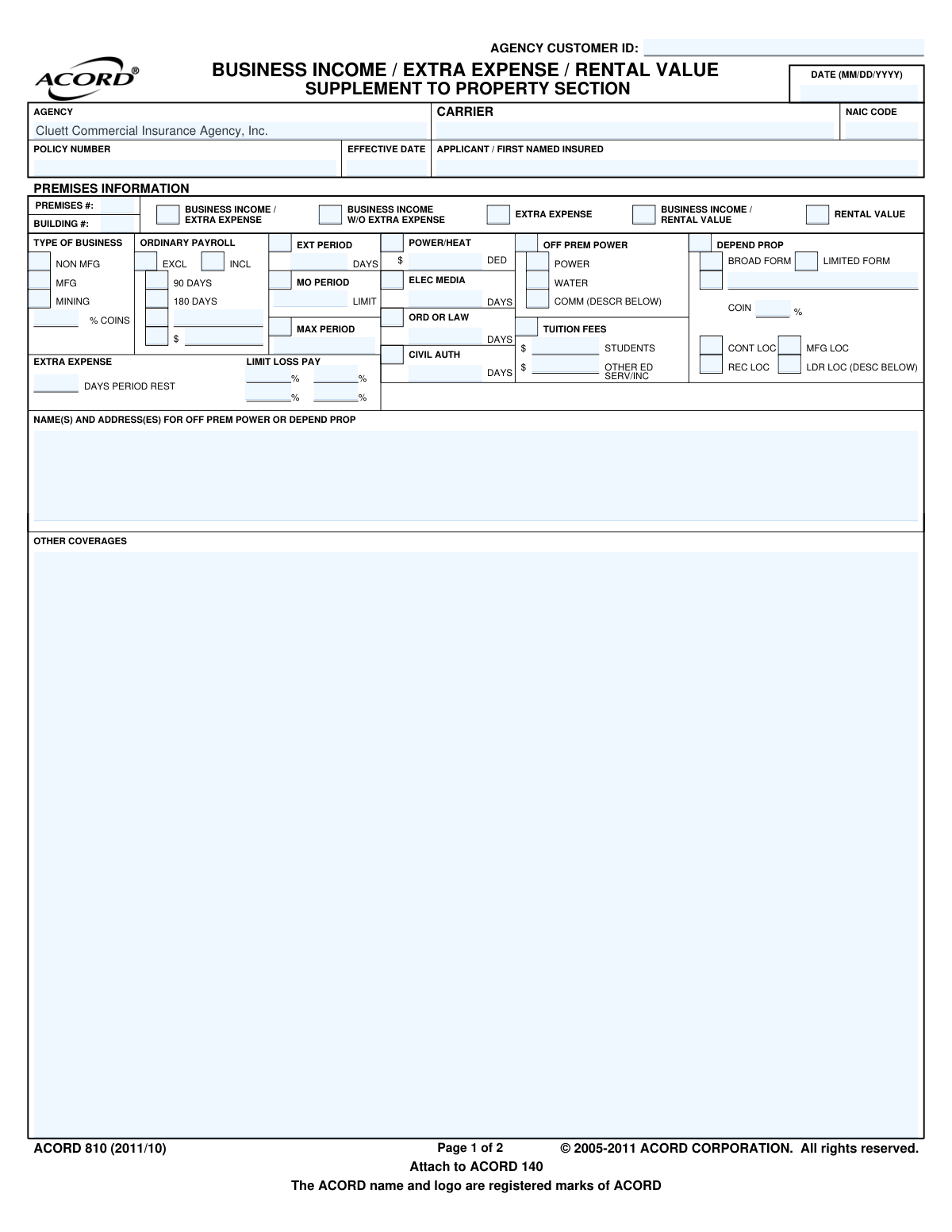
ACORD 810, the Business Income / Extra Expense / Rental Value form, is a supplemental document used with a primary commercial property insurance application, like the ACORD 140. It allows businesses to specify their needs for coverage against financial losses resulting from a disruption of operations, such as lost income or additional costs incurred to stay open. Today, this form can be filled out quickly and accurately using AI-powered services like Instafill.ai, which can also convert non-fillable PDF versions into interactive fillable forms.
Our AI automatically handles information lookup, data retrieval, formatting, and form filling.
It takes less than a minute to fill out ACORD 810 using our AI form filling.
Securely upload your data. Information is encrypted in transit and deleted immediately after the form is filled out.

Form specifications

Form name: ACORD 810, Business Income / Extra Expense / Rental Value
Number of fields: 123
Number of pages: 1
Language: English
main-image

Instafill Demo: How to fill out PDF forms in seconds with AI

How to Fill Out ACORD 810 Online for Free in 2026

Are you looking to fill out a ACORD 810 form online quickly and accurately? Instafill.ai offers the #1 AI-powered PDF filling software of 2026, allowing you to complete your ACORD 810 form in just 37 seconds or less.
Follow these steps to fill out your ACORD 810 form online using Instafill.ai:
  1. 1 Navigate to Instafill.ai and upload or select the ACORD 810 form.
  2. 2 Enter the applicant, agency, and policy information in the header section.
  3. 3 For each premises, select the type of coverage required, such as Business Income, Extra Expense, or Rental Value.
  4. 4 Specify the coverage details, including limits, coinsurance percentage, and any applicable periods for payroll or restoration.
  5. 5 Indicate any dependent property or other coverages needed, providing addresses and descriptions as required.
  6. 6 Use the AI assistant to review all entered data for completeness and accuracy against form requirements.
  7. 7 Securely download the completed ACORD 810 to attach to your main property application (ACORD 140).

Our AI-powered system ensures each field is filled out correctly, reducing errors and saving you time.

Why Choose Instafill.ai for Your Fillable ACORD 810 Form?

Speed

Complete your ACORD 810 in as little as 37 seconds.

Up-to-Date

Always use the latest 2026 ACORD 810 form version.

Cost-effective

No need to hire expensive lawyers.

Accuracy

Our AI performs 10 compliance checks to ensure your form is error-free.

Security

Your personal information is protected with bank-level encryption.

Frequently Asked Questions About Form ACORD 810

The ACORD 810 is a supplemental form used with the ACORD 140 Commercial Property Application. It is used to apply for Business Income, Extra Expense, and/or Rental Value insurance coverage.

Business owners or property owners who want to insure against financial losses resulting from a temporary shutdown of their operations due to a covered event should complete this form.

Business Income coverage replaces lost income during a shutdown, while Extra Expense coverage pays for additional costs to avoid or minimize a shutdown, such as renting a temporary location.

Coinsurance is the percentage of your total business income or rental value that you agree to insure. Selecting an adequate limit is crucial to avoid a penalty if you have a claim.

This section specifies if your policy will cover payroll for all employees during a business interruption. You can choose to include or exclude it, or cover it for a limited time (e.g., 90 or 180 days) to retain key staff.

No, this form allows you to list multiple premises. You can use the main section for the first location and the 'ADDITIONAL PREMISES INFORMATION' section on page 2 for others.

This optional coverage protects you from income loss caused by physical damage to the property of a key supplier or customer that your business relies on. You must list the dependent properties on the form.

This form is a supplement and is not a standalone document. It must be attached to the ACORD 140 Commercial Property Application and submitted together to your insurance agent or carrier.

You will need your basic policy and applicant information, details for each business premises, and financial projections to accurately determine the coverage limits for business income and payroll.

This provides coverage for your loss of business income when a government order prevents access to your property due to damage at a nearby location, even if your own property is not damaged.

Yes, services like Instafill.ai use AI to auto-fill form fields accurately and save time. This can help reduce errors and streamline the application process.

You can use a service like Instafill.ai to fill out the form online. Simply upload the ACORD 810 PDF, and the platform will make it an interactive, fillable form you can complete and share digitally.

If you have a non-fillable or 'flat' PDF, you can upload it to Instafill.ai. The service can convert the static document into an interactive, fillable form for you to complete with ease.

Rental Value coverage is for building owners and insures against the loss of rental income if the property becomes uninhabitable due to a covered loss. It is an alternative to Business Income coverage for landlords.

Compliance ACORD 810
Validation Checks by Instafill.ai

1
Effective Date Validity
This check validates that the 'EFFECTIVE DATE' field contains a valid date in MM/DD/YYYY format. It also ensures the date is not in the distant past and is logically sound for a new policy or endorsement. This is critical for defining the start of the coverage period. If the date is invalid or improperly formatted, the submission will be rejected to prevent policy binding errors.
2
Mutually Exclusive Coverage Selection
For each premises, this validation ensures that only one primary coverage type checkbox is selected (e.g., 'BUSINESS INCOME / EXTRA EXPENSE', 'EXTRA EXPENSE' only, 'RENTAL VALUE' only). Selecting multiple primary coverages for the same premises is ambiguous and would lead to incorrect rating and policy issuance. A failed validation will require the user to select only one option before proceeding.
3
Required Limit and Coinsurance
This check verifies that if a primary coverage type is selected for a premises, both the 'LIMIT' and '% COINS' fields are completed. These values are fundamental for calculating the premium and defining the insurer's maximum liability and the insured's participation. A submission will fail if these fields are empty when coverage is indicated, preventing the creation of an incomplete and un-ratable policy.
4
Ordinary Payroll Inclusion Logic
This validation ensures that if the 'INCL' (Include) checkbox for 'ORDINARY PAYROLL' is selected, one of the corresponding duration options ('90 DAYS' or '180 DAYS') must also be chosen. This duration is a critical component for defining the scope of payroll coverage. If 'INCL' is checked but no duration is selected, the form is considered incomplete and will be flagged for correction.
5
Mutually Exclusive Payroll Options
This check enforces that for 'ORDINARY PAYROLL', a user cannot select both 'INCL' and 'EXCL' simultaneously. Similarly, if payroll is included, a user cannot select both '90 DAYS' and '180 DAYS'. This prevents contradictory data entry that makes the coverage intent unclear. A failed validation will prompt the user to make a single, valid selection for each set of options.
6
Dependent Property Form Selection
This validation confirms that if any of the 'DEPEND PROP' location types (LDR LOC, MFG LOC, etc.) have a limit or percentage entered, then either 'BROAD FORM' or 'LIMITED FORM' must be selected. The form type dictates the perils covered for this extension and is essential for rating. Failure to select a form type will result in a validation error, as the scope of coverage is undefined.
7
Dependent Property or Off-Premises Power Detail Requirement
This check ensures that if a limit is entered for 'OFF PREM POWER' or any 'DEPEND PROP' coverage, the 'NAME(S) AND ADDRESS(ES) FOR OFF PREM POWER OR DEPEND PROP' field must be completed. This information is legally required to identify the specific, non-owned locations upon which the insured's business depends. If the description is missing, the submission is rejected to ensure the policy accurately reflects the covered exposures.
8
Valid Dollar Amount Format
This validation scans all fields representing monetary values, such as 'LIMIT', 'OFF PREM POWER', and 'TUITION FEES', to ensure they contain only positive, numeric characters formatted as currency. This prevents data entry errors, such as text or negative numbers, which would cause calculation and rating failures. Any field with an invalid format will be highlighted for correction.
9
Valid Time Period Format
This check verifies that all fields representing a time period, such as 'MO PERIOD', 'EXT PERIOD DAYS', and 'CIVIL AUTH' days, contain only positive integers. These values are critical for defining coverage durations and waiting periods. Submitting non-integer or negative values would make policy terms ambiguous, so the validation will fail and require correction.
10
Coinsurance Percentage Validity
This validation ensures the '% COINS' field contains a valid, standard percentage (e.g., 50, 70, 80, 90, 100). The coinsurance percentage is a key factor in both premium calculation and the settlement of a claim. An invalid percentage would make rating impossible, so the system will reject entries that do not conform to a predefined list of acceptable values.
11
Premises and Building Identification
This check confirms that the 'PREMISES #' and 'BUILDING #' fields are filled for each set of coverages entered on the form. These identifiers are crucial for linking the supplemental business income coverage to the specific property listed on the main ACORD 140 Property Section. Without this link, it's impossible to know which location the coverage applies to, so a missing ID will cause the submission to fail.
12
Mutually Exclusive Business Type
This validation ensures that for each premises, only one 'TYPE OF BUSINESS' checkbox ('NON MFG', 'MFG', or 'MINING') is selected. The business type is a primary rating factor that determines the risk profile and applicable rates for business income coverage. A submission with multiple or no business types selected will be rejected for being ambiguous and un-ratable.
13
Header Information Completeness
This check verifies that essential identifying information in the header, specifically 'APPLICANT / FIRST NAMED INSURED', 'POLICY NUMBER', and 'EFFECTIVE DATE', is present. This data is non-negotiable as it links the supplement to the correct insured and master policy. A submission lacking any of this core information will be rejected immediately as it cannot be processed or filed correctly.

Common Mistakes in Completing ACORD 810

Miscalculating the Business Income Limit

Applicants often underestimate their total business income needs, leading to an insufficient 'LIMIT'. This occurs from failing to complete a detailed business income worksheet, resulting in significant underinsurance and a financial shortfall after a major loss. To avoid this, use a formal worksheet to project gross earnings and continuing expenses for the entire period of restoration, ensuring the limit accurately reflects your potential loss. AI-powered tools like Instafill.ai can help by flagging unusually low limits based on business type and prompting for review.

Misunderstanding the Coinsurance Percentage

Selecting a '% COINS' value without understanding its implications is a frequent and costly error. Coinsurance requires you to insure your property for a certain percentage of its value, and failing to meet this can result in a substantial penalty during a claim, reducing your payout. Applicants should consult their agent to understand the calculation and choose a percentage that they can confidently meet. This field is critical and should not be treated as a simple checkbox.

Incorrectly Handling Ordinary Payroll Coverage

Deciding whether to include or exclude 'ORDINARY PAYROLL' and for how long (90 or 180 days) is often a point of confusion. Excluding it lowers the premium but means non-essential employee wages won't be covered during a shutdown, risking the loss of trained staff. Including it increases the premium but helps retain your workforce. This decision should be a strategic one based on your business's reliance on its workforce and ability to re-hire, not a random selection.

Omitting Dependent Property Information

Businesses often fail to list key suppliers, customers, or manufacturing locations in the 'DEPEND PROP' section. This leaves a critical gap in coverage, as a disruption at a key partner's location (e.g., a fire at your sole supplier's factory) would not be covered without this extension. You must identify and list the names and addresses of these critical partners to protect against supply chain disruptions. Since this form is a non-fillable PDF, tools like Instafill.ai can convert it into a fillable version, making it easier to add these necessary details.

Ignoring Off-Premises Utility Services Coverage

Many applicants overlook the 'OFF PREM POWER' section, assuming their standard policy covers income loss from a utility outage. Standard business income coverage is typically triggered only by physical damage to your own premises. To be covered for a shutdown caused by a downed power station or water main break miles away, you must select this coverage and specify a limit.

Missing Premises and Building Identifiers

Forgetting to enter the 'PREMISES #' and 'BUILDING #' is a common oversight, especially when insuring multiple locations. These numbers are essential as they link the specific business income coverage to the correct location listed on the main property application (ACORD 140). Without this information, the policy cannot be rated or issued correctly, leading to processing delays and potential gaps in coverage for the intended location.

Confusing Period of Restoration with Extended Period

Applicants often misunderstand the difference between the 'MO PERIOD' (Monthly Period of Indemnity) and the 'EXT PERIOD' (Extended Period of Indemnity). The period of restoration covers income loss until the property is physically repaired, while the extended period covers the additional time it takes for the business to ramp back up to its pre-loss income level. Failing to select an adequate extended period can leave a business without coverage during the crucial ramp-up phase.

Incomplete Extra Expense Breakdown

When selecting 'EXTRA EXPENSE' coverage, applicants frequently enter a total limit but fail to specify the 'LIMIT LOSS PAY' percentages and 'DAYS PERIOD REST'. This section is designed to manage cash flow by setting sub-limits for different timeframes (e.g., 40% of the limit in the first 30 days). Leaving this blank can lead to disputes or a payout structure that doesn't match the immediate cash needs required to keep the business operational after a loss.

Inconsistent Applicant and Policy Information

The 'APPLICANT / FIRST NAMED INSURED' and 'POLICY NUMBER' on this supplement must exactly match the information on the primary application, such as the ACORD 140. Mismatches or typos are frequent data entry errors that cause delays as the underwriter must halt processing to reconcile the information. Using an AI form-filling tool like Instafill.ai can prevent this by automatically populating consistent data across all related forms in an application package.

Incorrect Date Formatting

A simple but common mistake is entering the 'DATE' or 'EFFECTIVE DATE' in a format other than the specified MM/DD/YYYY. Using formats like D/M/YY or writing out the month can cause data entry system rejections or misinterpretation by the carrier. This slows down the quoting and binding process. Always double-check that dates are entered precisely as requested to ensure smooth processing.
Saved over 80 hours a year

“I was never sure if my IRS forms like W-9 were filled correctly. Now, I can complete the forms accurately without any external help.”

Kevin Martin Green

Your data stays secure with advanced protection from Instafill and our subprocessors

Robust compliance program

Transparent business model

You’re not the product. You always know where your data is and what it is processed for.

ISO 27001, HIPAA, and GDPR

Our subprocesses adhere to multiple compliance standards, including but not limited to ISO 27001, HIPAA, and GDPR.

Security & privacy by design

We consider security and privacy from the initial design phase of any new service or functionality. It’s not an afterthought, it’s built-in, including support for two-factor authentication (2FA) to further protect your account.

Fill out ACORD 810 with Instafill.ai

Worried about filling PDFs wrong? Instafill securely fills acord-810-business-income-extra-expense-rental-value forms, ensuring each field is accurate.