Yes! You can use AI to fill out ACORD 163, Commercial Auto Driver Information Schedule

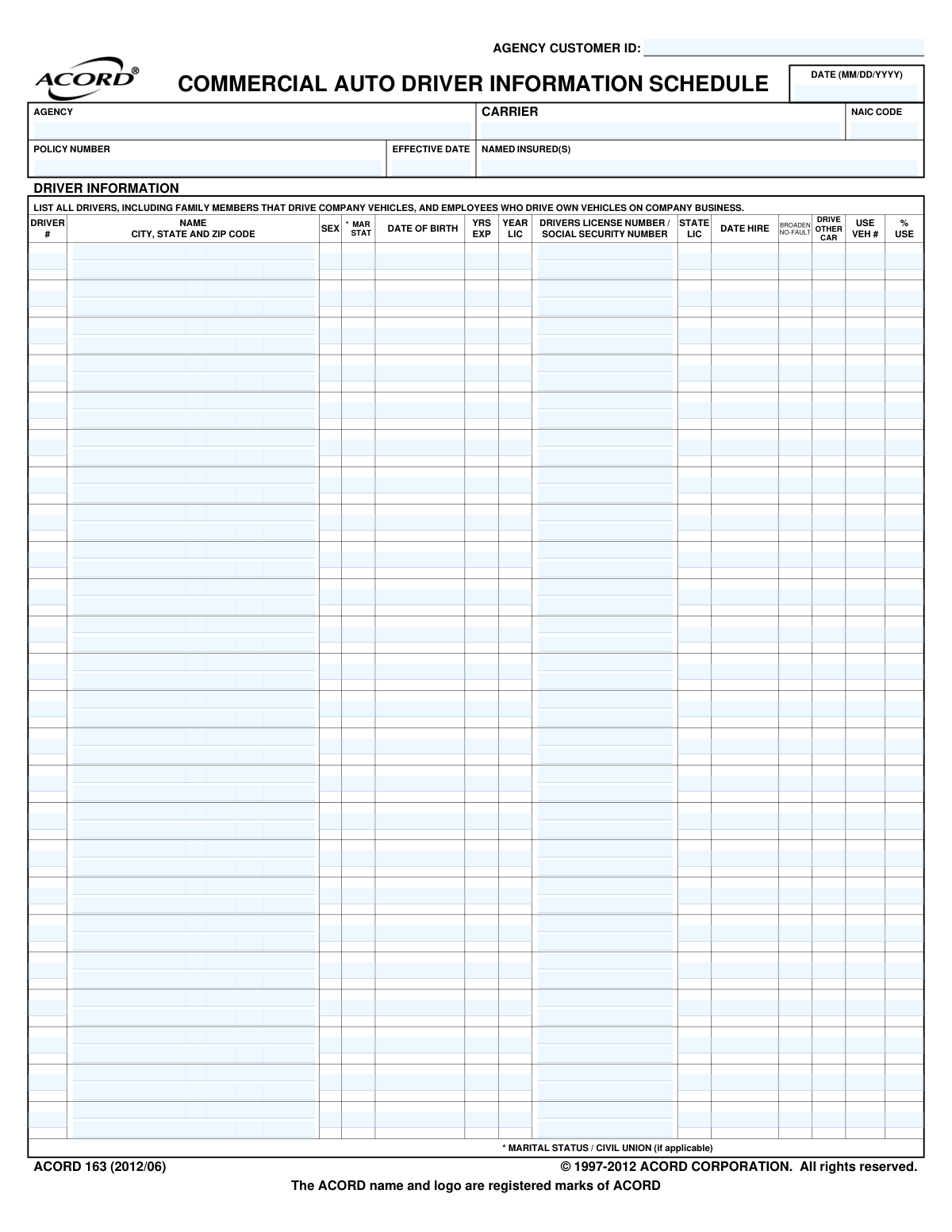
ACORD 163 is a standardized insurance form used by businesses to provide detailed information about all individuals who will be driving company vehicles. This includes employees, family members, and anyone else who might operate a vehicle on company business, which is essential for the insurer to accurately assess risk and determine policy premiums. Today, this form can be filled out quickly and accurately using AI-powered services like Instafill.ai, which can also convert non-fillable PDF versions into interactive fillable forms.
ACORD 163 is part of the commercial insurance forms category on Instafill.
Our AI automatically handles information lookup, data retrieval, formatting, and form filling.
It takes less than a minute to fill out ACORD 163 using our AI form filling.
Securely upload your data. Information is encrypted in transit and deleted immediately after the form is filled out.

Form specifications

Form name: ACORD 163, Commercial Auto Driver Information Schedule
Number of fields: 489
Number of pages: 1
Language: English
main-image

Instafill Demo: How to fill out PDF forms in seconds with AI

How to Fill Out ACORD 163 Online for Free in 2026

Are you looking to fill out a ACORD 163 form online quickly and accurately? Instafill.ai offers the #1 AI-powered PDF filling software of 2026, allowing you to complete your ACORD 163 form in just 37 seconds or less.
Follow these steps to fill out your ACORD 163 form online using Instafill.ai:
  1. 1 Navigate to Instafill.ai and upload or select the ACORD 163 form.
  2. 2 Provide the basic policy details, including the Named Insured, Policy Number, and Effective Date, in the designated header fields.
  3. 3 For each driver, enter their full name, date of birth, gender, marital status, and address.
  4. 4 Input each driver's license number, the state it was issued in, years of experience, and their date of hire.
  5. 5 Specify the vehicle number each driver uses and the percentage of use, if applicable.
  6. 6 Indicate if special coverages like 'Broaden No-Fault' or 'Drive Other Car' apply to any driver.
  7. 7 Review all entered driver information for accuracy, then securely sign and submit the completed schedule to your insurance agent or carrier.

Our AI-powered system ensures each field is filled out correctly, reducing errors and saving you time.

Why Choose Instafill.ai for Your Fillable ACORD 163 Form?

Speed

Complete your ACORD 163 in as little as 37 seconds.

Up-to-Date

Always use the latest 2026 ACORD 163 form version.

Cost-effective

No need to hire expensive lawyers.

Accuracy

Our AI performs 10 compliance checks to ensure your form is error-free.

Security

Your personal information is protected with bank-level encryption.

Frequently Asked Questions About Form ACORD 163

This form is used to list all drivers who need to be covered under a commercial auto insurance policy. The insurance company uses this information to evaluate risk and calculate the policy premium.

You must list all individuals who will operate company vehicles, including employees and any family members. You should also list any employees who use their own personal vehicles for company business.

For each driver, you'll need their full name, date of birth, driver's license number and state, and date of hire. You may also need their address, marital status, and years of driving experience.

While the form has a field for it, providing a Social Security Number may be optional depending on the carrier and state regulations. It is often used to obtain a Motor Vehicle Report (MVR) to verify driving history.

'YRS EXP' refers to the total number of years the person has been a licensed driver. 'YEAR LIC' is the specific year the driver first obtained their driver's license.

These refer to specific, optional insurance coverages. 'Drive Other Car' provides coverage for employees who drive company cars but don't own a personal vehicle, while 'Broadened No-Fault' expands personal injury protection; consult your agent to see if they are needed.

'% USE' is the percentage of time the driver uses a specific company vehicle. 'VEH #' is the number assigned to that vehicle on your policy's vehicle schedule, linking the driver to the primary vehicle they operate.

If you have more drivers than will fit on a single page, you can simply use additional copies of the ACORD 163 form. Number the pages and submit them all together with your application.

This form should be submitted to your insurance agent or broker as part of your commercial auto insurance application or renewal process. They will forward it to the insurance carrier.

Yes, services like Instafill.ai use AI to help you accurately auto-fill form fields with your saved driver information, which can save significant time and help prevent errors.

You can easily fill out this form online using Instafill.ai. Just upload the form, and the platform will make all the fields interactive for you to complete, save, and share securely.

If you have a non-fillable or 'flat' PDF, you can upload it to a platform like Instafill.ai. Their technology can convert it into an interactive, fillable form that you can complete on your computer.

Compliance ACORD 163
Validation Checks by Instafill.ai

1
Driver Record Completeness
This check ensures that if a driver's name is entered in a row, all other mandatory fields for that driver (e.g., Date of Birth, License Number, License State) are also completed. This is critical for underwriting, as a partially filled record is unusable for risk assessment. If validation fails, the system should flag the incomplete driver row and prevent submission until the required information is provided.
2
Valid Date Format (MM/DD/YYYY)
Verifies that all date fields, including 'Policy_EffectiveDate_A', 'Driver_BirthDate_*', and 'Driver_HiredDate_*', adhere to the MM/DD/YYYY format. This consistency is crucial for accurate age calculations, policy term enforcement, and data processing. A failed validation would prompt the user to correct the format before the data can be accepted.
3
Driver Minimum Age Verification
Calculates the driver's age based on the 'Driver_BirthDate_*' and checks if they meet the minimum legal driving age (e.g., 16 years old). This is a fundamental underwriting rule to ensure the driver is legally allowed to operate a vehicle. Submissions for underage drivers must be rejected or flagged for immediate manual review.
4
Logical Hire Date
Ensures the 'Driver_HiredDate_*' is chronologically after the driver's 'Driver_BirthDate_*'. This is a basic sanity check to prevent impossible data entry errors, such as a hire date that precedes the driver's birth. If the hire date is not after the birth date, the entry should be flagged as a logical error.
5
Driving Experience Consistency
This validation compares the 'Driver_ExperienceYearCount_*' against the driver's age calculated from 'Driver_BirthDate_*'. The years of experience cannot exceed the driver's age minus the minimum licensing age (e.g., Age - 16). This prevents exaggerated or fraudulent experience claims, which heavily impact risk rating, and would require correction if an inconsistency is found.
6
Valid Social Security Number Format
Checks that the 'Driver_TaxIdentifier_*' (Social Security Number) field, if provided, follows the standard ###-##-#### format or consists of 9 digits. Correct formatting is essential for identity verification and running Motor Vehicle Reports (MVRs). An invalid format would trigger an error, asking the user to re-enter the number correctly.
7
Valid State Abbreviation
Validates that the 'Driver_LicensedStateOrProvinceCode_*' and 'Driver_MailingAddress_StateOrProvinceCode_*' fields contain a valid two-letter US state or territory abbreviation. Using correct state codes is mandatory for jurisdiction, rating, and compliance purposes. An invalid code would cause the form to be rejected until a recognized abbreviation is used.
8
Valid Postal Code Format
Ensures the 'Driver_MailingAddress_PostalCode_*' is a valid 5-digit or 9-digit (ZIP+4) numerical code. Accurate postal codes are necessary for location-based risk assessment and for any physical mailings. The system should flag entries that do not conform to the standard US postal code structure.
9
License Number and State Co-dependency
This check verifies that if a 'Driver_LicenseNumberIdentifier_*' is entered, the corresponding 'Driver_LicensedStateOrProvinceCode_*' is also filled out, and vice-versa. A license number is meaningless without the issuing state, and a state is insufficient without the number. Failure to provide both pieces of information for a driver should result in a completeness error.
10
Logical Licensed Year
Verifies the 'Driver_LicensedYear_*' is a valid four-digit year that is not in the future. It also checks that the licensed year is logically possible, meaning it occurred after the driver reached legal licensing age. This check ensures the plausibility of the driver's history and prevents data entry mistakes.
11
Vehicle Use Percentage Range
Confirms that the 'Driver_Vehicle_UsePercent_*' field contains a numeric value between 0 and 100. This percentage is a key factor in determining exposure and premium, so it must be a valid and logical number. Values outside this range would be flagged as an error and require correction.
12
NAIC Code Format Validation
Checks that the 'Insurer_NAICCode_A' is a 5-digit numeric code. The NAIC code is a standard identifier for insurance carriers, and ensuring its correct format is vital for regulatory reporting and system-to-system data exchange. An incorrectly formatted code would prevent proper identification of the carrier.

Common Mistakes in Completing ACORD 163

Failing to List All Required Drivers

Businesses often mistakenly list only full-time employees, forgetting the form requires all drivers, including family members, temporary staff, and employees using personal cars for business. This oversight is a major risk, as an accident involving an unlisted driver can lead to a denied claim and direct liability for the company. To avoid this, carefully audit who drives for the business and ensure every single person is included on the schedule.

Entering an Incorrect Driver's License Number

A simple typo, like transposing digits in a driver's license number, is a frequent error that halts the underwriting process. Insurance carriers cannot pull the required Motor Vehicle Report (MVR) with incorrect information, leading to delays and follow-up requests. Always double-check the number against the physical license card; AI-powered form filling tools like Instafill.ai can also help by validating the number's format for the specified state.

Confusing 'Years Experience' with 'Year Licensed'

The form has separate columns for 'YRS EXP' (total years of driving) and 'YEAR LIC' (the year the license was first issued), which are often confused. An applicant might enter a two-digit number of years into the four-digit year field, or vice-versa. This error directly impacts the premium calculation, as experience is a key rating factor, so ensure 'YEAR LIC' is a four-digit year (e.g., 2005) and 'YRS EXP' is a total count (e.g., 19).

Using Incorrect Date Formats

The form specifies an MM/DD/YYYY format for dates like 'Date of Birth' and 'Date Hire', but users often default to other conventions (e.g., DD-MM-YY). This causes data entry failures in the carrier's system, delaying the application until the information is corrected and resubmitted. Using an intelligent form filler like Instafill.ai can prevent this by automatically formatting dates correctly as you type, ensuring compliance and smooth processing.

Using Nicknames Instead of Full Legal Names

Entering an informal name like 'Dave' instead of the legal name 'David' will cause a mismatch when the insurer attempts to verify the driver's identity. This prevents the system from finding the driver's MVR and other records, stopping the application process until the name is corrected to match the government-issued ID. To avoid delays, always use the full legal name as it appears on the driver's license.

Leaving Coverage Selection Columns Blank

Applicants often skip the 'BROADEN NO-FAULT' and 'DRIVE OTHER CAR' columns because they are unsure what these coverages mean. Leaving them blank creates ambiguity and may result in the driver not having crucial protection, such as coverage when renting a car for business. It is essential to discuss these options with your insurance agent to understand their purpose and make an informed choice for each driver on the schedule.

Inaccurate Vehicle Assignment or Usage Percentage

The 'VEH #' and '% USE' columns are frequently filled out with guesses or left incomplete, especially if vehicle assignments are fluid. Since premiums are tied to the specific vehicle and the driver's exposure to it, this inaccurate data leads to incorrect rating. To ensure accuracy, cross-reference an official vehicle list and provide a good-faith estimate of the percentage of time each driver uses the assigned vehicle.

Omitting Critical Header Information

Key identifiers at the top of the form, like the 'Policy Number' and 'Named Insured', are sometimes left blank by the person completing the schedule. Without this information, the document is 'unattached' and cannot be processed or linked to the correct client account by the carrier. This simple omission can cause the entire submission to be lost or rejected, so always ensure the header is fully completed.

Incomplete or Inaccurate Driver Address

The 'CITY, STATE AND ZIP CODE' field for each driver is sometimes entered partially or with errors, such as a wrong zip code. This information can be used for rating territories and verification, and inaccuracies can affect premiums or cause processing flags. Since this form is often a non-fillable PDF, manual entry increases the chance of error; tools like Instafill.ai can convert it to a fillable version and use auto-completion to ensure addresses are accurate.
Saved over 80 hours a year

“I was never sure if my IRS forms like W-9 were filled correctly. Now, I can complete the forms accurately without any external help.”

Kevin Martin Green

Your data stays secure with advanced protection from Instafill and our subprocessors

Robust compliance program

Transparent business model

You’re not the product. You always know where your data is and what it is processed for.

ISO 27001, HIPAA, and GDPR

Our subprocesses adhere to multiple compliance standards, including but not limited to ISO 27001, HIPAA, and GDPR.

Security & privacy by design

We consider security and privacy from the initial design phase of any new service or functionality. It’s not an afterthought, it’s built-in, including support for two-factor authentication (2FA) to further protect your account.

Fill out ACORD 163 with Instafill.ai

Worried about filling PDFs wrong? Instafill securely fills acord-163-commercial-auto-driver-information-schedule forms, ensuring each field is accurate.