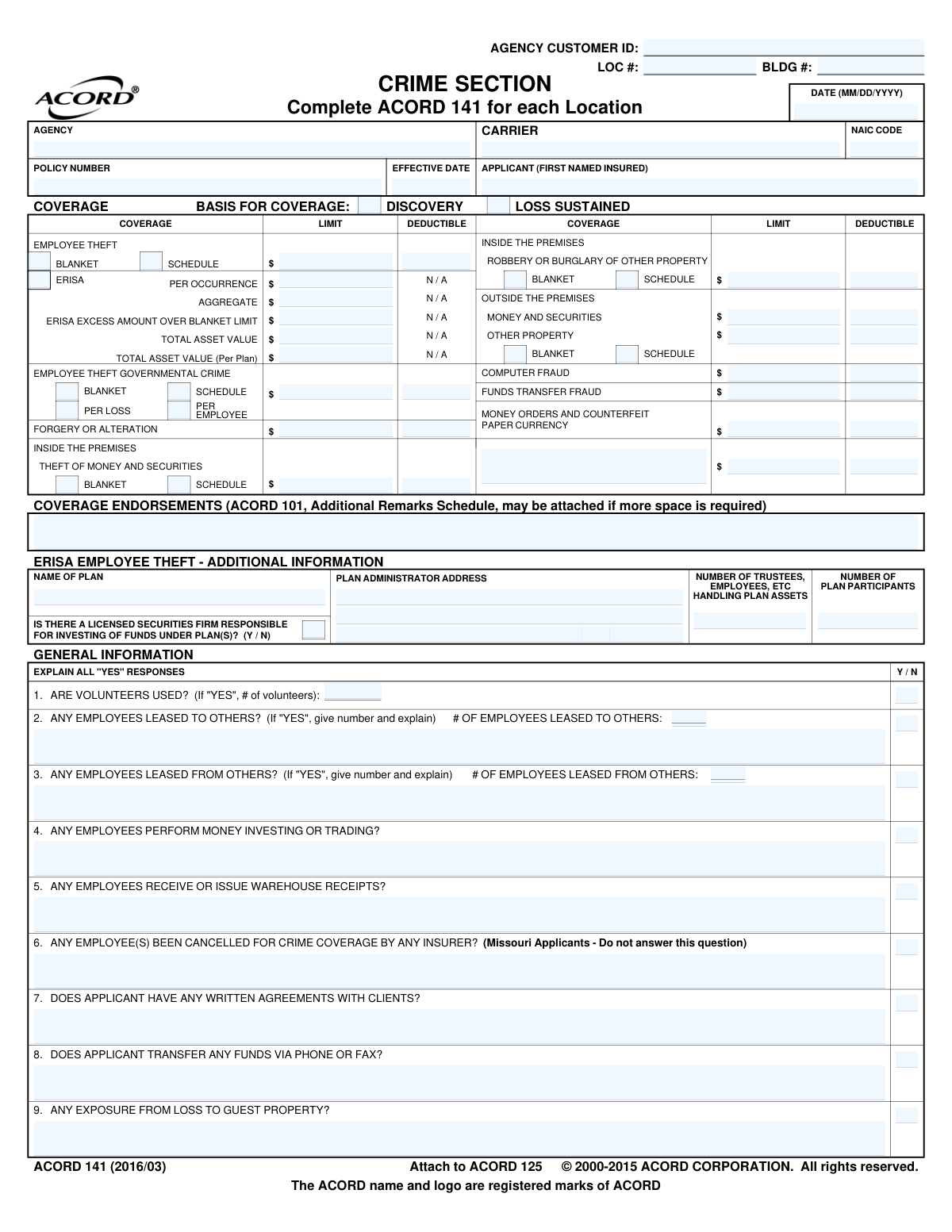
Yes! You can use AI to fill out ACORD 141, Commercial Insurance Application - Crime Section

ACORD 141, the Crime Section of the Commercial Insurance Application, is a detailed questionnaire used by insurance carriers to assess a business's risk exposure to crime-related losses. It covers aspects like employee theft, forgery, computer fraud, and theft of money and securities, making it essential for obtaining comprehensive crime insurance coverage. The information provided helps insurers determine policy terms, limits, and premiums based on the applicant's internal controls and security procedures. Today, this form can be filled out quickly and accurately using AI-powered services like Instafill.ai, which can also convert non-fillable PDF versions into interactive fillable forms.
ACORD 141 is part of the ACORD forms, commercial insurance forms and insurance application forms categories on Instafill.
Our AI automatically handles information lookup, data retrieval, formatting, and form filling.
It takes less than a minute to fill out ACORD 141 using our AI form filling.
Securely upload your data. Information is encrypted in transit and deleted immediately after the form is filled out.

Form specifications

Form name: ACORD 141, Commercial Insurance Application - Crime Section
Number of fields: 376
Number of pages: 1
Language: English
main-image

Instafill Demo: How to fill out PDF forms in seconds with AI

How to Fill Out ACORD 141 Online for Free in 2026

Are you looking to fill out a ACORD 141 form online quickly and accurately? Instafill.ai offers the #1 AI-powered PDF filling software of 2026, allowing you to complete your ACORD 141 form in just 37 seconds or less.
Follow these steps to fill out your ACORD 141 form online using Instafill.ai:
  1. 1 Navigate to Instafill.ai and upload or select the ACORD 141 form.
  2. 2 Use the AI assistant to automatically identify and label all fields, including applicant details, coverage types, and limits.
  3. 3 Provide business information as prompted, detailing employee classifications, audit procedures, and security protocols.
  4. 4 Specify the desired crime coverage types and limits, such as Employee Theft, Forgery or Alteration, and Computer Fraud.
  5. 5 Review the information pre-filled by the AI for accuracy, making any necessary corrections or additions to the detailed sections on controls and procedures.
  6. 6 Securely sign the application electronically and download the completed ACORD 141, ready for submission to your insurance agent or carrier.

Our AI-powered system ensures each field is filled out correctly, reducing errors and saving you time.

Why Choose Instafill.ai for Your Fillable ACORD 141 Form?

Speed

Complete your ACORD 141 in as little as 37 seconds.

Up-to-Date

Always use the latest 2026 ACORD 141 form version.

Cost-effective

No need to hire expensive lawyers.

Accuracy

Our AI performs 10 compliance checks to ensure your form is error-free.

Security

Your personal information is protected with bank-level encryption.

Frequently Asked Questions About Form ACORD 141

The ACORD 141 Crime Section form is a standard insurance application used by businesses to apply for commercial crime coverage. It gathers detailed information about a company's operations, financial controls, and security measures for insurers to assess risk and provide a quote.

Any business or organization seeking to purchase or renew insurance against crime-related losses, such as employee theft, forgery, or computer fraud, must complete this form. It is typically filled out by a business owner, officer, or risk manager with assistance from their insurance agent.

A 'Loss Sustained' policy covers losses that occur during the policy period, while a 'Discovery' policy covers losses that are discovered during the policy period, regardless of when they happened. The choice affects how claims are handled, especially for theft that occurs over a long period.

This section is specifically for businesses that sponsor an employee benefit plan, such as a 401(k). The Employee Retirement Income Security Act (ERISA) requires these plans to be bonded to protect plan assets from fraud, and this part of the form gathers the necessary information for that specific coverage.

Yes, the form instructions state, 'Complete ACORD 141 for each Location.' You must submit a separate application for each business location to accurately detail the unique risks, controls, and exposures at each site.

This section requires details about your company's financial oversight, such as how often audits are performed, who conducts them (CPA, staff), and what internal controls you have for banking, purchasing, and hiring. Be prepared to provide information on your audit reports and hiring practices like background checks.

You should enter the maximum value of money and securities you would have on hand at any given time for each category (e.g., inside the premises, with a messenger). Consider your busiest days, payroll times, or when you handle large deposits to estimate this 'maximum exposure' accurately.

Once you have completed and signed the application, you should submit it to your insurance producer (agent or broker). They will review the form and submit it to various insurance carriers to obtain quotes for your crime insurance policy.

Insurers use this detailed employee breakdown to understand your specific risks for internal theft and fraud. The duties of different roles present different levels of exposure, and this information is crucial for the insurer to accurately underwrite the policy and calculate the premium.

Yes, you can use AI-powered services like Instafill.ai to help complete this form. These tools can auto-fill fields using your saved business information, which saves a significant amount of time and helps ensure accuracy on a detailed application like this.

Simply upload the ACORD 141 PDF to the Instafill.ai platform. The service will make the document interactive and guide you through filling out the fields, using AI to suggest information from your profile and ensure all required sections are completed.

Services like Instafill.ai can instantly convert flat, non-fillable PDFs into interactive, fillable forms. This allows you to easily type your answers directly into the document, save your progress, and produce a clean, professional-looking application.

You should still complete the audit section to the best of your ability, describing your actual financial review process. The form allows you to specify if audits are performed by staff or a public accountant and to describe the scope of the audit if it's not a standard one.

This section requires specific details about your physical security measures. You will need to provide information on your alarm systems (type, grade, monitoring company), safes or vaults (manufacturer, class, lock type), and messenger protection protocols.

Compliance ACORD 141
Validation Checks by Instafill.ai

1
Mutually Exclusive Coverage Basis
This validation ensures that the applicant selects only one basis for coverage, either 'Loss Sustained' or 'Discovery', but not both. These options are mutually exclusive and define how claims are handled under the policy. If both are selected, the submission should be rejected and the user prompted to choose only one to ensure clarity in the policy terms.
2
Conditional Explanation for 'YES' Responses
In the 'GENERAL INFORMATION' section, several questions require a 'Y/N' answer and state 'EXPLAIN ALL "YES" RESPONSES'. This check verifies that if a question like 'Are volunteers used?' is answered 'YES', the corresponding explanation or count field is not empty. This is critical for underwriting to assess the specific risks introduced by these activities, and failure to provide details may result in an incomplete application.
3
Coverage Limit vs. Deductible Amount
For each coverage type (e.g., Forgery, Computer Fraud), this check validates that the requested Limit amount is greater than or equal to the Deductible amount. A deductible that exceeds the coverage limit is illogical and would render the coverage useless. This check prevents data entry errors that could lead to issuing a nonsensical policy, requiring correction before the policy can be bound.
4
Blanket vs. Schedule Coverage Selection
For coverages like 'Employee Theft' or 'Inside the Premises', the form offers a choice between 'Blanket' and 'Schedule'. This validation ensures that only one of these two options is selected for any given coverage. Selecting both is contradictory, as 'Blanket' applies to all employees/locations while 'Schedule' applies only to listed ones. The form must be corrected to reflect the applicant's true intent.
5
Employee Schedule Completion for Scheduled Coverage
This check is triggered if 'Schedule' is selected for 'Employee Theft' coverage. It verifies that the 'EMPLOYEE SCHEDULE' section on page 4 is completed with at least one employee's name, title, limit, and deductible. Without this information, 'Schedule' coverage is meaningless, as there are no specified employees to cover, making the application incomplete for rating and binding.
6
Valid Date Format and Plausibility
This validation ensures that all date fields, such as 'Policy_EffectiveDate_A' and 'NamedInsured_SignatureDate_A', are entered in a valid MM/DD/YYYY format. It also checks for plausibility, for instance, ensuring the signature date is not in the distant past or future. Correct date formatting is essential for establishing the policy period and maintaining accurate records.
7
Alarm Certificate Validity
If an alarm certificate number ('Alarm_Burglar_CertificateIdentifier_A') is provided, this check confirms that the corresponding expiration date ('Alarm_Burglar_CertificateExpirationDate_A') is also present and is not a date in the past. An expired alarm certificate means the protective system may not be currently certified, which impacts underwriting credits and risk assessment. The system should flag this for review or require an updated certificate.
8
Florida National Producer Number Requirement
The form explicitly states that the National Producer Number is required in Florida. This validation checks if the applicant's state is Florida and, if so, ensures that the 'Producer_NationalIdentifier_A' field is populated. Failure to provide this number in Florida can lead to regulatory non-compliance, so the application should be blocked until the information is supplied.
9
Missouri Applicant Question Restriction
This check enforces the specific instruction for question #6 in the General Information section: '(Missouri Applicants - Do not answer this question)'. If the applicant's address is identified as being in Missouri, the system will validate that the corresponding field ('CrimeLineOfBusiness_Question_KAFCode_A') is left blank. This prevents applicants from providing information they are legally exempt from disclosing, avoiding potential legal and compliance issues.
10
ERISA Excess Amount Logic
This validation applies to the 'ERISA' coverage section. It ensures that the 'ERISA EXCESS AMOUNT OVER BLANKET LIMIT' field is only populated if a value is also present in the 'Employee Theft' blanket limit field. It is illogical to have an excess amount without a primary blanket limit to be excess of. This prevents misconfiguration of complex ERISA coverage layers.
11
Numeric Field Type Validation
This check ensures that all fields intended to capture monetary values (limits, deductibles, asset values) or counts (number of employees, locations) contain only valid numeric data. This prevents data corruption from non-numeric characters (e.g., '$', ',', 'N/A') being entered into fields used for calculations. Such errors can cause system failures and incorrect premium calculations.
12
Conditional Leased Employee Count
This validation verifies that if an applicant answers 'YES' to leasing employees to or from others ('CrimeLineOfBusiness_Question_KABCode_A' or 'KACCode_A'), the corresponding count field ('EmployeeClass_LeasedToOthersEmployeeCount_A' or 'LeasedFromOthersEmployeeCount_A') is populated with a number greater than zero. A 'YES' answer without a corresponding count is incomplete information. This ensures underwriters have the necessary data to assess the exposure from non-owned employees.
13
Audit Performer Single Selection
In the 'CONTROLS AND AUDIT PROCEDURES' section, the form asks who performs the audit with options for CPA, Public Accountant, or Staff. This validation ensures that only one of these options is selected. Treating these checkboxes as a radio button group prevents ambiguity about who is responsible for the audit, which is a key underwriting data point.
14
Business Hours Chronology
This check validates the 'BUSINESS HOURS' fields in the 'MISCELLANEOUS INFORMATION' section. It ensures that the 'Close' time ('CrimeInformation_BusinessHoursCloseTime_A') is chronologically after the 'Start' time ('CrimeInformation_BusinessHoursStartTime_A'). This simple logic check prevents data entry errors that could misrepresent the applicant's hours of operation, a factor in assessing premises risk.

Common Mistakes in Completing ACORD 141

Confusing 'Blanket' vs. 'Schedule' Coverage

Applicants often misunderstand the difference between 'Blanket' coverage (which applies to all employees/locations) and 'Schedule' coverage (which applies only to listed employees/locations). A common error is selecting 'Schedule' on page 1 but failing to complete the corresponding 'Employee Schedule' on page 4, leaving specific employees uninsured. This mistake can lead to significant, uncovered losses and disputes during a claim.

Omitting Required Explanations for 'Yes' Responses

The form contains numerous yes/no questions where a 'YES' answer requires a detailed explanation (e.g., 'Any employees leased from others?'). Applicants frequently check 'YES' but forget to provide the corresponding explanation in the space provided or on the remarks page. This omission creates an incomplete application, forcing underwriters to halt the process and request the missing information, causing significant delays.

Inaccurate Employee Classification and Count

The 'Classification of Employees' grid on page 2 is complex and often filled out incorrectly. Applicants may undercount employees, misclassify individuals who perform multiple job functions (e.g., a bookkeeper who also handles cash), or forget to include all personnel with access to money or property. These errors result in inaccurate premium calculations and can create dangerous coverage gaps if a loss is caused by an unlisted or misclassified employee.

Misstating Maximum Money and Securities Exposure

When filling out the exposure grid on page 3, applicants are required to list the *maximum* value of money and securities at risk, not the average. A frequent mistake is to report a typical day's cash, underestimating exposure during peak times like holidays or weekends. This can leave the business severely underinsured and unable to recover the full amount of a large theft.

Providing Vague or Incomplete Protection System Details

Page 4 asks for highly technical details about safes, vaults, and alarm systems, such as UL grade, door thickness, and alarm installer name. Business owners often lack this information and either leave the section blank or provide guesses. Incomplete or inaccurate data prevents underwriters from applying potential premium credits and may even lead to a declination if security standards are not met.

Incorrectly Completing the ERISA Section

The section for Employee Retirement Income Security Act (ERISA) plans is highly specialized and a common source of confusion. Applicants may fill it out when it's not applicable, or if it is, they may misunderstand fields like 'Total Asset Value' or 'Excess Amount Over Blanket Limit.' An error here can lead to improper coverage for employee benefit plans, exposing the plan and its fiduciaries to significant liability.

Selecting the Wrong Coverage Basis ('Loss Sustained' vs. 'Discovery')

On page 1, applicants must choose between a 'Loss Sustained' or 'Discovery' basis, which dictates the trigger for coverage. Many applicants do not understand the critical difference: 'Loss Sustained' covers losses that occurred during the policy period, while 'Discovery' covers losses discovered during the policy period, regardless of when they occurred. Choosing the wrong basis can result in an outright claim denial depending on the timing of the loss and its discovery.

Failing to Provide Complete Audit Information

The 'Controls and Audit Procedures' section is critical for underwriting but is often rushed or left incomplete. Applicants may not know the name of their CPA, the date of the last audit, or fail to submit a copy of the audit report when discrepancies were noted. This lack of transparency raises red flags and will always result in follow-up questions, delaying the quoting and binding process.

Providing Contradictory Information Across Sections

A frequent issue is internal inconsistency within the application. For example, an applicant might state 'NO' to employees handling money in the 'General Information' section but then list a large cash exposure on the 'Money - Securities' grid. Such contradictions signal a lack of care in completing the form and force underwriters to question the validity of all provided data, requiring full clarification before a quote can be issued. AI-powered tools like Instafill.ai can help by cross-referencing answers to flag potential inconsistencies.

Missing Signatures or Required Producer Details

One of the most basic yet common mistakes is submitting the form without the required signatures from both the applicant and the producer on the final page. Additionally, producers may forget to include their state license number or the National Producer Number, which is explicitly required in some states. An unsigned or incomplete application is not legally binding and will be immediately rejected, restarting the submission process. If the form is a non-fillable PDF, tools like Instafill.ai can convert it into a fillable version to ensure all signature and data fields are easily completed.
Saved over 80 hours a year

“I was never sure if my IRS forms like W-9 were filled correctly. Now, I can complete the forms accurately without any external help.”

Kevin Martin Green

Your data stays secure with advanced protection from Instafill and our subprocessors

Robust compliance program

Transparent business model

You’re not the product. You always know where your data is and what it is processed for.

ISO 27001, HIPAA, and GDPR

Our subprocesses adhere to multiple compliance standards, including but not limited to ISO 27001, HIPAA, and GDPR.

Security & privacy by design

We consider security and privacy from the initial design phase of any new service or functionality. It’s not an afterthought, it’s built-in, including support for two-factor authentication (2FA) to further protect your account.

Fill out ACORD 141 with Instafill.ai

Worried about filling PDFs wrong? Instafill securely fills acord-141-commercial-insurance-application-crime-section forms, ensuring each field is accurate.