
Yes! You can use AI to fill out General Liability and Builder's Risk Insurance Application
Don't type 167 fields by hand. Tell our AI about yourself, or upload a document you already have, and it fills every field in seconds. You check it, then download, print or sign.
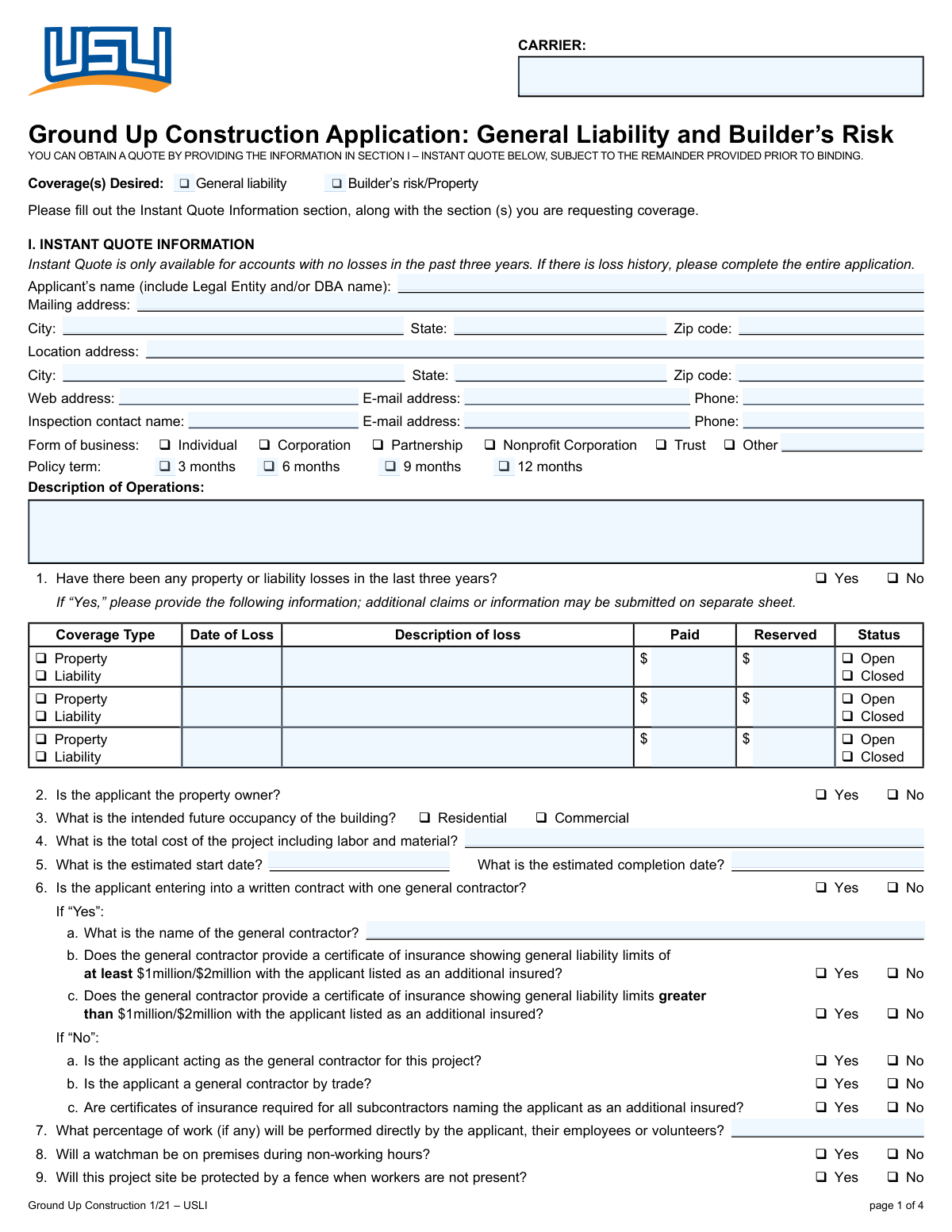
The AI does the filling. You just check it.
No typing into boxes, nothing to install.
What this form asks for
The AI fills all of it, from your answers or your documents.
The AI checks your answers before you download
14 checks built for this form, so a wrong date or a missing answer is caught before anyone else sees it.
This check verifies that if the applicant indicates a loss history by selecting 'Yes' for 'Loss History', then the details for at least the first loss (Date of Loss, Description, Amount) are provided. This is crucial for underwriting to accurately assess risk based on past claims. If this validation fails, the form submission should be blocked, and the user prompted to either provide loss details or change the answer to 'No'.
This validation ensures that the 'Estimated Completion Date' is on or after the 'Estimated Start Date'. This maintains logical data integrity and is essential for determining the policy term and premium calculation. An invalid date sequence would require the user to correct the dates before the form can be submitted, preventing nonsensical project timelines.
This check ensures that if the 'Other (specify)' checkbox for Business Entity is selected, the corresponding text field 'Other (Form of Business)' is not empty. This is necessary to properly classify the applicant's legal structure for legal and coverage purposes. Failure to provide this detail would result in an incomplete and potentially inaccurate policy, so the user must be prompted to specify the business type.
This validation confirms that if the applicant answers 'Yes' to 'Entering into written contract with one general contractor', the 'General contractor name' field must be filled out. This information is vital for understanding project management structure and potential third-party liability. If the name is missing, the submission should be halted with a message requiring the user to provide the contractor's name.
This validation ensures that the user selects only one option from the available business entity types (Individual, Corporation, Partnership, etc.). Selecting multiple entities is logically impossible and would create ambiguity in identifying the named insured. The form interface should use radio buttons or a similar control to enforce this, and a backend check should confirm only one value is submitted.
This check verifies that the 'Email Address' and 'Inspection Contact Email' fields contain values that conform to a standard email format (e.g., [email protected]). This is critical for ensuring that all electronic correspondence, including policy documents and billing notices, can be successfully delivered. An invalid format would trigger an error message, asking the user to correct the email address before proceeding.
And 8 more checks
- Valid US ZIP Code Format
- Minimum Coverage Type Selection
- Valid Total Project Cost
- Additional Interest Completeness
- Required Applicant Signature
- Standard Date Format
- General Contractor Role Consistency
- Valid Percentage Range for Work Performed
Let AI fill out your Construction Insurance Application
No typing. Every field filled in seconds, checked, ready to sign.
How to Fill Out Construction Insurance Application Online for Free in 2026
What the AI walks you through.
- Navigate to Instafill.ai and upload or select the General Liability and Builder's Risk Insurance Application.
- Provide applicant details, including contact information, business entity type, and desired policy term. The AI can assist by pre-filling known information.
- Enter a detailed description of your operations and disclose any property or liability losses from the past three years.
- Supply comprehensive project information, such as total cost, start/completion dates, and details about the general contractor and their insurance.
- Answer the series of yes/no questions regarding specific project risks, such as demolition, blasting, or work on filled ground.
- List any additional interests like mortgagees or loss payees, and select your desired liability limits and deductibles.
- Review all the information populated by the AI for accuracy, then electronically sign and date the application to complete the process.
Common Mistakes in Completing Construction Insurance Application
The ones the AI is built to catch.
Confusing Mailing and Location Addresses
Providing a Vague 'Description of Operations'
Incomplete or Inaccurate Loss History Reporting
Mishandling the Conditional General Contractor Section
Incorrectly Listing Additional Interests
Mismatching Applicant Name and Business Entity
Understating the 'Total Project Cost'
Rushing Through the Yes/No Eligibility Questions
Misinterpreting 'Percent of Work Performed by Applicant'
Selecting Multiple Contradictory Options
Frequently Asked Questions About Construction Insurance Application
Is it really free for 7 days?
Can I fill other forms too?
How do I cancel?
How does the AI fill out Construction Insurance Application?
What happens to my information?
How complex is Construction Insurance Application to fill out?
What is the purpose of this form?
Who needs to fill out this form?
What is the difference between the 'Mailing Address' and 'Location Address'?
My business is an LLC. Which 'Business Entity' box should I check?
What should I do if I have had more than three losses in the past three years?
What do I do if I am acting as my own general contractor for the project?
What is an 'Additional Interest' and why would I need to list one?
Where can I find the 'Protection Class' for my building?
What information do I need to provide about my General Contractor?
Do I have to disclose if a previous insurance policy was cancelled?
Can I use an AI tool to help me fill out this form?
How can I fill this form out online if I only have a paper copy or a flat PDF?
Get your Construction Insurance Application filled out by AI
$0 today. Cancel before Nov 10 and you pay nothing.
Other forms like this one
insurance forms: Form 1095-A, Health Insurance Marketplace Statement, Form SSA-4-BK, Application for Child's Insurance Benefits, Form SSA-10, Application for Widow's or Widower's Insurance Benefits, Form 1095-C, Employer-Provided Health Insurance Offer and Coverage, National Integrity Life Insurance Company Ownership Change Request Form (NI-77-0039-2505), Record of Advice and Needs Analysis (Non-Life Insurance — Personal and Commercial Lines), Form 7206 (2025), Self-Employed Health Insurance Deduction, Continental American Insurance Company (CAIC) / Aflac Group Critical Illness Claim Form (with Attending Physician’s Statement, HIPAA Authorization to Obtain Information, and Electronic Funds Transaction Authorization), Prudential Group Disability Insurance – Education and Employment History Form (GL.2009.009, Ed. 06/2017), acord-25-201603-certificate-of-liability-insurance-1, Brotherhood Mutual Insurance Company Ministry Driver Screening Form (A99), Assurity Life Insurance Company Disability Claim Form — Attending Physician’s Statement, Amateur Sports / Activities Accident Insurance Quote Request Form (Philadelphia Insurance Companies), Martial Arts Studio General Liability and Property Application (Fitness and Wellness Insurance / Philadelphia Insurance Companies) (03/2011), The Prudential Insurance Company of America Group Disability Insurance – Education and Employment History Form (GL.2009.009, Ed. 06/2017), VA Form 29-357, Claim for Disability Insurance Benefits (Government Life Insurance), CMS-1500 (02-12), Health Insurance Claim Form (NUCC Approved) (OMB 0938-1197), Prudential Group Disability Insurance – Education and Employment History Form (GL.2009.009, Ed. 06/2017), HDFC ERGO General Insurance Company Limited – Request for Cashless Hospitalisation for Health Insurance (Policy Part – C), Beneficiary Designation/Change - Principal Life Insurance Company
insurance application forms: Form SSA-4-BK, Application for Child's Insurance Benefits, Form SSA-10, Application for Widow's or Widower's Insurance Benefits, Martial Arts Studio General Liability and Property Application (Fitness and Wellness Insurance / Philadelphia Insurance Companies) (03/2011), Transamerica Life Insurance Company Individual Whole Life Insurance Application, Argonaut Insurance Company, AEIG Instructors and Trainers Liability Application, Application for Specific Project Insurance Coverage, National Fire & Marine Insurance Company Physicians Professional Liability Application, Ameritas Dental Network Application (Form AM 202), ACORD 125, Commercial Insurance Application and ACORD 143, Transportation Section, AXIS MEDIA/PROFESSIONAL INSURANCE® PRODUCERS LIABILITY NEW BUSINESS APPLICATION, Argonaut Insurance Company, Equine Instructors and Trainers Liability Application, Form SSA-2-BK, Application for Wife's or Husband's Insurance Benefits, ACORD 125, Commercial Insurance Application, Physician's Professional Liability Insurance Application, ACORD 125, Commercial Insurance Application, Applicant Information Section, Form SSA-16, Application for Disability Insurance Benefits, Affinity Healthcare Non-Emergency Medical Transportation Insurance Application, ACORD 80, Homeowner Application, ACORD 83, Personal Umbrella Application, ACORD 130 CA, California Workers Compensation Application
liability insurance forms: Argonaut Insurance Company, AEIG Instructors and Trainers Liability Application, acord-25-201603-certificate-of-liability-insurance-1, Martial Arts Studio General Liability and Property Application (Fitness and Wellness Insurance / Philadelphia Insurance Companies) (03/2011), National Fire & Marine Insurance Company Physicians Professional Liability Application, AXIS MEDIA/PROFESSIONAL INSURANCE® PRODUCERS LIABILITY NEW BUSINESS APPLICATION, Argonaut Insurance Company, Equine Instructors and Trainers Liability Application, Physician's Professional Liability Insurance Application, ACORD 131, Umbrella / Excess Liability Section, ACORD 25 (2010/05), Certificate of Liability Insurance, ACORD 126 (2016/09), Commercial General Liability Section, ACORD 126 (2009/08), Commercial General Liability Section, ACORD 25, Certificate of Liability Insurance (2016/03), ACORD 25, Certificate of Liability Insurance (2025/12)
liability application forms: FARM LIABILITY / LIMITED PROPERTY - APPLICATION, Oregon Practitioner Credentialing Application (including Attachment A: Professional Liability Action Detail), Martial Arts Studio General Liability and Property Application (Fitness and Wellness Insurance / Philadelphia Insurance Companies) (03/2011), Argonaut Insurance Company, AEIG Instructors and Trainers Liability Application, National Fire & Marine Insurance Company Physicians Professional Liability Application, AXIS MEDIA/PROFESSIONAL INSURANCE® PRODUCERS LIABILITY NEW BUSINESS APPLICATION, AEIG Instructors and Trainers Liability Application, Argonaut Insurance Company, Equine Instructors and Trainers Liability Application, Physician's Professional Liability Insurance Application
Let AI fill out your Construction Insurance Application
Your trial starts once a card is added. You pay nothing before Nov 10.
Our AI already knows this form, all 167 fields of it. Skip the typing: tell it about yourself, or upload what you have, and it fills the whole form in seconds.
- AI fills every field on all 4 pages, tables and checkboxes included
- No typing into boxes: answer a few questions, or upload a document you already have, an old copy of this form, a photo of a document
- The AI checks the answers; you review and change anything before you download
- Download the finished PDF, print it, or sign it online
- Encrypted, and never used to train AI
Cancel before Nov 10 and you pay nothing.
A card is needed to start the trial. Cancel in two clicks from your account.
Terms · Privacy