
Yes! You can use AI to fill out Affinity Healthcare Non-Emergency Medical Transportation Insurance Application
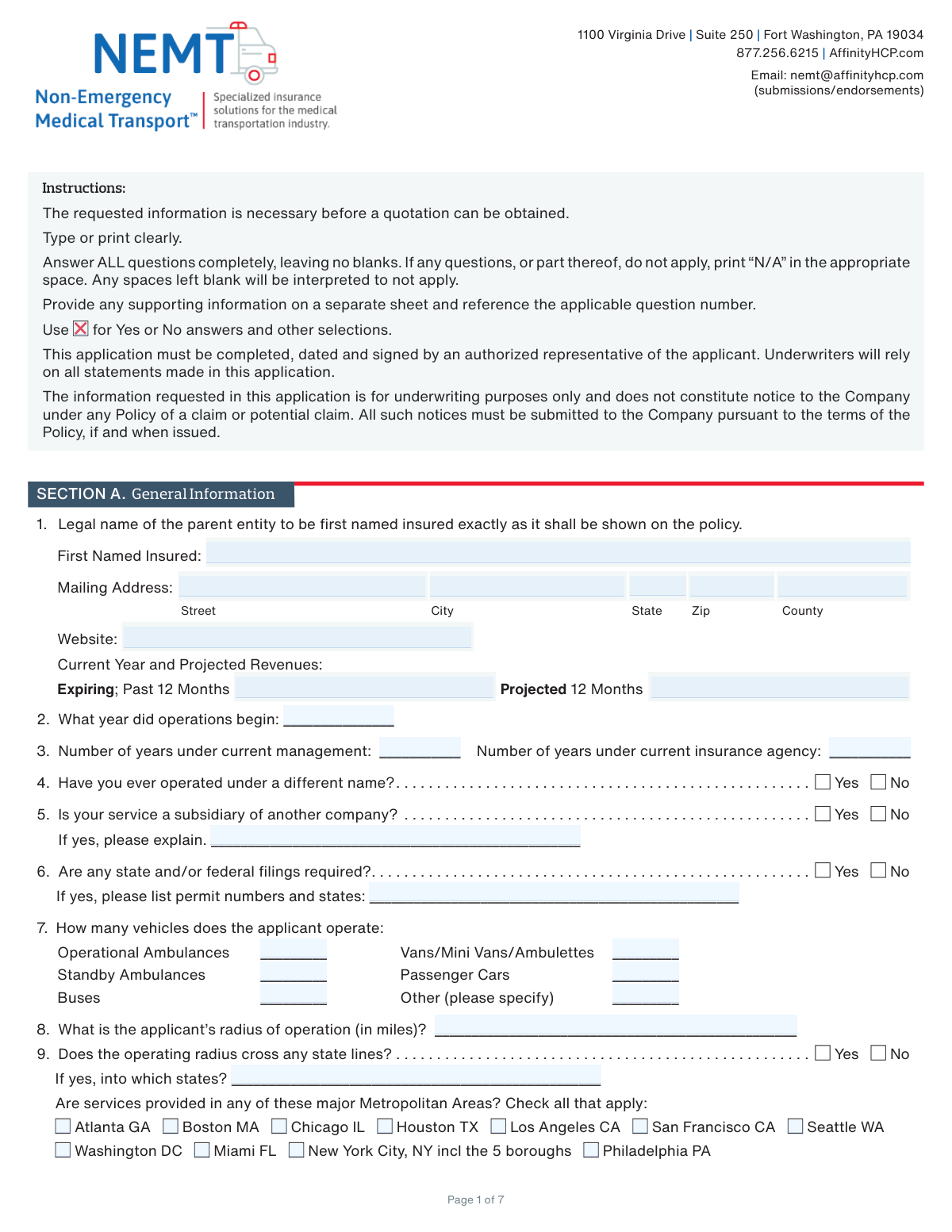
Don't type 352 fields by hand. Tell our AI about yourself, or upload your insurance card, and it fills every field in seconds. You check it, then download, print or sign.
The AI does the filling. You just check it.
No typing into boxes, nothing to install.
What this form asks for
The AI fills all of it, from your answers or your documents.
The AI checks your answers before you download
12 checks built for this form, so a wrong date or a missing answer is caught before anyone else sees it.
This check ensures that the 'Number of years under current management' (Q3) is not greater than the total years the company has been in operation, calculated from the 'Operations Start Year' (Q2). This is a logical validation to prevent data entry errors and ensure the timeline of the business's history is coherent. If this validation fails, the form should prompt the user to correct one of the two fields as they are contradictory.
This validation verifies that if the applicant answers 'Yes' to question 5 ('Is your service a subsidiary of another company?'), the corresponding explanation text field is not left blank. This information is crucial for underwriters to understand the full corporate structure and potential associated risks from a parent company. A failure would prevent submission until the required explanation is provided.
This check validates that the sum of individual driver categories in question 19 (Full-Time, Part-Time, Volunteer, Backup, Contracted) equals the value entered for 'Total Number of Drivers'. This is a critical data integrity check to ensure the driver roster is accurately reported for liability and risk assessment. If the numbers do not add up, an error message should be displayed, requiring the user to reconcile the counts before proceeding.
This check ensures that the percentages entered in each of the three columns in question 13 sum to exactly 100%. This validation is vital for accurately assessing the nature of the applicant's services (e.g., transport type, service level, scheduling). If any column does not total 100%, it indicates incomplete or inaccurate data, and the form should highlight the discrepancy for correction.
This validation rule confirms that if an applicant answers 'Yes' to question 9 ('Does the operating radius cross any state lines?'), the subsequent field asking 'into which states?' is filled out. Operating across state lines has significant insurance and regulatory implications, so this information is mandatory for accurate quoting. Failure to provide the states would block form submission until the information is entered.
This check validates that if 'Yes' is selected for a minimum driver age requirement (Q30), the age provided is a reasonable number (e.g., 18-25). It also cross-references this with the number of drivers 'Under 23' (Q21). For instance, if the minimum age is set to 23 or higher, the count for drivers under 23 must be zero. This logical check ensures consistency in the applicant's stated hiring policies and driver demographics.
And 6 more checks
- Revenue and Mileage Field Format
- Conditional Requirement for Prior Losses Details
- Driver Type Breakdown Consistency
- Vehicle Count Completeness
- Signature and Date Presence
- Conditional Requirement for 'Other' Service Type
Let AI fill out your A-12667-0324
No typing. Every field filled in seconds, checked, ready to sign.
How to Fill Out A-12667-0324 Online for Free in 2026
What the AI walks you through.
- Navigate to Instafill.ai and upload or select the Affinity Healthcare Insurance Application form.
- Use the AI assistant to populate Section A with your general business information, including legal name, address, operational history, and revenue details.
- Provide comprehensive details about your fleet, services, and operational scope, such as vehicle counts, types of service offered, and annual call volumes in Sections A and B.
- Complete the sections on driver hiring, training, and qualifications (Sections C & D), and detail your procedures for wheelchair and stretcher transport (Sections E & F).
- Fill in the safety procedures and vehicle maintenance sections (G & H), answering questions about safety programs, inspections, and maintenance records.
- Input your previous insurance coverage information for Professional, General, and Auto Liability for the last three years as requested in Section I.
- Carefully review all entered information for accuracy, then use the platform's tools to electronically sign and date the declaration in Section J to complete the application.
Common Mistakes in Completing A-12667-0324
The ones the AI is built to catch.
Incomplete Conditional Answers
Incorrect Percentage Calculations
Inconsistent Driver and Vehicle Counts
Leaving Blanks Instead of Using 'N/A'
Vague Descriptions for Critical Data
Misinterpreting GPS Monitoring Purpose
Inaccurate or Incomplete Insurance History
Using a DBA Instead of the Legal Entity Name
Forgetting to Sign and Date the Application
Confusing Revenue and Mileage Timeframes
Frequently Asked Questions About A-12667-0324
Is it really free for 7 days?
Can I fill other forms too?
How do I cancel?
How does the AI fill out A-12667-0324?
What happens to my information?
How complex is A-12667-0324 to fill out?
What is the purpose of this form?
Who needs to fill out this application?
What should I do if a question doesn't apply to my business?
How do I submit the completed form?
I'm a new company with no operational history. How should I answer questions about past years?
What information is required for the 'Previous Insurance' sections?
Does completing this application guarantee that I will receive insurance coverage?
What is the difference between 'Door-to-Door' and 'Door-through-Door' service in question 13?
For question 56, what is the difference between GPS for navigation and GPS to monitor driver behavior?
What happens if my company's information changes after I've submitted the application?
Can I use an AI tool to help me fill out this form?
The PDF I received is not fillable. How can I complete it on my computer?
How can I fill this form out online using Instafill.ai?
Get your A-12667-0324 filled out by AI
$0 today. Cancel before Nov 3 and you pay nothing.
Other forms like this one
insurance forms: Form 1095-A, Health Insurance Marketplace Statement, Form SSA-4-BK, Application for Child's Insurance Benefits, Form SSA-10, Application for Widow's or Widower's Insurance Benefits, Form 1095-C, Employer-Provided Health Insurance Offer and Coverage, National Integrity Life Insurance Company Ownership Change Request Form (NI-77-0039-2505), Record of Advice and Needs Analysis (Non-Life Insurance — Personal and Commercial Lines), Form 7206 (2025), Self-Employed Health Insurance Deduction, Continental American Insurance Company (CAIC) / Aflac Group Critical Illness Claim Form (with Attending Physician’s Statement, HIPAA Authorization to Obtain Information, and Electronic Funds Transaction Authorization), Prudential Group Disability Insurance – Education and Employment History Form (GL.2009.009, Ed. 06/2017), acord-25-201603-certificate-of-liability-insurance-1, Brotherhood Mutual Insurance Company Ministry Driver Screening Form (A99), Assurity Life Insurance Company Disability Claim Form — Attending Physician’s Statement, Amateur Sports / Activities Accident Insurance Quote Request Form (Philadelphia Insurance Companies), Martial Arts Studio General Liability and Property Application (Fitness and Wellness Insurance / Philadelphia Insurance Companies) (03/2011), The Prudential Insurance Company of America Group Disability Insurance – Education and Employment History Form (GL.2009.009, Ed. 06/2017), VA Form 29-357, Claim for Disability Insurance Benefits (Government Life Insurance), CMS-1500 (02-12), Health Insurance Claim Form (NUCC Approved) (OMB 0938-1197), Prudential Group Disability Insurance – Education and Employment History Form (GL.2009.009, Ed. 06/2017), HDFC ERGO General Insurance Company Limited – Request for Cashless Hospitalisation for Health Insurance (Policy Part – C), Beneficiary Designation/Change - Principal Life Insurance Company
healthcare forms: Direct Rollover Request for Appalachian Regional Healthcare, Inc. Voluntary Plan, Molina Healthcare Prior Authorization Request Form, UnitedHealthcare Prior Authorization Request Form, Optum Rx / UnitedHealthcare Prior Authorization Request Form, Advanced Imaging Prior Authorization Request Form, Cigna Prior Authorization Form, Form HFS 3082, Drug Prior Authorization Request Form, Kaiser Permanente Washington Request for Authorization, Medicaid Alaska EDI Enrollment - Provider Information Submission Agreement, Outpatient Imaging Prior Authorization Request Form, Prior Authorization Request Form for Prescription Drugs, Radiological Services Request (RSR), Retrospective Review Authorization Form, Standard Health Insurance Claim Form - Part B, Uniform Pharmacy Prior Authorization Request Form, Healthcare Professional Credentialing Application, Amazon Healthcare Provider Form for Accommodation Request
medical forms: Form OWCP-915, Claim for Medical Reimbursement, Form 8994, Employer Credit for Paid Family and Medical Leave, Form OF-178, Certificate of Medical Examination, Form N-648, Medical Certification for Disability Exceptions, U.S. Coast Guard Form CG-719K, Application for Medical Certificate, The Department of Medical Assistance Services Applied Behavior Analysis Preservice Service Authorization Request Form (Effective Dates of Service 09/01/2025 and after), State of Illinois Department of Children and Family Services Medical Report on an Adult in a Child Care Facility (CFS 602), Carer Payment and Carer Allowance – Medical Report (SA431) for a child under 16 years, Medically Prescribed Treatment (Non-Medication) Form — Provider Treatment Order Form | Office of School Health | School Year 2025–2026, VA Form 10-7959f-2, Foreign Medical Program (FMP) Claim Cover Sheet, Department of Medical Assistance Services Applied Behavior Analysis (97155, Et al.) Initial Service Authorization Request Form, Applied Behavior Analysis Concurrent Service Authorization Request Form (CPT Codes 97153, 97154, 97155, 97156, 97157, 97158, 0373T) – Virginia Department of Medical Assistance Services, Department of Medical Assistance Services Enhanced Services Individual Service Plan (ISP) Template, Form DS-1843, Medical History and Examination for Individuals Age 12 and Older, Scheduled Medical Leave of Absence (MLOA) - BLET 13, Admissions Application, School of Diagnostic Imaging, Mills-Peninsula Medical Center, Albany Medical Center 2024 Benefits Guide, Form BWC-1141, Request for Medical Information, VA Form 21P-8416, Medical Expense Report, Medicare Enrollment Application for Durable Medical Equipment, Prosthetics, Orthotics, and Supplies (DMEPOS) Suppliers, CMS-855S
transportation forms: State of California Department of Transportation California Civil Rights Laws Certification, State of California Department of Transportation Darfur Contracting Act Certification, Form DOT ADM-0077, State of California Department of Transportation, Contract Requirements, State of California Department of Transportation Subcontractor List, State of California Department of Transportation, Certified DVBE Summary, California Company Preference, DOT DES-OE-0102.9, Arizona Department of Transportation Rental Application (Residential Lease), ACORD 125, Commercial Insurance Application and ACORD 143, Transportation Section, Physician Certification Statement for Non-Emergency Medical Transportation
CAR forms: Form SSA-44, Medicare Income-Related Monthly Adjustment Amount - Life-Changing Event, Form I-90, Application to Replace Permanent Resident Card, Form 2441, Child and Dependent Care Expenses, Form WH-380-E, Certification of Health Care Provider, Form 4137, Social Security and Medicare Tax on Unreported Tip Income, Form 8959, Additional Medicare Tax, Form 8919, Uncollected Social Security and Medicare Tax, Form CMS-1763, Request for Termination of Medicare Coverage, Form CMS-855O, Medicare Enrollment Application, Form CMS-460, Medicare Participation Agreement, Form CMS-4040, Request for Enrollment in Medicare Part B, Form WH-380-F, Certification of Health Care Provider, Form W-10, Dependent Care Provider’s Identification, Form 1099-K, Payment Card and Third Party Network Transactions, Form CMS-40B, Application for Enrollment in Medicare Part B, Form SS-5-FS, Application for a Social Security Card, Form REG 195, Disabled Person Placard, Form AR-11, Alien's Change of Address Card, Form I-905, Application for Authorization to Issue Certification for Health Care Workers, Form I-131A, Application for Carrier Documentation
health insurance forms: Form 1095-A, Health Insurance Marketplace Statement, Form 1095-C, Employer-Provided Health Insurance Offer and Coverage, Form 7206 (2025), Self-Employed Health Insurance Deduction, CMS-1500 (02-12), Health Insurance Claim Form (NUCC Approved) (OMB 0938-1197), HDFC ERGO General Insurance Company Limited – Request for Cashless Hospitalisation for Health Insurance (Policy Part – C), Standard Health Insurance Claim Form - Part B, Blue Shield of California Network Participation Letter of Intent, Blue Shield of California Prior Authorization Request Form, Blue Shield of California Urgent Request for Prior Authorization, Cigna Out-of-Network Referral Disclosure Form, Identificación Estado Sanitario Poblacional, Anexo II, Res. 83/2007 (Superintendencia de Servicios de Salud), John Hancock Independent Care Provider Service Reimbursement, John Hancock Independent Care Provider Service Reimbursement, Kaiser Permanente Washington Request for Authorization, Oscar Grievance and Appeal Form - Florida, R+V Krankenversicherung AG Antrag Krankenversicherung und Pflegepflichtversicherung, UnitedHealthcare Prior Authorization Request Form, Form CMS-1561, Health Insurance Benefit Agreement, CMS-1500 Health Insurance Claim Form (OMB-0938-0999), Form 8941, Credit for Small Employer Health Insurance Premiums
health care forms: Form WH-380-E, Certification of Health Care Provider, Form WH-380-F, Certification of Health Care Provider, Form I-905, Application for Authorization to Issue Certification for Health Care Workers, DHS-6696-ENG, Minnesota Health Care Programs Application (MNsure/DHS), Form CH-006: PA-BH-Res-PCS, Oregon Behavioral Health Support Program Plan of Care Authorization (Plan of Care Request for Behavioral Health Residential or Personal Care Services), Prior Authorization (PA) Request Form – Adult Palliative Care (Alameda Alliance for Health), Medicare Enrolment Application (Australia) – Enrol in Medicare, Re-enrol/Extend Eligibility, Enrol a Newborn, and Register for My Health Record, Alameda Alliance for Health Prior Authorization (PA) Request Form – Adult Palliative Care, Health Assessment – Ontario Health atHome (Fixing Long-Term Care Act, 2021) (Form 4768-69E), Health Assessment - Ontario Health atHome (Fixing Long-Term Care Act, 2021) — Form 4768-69E, Request for Transfer of Records (Adelaide Health Care) – AHC-0013-05-PS (Version 2), Application for Access to Health Care Records (Nepean Blue Mountains Local Health District) – NBMA-431, L.A. Care Behavioral Health Treatment Applied Behavioral Analysis Authorization Request Form, Medicaid Managed Care Applied Behavior Analysis — Authorization Request (Healthy Blue Louisiana, BLAPEC-1989-20), Iowa Advance Directive: Durable Power of Attorney for Health Care and Declaration (Living Will), Direct Rollover Request for Appalachian Regional Healthcare, Inc. Voluntary Plan, Molina Healthcare Prior Authorization Request Form, UnitedHealthcare Prior Authorization Request Form, Optum Rx / UnitedHealthcare Prior Authorization Request Form, Texas Standard Prior Authorization Request Form for Health Care Services
VA medical forms: Form OWCP-915, Claim for Medical Reimbursement, Form 8994, Employer Credit for Paid Family and Medical Leave, Form OF-178, Certificate of Medical Examination, Form N-648, Medical Certification for Disability Exceptions, U.S. Coast Guard Form CG-719K, Application for Medical Certificate, The Department of Medical Assistance Services Applied Behavior Analysis Preservice Service Authorization Request Form (Effective Dates of Service 09/01/2025 and after), State of Illinois Department of Children and Family Services Medical Report on an Adult in a Child Care Facility (CFS 602), Carer Payment and Carer Allowance – Medical Report (SA431) for a child under 16 years, Medically Prescribed Treatment (Non-Medication) Form — Provider Treatment Order Form | Office of School Health | School Year 2025–2026, VA Form 10-7959f-2, Foreign Medical Program (FMP) Claim Cover Sheet, Department of Medical Assistance Services Applied Behavior Analysis (97155, Et al.) Initial Service Authorization Request Form, Applied Behavior Analysis Concurrent Service Authorization Request Form (CPT Codes 97153, 97154, 97155, 97156, 97157, 97158, 0373T) – Virginia Department of Medical Assistance Services, Department of Medical Assistance Services Enhanced Services Individual Service Plan (ISP) Template, Form DS-1843, Medical History and Examination for Individuals Age 12 and Older, Scheduled Medical Leave of Absence (MLOA) - BLET 13, Admissions Application, School of Diagnostic Imaging, Mills-Peninsula Medical Center, Albany Medical Center 2024 Benefits Guide, Form BWC-1141, Request for Medical Information, VA Form 21P-8416, Medical Expense Report, Medicare Enrollment Application for Durable Medical Equipment, Prosthetics, Orthotics, and Supplies (DMEPOS) Suppliers, CMS-855S
Medi-Cal forms: Form OWCP-915, Claim for Medical Reimbursement, Form 8994, Employer Credit for Paid Family and Medical Leave, Form OF-178, Certificate of Medical Examination, Form N-648, Medical Certification for Disability Exceptions, U.S. Coast Guard Form CG-719K, Application for Medical Certificate, The Department of Medical Assistance Services Applied Behavior Analysis Preservice Service Authorization Request Form (Effective Dates of Service 09/01/2025 and after), State of Illinois Department of Children and Family Services Medical Report on an Adult in a Child Care Facility (CFS 602), Carer Payment and Carer Allowance – Medical Report (SA431) for a child under 16 years, Medically Prescribed Treatment (Non-Medication) Form — Provider Treatment Order Form | Office of School Health | School Year 2025–2026, VA Form 10-7959f-2, Foreign Medical Program (FMP) Claim Cover Sheet, ABA Authorization Request (Medi-Cal) – Initial and Concurrent Requests, Department of Medical Assistance Services Applied Behavior Analysis (97155, Et al.) Initial Service Authorization Request Form, Applied Behavior Analysis Concurrent Service Authorization Request Form (CPT Codes 97153, 97154, 97155, 97156, 97157, 97158, 0373T) – Virginia Department of Medical Assistance Services, Department of Medical Assistance Services Enhanced Services Individual Service Plan (ISP) Template, Form DS-1843, Medical History and Examination for Individuals Age 12 and Older, Scheduled Medical Leave of Absence (MLOA) - BLET 13, Admissions Application, School of Diagnostic Imaging, Mills-Peninsula Medical Center, Albany Medical Center 2024 Benefits Guide, Form BWC-1141, Request for Medical Information, VA Form 21P-8416, Medical Expense Report
medical insurance forms: Form AI-346, Gastos Médicos Mayores Informe Médico, Form CMS-40B, Request for Enrollment in Medicare Part B (Medical Insurance), Form CMS-1763, Request for Termination of Premium Hospital and/or Supplementary Medical Insurance, Form CMS-40B, Application for Enrollment in Medicare Part B (Medical Insurance) (01/24), Form CMS-18-F-5, Application for Medicare Part A (Hospital Insurance)
insurance application forms: Form SSA-4-BK, Application for Child's Insurance Benefits, Form SSA-10, Application for Widow's or Widower's Insurance Benefits, Martial Arts Studio General Liability and Property Application (Fitness and Wellness Insurance / Philadelphia Insurance Companies) (03/2011), Transamerica Life Insurance Company Individual Whole Life Insurance Application, Argonaut Insurance Company, AEIG Instructors and Trainers Liability Application, Application for Specific Project Insurance Coverage, National Fire & Marine Insurance Company Physicians Professional Liability Application, Ameritas Dental Network Application (Form AM 202), ACORD 125, Commercial Insurance Application and ACORD 143, Transportation Section, AXIS MEDIA/PROFESSIONAL INSURANCE® PRODUCERS LIABILITY NEW BUSINESS APPLICATION, Argonaut Insurance Company, Equine Instructors and Trainers Liability Application, Form SSA-2-BK, Application for Wife's or Husband's Insurance Benefits, ACORD 125, Commercial Insurance Application, Physician's Professional Liability Insurance Application, ACORD 125, Commercial Insurance Application, Applicant Information Section, Form SSA-16, Application for Disability Insurance Benefits, General Liability and Builder's Risk Insurance Application, ACORD 80, Homeowner Application, ACORD 83, Personal Umbrella Application, ACORD 130 CA, California Workers Compensation Application
L.A. Care forms: Form SSA-44, Medicare Income-Related Monthly Adjustment Amount - Life-Changing Event, Form 2441, Child and Dependent Care Expenses, Form WH-380-E, Certification of Health Care Provider, Form 4137, Social Security and Medicare Tax on Unreported Tip Income, Form 8959, Additional Medicare Tax, Form 8919, Uncollected Social Security and Medicare Tax, Form CMS-1763, Request for Termination of Medicare Coverage, Form CMS-855O, Medicare Enrollment Application, Form CMS-460, Medicare Participation Agreement, Form CMS-4040, Request for Enrollment in Medicare Part B, Form WH-380-F, Certification of Health Care Provider, Form W-10, Dependent Care Provider’s Identification, Form CMS-40B, Application for Enrollment in Medicare Part B, Form I-905, Application for Authorization to Issue Certification for Health Care Workers, DHS-6696-ENG, Minnesota Health Care Programs Application (MNsure/DHS), California Department of Social Services (CDSS) Community Care Licensing Child Care Forms Packet (LIC 9150, LIC 282, LIC 627, LIC 700, LIC 995A, CDPH 286, LIC 9227), State of Illinois Department of Human Services (IDHS) – Bureau of Child Care and Development Child Care Application (Form IL444-3455), Form CH-006: PA-BH-Res-PCS, Oregon Behavioral Health Support Program Plan of Care Authorization (Plan of Care Request for Behavioral Health Residential or Personal Care Services), State of Illinois Department of Children and Family Services Medical Report on an Adult in a Child Care Facility (CFS 602), Carer Payment and Carer Allowance – Medical Report (SA431) for a child under 16 years
health forms: Form 1095-A, Health Insurance Marketplace Statement, Form 8889, Health Savings Accounts, Form WH-380-E, Certification of Health Care Provider, Form 7206, Self-Employed Health Ins. Ded., Form 8885, Health Coverage Tax Credit, Form WH-380-F, Certification of Health Care Provider, Form 1095-C, Employer-Provided Health Insurance Offer and Coverage, Form 1095-B, Health Coverage, Form I-905, Application for Authorization to Issue Certification for Health Care Workers, Form BHVH, Outpatient Behavioral Health – ABA Treatment Request, Form SHA, Separation Health Assessment, DHS-6696-ENG, Minnesota Health Care Programs Application (MNsure/DHS), Geisinger Health Plan Behavioral Health Professional Services Questionnaire, Priority Health Small Group Renewal Decision Form, Form CH-006: PA-BH-Res-PCS, Oregon Behavioral Health Support Program Plan of Care Authorization (Plan of Care Request for Behavioral Health Residential or Personal Care Services), Form 7206 (2025), Self-Employed Health Insurance Deduction, HIPAA Authorization Form, Authorization for the Release of Protected Health Information, Prior Authorization (PA) Request Form – Adult Palliative Care (Alameda Alliance for Health), Medicare Enrolment Application (Australia) – Enrol in Medicare, Re-enrol/Extend Eligibility, Enrol a Newborn, and Register for My Health Record, Alameda Alliance for Health Prior Authorization (PA) Request Form – Adult Palliative Care
Let AI fill out your A-12667-0324
Your trial starts once a card is added. You pay nothing before Nov 3.
Our AI already knows this form, all 352 fields of it. Skip the typing: tell it about yourself, or upload what you have, and it fills the whole form in seconds.
- AI fills every field on all 7 pages, tables and checkboxes included
- No typing into boxes: answer a few questions, or upload your insurance card, an old copy of this form, a photo of a document
- The AI checks the answers; you review and change anything before you download
- Download the finished PDF, print it, or sign it online
- Encrypted, and never used to train AI
Cancel before Nov 3 and you pay nothing.
A card is needed to start the trial. Cancel in two clicks from your account.
Terms · Privacy