
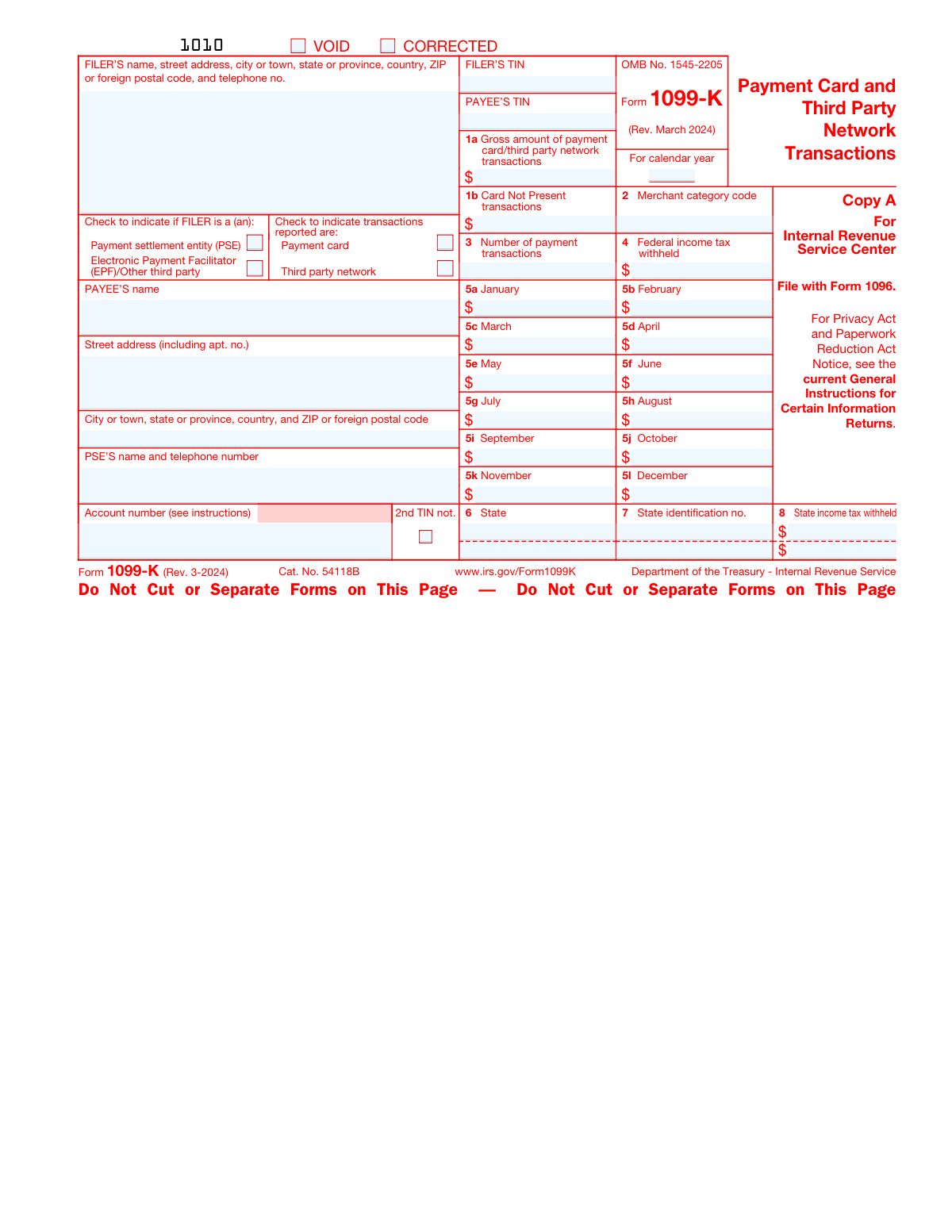
Yes! You can use AI to fill out Form 1099-K, Payment Card and Third Party Network Transactions
Don't type 151 fields by hand. Tell our AI about yourself, or upload your W-2 or last year's return, and it fills every field in seconds. You check it, then download, print or sign.
The AI does the filling. You just check it.
No typing into boxes, nothing to install.
What this form asks for
The AI fills all of it, from your answers or your documents.
The AI checks your answers before you download
22 checks built for this form, so a wrong date or a missing answer is caught before anyone else sees it.
This validation check ensures that the calendar year entered on Form 1099-K corresponds accurately to the year in which the payment card and third-party network transactions occurred. It prevents the reporting of transactions in an incorrect tax year, which could lead to discrepancies with the IRS records. The AI verifies that the year is not only numerically correct but also falls within a reasonable range of the current processing year to avoid future-dated or significantly past-dated entries.
This validation check verifies that the 'VOID' box on Form 1099-K is marked only if the form is intended to be voided. It ensures that the form is not mistakenly submitted to the IRS as a valid document when it should be disregarded. The AI checks for the presence of a checkmark or an indication in the 'VOID' box and confirms that no other conflicting information is present on the form that would invalidate the void status.
This validation check confirms that the 'CORRECTED' box is marked on Form 1099-K when the form is submitted to correct information on a previously filed version. It ensures that the IRS is aware that the form is an amendment and not a duplicate entry. The AI assesses whether the 'CORRECTED' box is checked and also checks for accompanying documentation or notes that explain the nature of the correction.
This validation check ensures that all required FILER information fields on Form 1099-K are fully and accurately completed. It includes checking the completeness of the name, address, city, state, country, ZIP or foreign postal code, and telephone number. The AI cross-references these details with available databases or prior form submissions to confirm their validity and to prevent errors in the IRS's records.
This validation check determines whether the FILER's status on Form 1099-K is correctly identified as either a Payment Settlement Entity (PSE) or an Electronic Payment Facilitator (EPF)/Other third party. It is crucial for the correct processing of the form, as different rules and obligations may apply depending on the FILER's status. The AI examines the indicated status and may cross-check with the FILER's business records or IRS guidelines to ensure accurate classification.
This validation check ensures that the form accurately reflects the nature of the transactions being reported. It verifies that the appropriate box is marked to indicate whether the transactions are from a payment card or a third-party network. This distinction is crucial for tax reporting purposes and must be clearly specified. The check prevents any ambiguity regarding the transaction type, which could lead to incorrect tax assessments or processing delays.
And 16 more checks
- Ensures that the PAYEE's information is fully provided, including name, street address, city, state, country, and ZIP or foreign postal code.
- Confirms the PSE's name and telephone number are accurately entered.
- Verifies that the account number assigned by the PSE to the payee's account is correctly entered.
- Checks for the correct entry of the FILER's TIN and PAYEE's TIN.
- Validates the gross amount of payment card/third party network transactions entered in Box 1a.
- Ensures that the gross amount of Card Not Present transactions is entered in Box 1b.
- Verifies the Merchant category code entered in Box 2.
- Confirms the number of payment transactions is accurately reported in Box 3.
- Checks for any Federal income tax withheld reported in Box 4.
- Validates the gross amount of payment card/third party network transactions for each month entered in Boxes 5a-5l.
- Ensures the State where the transactions occurred is correctly entered in Box 6.
- Verifies the State identification number is accurately entered in Box 7.
- Confirms any State income tax withheld is correctly reported in Box 8.
- Checks that Copy A is filed with Form 1096 when submitting to the IRS and that official IRS forms are used for filing.
- Ensures e-filing is used for 10 or more information returns, as required.
- Confirms that the form is the correct revision for March 2024 and that the OMB No. 1545-2205 is current.
Let AI fill out your Form 1099-K
No typing. Every field filled in seconds, checked, ready to sign.
How to Fill Out Form 1099-K Online for Free in 2026
What the AI walks you through.
- Visit instafill.ai site and select Form 1099-K
- Enter FILER and PAYEE information
- Input transaction amounts and codes
- Provide state tax information if applicable
- Sign and date the form electronically
- Check for accuracy and submit the form
Common Mistakes in Completing Form 1099-K
The ones the AI is built to catch.
Filling out the wrong copy of the form for the intended purpose
Entering incorrect calendar year for reported transactions
Failing to check the VOID box when the form is void
Neglecting to check the CORRECTED box when correcting a previous form
Providing incomplete or incorrect FILER'S information
Not checking the correct FILER'S status box (PSE or EPF/Other)
Selecting the wrong transaction type (Payment card or Third party network)
Omitting or miswriting PAYEE'S information
Leaving out PSE'S name and telephone number
Forgetting to enter the account number assigned by the PSE
Entering incorrect or mismatched FILER'S TIN and PAYEE'S TIN
Misreporting amounts in Box 1a for gross payment transactions
Misreporting Card Not Present transactions in Box 1b
Entering the wrong Merchant category code in Box 2
Incorrectly reporting the Number of payment transactions in Box 3
Failing to report Federal income tax withheld in Box 4
Misreporting monthly transaction amounts in Boxes 5a-5l
Not specifying the State where transactions occurred in Box 6
Leaving out State identification no. in Box 7
Failing to report State income tax withheld in Box 8
Not filing Copy A with Form 1096 when submitting to the IRS
Printing and filing Copy A from the website instead of using official IRS forms
Not e-filing when required for 10 or more information returns
Contacting the wrong entity for questions about reported amounts
Not referring to IRS publications for business or gig economy work guidance
Ignoring the latest updates and developments from the IRS website
Frequently Asked Questions About Form 1099-K
Is it really free for 7 days?
Can I fill other forms too?
How do I cancel?
How does the AI fill out Form 1099-K?
What happens to my information?
How complex is Form 1099-K to fill out?
What is Form 1099-K used for?
Who needs to file Form 1099-K?
What should I do if I receive a Form 1099-K?
How do I know if I need to e-file my Form 1099-K?
Can I print and file Copy A of Form 1099-K from the IRS website?
Where can I find the official IRS information returns including a scannable Copy A for filing?
What are the penalties for filing a non-scannable Form 1099-K with the IRS?
What is the deadline for filing Form 1099-K?
What should I do if I have fewer than 10 information returns to file?
What is the purpose of the different copies of Form 1099-K (Copy A, Copy B, Copy 1, Copy 2)?
What information is reported in Box 1a on Form 1099-K?
What does Box 1b on Form 1099-K indicate?
What is the Merchant category code in Box 2 of Form 1099-K?
How is the number of payment transactions reported on Form 1099-K?
What does Box 4 on Form 1099-K represent?
What should I do if the amounts reported on Form 1099-K are incorrect?
How do I report income from Form 1099-K on my tax return?
What is the significance of the state information (Boxes 6-8) on Form 1099-K?
Where can I find more information about Form 1099-K and its instructions?
What is the Free File Program mentioned in the Form 1099-K instructions?
Get your Form 1099-K filled out by AI
$0 today. Cancel before Nov 2 and you pay nothing.
Other forms like this one
CAR forms: Form SSA-44, Medicare Income-Related Monthly Adjustment Amount - Life-Changing Event, Form I-90, Application to Replace Permanent Resident Card, Form 2441, Child and Dependent Care Expenses, Form WH-380-E, Certification of Health Care Provider, Form 4137, Social Security and Medicare Tax on Unreported Tip Income, Form 8959, Additional Medicare Tax, Form 8919, Uncollected Social Security and Medicare Tax, Form CMS-1763, Request for Termination of Medicare Coverage, Form CMS-855O, Medicare Enrollment Application, Form CMS-460, Medicare Participation Agreement, Form CMS-4040, Request for Enrollment in Medicare Part B, Form WH-380-F, Certification of Health Care Provider, Form W-10, Dependent Care Provider’s Identification, Form CMS-40B, Application for Enrollment in Medicare Part B, Form SS-5-FS, Application for a Social Security Card, Form REG 195, Disabled Person Placard, Form AR-11, Alien's Change of Address Card, Form I-905, Application for Authorization to Issue Certification for Health Care Workers, Form I-131A, Application for Carrier Documentation, Form DBQ, Scars/Disfigurement Disability Benefits
1099 forms: Form 1099-NEC, Nonemployee Compensation, Form 4852, Substitute for Form W-2 or 1099-R, Form 1099-MISC, Miscellaneous Information, Form 1099-INT, Interest Income, Form 1099-DIV, Dividends and Distributions, Form 1099-R, Distributions From Pensions etc., Form 1099-S, Proceeds From Real Estate Transactions, Form 1099-G, Certain Government Payments, Form 1099-C, Cancellation of Debt, Form 1099-OID, Original Issue Discount, Form 1099-PATR, Taxable Distributions from Cooperatives, Form 1099-Q, Payments From Qualified Education Programs, Form 1099-SA, Distributions from HSA/MSA, Form 1099-B, Proceeds From Broker Transactions, Form 1099-NEC, Nonemployee Compensation, Form 1099-NEC, Nonemployee Compensation, Form 1099-NEC, Nonemployee Compensation, Form 1099-NEC, Nonemployee Compensation, Instructions for Forms 1099-R and 5498, Form 1099-MISC, Miscellaneous Information
payment forms: Form 5405, Repayment of First-Time Homebuyer Credit, Form 1127, Application for Extension of Time for Payment of Tax Due to Undue Hardship, Form 1099-G, Certain Government Payments, Form 1099-Q, Payments From Qualified Education Programs, Form SSA-8, Application for Lump-Sum Death Payment, Form 1845-0163, Borrower Defense to Repayment Application, application-and-contract-for-electric-facilities-w, Carer Payment and Carer Allowance – Medical Report (SA431) for a child under 16 years, Income-Driven Repayment (IDR) Plan Request (PAYE, IBR, and ICR) — William D. Ford Federal Direct Loan (Direct Loan) Program and Federal Family Education Loan (FFEL) Programs (OMB No. 1845-0102), Fidelity NetBenefits Distribution - Recurring Payments, Electronic Dividend and Interest Payment Authorization Form, Vanguard Super Apply for a financial hardship payment, Special Tax Notice Regarding Plan Payments, Empower Loan Payment Change Request Form, Empower Retirement Payment Request Form, Empower 401(k) Loan Prepayment Request Form, Special Tax Notice Regarding Plan Payments, Transamerica Automatic Payment Authorization, Excess Withdrawal Request and Form W-4R, Withholding Certificate for Nonperiodic Payments and Eligible Rollover Distributions, Form F6776, Authorization of Interest-Only Payments (ERISA)
Let AI fill out your Form 1099-K
Your trial starts once a card is added. You pay nothing before Nov 2.
Our AI already knows this form, all 151 fields of it. Skip the typing: tell it about yourself, or upload what you have, and it fills the whole form in seconds.
- AI fills every field on all 6 pages, tables and checkboxes included
- No typing into boxes: answer a few questions, or upload your W-2 or last year's return, an old copy of this form, a photo of a document
- The AI checks the answers; you review and change anything before you download
- Download the finished PDF, print it, or sign it online
- Encrypted, and never used to train AI
Cancel before Nov 2 and you pay nothing.
A card is needed to start the trial. Cancel in two clicks from your account.
Terms · Privacy