
Yes! You can use AI to fill out Form AR-11, Alien's Change of Address Card
Don't type 31 fields by hand. Tell our AI about yourself, or upload a document you already have, and it fills every field in seconds. You check it, then download, print or sign.
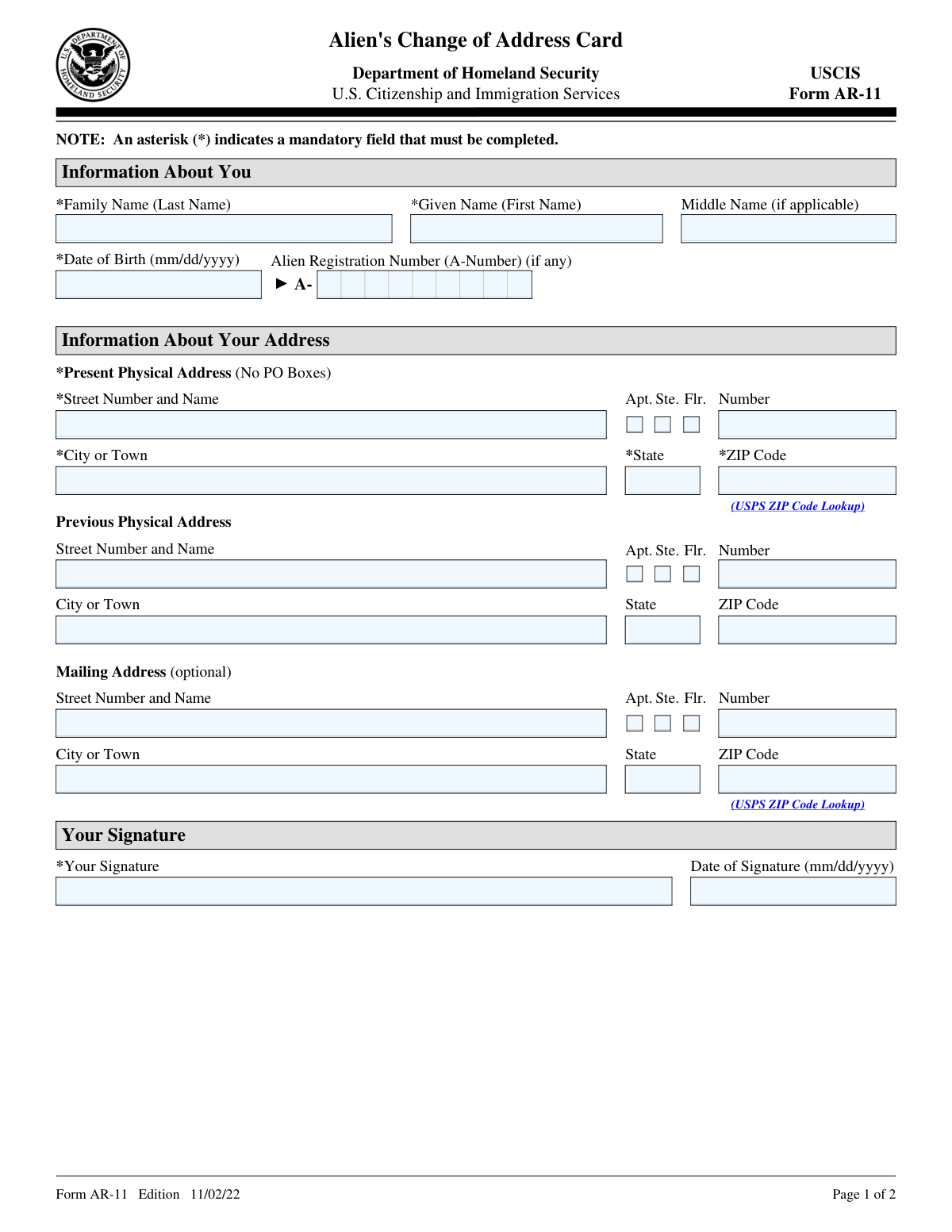
The AI does the filling. You just check it.
No typing into boxes, nothing to install.
What this form asks for
The AI fills all of it, from your answers or your documents.
The AI checks your answers before you download
15 checks built for this form, so a wrong date or a missing answer is caught before anyone else sees it.
This validation check ensures that the Family Name field is not left empty and contains a valid entry. It confirms that the input adheres to the expected format for a last name, which typically includes alphabetic characters. The check also verifies that no special characters or numbers are present, as these are not acceptable in this field. By enforcing this validation, the software helps maintain the integrity of the data submitted.
This validation check confirms that the Given Name field is completed with a valid first name. It verifies that the entry consists of alphabetic characters and does not include any special characters or numbers. The check also ensures that the field is not left blank, which is crucial for proper identification. By implementing this validation, the software enhances the accuracy of the information provided in the form.
This validation check verifies that if the Middle Name field is provided, it is filled out correctly with a valid entry. It ensures that the input consists solely of alphabetic characters and does not contain any invalid symbols or numbers. The check also confirms that the field is not left empty if it is required for the individual’s identification. This validation helps to ensure that all relevant personal information is accurately captured.
This validation check ensures that the Alien Registration Number, commonly referred to as the A-Number, is entered in the correct format when provided. It verifies that the number follows the standard format, which typically includes an 'A' followed by a series of digits. The check also confirms that the field is not left blank if an A-Number is required. By enforcing this validation, the software helps to ensure that the identification number is valid and usable.
This validation check confirms that the Date of Birth is entered in the correct mm/dd/yyyy format. It ensures that the input consists of two digits for the month, two digits for the day, and four digits for the year, separated by slashes. The check also verifies that the date is a valid calendar date, preventing entries such as February 30th. By implementing this validation, the software helps to maintain the accuracy and consistency of the date information provided.
This validation check ensures that the Present Physical Address field is filled out with a complete street address, which is crucial for accurate identification and communication. It confirms that no P.O. Box addresses are included, as these do not provide a physical location. By enforcing this requirement, the software helps to prevent any potential issues with mail delivery or processing. This check is vital for maintaining the integrity of the address information provided.
And 9 more checks
- Confirms that the City or Town field is filled with a valid entry.
- Verifies that the State is selected from the provided options.
- Checks that the ZIP Code is entered correctly and matches the specified address.
- Validates that the Previous Physical Address is filled out using the same format as the Present Physical Address if applicable.
- Ensures that all mandatory fields marked with an asterisk (*) are completed to avoid processing delays.
- Ensures that the Mailing Address is filled out correctly if provided, even though it is optional.
- Confirms that the Signature field is signed appropriately.
- Validates that the Date of Signature is entered in the mm/dd/yyyy format.
- Confirms that the form is mailed to the correct address as specified in the submission instructions.
Let AI fill out your Form AR-11
No typing. Every field filled in seconds, checked, ready to sign.
Common Mistakes in Completing Form AR-11
The ones the AI is built to catch.
Missing last name in personal information
Incorrect date format for date of birth
Omitting the Alien Registration Number (A-Number)
Using P.O. Box instead of physical address
Leaving out city or town in address
Not providing ZIP code for current address
Failing to fill in previous physical address if applicable
Not signing the form before submission
Incorrect date format for date of signature
Neglecting to notify Immigration Court if in proceedings
Leaving optional mailing address blank when needed
Not checking for mandatory fields marked with an asterisk
Frequently Asked Questions About Form AR-11
Is it really free for 7 days?
Can I fill other forms too?
How do I cancel?
How does the AI fill out Form AR-11?
What happens to my information?
How complex is Form AR-11 to fill out?
What is Form AR-11?
Who is required to file Form AR-11?
What information do I need to provide on Form AR-11?
What happens if I fail to report a change of address using Form AR-11?
How do I submit Form AR-11?
Is there a deadline for submitting Form AR-11 after a change of address?
What are the consequences of not updating my address with USCIS?
Can I use a P.O. Box as my address on Form AR-11?
What should I do if I am in immigration proceedings and change my address?
What is the purpose of collecting information on Form AR-11?
Can I provide a mailing address that is different from my physical address on Form AR-11?
What is the significance of the asterisk (*) next to certain fields on Form AR-11?
Where should I send my completed Form AR-11?
What should I do if I make a mistake on my Form AR-11?
Is there a fee associated with filing Form AR-11?
How does USCIS use the information provided on Form AR-11?
Can I update my address online instead of using Form AR-11?
What should I do if I do not have an Alien Registration Number (A-Number)?
What privacy protections are in place for the information I provide on Form AR-11?
Where can I find more information about the address change process?
Get your Form AR-11 filled out by AI
$0 today. Cancel before Oct 31 and you pay nothing.
Other forms like this one
CAR forms: Form SSA-44, Medicare Income-Related Monthly Adjustment Amount - Life-Changing Event, Form I-90, Application to Replace Permanent Resident Card, Form 2441, Child and Dependent Care Expenses, Form WH-380-E, Certification of Health Care Provider, Form 4137, Social Security and Medicare Tax on Unreported Tip Income, Form 8959, Additional Medicare Tax, Form 8919, Uncollected Social Security and Medicare Tax, Form CMS-1763, Request for Termination of Medicare Coverage, Form CMS-855O, Medicare Enrollment Application, Form CMS-460, Medicare Participation Agreement, Form CMS-4040, Request for Enrollment in Medicare Part B, Form WH-380-F, Certification of Health Care Provider, Form W-10, Dependent Care Provider’s Identification, Form 1099-K, Payment Card and Third Party Network Transactions, Form CMS-40B, Application for Enrollment in Medicare Part B, Form SS-5-FS, Application for a Social Security Card, Form REG 195, Disabled Person Placard, Form I-905, Application for Authorization to Issue Certification for Health Care Workers, Form I-131A, Application for Carrier Documentation, Form DBQ, Scars/Disfigurement Disability Benefits
Let AI fill out your Form AR-11
Your trial starts once a card is added. You pay nothing before Oct 31.
Our AI already knows this form, all 31 fields of it. Skip the typing: tell it about yourself, or upload what you have, and it fills the whole form in seconds.
- AI fills every field on the form, checkboxes included
- No typing into boxes: answer a few questions, or upload a document you already have, an old copy of this form, a photo of a document
- The AI checks the answers; you review and change anything before you download
- Download the finished PDF, print it, or sign it online
- Encrypted, and never used to train AI
Cancel before Oct 31 and you pay nothing.
A card is needed to start the trial. Cancel in two clicks from your account.
Terms · Privacy