Yes! You can use AI to fill out ACORD 81, Personal Inland Marine Application (2012/02)

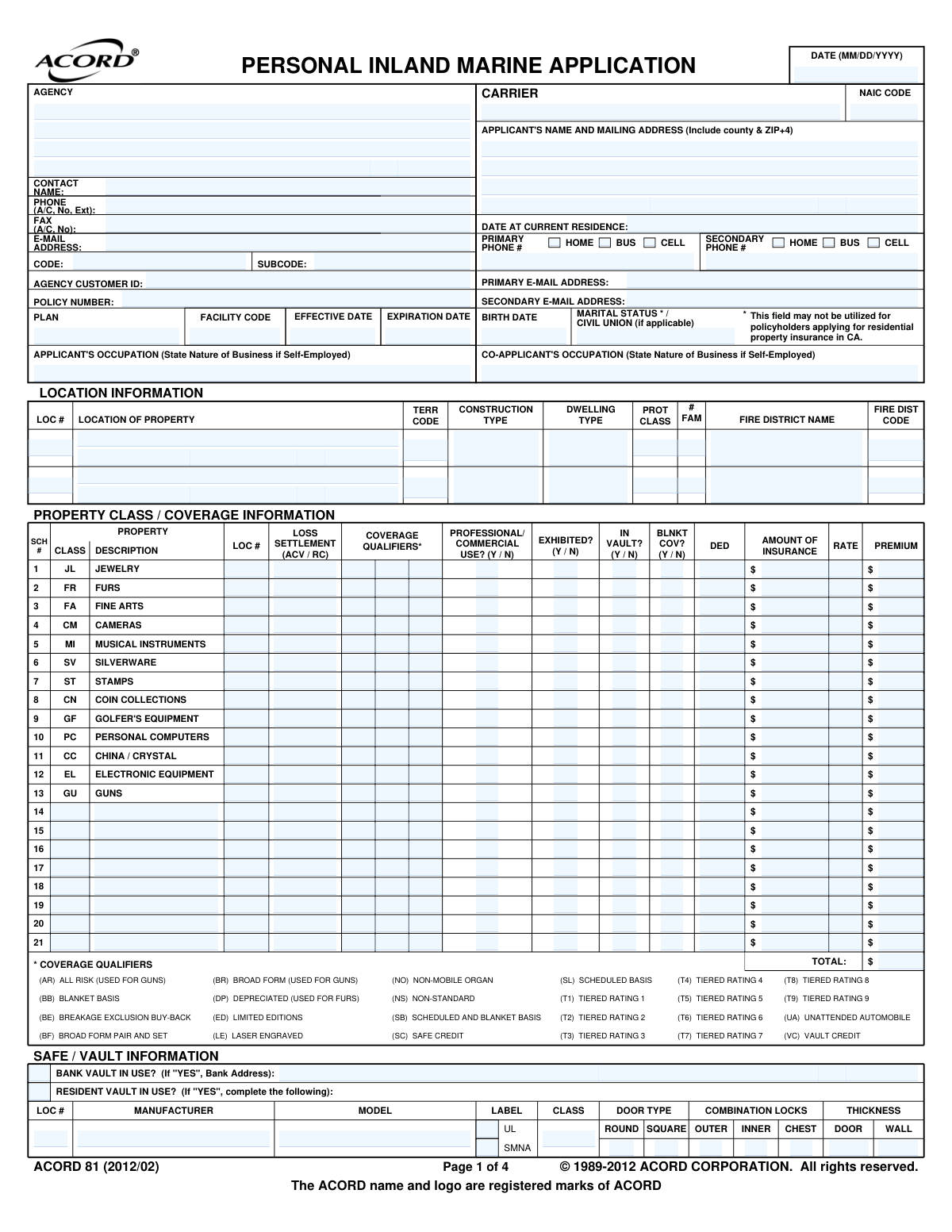
ACORD Form 81 is a standardized insurance application used to gather detailed information about valuable personal property that requires separate coverage, known as a personal inland marine policy or personal articles floater. This includes items such as jewelry, furs, fine arts, and musical instruments, which may have limited coverage under a standard homeowners policy. Today, this form can be filled out quickly and accurately using AI-powered services like Instafill.ai, which can also convert non-fillable PDF versions into interactive fillable forms.
ACORD 81 is part of the ACORD forms and insurance application forms categories on Instafill.
Our AI automatically handles information lookup, data retrieval, formatting, and form filling.
It takes less than a minute to fill out ACORD 81 using our AI form filling.
Securely upload your data. Information is encrypted in transit and deleted immediately after the form is filled out.

Form specifications

Form name: ACORD 81, Personal Inland Marine Application (2012/02)
Number of fields: 679
Number of pages: 1
Language: English
main-image

Instafill Demo: How to fill out PDF forms in seconds with AI

How to Fill Out ACORD 81 Online for Free in 2026

Are you looking to fill out a ACORD 81 form online quickly and accurately? Instafill.ai offers the #1 AI-powered PDF filling software of 2026, allowing you to complete your ACORD 81 form in just 37 seconds or less.
Follow these steps to fill out your ACORD 81 form online using Instafill.ai:
  1. 1 Navigate to Instafill.ai and upload or select the ACORD 81 Personal Inland Marine Application.
  2. 2 Use the AI assistant to automatically populate applicant and co-applicant information, including names, addresses, contact details, and occupation.
  3. 3 Provide details about the property location, dwelling type, and any safe or vault information if applicable.
  4. 4 Enter the specific details for each class of property to be insured, such as description, value, and any required coverage qualifiers, using the schedule section.
  5. 5 Answer the series of general information and loss history questions, explaining any 'yes' responses as required.
  6. 6 Review all the information pre-filled by the AI for accuracy, including policy details, premium information, and additional interests.
  7. 7 Electronically sign and date the application in the signature section to finalize and bind coverage if applicable.

Our AI-powered system ensures each field is filled out correctly, reducing errors and saving you time.

Why Choose Instafill.ai for Your Fillable ACORD 81 Form?

Speed

Complete your ACORD 81 in as little as 37 seconds.

Up-to-Date

Always use the latest 2026 ACORD 81 form version.

Cost-effective

No need to hire expensive lawyers.

Accuracy

Our AI performs 10 compliance checks to ensure your form is error-free.

Security

Your personal information is protected with bank-level encryption.

Frequently Asked Questions About Form ACORD 81

This application is used to obtain insurance coverage for valuable, movable personal property, such as jewelry, fine art, and cameras. It allows you to insure specific items for their appraised value, often providing broader coverage than a standard homeowner's policy.

Anyone who wants to insure valuable personal articles against risks like theft, loss, or damage should complete this form. It's for individuals whose items' value exceeds the coverage limits of their standard home insurance.

Scheduled coverage lists and insures each item individually for an agreed-upon value, typically requiring an appraisal. Blanket coverage provides a single, total amount of insurance for a category of items (e.g., $10,000 for all silverware) without listing each piece separately.

You will likely need to attach recent appraisals to verify the value of your items, especially for scheduled property. It is also recommended to include photographs and bills of sale to fully document your possessions.

For each item you want to insure, you must provide a detailed description, the date it was valued (by purchase or appraisal), whether a formal appraisal exists, and the specific amount of insurance you are requesting for that item.

Informing the insurance company about secure storage like a safe or bank vault shows you take extra steps to protect your valuables. This can often qualify you for premium credits or discounts, such as the 'Safe Credit (SC)' or 'Vault Credit (VC)' mentioned on the form.

You must indicate any professional or commercial use in the designated field. Standard personal policies may not cover business use, so this disclosure is critical to ensure you have the correct coverage, which may require a special endorsement.

You are required to disclose any losses from the past few years in the 'Loss History' section, regardless of whether an insurance claim was filed. Provide the date, a description of the event, and the value of the loss.

Not automatically. Coverage is only effective if an authorized agent completes the 'Insurance Binder' section on the form, which specifies the exact date and time coverage begins. Otherwise, coverage starts only after the company formally approves your application and issues a policy.

Yes, services like Instafill.ai use AI to accurately auto-fill form fields, which can save you significant time and help prevent errors. This is especially useful for entering repetitive information like your name and address.

You can use a service like Instafill.ai to upload the form, and its AI will make the fields interactive for you to fill out online. Once completed, you can easily download, print, or share the finished document.

Tools like Instafill.ai are designed to solve this problem by converting flat, non-fillable PDFs into interactive, fillable forms. Simply upload your PDF to the platform, and it will become an easy-to-complete digital document.

Coverage Qualifiers are codes used by the insurance company to specify the type of coverage or rating for an item. For example, 'AR' stands for All Risk coverage on guns, while 'SC' indicates a Safe Credit is being applied.

Compliance ACORD 81
Validation Checks by Instafill.ai

1
Policy Term Date Logic
This validation ensures that the 'Expiration Date' of the policy is chronologically after the 'Effective Date'. This is crucial for defining a valid and logical policy term. If the expiration date is not after the effective date, the system will display an error and require the user to correct the dates before submission.
2
Applicant Age Verification
This check calculates the applicant's age based on the provided 'BIRTH DATE' to ensure they are of legal age to enter into a contract, typically 18 years or older. This is a legal requirement for the policy to be valid. A submission for an underage applicant will be rejected, prompting for a correction or confirmation.
3
Conditional Safe/Vault Detail Requirement
This validation checks if the 'SAFE / VAULT INFORMATION' section is completed when the applicant answers 'YES' to 'RESIDENT VAULT IN USE?' or 'BANK VAULT IN USE?'. This information is critical for underwriting and determining eligibility for safe or vault credits on the premium. Failure to provide these details when required will result in a completeness error, preventing submission until the information is filled in.
4
Scheduled Property Total Consistency
This check verifies that the 'TOTAL' amount of insurance listed in the summary on Page 2 matches the sum of the 'AMOUNT OF INSURANCE' for all individual items listed in the detailed 'SCHEDULE OF PROPERTY' on Page 3. This ensures financial data consistency across the application, which is vital for accurate premium calculation and coverage limits. A mismatch will trigger an error requiring the user to reconcile the amounts.
5
Conditional Loss History Details
This validation ensures that if the applicant answers 'Y' (Yes) to the question about prior losses, the corresponding loss details table is filled out with at least one entry. This information is a primary factor in risk assessment and underwriting. If the condition is met but no details are provided, the form submission will be blocked with a message requiring the user to describe the prior losses.
6
Explanation for 'Yes' Responses in General Information
This check confirms that for any question in the 'GENERAL INFORMATION' section where 'Y' (Yes) is selected and an explanation is required (e.g., #6, #7, #8), the corresponding explanation field is not empty. These explanations are necessary for the underwriter to understand potential risks associated with the applicant. A missing explanation will halt the submission and prompt the user to provide the required details.
7
Valuation Date Logic
This validation ensures that the 'VALUATION DATE' entered in the 'SCHEDULE OF PROPERTY' is a valid date that is not in the future. This is important to confirm that the property's value is based on a historical or current appraisal, not a speculative future value. An invalid or future date will be flagged as an error, requiring the user to input a valid past or present date.
8
Formal Appraisal Attachment Check
This validation cross-references the 'SCHEDULE OF PROPERTY' with the 'ATTACHMENTS' section. If 'FORMAL APPRAISAL?' is marked 'Y' (Yes) for any item, the system flags that an appraisal document should be attached to the submission. This is critical for verifying the value of high-value items like jewelry and fine arts, and failure to provide the document could delay or prevent binding coverage.
9
Binder Date Consistency
If the 'INSURANCE BINDER' section is completed, this check validates that the binder's 'Effective Date' is on or after the application signature date and before the binder's 'Expiration Date'. This ensures the temporary coverage period is logical and legally sound. An illogical date sequence will prevent the binder from being issued and require correction.
10
Applicant Signature and Date Requirement
This validation confirms that the 'APPLICANT'S SIGNATURE' and the signature 'DATE' fields are both completed. The signature legally binds the applicant to the statements made in the application, and the date establishes when this occurred. An application missing a signature or a valid, non-future date is incomplete and will be rejected.
11
State-Specific Producer Number (Florida)
This check enforces a state-specific regulation by ensuring the 'NATIONAL PRODUCER NUMBER' field is populated if the producer is operating in Florida. This is a compliance requirement for agents in that state. If the application is for Florida and this number is missing, an error will be displayed, preventing submission until the number is provided.
12
Loss Settlement Selection Requirement
This validation ensures that for every item listed in the 'PROPERTY CLASS / COVERAGE INFORMATION' schedule, the 'LOSS SETTLEMENT' field is explicitly selected as either 'ACV' (Actual Cash Value) or 'RC' (Replacement Cost). This choice is fundamental to defining the coverage and calculating the premium. The form will be considered incomplete if this selection is missing for any item.
13
Email Address Format Validation
This check verifies that the values entered into the 'PRIMARY E-MAIL ADDRESS' and 'SECONDARY E-MAIL ADDRESS' fields adhere to a standard email format (e.g., [email protected]). Correctly formatted email addresses are essential for all digital communications, including policy documents and billing notices. An invalid format will trigger an error message prompting the user to correct the entry.
14
Address Completeness and ZIP+4 Format
This validation ensures the 'APPLICANT'S NAME AND MAILING ADDRESS' field contains a complete street address, city, county, and a valid ZIP code, ideally in the ZIP+4 format. A complete and accurate address is critical for rating, determining territory codes, and ensuring policy documents are mailed correctly. The system will flag an incomplete address and may suggest corrections based on postal service data.

Common Mistakes in Completing ACORD 81

Providing Vague Property Descriptions

Applicants often list items with generic descriptions like "ring" or "camera" in the Schedule of Property section. This is insufficient for underwriting and claims, as the insurer needs specific details like brand, model, serial number, and identifying characteristics (e.g., "1.5 Carat Round Brilliant Diamond Solitaire Engagement Ring, Platinum Band, GIA #12345"). In the event of a loss, a vague description can lead to disputes over the item's value and replacement, causing significant delays and potential underpayment. To avoid this, provide as much detail as possible, referencing appraisals and receipts.

Misunderstanding Loss Settlement (ACV vs. RC)

The form requires selecting a Loss Settlement option: ACV (Actual Cash Value) or RC (Replacement Cost). Many applicants don't understand that ACV pays the depreciated value, while RC pays the cost to replace the item with a new, similar one. Mistakenly choosing ACV for valuable items can result in a payout that is far less than what is needed for a replacement. It is crucial to select RC for most high-value personal property to ensure you are made whole after a loss.

Failing to Provide Current, Formal Appraisals

High-value items like jewelry and fine art require a formal, written appraisal to be insured for a specific value. A common mistake is relying on an old appraisal, a store receipt, or not having one at all. Insurers typically require appraisals to be recent (often within 1-3 years) because market values fluctuate. Submitting an application without a current appraisal will delay processing and may result in the item being insured for a lower amount than its true worth.

Omitting Details in the Safe/Vault Information Section

The form requests highly specific details about any safe or vault, including manufacturer, UL label, and thickness, as these can provide significant premium credits. Applicants often leave this section blank or provide guesses because they don't have the information handy. This mistake causes the applicant to miss out on substantial discounts and may delay the underwriting process. Before filling out the form, applicants should gather all documentation and photograph the safe's labels.

Neglecting to Explain 'Yes' Responses

The General Information section contains critical yes/no questions about loss history, prior insurance cancellations, and bankruptcies, with a prompt to "EXPLAIN ALL 'YES' RESPONSES". A frequent error is checking "Yes" without providing the required detailed explanation. This omission is a red flag for underwriters and will always result in a follow-up request, delaying the application approval. To prevent delays, always provide a clear, concise explanation for any "Yes" answer.

Misinterpreting the 'Professional/Commercial Use' Question

This policy is for personal items, so any business-related use is a material fact that affects coverage. Applicants may mistakenly overlook or misinterpret questions about professional or commercial use, such as a photographer using their camera for paid gigs. Failing to disclose this can lead to a claim being denied, as the risk profile is entirely different. If an item is used even partially for business, it must be disclosed to ensure proper coverage is obtained.

Incorrectly Formatting the ZIP+4 Code

The form specifically requests the applicant's address including the "ZIP+4" code, which is used for precise, location-based rating. Many people only know their 5-digit ZIP code and either leave the "+4" part blank or guess. This can lead to rating errors or returned mail. AI-powered form filling tools like Instafill.ai can help prevent this by automatically looking up and entering the correct, validated ZIP+4, ensuring data accuracy.

Submitting Incomplete Loss History

When asked about loss history, applicants sometimes only list claims they filed with a previous insurer. However, the form asks for "ANY losses, whether or not paid by insurance," which includes items that were lost or stolen but not claimed. Omitting this information is considered a material misrepresentation and can jeopardize the validity of the policy. It's essential to be thorough and disclose all relevant incidents within the specified timeframe to ensure the policy is issued on correct information.

Ignoring or Misusing Coverage Qualifier Codes

The property information grid includes a column for "COVERAGE QUALIFIERS*" with a list of two-letter codes (e.g., BF, AR, DP). These are technical codes that an agent uses to specify the exact type of coverage. Applicants filling this out themselves may ignore this column or guess, leading to incorrect or inadequate coverage. This section should be completed with the direct guidance of an insurance agent to ensure the policy is structured correctly for the items being insured.

Forgetting to Sign and Date the Application

It's a simple but surprisingly common mistake: the applicant completes the entire multi-page form but forgets to sign and date it on the final page. An unsigned application is not legally binding and cannot be processed by the insurance carrier, halting the entire process. This can leave the applicant without coverage during the delay. Since many complex forms like this are only available as non-fillable PDFs, tools like Instafill.ai can convert them into fillable versions, making it easier to add a digital signature and avoid this oversight.
Saved over 80 hours a year

“I was never sure if my IRS forms like W-9 were filled correctly. Now, I can complete the forms accurately without any external help.”

Kevin Martin Green

Your data stays secure with advanced protection from Instafill and our subprocessors

Robust compliance program

Transparent business model

You’re not the product. You always know where your data is and what it is processed for.

ISO 27001, HIPAA, and GDPR

Our subprocesses adhere to multiple compliance standards, including but not limited to ISO 27001, HIPAA, and GDPR.

Security & privacy by design

We consider security and privacy from the initial design phase of any new service or functionality. It’s not an afterthought, it’s built-in, including support for two-factor authentication (2FA) to further protect your account.

Fill out ACORD 81 with Instafill.ai

Worried about filling PDFs wrong? Instafill securely fills acord-81-personal-inland-marine-application-201202 forms, ensuring each field is accurate.