Yes! You can use AI to fill out Ameritas Dental Network Application (Form AM 202)

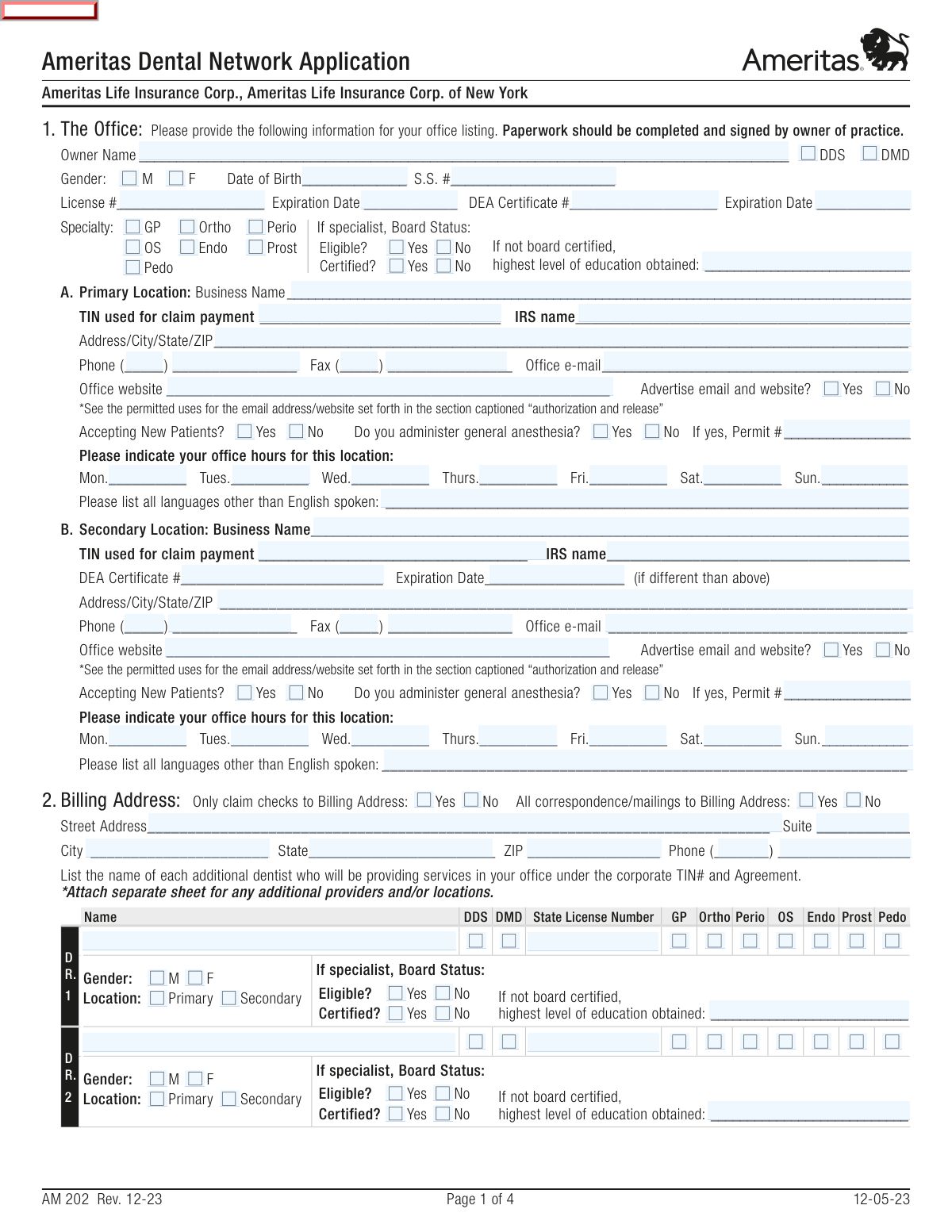
Form AM 202, the Ameritas Dental Network Application, is a comprehensive document required for dental practices wishing to join the Ameritas provider network. It gathers essential information about the practice owner, office locations, staff credentials, professional history, and adherence to quality assurance standards. Completing this application is a critical step for dentists to become in-network providers for patients with Ameritas dental insurance. Today, this form can be filled out quickly and accurately using AI-powered services like Instafill.ai, which can also convert non-fillable PDF versions into interactive fillable forms.
Our AI automatically handles information lookup, data retrieval, formatting, and form filling.
It takes less than a minute to fill out AM 202 using our AI form filling.
Securely upload your data. Information is encrypted in transit and deleted immediately after the form is filled out.

Form specifications

Form name: Ameritas Dental Network Application (Form AM 202)
Number of pages: 4
Language: English
Categories: dental network forms
main-image

Instafill Demo: How to fill out PDF forms in seconds with AI

How to Fill Out AM 202 Online for Free in 2026

Are you looking to fill out a AM 202 form online quickly and accurately? Instafill.ai offers the #1 AI-powered PDF filling software of 2026, allowing you to complete your AM 202 form in just 37 seconds or less.
Follow these steps to fill out your AM 202 form online using Instafill.ai:
  1. 1 Navigate to a service like Instafill.ai and upload the Ameritas Dental Network Application or select it from their template library.
  2. 2 Provide the practice owner's personal and professional details, including name, date of birth, license number, and specialty.
  3. 3 Enter detailed information for the primary and any secondary office locations, such as business name, TIN, address, contact information, and office hours.
  4. 4 Complete the sections on the owner's education, five-year work history, and license history across all jurisdictions.
  5. 5 Answer the detailed licensing information and office evaluation questionnaires, attesting to compliance with network standards for safety and quality.
  6. 6 If applicable, list all additional dentists who will be providing services under the practice's TIN and agreement.
  7. 7 Review all the information populated by the AI for accuracy, then electronically sign and date the Authorization and Release to complete the application process.

Our AI-powered system ensures each field is filled out correctly, reducing errors and saving you time.

Why Choose Instafill.ai for Your Fillable AM 202 Form?

Speed

Complete your AM 202 in as little as 37 seconds.

Up-to-Date

Always use the latest 2026 AM 202 form version.

Cost-effective

No need to hire expensive lawyers.

Accuracy

Our AI performs 10 compliance checks to ensure your form is error-free.

Security

Your personal information is protected with bank-level encryption.

Frequently Asked Questions About Form AM 202

This form is used by dental practice owners to apply for participation in the Ameritas Dental Network. Completing it is the first step to becoming an in-network provider for Ameritas insurance plans.

The owner of the dental practice is required to complete and sign the application. Information for other dentists providing services at the location can be added, but the owner is the responsible applicant.

The form includes sections for a primary and a secondary location. For any additional locations, you must attach a separate sheet with all the required information and complete a copy of the 'Office Evaluation' section for each additional office.

The form has space for two additional dentists. If more dentists will be providing services under your corporate TIN, you must list them on a separate sheet and attach it to your application.

You will need the practice owner's personal details (SSN, DOB), license and DEA numbers, the practice's Tax ID Number (TIN), education and five-year work history, and details of any malpractice or disciplinary history.

If you answer 'YES' to any question in Section 6 regarding your license, memberships, or legal history, you must provide a full, detailed explanation. You can use the space on the form or attach a separate sheet if more room is needed.

This section is a self-assessment to confirm your office meets Ameritas' quality assurance, safety, and accessibility standards. You must complete an evaluation for each practice location and attest that any deficiencies will be corrected within 90 days.

After checking your specialty (e.g., Ortho, Perio), you should check 'No' for 'Certified?'. You must then enter your highest level of education obtained in the corresponding field to provide details on your qualifications.

Ameritas will provide a written notification informing you whether your application for participation in the network has been accepted or denied. If denied, the notification will include the specific reasons.

Yes, services like Instafill.ai use AI to help you accurately auto-fill form fields with your saved information. This can save you significant time and help prevent errors while completing the application.

Simply upload the Ameritas Dental Network Application PDF to the Instafill.ai platform. The AI will make the form fillable, and you can use its features to quickly populate your practice information, review, and sign it digitally.

If you have a non-fillable or 'flat' PDF, you can use a service like Instafill.ai. It can convert the static document into an interactive, fillable form that you can easily complete on your computer.

The TIN is your Taxpayer Identification Number used for billing, while the 'IRS name' is the official legal name of the business or individual associated with that TIN on file with the IRS. It is crucial that these two fields match your tax documents.

The form requires you to explain any professional work history gaps of six months or more within the last five years. You must provide this explanation on a separate sheet and attach it to your application.

Compliance AM 202
Validation Checks by Instafill.ai

1
SSN Format and Completeness
This check verifies that the Social Security Number (SSN) field contains exactly nine digits and is not left blank. The SSN is critical for identity verification, background checks, and tax reporting purposes. If the SSN is missing, incomplete, or contains non-numeric characters, the application cannot be processed for credentialing.
2
License and DEA Expiration Date Validity
This validation ensures that both the 'License Expiration Date' and 'DEA Certificate Expiration Date' are valid future dates. Practicing with an expired license or DEA registration is illegal and a major compliance risk. If an expiration date is in the past, the application will be flagged for rejection until the provider submits proof of renewal.
3
Conditional Anesthesia Permit Requirement
This check confirms that if 'Do you administer general anesthesia?' is answered 'Yes' for either the primary or secondary location, the corresponding 'Permit #' field is filled. Administering anesthesia requires specific legal permits for patient safety and regulatory compliance. An application with a 'Yes' answer but no permit number will be considered incomplete and returned for correction.
4
Conditional Specialist Education Requirement
This validation is triggered if a provider selects a specialty (e.g., Ortho, OS, etc.) and also indicates they are not board certified ('Certified? No'). It ensures the 'highest level of education obtained' field is completed to provide alternative credentialing information. Without this detail, the provider's qualifications as a specialist cannot be properly evaluated, and the application will be held for more information.
5
Explanation for Adverse Licensing History
This check verifies that if any question in Section 6 ('Licensing Information') is answered 'YES', the corresponding details field is filled with a complete explanation. These questions relate to serious issues like malpractice suits, license revocations, or criminal convictions that require full disclosure for risk assessment. Failure to explain a 'YES' answer will result in the application being rejected or immediately flagged for a high-priority manual review.
6
TIN and IRS Name Completeness
This validation ensures that for each practice location, both the 'TIN used for claim payment' and the 'IRS name' fields are completed. This information is essential for processing claim payments accurately and for issuing correct year-end tax documents (1099s). If either field is missing, it can lead to payment delays and tax reporting errors, so the form will be considered incomplete.
7
Work History Gap Analysis
This check analyzes the 'Dates of Employment' in the Work History section to identify any chronological gaps of six months or more between positions. The form requires that such gaps be explained on a separate sheet. This validation is important for ensuring a continuous and transparent professional history, and a lack of explanation for a significant gap will trigger a request for additional information.
8
Work History Date Logic
This validation ensures that for each entry in the 'Work History' section, the 'To' date is not earlier than the 'From' date. This is a fundamental logic check to ensure the data provided is accurate and makes chronological sense. An illogical date range would indicate a data entry error and must be corrected before the application can be accepted.
9
Oral Surgeon Specific Safety Checks
This check is triggered if the provider's specialty is 'OS' (Oral Surgeon). It verifies that the questions 'staff has current CPR training' and 'emergency Drug Kit is current' in the Office Evaluation section are answered. These represent heightened safety protocols for a higher-risk specialty, and a 'No' answer or a blank response would require follow-up to ensure compliance with network standards.
10
Billing Address Conditional Completeness
This validation confirms that if either 'Only claim checks to Billing Address: Yes' or 'All correspondence/mailings to Billing Address: Yes' is selected, then the full billing address fields (Street, City, State, ZIP) are filled out. This logic prevents a situation where mail or payments are designated for a separate billing address that has not been specified. An incomplete billing address will cause the form to be rejected for correction.
11
Secondary Location Core Information Completeness
This check ensures that if any information is entered into the 'Secondary Location' section (e.g., Business Name), then the core address and phone number fields for that location must also be completed. This prevents the submission of a partially-defined practice location, which would be unusable for provider directories or patient contact. The system will require the full address details if the section is started.
12
Date of Birth Logical Age Check
This validation verifies that the 'Date of Birth' entered is a valid date and corresponds to an age that is reasonable for a practicing dentist (e.g., over 21 years old). This serves as a basic sanity check on the data and helps catch significant data entry errors. An illogical or impossible date would halt processing and require correction.

Common Mistakes in Completing AM 202

Mismatching TIN and IRS Legal Name

Applicants often enter their practice's common or 'Doing Business As' (DBA) name in the 'Business Name' field but provide a different legal entity name for the 'IRS name' associated with the TIN. This discrepancy causes immediate flags during verification, leading to claim payment rejections and significant delays in the credentialing process. To avoid this, ensure the 'IRS name' exactly matches the legal name registered with the IRS for the provided Taxpayer Identification Number (TIN).

Failing to Explain 'Yes' Answers in Licensing Section

Section 6 contains critical questions about license history, malpractice, and criminal records, where a 'Yes' answer requires a full, detailed explanation on a separate sheet. A common error is checking 'Yes' without attaching the mandatory explanation, or providing a vague, insufficient one. This is a major red flag that halts the application process until complete details are provided, potentially leading to denial. Always attach a comprehensive document explaining the circumstances for any 'Yes' answer.

Forgetting to Explain Gaps in Work History

The form requires a five-year work history and an explanation for any employment gaps of six months or more. Applicants frequently list their previous positions but neglect to account for periods of unemployment, travel, or other breaks, leaving unexplained gaps. This forces the credentialing team to request additional information, delaying the application. Proactively document and explain any significant gaps on a separate sheet as instructed.

Submitting Only One Office Evaluation for Multiple Locations

The form explicitly states that a photocopy of the 'Office Evaluation' section (Page 3) must be completed for each practice location. A frequent mistake is filling out the evaluation for the primary location but forgetting to submit separate, completed evaluations for secondary or other locations. This results in an incomplete application, and only the location with a submitted evaluation can be considered for network participation. Ensure a distinct and complete evaluation is submitted for every office address listed.

Incomplete Information for Additional Dentists

The table for listing additional dentists has multiple required fields, including license number, specialty, and board status. Office managers or owners often miss filling out all the columns for each associate dentist, leaving critical data points blank. An incomplete entry for an additional provider prevents them from being credentialed, meaning they cannot be considered in-network under the practice's agreement. Carefully complete every field for each dentist listed.

Incorrect Signatory on the Application

The instructions clearly state that the paperwork must be 'completed and signed by owner of practice.' A common and critical error is having an office manager, associate dentist, or another non-owner sign the final authorization page. This invalidates the entire application, as the legal attestation and release of information must come from the practice owner. The application will be rejected and must be resubmitted with the correct signature.

Ignoring Conditional Field Requirements

This form contains many conditional fields, such as providing an 'Anesthesia Permit #' only if you answer 'Yes' to administering it, or filling out 'highest level of education' only if a specialist is not board certified. Applicants often miss these dependencies, either leaving a required field blank or filling in a field that should have been skipped. This creates confusion and requires clarification, slowing down processing. AI-powered tools like Instafill.ai can help by automatically showing or hiding relevant fields based on your answers.

Inconsistent or Vague Office Hours

The fields for office hours are free-text, leading to inconsistent entries like '9-5', 'By appt only', or leaving them blank. This creates ambiguity for the provider directory and can frustrate potential patients looking for clear information. To avoid this, use a standardized format (e.g., '9:00 AM - 5:00 PM' or 'Closed') for every day of the week to ensure your listing is accurate and professional.

Missing License or DEA Expiration Dates

Applicants sometimes enter their license and DEA numbers correctly but forget to include the corresponding expiration dates. These dates are essential for primary source verification and are a mandatory part of the credentialing file. Omitting them results in an incomplete application that cannot be processed until the information is provided. Always double-check that both the number and expiration date are entered for all required credentials.

Forgetting to Attach Required Separate Sheets

The application repeatedly instructs the applicant to attach separate sheets for various purposes: listing additional providers, explaining work history gaps, and detailing 'Yes' answers in the licensing section. A very common mistake is mentioning these items in the form but failing to physically attach the corresponding documents. This guarantees the application will be put on hold. Before submitting, create a checklist of all required attachments to ensure the packet is complete. If the form is a non-fillable PDF, a tool like Instafill.ai can convert it to a fillable version and help manage the attachment process.
Saved over 80 hours a year

“I was never sure if my IRS forms like W-9 were filled correctly. Now, I can complete the forms accurately without any external help.”

Kevin Martin Green

Your data stays secure with advanced protection from Instafill and our subprocessors

Robust compliance program

Transparent business model

You’re not the product. You always know where your data is and what it is processed for.

ISO 27001, HIPAA, and GDPR

Our subprocesses adhere to multiple compliance standards, including but not limited to ISO 27001, HIPAA, and GDPR.

Security & privacy by design

We consider security and privacy from the initial design phase of any new service or functionality. It’s not an afterthought, it’s built-in, including support for two-factor authentication (2FA) to further protect your account.

Fill out AM 202 with Instafill.ai

Worried about filling PDFs wrong? Instafill securely fills ameritas-dental-network-application-form-am-202 forms, ensuring each field is accurate.