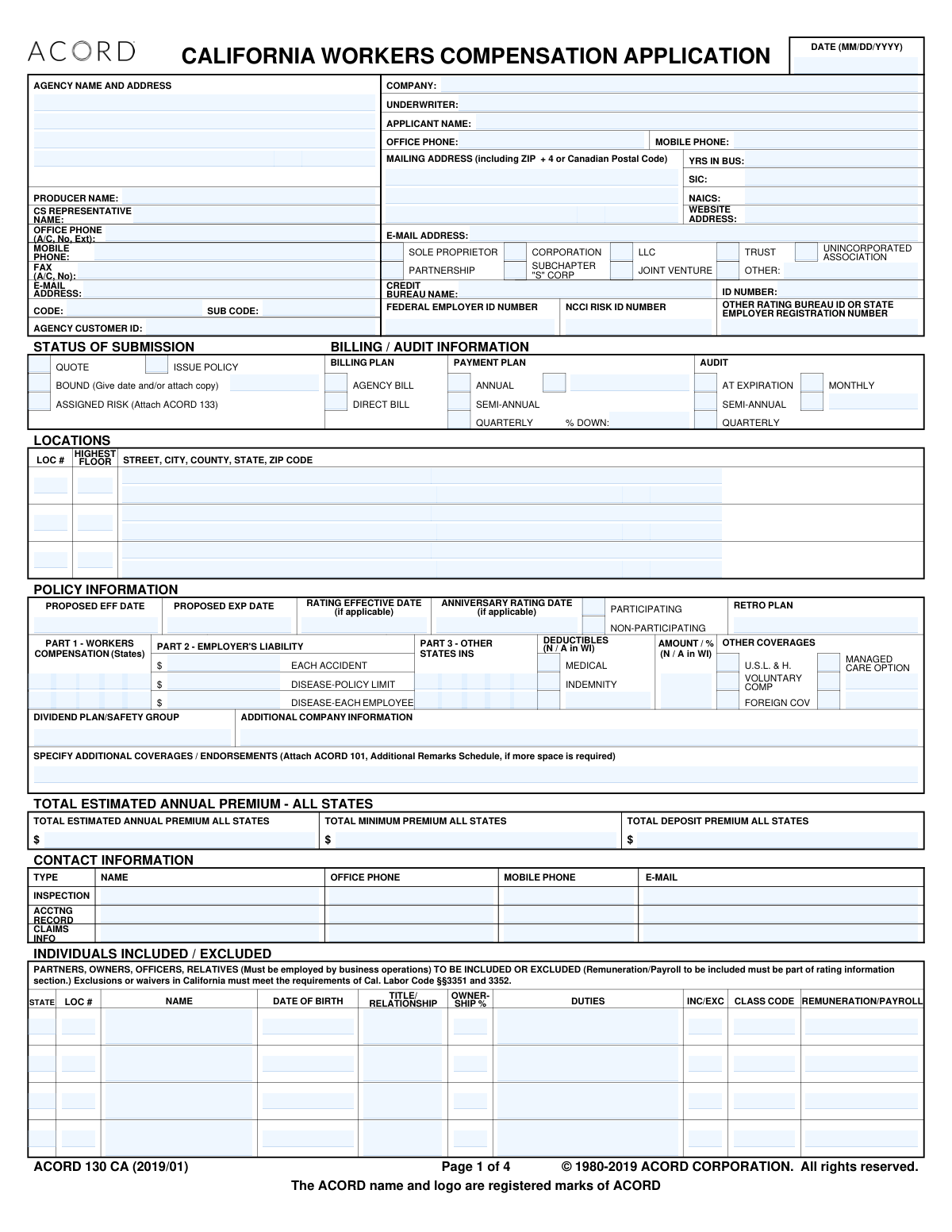
Yes! You can use AI to fill out ACORD 130 CA, California Workers Compensation Application

ACORD 130 CA is the official California Workers Compensation Application used by businesses to provide underwriters with the necessary information to issue a policy. It details the company's nature of business, payroll, employee classifications, prior carrier information, and specific operational risks. Completing this form accurately is crucial for obtaining appropriate coverage and correct premium calculations. Today, this form can be filled out quickly and accurately using AI-powered services like Instafill.ai, which can also convert non-fillable PDF versions into interactive fillable forms.
ACORD 130 CA is part of the ACORD forms, California insurance forms, insurance application forms and workers compensation forms categories on Instafill.
Our AI automatically handles information lookup, data retrieval, formatting, and form filling.
It takes less than a minute to fill out ACORD 130 CA using our AI form filling.
Securely upload your data. Information is encrypted in transit and deleted immediately after the form is filled out.

Form specifications

Form name: ACORD 130 CA, California Workers Compensation Application
Number of fields: 478
Number of pages: 1
Language: English
main-image

Instafill Demo: How to fill out PDF forms in seconds with AI

How to Fill Out ACORD 130 CA Online for Free in 2026

Are you looking to fill out a ACORD 130 CA form online quickly and accurately? Instafill.ai offers the #1 AI-powered PDF filling software of 2026, allowing you to complete your ACORD 130 CA form in just 37 seconds or less.
Follow these steps to fill out your ACORD 130 CA form online using Instafill.ai:
  1. 1 Navigate to Instafill.ai and upload or select the ACORD 130 CA form.
  2. 2 Provide applicant information, including business name, address, legal entity type, and Federal Employer ID Number.
  3. 3 Specify the desired policy effective dates, billing plan, and audit preferences.
  4. 4 List all partners, owners, and officers, indicating their duties, ownership percentage, and whether they should be included or excluded from coverage.
  5. 5 Complete the Rating Information worksheet by detailing employee classifications, estimated annual payroll for each class, and number of employees.
  6. 6 Answer the General Information questions regarding business operations, safety programs, use of subcontractors, and prior insurance history.
  7. 7 Review all entered data for accuracy, then have an authorized representative sign and date the application before submission.

Our AI-powered system ensures each field is filled out correctly, reducing errors and saving you time.

Why Choose Instafill.ai for Your Fillable ACORD 130 CA Form?

Speed

Complete your ACORD 130 CA in as little as 37 seconds.

Up-to-Date

Always use the latest 2026 ACORD 130 CA form version.

Cost-effective

No need to hire expensive lawyers.

Accuracy

Our AI performs 10 compliance checks to ensure your form is error-free.

Security

Your personal information is protected with bank-level encryption.

Frequently Asked Questions About Form ACORD 130 CA

This form, specifically the ACORD 130 CA, is used by businesses in California to apply for workers' compensation insurance. This insurance provides benefits to employees who suffer job-related injuries or illnesses.

Any business owner in California with one or more employees is typically required by law to carry workers' compensation insurance. This application is the first step to obtaining a policy quote and coverage.

You should have your business's legal name and address, Federal Employer ID Number (FEIN), a detailed description of your operations, and estimated annual payroll for each job type. You will also need your insurance and loss history for the past five years.

This section is for listing business owners, partners, and officers to specify whether they will be covered by the policy. In California, certain individuals can elect to be excluded, which will affect the final premium.

You must list each job classification in your business, the number of full-time and part-time employees in each role, and the total estimated annual payroll for that classification. This information is critical for the insurer to calculate your premium.

You must disclose your use of subcontractors and state whether you obtain certificates of insurance from them. If you hire subcontractors who do not have their own workers' compensation insurance, you may be required to cover them under your policy, and their payroll must be included.

The form provides space to list the physical address for each of your business locations. You must also associate employee classifications and payroll with the correct location on the 'Rating Information' page.

Insurers require up to five years of your company's past insurance coverage and claims history to evaluate risk. You need to provide policy numbers, carrier names, premiums, and details on any claims (losses) that occurred.

The application must be signed by an authorized representative of the business, such as an Officer, Owner, or Partner. The producer or agent also signs the form.

Yes, you can use AI-powered services like Instafill.ai to help fill out this form. These tools can auto-fill fields accurately using your saved information, which saves time and helps prevent errors.

To fill this form out online, you can upload it to a platform like Instafill.ai. The service will make the document interactive, allowing you to type directly into the fields, sign electronically, and then download or share the completed PDF.

If you have a non-fillable or 'flat' PDF, services like Instafill.ai can convert it into an interactive, fillable form. Simply upload the document, and the platform will automatically detect the fields for you to complete online.

Part 1, 'Workers Compensation,' covers the benefits payable to an injured worker as required by state law. Part 2, 'Employer's Liability,' protects your business against lawsuits filed by employees for work-related injuries or illnesses not covered by the workers' compensation statute.

Provide a detailed description of all your business activities, including the raw materials used, processes performed, and final products or services offered. This helps the underwriter accurately classify your business risk and determine the correct premium.

Compliance ACORD 130 CA
Validation Checks by Instafill.ai

1
Validate Federal Employer ID Number (FEIN) Format
This check ensures the Federal Employer ID Number (FEIN) is entered in the correct XX-XXXXXXX format. The FEIN is a unique identifier for the business entity, critical for tax and legal purposes. If the format is incorrect, the application cannot be processed correctly by regulatory bodies or the insurer's system, leading to rejection or delays.
2
Ensures Policy Effective Date Precedes Expiration Date
This validation confirms that the 'PROPOSED EFF DATE' is chronologically earlier than the 'PROPOSED EXP DATE'. This is a fundamental logical check to ensure the policy term is valid and makes sense. An invalid date range would make the policy contract void and prevent the system from calculating the correct coverage period.
3
Mandatory Applicant Name
Verifies that the 'APPLICANT NAME' field is not empty. The applicant's full legal name is the most basic and essential piece of information on the application, identifying the entity to be insured. Without this information, a policy cannot be quoted, bound, or issued.
4
Conditional Requirement for 'YES' Responses in General Information
This check ensures that for any question in the 'GENERAL INFORMATION' section answered with 'YES', the corresponding 'EXPLAIN ALL "YES" RESPONSES' area contains an explanation. These explanations are critical for the underwriter to accurately assess the applicant's risk profile. Failure to provide an explanation for a 'YES' answer will result in an incomplete submission and require follow-up, delaying the quoting process.
5
Validate Legal Entity Selection
This check confirms that at least one legal entity type (e.g., Corporation, Partnership, LLC) is selected for the applicant. If 'OTHER' is selected, it also validates that a description is provided in the adjacent text field. This information is crucial for determining legal status, ownership structure, and specific coverage requirements, and an omission will halt the underwriting process.
6
Validate Individual Ownership Percentage
This check ensures that the 'OWNERSHIP %' for each individual listed in the 'INDIVIDUALS INCLUDED / EXCLUDED' section is a valid number between 0 and 100. It may also sum the percentages to ensure the total does not exceed 100%. This is important for determining who has a controlling interest and for applying correct rating rules, especially for owner exclusions.
7
Consistency of Total Premium Calculations
This validation verifies that the sum of all 'TOTAL ESTIMATED ANNUAL PREMIUM' values from each state's 'RATING INFORMATION' worksheet equals the 'TOTAL ESTIMATED ANNUAL PREMIUM - ALL STATES' on the first page. This cross-check ensures financial data integrity and accuracy throughout the application. Discrepancies would indicate a calculation error and prevent the generation of an accurate quote or policy.
8
Applicant Signature Presence
This check verifies that the 'APPLICANT'S SIGNATURE' field is not empty. The applicant's signature is a legal requirement, confirming that the information provided is true and complete to the best of their knowledge. An application without a signature is not legally binding and cannot be processed.
9
Validate US Postal Code Format
This check ensures that all ZIP code fields, such as in the 'MAILING ADDRESS', adhere to a valid 5-digit (XXXXX) or 9-digit (XXXXX-XXXX) format. Correctly formatted postal codes are essential for mail delivery, location-based rating, and data verification. An invalid format can lead to communication errors and incorrect risk assessment.
10
Completeness of Prior Carrier History
This validation ensures that if a 'YEAR' is entered in the 'PRIOR CARRIER INFORMATION' section, the corresponding 'CARRIER & POLICY NUMBER', 'ANNUAL PREMIUM', and loss data fields are also filled out. Complete loss history is essential for experience rating and predictive modeling by the underwriter. Incomplete prior carrier data will require manual follow-up and delay the quoting process.
11
Remuneration for Included Individuals
This check verifies that if an individual in the 'INDIVIDUALS INCLUDED / EXCLUDED' table is marked as 'INC' (Included), their 'REMUNERATION/PAYROLL' field contains a non-zero, positive monetary value. The payroll for included owners, partners, or officers is a key component of the premium calculation. Missing remuneration data for an included individual will result in an inaccurate premium calculation.
12
Validate State Code Abbreviation
This check ensures that all fields requiring a state, such as in 'LOCATIONS' or 'PART 1 - WORKERS COMPENSATION', use a valid two-letter state abbreviation. Using standardized state codes is critical for correct rating, form assignment, and regulatory compliance. An invalid code would cause system errors and incorrect policy construction.
13
Phone Number Format Validation
This check ensures that all phone number fields, such as 'OFFICE PHONE', are entered in a valid and consistent format (e.g., (A/C, No, Ext) or (XXX) XXX-XXXX). Proper formatting is necessary for data standardization and to ensure the insurer or producer can successfully contact the applicant. An improperly formatted number could be unusable, hindering communication.
14
Submission Status Selection
This validation confirms that at least one option under 'STATUS OF SUBMISSION' (e.g., 'QUOTE', 'ISSUE POLICY') is checked. This information directs the workflow and tells the underwriter what action to take with the application. Without a clear status, the agent's intent is unknown, and the submission cannot be actioned.

Common Mistakes in Completing ACORD 130 CA

Incorrectly Estimating and Allocating Payroll

Applicants often miscalculate or improperly allocate their estimated annual payroll (remuneration) across different class codes. This can happen by using outdated figures, forgetting to include overtime or bonuses, or failing to separate the payroll for employees who perform duties under multiple classifications. Inaccurate payroll figures are a primary cause of significant premium adjustments during the final audit, potentially leading to large, unexpected bills. To avoid this, use current, detailed payroll records and work with your agent to accurately segment payroll by job function. AI-powered tools like Instafill.ai can help by cross-referencing employee counts and payroll data to flag potential inconsistencies before submission.

Using Incorrect Employee Classification Codes

Assigning the wrong class code to a group of employees is one of the most frequent and costly errors. Each code corresponds to a specific type of work and has a different rate. This mistake often occurs due to a misunderstanding of the NCCI or state-specific classification system or a vague description of operations. Using an incorrect code can lead to over or underpayment of premium, which will be corrected at audit, and could even jeopardize coverage for a claim if operations are found to be misclassified. Always provide a detailed description of all business operations so the underwriter can verify the correct codes are being used.

Providing a Vague 'Nature of Business' Description

The 'Nature of Business / Description of Operations' section is often filled with generic terms like 'construction' or 'consulting' instead of the required detail. Underwriters rely on this section to validate the class codes and understand the risks involved. A vague description forces the underwriter to issue a request for more information, delaying the quoting process significantly. To prevent this, be specific: describe raw materials, processes, equipment used, types of services performed, and customer interactions. For example, instead of 'landscaping', specify '70% residential lawn maintenance, 30% commercial tree trimming up to 15 feet'.

Errors in Owner/Officer Inclusion or Exclusion

The rules for including or excluding owners, partners, and officers from workers' compensation coverage are complex and vary by state and entity type. Applicants frequently misunderstand these rules, leading them to incorrectly include an owner who should be excluded (inflating premium) or exclude an owner who is legally required to be covered (creating a coverage gap). As noted on the form for California, specific labor codes must be met. Always verify your state's specific requirements for exclusion and ensure the form is filled out and signed correctly to elect or reject coverage.

Incomplete Prior Carrier and Loss History

Applicants may omit prior insurance carriers, provide incomplete policy numbers, or fail to attach the required 3-5 years of 'loss runs' (detailed claim history reports). This information is critical for an underwriter to assess risk and determine eligibility and pricing. Missing history is a major red flag that halts the underwriting process until the complete records are provided. Before starting the application, gather all policy information and request loss run reports from your previous carriers to ensure you can provide a complete and accurate history.

Failing to Explain 'Yes' Answers

The 'General Information' section contains numerous yes/no questions, many of which require a detailed explanation if 'Yes' is selected. A common mistake is to check 'Yes' without providing the mandatory follow-up details in the space provided. This creates an incomplete application and forces the underwriter to stop and request the missing information, delaying the quote. To avoid this, carefully read each question and be prepared to provide a full explanation for any 'Yes' answers, such as detailing the states where employees travel or describing the nature of any subcontracted work.

Mishandling Subcontractor Information

Businesses often incorrectly report their use of subcontractors, either by stating they don't use them when they do, or by failing to specify whether they collect Certificates of Insurance from them. If a subcontractor is uninsured, their payroll may be added to the applicant's payroll for premium calculation purposes, resulting in a significant cost increase. It is crucial to accurately report the percentage of work subcontracted and confirm whether valid Certificates of Insurance are consistently obtained, as this directly impacts the final premium.

Mismatching Legal Name and Business Entity Type

An applicant might enter a 'Doing Business As' (DBA) name in the 'Applicant Name' field instead of the full legal entity name, or they might select the wrong legal entity type (e.g., checking 'Sole Proprietor' for an LLC). The legal name and Federal Employer ID Number (FEIN) must match official records exactly for the policy to be valid. This error can cause issues with claims, audits, and legal compliance. Always use the exact legal name registered with the state and double-check that the correct entity type is selected. AI-powered form fillers like Instafill.ai can help prevent this by validating the FEIN and cross-referencing against business databases.

Omitting Physical Work Locations

Applicants sometimes list only their primary mailing address and forget to include all other physical locations where employees work. Workers' compensation rates can vary by territory, and coverage needs to be extended to all locations. Failing to list a location can result in uncovered claims and incorrect premium calculations. Ensure that every separate office, warehouse, or job site is listed in the 'Locations' section with a complete address.

Using an Unauthorized Signatory

The application explicitly states that the signature must be from an 'Officer, Owner or Partner'. Often, an office manager or administrative assistant signs the form, which can render the application invalid. The signature legally binds the company to the statements made in the application, so it must be from an individual with the proper authority. This mistake can lead to the insurer rejecting the application or, in a worst-case scenario, denying a claim based on misrepresentation. Always ensure the correct individual reviews and signs the final document.
Saved over 80 hours a year

“I was never sure if my IRS forms like W-9 were filled correctly. Now, I can complete the forms accurately without any external help.”

Kevin Martin Green

Your data stays secure with advanced protection from Instafill and our subprocessors

Robust compliance program

Transparent business model

You’re not the product. You always know where your data is and what it is processed for.

ISO 27001, HIPAA, and GDPR

Our subprocesses adhere to multiple compliance standards, including but not limited to ISO 27001, HIPAA, and GDPR.

Security & privacy by design

We consider security and privacy from the initial design phase of any new service or functionality. It’s not an afterthought, it’s built-in, including support for two-factor authentication (2FA) to further protect your account.

Fill out ACORD 130 CA with Instafill.ai

Worried about filling PDFs wrong? Instafill securely fills acord-130-ca-california-workers-compensation-application forms, ensuring each field is accurate.