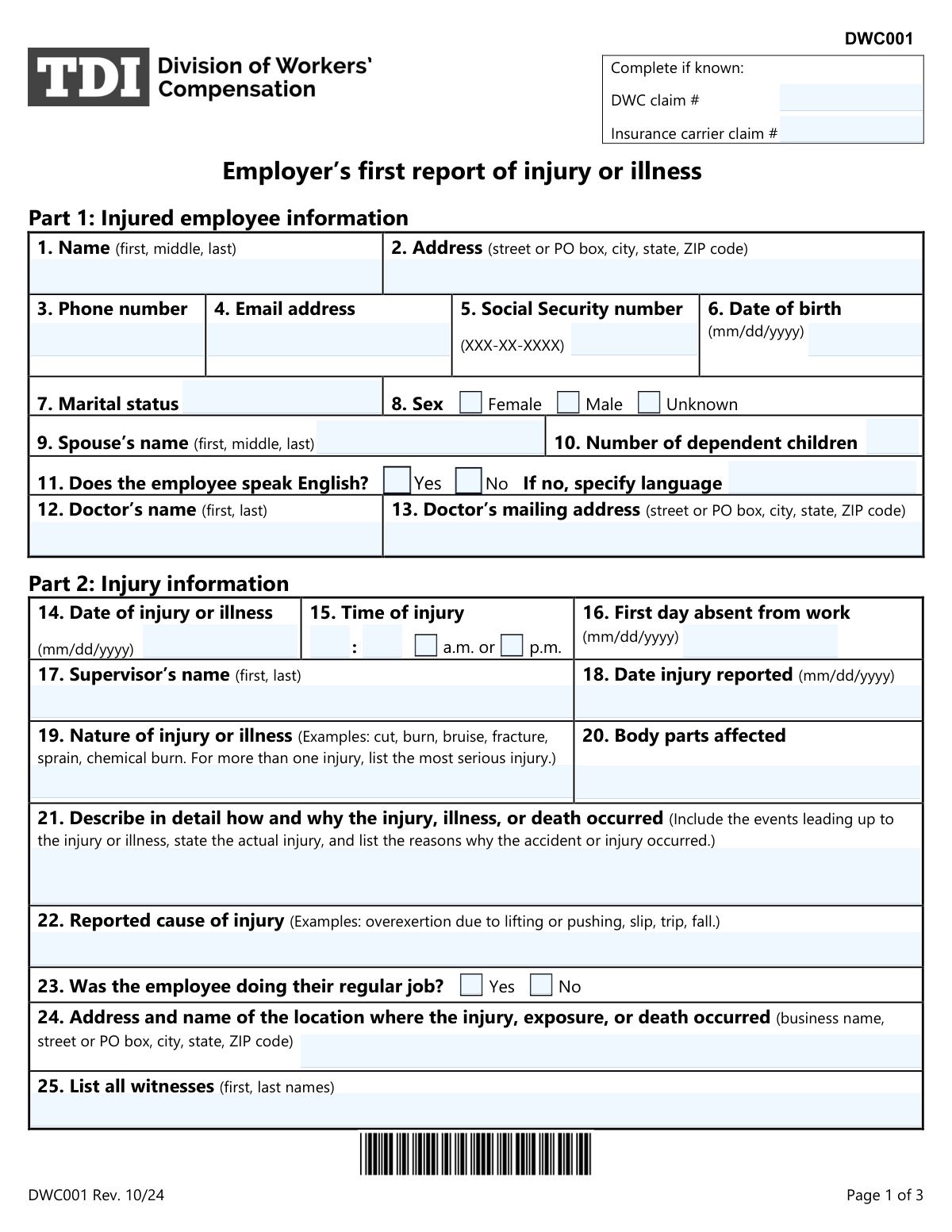
Yes! You can use AI to fill out DWC Form-001, Employer’s first report of injury or illness
The DWC Form-001, Employer's First Report of Injury or Illness, is a mandatory document for Texas employers to report workplace injuries to their workers' compensation insurance carrier. Filing this form is the first step in initiating the claims process and is required by law within eight days of an employee's absence, notice of occupational disease, or death. Today, this form can be filled out quickly and accurately using AI-powered services like Instafill.ai, which can also convert non-fillable PDF versions into interactive fillable forms.
Our AI automatically handles information lookup, data retrieval, formatting, and form filling.
It takes less than a minute to fill out DWC-001 using our AI form filling.
Securely upload your data. Information is encrypted in transit and deleted immediately after the form is filled out.
Form specifications
| Form name: | DWC Form-001, Employer’s first report of injury or illness |
| Number of pages: | 2 |
| Language: | English |
| Categories: | employer forms, IRS forms |
Instafill Demo: How to fill out PDF forms in seconds with AI
How to Fill Out DWC-001 Online for Free in 2026
Are you looking to fill out a DWC-001 form online quickly and accurately? Instafill.ai offers the #1 AI-powered PDF filling software of 2026, allowing you to complete your DWC-001 form in just 37 seconds or less.
Follow these steps to fill out your DWC-001 form online using Instafill.ai:
- 1 Navigate to Instafill.ai and upload or select the DWC Form-001.
- 2 Use the AI assistant to automatically populate employer and insurance carrier information from your saved profile.
- 3 Enter the injured employee's personal details, including their name, address, SSN, and date of birth.
- 4 Provide comprehensive details about the injury, such as the date, time, location, and a thorough description of how it occurred.
- 5 Input the employee's employment and wage information, like their job title, date of hire, and rate of pay.
- 6 Carefully review all entered information for accuracy, then certify the form with your digital signature and the current date.
- 7 Download the completed DWC-001 and submit it to your insurance carrier and the injured employee as required.
Our AI-powered system ensures each field is filled out correctly, reducing errors and saving you time.
Why Choose Instafill.ai for Your Fillable DWC-001 Form?
Speed
Complete your DWC-001 in as little as 37 seconds.
Up-to-Date
Always use the latest 2026 DWC-001 form version.
Cost-effective
No need to hire expensive lawyers.
Accuracy
Our AI performs 10 compliance checks to ensure your form is error-free.
Security
Your personal information is protected with bank-level encryption.
Frequently Asked Questions About Form DWC-001
The DWC001, 'Employer’s first report of injury or illness,' is used by employers to report a work-related injury or illness. It provides the insurance carrier with the necessary information to begin the workers' compensation claims process.
You must send this form to your insurance carrier and the employee within eight days after the employee’s first day of absence from work, you receive notice of an occupational disease, or an employee dies.
Send the form to your workers’ compensation insurance carrier and give a copy to the injured employee or their representative. Do not send it to the Texas Division of Workers’ Compensation (DWC) unless they specifically ask for it.
Yes, the form requires the employee's Social Security number in Part 1, field 5. This information is essential for correctly identifying the employee and processing the claim.
You should provide a detailed description of how and why the injury occurred. Include the events leading up to the incident, the actual injury, and the reasons for the accident to give the insurance carrier a clear account.
The North American Industry Classification System (NAICS) code classifies business establishments. You can typically find your company's six-digit NAICS code on tax documents or by searching the U.S. Census Bureau website.
The form states 'Complete if known' for these fields, so you can leave them blank if you don't have the numbers. They are often assigned after the initial report is filed.
Yes, you must keep a copy of the completed DWC001 form for your records. This copy serves as the required Employer’s Record of Injury.
'Nature of injury' refers to the physical harm, like a 'fracture' or 'burn.' 'Reported cause of injury' describes the event that led to it, such as a 'slip, trip, fall' or 'overexertion.'
Yes, services like Instafill.ai use AI to accurately auto-fill form fields with your saved information, which can save you significant time and help reduce errors.
You can use a service like Instafill.ai to complete the form online. Simply upload the DWC001 PDF, and the platform will make it fillable, allowing you to type your answers directly and save your progress.
If you have a non-fillable or 'flat' PDF, you can use a tool like Instafill.ai to instantly convert it into an interactive, fillable form. This allows you to easily type information into the fields instead of printing and filling it out by hand.
For further assistance, you can call the Division of Workers' Compensation at 800-252-7031, Monday through Friday, 8 a.m. to 5 p.m., Central time, or visit the TDI website.
Compliance DWC-001
Validation Checks by Instafill.ai
1
Validate Social Security Number Format
This check ensures the Social Security Number in field 5 is entered in the standard XXX-XX-XXXX format. Correct formatting is critical for unique employee identification and integration with state and federal systems. A validation failure would prevent the form from being processed until the number is corrected, as it is a key identifier for the employee's claim.
2
Ensure Date of Injury Precedes Date Reported
This validation confirms that the 'Date of injury or illness' (field 14) is on or before the 'Date injury reported' (field 18). An injury cannot be reported before it has occurred, so this check prevents logical impossibilities and simple data entry errors. If this validation fails, it indicates a mistake in one or both dates that must be corrected to ensure an accurate timeline of events.
3
Verify Date of Injury is After Date of Hire
This check ensures the 'Date of injury or illness' (field 14) is on or after the employee's 'Date of hire' (field 29). This is a crucial logical check to confirm that the incident occurred during the individual's employment with the company. A failure would suggest either a data entry error or that the incident is not a work-related injury for this employer, requiring immediate clarification.
4
Confirm Date of Birth Precedes Date of Injury
This validation verifies that the employee's 'Date of birth' (field 6) is chronologically before the 'Date of injury or illness' (field 14). This check serves as a basic sanity check to catch significant data entry errors and confirm a plausible age for the employee at the time of the incident. An error here would require correction to ensure the employee's identity and age are recorded accurately.
5
Conditional Requirement for Non-English Language
This check validates that if the answer to 'Does the employee speak English?' (field 11) is 'No', then the corresponding language specification field must be filled out. This information is vital for the insurance carrier and medical providers to arrange for translation services, ensuring proper communication with the injured employee. Failure to provide the language would hinder the claims process and the employee's access to care.
6
Conditional Requirement for Date of Death
This validation ensures that if 'Did the employee die?' (field 28) is marked 'Yes', then the 'Date of death' field must be completed with a valid date. This is a critical piece of information for processing a fatality claim and determining survivor benefits. A missing date of death on a fatality claim would halt the process until the information is provided.
7
Validate Date of Death is After Date of Injury
This check confirms that the 'Date of death' (field 28) is on or after the 'Date of injury or illness' (field 14). This logical validation ensures the timeline of events is correct and that the death could be related to the reported injury. An invalid sequence would indicate a significant data error that must be resolved before the claim can be processed.
8
Validate NAICS Code Format
This check ensures that the 'Primary NAICS code' (field 46) and 'Specific NAICS code' (field 47) are both six-digit numbers. The North American Industry Classification System (NAICS) uses a standard six-digit structure for classifying businesses. An incorrect format would lead to misclassification, affecting statistical reporting, premium calculations, and risk analysis.
9
Validate Federal Employer Identification Number (FEIN) Format
This check verifies that the 'Federal employer identification number' (field 45) follows the standard XX-XXXXXXX format. The FEIN is the unique identifier for the business entity, and a valid number is essential for legal and regulatory reporting. An incorrectly formatted FEIN would cause the report to be rejected or misfiled, delaying the claim.
10
Ensure First Day Absent is After Date of Injury
This validation confirms that the 'First day absent from work' (field 16) is on or after the 'Date of injury or illness' (field 14). An employee cannot be absent due to an injury before the injury occurred. This check prevents data entry errors and ensures the period of disability is recorded accurately, which is essential for calculating wage replacement benefits.
11
Validate Return-to-Work Date Sequence
This check ensures that the 'Return-to-work date' (field 27), if provided, occurs on or after the 'First day absent from work' (field 16). This maintains a logical timeline for the employee's absence and return. An invalid sequence would misrepresent the duration of disability and could lead to incorrect benefit payments.
12
Require Detailed Injury Description
This validation ensures that the narrative field 'Describe in detail how and why the injury... occurred' (field 21) is not left blank. This detailed description is the most critical piece of information for the insurance carrier to understand the circumstances of the incident and make a determination on compensability. A missing description would render the report incomplete and require follow-up before the claim can be investigated.
13
Validate Time of Injury AM/PM Selection
This check ensures that for the 'Time of injury' (field 15), one of the 'a.m.' or 'p.m.' options is selected. Specifying the time of day is crucial for verifying that the injury occurred during work hours. An incomplete time entry creates ambiguity that could complicate or delay the claim investigation process.
14
Conditional Response for Accident Prevention Services
This check validates that if 'Did you request accident prevention services...' (field 51) is answered 'Yes', then the follow-up question 'did you receive them?' must also be answered. This ensures complete data is captured for this two-part question. This information is used for tracking safety program engagement and effectiveness, and incomplete data would skew these metrics.
Common Mistakes in Completing DWC-001
In Field 21, filers often provide a one-sentence description that repeats the information from Fields 19 and 22, instead of a detailed narrative. This occurs because they overlook the instruction to 'describe in detail.' A vague description forces the insurance carrier to request more information, delaying the investigation and the processing of the claim. To avoid this, clearly document the sequence of events, the specific actions the employee was performing, and the resulting injury.
The form specifies an 'mm/dd/yyyy' format for all date fields (e.g., Date of Birth, Date of Injury), but people frequently use other formats like 'dd/mm/yyyy' or enter illogical dates. This leads to data entry errors and can create inconsistencies that delay claim processing, such as listing a report date that is before the injury date. Using a tool like Instafill.ai can help by automatically validating and standardizing dates into the required format, preventing such errors.
Employers often leave fields for the Federal Employer Identification Number (FEIN), NAICS codes, and the Texas Comptroller Taxpayer Number blank. This usually happens when the person completing the form doesn't have this information readily available. Missing identifiers can delay claim setup and affect regulatory reporting, potentially leading to compliance issues. It's best to gather all company information before starting the form to ensure completeness.
Field 15 requires the filer to enter the hour and minute of the injury and then separately check a box for 'a.m.' or 'p.m.'. It is very common for the checkbox to be missed, leaving the time of the incident ambiguous. This can be a critical detail for determining whether the injury occurred during work hours, and its omission can require follow-up from the insurance carrier, slowing down the claim.
The form asks for 'Length of service in current position' (Field 31) and 'Length of service in current occupation' (Field 32) separately. Filers often enter the same duration for both, even if an employee was promoted or changed roles within the same general occupation. This distinction is important for the insurer's risk analysis, and inaccurate data can affect underwriting and statistical records. Ensure you differentiate between the employee's time in their specific job title versus their overall career field.
In Field 35, filers must enter either an hourly or weekly rate of pay, but they sometimes enter a bi-weekly or monthly salary without converting it. This mistake directly impacts the calculation of the employee's wage replacement benefits, leading to incorrect payment amounts and subsequent disputes. Always convert salaries to the requested hourly or weekly format to ensure benefit accuracy from the start.
When an injury occurs at a location other than the main business address (e.g., a client site, a different branch), filers may mistakenly enter the company's mailing address in Field 24. The form specifically asks for the address where the injury occurred. This error can misrepresent the circumstances of the incident and complicate the investigation, so it's crucial to provide the precise physical location of the event.
A frequent and critical error is failing to sign and date the certification in Part 5. An unsigned form is not considered a valid legal document and will be rejected by the insurance carrier, halting the entire claims process. This simple oversight requires the form to be corrected and resubmitted, causing unnecessary delays in providing benefits to the injured employee. If the form is a non-fillable PDF, a tool like Instafill.ai can convert it to a fillable version where a digital signature can be easily applied.
Despite clear instructions in the FAQ, employers sometimes send this form directly to the Texas Division of Workers' Compensation (DWC) instead of their insurance carrier. This happens when filers rush and don't read the submission guidelines. Sending the form to the wrong entity means the claim is not initiated, leading to non-compliance with the eight-day reporting deadline and potential fines.
Filers may enter an incomplete Social Security Number in Field 5, transpose digits, or leave it blank due to privacy concerns. However, the SSN is a primary identifier for the injured employee and is essential for the insurance carrier to set up the claim and report it correctly. An incorrect or missing SSN will almost certainly cause processing delays while the carrier works to verify the employee's identity. AI-powered form fillers can help by validating the format (XXX-XX-XXXX) to catch errors before submission.
Saved over 80 hours a year
“I was never sure if my IRS forms like W-9 were filled correctly. Now, I can complete the forms accurately without any external help.”
Kevin Martin Green
Your data stays secure with advanced protection from Instafill and our subprocessors

Robust compliance program
Transparent business model
You’re not the product. You always know where your data is and what it is processed for.
ISO 27001, HIPAA, and GDPR
Our subprocesses adhere to multiple compliance standards, including but not limited to ISO 27001, HIPAA, and GDPR.
Security & privacy by design
We consider security and privacy from the initial design phase of any new service or functionality. It’s not an afterthought, it’s built-in, including support for two-factor authentication (2FA) to further protect your account.
Fill out DWC-001 with Instafill.ai
Worried about filling PDFs wrong? Instafill securely fills dwc-form-001-employers-first-report-of-injury-or-illness forms, ensuring each field is accurate.