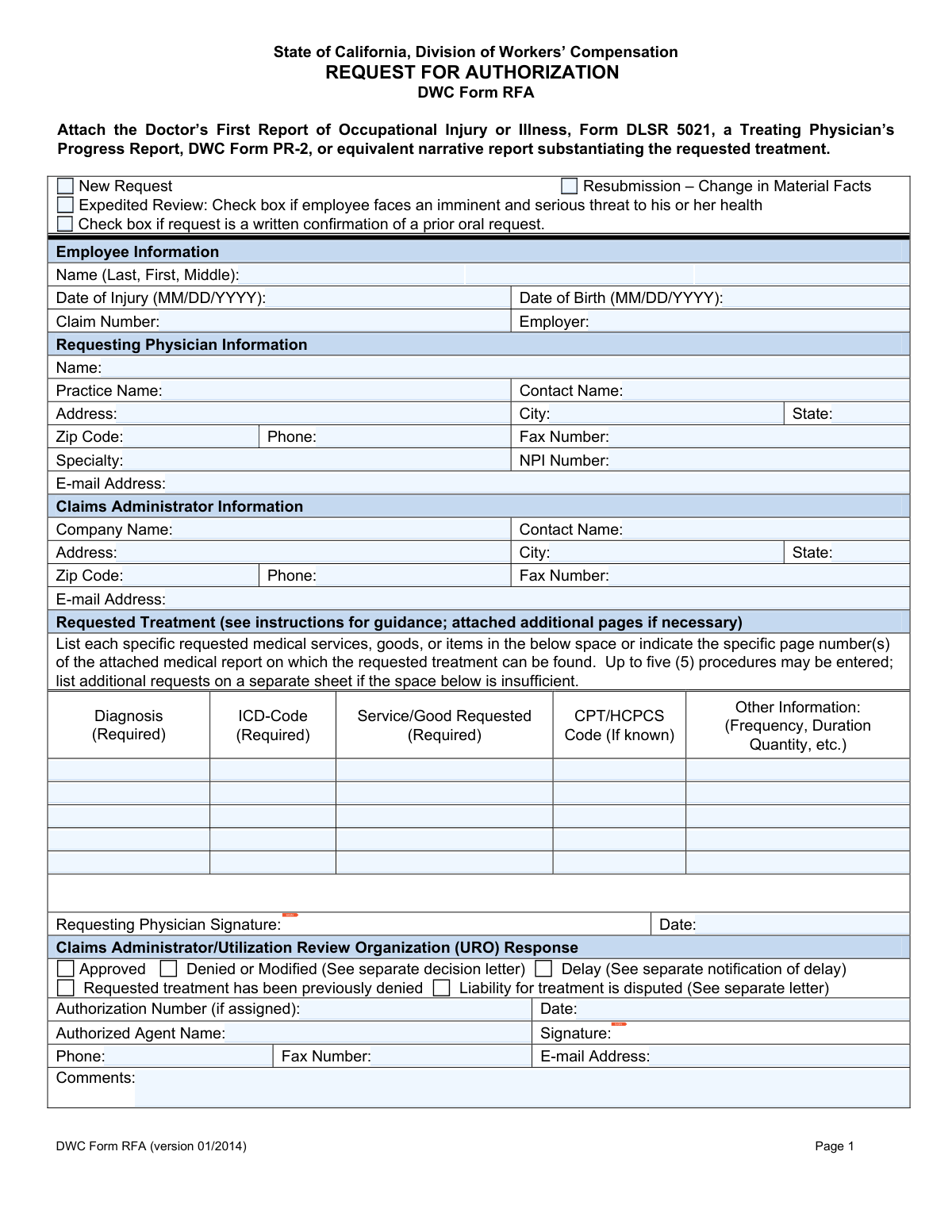
Yes! You can use AI to fill out DWC Form RFA, Request for Authorization
DWC Form RFA is a mandatory document in California's workers' compensation system, submitted by a treating physician to a claims administrator to obtain prior authorization for medical services. It officially initiates the utilization review process, ensuring that the requested treatment is medically necessary for the employee's work-related injury. Proper and timely submission is crucial for securing approval for patient care. Today, this form can be filled out quickly and accurately using AI-powered services like Instafill.ai, which can also convert non-fillable PDF versions into interactive fillable forms.
Our AI automatically handles information lookup, data retrieval, formatting, and form filling.
It takes less than a minute to fill out DWC Form RFA using our AI form filling.
Securely upload your data. Information is encrypted in transit and deleted immediately after the form is filled out.
Form specifications
| Form name: | DWC Form RFA, Request for Authorization |
| Number of fields: | 72 |
| Number of pages: | 1 |
| Language: | English |
| Categories: | authorization forms |
Instafill Demo: How to fill out PDF forms in seconds with AI
How to Fill Out DWC Form RFA Online for Free in 2026
Are you looking to fill out a DWC FORM RFA form online quickly and accurately? Instafill.ai offers the #1 AI-powered PDF filling software of 2026, allowing you to complete your DWC FORM RFA form in just 37 seconds or less.
Follow these steps to fill out your DWC FORM RFA form online using Instafill.ai:
- 1 Navigate to Instafill.ai and upload or select the DWC Form RFA.
- 2 Allow the AI to pre-fill your saved information, such as requesting physician and practice details.
- 3 Enter the employee's information, including name, date of birth, date of injury, and claim number.
- 4 Complete the 'Requested Treatment' section by detailing each service, including diagnosis, ICD code, and CPT/HCPCS codes if known.
- 5 Attach required supporting documents, like the Form DLSR 5021 or a narrative medical report, as prompted by the system.
- 6 Review all sections for accuracy, then have the requesting physician apply a secure digital signature and date the form.
- 7 Submit the completed form and attachments directly to the claims administrator via their designated fax, email, or mailing address.
Our AI-powered system ensures each field is filled out correctly, reducing errors and saving you time.
Why Choose Instafill.ai for Your Fillable DWC Form RFA Form?
Speed
Complete your DWC Form RFA in as little as 37 seconds.
Up-to-Date
Always use the latest 2026 DWC Form RFA form version.
Cost-effective
No need to hire expensive lawyers.
Accuracy
Our AI performs 10 compliance checks to ensure your form is error-free.
Security
Your personal information is protected with bank-level encryption.
Frequently Asked Questions About Form DWC Form RFA
The DWC Form RFA is used by a treating physician in California to request authorization for medical treatment for an employee's work-related injury. It officially starts the utilization review process required by the state's labor code.
The employee's treating physician is responsible for completing, signing, and submitting the DWC Form RFA to the workers' compensation claims administrator.
You must attach a medical report that substantiates the requested treatment, such as a Doctor’s First Report (DLSR 5021), a Progress Report (DWC Form PR-2), or an equivalent narrative report.
The form can be mailed, faxed, or e-mailed to the claims administrator. Ensure you use the contact information specifically designated by the administrator for receiving these requests.
Check the 'Expedited Review' box only if the employee faces an imminent and serious threat to their health. You must attach documentation that supports the urgent nature of the employee's condition.
Select this option if you are re-requesting a treatment that was previously denied because the employee's medical condition has changed. You must include new documentation to support the change.
For each request, you must provide the Diagnosis, the ICD-Code, and a description of the Service/Good Requested. The CPT/HCPCS code should be included if it is known.
The form provides space for up to five procedures. If you need to request more, list the additional treatments on a separate sheet and attach it to the DWC Form RFA.
Yes, a signature from the requesting physician is mandatory for the form to be considered complete. The signature line is located directly below the 'Requested Treatment' section.
The claims administrator will respond in writing, and may do so by completing the bottom portion of the RFA form and returning it to you. For denials, modifications, or delays, you will receive a separate decision letter.
Yes, services like Instafill.ai use AI to accurately auto-fill form fields from your records. This can save time, reduce errors, and help ensure all required information is included.
You can upload the DWC Form RFA to Instafill.ai to make it an interactive, fillable form. The platform allows you to easily enter all required information, add a digital signature, and download the completed PDF for submission.
If you have a non-fillable PDF, you can use a service like Instafill.ai to convert it into an interactive form. This allows you to type information directly into the fields instead of printing and filling it out by hand.
The claims administrator's contact information, including their name, address, and phone/fax numbers, should be available in the employee's claim file or can be obtained from the employer or insurance carrier.
Compliance DWC Form RFA
Validation Checks by Instafill.ai
1
Date of Injury and Date of Birth Chronology
This validation ensures the 'Date of Injury' is chronologically after the 'Date of Birth'. An injury date that precedes the birth date is a logical impossibility and indicates a data entry error. If this validation fails, the form should be rejected and returned to the sender for correction to ensure the claim's basic facts are accurate.
2
NPI Number Format and Validity
This check verifies that the 'NPI Number' field contains exactly 10 digits and is a valid number according to the Luhn algorithm or a checksum validation. The NPI is a critical unique identifier for healthcare providers, and an invalid number will prevent proper identification, billing, and compliance. A failure would halt processing until a valid NPI is provided.
3
Mandatory Physician Signature
This check confirms that the 'Requesting Physician Signature' field is not empty. A physician's signature is a legal attestation that the information is accurate and the request is medically justified. A missing signature invalidates the entire request, and the form must be returned to the physician for completion.
4
Required Treatment Row Completeness
For any row in the 'Requested Treatment' section that contains data, this check ensures that the 'Diagnosis', 'ICD-Code', and 'Service/Good Requested' fields are all filled out. These fields are explicitly marked as required and are essential for the claims administrator to evaluate the medical necessity of the request. Incomplete rows will lead to delays or automatic denial of that specific treatment line item.
5
ICD Code Format Validation
This validation inspects the 'ICD-Code' field in each treatment row to ensure it conforms to a valid ICD-9 or ICD-10 format (e.g., starts with a letter followed by numbers and optional decimals). Using properly formatted codes is crucial for the utilization review process and for accurate medical records. An invalid format would cause processing errors and require clarification from the provider.
6
Request Type Exclusivity
This check ensures that mutually exclusive request types, such as 'New Request' and 'Resubmission – Change in Material Facts', are not selected simultaneously. Selecting both creates ambiguity about the nature of the request, which can lead to incorrect processing. If both are checked, the form should be flagged for manual review or rejected for clarification.
7
Completeness of Physician Information
This validation verifies that the requesting physician's name, full address (address, city, state, zip), and phone number are all provided. This contact information is essential for the claims administrator to communicate the authorization decision or request additional information. Missing data can significantly delay the review process or result in the response being sent to the wrong location.
8
Completeness of Employee Information
This check ensures that the employee's full name, date of injury, and claim number are all present. These fields are the primary identifiers used to match the request to the correct workers' compensation case file. Failure to provide this complete information would make it impossible for the claims administrator to process the request, leading to an immediate rejection.
9
Date Field Format (MM/DD/YYYY)
This validation ensures that both the 'Date of Injury' and 'Date of Birth' fields are entered in the specified MM/DD/YYYY format and represent valid calendar dates. Incorrectly formatted dates can cause system errors and misinterpretation of critical claim information. Submissions with invalid date formats should be rejected to enforce data consistency.
10
State Field Abbreviation
This check verifies that the 'State' fields in both the 'Requesting Physician Information' and 'Claims Administrator Information' sections contain a valid two-letter postal abbreviation. Using standardized state codes is important for address validation, mail routing, and data integrity. An invalid entry could cause communication to be lost or delayed.
11
Phone and Fax Number Format
This validation confirms that all phone and fax number fields are entered in a recognizable U.S. phone number format (e.g., 10 digits, with or without parentheses, spaces, or dashes). This ensures the numbers are valid and can be used for communication by the claims administrator. An improperly formatted number could prevent urgent contact regarding the request.
12
Attachment Requirement Verification
This check verifies that a required medical report (e.g., Form DLSR 5021, PR-2, or equivalent) is attached to the submission. The form instructions mandate this attachment to substantiate the requested treatment, making it a critical component for utilization review. If the form is submitted electronically without an attachment, it should be considered incomplete and rejected.
13
Claim Number Presence
This validation ensures the 'Claim Number' field is not empty. The claim number is the unique key that links the request to the specific case within the claims administrator's system. Without it, the request cannot be processed or routed correctly, and would be returned to the provider for completion.
14
Email Address Format Validation
This check verifies that all email address fields contain a string that follows a standard email format (e.g., '[email protected]'). Correct email addresses are vital for modern, efficient communication of approvals, denials, or requests for more information. An invalid format would prevent electronic correspondence, potentially delaying the patient's care.
Common Mistakes in Completing DWC Form RFA
The Claim Number is the primary identifier linking the request to the employee's case. This mistake often occurs due to typographical errors or referencing an outdated number. An incorrect or missing claim number will cause the claims administrator to reject the request or be unable to process it, leading to significant delays in patient care. Always verify the claim number against recent correspondence from the claims administrator before submission.
An unsigned or undated Request for Authorization (RFA) is legally invalid and will be immediately returned or denied. This error typically happens when administrative staff prepare the form but fail to get the final sign-off from the physician before sending. This simple oversight forces a complete resubmission, restarting the review timeline and delaying necessary medical treatment for the injured worker. Always perform a final check to ensure the physician has personally signed and dated the form.
The form explicitly requires attaching a supporting medical report, such as a DWC Form PR-2 or an equivalent narrative report. Staff may forget to include the attachment or assume the RFA form is sufficient on its own. Without the substantiating report, the utilization review has no clinical basis to approve the request, resulting in an automatic denial for lack of information and delaying the authorization process. Ensure all necessary clinical notes are attached before faxing, mailing, or emailing the form.
In the 'Service/Good Requested' section, providers often enter vague descriptions like 'Physical Therapy' or 'MRI'. This is insufficient for authorization, as the reviewer needs specifics. The 'Other Information' column for frequency, duration, and quantity is frequently left blank, which is critical information for the reviewer. This lack of detail forces the claims administrator to deny or delay the request to seek clarification, hindering patient care. Be explicit: specify 'Physical Therapy to lumbar spine, 3 times per week for 4 weeks' or 'MRI of right shoulder without contrast'.
The form marks the 'Diagnosis' and 'ICD-Code' fields as required for each requested service. A common mistake is to list the diagnosis description but omit the corresponding ICD code, or vice-versa. This happens due to clerical oversight or not having the information readily available during form completion. A request without a valid ICD code cannot be properly processed and will be denied, requiring correction and resubmission. AI-powered tools like Instafill.ai can help by validating that required fields like the ICD code are not left empty.
Physician offices often deal with numerous claims administrators and may accidentally enter the wrong company name, address, or fax number. Sending the RFA to the wrong entity means the request never reaches the correct reviewer, leading to a 'limbo' state where the provider waits for a response that will never come. This wastes valuable time and can push the request past timely filing limits. Always confirm the correct claims administrator and their designated fax number or address for RFAs before sending.
The National Provider Identifier (NPI) is a standard, unique identifier for healthcare providers and is essential for processing and tracking requests. Forgetting to include the NPI number can cause processing delays as the claims administrator's system may be unable to identify the requesting physician. This is a simple data entry error that can be avoided by using templates or automated form-filling solutions. AI tools like Instafill.ai can store and automatically populate recurring information like the NPI number, preventing this common mistake.
The 'Expedited Review' checkbox should only be used when the employee faces an 'imminent and serious threat to his or her health,' which must be substantiated in the attached medical report. Some offices check this box routinely in an attempt to speed up all requests. This misuse can lead to the request being denied expedited status and may damage the provider's credibility with reviewers, potentially leading to greater scrutiny on future requests. Only check this box when the strict medical criteria are met and clearly documented.
A reviewer must see a clear and logical link between the diagnosis (ICD code) and the requested treatment (CPT code). A mistake occurs when the requested service does not medically correlate with the listed diagnosis, for example, requesting a knee MRI for a shoulder injury diagnosis. This can happen from a copy-paste error or when filling out requests for multiple body parts. Such a mismatch will lead to a denial, as the medical necessity is not established. Carefully review each line item to ensure the diagnosis justifies the requested service.
Often, the only version of a form available online is a flat, non-fillable PDF, leading to illegible handwritten submissions or cumbersome manual typing. Handwritten forms are prone to data entry errors, misinterpretation of handwriting, and missing fields, which are common causes for rejection. This slows down the entire process for both the provider and the claims administrator. To avoid this, tools like Instafill.ai can convert non-fillable PDFs into interactive, fillable forms, ensuring all data is clear, legible, and correctly formatted.
Saved over 80 hours a year
“I was never sure if my IRS forms like W-9 were filled correctly. Now, I can complete the forms accurately without any external help.”
Kevin Martin Green
Your data stays secure with advanced protection from Instafill and our subprocessors

Robust compliance program
Transparent business model
You’re not the product. You always know where your data is and what it is processed for.
ISO 27001, HIPAA, and GDPR
Our subprocesses adhere to multiple compliance standards, including but not limited to ISO 27001, HIPAA, and GDPR.
Security & privacy by design
We consider security and privacy from the initial design phase of any new service or functionality. It’s not an afterthought, it’s built-in, including support for two-factor authentication (2FA) to further protect your account.
Fill out DWC Form RFA with Instafill.ai
Worried about filling PDFs wrong? Instafill securely fills dwc-form-rfa-request-for-authorization forms, ensuring each field is accurate.