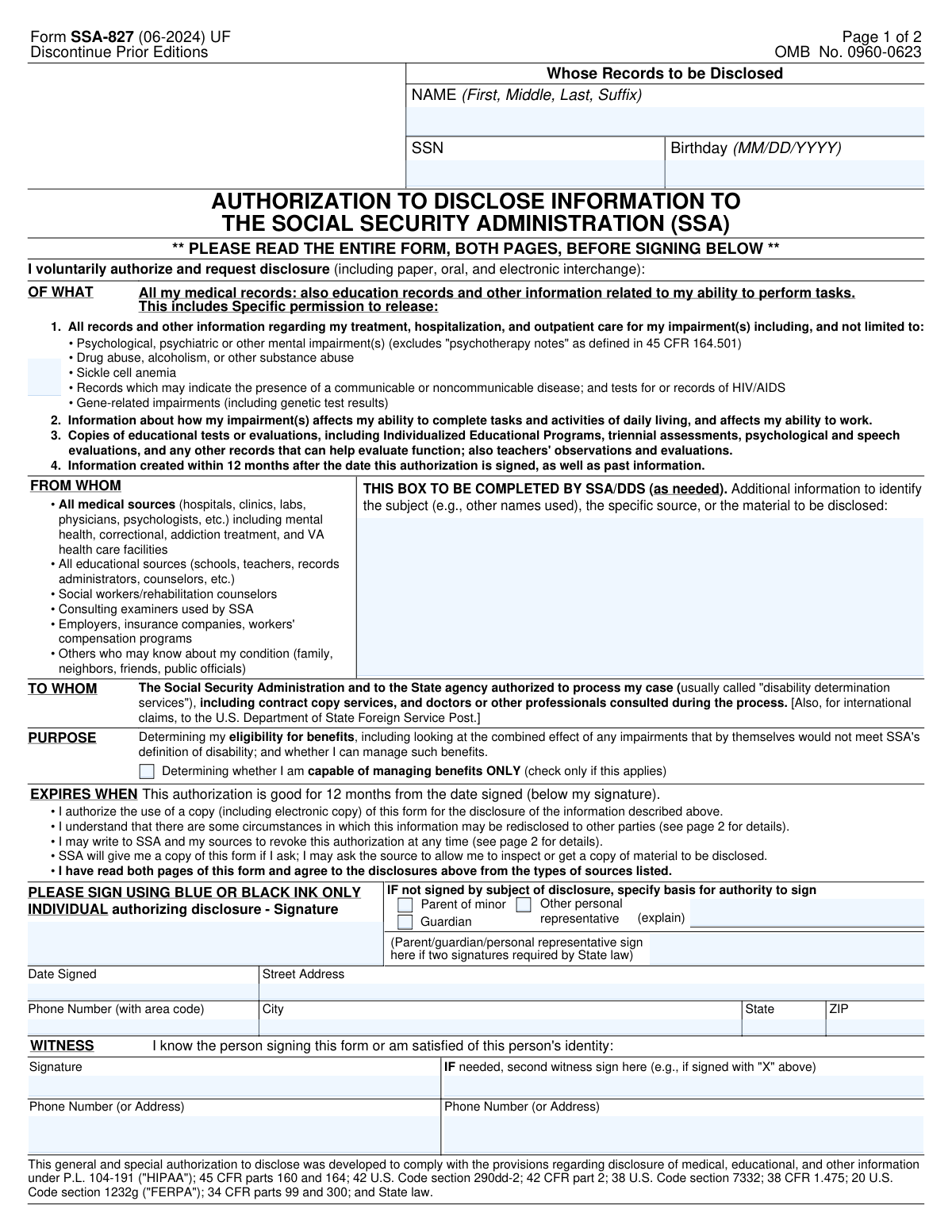
Yes! You can use AI to fill out Form SSA-827 (06-2024), Authorization to Disclose Information to the Social Security Administration (SSA)

Form SSA-827 is a HIPAA/FERPA-compliant authorization that allows the SSA and the state agency processing a disability claim (DDS) to request and receive a claimant’s medical records, educational records, and other information relevant to functioning and work ability. It includes specific permission for sensitive categories (e.g., mental health treatment records excluding psychotherapy notes, substance use treatment information, HIV/AIDS testing/records, genetic test results) and generally remains valid for 12 months from the date signed. This form is important because many providers and schools cannot release records to SSA without a signed authorization, and missing authorizations can delay or affect a benefits decision. Today, this form can be filled out quickly and accurately using AI-powered services like Instafill.ai, which can also convert non-fillable PDF versions into interactive fillable forms.
Our AI automatically handles information lookup, data retrieval, formatting, and form filling.
It takes less than a minute to fill out SSA-827 using our AI form filling.
Securely upload your data. Information is encrypted in transit and deleted immediately after the form is filled out.

Form specifications

Form name: Form SSA-827 (06-2024), Authorization to Disclose Information to the Social Security Administration (SSA)
Number of pages: 2
Language: English
Categories: disability forms, social security forms, SSA forms, authorization forms
main-image

Instafill Demo: filling out a legal form in seconds

How to Fill Out SSA-827 Online for Free in 2026

Are you looking to fill out a SSA-827 form online quickly and accurately? Instafill.ai offers the #1 AI-powered PDF filling software of 2026, allowing you to complete your SSA-827 form in just 37 seconds or less.
Follow these steps to fill out your SSA-827 form online using Instafill.ai:
  1. 1 Go to Instafill.ai and upload Form SSA-827 (or select it from the form library).
  2. 2 Enter the disclosed person’s identifying information (full name, SSN, and date of birth).
  3. 3 Review the authorization scope (types of records and sensitive information categories) and confirm it matches what you intend to authorize for SSA/DDS.
  4. 4 If applicable, complete any SSA/DDS “Additional Information” fields to help identify sources/records, and select the purpose option (including the “capable of managing benefits ONLY” checkbox if it applies).
  5. 5 Provide the signer details and authority (sign as the individual, or check parent/guardian/other representative and add an explanation; add a second signature if required by state law).
  6. 6 Add signature(s), date signed, address, and phone number; complete witness signature(s) and contact information if required (e.g., if signed with an “X” or otherwise needed).
  7. 7 Use Instafill.ai to validate required fields, generate a clean final copy, then download/print and submit to your local Social Security office as instructed.

Our AI-powered system ensures each field is filled out correctly, reducing errors and saving you time.

Why Choose Instafill.ai for Your Fillable SSA-827 Form?

Speed

Complete your SSA-827 in as little as 37 seconds.

Up-to-Date

Always use the latest 2026 SSA-827 form version.

Cost-effective

No need to hire expensive lawyers.

Accuracy

Our AI performs 10 compliance checks to ensure your form is error-free.

Security

Your personal information is protected with bank-level encryption.

Frequently Asked Questions About Form SSA-827

Form SSA-827 is an authorization that lets the Social Security Administration (SSA) request and receive your medical, educational, and other records needed to process your disability-related claim and/or evaluate your ability to manage benefits.

The person whose records will be disclosed should sign the form. If the person is a minor or cannot sign, a parent, legal guardian, or other authorized personal representative may sign and must indicate their authority on the form.

You must provide the disclosed person’s full name, Social Security Number (SSN), and date of birth. This identifies whose records SSA is allowed to request.

It authorizes release of medical records, educational records, and other information related to your ability to perform tasks and work. It also includes permission for sensitive categories like mental health treatment records, substance use treatment information, HIV/AIDS testing records, and genetic test results (with the exception of “psychotherapy notes” as defined by HIPAA).

Yes. It authorizes disclosure of past records and information created within 12 months after the date you sign the authorization.

The authorization expires 12 months from the date you sign it. After it expires, SSA may ask you to sign a new authorization if more records are needed.

This option is used when the disclosure is solely for evaluating whether you can manage benefits (for example, whether a representative payee is needed). Only check it if SSA instructs you that this is the only purpose for the release.

Usually no—SSA can copy the signed authorization and send it to many sources. However, some states or specific providers may require the authorization to name the source, and SSA may contact you to sign additional source-specific forms if needed.

That box is typically completed by SSA or the state Disability Determination Services (DDS) if they need extra details (like other names you used or a specific provider). Leave it blank unless SSA/DDS tells you to complete it.

A witness section is provided, but whether it’s required can depend on the situation (for example, if the signer uses an “X” or if state law requires additional signatures). Follow SSA’s instructions for your case and complete witness fields if requested.

The form instructs you to sign using blue or black ink only. Using other colors may cause processing delays or require you to re-sign.

Send or bring the completed form to your local Social Security office. You can find the correct office at www.ssa.gov or by calling 1-800-772-1213 (TTY 1-800-325-0778).

Yes. You can revoke it at any time by sending a written statement to any Social Security office, and you should also notify any sources you no longer want to release information. SSA may still use information that was disclosed before the revocation to decide your claim.

A covered medical entity generally may not condition treatment, payment, enrollment, or eligibility for benefits on whether you sign this authorization. However, not signing may prevent SSA from obtaining needed records and could delay a decision or lead to a denial.

Yes. AI form-filling tools (such as Instafill.ai) can help you auto-fill fields like name, SSN, date of birth, address, and phone number to reduce errors and save time—while you still review everything before signing.

Upload the SSA-827 PDF to Instafill.ai, then follow the prompts to extract your information and auto-fill the form fields. Review the completed entries for accuracy, download the filled form, and sign it (blue or black ink) before submitting it to your local SSA office.

If the PDF isn’t fillable, Instafill.ai can convert a flat, non-fillable PDF into an interactive fillable form so you can type into the fields. After conversion, you can auto-fill and export the completed document for printing and signature.

Compliance SSA-827
Validation Checks by Instafill.ai

1
Disclosed Person Name completeness and allowed characters
Validates that the disclosed person’s name includes at least a first and last name, and that the field is not left blank or filled with placeholders (e.g., “N/A”, “Unknown”). It should also restrict characters to common name characters (letters, spaces, hyphens, apostrophes) and limit length to prevent truncation or injection. This is important to correctly match the authorization to the right individual and avoid misidentification. If validation fails, the submission should be rejected or routed for manual review with a request to correct the name.
2
SSN format and invalid/placeholder SSN detection
Checks that the SSN is exactly 9 digits (optionally allowing hyphens in the pattern ###-##-####) and contains only numeric characters aside from formatting. It should also block known invalid patterns (e.g., 000-00-0000, 123-45-6789, all same digits) and disallow empty values. This prevents downstream matching errors and reduces fraud or accidental entry of dummy data. If validation fails, the form should not be accepted until a valid SSN is provided.
3
Birthday date format and plausible range validation
Ensures the birthday is provided in MM/DD/YYYY format and represents a real calendar date (e.g., not 02/30/2020). It should also enforce plausibility rules (not in the future; not unreasonably old such as >120 years unless flagged for review). Accurate DOB is critical for identity matching and eligibility processing. If validation fails, prompt the user to correct the date or route to manual review if the value is unusual but possible.
4
Date Signed required, valid date, and not in the future
Validates that the Date Signed field is present, in a valid date format, and not later than today (no future signatures). This is important because the authorization’s effective period is based on the signature date and a future date can invalidate the consent timeline. If validation fails, the submission should be blocked until a correct signature date is entered.
5
Authorization expiration window calculation (12 months from Date Signed)
Computes the authorization expiration as 12 months from the Date Signed and verifies the submission is not already expired at intake (e.g., if an old form is uploaded). This check ensures SSA and sources can rely on a currently valid authorization. If the authorization is expired, the system should reject the form and request a newly signed SSA-827.
6
Signature presence and non-placeholder validation
Checks that the Individual Authorizer Signature field is completed and is not a placeholder value (e.g., “/s/”, “typed name” if wet signature is required by the channel, or “X” without witness logic). A missing or invalid signature means there is no valid authorization to disclose protected information. If validation fails, the form must be rejected and returned for proper signature completion.
7
Representative authority selection consistency
If the form is not signed by the subject of disclosure, validates that exactly one authority basis is selected: Parent of minor, Guardian, or Other personal representative. This prevents ambiguous authority claims and ensures the signer has legal standing to authorize disclosure. If multiple boxes are checked or none are checked when required, the submission should be flagged and returned for correction.
8
Other personal representative explanation required when selected
When 'Other personal representative' is checked, verifies that the Representative's Authorization Explanation is provided and meets minimum detail (e.g., relationship and legal basis such as POA, executor, authorized rep). This is important for compliance and for sources that require proof of authority before releasing records. If missing or too vague, the system should reject or route for manual review and request clarification/documentation.
9
Minor/guardian logic based on disclosed person age
Uses the disclosed person’s Birthday to determine if the person is a minor on the Date Signed; if so, requires Parent of minor or Guardian (or other legally valid representative) to be indicated. If the person is an adult, the system should flag cases where Parent of minor is selected as inconsistent unless additional documentation is provided. This ensures the authorization is legally valid for the individual’s age status. If validation fails, route to manual review or require corrected authority selection.
10
Second signature requirement handling (state-law dependent)
If the workflow indicates the state requires two signatures for a parent/guardian/personal representative, validates that the Representative's Second Signature is present. Conversely, if two signatures are not required, the system should allow the field to be blank without error. This prevents rejections by sources that enforce state-specific consent rules. If validation fails under a two-signature requirement, the submission should be rejected and returned for completion.
11
Witness signature requirement when signed with 'X' or mark
If the authorizer signature indicates a mark (e.g., 'X') or the channel flags a mark-signature scenario, requires at least one witness signature and witness contact information. This is important to establish identity and intent when a standard signature is not provided. If witness information is missing in such cases, the form should be rejected or escalated for manual verification.
12
Witness contact information completeness and format
Validates that each provided witness has either a phone number or an address (as the form allows), and that the phone number (if provided) is in a valid format with area code. This ensures SSA can contact witnesses if identity or execution is questioned. If validation fails, the system should request corrected witness contact details before accepting the submission.
13
Phone number format validation (authorizer)
Checks that the authorizer phone number includes an area code and contains 10 digits (optionally allowing common punctuation like parentheses and hyphens), and rejects clearly invalid values (e.g., 000-000-0000). A valid phone number is important for follow-up on missing information or consent issues. If validation fails, prompt for correction or allow submission only if phone is not required by the intake channel (otherwise reject).
14
Address completeness and USPS-style validation (Street/City/State/ZIP)
Ensures Street Address, City, State, and ZIP are present and consistent, with State as a valid 2-letter US abbreviation and ZIP as 5 digits (optionally ZIP+4). It should also check for obvious placeholders (e.g., “123”, “N/A”) and excessive length. Accurate address supports identity verification and correspondence. If validation fails, the system should block submission until a complete, valid address is provided.
15
Purpose of disclosure option exclusivity and interpretation
Validates that the 'Determining whether I am capable of managing benefits ONLY' checkbox is either unchecked (default broad purpose) or checked (restricting purpose), and that the system records the correct purpose accordingly. This is important because a checked box narrows the authorization scope and may affect what information can be requested. If the purpose selection is ambiguous (e.g., multiple purpose indicators in a digital UI), the submission should be flagged and the user prompted to confirm the intended purpose.
16
SSA/DDS Additional Information field length and safe content validation
If SSA/DDS Additional Information is provided, validates it does not exceed configured length limits and does not contain disallowed content (e.g., scripts, control characters) while allowing typical identifiers like alternate names or source details. This protects downstream systems from malformed input and ensures the field remains usable for identifying sources/subjects. If validation fails, the system should sanitize/strip unsafe characters and/or reject with an error requiring revision.

Common Mistakes in Completing SSA-827

Name entered incompletely or not matching SSA records

People often enter nicknames, omit a middle name/initial, forget a suffix (Jr., Sr., III), or use a married name that doesn’t match what SSA has on file. This can cause identity-matching problems and delays when SSA/DDS requests records from providers or schools. Enter the full legal name exactly as it appears on SSA records and include any suffix; if you’ve used other names, ensure SSA/DDS is aware (often via the “Additional Information” area if instructed). AI-powered tools like Instafill.ai can help standardize name formatting and reduce mismatches across documents.

SSN missing digits or entered in the wrong format

A common error is transposing numbers, leaving off the last four digits, or adding dashes/spaces inconsistently when copying from another document. An incorrect SSN can lead to the authorization being associated with the wrong person or rejected, slowing the disability/benefits determination process. Carefully verify all 9 digits against an official source (SSA card, tax document) before signing. Instafill.ai can validate SSN length/format and flag likely typos before submission.

Birthday not in MM/DD/YYYY format or incorrect date used

Applicants frequently use DD/MM/YYYY (common outside the U.S.), write only month/year, or accidentally enter today’s date instead of the date of birth. A wrong DOB can prevent record matching with medical/education sources and may trigger follow-up requests from SSA. Always enter the date of birth in MM/DD/YYYY and double-check it against an ID or birth certificate. Instafill.ai can enforce the required date format and catch invalid dates.

Signing before reading both pages (missing key consent implications)

Because page 1 looks like the “main” page, many people sign without reviewing page 2 explanations about redisclosure, revocation, and state/source-specific requirements. This can lead to misunderstandings about what is being released (including sensitive categories like substance use treatment information) and surprise when SSA requests additional authorizations. Read both pages before signing so you understand scope, duration (12 months), and your revocation rights. If the form is only available as a flat, non-fillable PDF, Instafill.ai can convert it into a fillable version and guide you through required acknowledgments.

Using the wrong ink color or an invalid signature style

The form instructs “PLEASE SIGN USING BLUE OR BLACK INK ONLY,” but people often sign in pencil, other ink colors, or submit a low-quality scan where the signature is faint. This can cause SSA or a records source to reject the authorization as not properly executed, delaying evidence collection. Sign in blue or black ink and ensure the scan/photo is clear and complete. Instafill.ai can prompt for signature requirements and help ensure the final output is legible and properly captured.

Date signed missing, incomplete, or inconsistent with the signature

It’s common to forget the “Date Signed,” write an ambiguous date format (e.g., 02/03/24), or pre-date/post-date the form unintentionally. Since the authorization expires 12 months from the date signed, an incorrect date can shorten the usable period or cause sources to question validity. Use a clear U.S. date format (MM/DD/YYYY) and make sure it matches the actual signing date. Instafill.ai can auto-format dates and warn if the date is missing or inconsistent.

Representative authority section completed incorrectly (or left blank when needed)

When someone other than the subject signs (parent of minor, guardian, other personal representative), people often forget to check the correct box or fail to explain the basis of authority for “Other personal representative.” This can invalidate the authorization and force SSA to request a corrected form, delaying the claim. Only complete the representative section if the signer is not the person whose records are being disclosed, and provide the required explanation/documentation as applicable. Instafill.ai can route users through the correct signer path and ensure the right boxes and explanations are completed.

Missing second signature where state law requires it

The form includes a line for a second signature “if two signatures required by State law,” but many people ignore it because they’re unsure whether it applies. If a particular state or source requires two signatures and only one is provided, the provider/school may refuse to release records until corrected. Follow any SSA/DDS instructions and, if told two signatures are required, obtain the additional signature in the designated area. Instafill.ai can include conditional prompts/checklists based on state/source requirements to reduce rework.

Witness section completed when not required—or left incomplete when required

Applicants sometimes add a witness signature unnecessarily, or they provide a witness signature but forget the witness phone number/address, making the witness information unusable. Conversely, if the claimant signs with an “X” or a second witness is required, people may omit the second witness entirely. Incomplete witness details can lead to questions about identity verification and may require re-signing. Only complete witness fields when applicable, and ensure each witness provides both signature and contact information as requested; Instafill.ai can help by showing witness fields only when needed and validating completeness.

Address and phone number entered with errors or missing key parts

Common issues include missing apartment/unit numbers, using an old address, omitting the area code, or entering a phone number that can’t accept calls/voicemails. SSA/DDS may need to contact the claimant quickly for additional authorizations or consultative exams; bad contact info can cause missed deadlines and delays. Provide a current mailing address (including unit) and a reliable phone number with area code, and update SSA if anything changes. Instafill.ai can standardize address formatting (including ZIP) and validate phone number length/structure.

Not providing source-identifying details when SSA/DDS requests them

Although the “SSA/DDS Additional Information” box is typically completed by SSA/DDS, some cases require extra identifiers (other names used, specific facilities, or record types) to satisfy certain state laws or provider policies. People may leave it blank even when instructed to add details, leading to providers refusing release or SSA requesting additional forms per source. If SSA/DDS asks for specific sources or alternate names, include them exactly (facility name, location, dates of treatment, prior names). Instafill.ai can help ensure these details are captured consistently and formatted clearly for record requests.
Saved over 80 hours a year

“I was never sure if my IRS forms like W-9 were filled correctly. Now, I can complete the forms accurately without any external help.”

Kevin Martin Green

Your data stays secure with advanced protection from Instafill and our subprocessors

Robust compliance program

Transparent business model

You’re not the product. You always know where your data is and what it is processed for.

ISO 27001, HIPAA, and GDPR

Our subprocesses adhere to multiple compliance standards, including but not limited to ISO 27001, HIPAA, and GDPR.

Security & privacy by design

We consider security and privacy from the initial design phase of any new service or functionality. It’s not an afterthought, it’s built-in, including support for two-factor authentication (2FA) to further protect your account.

Fill out SSA-827 with Instafill.ai

Worried about filling PDFs wrong? Instafill securely fills form-ssa-827-06-2024-authorization-to-disclose-information-to-the-social-security-administration-ssa forms, ensuring each field is accurate.