Yes! You can use AI to fill out Form G-1450, Authorization for Credit Card Transactions
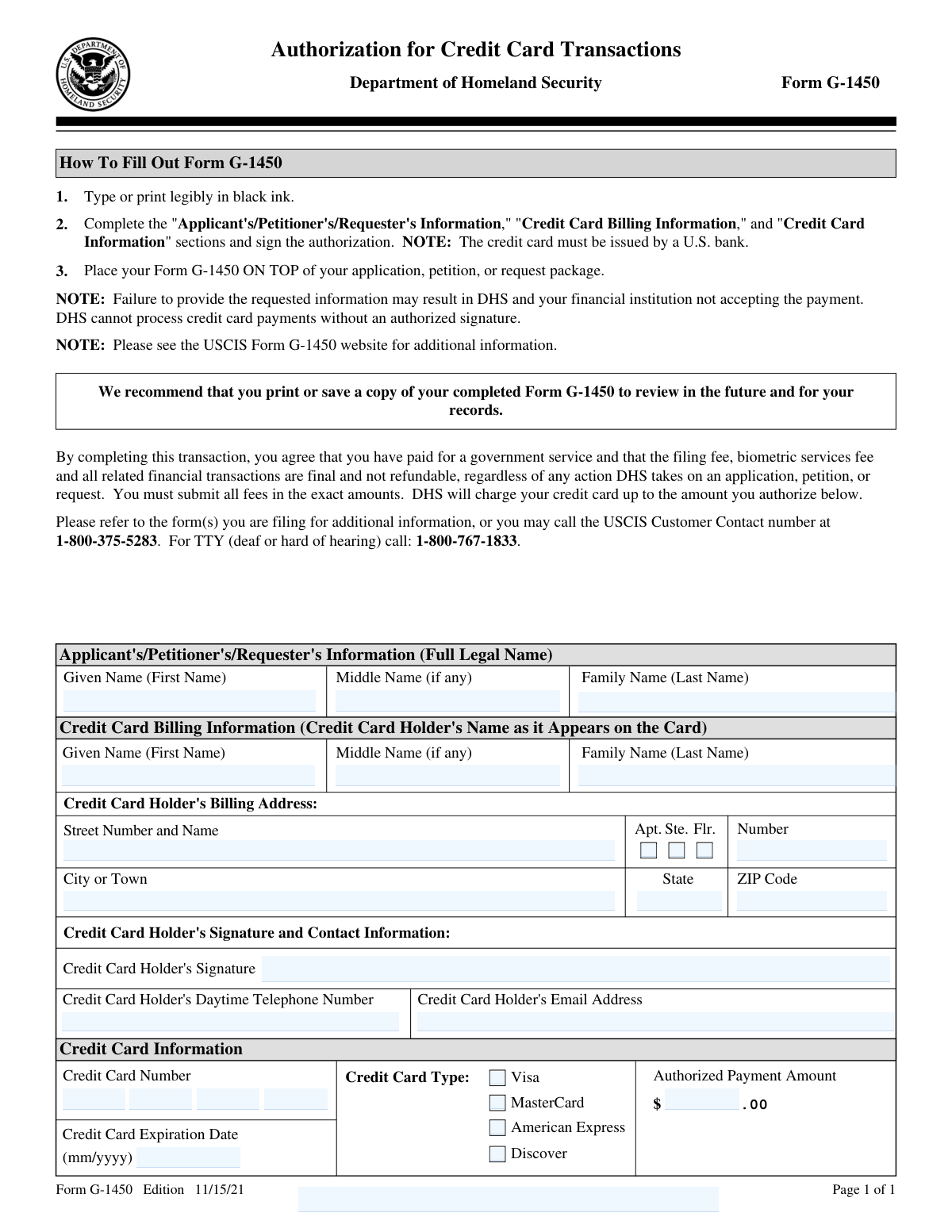
Form G-1450 is a one-page USCIS payment authorization form used to pay USCIS/DHS filing fees (and any related fees, such as biometric services fees) by credit card. It is submitted on top of the application, petition, or request package so DHS can process the payment. The form captures the applicant/requesterâs name, the credit card holderâs billing details, and the card information, and it requires the cardholderâs signature to authorize the charge. Providing complete and accurate information is important because missing details or an unsigned authorization may cause the payment to be rejected and the filing to be delayed or not accepted.
Our AI automatically handles information lookup, data retrieval, formatting, and form filling.
It takes less than a minute to fill out G-1450 using our AI form filling.
Securely upload your data. Information is encrypted in transit and deleted immediately after the form is filled out.
Form specifications
| Form name: | Form G-1450, Authorization for Credit Card Transactions |
| Number of pages: | 1 |
| Filled form examples: | Form G-1450 Examples |
| Language: | English |
| Categories: | CAR forms |
Instafill Demo: filling out a legal form in seconds
How to Fill Out G-1450 Online for Free in 2026
Are you looking to fill out a G-1450 form online quickly and accurately? Instafill.ai offers the #1 AI-powered PDF filling software of 2026, allowing you to complete your G-1450 form in just 37 seconds or less.
Follow these steps to fill out your G-1450 form online using Instafill.ai:
- 1 Enter the applicant’s/petitioner’s/requester’s full legal name (last, first, middle) in the Applicant Information section.
- 2 Enter the credit card holder’s name exactly as it appears on the card in the Credit Card Billing Information section.
- 3 Provide the credit card holder’s billing address (street, unit, city, state, ZIP code).
- 4 Add the cardholder’s contact details, including daytime telephone number and email address.
- 5 Select the credit card type (Visa, MasterCard, American Express, or Discover) and enter the credit card number and expiration date (mm/yyyy).
- 6 Enter the authorized payment amount in dollars and cents, ensuring it matches the exact required USCIS fee total.
- 7 Have the credit card holder sign the form to authorize the transaction, then place Form G-1450 on top of the application/petition/request package and save a copy for records.
Our AI-powered system ensures each field is filled out correctly, reducing errors and saving you time.
Why Choose Instafill.ai for Your Fillable G-1450 Form?
Speed
Complete your G-1450 in as little as 37 seconds.
Up-to-Date
Always use the latest 2026 G-1450 form version.
Cost-effective
No need to hire expensive lawyers.
Accuracy
Our AI performs 10 compliance checks to ensure your form is error-free.
Security
Your personal information is protected with bank-level encryption.
Frequently Asked Questions About Form G-1450
Form G-1450 is used to authorize USCIS (Department of Homeland Security) to charge a filing fee and any related fees to a credit card. You include it with your application, petition, or request package when you want to pay by credit card.
The person authorizing the credit card charge should complete and sign the form. This may be the applicant/petitioner/requester or a different credit card holder paying on their behalf.
No. The form notes that the credit card must be issued by a U.S. bank, or the payment may not be accepted.
The form lists Visa, MasterCard, American Express, and Discover as accepted credit card types. Select the correct type and provide the card details.
You must provide the full legal name of the applicant/petitioner/requester, including last (family) name, first (given) name, and middle name (if any). This identifies who the payment is associated with.
Enter the credit card holderâs name exactly as it appears on the card. This should match the billing records for the card to help avoid payment rejection.
Use the billing address associated with the credit card account (street, apartment/suite if applicable, city, state, and ZIP code). Using a different address may cause the transaction to be declined.
Enter the exact total amount USCIS is authorized to charge, including the filing fee, biometric services fee, and any other required fees for the form(s) you are submitting. The form states you must submit all fees in the exact amounts.
Yes. DHS cannot process credit card payments without an authorized signature, and missing signature information may result in the payment not being accepted.
Place Form G-1450 on top of your application, petition, or request package. This helps USCIS process the payment first.
Failure to provide requested information may result in DHS and your financial institution not accepting the payment. The form instructs you to type or print legibly in black ink to reduce errors.
No. The authorization states that filing fees, biometric services fees, and related financial transactions are final and not refundable, regardless of any action DHS takes on the application, petition, or request.
Yes. The form recommends printing or saving a copy of the completed Form G-1450 for your records and future reference.
The form directs you to refer to the instructions for the specific form(s) you are filing, or contact the USCIS Customer Contact number at 1-800-375-5283 (TTY: 1-800-767-1833). You can also check the USCIS Form G-1450 website for additional information.
Compliance G-1450
Validation Checks by Instafill.ai
1
Ensures Applicant/Petitioner/Requester Full Legal Name fields are complete
Validates that the Applicant/Petitioner/Requester section includes at minimum a Family Name (Last Name) and Given Name (First Name), with Middle Name optional. This is required to associate the payment authorization with the correct filing package and person. If missing, the payment form may be rejected or the filing may be delayed due to inability to match the payment to the request.
2
Ensures Credit Card Holder Name is provided and formatted as a personal name
Checks that the Credit Card Billing Information name fields (First/Given, optional Middle, Last/Family) are present and contain only valid name characters (letters, spaces, hyphens, apostrophes) and are not obviously invalid (e.g., all numbers or symbols). The cardholder name is used by the payment processor for verification and to reduce fraud/chargeback risk. If invalid, the transaction may be declined or flagged for manual review.
3
Validates that the Credit Card Holder Billing Address is complete
Verifies that Street Number and Name, City or Town, State, and ZIP Code are all provided; Apt/Flr/Ste and Number are optional but must be consistent if selected. A complete billing address is commonly required for Address Verification Service (AVS) checks and payment acceptance. If incomplete, DHS/USCIS or the financial institution may not accept the payment.
4
Validates U.S. State/Territory code format for billing address
Ensures the State field is a valid U.S. state or territory abbreviation (typically two letters, e.g., CA, NY, PR). This standardization supports address validation and reduces downstream processing errors. If the state is not recognized, the address may fail validation and the payment may be rejected.
5
Validates ZIP Code format (5-digit or ZIP+4)
Checks that the ZIP Code is either 5 digits (e.g., 12345) or ZIP+4 (e.g., 12345-6789) and contains only digits and an optional hyphen. Correct ZIP formatting improves AVS matching and mail/address consistency. If invalid, the submission should be flagged and the user prompted to correct it before processing.
6
Validates daytime telephone number format and plausibility
Ensures the Credit Card Holder's Daytime Telephone Number is present and matches an acceptable U.S. phone format (e.g., 10 digits, allowing separators like parentheses, spaces, or hyphens) and is not an obviously invalid sequence (e.g., all zeros). A valid phone number is important for resolving payment issues or contacting the cardholder if the transaction fails. If invalid or missing, the form should be rejected or routed for correction.
7
Validates email address format for cardholder contact
Checks that the Credit Card Holder's Email Address is present and conforms to a standard email pattern (local-part@domain with a valid domain and TLD) and does not contain spaces. Email is used for communication regarding payment problems or follow-up. If invalid, the system should require correction to avoid failed communications.
8
Ensures exactly one credit card type is selected
Validates that one and only one of the listed card types (Visa, MasterCard, American Express, Discover) is selected. Multiple selections create ambiguity for card number validation and payment routing, while no selection prevents proper processing. If this check fails, the submission should be blocked until a single card type is chosen.
9
Validates credit card number format and length by card type
Checks that the Credit Card Number contains only digits (no letters), and that its length matches the selected card type (e.g., Visa 13/16/19, MasterCard 16, AmEx 15, Discover 16/19 as applicable). This prevents obvious entry errors and reduces declines due to malformed account numbers. If invalid, the user must correct the number before the payment can be attempted.
10
Performs Luhn checksum validation on the credit card number
Applies the Luhn algorithm to confirm the card number is mathematically valid for major card networks. This catches common typos (transposed digits, single-digit errors) before submitting to the payment processor. If the checksum fails, the form should be rejected with an instruction to re-enter the card number.
11
Validates credit card expiration date format (mm/yyyy)
Ensures the expiration date is provided in the required mm/yyyy format, with a valid month (01â12) and a four-digit year. Correct formatting is required for payment authorization and prevents misinterpretation of the date. If the format is wrong, the system should not proceed with payment processing.
12
Ensures credit card is not expired as of submission date
Checks that the expiration month/year is the current month or later (not in the past). An expired card will be declined and can cause filing delays. If expired, the submission should be blocked and the user prompted to provide a valid, unexpired card.
13
Validates authorized payment amount is present, numeric, and properly formatted
Ensures the Authorized Payment Amount is provided, is a valid currency value, and includes dollars and cents (allowing .00) without invalid characters. This prevents processing errors and ensures the amount can be transmitted to the payment processor. If invalid, the form should be rejected and the amount must be corrected.
14
Ensures authorized payment amount is greater than $0.00 and within reasonable limits
Validates that the authorized amount is strictly positive and optionally enforces a maximum threshold consistent with USCIS fee expectations to catch accidental extra zeros (e.g., $5,350 vs $535). This reduces the risk of unintended overpayment and charge disputes. If the amount is zero/negative or implausibly high, the system should require confirmation or correction before acceptance.
15
Requires cardholder signature presence and non-blank authorization
Checks that the Credit Card Holder's Signature field is completed (e.g., captured signature image, e-signature, or attestation depending on channel) and is not blank. The form explicitly states DHS cannot process credit card payments without an authorized signature. If missing, the payment authorization is invalid and the submission must be rejected.
16
Validates U.S. bank issuance requirement acknowledgment/eligibility
Implements a check to ensure the card is eligible under the stated rule that the credit card must be issued by a U.S. bank (e.g., via BIN/IIN lookup when available, or a required attestation if BIN validation is not possible). This is a form-level requirement and non-compliance can lead to payment rejection by DHS or the financial institution. If the card is identified as non-U.S.-issued or the attestation is not provided, the system should block submission and request an eligible card.
Common Mistakes in Completing G-1450
People often assume any major-brand card (Visa/MasterCard/AmEx/Discover) will work, even if it was issued by a foreign bank. USCIS notes the card must be issued by a U.S. bank; otherwise the transaction may be declined and the filing can be rejected or delayed. To avoid this, confirm the issuing bank is U.S.-based (check your card statement or call the number on the back) and use a different card if needed.
Applicants frequently forget to fill in the âAuthorized Payment Amountâ or they guess the amount instead of using the exact filing/biometrics fees required for their specific form. If the amount is missing or incorrect, USCIS may be unable to process payment, which can lead to rejection of the package or significant delays. Always verify the exact total fee for the form(s) you are filing (including biometrics, if applicable) and enter that exact amount in dollars and cents.
A very common error is forgetting to sign the authorization or having the applicant sign when the cardholder is someone else. USCIS states it cannot process credit card payments without an authorized signature, so the payment will fail and the submission may be rejected. Ensure the actual credit card holder signs on the âCredit Card Holderâs Signatureâ line and that the signature matches the cardholder name.
People sometimes repeat the applicantâs name in the billing section even when a different person is paying, or they use nicknames/initials that donât match the card. This can trigger verification issues with the financial institution or create confusion if USCIS needs to contact the payer. Enter the applicant/petitioner/requesterâs full legal name in the first section, and separately enter the credit card holderâs name exactly as it appears on the card in the billing section.
Because the form is often scanned and keyed, light ink, pencil, or messy handwriting can cause digits and names to be misread (especially card numbers, ZIP codes, and expiration dates). Misread information can lead to declined charges and processing delays. Type the form when possible or print clearly in black ink, and double-check that every number is unambiguous.
Many cardholders write the expiration as mm/yy, include a day, or swap month and year. An incorrect format or wrong date can cause the transaction to be declined. Follow the formâs required format exactly (mm/yyyy) and confirm the month and year match what is printed on the card.
Applicants sometimes omit digits, transpose numbers, or include spaces/dashes that make the number hard to interpret. Even a single incorrect digit will cause the payment to fail, potentially resulting in rejection of the filing package. Carefully copy the full card number, verify the digit count, and re-check each group of numbers before submitting.
People often leave out apartment/unit numbers, use an old address, or forget the ZIP code/state, especially when the mailing address differs from the cardâs billing address. Address mismatches can trigger bank fraud controls and lead to a declined charge. Use the credit card holderâs billing address exactly as it appears on the card statement, including Apt/Ste/Flr, city, state, and ZIP code.
Some filers forget to indicate whether the card is Visa, MasterCard, American Express, or Discover, or they mark multiple options. This can interfere with processing or cause confusion during data entry. Check only the single card type that matches the logo/brand on the card you are using.
Applicants sometimes leave the daytime phone number or email blank, or they provide the applicantâs contact details instead of the cardholderâs. If there is a payment issue, USCIS may be unable to quickly resolve it, increasing the chance of rejection or delay. Provide the credit card holderâs reachable daytime phone number and a valid email address, and confirm they will respond promptly if contacted.
Filers frequently tuck the payment form inside the packet or behind supporting documents. If the payment form is not immediately visible, it can be missed during intake, delaying fee collection and processing. Follow the instruction to place Form G-1450 on top of your application, petition, or request package before mailing.
Saved over 80 hours a year
âI was never sure if my IRS forms like W-9 were filled correctly. Now, I can complete the forms accurately without any external help.â
Kevin Martin Green
Your data stays secure with advanced protection from Instafill and our subprocessors

Robust compliance program
Transparent business model
Youâre not the product. You always know where your data is and what it is processed for.
ISO 27001, HIPAA, and GDPR
Our subprocesses adhere to multiple compliance standards, including but not limited to ISO 27001, HIPAA, and GDPR.
Security & privacy by design
We consider security and privacy from the initial design phase of any new service or functionality. Itâs not an afterthought, itâs built-in, including support for two-factor authentication (2FA) to further protect your account.
Fill out G-1450 with Instafill.ai
Worried about filling PDFs wrong? Instafill securely fills form-g-1450-authorization-for-credit-card-transact forms, ensuring each field is accurate.



