Yes! You can use AI to fill out Alameda Alliance for Health Prior Authorization (PA) Request Form – Adult Palliative Care

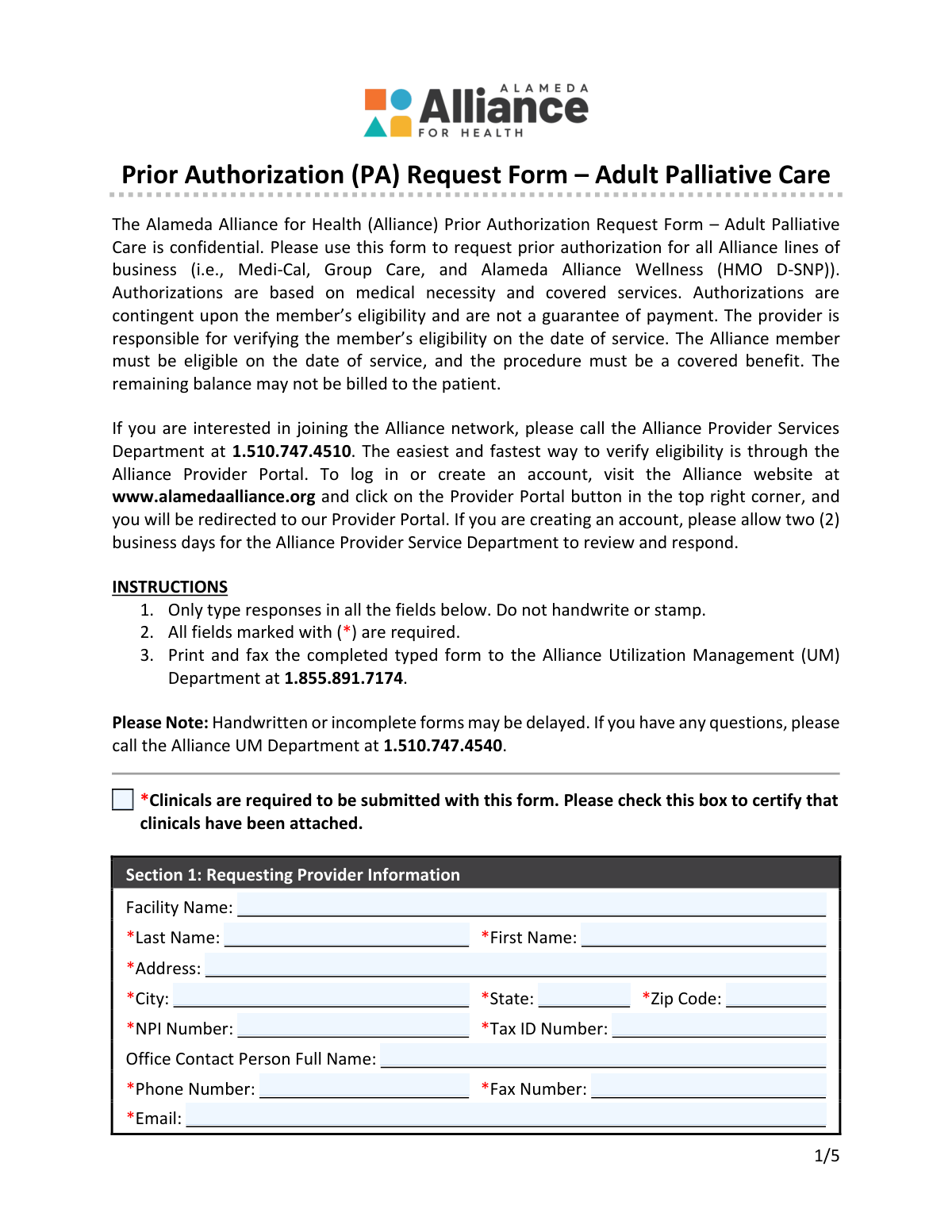
The Alameda Alliance for Health Prior Authorization (PA) Request Form – Adult Palliative Care is a confidential utilization management form providers use to request prior authorization for adult palliative care services for Alliance members. It collects requesting and rendering provider details, member demographics and coverage identifiers, request type (routine/urgent/retro/standing referral/change), eligibility criteria, and required diagnosis and service codes (ICD and CPT/HCPCS). Submitting complete information and supporting clinical documentation is important because authorization decisions are based on medical necessity, covered benefits, and member eligibility, and incomplete/handwritten submissions may delay processing. Today, this form can be filled out quickly and accurately using AI-powered services like Instafill.ai, which can also convert non-fillable PDF versions into interactive fillable forms.
Our AI automatically handles information lookup, data retrieval, formatting, and form filling.
It takes less than a minute to fill out Alliance PA Request – Adult Palliative Care using our AI form filling.
Securely upload your data. Information is encrypted in transit and deleted immediately after the form is filled out.

Form specifications

Form name: Alameda Alliance for Health Prior Authorization (PA) Request Form – Adult Palliative Care
Number of pages: 5
Filled form examples: Form Alliance PA Request – Adult Palliative Care Examples
Language: English
Categories: Alameda Alliance forms, CAR forms
main-image

Instafill Demo: filling out a legal form in seconds

How to Fill Out Alliance PA Request – Adult Palliative Care Online for Free in 2026

Are you looking to fill out a ALLIANCE PA REQUEST – ADULT PALLIATIVE CARE form online quickly and accurately? Instafill.ai offers the #1 AI-powered PDF filling software of 2026, allowing you to complete your ALLIANCE PA REQUEST – ADULT PALLIATIVE CARE form in just 37 seconds or less.
Follow these steps to fill out your ALLIANCE PA REQUEST – ADULT PALLIATIVE CARE form online using Instafill.ai:
  1. 1 Go to Instafill.ai and upload the PDF (or search/select the “Alameda Alliance for Health Prior Authorization (PA) Request Form – Adult Palliative Care”).
  2. 2 Let the AI detect and create fillable fields (including checkboxes and code tables) and confirm the form version/date if prompted.
  3. 3 Enter Requesting Provider Information (facility, provider name, address, NPI, Tax ID, contact details) and certify that clinicals are attached.
  4. 4 Choose the Type of Request (retro, routine, standing referral, urgent, or authorization change) and add the Alliance authorization number if requesting a change.
  5. 5 Complete Member Information (name, DOB, Alliance Member ID, CIN, MBI if applicable, address/phone, and other insurance details).
  6. 6 Fill Requested Service eligibility and qualifying condition checkboxes, then add Rendering/Servicing Provider details, service dates, place of service, out-of-network and discharge planning information as applicable.
  7. 7 Enter at least one ICD diagnosis code and the CPT/HCPCS service code(s) with descriptions/modifiers/units, then have Instafill.ai validate required fields, export the completed form, and submit it per instructions (print and fax to Alliance UM at 1.855.891.7174) with clinical attachments.

Our AI-powered system ensures each field is filled out correctly, reducing errors and saving you time.

Why Choose Instafill.ai for Your Fillable Alliance PA Request – Adult Palliative Care Form?

Speed

Complete your Alliance PA Request – Adult Palliative Care in as little as 37 seconds.

Up-to-Date

Always use the latest 2026 Alliance PA Request – Adult Palliative Care form version.

Cost-effective

No need to hire expensive lawyers.

Accuracy

Our AI performs 10 compliance checks to ensure your form is error-free.

Security

Your personal information is protected with bank-level encryption.

Frequently Asked Questions About Form Alliance PA Request – Adult Palliative Care

This form is used to request prior authorization for adult palliative care services through Alameda Alliance for Health. Authorization decisions are based on medical necessity, covered benefits, and the member’s eligibility on the date of service.

The requesting provider or facility should complete and submit the form to Alliance Utilization Management (UM). The provider is responsible for ensuring all required fields are completed and that clinical documentation is attached.

This form is used for all Alliance lines of business, including Medi-Cal, Group Care, and Alameda Alliance Wellness (HMO D-SNP).

Yes. Clinicals are required, and you must check the box certifying that clinical documentation has been attached, or the request may be delayed.

No. The instructions state you must type responses in all fields and not handwrite or stamp the form; handwritten or incomplete forms may be delayed.

Print and fax the completed typed form to the Alliance UM Department at 1.855.891.7174. If you have questions, you can call UM at 1.510.747.4540.

Select only one request type based on the situation: Routine for standard review, Urgent for imminent serious threats, Retro for certain eligibility/urgent care situations within 90 days of service, Standing Referral for ongoing referral needs, or Authorization Change to modify an existing authorization.

Routine requests may take up to 7 calendar days, urgent requests up to 72 hours, standing referrals up to 3 business days, and retro requests up to 30 calendar days from receipt (and must be within 90 days of the date of service).

Check 'Authorization Change Request' and provide the Alliance Authorization Number. The form instructs you to use a separate sheet to specify the requested changes and/or attach supporting documentation.

Required member fields include name, date of birth, Alliance Member ID, CIN, and address details. For newborn services, you should provide the mother’s information.

You must select one general eligibility option (decline in health status and not hospice-eligible, or hospice-eligible but declines) and select at least one qualifying condition (CHF, COPD, advanced cancer, liver disease, or advanced dementia/Alzheimer’s) that meets the criteria listed on the form.

You must provide the rendering provider’s name, address, NPI, Tax ID, phone/fax, and the starting service date, plus the place of service (select only one). Include an ending service date if known.

Complete Section 6 if the requested service is out-of-network by selecting 'Yes' and choosing one reason (e.g., in-network not available, timely access, specialized expertise). If it is in-network, select 'No' and no out-of-network reason is needed.

At least one ICD diagnosis code is required, and you should mark which one is primary. For the requested services, enter the CPT/HCPCS code(s), description, any modifiers, quantity, unit type, and total billable units.

No—authorization is contingent on eligibility and covered benefits and is not a guarantee of payment. The form states the remaining balance may not be billed to the patient.

Yes—AI tools like Instafill.ai can help auto-fill form fields accurately and save time by pulling details from your provided information. Typically, you upload the PDF to Instafill.ai, review the extracted fields (provider/member/codes/dates), and then download a completed, typed version for printing and faxing.

If the PDF is flat/non-fillable, Instafill.ai can convert it into an interactive fillable form so you can type into the fields. After conversion, you can auto-fill and export the completed form for submission.

Compliance Alliance PA Request – Adult Palliative Care
Validation Checks by Instafill.ai

1
Clinicals Attachment Certification Required
Validates that the 'Certify Clinicals Attached' checkbox is checked before the request can be submitted. The form explicitly states clinicals are required, and UM review cannot proceed without supporting documentation. If unchecked, the submission should be rejected or routed to a pend/deficiency workflow requesting the missing clinicals.
2
Requesting Provider Required Fields Completeness
Ensures all required requesting provider fields are present: provider last name, first name, address, city, state, zip code, NPI, tax ID, phone number, fax number, and email. These fields are necessary to identify the submitting entity and to communicate determinations or requests for additional information. If any required field is missing, the form should fail validation and prompt the user to complete the missing items.
3
Provider NPI Format and Check-Digit Validation (Requesting and Rendering)
Validates that each NPI is exactly 10 digits and passes the NPI Luhn check-digit algorithm. This prevents typographical errors and ensures the provider can be correctly matched to enrollment/credentialing and claims systems. If validation fails, the submission should be blocked and the user instructed to correct the NPI.
4
Tax ID (TIN) Format Validation (Requesting and Rendering)
Checks that the Tax ID Number is a valid EIN/TIN format (typically 9 digits, allowing optional hyphen formatting such as XX-XXXXXXX). Correct TINs are critical for provider identification, contracting, and payment routing. If the TIN is not 9 digits or contains invalid characters, the form should be rejected with a clear error message.
5
Phone and Fax Number Format Validation
Validates that requesting and rendering provider phone/fax numbers (and member phone if provided) contain valid US phone formats (10 digits, allowing common punctuation and optional country code). Reliable contact numbers are required for time-sensitive UM outreach, especially for urgent requests. If invalid, the system should require correction before submission or at minimum flag the record as incomplete for outreach risk.
6
Email Address Syntax and Domain Validation
Ensures the requesting provider email is present (required) and matches standard email syntax (local@domain) with a plausible domain structure. Email is often used for notifications and follow-up, and malformed addresses lead to failed communications and processing delays. If invalid, the submission should be blocked until a valid email is provided.
7
Type of Request: Exactly One Selection Enforced
Validates that exactly one request type is selected among Retro, Routine, Standing Referral, Urgent, and Authorization Change Request. The selected type drives processing timelines and internal routing, so multiple selections create ambiguity and operational errors. If none or more than one is selected, the form should fail validation and require a single choice.
8
Authorization Change Request Requires Authorization Number
If 'Authorization Change Request' is selected, validates that the Alliance Authorization Number is provided and meets expected formatting rules (e.g., non-empty, minimum length, allowed characters). The authorization number is required to locate the existing authorization and apply changes accurately. If missing or malformed, the request should be rejected or pended until a valid authorization number is supplied.
9
Member Required Fields and Date of Birth Format/Validity
Ensures required member fields are completed: last name, first name, date of birth, Alliance Member ID, CIN, address, city, state, and zip code. Also validates DOB is in MM/DD/YYYY format and represents a real calendar date not in the future. If any required member field is missing or DOB is invalid, the submission should be blocked because eligibility and member matching cannot be reliably performed.
10
Member Identifier Format Validation (Alliance Member ID, CIN, and Optional MBI)
Validates that the Alliance Member ID and CIN conform to expected character sets/lengths (e.g., alphanumeric where applicable, no illegal symbols) and are not obviously placeholder values (e.g., all zeros). If an MBI is provided, validates it matches Medicare MBI rules (11 characters, uppercase letters and digits excluding S, L, O, I, B, Z in the appropriate positions). If identifiers fail validation, the form should be rejected or pended because incorrect IDs can cause misidentification and eligibility/coverage errors.
11
General Eligibility: Exactly One Selection Required
Validates that exactly one General Eligibility option is selected: either 'not eligible for hospice' or 'eligible for hospice but declines.' This is a core program eligibility gate and must be unambiguous for clinical review. If both or neither are selected, the submission should fail validation and require a single selection.
12
Qualifying Condition: At Least One Condition Selected
Ensures at least one qualifying condition checkbox is selected (CHF, COPD, Advanced Cancer, Liver Disease, or Advanced Dementia/Alzheimer’s). The form states the member must meet at least one condition to be eligible for adult palliative care authorization. If none are selected, the request should be rejected or pended as not meeting minimum submission criteria.
13
Service Dates Format and Chronological Consistency
Validates that Starting Service Date is present (required) and in MM/DD/YYYY format, and that Ending Service Date (if provided) is also valid and not earlier than the start date. Correct service dates are essential for eligibility verification, retroactive rules, and authorization span creation. If dates are invalid or inconsistent, the submission should be blocked and the user prompted to correct them.
14
Retro Request 90-Day Timeliness Rule
If 'Retro' is selected, validates that the Starting Service Date (or date of service, if captured elsewhere) is within 90 days of the submission/receipt date. The form specifies retro requests must be within 90 days, and late submissions may be administratively denied. If outside the 90-day window, the system should flag for denial/exception handling and require justification or prevent submission per policy.
15
Place of Service: Exactly One Selection and 'Other' Description Required
Validates that exactly one Place of Service is selected and that if 'Other (99)' is chosen, the accompanying description field is populated with a meaningful location. Place of service affects benefit rules, coding, and network/payment logic, and 'Other' without detail is not actionable. If multiple/none are selected or 'Other' lacks a description, the submission should fail validation.
16
Out-of-Network Logic and Reason Requirement
Validates that the out-of-network question has exactly one answer (Yes or No). If 'Yes' is selected, requires exactly one out-of-network reason to be selected, and if 'Other' is selected, requires a free-text explanation. If these conditions are not met, the request should be rejected or pended because OON determinations require a documented rationale.
17
Discharge Planning Conditional Discharge Date Validation
Validates that the discharge planning question has exactly one answer (Yes or No), and if 'Yes' is selected, a discharge date is provided in MM/DD/YYYY format and is a valid calendar date. Discharge planning requests are time-sensitive and require a target discharge date for appropriate prioritization and coordination. If 'Yes' is selected without a valid discharge date, the submission should be pended for missing critical information.
18
Diagnosis Codes: At Least One ICD-10 and Single Primary Diagnosis
Ensures at least one ICD code is provided and that each entered ICD code matches ICD-10-CM formatting rules (alphanumeric, correct length, optional decimal in the correct position). Also enforces that exactly one of the provided ICD codes is marked as the primary diagnosis (and that a primary checkbox cannot be selected for an empty ICD row). If ICD codes are missing/invalid or primary selection is inconsistent, the submission should fail validation because medical necessity review and claims alignment depend on accurate diagnosis data.
19
Service Line Coding Integrity (CPT/HCPCS, Units, Modifiers)
For each service line, validates that if a CPT/HCPCS code is entered, the description is present, quantity is a positive number, unit type is selected, and total billable units is present and consistent (e.g., numeric and not less than quantity where applicable). Also validates modifiers (if provided) are in valid modifier format (typically 2 characters for CPT modifiers) and do not contain illegal characters. If any populated line has incomplete or invalid coding/units, the system should reject or pend the submission to prevent incorrect authorization creation and downstream claims denials.

Common Mistakes in Completing Alliance PA Request – Adult Palliative Care

Submitting without checking the “Clinicals attached” certification box

People often attach clinical notes but forget to check the required certification box, especially when rushing to fax the packet. UM may treat the request as incomplete and delay review until the attestation is corrected or the packet is re-sent. Always check the box and confirm the clinicals are actually included in the same fax transmission. AI-powered tools like Instafill.ai can flag unchecked required checkboxes before submission and help ensure attachments are accounted for in the workflow.

Handwriting, stamping, or using non-typed entries

This form explicitly instructs users to type responses only, but many offices still handwrite corrections or stamp information out of habit. Handwritten or stamped fields can be illegible after faxing, leading to data entry errors, follow-up calls, and processing delays. Avoid this by completing the form digitally and reprinting a clean typed version if changes are needed. If the form is only available as a flat non-fillable PDF, Instafill.ai can convert it into a fillable version and keep entries consistently typed.

Selecting multiple request types (or none) in Section 2

Section 2 requires selecting only one request type, but submitters sometimes check both “Routine” and “Urgent,” or forget to select any option. This creates ambiguity about the required turnaround time and can cause the request to be routed incorrectly or downgraded for review. Choose exactly one option that matches the clinical situation and timing rules (e.g., Retro within 90 days). Instafill.ai can enforce single-select logic and warn when multiple boxes are checked.

Choosing “Retro” without meeting the 90-day rule or without a valid retro rationale

Retro requests are limited to eligibility issues or urgent care and must be submitted within 90 days of the date of service, but many submissions miss the deadline or use Retro for convenience. This can result in denial or a request to resubmit under the correct type, delaying care coordination and payment decisions. Verify the date of service and document the retro-eligible reason before selecting Retro. Automated validation in Instafill.ai can prompt for date-of-service checks and help prevent out-of-window retro submissions.

Marking “Authorization Change Request” but omitting the Alliance Authorization Number

When requesting a change to an existing authorization, the form requires the Alliance authorization number, yet it’s frequently left blank or replaced with an internal reference number. UM cannot locate the existing authorization reliably, which can stall the change request or lead to duplicate authorizations. Always enter the exact Alliance authorization number and attach a separate sheet describing the requested changes as instructed. Instafill.ai can require the authorization number field when that request type is selected and validate expected formats.

Member identification mix-ups (Alliance Member ID vs. CIN vs. MBI)

Submitters often swap identifiers, enter the CIN in the Alliance Member ID field, or leave CIN blank even though it is required. Incorrect identifiers can prevent eligibility verification, cause misrouting to the wrong member record, and delay authorization decisions. Carefully copy each ID into the correct field and double-check against the member’s card/eligibility system. Instafill.ai can map data from source systems to the correct fields and apply format checks to reduce transposition errors.

Incorrect date formats or inconsistent service dates

The form specifies MM/DD/YYYY, but people frequently use DD/MM/YYYY, omit leading zeros, or enter a starting service date after the ending service date. Date errors can trigger UM follow-ups, affect retro timeliness determinations, and create confusion about the requested authorization period. Always use MM/DD/YYYY and confirm the requested service span is logical and matches the clinical documentation. Instafill.ai can auto-format dates and flag impossible or inconsistent date ranges.

Failing to select exactly one General Eligibility option in Section 4

Section 4 requires selecting only one general eligibility statement (decline in health status and not hospice-eligible, or hospice-eligible but declines), but submissions sometimes check both or neither. This makes it unclear whether palliative care criteria are met and can lead to requests for additional information or denial for insufficient documentation. Select the single statement that matches the patient’s situation and ensure the clinicals support it. Instafill.ai can enforce single-choice selection and prompt for missing required selections.

Checking a qualifying condition without documenting the required sub-criteria

The qualifying conditions (CHF, COPD, advanced cancer, liver disease, advanced dementia) have specific thresholds (e.g., EF < 30%, oxygen liters/min, MELD > 19, KPS ≀ 70, dementia criteria 4/5), but many forms simply check the box without evidence in the attached clinicals. UM may pend the request for missing metrics or determine medical necessity is not established. Ensure the clinical packet explicitly includes the required measurements, dates, and supporting notes that match the selected condition’s criteria. Instafill.ai can provide checklist-style prompts to ensure required supporting data is included when a condition is selected.

Requesting out-of-network services without selecting a single reason (or selecting a reason while answering “No”)

Section 6 requires a Yes/No for out-of-network and, if Yes, exactly one reason; common errors include marking “Yes” but leaving the reason blank, checking multiple reasons, or selecting a reason while also marking “No.” This can delay routing to the appropriate review pathway and may result in a request for clarification. Make sure the Yes/No answer matches the network status and choose one best reason, adding details if “Other” is selected. Instafill.ai can apply conditional logic so the reason field is required only when “Yes” is selected and restrict it to one choice.

Missing or invalid ICD and CPT/HCPCS coding details (primary diagnosis, modifiers, units)

At least one ICD code is required, but submissions often leave ICDs blank, use non-billable/invalid codes, or forget to mark which diagnosis is primary. Similarly, CPT/HCPCS lines are frequently missing quantity, unit type, total billable units, or include mismatched modifiers, which can cause UM to pend the request or lead to downstream billing issues. Enter at least one valid ICD-10 code, mark only one as primary, and complete each service line with consistent quantity/unit calculations. Instafill.ai can validate code formats, enforce “one primary” selection, and help calculate/format units consistently.
Saved over 80 hours a year

“I was never sure if my IRS forms like W-9 were filled correctly. Now, I can complete the forms accurately without any external help.”

Kevin Martin Green

Your data stays secure with advanced protection from Instafill and our subprocessors

Robust compliance program

Transparent business model

You’re not the product. You always know where your data is and what it is processed for.

ISO 27001, HIPAA, and GDPR

Our subprocesses adhere to multiple compliance standards, including but not limited to ISO 27001, HIPAA, and GDPR.

Security & privacy by design

We consider security and privacy from the initial design phase of any new service or functionality. It’s not an afterthought, it’s built-in, including support for two-factor authentication (2FA) to further protect your account.

Fill out Alliance PA Request – Adult Palliative Care with Instafill.ai

Worried about filling PDFs wrong? Instafill securely fills alameda-alliance-for-health-prior-authorization-pa-request-form-adult-palliative-care forms, ensuring each field is accurate.