
Yes! You can use AI to fill out Continental American Insurance Company (CAIC) / Aflac Group Critical Illness Claim Form (with Attending Physician’s Statement, HIPAA Authorization to Obtain Information, and Electronic Funds Transaction Authorization)
Don't type 139 fields by hand. Tell our AI about yourself, or upload a document you already have, and it fills every field in seconds. You check it, then download, print or sign.
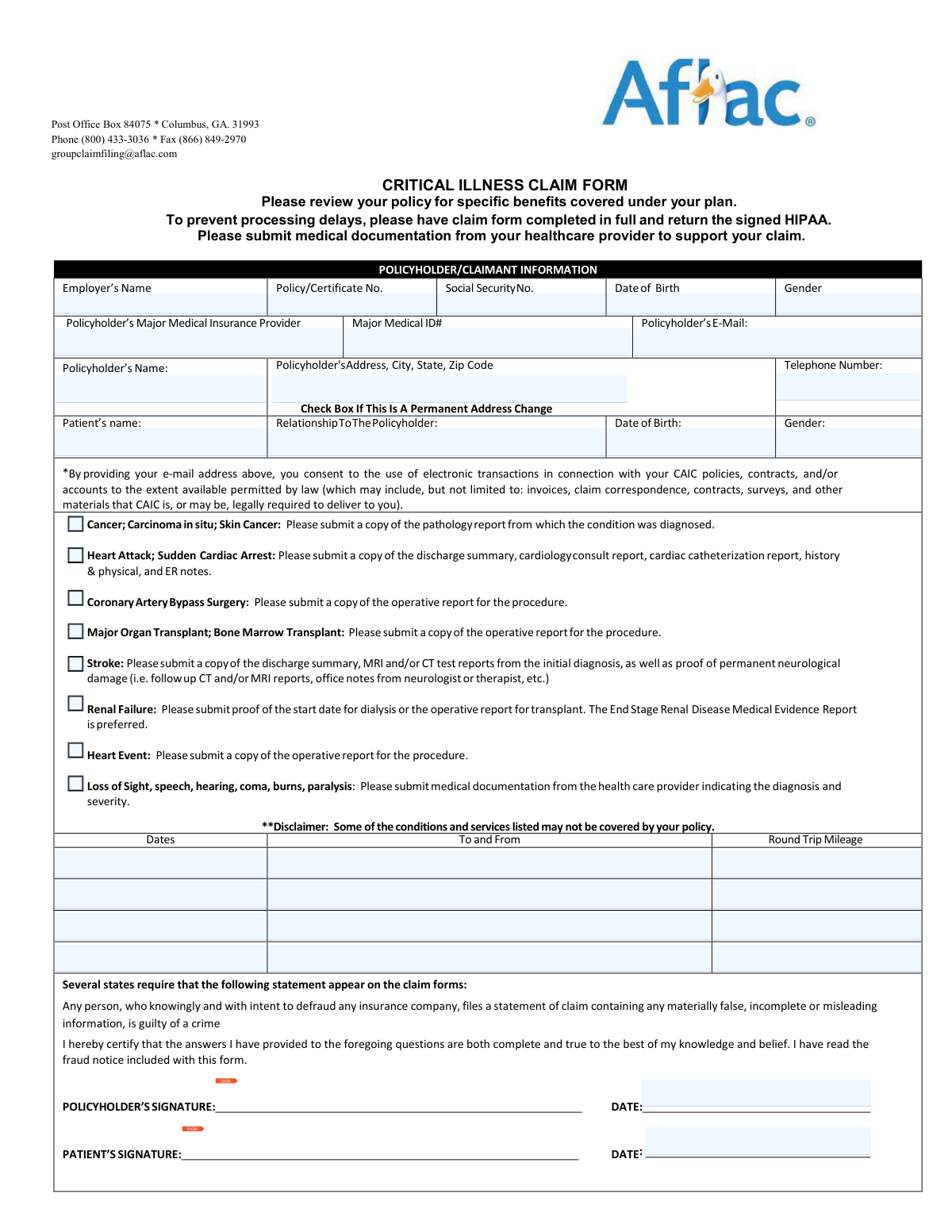
The AI does the filling. You just check it.
No typing into boxes, nothing to install.
What this form asks for
The AI fills all of it, from your answers or your documents.
The AI checks your answers before you download
16 checks built for this form, so a wrong date or a missing answer is caught before anyone else sees it.
Validate that a Policy/Certificate Number is provided and that it matches the eligibility rule stated on the EFT section: if the policy number contains both letters and numbers (e.g., 0Y123B45), the request must be routed to Aflac (not CAIC) and CAIC direct deposit cannot be processed. This prevents misrouting and processing delays caused by submitting to the wrong administrator. If the format indicates an Aflac-administered policy, the submission should be rejected or redirected with clear instructions and the correct link.
Ensure required policyholder fields are completed: Employer’s Name, Policyholder’s Name, Policy/Certificate No., Date of Birth, Gender, Address (including City/State/ZIP), and Telephone Number. These fields are necessary to identify the insured, match coverage, and contact the claimant for missing information. If any required field is missing, the claim should be flagged as incomplete and held for follow-up before adjudication.
Validate that the Social Security Number, when provided, is exactly 9 digits (optionally allowing hyphens in the ###-##-#### pattern) and is not an obviously invalid value (e.g., all zeros). SSN is used for identity matching and to reduce duplicate records. If the SSN fails validation, the system should reject the value and request correction or allow submission only if SSN is truly optional for that section.
Validate that all dates (DOBs, diagnosis dates, symptom onset, admitted/discharged, signature dates, expected return-to-work dates) are in a valid date format and represent real calendar dates. Also enforce realism rules (e.g., DOB not in the future; admission/discharge not before DOB; signature dates not in the future beyond a small tolerance if allowed). If invalid or unrealistic, the submission should be blocked or routed to exception handling to prevent downstream calculation and eligibility errors.
Require Patient’s Name, Relationship to Policyholder, Patient DOB, and Patient Gender when the patient is not the policyholder, and ensure the relationship selection is present and plausible. This is critical for dependent coverage validation and for determining who must sign HIPAA (adult dependent vs minor). If relationship or patient identifiers are missing/inconsistent, the claim should be marked incomplete and the correct signer requirements should be enforced.
Validate telephone numbers for the policyholder and attending physician using a consistent rule (e.g., 10 digits for US numbers, allowing common punctuation). Accurate phone numbers are essential for obtaining missing documentation and clarifying medical details. If a phone number is invalid, the system should prompt for correction and prevent submission if the phone is required for that section.
And 10 more checks
- Email Address Format and Consent Capture
- Signature Presence and Wet-Signature Requirement Enforcement
- HIPAA Authorization Correct Signer Logic (Adult Dependent/Minor/Representative)
- Attending Physician Statement Minimum Completeness
- Condition-Specific Documentation Requirement Validation
- Myocardial Infarction Criteria Logical Consistency
- Hospitalization and Confinement Date Logic
- Work Status and Return-to-Duty Date Consistency
- EFT (Direct Deposit) Selection and Banking Field Validation
- Duplicate Identity and Cross-Form Consistency (Names/DOB/Certificate #)
Let AI fill out your CAIC Critical Illness Claim Form
No typing. Every field filled in seconds, checked, ready to sign.
How to Fill Out CAIC Critical Illness Claim Form Online for Free in 2026
What the AI walks you through.
- Confirm you have the correct administrator/form (this packet is for Aflac Group/CAIC; verify your policy/certificate number and review your policy for covered benefits).
- Complete the Policyholder/Claimant Information section (employer, policy/certificate number, contact details, patient information, relationship, and any address change).
- Identify the critical illness condition/event being claimed and gather the required supporting medical documentation (e.g., chart notes/admission-discharge paperwork, operative/surgical report, pathology report, imaging/ER/cardiology records, dialysis start proof, etc., as applicable).
- Have the treating provider complete and sign the Attending Physician’s Statement (Page 1–2), including diagnosis dates, clinical criteria questions, restrictions/limitations, hospitalization details, and return-to-work expectations.
- Complete and sign the HIPAA Authorization to Obtain Information (AGC06106_2016); ensure the correct person signs (adult dependent signs for themselves; parent/guardian signs for a minor; legal representative signs if applicable).
- If you want direct deposit, complete the Electronic Funds Transaction Authorization, attach a voided check or bank direct deposit form, and sign (note: forms without signatures will not be processed; electronic signatures not accepted).
- Review fraud warnings, sign and date all required signature lines (policyholder/patient/physician as applicable), then submit the packet and attachments by email to [email protected] or fax to 1-866-849-2970.
Common Mistakes in Completing CAIC Critical Illness Claim Form
The ones the AI is built to catch.
Leaving required policyholder/claimant fields blank or partially filled
Confusing the policyholder with the patient (or mixing their information)
Not submitting the correct medical documentation for the specific condition
Providing the wrong “date of diagnosis” (using visit date instead of the form’s definition)
Submitting a stroke claim without proof of permanent neurological damage or including excluded events
Attending Physician Statement left incomplete or filled out by the claimant
Missing signatures and dates (policyholder, patient, physician, HIPAA, EFT)
HIPAA authorization signed by the wrong person (adult dependent/minor rules ignored)
Incorrect or incomplete direct deposit (EFT) details and missing voided check/bank form
Submitting the EFT form for an ineligible policy number (letters + numbers)
Sending the claim to the wrong destination or omitting attachments when emailing/faxing
Frequently Asked Questions About CAIC Critical Illness Claim Form
Is it really free for 7 days?
Can I fill other forms too?
How do I cancel?
How does the AI fill out CAIC Critical Illness Claim Form?
What happens to my information?
How complex is CAIC Critical Illness Claim Form to fill out?
What is this Critical Illness Claim Form used for?
Who needs to complete this claim form?
Where do I send the completed claim form and documents?
What supporting medical documentation is required with my claim?
What documents are required for a cancer or carcinoma in situ claim?
What documents are required for a heart attack (myocardial infarction) or sudden cardiac arrest claim?
What documents are required for coronary artery bypass surgery or a transplant claim?
What documents are required for a stroke claim, and are TIAs covered?
What documentation is needed for renal failure (end stage renal disease)?
Do benefits get paid to me or to my doctor/hospital?
Do I have to sign the HIPAA authorization, and who should sign it?
How do I report a permanent address change on the claim form?
Can I choose to receive claim communications electronically by providing my email address?
How do I set up direct deposit for my claim payment, and what do I need to include?
Are electronic signatures accepted on the direct deposit form?
What if my policy number contains both letters and numbers—should I use this form?
Get your CAIC Critical Illness Claim Form filled out by AI
$0 today. Cancel before Nov 2 and you pay nothing.
Other forms like this one
insurance forms: Form 1095-A, Health Insurance Marketplace Statement, Form SSA-4-BK, Application for Child's Insurance Benefits, Form SSA-10, Application for Widow's or Widower's Insurance Benefits, Form 1095-C, Employer-Provided Health Insurance Offer and Coverage, National Integrity Life Insurance Company Ownership Change Request Form (NI-77-0039-2505), Record of Advice and Needs Analysis (Non-Life Insurance — Personal and Commercial Lines), Form 7206 (2025), Self-Employed Health Insurance Deduction, Prudential Group Disability Insurance – Education and Employment History Form (GL.2009.009, Ed. 06/2017), acord-25-201603-certificate-of-liability-insurance-1, Brotherhood Mutual Insurance Company Ministry Driver Screening Form (A99), Assurity Life Insurance Company Disability Claim Form — Attending Physician’s Statement, Amateur Sports / Activities Accident Insurance Quote Request Form (Philadelphia Insurance Companies), Martial Arts Studio General Liability and Property Application (Fitness and Wellness Insurance / Philadelphia Insurance Companies) (03/2011), The Prudential Insurance Company of America Group Disability Insurance – Education and Employment History Form (GL.2009.009, Ed. 06/2017), VA Form 29-357, Claim for Disability Insurance Benefits (Government Life Insurance), CMS-1500 (02-12), Health Insurance Claim Form (NUCC Approved) (OMB 0938-1197), Prudential Group Disability Insurance – Education and Employment History Form (GL.2009.009, Ed. 06/2017), HDFC ERGO General Insurance Company Limited – Request for Cashless Hospitalisation for Health Insurance (Policy Part – C), Beneficiary Designation/Change - Principal Life Insurance Company, Principal Life Insurance Company UCTIE INTERNATIONAL UNION 401(K) SAVINGS PLAN Enrollment Form
insurance claim forms: Assurity Life Insurance Company Disability Claim Form — Attending Physician’s Statement, VA Form 29-357, Claim for Disability Insurance Benefits (Government Life Insurance), CMS-1500 (02-12), Health Insurance Claim Form (NUCC Approved) (OMB 0938-1197), Standard Health Insurance Claim Form - Part B, DWC002, Employer’s report for reimbursement of voluntary payment, Form BWC-1141, Request for Medical Information, Lincoln Financial Group Requesting a distribution, Bajaj Allianz Overseas Travel Insurance Claim Form, CMS-1500 Health Insurance Claim Form (OMB-0938-0999), ACORD 160, Property Loss Notice
VA claim forms: Form OWCP-915, Claim for Medical Reimbursement, Form 8862, Information To Claim Certain Credits, Form CA-7, Claim for Compensation, Form CA-5, Claim for Compensation, Form SC-100, Plaintiff's Claim and ORDER to Go to Small Claims Court, Form 20-0995, Decision Review Request: Supplemental Claim, Form 104, List of Creditors 20 Largest Unsecured Claims, Form 941-X (Rev. April 2023), Adjusted Employer’s QUARTERLY Federal Tax Return or Claim for Refund, Judicial Council of California Form SC-104, Proof of Service (Small Claims), Immigration and Refugee Board of Canada (IRB) – Refugee Protection Division (RPD) Basis of Claim Form (for persons claiming refugee protection in Canada) (RPD.02.01), SC-108, Request to Correct or Cancel Judgment and Answer (Small Claims), Judicial Council of California Form SC-105, Request for Court Order and Answer (Small Claims), SC-120, Defendant’s Claim and ORDER to Go to Small Claims Court (Small Claims), Judicial Council of California Form SC-104, Proof of Service (Small Claims), Judicial Council of California Form SC-108, Request to Correct or Cancel Judgment and Answer (Small Claims), SC-105, Request for Court Order and Answer (Small Claims), Judicial Council of California Form SC-120, Defendant’s Claim and ORDER to Go to Small Claims Court (Small Claims), Small Claim and Notice of Small Claim (ORS 46.425) (OJD Official) (Jan 2026), VA Form 21-4138, Statement in Support of Claim, Form SSA-795, Statement of Claimant or Other Person
authorization forms: Form I-765, Application for Employment Authorization, Form CMS-588, EFT Authorization Agreement, Form 8821, Tax Information Authorization, Form 8879, IRS e-file Signature Authorization, Form SSA-827, Authorization to Disclose Information, Form I-905, Application for Authorization to Issue Certification for Health Care Workers, Form G-1650, Authorization for ACH Transactions, Arizona Form 285, General Disclosure/Representation Authorization Form, Arizona Form 285-I, Individual Income Tax Disclosure/Representation Authorization Form, The Department of Medical Assistance Services Applied Behavior Analysis Preservice Service Authorization Request Form (Effective Dates of Service 09/01/2025 and after), Form CH-006: PA-BH-Res-PCS, Oregon Behavioral Health Support Program Plan of Care Authorization (Plan of Care Request for Behavioral Health Residential or Personal Care Services), HIPAA Authorization Form, Authorization for the Release of Protected Health Information, Form G-1450, Authorization for Credit Card Transactions, Prior Authorization (PA) Request Form – Adult Palliative Care (Alameda Alliance for Health), Alameda Alliance for Health Prior Authorization (PA) Request Form – Adult Palliative Care, Manulife Group Benefits Drug Prior Authorization Form – Mounjaro (Tirzepatide) (GL5197E), Manulife Group Benefits Drug Prior Authorization Form (Ozempic/Semaglutide) – GL5197E, Out-of-Network Pre-Authorization and Exception Request Form, Form SSA-827 (06-2024), Authorization to Disclose Information to the Social Security Administration (SSA), Manulife Group Benefits Drug Prior Authorization Form (Wegovy/Semaglutide) – GL5197E - MLI (08/2025-WEGOV)
PA state forms: Form 1095-A, Health Insurance Marketplace Statement, Form W-2, Wage and Tax Statement, Form 593, Real Estate Withholding, Form 8938, Statement of Specified Foreign Financial Assets, Form CMS-2567, Statement of Deficiencies, Form 1098, Mortgage Interest Statement, Form 1098-T, Tuition Statement, Form 1099-S, Proceeds From Real Estate Transactions, Form 1098-E, Student Loan Interest Statement, Form DS-3053, Statement of Consent, Form DS-86, Statement of Non-Receipt of a U.S. Passport, Form DS-86, Statement of Non-Receipt of a U.S. Passport, Form 108, Statement of Intention, Form 107, Statement of Financial Affairs, Form 121, Statement About Your SSNs, Form 122A-1, Chapter 7 Statement of Current Monthly Income, Center for Infertility & Reproductive Surgery – New Patient Questionnaire and Patient/Guarantor Statement (Brigham and Women’s Hospital, Department of Obstetrics and Gynecology), Adult Travel Document Application for Stateless and Protected Persons in Canada (16 years of age or over) (PPTC 190), Form W-8IMY (Rev. October 2021), Certificate of Foreign Intermediary, Foreign Flow-Through Entity, or Certain U.S. Branches for United States Tax Withholding and Reporting, Form W-2, Wage and Tax Statement (2025)
physician forms: Form CA-20, Attending Physician's Report, Form 1776, Physician’s Statement for Disabled License Plates or Placards, Assurity Life Insurance Company Disability Claim Form — Attending Physician’s Statement, Physician’s Statement of Disability / Functional Limitations (ICD Diagnosis Codes, Treatment, ADLs, and Return-to-Work), California Participating Physician Application, National Fire & Marine Insurance Company Physicians Professional Liability Application, CMS-855I, Medicare Enrollment Application for Physicians and Non-Physician Practitioners, Physician Certification Statement for Non-Emergency Medical Transportation, Form CMS L564, Physician's/Supplier's Statement for Emergency Services, Physician's Professional Liability Insurance Application, Attending Physician’s Statement, Attending Physician's Statement for Disability Claim, Physician's Report for Child Care, Rule 12.36—Form 4: Physician or Mental Health Professional’s Report of Examination, Form CMS-460, Medicare Participation Agreement, Form CMS-855O, Medicare Enrollment Application
insurance authorization forms: Advanced Imaging Prior Authorization Request Form, Outpatient Imaging Prior Authorization Request Form, Radiology Prior Authorization Request Form, Texas Standard Prior Authorization Request Form for Health Care Services, Texas Standard Prior Authorization Request Form for Prescription Drug Benefits, UnitedHealthcare Prior Authorization Request Form, Indiana Health Coverage Programs Prior Authorization Request Form (Version 10.0, January 2026)
company forms: Form S-1, Surety Company Annual Report, National Integrity Life Insurance Company Ownership Change Request Form (NI-77-0039-2505), QBCC Licence Application Form – Company (Application made under section 33, Queensland Building and Construction Commission Act 1991), California Form 568 (2024), Limited Liability Company Return of Income, Brotherhood Mutual Insurance Company Ministry Driver Screening Form (A99), Assurity Life Insurance Company Disability Claim Form — Attending Physician’s Statement, Due Diligence Form (Australian Company) – The Perth Mint, The Prudential Insurance Company of America Group Disability Insurance – Education and Employment History Form (GL.2009.009, Ed. 06/2017), Pennsylvania Department of State — Certificate of Termination (Domestic Limited Liability Company) (15 Pa.C.S. § 8872(f)) (DSCB:15-8872(f)), Louisiana Secretary of State – Notice of Change of Registered Office and/or Change of Registered Agent (Domestic Limited Liability Company) (R.S. 12:1308) (Form SS983, Rev. 01/24), Form LLC1050, Articles of Cancellation of a Virginia Limited Liability Company, HDFC ERGO General Insurance Company Limited – Request for Cashless Hospitalisation for Health Insurance (Policy Part – C), Anmeldung zum R+V-Firmenportal Vorsorge (Registration for the R+V Company Portal for Pensions), Beneficiary Designation/Change - Principal Life Insurance Company, Principal Life Insurance Company UCTIE INTERNATIONAL UNION 401(K) SAVINGS PLAN Enrollment Form, Principal Life Insurance Company Death Notification Form, Principal Life Insurance Company Form PG4701, In-Plan Roth Conversion – No Spousal Consent Needed, Principal Life Insurance Company Administration Guide, Principal Life Insurance Company Small Amounts Benefit Election, SEC Application for an Order under Section 17(b) of the Investment Company Act of 1940 (File No. 812-11000)
HIPAA forms: HIPAA Authorization for Release of Health-Related Information, HIPAA Authorization Form, Authorization for the Release of Protected Health Information, California HIPAA Authorization Form, Authorization for the Release of Protected Health Information, Kaiser Permanente Authorization for Use or Disclosure of Patient Health Information, Minnesota Standard Consent Form to Release Health Information, UCLA Form #30910, Authorization for Release of Health Information, HIPAA Authorization Form for Release of Protected Health Information, OCA Official Form No.: 960, Authorization for Release of Health Information Pursuant to HIPAA
group insurance forms: Principal Group Disability Insurance Options (Forms GC 3000-2, GC 4000-2, GP53705-05), Prudential Group Disability Insurance – Education and Employment History Form (GL.2009.009, Ed. 06/2017), The Prudential Insurance Company of America Group Disability Insurance – Education and Employment History Form (GL.2009.009, Ed. 06/2017), Prudential Group Disability Insurance – Education and Employment History Form (GL.2009.009, Ed. 06/2017)
NJ state forms: Form 1095-A, Health Insurance Marketplace Statement, Form W-2, Wage and Tax Statement, Form 593, Real Estate Withholding, Form 8938, Statement of Specified Foreign Financial Assets, Form CMS-2567, Statement of Deficiencies, Form 1098, Mortgage Interest Statement, Form 1098-T, Tuition Statement, Form 1099-S, Proceeds From Real Estate Transactions, Form 1098-E, Student Loan Interest Statement, Form DS-3053, Statement of Consent, Form DS-86, Statement of Non-Receipt of a U.S. Passport, Form DS-86, Statement of Non-Receipt of a U.S. Passport, Form 108, Statement of Intention, Form 107, Statement of Financial Affairs, Form 121, Statement About Your SSNs, Form 122A-1, Chapter 7 Statement of Current Monthly Income, Center for Infertility & Reproductive Surgery – New Patient Questionnaire and Patient/Guarantor Statement (Brigham and Women’s Hospital, Department of Obstetrics and Gynecology), Adult Travel Document Application for Stateless and Protected Persons in Canada (16 years of age or over) (PPTC 190), Form W-8IMY (Rev. October 2021), Certificate of Foreign Intermediary, Foreign Flow-Through Entity, or Certain U.S. Branches for United States Tax Withholding and Reporting, Form W-2, Wage and Tax Statement (2025)
state ID forms: Application for Renewal or Duplicate of Alabama Driver License or ID card, Form 1095-A, Health Insurance Marketplace Statement, Form W-2, Wage and Tax Statement, Form 593, Real Estate Withholding, Form 8938, Statement of Specified Foreign Financial Assets, Form CMS-2567, Statement of Deficiencies, Form 1098, Mortgage Interest Statement, Form 1098-T, Tuition Statement, Form 1099-S, Proceeds From Real Estate Transactions, Form 1098-E, Student Loan Interest Statement, Form DS-3053, Statement of Consent, Form DS-86, Statement of Non-Receipt of a U.S. Passport, Form 108, Statement of Intention, Form 107, Statement of Financial Affairs, Form 121, Statement About Your SSNs, Form 122A-1, Chapter 7 Statement of Current Monthly Income, Center for Infertility & Reproductive Surgery – New Patient Questionnaire and Patient/Guarantor Statement (Brigham and Women’s Hospital, Department of Obstetrics and Gynecology), Adult Travel Document Application for Stateless and Protected Persons in Canada (16 years of age or over) (PPTC 190), Form W-8IMY (Rev. October 2021), Certificate of Foreign Intermediary, Foreign Flow-Through Entity, or Certain U.S. Branches for United States Tax Withholding and Reporting, Form W-2, Wage and Tax Statement (2025)
Let AI fill out your CAIC Critical Illness Claim Form
Your trial starts once a card is added. You pay nothing before Nov 2.
Our AI already knows this form, all 139 fields of it. Skip the typing: tell it about yourself, or upload what you have, and it fills the whole form in seconds.
- AI fills every field on all 8 pages, tables and checkboxes included
- No typing into boxes: answer a few questions, or upload a document you already have, an old copy of this form, a photo of a document
- The AI checks the answers; you review and change anything before you download
- Download the finished PDF, print it, or sign it online
- Encrypted, and never used to train AI
Cancel before Nov 2 and you pay nothing.
A card is needed to start the trial. Cancel in two clicks from your account.
Terms · Privacy