
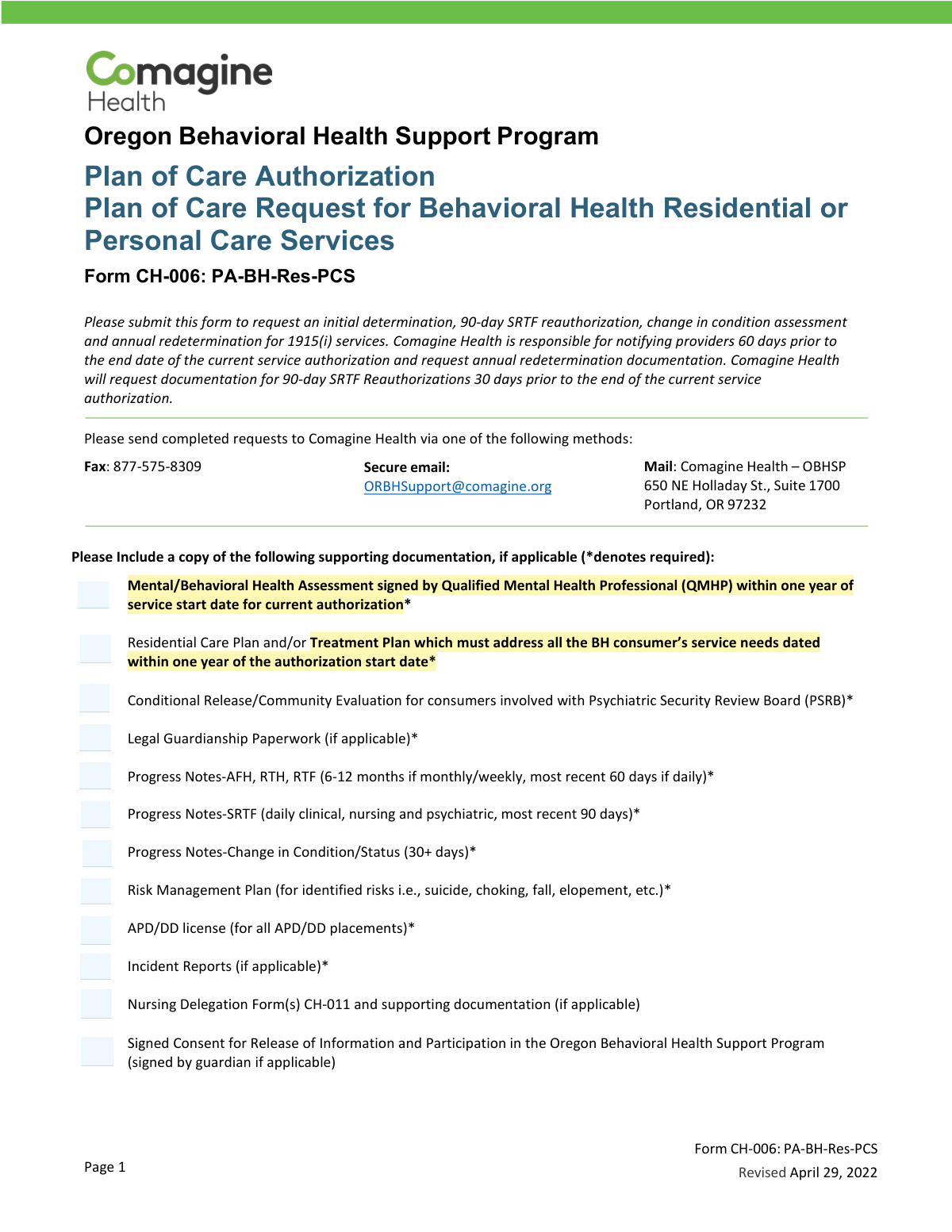
Yes! You can use AI to fill out Form CH-006: PA-BH-Res-PCS, Oregon Behavioral Health Support Program Plan of Care Authorization (Plan of Care Request for Behavioral Health Residential or Personal Care Services)
Don't type 75 fields by hand. Tell our AI about yourself, or upload your insurance card, and it fills every field in seconds. You check it, then download, print or sign.
The AI does the filling. You just check it.
No typing into boxes, nothing to install.
What this form asks for
The AI fills all of it, from your answers or your documents.
The AI checks your answers before you download
19 checks built for this form, so a wrong date or a missing answer is caught before anyone else sees it.
Validates that the Individual/Member Last Name and First Name are both provided and contain alphabetic characters (allowing common punctuation like hyphens and apostrophes). This prevents submissions that cannot be matched to eligibility/clinical records or that contain placeholders (e.g., 'N/A', 'Unknown'). If validation fails, the form should be rejected and routed back for correction because downstream authorization and record matching will be unreliable.
Checks that Date of Birth is present, follows a valid date format (MM/DD/YYYY), and represents a plausible date (not in the future and not unreasonably old, e.g., >120 years). This is important for identity verification and for age-dependent level-of-care options (e.g., TAY programs). If it fails, block submission and request correction to avoid misidentification and incorrect service placement.
Ensures the Primary ICD-10 Diagnosis Code is provided and matches ICD-10 formatting rules (e.g., one letter followed by 2 digits, optional decimal and additional characters such as F32.1). Accurate diagnosis coding is required for medical necessity review and correct authorization categorization. If invalid or missing, flag as incomplete and prevent submission until corrected.
Validates that the Medicaid ID is present and conforms to expected character set and length rules used by the program (e.g., numeric-only if required, or alphanumeric if allowed, with no spaces). This is critical for eligibility verification and linking the request to the correct member record. If validation fails, the request should not proceed because eligibility and prior authorizations cannot be reliably retrieved.
Checks that exactly one Legal Status option is selected (Voluntary, Voluntary by Guardian, Civil Commitment, PSRB, 370 Aid and Assist). This matters because legal status can drive required documentation (e.g., PSRB conditional release/community evaluation) and care coordination requirements. If multiple or none are selected, the submission should be rejected as ambiguous and returned for clarification.
If 'Voluntary by Guardian' is selected or guardian involvement is otherwise indicated, validates that Legal Guardian Name, Relationship, Address, Phone, and Email are completed. This ensures legal authority and contactability for consent and participation requirements. If missing, the form should be flagged as incomplete and held until guardian details are provided.
And 13 more checks
- Guardian contact format validation (phone and email)
- Request type selection is exactly one and drives timing rules
- Admission date required/conditional and valid date
- County of Responsibility and CCO required fields
- Referring provider identifiers and contact information completeness
- Rendering provider identifiers and contact information completeness
- Level of Care selection is exactly one and compatible with request type
- Procedure code required and consistent with Level of Care (including N/A rule)
- Modifiers selection validation (allowed set and duplicates)
- Units requested is numeric, positive, and reasonable for date span
- Dates of Service range validation (format, order, and alignment)
- Member/guardian awareness question required and consistent with guardian status
- Signature blocks completeness and date validity
Let AI fill out your CH-006 (PA-BH-Res-PCS)
No typing. Every field filled in seconds, checked, ready to sign.
How to Fill Out CH-006 (PA-BH-Res-PCS) Online for Free in 2026
What the AI walks you through.
- Select the request type (Initial Request, Annual Redetermination, 90-day SRTF Reauthorization, or Change in Condition) and gather the required supporting documents (e.g., QMHP assessment, care/treatment plan, progress notes, releases, guardianship paperwork if applicable).
- Enter Individual/Member Information: name, date of birth, primary ICD-10 diagnosis code, Medicaid ID, and legal status (Voluntary, Civil Commitment, PSRB, etc.).
- Complete Guardian Information if applicable: guardian name, relationship, address, phone, and email.
- Fill in Request Information: date of admission (if applicable), county of responsibility, CCO, and the Referring Provider’s name, MCD number, phone, email, and fax.
- Complete Rendering Provider details: provider name, MCD number, phone, email, and fax.
- Select the Level of Care and Procedure Code, choose all applicable modifiers, and enter the number of units requested and dates of service (from/to).
- Confirm the individual/guardian is aware of the referral, obtain required signatures (CMHP representative and provider/staff submitting), then submit the completed form and attachments to Comagine Health via fax, secure email, or mail.
Common Mistakes in Completing CH-006 (PA-BH-Res-PCS)
The ones the AI is built to catch.
Missing required supporting documentation or submitting outdated documents
Selecting the wrong request type (Initial vs Annual vs 90-day SRTF vs Change in Condition)
Incorrect or incomplete member identifiers (Medicaid ID, DOB, ICD-10 code)
Leaving legal status blank or choosing a status that conflicts with attachments
Providing guardian information inconsistently or omitting guardianship paperwork
Wrong level of care selection (AFH/RTH/RTF/SRTF/DD/APD/TAY/Independent Living)
Procedure code/modifier errors (wrong code, missing modifiers, or selecting N/A incorrectly)
Units requested and dates of service don’t align (math and timeframe issues)
Missing admission date when required or using an incorrect date format
Incomplete provider information (MCD number, contact details, or mixing referring vs rendering provider)
Missing required signatures, names/titles, or dates
Frequently Asked Questions About CH-006 (PA-BH-Res-PCS)
Is it really free for 7 days?
Can I fill other forms too?
How do I cancel?
How does the AI fill out CH-006 (PA-BH-Res-PCS)?
What happens to my information?
How complex is CH-006 (PA-BH-Res-PCS) to fill out?
What is Form CH-006 (PA-BH-Res-PCS) used for?
Who should complete and submit this form?
Where do I send the completed CH-006 form?
What supporting documents are required with the request?
How recent do progress notes need to be?
When can I submit an Annual Redetermination request?
When can I submit a 90-day SRTF Reauthorization request?
What qualifies as a Change in Condition request, and when is it accepted?
What member information is required in the Individual/Member Information section?
How do I choose the correct legal status on the form?
What provider details are required for the Referring Provider and Rendering Provider sections?
How do I select the correct Level of Care and Procedure Code?
What dates should I enter for Dates of Service and admission date?
Do I need the individual’s or guardian’s consent/awareness to submit the referral?
What additional documents might be required for specific situations (PSRB, APD/DD placements, or identified risks)?
Get your CH-006 (PA-BH-Res-PCS) filled out by AI
$0 today. Cancel before Nov 1 and you pay nothing.
Other forms like this one
CAR forms: Form SSA-44, Medicare Income-Related Monthly Adjustment Amount - Life-Changing Event, Form I-90, Application to Replace Permanent Resident Card, Form 2441, Child and Dependent Care Expenses, Form WH-380-E, Certification of Health Care Provider, Form 4137, Social Security and Medicare Tax on Unreported Tip Income, Form 8959, Additional Medicare Tax, Form 8919, Uncollected Social Security and Medicare Tax, Form CMS-1763, Request for Termination of Medicare Coverage, Form CMS-855O, Medicare Enrollment Application, Form CMS-460, Medicare Participation Agreement, Form CMS-4040, Request for Enrollment in Medicare Part B, Form WH-380-F, Certification of Health Care Provider, Form W-10, Dependent Care Provider’s Identification, Form 1099-K, Payment Card and Third Party Network Transactions, Form CMS-40B, Application for Enrollment in Medicare Part B, Form SS-5-FS, Application for a Social Security Card, Form REG 195, Disabled Person Placard, Form AR-11, Alien's Change of Address Card, Form I-905, Application for Authorization to Issue Certification for Health Care Workers, Form I-131A, Application for Carrier Documentation
health care forms: Form WH-380-E, Certification of Health Care Provider, Form WH-380-F, Certification of Health Care Provider, Form I-905, Application for Authorization to Issue Certification for Health Care Workers, DHS-6696-ENG, Minnesota Health Care Programs Application (MNsure/DHS), Prior Authorization (PA) Request Form – Adult Palliative Care (Alameda Alliance for Health), Medicare Enrolment Application (Australia) – Enrol in Medicare, Re-enrol/Extend Eligibility, Enrol a Newborn, and Register for My Health Record, Alameda Alliance for Health Prior Authorization (PA) Request Form – Adult Palliative Care, Health Assessment – Ontario Health atHome (Fixing Long-Term Care Act, 2021) (Form 4768-69E), Health Assessment - Ontario Health atHome (Fixing Long-Term Care Act, 2021) — Form 4768-69E, Request for Transfer of Records (Adelaide Health Care) – AHC-0013-05-PS (Version 2), Application for Access to Health Care Records (Nepean Blue Mountains Local Health District) – NBMA-431, L.A. Care Behavioral Health Treatment Applied Behavioral Analysis Authorization Request Form, Medicaid Managed Care Applied Behavior Analysis — Authorization Request (Healthy Blue Louisiana, BLAPEC-1989-20), Iowa Advance Directive: Durable Power of Attorney for Health Care and Declaration (Living Will), Direct Rollover Request for Appalachian Regional Healthcare, Inc. Voluntary Plan, Molina Healthcare Prior Authorization Request Form, UnitedHealthcare Prior Authorization Request Form, Optum Rx / UnitedHealthcare Prior Authorization Request Form, Texas Standard Prior Authorization Request Form for Health Care Services, Form T-3, Children with Special Health Care Needs (CSHCN) Services Program Application
behavioral health forms: Form BHVH, Outpatient Behavioral Health – ABA Treatment Request, Geisinger Health Plan Behavioral Health Professional Services Questionnaire, Applied Behavioral Analysis (ABA) Prior Authorization Request Form (Health Net Behavioral Health Autism Center), L.A. Care Behavioral Health Treatment Applied Behavioral Analysis Authorization Request Form, Health Net Applied Behavioral Analysis (ABA) Recommendation and Referral Form (24-989), Evernorth Behavioral Health Applied Behavior Analysis Prior Authorization Form (PCOMM-2025-224), Applied Behavioral Analysis (ABA) Authorization Form, Louisiana Health Connect (BRO-DP-ABA FORM-0822), Form 5385BSP, Behavioral Health Utilization Management Applied Behavioral Analysis (ABA) Initial Request Form, Outpatient Behavioral Health (BH) – ABA Treatment Request: Required Information for Precertification (GR-69017-4), Highmark Health Options Applied Behavioral Analysis (ABA) Prior Authorization Request Form, Biopsychosocial Assessment and ABA Treatment Plan, Colorado OBH Critical Incident Report, Behavioral Health Treatment/Applied Behavioral Analysis/Autism Services Recommendation Form, Form CARE-102, Petition to Begin CARE Act Proceedings By Licensed Behavioral Health Professional Only, Outpatient Behavioral Health (BH) – ABA Treatment Request: Required Information for Precertification
authorization forms: Form I-765, Application for Employment Authorization, Form CMS-588, EFT Authorization Agreement, Form 8821, Tax Information Authorization, Form 8879, IRS e-file Signature Authorization, Form SSA-827, Authorization to Disclose Information, Form I-905, Application for Authorization to Issue Certification for Health Care Workers, Form G-1650, Authorization for ACH Transactions, Arizona Form 285, General Disclosure/Representation Authorization Form, Arizona Form 285-I, Individual Income Tax Disclosure/Representation Authorization Form, The Department of Medical Assistance Services Applied Behavior Analysis Preservice Service Authorization Request Form (Effective Dates of Service 09/01/2025 and after), Continental American Insurance Company (CAIC) / Aflac Group Critical Illness Claim Form (with Attending Physician’s Statement, HIPAA Authorization to Obtain Information, and Electronic Funds Transaction Authorization), HIPAA Authorization Form, Authorization for the Release of Protected Health Information, Form G-1450, Authorization for Credit Card Transactions, Prior Authorization (PA) Request Form – Adult Palliative Care (Alameda Alliance for Health), Alameda Alliance for Health Prior Authorization (PA) Request Form – Adult Palliative Care, Manulife Group Benefits Drug Prior Authorization Form – Mounjaro (Tirzepatide) (GL5197E), Manulife Group Benefits Drug Prior Authorization Form (Ozempic/Semaglutide) – GL5197E, Out-of-Network Pre-Authorization and Exception Request Form, Form SSA-827 (06-2024), Authorization to Disclose Information to the Social Security Administration (SSA), Manulife Group Benefits Drug Prior Authorization Form (Wegovy/Semaglutide) – GL5197E - MLI (08/2025-WEGOV)
service authorization forms: The Department of Medical Assistance Services Applied Behavior Analysis Preservice Service Authorization Request Form (Effective Dates of Service 09/01/2025 and after), Department of Medical Assistance Services Applied Behavior Analysis (97155, Et al.) Initial Service Authorization Request Form, Applied Behavior Analysis Concurrent Service Authorization Request Form (CPT Codes 97153, 97154, 97155, 97156, 97157, 97158, 0373T) – Virginia Department of Medical Assistance Services, Plan–to-Plan Transfer, Plan Exchange, or Service Credit Authorization Form, Empower Plan Service Center Authorization Form (PSC Plan Sponsor Username Request Form), Texas Standard Prior Authorization Request Form for Health Care Services, Merrill RMD Service Enrollment and Authorization Form, Anthem Blue Cross Community-Based Adult Services (CBAS) Authorization Request Form, Request for Authorization for Applied Behavior Analysis (ABA) Services, Applied Behavior Analysis (ABA) Services Request for Authorization Form, Service Authorization Request Form, Community Based Adult Services (CBAS) Treatment Authorization Request
L.A. Care forms: Form SSA-44, Medicare Income-Related Monthly Adjustment Amount - Life-Changing Event, Form 2441, Child and Dependent Care Expenses, Form WH-380-E, Certification of Health Care Provider, Form 4137, Social Security and Medicare Tax on Unreported Tip Income, Form 8959, Additional Medicare Tax, Form 8919, Uncollected Social Security and Medicare Tax, Form CMS-1763, Request for Termination of Medicare Coverage, Form CMS-855O, Medicare Enrollment Application, Form CMS-460, Medicare Participation Agreement, Form CMS-4040, Request for Enrollment in Medicare Part B, Form WH-380-F, Certification of Health Care Provider, Form W-10, Dependent Care Provider’s Identification, Form CMS-40B, Application for Enrollment in Medicare Part B, Form I-905, Application for Authorization to Issue Certification for Health Care Workers, DHS-6696-ENG, Minnesota Health Care Programs Application (MNsure/DHS), California Department of Social Services (CDSS) Community Care Licensing Child Care Forms Packet (LIC 9150, LIC 282, LIC 627, LIC 700, LIC 995A, CDPH 286, LIC 9227), State of Illinois Department of Human Services (IDHS) – Bureau of Child Care and Development Child Care Application (Form IL444-3455), State of Illinois Department of Children and Family Services Medical Report on an Adult in a Child Care Facility (CFS 602), Carer Payment and Carer Allowance – Medical Report (SA431) for a child under 16 years, Pennsylvania Application for Subsidized Child Care (CY 868)
health services forms: Geisinger Health Plan Behavioral Health Professional Services Questionnaire, California Department of Social Services Form RFA 07 (2/18), Resource Family Approval (RFA) Health Questionnaire (Mandatory), Texas Standard Prior Authorization Request Form for Health Care Services, Form T-3, Children with Special Health Care Needs (CSHCN) Services Program Application, Behavioral Health Treatment/Applied Behavioral Analysis/Autism Services Recommendation Form, Blue Shield Promise Community Health Worker (CHW) Services Recommendation Form, Community Health Worker (CHW) Services Request for Extension of Services, San Francisco Health Plan (SFHP) Doula Services Attestation Form, Health & Human Services Agency California Department of Social Services APPLICATION FOR A FAMILY CHILD HOME LICENSE LIC 279
health forms: Form 1095-A, Health Insurance Marketplace Statement, Form 8889, Health Savings Accounts, Form WH-380-E, Certification of Health Care Provider, Form 7206, Self-Employed Health Ins. Ded., Form 8885, Health Coverage Tax Credit, Form WH-380-F, Certification of Health Care Provider, Form 1095-C, Employer-Provided Health Insurance Offer and Coverage, Form 1095-B, Health Coverage, Form I-905, Application for Authorization to Issue Certification for Health Care Workers, Form BHVH, Outpatient Behavioral Health – ABA Treatment Request, Form SHA, Separation Health Assessment, DHS-6696-ENG, Minnesota Health Care Programs Application (MNsure/DHS), Geisinger Health Plan Behavioral Health Professional Services Questionnaire, Priority Health Small Group Renewal Decision Form, Form 7206 (2025), Self-Employed Health Insurance Deduction, HIPAA Authorization Form, Authorization for the Release of Protected Health Information, Prior Authorization (PA) Request Form – Adult Palliative Care (Alameda Alliance for Health), Medicare Enrolment Application (Australia) – Enrol in Medicare, Re-enrol/Extend Eligibility, Enrol a Newborn, and Register for My Health Record, Alameda Alliance for Health Prior Authorization (PA) Request Form – Adult Palliative Care, Health Assessment – Ontario Health atHome (Fixing Long-Term Care Act, 2021) (Form 4768-69E)
health care program forms: Form T-3, Children with Special Health Care Needs (CSHCN) Services Program Application, DHS-6696-ENG, Minnesota Health Care Programs Application (MNsure/DHS), Indiana Health Coverage Programs (IHCP) Managed Care Entity (MCE) Provider Enrollment Form, New York State Department of Health Medicare Savings Program Application
Let AI fill out your CH-006 (PA-BH-Res-PCS)
Your trial starts once a card is added. You pay nothing before Nov 1.
Our AI already knows this form, all 75 fields of it. Skip the typing: tell it about yourself, or upload what you have, and it fills the whole form in seconds.
- AI fills every field on all 3 pages, checkboxes included
- No typing into boxes: answer a few questions, or upload your insurance card, an old copy of this form, a photo of a document
- The AI checks the answers; you review and change anything before you download
- Download the finished PDF, print it, or sign it online
- Encrypted, and never used to train AI
Cancel before Nov 1 and you pay nothing.
A card is needed to start the trial. Cancel in two clicks from your account.
Terms · Privacy