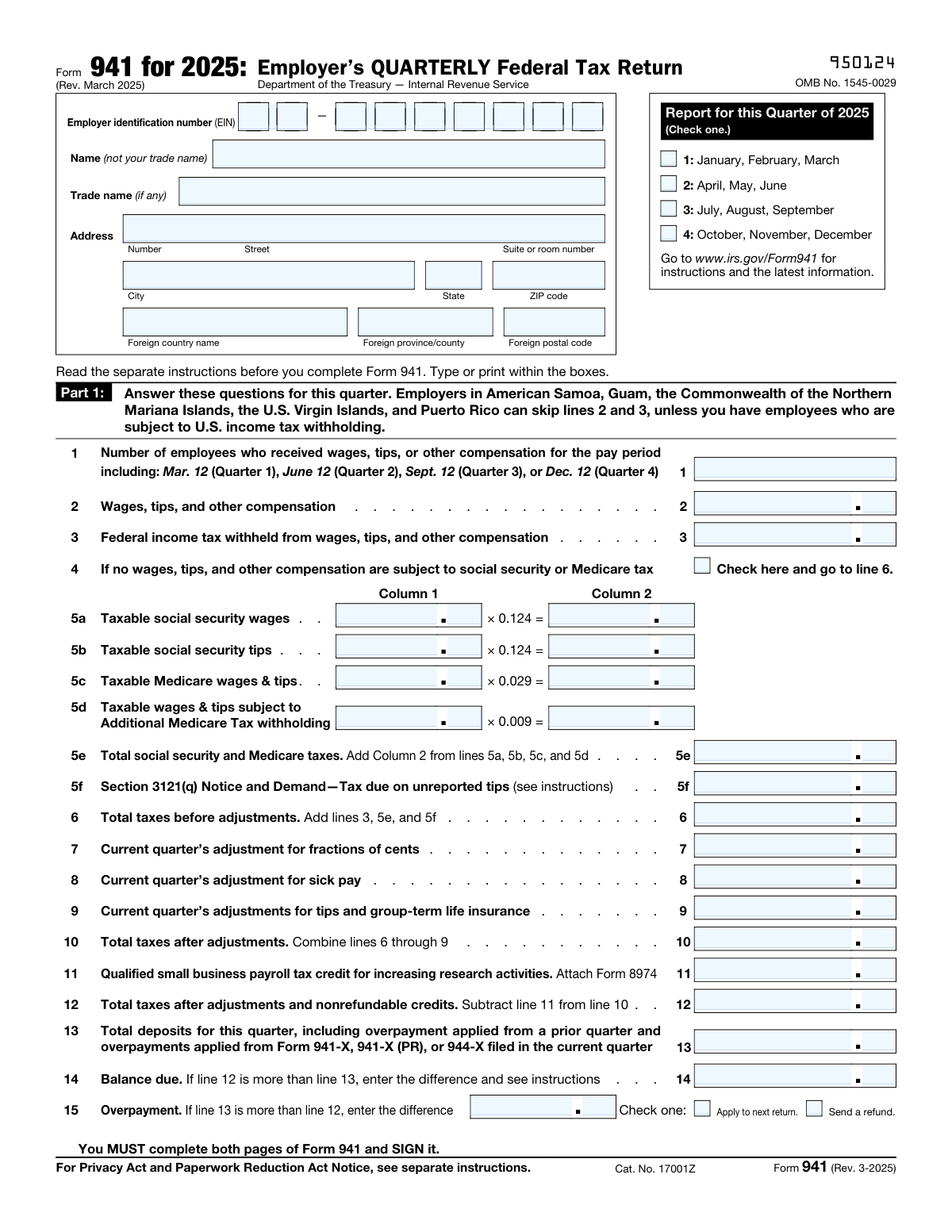
Yes! You can use AI to fill out Form 941, Employer's QUARTERLY Federal Tax Return (Rev. March 2025)
Form 941, the Employer's Quarterly Federal Tax Return, is an IRS form that most employers must file four times a year to report wages paid to employees, federal income taxes withheld, and the employer's and employees' share of Social Security and Medicare (FICA) taxes. It is a critical compliance document that also allows employers to report adjustments, credits, and deposit schedules, and to reconcile tax liabilities with deposits already made. Failure to file accurately and on time can result in significant penalties from the IRS. Today, employers can fill out Form 941 quickly and accurately using AI-powered services like Instafill.ai, which can also convert non-fillable PDF versions into interactive fillable forms.
Our AI automatically handles information lookup, data retrieval, formatting, and form filling.
It takes less than a minute to fill out Form 941 using our AI form filling.
Securely upload your data. Information is encrypted in transit and deleted immediately after the form is filled out.
Form specifications
| Form name: | Form 941, Employer's QUARTERLY Federal Tax Return (Rev. March 2025) |
| Number of pages: | 3 |
| Language: | English |
Instafill Demo: filling out a legal form in seconds
How to Fill Out Form 941 Online for Free in 2026
Are you looking to fill out a FORM 941 form online quickly and accurately? Instafill.ai offers the #1 AI-powered PDF filling software of 2026, allowing you to complete your FORM 941 form in just 37 seconds or less.
Follow these steps to fill out your FORM 941 form online using Instafill.ai:
- 1 Navigate to Instafill.ai and search for or upload Form 941 (Rev. March 2025) to begin filling it out online.
- 2 Enter your Employer Identification Number (EIN), legal business name, trade name (if applicable), and complete business address in the entity information section.
- 3 Select the correct reporting quarter (Q1–Q4) and complete Part 1 by entering the number of employees, total wages and tips, federal income tax withheld, and calculating Social Security and Medicare taxes on lines 5a through 5f.
- 4 Calculate and enter total taxes before and after adjustments (lines 6–10), apply any qualified small business payroll tax credit (line 11), and determine your balance due or overpayment (lines 12–15).
- 5 Complete Part 2 by selecting your deposit schedule (less than $2,500, monthly, or semiweekly) and entering monthly tax liabilities if applicable; attach Schedule B if you are a semiweekly depositor.
- 6 Fill out Part 3 with any business closure or seasonal employer information, and complete Part 4 to designate (or decline) a third-party designee to discuss the return with the IRS.
- 7 Sign and date the form in Part 5, complete the Paid Preparer section if applicable, and if making a payment, fill out the Form 941-V payment voucher with your EIN, payment amount, tax period, and business address before submitting.
Our AI-powered system ensures each field is filled out correctly, reducing errors and saving you time.
Why Choose Instafill.ai for Your Fillable Form 941 Form?
Speed
Complete your Form 941 in as little as 37 seconds.
Up-to-Date
Always use the latest 2026 Form 941 form version.
Cost-effective
No need to hire expensive lawyers.
Accuracy
Our AI performs 10 compliance checks to ensure your form is error-free.
Security
Your personal information is protected with bank-level encryption.
Frequently Asked Questions About Form Form 941
Form 941 is the Employer's Quarterly Federal Tax Return used to report wages paid to employees, federal income tax withheld, and Social Security and Medicare taxes. Most employers who pay wages to employees are required to file this form every quarter with the IRS.
Form 941 must be filed four times a year — once for each quarter. The quarters cover January–March, April–June, July–September, and October–December. You must check the appropriate quarter box on the form when filing.
Form 941 is generally due by the last day of the month following the end of each quarter: April 30, July 31, October 31, and January 31. If you made timely deposits covering all taxes owed, you have an additional 10 days to file.
You will need your Employer Identification Number (EIN), the number of employees who received wages during the quarter, total wages and tips paid, federal income tax withheld, and Social Security and Medicare tax amounts. You should also have records of any tax deposits made during the quarter.
Your deposit schedule is determined by the total taxes reported in a lookback period. Monthly schedule depositors report their tax liability for each of the three months in the quarter, while semiweekly schedule depositors must attach Schedule B (Form 941) to detail their tax liability. If you're unsure which applies to you, refer to Section 11 of IRS Publication 15.
The Additional Medicare Tax is an extra 0.9% tax that applies to wages and tips exceeding $200,000 paid to an employee in a calendar year. Employers are required to withhold this tax on wages above that threshold and report it on line 5d of Form 941.
If line 13 (total deposits) is greater than line 12 (total taxes after adjustments and credits), you have an overpayment. You can choose to either apply the overpayment to your next return or request a refund by checking the appropriate box on line 15 of Form 941.
Yes, Form 941-V is the payment voucher attached to Form 941 and should be used when making a payment by check or money order. Make your check payable to 'United States Treasury,' include your EIN and tax period on the check, and detach the voucher before mailing it with your payment — do not staple them together.
If your business has closed or you stopped paying wages, check the box on line 17 in Part 3, enter the final date you paid wages, and attach a statement to your return explaining the situation. This helps the IRS understand that future quarterly filings may not be required.
Yes, in Part 4 you can designate a third party — such as an employee, paid tax preparer, or another person — to discuss the return with the IRS. You'll need to provide their name, phone number, and a 5-digit PIN they will use when speaking with the IRS.
The Qualified Small Business Payroll Tax Credit on line 11 is a nonrefundable credit for eligible small businesses that increase their research activities. To claim it, you must attach Form 8974 to your Form 941, and the credit amount is subtracted from your total taxes after adjustments.
Yes, AI-powered services like Instafill.ai can automatically fill in Form 941 fields accurately using your payroll and tax data, saving you significant time and reducing the risk of errors. These tools are especially helpful for employers who file quarterly and want a streamlined, reliable process.
To fill out Form 941 online, visit Instafill.ai, upload your Form 941 PDF, and the AI will guide you through entering your EIN, wages, tax withholdings, deposit schedule, and other required information. Once completed, you can download the filled form, review it, sign it, and submit it to the IRS.
If you have a flat, non-fillable PDF version of Form 941, Instafill.ai can convert it into an interactive fillable form so you can type directly into the fields. This eliminates the need to print and handwrite your information, making the process faster and more accurate.
No, seasonal employers who do not pay wages in every quarter of the year are not required to file Form 941 for quarters in which no wages were paid. Simply check the seasonal employer box in Part 3 (line 18) to notify the IRS that you don't file for every quarter.
Compliance Form 941
Validation Checks by Instafill.ai
1
Ensures the Employer Identification Number (EIN) is in the correct format
The EIN must consist of exactly nine digits split into two parts: the first two digits and the last seven digits, formatted as XX-XXXXXXX. Both parts must contain only numeric characters and together must form a complete, valid EIN. If the EIN is missing, incomplete, or contains non-numeric characters, the form cannot be properly matched to the employer's tax account, potentially resulting in misapplied payments or penalties.
2
Ensures exactly one reporting quarter is selected
The form requires that one and only one quarter checkbox be selected from the four options: Q1 (January–March), Q2 (April–June), Q3 (July–September), or Q4 (October–December). Selecting multiple quarters or leaving the quarter unselected makes the return ambiguous and unprocessable. The IRS requires a distinct quarterly filing, and failure to select a single quarter may result in the return being rejected or misapplied to the wrong tax period.
3
Ensures the employer's legal name is provided and not left blank
The 'Name (not your trade name)' field must contain the full legal name of the employer and cannot be left blank. This field is critical for identifying the taxpayer and must not be substituted with a trade name or abbreviation. An absent or incorrect legal name can cause the return to be unmatched to the correct tax account, leading to processing delays or penalties.
4
Ensures the total social security and Medicare taxes (Line 5e) equals the sum of Column 2 from Lines 5a, 5b, 5c, and 5d
Line 5e must equal the arithmetic sum of the Column 2 values from lines 5a, 5b, 5c, and 5d. Each Column 2 value is derived by multiplying the respective Column 1 taxable wage/tip amount by its prescribed tax rate (0.124 for social security, 0.029 for Medicare, and 0.009 for Additional Medicare Tax). If Line 5e does not match this sum, it indicates a calculation error that will cascade into incorrect totals on Lines 6, 10, and 12, potentially resulting in underpayment penalties or overpayment.
5
Ensures Line 6 (Total Taxes Before Adjustments) equals the sum of Lines 3, 5e, and 5f
Line 6 must be the exact sum of Line 3 (federal income tax withheld), Line 5e (total social security and Medicare taxes), and Line 5f (Section 3121(q) tax due on unreported tips). This is a critical arithmetic consistency check that forms the basis for all subsequent tax calculations on the form. An incorrect Line 6 value will produce erroneous results for Lines 10, 12, 14, and 15, potentially leading to incorrect tax liability reporting.
6
Ensures Line 10 (Total Taxes After Adjustments) correctly combines Lines 6 through 9
Line 10 must equal Line 6 plus or minus the adjustments entered on Lines 7, 8, and 9 (fractions of cents, sick pay, and tips/group-term life insurance adjustments). These adjustment lines may be positive or negative values, and their combined effect on Line 6 must produce the correct Line 10 total. An incorrect Line 10 will directly affect Line 12 and the resulting balance due or overpayment calculation.
7
Ensures Line 12 equals Line 10 minus Line 11
Line 12 (Total Taxes After Adjustments and Nonrefundable Credits) must equal Line 10 minus Line 11 (Qualified Small Business Payroll Tax Credit from Form 8974). Line 11 cannot exceed Line 10, as the credit is nonrefundable and cannot reduce the tax liability below zero. If this subtraction is incorrect, the balance due or overpayment amounts on Lines 14 and 15 will be inaccurate, potentially resulting in underpayment penalties.
8
Ensures that only one of Balance Due (Line 14) or Overpayment (Line 15) is populated, not both
Lines 14 and 15 are mutually exclusive: Line 14 (Balance Due) should only be completed if Line 12 is greater than Line 13, while Line 15 (Overpayment) should only be completed if Line 13 is greater than Line 12. If both lines contain values, or if the populated line does not reflect the correct difference between Lines 12 and 13, the form contains a logical inconsistency. Populating both lines simultaneously would create conflicting payment instructions and could result in incorrect tax account adjustments.
9
Ensures an overpayment disposition option is selected when Line 15 is populated
When an overpayment amount is entered on Line 15, exactly one of the two disposition checkboxes must be selected: 'Apply to next return' or 'Send a refund.' Leaving both checkboxes blank when an overpayment exists means the IRS has no instruction on how to handle the excess funds, which may cause processing delays. Selecting both options simultaneously is also invalid, as the two choices are mutually exclusive.
10
Ensures the monthly deposit schedule total liability equals Line 12
When the monthly schedule depositor option is selected in Part 2, the sum of Month 1, Month 2, and Month 3 tax liabilities must equal the amount reported on Line 12. This consistency check ensures that the monthly breakdown of tax liability is reconciled with the total tax liability for the quarter. A discrepancy between the monthly totals and Line 12 indicates a reporting error that could trigger IRS scrutiny or deposit penalty assessments.
11
Ensures exactly one deposit schedule option is selected in Part 2
In Part 2, the filer must select exactly one of the three deposit schedule options: the less-than-$2,500 threshold option, the monthly schedule depositor option, or the semiweekly schedule depositor option. Selecting multiple options or leaving all options blank creates an ambiguous deposit classification that prevents proper IRS processing. The correct selection must also be consistent with the tax liability reported on Line 12 and the employer's known deposit schedule.
12
Ensures the final date wages were paid is provided when the business closure checkbox is selected
If the checkbox on Line 17 is checked to indicate the business has closed or stopped paying wages, the final date wages were paid must also be entered in MM/DD/YYYY format. This date is required for the IRS to update the employer's filing requirements and close the tax account appropriately. Leaving the date blank while checking the closure box creates an incomplete record that may result in continued filing requirement notices being sent to the employer.
13
Ensures the third-party designee information is complete when authorization is granted
If the 'Yes' option is selected in Part 4 to authorize a third-party designee, then the designee's name, phone number, and a 5-digit PIN must all be provided. Any of these three fields being blank while the 'Yes' box is checked renders the authorization incomplete and unenforceable. The IRS requires all three pieces of information to verify the designee's identity when they contact the IRS on the employer's behalf.
14
Ensures the signatory information is complete, including printed name, title, date, and phone number
The form must be signed, and the signature must be accompanied by the signer's printed name, job title, signing date in MM/DD/YYYY format, and best daytime phone number. All of these fields are required for the declaration under penalties of perjury to be valid and for the IRS to contact the responsible party if needed. An unsigned or incompletely signed return is considered invalid and will not be processed, potentially resulting in a failure-to-file penalty.
15
Ensures the paid preparer's PTIN is provided and correctly formatted when a paid preparer completes the form
If a paid preparer completes the form, the Preparer Tax Identification Number (PTIN) field must be populated with a valid PTIN, which begins with the letter 'P' followed by eight numeric digits (e.g., P12345678). A missing or incorrectly formatted PTIN violates IRS preparer identification requirements and may subject the preparer to penalties under IRC Section 6695. The preparer's name and signature must also be present alongside the PTIN for the paid preparer section to be considered complete.
16
Ensures the Column 2 tax calculations for Lines 5a, 5b, 5c, and 5d are mathematically consistent with their Column 1 values and prescribed rates
Each Column 2 value must equal the corresponding Column 1 taxable wage or tip amount multiplied by the prescribed tax rate: Line 5a Column 1 × 0.124, Line 5b Column 1 × 0.124, Line 5c Column 1 × 0.029, and Line 5d Column 1 × 0.009. Any deviation beyond a minor rounding difference indicates a calculation error that will produce an incorrect Line 5e total. These rate-based calculations are foundational to the entire tax liability computation on the form, and errors here will propagate through Lines 6, 10, 12, 14, and 15.
Common Mistakes in Completing Form 941
Many employers enter their trade name (DBA) in the 'Name' field instead of their legal business name. The IRS requires the legal name that matches the name associated with the EIN on file, not the name the business operates under. This mismatch can cause processing delays or misapplied payments. Always enter the full legal name in the 'Name' field and reserve the trade name for the 'Trade name (if any)' field. Tools like Instafill.ai can help ensure the correct name is populated in the right field automatically.
A common error is entering the EIN incorrectly, such as transposing digits, omitting digits, or entering the Social Security Number instead of the EIN. The EIN must be entered in two parts: the first two digits and the remaining seven digits. An incorrect EIN can result in payments being misapplied, penalties, or the return being rejected. Always double-check the EIN against the IRS-issued EIN confirmation letter, and consider using Instafill.ai to auto-populate and validate the EIN format.
Employers sometimes forget to check the box indicating which quarter the return covers, or they check the wrong quarter. This is especially common when filing late or when preparing multiple quarters at once. Filing with the wrong quarter checked can result in misapplied tax deposits and potential penalties. Carefully verify the quarter before submitting, ensuring the checked quarter matches the payroll period being reported.
Line 1 asks for the number of employees who received wages during a specific pay period (e.g., March 12 for Quarter 1), not the total number of employees for the entire quarter. Employers frequently report the total headcount for all three months or include employees who were not paid during that specific reference pay period. This misunderstanding leads to inaccurate reporting. Read the instructions carefully and count only employees who received wages during the designated reference date for the applicable quarter.
Employers often make arithmetic errors when multiplying taxable wages by the applicable tax rates (0.124 for social security, 0.029 for Medicare, 0.009 for Additional Medicare Tax) or when summing Column 2 totals for line 5e. These errors cascade into incorrect totals on lines 6, 10, and 12, potentially triggering underpayment penalties. Always use a calculator or payroll software to verify each multiplication, and ensure line 5e equals the sum of all Column 2 entries. Instafill.ai can automatically perform these calculations to reduce errors.
Line 7 is frequently left blank or filled in incorrectly. This adjustment accounts for small rounding differences that arise when employee and employer shares of social security and Medicare taxes are calculated separately and then combined. Leaving it blank when there is a rounding difference will cause the return to not balance. Calculate the difference between the taxes actually withheld and the amounts computed on lines 5a–5d, and enter the result (which can be positive or negative) on line 7.
Employers frequently check the wrong deposit schedule option—for example, checking the monthly depositor box when they are actually a semiweekly depositor, or vice versa. This mistake can result in failure to attach the required Schedule B (Form 941) for semiweekly depositors, leading to IRS notices and potential penalties. Review IRS Publication 15 to confirm your deposit schedule classification, and ensure that semiweekly depositors attach a completed Schedule B to the return.
When completing the monthly deposit schedule in Part 2, employers often enter monthly tax liability amounts that do not add up to the total on line 12. The form explicitly states that the total liability for the quarter must equal line 12. A discrepancy signals an error in either the monthly breakdown or the tax calculation, and the IRS may flag the return for review. Carefully verify that Month 1 + Month 2 + Month 3 = Total liability for quarter = Line 12 before submitting.
Employers who qualify for the qualified small business payroll tax credit for increasing research activities (line 11) sometimes enter an amount without attaching the required Form 8974. Without Form 8974, the IRS cannot verify the credit, and it may be disallowed, resulting in a balance due plus interest and penalties. Always complete and attach Form 8974 whenever a credit is claimed on line 11, and ensure the amount on line 11 matches the amount calculated on Form 8974.
When an overpayment exists (line 13 is greater than line 12), employers often forget to check either 'Apply to next return' or 'Send a refund.' Leaving both boxes unchecked means the IRS does not know how to handle the excess amount, which can delay resolution and cause confusion in subsequent quarters. Always select one of the two options when an overpayment is reported, and consider your cash flow needs when deciding between applying the credit forward or requesting a refund.
Form 941 is invalid if it is not signed and dated by an authorized individual. Employers sometimes complete all the financial fields but forget to sign, print their name, enter their title, or include the date in Part 5. An unsigned return is not considered filed, which can result in failure-to-file penalties. Ensure that the authorized signer—an officer, owner, or authorized agent—signs the form, prints their name and title, and enters the current date before submission.
When making a payment with Form 941, employers often forget to complete the payment voucher (Form 941-V), fail to darken the correct quarter circle, or make the check payable to the wrong entity. Payments should be made payable to 'United States Treasury,' and the check must include the EIN, 'Form 941,' and the specific tax period. Omitting or incorrectly completing the voucher can result in misapplied payments and delayed credit to the employer's account. Do not staple the voucher or payment to Form 941, and verify all voucher details match the main form.
Saved over 80 hours a year
“I was never sure if my IRS forms like W-9 were filled correctly. Now, I can complete the forms accurately without any external help.”
Kevin Martin Green
Your data stays secure with advanced protection from Instafill and our subprocessors

Robust compliance program
Transparent business model
You’re not the product. You always know where your data is and what it is processed for.
ISO 27001, HIPAA, and GDPR
Our subprocesses adhere to multiple compliance standards, including but not limited to ISO 27001, HIPAA, and GDPR.
Security & privacy by design
We consider security and privacy from the initial design phase of any new service or functionality. It’s not an afterthought, it’s built-in, including support for two-factor authentication (2FA) to further protect your account.
Fill out Form 941 with Instafill.ai
Worried about filling PDFs wrong? Instafill securely fills form-941-employers-quarterly-federal-tax-return-rev-march-2025 forms, ensuring each field is accurate.