
Yes! You can use AI to fill out Form 8027, Employer’s Annual Information Return
Don't type 42 fields by hand. Tell our AI about yourself, or upload a document you already have, and it fills every field in seconds. You check it, then download, print or sign.
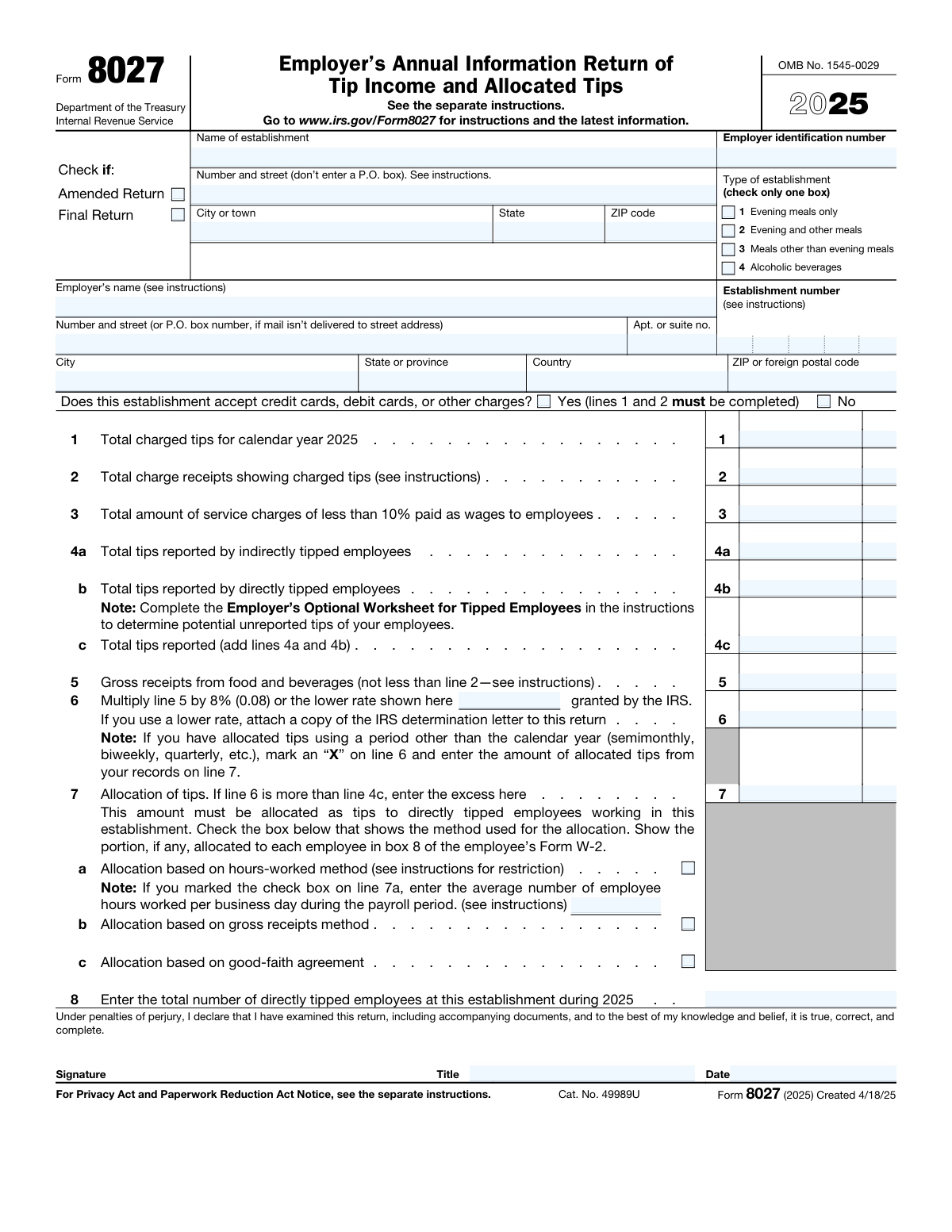
The AI does the filling. You just check it.
No typing into boxes, nothing to install.
What this form asks for
The AI fills all of it, from your answers or your documents.
The AI checks your answers before you download
15 checks built for this form, so a wrong date or a missing answer is caught before anyone else sees it.
The software ensures that all mandatory fields on the Employer's Annual Information Return for the year 2023 are filled out correctly. It checks for completeness and accuracy in the information provided, such as the employer's identification number, name, and address. The system also verifies that the form is applicable for the correct tax year and that no required sections are left blank.
The software confirms that the total gross receipts from food and beverage sales are accurately reported on the form, ensuring that nonallocable receipts, such as carry-out sales and amounts paid for meals that are not consumed on the premises, are excluded. It cross-references the reported amounts with the establishment's records to ensure that only allocable receipts are included in the calculation.
The software verifies the accuracy of allocated tips calculation, particularly when the reported tips are less than 8% of the gross receipts or a lower rate that has been approved by the IRS. It checks the establishment's compliance with the tip allocation guidelines and ensures that the correct formula is used to determine the allocated tips.
The software checks that the chosen method for allocating tips among employees is correctly applied and documented on the form. It ensures that whether the hours-worked, gross receipts, or good-faith agreement method is used, the process is consistent with IRS regulations and that the necessary documentation is maintained for verification purposes.
The software ensures that any allocated tips are reported to employees on their Form W-2, as required by the IRS. It assists in the accurate reporting of allocated tips in the correct boxes on the W-2 form and ensures that employees receive the information necessary for their personal tax filings.
Ensures that service charges and tips are accurately differentiated on the Employer's Annual Information Return. This validation check is crucial as it affects the tax reporting for both the employer and the employees. It confirms that the amounts entered align with the IRS definitions and guidelines, preventing any misclassification that could lead to tax discrepancies or audits. The system meticulously reviews the data to ensure that all reported figures reflect the correct categorization as per tax regulations.
And 9 more checks
- Validates signature and contact information
- Confirms record-keeping compliance
- Verifies Form 8027-T completion
- Checks correct filing address
- Confirms that the form is filed by the due date
- Verifies that an extension is requested using Form 8809 if needed
- Ensures adherence to the Privacy Act and Paperwork Reduction Act Notice requirements
- Validates that the electronic filing is done through IRS.gov/FIRE if not filing by paper
- Checks for the inclusion of the employer's contact information for assistance with tip reporting and compliance
Let AI fill out your Form 8027
No typing. Every field filled in seconds, checked, ready to sign.
How to Fill Out Form 8027 Online for Free in 2026
What the AI walks you through.
- Visit instafill.ai site and select Form 8027.
- Enter establishment and employer details.
- Fill in total charged tips and receipts.
- Report tips from directly and indirectly tipped employees.
- Complete allocation of tips section as needed.
- Sign and date the form electronically.
- Check for accuracy and submit form.
Common Mistakes in Completing Form 8027
The ones the AI is built to catch.
Failing to report all gross receipts from food and beverages
Incorrectly allocating tips based on an unapproved method or rate
Misclassifying service charges as tips
Failing to provide accurate contact information and sign the form
Late or untimely filing of the form and statements to employees
Neglecting to retain copies and statements for the required record-keeping period
Incorrectly reporting service charges as tips
Failing to report allocated tips to employees on Form W-2
Ignoring Privacy Act and Paperwork Reduction Act Notice requirements
Frequently Asked Questions About Form 8027
Is it really free for 7 days?
Can I fill other forms too?
How do I cancel?
How does the AI fill out Form 8027?
What happens to my information?
How complex is Form 8027 to fill out?
What is Form 8027 and what is its purpose?
Who is required to file Form 8027?
What information is required to be reported on Form 8027?
What is the difference between an amended return and a final return?
How should the name and address of the establishment be reported?
What is the difference between directly and indirectly tipped employees?
How should tips reported by indirectly tipped employees be reported on Form 8027?
How should tips reported by directly tipped employees be reported on Form 8027?
What is the purpose of the optional worksheet for tipped employees?
What is the difference between the hours-worked method and the gross receipts method for tip allocation?
How should the allocation of tips be reported on Form 8027?
What is the penalty for filing a false or incomplete Form 8027?
What is the deadline for filing Form 8027?
What is the difference between a service charge and a tip?
How should service charges paid as wages to employees be reported on Form 8027?
What is the purpose of line 6 on Form 8027?
What should be done if tips have been allocated using a period other than the calendar year?
What is the purpose of the signature and title on Form 8027?
Get your Form 8027 filled out by AI
$0 today. Cancel before Oct 31 and you pay nothing.
Other forms like this one
employer forms: Form 940, Employer’s Annual FUTA Tax Return, Form DE 1, Commercial Employer Account Registration, Form 8994, Employer Credit for Paid Family and Medical Leave, Form 1095-C, Employer-Provided Health Insurance Offer and Coverage, Form 941, Employer’s Quarterly Federal Tax Return, Form I-129CWR, Semiannual Report for CW-1 Employers, Form 941-X (Rev. April 2023), Adjusted Employer’s QUARTERLY Federal Tax Return or Claim for Refund, C139 – Employer’s Information Questionnaire (WCB Alberta), Form SS-4 (Rev. December 2025), Application for Employer Identification Number, City of Carlinville Application for Employment (An Equal Opportunity Employer), Form 941, Employer's QUARTERLY Federal Tax Return (Rev. March 2025), Easy Transfer Form: Moving Funds to an Employer-Sponsored Retirement Plan at TIAA, Form F10462, Moving Funds to an Employer-Sponsored Retirement Plan at TIAA, Moving Funds to an Employer-Sponsored Retirement Plan at TIAA, Form F10794, Cash Withdrawal or Rollover Transfer Payout Annuity for Private Employer Plans, DWC002, Employer’s report for reimbursement of voluntary payment, DWC001S, Employer’s first report of injury or illness, DWC Form-001, Employer’s first report of injury or illness, The E-Verify Memorandum of Understanding for Employers, SIMPLE Retirement Account (SRA) Program Employer Notice and Salary-Reduction Agreement
Let AI fill out your Form 8027
Your trial starts once a card is added. You pay nothing before Oct 31.
Our AI already knows this form, all 42 fields of it. Skip the typing: tell it about yourself, or upload what you have, and it fills the whole form in seconds.
- AI fills every field on the form, checkboxes included
- No typing into boxes: answer a few questions, or upload a document you already have, an old copy of this form, a photo of a document
- The AI checks the answers; you review and change anything before you download
- Download the finished PDF, print it, or sign it online
- Encrypted, and never used to train AI
Cancel before Oct 31 and you pay nothing.
A card is needed to start the trial. Cancel in two clicks from your account.
Terms · Privacy