Yes! You can use AI to fill out Form F10462, Moving Funds to an Employer-Sponsored Retirement Plan at TIAA
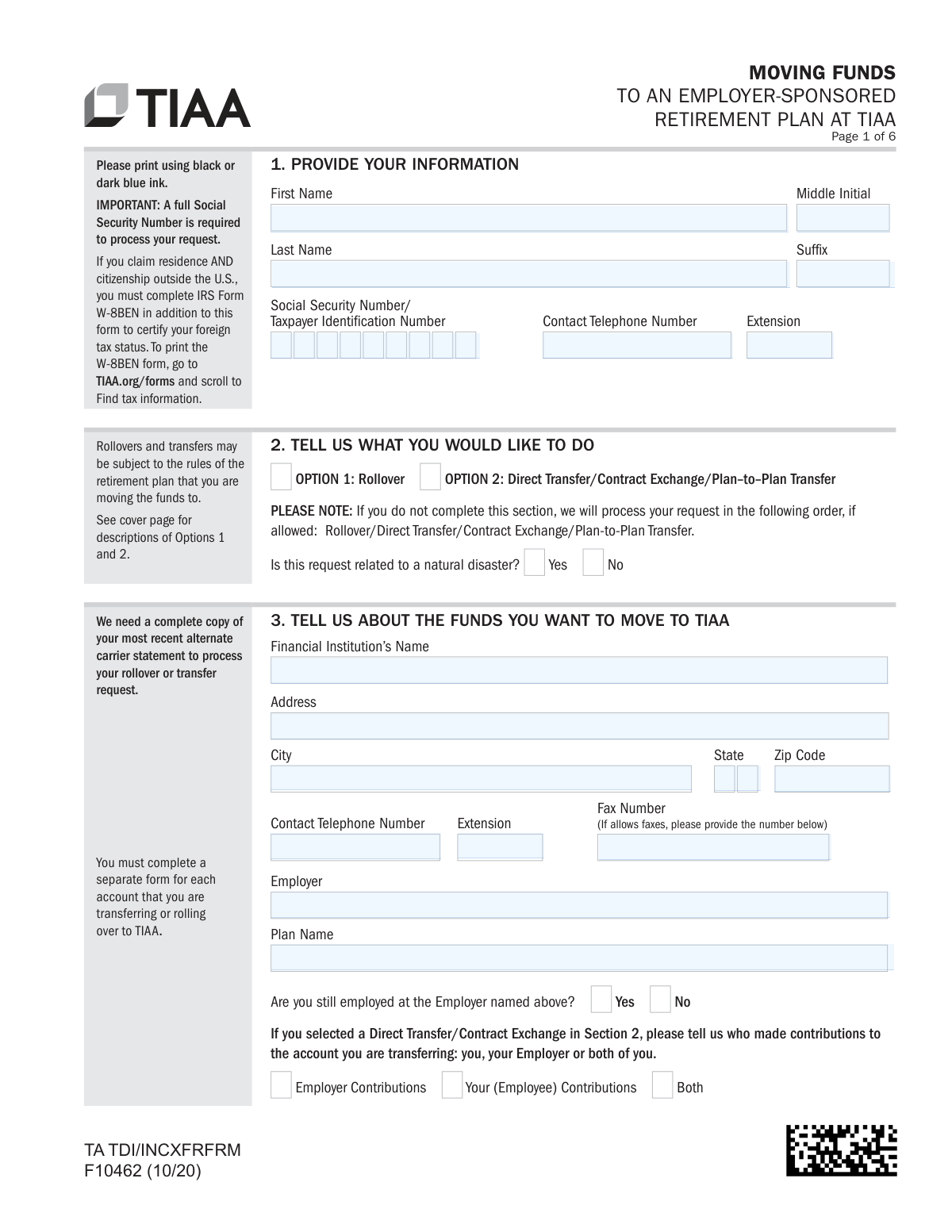
TIAA Form F10462, 'Moving Funds to an Employer-Sponsored Retirement Plan,' is a document used to authorize the consolidation of retirement savings into a TIAA plan. It allows TIAA to request a direct transfer or rollover of funds from another financial institution, which is important for managing retirement assets in one place. Today, this form can be filled out quickly and accurately using AI-powered services like Instafill.ai, which can also convert non-fillable PDF versions into interactive fillable forms.
F10462 is part of the
employer forms, sponsor forms, retirement plan forms, TIAA forms, retirement fund forms, plan sponsor forms and employer plan forms categories on Instafill.
Rather not fill this in by hand? Instafill is an online form filler that completes PDF forms automatically — upload the blank form, answer a few questions, and the AI fills every field.
Form specifications
| Form name: | Form F10462, Moving Funds to an Employer-Sponsored Retirement Plan at TIAA |
| Number of pages: | 1 |
| Language: | English |
Our AI automatically handles information lookup, data retrieval, formatting, and form filling.
It takes less than a minute to fill out F10462 using our AI form filling.
Securely upload your data. Information is encrypted in transit and deleted immediately after the form is filled out.
Instafill Demo: How to fill out PDF forms in seconds with AI
How to Fill Out F10462 Online for Free in 2026
Are you looking to fill out a F10462 form online quickly and accurately? Instafill.ai offers the #1 AI-powered PDF filling software of 2026, allowing you to complete your F10462 form in just 37 seconds or less.
Follow these steps to fill out your F10462 form online using Instafill.ai:
- 1 Navigate to Instafill.ai and upload or select TIAA Form F10462.
- 2 Use the AI assistant to accurately input your personal details in Section 1, including your name, Social Security Number, and contact information.
- 3 In Sections 2 and 3, specify the transaction type (Rollover or Transfer) and provide details about the financial institution and account you are moving funds from, ensuring you attach a recent statement.
- 4 Provide instructions for fund liquidation (Section 3) and how the funds should be allocated into your TIAA account (Sections 5 and 6).
- 5 Carefully review all the information auto-filled by the AI, then provide your digital signature in Section 7 to authorize the transfer and certify your tax status.
- 6 Determine if a Medallion Signature Guarantee (Section 8) or Employer Authorization (Section 9) is required and complete these sections accordingly.
- 7 Download the completed form and submit it to TIAA along with your most recent account statement as instructed on the form.
Our AI-powered system ensures each field is filled out correctly, reducing errors and saving you time.
Why Choose Instafill.ai for Your Fillable F10462 Form?
Speed
Complete your F10462 in as little as 37 seconds.
Up-to-Date
Always use the latest 2026 F10462 form version.
Cost-effective
No need to hire expensive lawyers.
Accuracy
Our AI performs 10 compliance checks to ensure your form is error-free.
Security
Your personal information is protected with bank-level encryption.
Frequently Asked Questions About F10462
This form authorizes TIAA to move your retirement funds from another financial institution into your employer-sponsored retirement plan at TIAA. It is used to consolidate your retirement savings in one place.
You should use this form if you want to transfer or roll over funds from a previous employer's plan, like a 401(k) or 403(b), into your current employer-sponsored plan managed by TIAA.
No, this form is only for moving funds into an employer-sponsored retirement plan. For IRA rollovers, you must use the 'TIAA Investment Solutions IRA Transfer or Rollover Authorization Form (F10463)'.
You must attach a complete copy of your most recent account statement from the financial institution you are moving the funds from. Your request cannot be processed without this document.
The entire process can take up to six weeks to complete. The timeline largely depends on how quickly your current financial institution responds to TIAA's request.
A rollover is typically used when you've left an employer and requires a qualifying event like separation from service or reaching age 59½. A direct transfer moves funds between providers within your current employer's plan and does not require a qualifying event.
If you do not provide valid allocation instructions, TIAA will allocate the funds to the default investment option specified by your employer's plan. You can change your allocation at any time after the funds are applied.
Your current financial institution may require a Medallion Signature Guarantee to release the funds. You should contact them to confirm if this is necessary for your transfer.
Send the completed form and your account statement via standard mail to P.O. Box 1260, Charlotte, NC 28201, or via overnight mail to 8500 Andrew Carnegie Blvd, Charlotte, NC 28262.
Yes, your current provider must send TIAA specific information about your Roth contributions and earnings. If TIAA doesn't receive this information promptly, the Roth portion of your transfer will be returned.
Yes, in Section 3 you can instruct your provider to liquidate the CD immediately, though you may incur early withdrawal penalties. Alternatively, you can request liquidation at maturity to avoid penalties.
Yes, services like Instafill.ai use AI to help you accurately auto-fill form fields, which can save you time and reduce errors.
You can use a service like Instafill.ai to fill out the form online. Simply upload the PDF to their platform, and their tool will guide you through filling out the required fields interactively.
If you have a non-fillable or 'flat' PDF, you can use a service like Instafill.ai. Their platform can convert non-fillable PDFs into interactive, fillable forms that you can complete and sign online.
Compliance F10462
Validation Checks by Instafill.ai
1
SSN/TIN Format and Presence
This check verifies that the Social Security Number/Taxpayer Identification Number field in Section 1 is not empty and follows the standard 9-digit format (XXX-XX-XXXX or XXXXXXXXX). This number is critical for identity verification and tax reporting purposes. If the field is empty or the format is invalid, the form submission will be blocked until a valid number is provided.
2
Mandatory Statement Attachment
Validates that the user has uploaded a file corresponding to the 'most recent statement for the account(s) you are transferring'. The form explicitly states this document is required to process the request. Failure to attach a statement will prevent the form from being submitted, as TIAA cannot initiate the transfer without this documentation from the other financial institution.
3
Transaction Type Selection
Ensures that the user has made a selection in Section 2, choosing either 'OPTION 1: Rollover' or 'OPTION 2: Direct Transfer/Contract Exchange/Plan–to–Plan Transfer'. This choice is fundamental as it dictates the rules and processing logic for the entire transaction. If no option is selected, the form submission will fail, and the user will be prompted to specify the type of fund movement they are authorizing.
4
Conditional Contribution Source for Direct Transfers
This check is triggered if the user selects 'OPTION 2: Direct Transfer/Contract Exchange' in Section 2. It then verifies that the user has specified who made contributions to the account (you, your Employer, or both) in Section 3. This information is necessary for TIAA to correctly process the transfer according to plan rules. If the transaction is a direct transfer and this field is left blank, an error will be displayed, requiring the user to make a selection.
5
Allocation Percentage Summation
If the user chooses to define a new allocation in Section 6 (Option B), this validation sums the percentages entered for all investment funds. The total must equal exactly 100%. This ensures that all incoming funds are allocated according to the user's instructions, with no portion left unassigned or over-allocated. If the sum is not 100%, the user will receive an error message and must adjust the percentages before proceeding.
6
Fund Destination Logic
Verifies that the user has provided complete instructions in Section 5 for where to apply the funds. If 'Apply funds to my existing account' is selected, it checks that at least one TIAA or CREF contract number is entered. If 'Apply funds to my new TIAA account' is selected, it ensures a plan type is chosen. This prevents the funds from arriving at TIAA without a clear destination, which would cause significant delays. A failure would result in an error message highlighting the incomplete section.
7
Partial Liquidation Specificity
When a user opts for a partial liquidation in Section 3, this check ensures that for any given fund, only one of the following is specified: 'Number of Shares', 'Percent', or 'Dollar Amount'. Providing multiple conflicting instructions for a single fund is ambiguous and would halt processing. If a user enters values in more than one of these fields for the same fund, the system will flag the error and require them to choose only one liquidation method per line.
8
Governmental 457(b) Conditional Logic Chain
This validation enforces the required sequence of questions regarding Governmental 457(b) plans in Section 3. If the user answers 'Yes' to transferring from one 457(b) to another, it then requires an answer to whether money has been rolled into that plan. This logic continues for all related questions, ensuring TIAA receives the necessary data for tax tracking related to early withdrawal penalties. A failure to answer a dependent question will block submission and prompt the user for the required information.
9
Signature and Date Presence
Confirms that the user has provided a signature and a valid date in Section 7. The signature is the legal authorization for TIAA to act on the user's behalf, and the date establishes when this authorization was granted. An electronic form would check for a digital signature or a checked authorization box and a date that is properly formatted and current. Without these, the form is legally incomplete and cannot be processed.
10
Roth Source Specification
If the user indicates in Section 3 that the funds being transferred include a Roth contribution, this check verifies that the specific Roth plan type ('Roth 403(b)(1/7)', 'Roth 401(k)', or 'Public 457(b) Roth') has been selected. This detail is critical because TIAA must track Roth contributions and earnings separately for tax purposes. If Roth funds are indicated but the type is not specified, the form will be considered incomplete.
11
Employer Information for Transfers
If the transaction is a 'Direct Transfer/Contract Exchange' (Section 2), this validation verifies that the 'Employer' and 'Plan Name' fields in Section 3 are completed. The form explicitly states this information is required for these transaction types, as the transfer occurs within the context of a specific employer's plan. If these fields are empty for a relevant transaction type, the submission will be blocked until the user provides the required details.
12
CD Liquidation Instruction Completeness
If the user is moving funds from a Certificate of Deposit (CD) as indicated in Section 3-B, this check ensures an account number is provided and a liquidation option is selected. The user must choose to either liquidate immediately (and acknowledge potential penalties) or at maturity. Without this clear instruction, TIAA cannot proceed with the request to the other financial institution, so the form would be rejected until the choice is made.
Common Mistakes in Completing F10462
This form (F10462) is exclusively for moving funds into an employer-sponsored plan, not an IRA. People often confuse the two and use this form for an IRA rollover, which will be rejected, causing significant delays. To avoid this, carefully read the instructions on the first page and use the TIAA Investment Solutions IRA Transfer or Rollover Authorization Form (F10463) for all IRA-related rollovers.
The form explicitly states that a complete, most recent statement for the account being moved is required for processing. This is one of the most common reasons for delay, as TIAA cannot initiate the transfer without verifying the account details. Always double-check that a full copy of your statement is included with your submission to prevent your form from being put on hold or returned.
In Section 3, applicants often provide just the name of their current financial institution but omit the full address, contact phone number, and fax number. TIAA needs this specific contact information to formally request the funds. Missing details force TIAA to research the information or contact you for clarification, delaying the entire process by days or even weeks.
Applicants are often unsure whether their transaction is a Rollover (Option 1) or a Direct Transfer/Exchange (Option 2), as the eligibility rules are complex. Selecting the wrong option or leaving it blank can lead to the transaction being processed incorrectly or rejected. Before filling out Section 2, confirm your eligibility for each option based on your employment status and plan rules, or call TIAA for guidance.
In Section 3, people make errors when specifying how to liquidate funds, such as checking 'Liquidate entire account' while also listing a partial dollar amount. For partial liquidations, they may enter both a number of shares and a percentage, creating ambiguity. This forces TIAA to halt the process and contact you for clarification. To avoid this, choose only one liquidation option and provide only one type of value (shares, percent, or dollars) per fund.
The questions regarding rollovers from one Governmental 457(b) plan to another are highly specific and often answered incorrectly or skipped. Failing to disclose the originating source of funds previously rolled into that plan has direct tax implications, as it affects tracking for the 10% early withdrawal penalty. If you are moving a 457(b) plan, you must carefully review your records or contact your previous provider to answer these questions accurately.
When choosing a custom allocation in Section 6, the percentages for each investment fund must add up to exactly 100%. A common mistake is miscalculating the total, which invalidates the instructions. If the allocation is invalid, TIAA will place the entire amount into the plan's default investment, which may not match your financial goals. AI-powered tools like Instafill.ai can automatically validate these fields to ensure they sum correctly before submission.
An unsigned or undated form is invalid and cannot be processed. Furthermore, TIAA specifies that only wet ink signatures or their proprietary digital signature are accepted; a standard digital signature from a program like Adobe Acrobat is not valid. Forgetting to sign, or using the wrong signature method, will result in the form being immediately rejected and returned to you.
Many financial institutions require a Medallion Signature Guarantee (Section 8) to release funds, but applicants often overlook this or confuse it with a notary. Submitting the form without a required guarantee will cause the request to be rejected by the other institution, stopping the process entirely. You must contact your current financial institution beforehand to confirm if this guarantee is needed to prevent this major delay.
Depending on the plan, an authorized signature from your employer or plan administrator may be required in Section 9 to approve the transfer. Applicants often don't realize this is necessary and submit the form without it, leading to rejection. To avoid this, you must contact your employer or TIAA to determine if this authorization is required for your specific plan before mailing the form.
The instructions in Section 3 state that a separate form must be completed for each account you are transferring or rolling over. People with multiple accounts at the same institution sometimes try to list them all on one form to save time. This will lead to processing errors and delays, as each account transfer must be initiated and tracked as a separate transaction.
Saved over 80 hours a year
“I was never sure if my IRS forms like W-9 were filled correctly. Now, I can complete the forms accurately without any external help.”
Kevin Martin Green
Your data stays secure with advanced protection from Instafill and our subprocessors




Robust compliance program
Transparent business model
You’re not the product. You always know where your data is and what it is processed for.
ISO 27001, HIPAA, and GDPR
Our subprocesses adhere to multiple compliance standards, including but not limited to ISO 27001, HIPAA, and GDPR.
Security & privacy by design
We consider security and privacy from the initial design phase of any new service or functionality. It’s not an afterthought, it’s built-in, including support for two-factor authentication (2FA) to further protect your account.
Fill out F10462 with Instafill.ai
Worried about filling PDFs wrong? Instafill securely fills form-f10462-moving-funds-to-an-employer-sponsored-retirement-plan-at-tiaa forms, ensuring each field is accurate.
