Yes! You can use AI to fill out First Republic Securities Company, LLC Entity Account Application (FRSC 778 E 7/19)

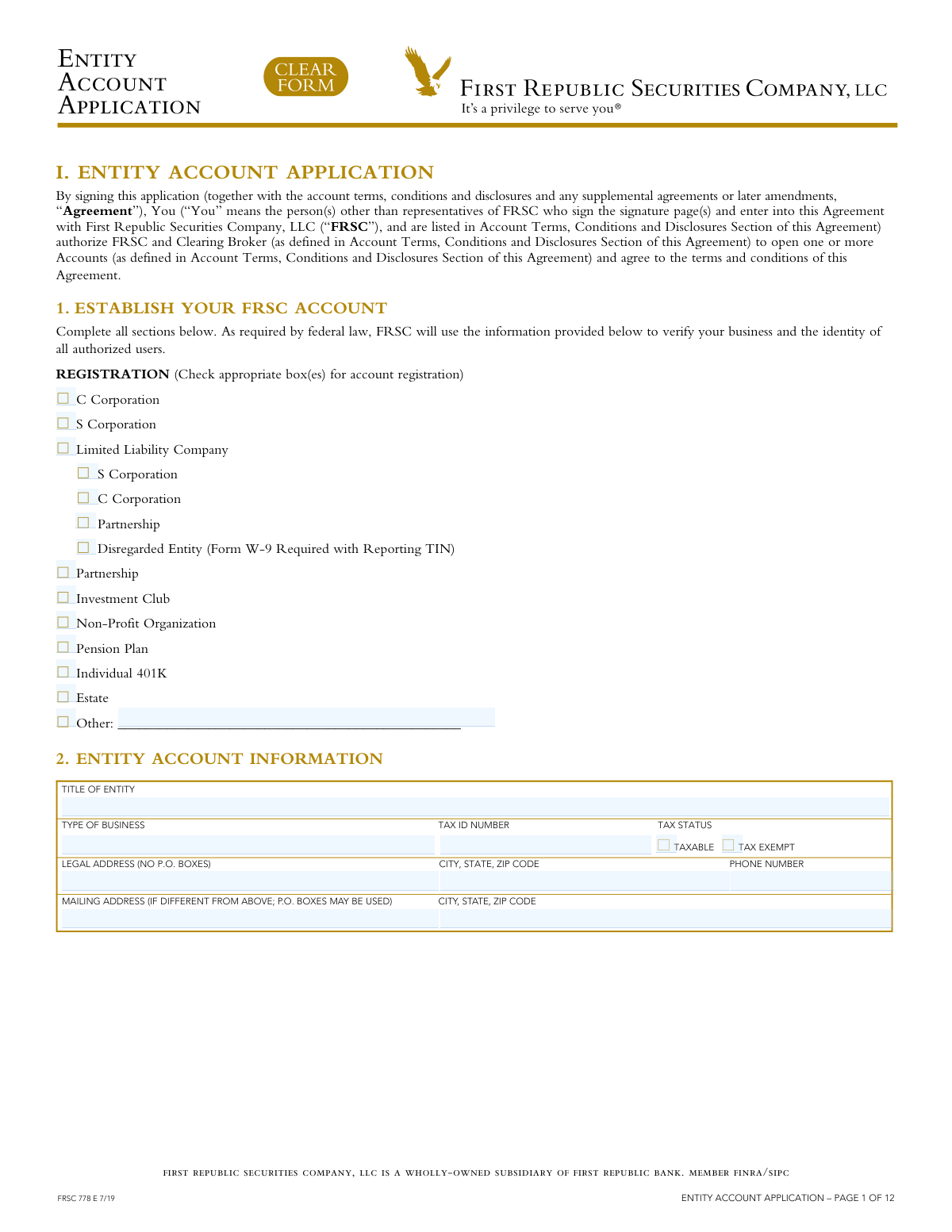
The FRSC 778 E, or Entity Account Application, is a form used by corporations, LLCs, partnerships, and other legal entities to apply for a brokerage account with First Republic Securities Company, LLC. It gathers essential information about the entity, its tax status, and the personal details of all authorized signers who will manage the account. Today, this form can be filled out quickly and accurately using AI-powered services like Instafill.ai, which can also convert non-fillable PDF versions into interactive fillable forms.
Our AI automatically handles information lookup, data retrieval, formatting, and form filling.
It takes less than a minute to fill out FRSC 778 E using our AI form filling.
Securely upload your data. Information is encrypted in transit and deleted immediately after the form is filled out.

Form specifications

Form name: First Republic Securities Company, LLC Entity Account Application (FRSC 778 E 7/19)
Number of pages: 1
Language: English
Categories: IRS forms, LLC forms, SEC forms, company forms, securities forms
main-image

Instafill Demo: How to fill out PDF forms in seconds with AI

How to Fill Out FRSC 778 E Online for Free in 2026

Are you looking to fill out a FRSC 778 E form online quickly and accurately? Instafill.ai offers the #1 AI-powered PDF filling software of 2026, allowing you to complete your FRSC 778 E form in just 37 seconds or less.
Follow these steps to fill out your FRSC 778 E form online using Instafill.ai:
  1. 1 Navigate to Instafill.ai and upload or select the FRSC 778 E Entity Account Application.
  2. 2 Use the AI assistant to complete Section 1 (Registration) and Section 2 (Entity Account Information), providing details like your business type, legal name, address, and Tax ID.
  3. 3 Fill in the personal information for all authorized signers in Sections 3 through 6, including their names, addresses, dates of birth, and Social Security Numbers.
  4. 4 Specify your preferences for account features in Sections 7 through 9, such as margin privileges, electronic delivery of documents, and cash sweep options.
  5. 5 Complete the Taxpayer Certification in Section 10 and, if applicable, the Confirmation Suppression in Section 11.
  6. 6 Carefully review all the information you've entered, then have all required individuals provide their electronic signatures and dates in the Client Approval section to finalize the application.
  7. 7 Securely download the completed form for your records and submit it to First Republic Securities Company as required.

Our AI-powered system ensures each field is filled out correctly, reducing errors and saving you time.

Why Choose Instafill.ai for Your Fillable FRSC 778 E Form?

Speed

Complete your FRSC 778 E in as little as 37 seconds.

Up-to-Date

Always use the latest 2026 FRSC 778 E form version.

Cost-effective

No need to hire expensive lawyers.

Accuracy

Our AI performs 10 compliance checks to ensure your form is error-free.

Security

Your personal information is protected with bank-level encryption.

Frequently Asked Questions About Form FRSC 778 E

This form is used by legal entities, such as corporations, LLCs, partnerships, and estates, to apply for one or more brokerage accounts with First Republic Securities Company, LLC (FRSC).

An Authorized Person is any individual with the authority to sign for and manage the entity's account. You must provide their full legal name, address, date of birth, Social Security Number, and other personal details as required by federal law.

You must provide the entity's official title, business type, Tax ID number, tax status (taxable or tax-exempt), and legal address. Note that a P.O. Box cannot be used for the legal address.

Yes, margin privileges are automatically added to the account, allowing you to borrow against eligible securities. If you do not want this feature, you must check the 'Do Not Add Margin' box in Section 7.

By providing an email, you consent to electronic delivery by default. To receive paper documents by mail, you must check the appropriate boxes in Section 8 for monthly statements, trade confirmations, and other communications.

If your entity is a U.S. person (e.g., a domestic corporation), check the W-9 certification box. If your entity is considered a foreign client, you must check the W-8 certification box and attach the relevant Form W-8.

This form is required by federal law to identify the individuals who ultimately own or control the legal entity. You must list any individual who owns a significant percentage (10% or 25% depending on the entity type) and at least one person with managerial control.

To transfer an account from another institution, you must complete the 'Account Transfer Form' section and attach a complete copy of your most recent brokerage account statement from the delivering firm.

This document is required for corporate entities to certify that their Board of Directors has officially authorized opening the account and has designated specific individuals to act on the corporation's behalf.

Pershing LLC is the clearing broker for FRSC. They are responsible for executing and settling transactions, as well as holding the securities and cash in your account.

Yes, services like Instafill.ai use AI to accurately auto-fill form fields, which can save you significant time and help avoid errors on complex forms like this one.

Simply upload the Entity Account Application PDF to the Instafill.ai platform. The AI will identify the fields, allowing you to use its browser extension to automatically populate your information from your saved profile.

If you have a non-fillable or 'flat' PDF, you can upload it to a service like Instafill.ai. The platform can convert it into an interactive, fillable form that you can complete and sign electronically.

Compliance FRSC 778 E
Validation Checks by Instafill.ai

1
Entity Registration Type Completeness
This check ensures that at least one box is checked in Section 1 'Registration' to define the legal structure of the entity (e.g., C Corporation, Partnership, LLC). This is a fundamental requirement for opening a legal entity account, as it determines tax reporting, legal obligations, and account features. If no registration type is selected, the application is incomplete and cannot be processed.
2
LLC Sub-Type Selection Logic
This validation verifies that if 'Limited Liability Company' is checked in Section 1, one of the corresponding sub-types (S Corporation, C Corporation, Partnership, or Disregarded Entity) is also selected. This level of detail is crucial for correct tax classification and reporting by the financial institution. An application with 'LLC' checked but no sub-type selected would be considered ambiguous and rejected for clarification.
3
Entity Tax ID Number Format
This check validates that the 'Tax ID Number' provided in Section 2 conforms to the standard 9-digit Employer Identification Number (EIN) format (XX-XXXXXXX). A valid TIN is required by federal law for identity verification and for the IRS to track tax payments. An incorrectly formatted number would cause processing failures and potential compliance issues.
4
Legal Address P.O. Box Prohibition
This validation ensures that the 'Legal Address' fields for both the entity (Section 2) and any authorized persons (Section 3-6) do not contain 'P.O. Box' or similar variations. Federal regulations, such as the USA PATRIOT Act, require a physical street address for identity verification and to establish a legal presence. An entry with a P.O. Box would fail this check and require the applicant to provide a valid physical address.
5
Authorized Person Date of Birth Validation
This check verifies that the 'Date of Birth' for each authorized person is in a valid MM/DD/YYYY format and that the individual is of legal age (e.g., 18 years or older). This is necessary to confirm the individual has the legal capacity to enter into a binding agreement. An invalid date or an underage individual would result in the rejection of that authorized person's information.
6
Authorized Person Social Security Number Format
This validation ensures the 'Social Security/Tax ID Number' for each authorized person is in the correct XXX-XX-XXXX format for an SSN or XX-XXXXXXX for a TIN. This is a critical data point for Know Your Customer (KYC) regulations to verify the identity of individuals with control over the account. Mismatched formats would prevent identity verification and halt the application process.
7
Email Address for Electronic Delivery
This check validates that the provided 'Email Address' follows a standard format (e.g., [email protected]), especially when electronic delivery of account communications is requested. A valid email is essential for the applicant to receive timely statements, trade confirmations, and other important notices. If the format is invalid, the system cannot ensure delivery, and the application may be flagged for correction.
8
Conditional Requirement for 'Other' Country
This validation ensures that if the 'Other' checkbox is selected for 'Country of Citizenship' or 'Country of Legal Residence' for an authorized person, the corresponding text field is not empty. This is a logical check to ensure complete data capture when a standard option does not apply. An empty 'Other' field would render the citizenship/residence information incomplete and require follow-up.
9
Taxpayer Certification Consistency
This check cross-references the selection in Section 10 'Taxpayer Certification' (W-9 or W-8) with the entity's and authorized persons' residency and citizenship information. A U.S. entity or person should certify with a W-9, while a foreign entity requires a W-8. An inconsistency can lead to incorrect tax withholding and reporting, creating significant compliance risks for both the client and the financial institution.
10
Entity Name Consistency Across Sections
This validation confirms that the 'Full Name of Legal Entity' provided in the signature section (Section 12) is an exact match to the 'Title of entity' in Section 2. This consistency is vital for the legal enforceability of the agreement. A discrepancy could call the validity of the entire application into question, causing it to be rejected.
11
Signature Authority Verification
This check verifies that the printed name accompanying an authorized signature in Section 12 matches the name of one of the 'Authorized Person' listed in Sections 3-6. This ensures that the person signing the legally binding agreement has been explicitly granted the authority to do so on the application. A signature from an unlisted individual would invalidate the approval.
12
Beneficial Ownership Information Requirement
This validation applies to the 'Certification of Beneficial Ownership' form and ensures that if no exemption is claimed in Section A, then Section B (Control Person) and Section C (Ultimate Beneficial Owners) are completed with the required individual information. This is mandated by the FinCEN Final Rule to prevent financial crimes. An incomplete form would be a direct violation of anti-money laundering (AML) regulations.
13
Account Transfer Statement Attachment
This check, related to the 'Account Transfer Form', verifies that a copy of the most recent brokerage account statement from the delivering firm is included with the submission. The form explicitly requires this attachment to process the transfer. Without the statement, the receiving firm cannot verify the assets, account title, or account number, making the transfer impossible to execute.
14
Partial Transfer Asset Specification
This validation ensures that if 'Partial Transfer' is selected in Step 3 of the 'Account Transfer Form', then Step 4 is completed with a list of the specific assets to be transferred. A partial transfer request without a corresponding list of assets is ambiguous and cannot be acted upon. The form would be rejected as 'Not in Good Order' (NIGO) until the specific instructions are provided.

Common Mistakes in Completing FRSC 778 E

Providing an Incorrect or Incomplete Entity Name

Applicants often use a DBA (Doing Business As), a trade name, or an abbreviation instead of the full, official legal entity name. The name provided in Section 2 and on the signature page must exactly match the name on the entity's formation documents, such as the articles of incorporation or organization. Any discrepancy can lead to rejection of the application, failed asset transfers, and significant delays in account opening due to identity verification failures.

Using a P.O. Box for a Legal Address

The form explicitly states 'no P.O. Boxes' for the legal address of the entity and any authorized persons. This is a strict federal requirement for customer identification programs (CIP) to prevent fraud and money laundering. Using a P.O. Box will result in an automatic rejection of the application. Applicants must provide a physical street address, even if they prefer to use a P.O. Box for mailing.

Incomplete Information for Authorized Persons

Sections 3 through 6 require complete personal details for every individual authorized to act on the account, including their full legal name, physical address, date of birth, and Social Security Number. It is common for applicants to skip fields or provide partial information, which halts the application process. Financial institutions are legally obligated to collect and verify this information to comply with KYC (Know Your Customer) regulations.

Incorrectly Identifying Beneficial Owners and Control Person

The 'Certification of Beneficial Ownership' form is frequently filled out incorrectly. Common errors include listing a trust or another company as an owner instead of the ultimate individual, or miscalculating ownership percentages. Additionally, applicants often misunderstand the 'Control Person' requirement, which must be an individual with significant managerial authority (like a CEO or President), not just any owner. These errors violate federal anti-money laundering laws and will cause the application to be returned for correction.

Forgetting to Attach Required Supporting Documents

This comprehensive application package requires multiple attachments, such as the 'Certification of Beneficial Ownership', a 'Corporate Resolution' for corporations, and a recent account statement for asset transfers. Applicants frequently forget to include one or more of these crucial documents. This is a leading cause of processing delays, as the financial institution cannot proceed without a complete package. Creating a checklist of all required documents before submission is essential.

Mismatched Account Titles on Transfer Forms

When completing the 'Account Transfer Form', the 'Account Title' in Step 2 must be an exact, character-for-character match with the title on the statement from the delivering firm. Even minor variations, such as including or omitting a middle initial or a suffix like 'Jr.', will cause the automated transfer system (ACATS) to reject the request. This forces a manual, and much slower, resolution process. AI-powered tools like Instafill.ai can help prevent this by extracting data precisely from account statements.

Improperly Executed Signature Pages

The signature section requires the signature and printed name of each authorized person. Mistakes include signatures from individuals not listed as authorized signers, illegible printed names, or a mismatch between the signature and the name on file. This invalidates the legal agreement and requires the form to be re-signed, causing significant delays. Each signature must correspond directly to an individual identified in the 'Authorized Person' sections.

Incorrect Taxpayer Certification Selection (W-9/W-8)

In Section 10, U.S. entities must certify their W-9 status, while foreign entities must certify their W-8 status and attach the appropriate W-8 form (e.g., W-8BEN-E). Choosing the wrong option or, for foreign entities, failing to attach the correct, completed W-8 form is a critical error. This leads to incorrect tax withholding, potential penalties from the IRS, and delays in account activation while the proper tax documentation is sorted out.

Failing to Complete the Corporate Resolution Correctly

For corporate entities, the 'Corporate Resolution Certification' form must be completed. Common mistakes include having an authorized trader sign as the certifying officer (which is often not allowed) or, for single-officer corporations, failing to complete the 'Additional Certification' in Step 4. An improperly certified resolution means there is no valid proof that the corporation's board has approved the account, rendering the entire application invalid until corrected.

Submitting a Non-Fillable PDF with Handwriting

This form is often distributed as a flat, non-fillable PDF, leading to submissions with illegible handwriting. Poor handwriting can cause data entry errors for critical information like names, addresses, and Tax ID numbers, leading to application rejections or future account issues. To avoid this, it's best to use a tool like Instafill.ai that can convert non-fillable PDFs into interactive, fillable forms, ensuring all information is clear, legible, and accurately formatted.
Saved over 80 hours a year

“I was never sure if my IRS forms like W-9 were filled correctly. Now, I can complete the forms accurately without any external help.”

Kevin Martin Green

Your data stays secure with advanced protection from Instafill and our subprocessors

Robust compliance program

Transparent business model

You’re not the product. You always know where your data is and what it is processed for.

ISO 27001, HIPAA, and GDPR

Our subprocesses adhere to multiple compliance standards, including but not limited to ISO 27001, HIPAA, and GDPR.

Security & privacy by design

We consider security and privacy from the initial design phase of any new service or functionality. It’s not an afterthought, it’s built-in, including support for two-factor authentication (2FA) to further protect your account.

Fill out FRSC 778 E with Instafill.ai

Worried about filling PDFs wrong? Instafill securely fills first-republic-securities-company-llc-entity-account-application-frsc-778-e-719 forms, ensuring each field is accurate.